Cloud Computing
Sean Connolly D20124903
What is cloud computing?
Cloud computing offers a range of services to provide physical and
virtual resources and data storage, alongside other tools, hosted in
remote data centres and accessed via the internet for a subscription or
pay-as-you-go fee.
Types of cloud
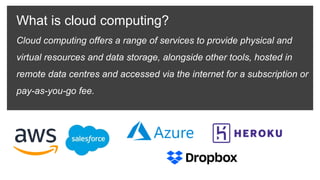
Community
Public
Private
Hybrid
• Public cloud providers like Microsoft and AWS host data and applications where public
individuals and business pay a fee to access the services
• Vast capacity makes scalability a trivial task. Providers will offer many services, e.g., backups
• Cloud is privately accessible by a single organisation and secured behind a firewall
• Gives an organisation a high level of control over security and policies but comes at an
increased cost of maintenance and upgrades
• Composed of public and private clouds. Sensitive data can be stored privately.
• Organisation may retain critical data applications on private cloud, but use public cloud for
additional storage or running apps, e.g., Office365
• Multi-tenant platform shared by entities with some shared interest or common goal.
• Often used by government agencies or conglomerate organisations
Applications
Data
O/S
Runtime
Middleware
Virtualisation
Servers
Storage
Networking
Applications
Data
O/S
Runtime
Middleware
Virtualisation
Servers
Storage
Networking
Applications
Data
O/S
Runtime
Middleware
Virtualisation
Servers
Storage
Networking
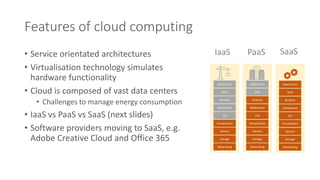
Features of cloud computing
• Service orientated architectures
• Virtualisation technology simulates
hardware functionality
• Cloud is composed of vast data centers
• Challenges to manage energy consumption
• IaaS vs PaaS vs SaaS (next slides)
• Software providers moving to SaaS, e.g.
Adobe Creative Cloud and Office 365
IaaS PaaS SaaS
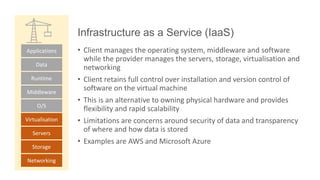
Infrastructure as a Service (IaaS)
Applications
Data
O/S
Runtime
Middleware
Virtualisation
Servers
Storage
Networking
• Client manages the operating system, middleware and software
while the provider manages the servers, storage, virtualisation and
networking
• Client retains full control over installation and version control of
software on the virtual machine
• This is an alternative to owning physical hardware and provides
flexibility and rapid scalability
• Limitations are concerns around security of data and transparency
of where and how data is stored
• Examples are AWS and Microsoft Azure
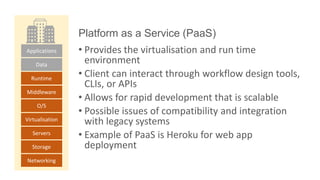
Platform as a Service (PaaS)
Applications
Data
O/S
Runtime
Middleware
Virtualisation
Servers
Storage
Networking
• Provides the virtualisation and run time
environment
• Client can interact through workflow design tools,
CLIs, or APIs
• Allows for rapid development that is scalable
• Possible issues of compatibility and integration
with legacy systems
• Example of PaaS is Heroku for web app
deployment
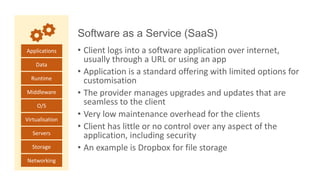
Software as a Service (SaaS)
Applications
Data
O/S
Runtime
Middleware
Virtualisation
Servers
Storage
Networking
• Client logs into a software application over internet,
usually through a URL or using an app
• Application is a standard offering with limited options for
customisation
• The provider manages upgrades and updates that are
seamless to the client
• Very low maintenance overhead for the clients
• Client has little or no control over any aspect of the
application, including security
• An example is Dropbox for file storage
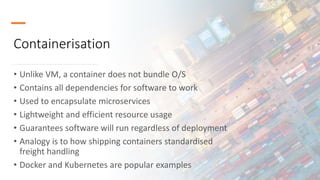
Containerisation
• Unlike VM, a container does not bundle O/S
• Contains all dependencies for software to work
• Used to encapsulate microservices
• Lightweight and efficient resource usage
• Guarantees software will run regardless of deployment
• Analogy is to how shipping containers standardised
freight handling
• Docker and Kubernetes are popular examples
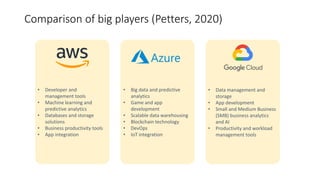
Comparison of big players (Petters, 2020)
• Developer and
management tools
• Machine learning and
predictive analytics
• Databases and storage
solutions
• Business productivity tools
• App integration
• Big data and predictive
analytics
• Game and app
development
• Scalable data warehousing
• Blockchain technology
• DevOps
• IoT integration
• Data management and
storage
• App development
• Small and Medium Business
(SMB) business analytics
and AI
• Productivity and workload
management tools
Benefits of Cloud
• Cost effective through efficient allocation of resources
• Flexible payment, pay-as-you-go models
• Rapidly scalable
• High performance
• Software versioning and updates can be seamlessly managed
• Data can be backed up for business continuity and disaster recovery
• High availability
• Ease to share and collaborate
Limitations of Cloud
• Vendor lock-in
• Loss of direct control, e.g., versioning, upgrades, governance
• Limited transparency on security and privacy protocols
• Security concerns around shared resources
• Data centres are high profile targets for cyber attackers
References and bibliography
Petters, J. (2020). AWS vs Azure vs Google: Cloud Services Comparison. Retrieved from
https://blogvaronis2.wpengine.com/wp-content/uploads/2019/07/aws-vs-azure-vs-google-
overview.png
IBM. (n.d.). IBM Cloud Learn Hub. Retrieved from https://www.ibm.com/cloud/learn
Microsoft. (n.d.). What is cloud computing?. Retrieved from https://azure.microsoft.com/en-
us/overview/what-is-cloud-computing/#cloud-computing-models
Docker. (n.d.). What is a Container? Retrieved from https://www.docker.com/resources/what-container
Felter, B. (2021). The Different Types of Cloud Computing and How They Differ. Retrieved from
https://www.vxchnge.com/blog/different-types-of-cloud-computing

Cloud Computing Overview

  • 1.
  • 2.
    What is cloudcomputing? Cloud computing offers a range of services to provide physical and virtual resources and data storage, alongside other tools, hosted in remote data centres and accessed via the internet for a subscription or pay-as-you-go fee.
  • 3.
    Types of cloud Community Public Private Hybrid •Public cloud providers like Microsoft and AWS host data and applications where public individuals and business pay a fee to access the services • Vast capacity makes scalability a trivial task. Providers will offer many services, e.g., backups • Cloud is privately accessible by a single organisation and secured behind a firewall • Gives an organisation a high level of control over security and policies but comes at an increased cost of maintenance and upgrades • Composed of public and private clouds. Sensitive data can be stored privately. • Organisation may retain critical data applications on private cloud, but use public cloud for additional storage or running apps, e.g., Office365 • Multi-tenant platform shared by entities with some shared interest or common goal. • Often used by government agencies or conglomerate organisations
  • 4.
    Applications Data O/S Runtime Middleware Virtualisation Servers Storage Networking Applications Data O/S Runtime Middleware Virtualisation Servers Storage Networking Applications Data O/S Runtime Middleware Virtualisation Servers Storage Networking Features of cloudcomputing • Service orientated architectures • Virtualisation technology simulates hardware functionality • Cloud is composed of vast data centers • Challenges to manage energy consumption • IaaS vs PaaS vs SaaS (next slides) • Software providers moving to SaaS, e.g. Adobe Creative Cloud and Office 365 IaaS PaaS SaaS
  • 5.
    Infrastructure as aService (IaaS) Applications Data O/S Runtime Middleware Virtualisation Servers Storage Networking • Client manages the operating system, middleware and software while the provider manages the servers, storage, virtualisation and networking • Client retains full control over installation and version control of software on the virtual machine • This is an alternative to owning physical hardware and provides flexibility and rapid scalability • Limitations are concerns around security of data and transparency of where and how data is stored • Examples are AWS and Microsoft Azure
  • 6.
    Platform as aService (PaaS) Applications Data O/S Runtime Middleware Virtualisation Servers Storage Networking • Provides the virtualisation and run time environment • Client can interact through workflow design tools, CLIs, or APIs • Allows for rapid development that is scalable • Possible issues of compatibility and integration with legacy systems • Example of PaaS is Heroku for web app deployment
  • 7.
    Software as aService (SaaS) Applications Data O/S Runtime Middleware Virtualisation Servers Storage Networking • Client logs into a software application over internet, usually through a URL or using an app • Application is a standard offering with limited options for customisation • The provider manages upgrades and updates that are seamless to the client • Very low maintenance overhead for the clients • Client has little or no control over any aspect of the application, including security • An example is Dropbox for file storage
  • 8.
    Containerisation • Unlike VM,a container does not bundle O/S • Contains all dependencies for software to work • Used to encapsulate microservices • Lightweight and efficient resource usage • Guarantees software will run regardless of deployment • Analogy is to how shipping containers standardised freight handling • Docker and Kubernetes are popular examples
  • 9.
    Comparison of bigplayers (Petters, 2020) • Developer and management tools • Machine learning and predictive analytics • Databases and storage solutions • Business productivity tools • App integration • Big data and predictive analytics • Game and app development • Scalable data warehousing • Blockchain technology • DevOps • IoT integration • Data management and storage • App development • Small and Medium Business (SMB) business analytics and AI • Productivity and workload management tools
  • 10.
    Benefits of Cloud •Cost effective through efficient allocation of resources • Flexible payment, pay-as-you-go models • Rapidly scalable • High performance • Software versioning and updates can be seamlessly managed • Data can be backed up for business continuity and disaster recovery • High availability • Ease to share and collaborate Limitations of Cloud • Vendor lock-in • Loss of direct control, e.g., versioning, upgrades, governance • Limited transparency on security and privacy protocols • Security concerns around shared resources • Data centres are high profile targets for cyber attackers
  • 11.
    References and bibliography Petters,J. (2020). AWS vs Azure vs Google: Cloud Services Comparison. Retrieved from https://blogvaronis2.wpengine.com/wp-content/uploads/2019/07/aws-vs-azure-vs-google- overview.png IBM. (n.d.). IBM Cloud Learn Hub. Retrieved from https://www.ibm.com/cloud/learn Microsoft. (n.d.). What is cloud computing?. Retrieved from https://azure.microsoft.com/en- us/overview/what-is-cloud-computing/#cloud-computing-models Docker. (n.d.). What is a Container? Retrieved from https://www.docker.com/resources/what-container Felter, B. (2021). The Different Types of Cloud Computing and How They Differ. Retrieved from https://www.vxchnge.com/blog/different-types-of-cloud-computing