What have you learnt
about technologies from
the process of
constructing this
product?
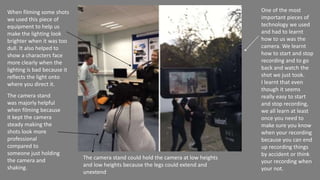
One of the most
important pieces of
technology we used
and had to learnt
how to us was the
camera. We learnt
how to start and stop
recording and to go
back and watch the
shot we just took.
I learnt that even
though it seems
really easy to start
and stop recording,
we all learn at least
once you need to
make sure you know
when your recording
because you can end
up recording things
by accident or think
your recording when
your not.
When filming some shots
we used this piece of
equipment to help us
make the lighting look
brighter when it was too
dull. It also helped to
show a characters face
more clearly when the
lighting is bad because it
reflects the light onto
where you direct it.
The camera stand
was majorly helpful
when filming because
it kept the camera
steady making the
shots look more
professional
compared to
someone just holding
the camera and
shaking.
The camera stand could hold the camera at low heights
and low heights because the legs could extend and
unextend
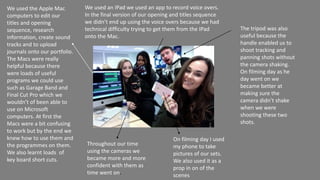
On filming day I used
my phone to take
pictures of our sets.
We also used it as a
prop in on of the
scenes
We used the Apple Mac
computers to edit our
titles and opening
sequence, research
information, create sound
tracks and to upload
journals onto our portfolio.
The Macs were really
helpful because there
were loads of useful
programs we could use
such as Garage Band and
Final Cut Pro which we
wouldn’t of been able to
use on Microsoft
computers. At first the
Macs were a bit confusing
to work but by the end we
knew how to use them and
the programmes on them.
We also learnt loads of
key board short cuts.
We used an IPad we used an app to record voice overs.
In the final version of our opening and titles sequence
we didn’t end up using the voice overs because we had
technical difficulty trying to get them from the IPad
onto the Mac.
Throughout our time
using the cameras we
became more and more
confident with them as
time went on.
The tripod was also
useful because the
handle enabled us to
shoot tracking and
panning shots without
the camera shaking.
On filming day as he
day went on we
became better at
making sure the
camera didn’t shake
when we were
shooting these two
shots.
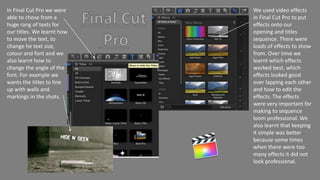
We used video effects
in Final Cut Pro to put
effects onto our
opening and titles
sequence. There were
loads of effects to show
from. Over time we
learnt which effects
worked best, which
effects looked good
over lapping each other
and how to edit the
effects. The effects
were very important for
making to sequence
loom professional. We
also learnt that keeping
it simple was better
because some times
when there were too
many effects it did not
look professional.
In Final Cut Pro we were
able to chose from a
huge rang of texts for
our titles. We learnt how
to move the text, to
change he text size,
colour and font and we
also learnt how to
change the angle of the
font. For example we
wants the titles to line
up with walls and
markings in the shots.
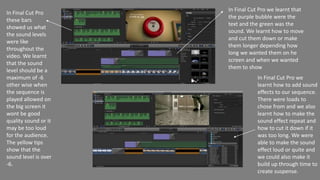
In Final Cut Pro
these bars
showed us what
the sound levels
were like
throughout the
video. We learnt
that the sound
level should be a
maximum of -6
other wise when
the sequence is
played allowed on
the big screen it
wont be good
quality sound or it
may be too loud
for the audience.
The yellow tips
show that the
sound level is over
-6.
In Final Cut Pro we
learnt how to add sound
effects to our sequence.
There were loads to
chose from and we also
learnt how to make the
sound effect repeat and
how to cut it down if it
was too long. We were
able to make the sound
effect loud or quite and
we could also make it
build up through time to
create suspense.
In Final Cut Pro we learnt that
the purple bubble were the
text and the green was the
sound. We learnt how to move
and cut them down or make
them longer depending how
long we wanted them on he
screen and when we wanted
them to show
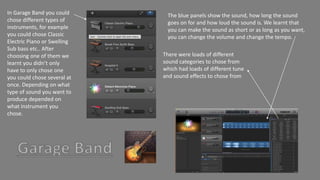
In Garage Band you could
chose different types of
instruments, for example
you could chose Classic
Electric Piano or Swelling
Sub bass etc.. After
choosing one of them we
learnt you didn’t only
have to only chose one
you could chose several at
once. Depending on what
type of sound you want to
produce depended on
what instrument you
chose.
The blue panels show the sound, how long the sound
goes on for and how loud the sound is. We learnt that
you can make the sound as short or as long as you want,
you can change the volume and change the tempo.
There were loads of different
sound categories to chose from
which had loads of different tune
and sound effects to chose from
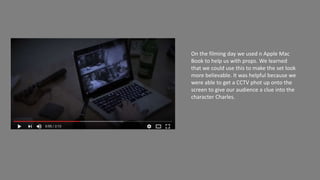
On the filming day we used n Apple Mac
Book to help us with props. We learned
that we could use this to make the set look
more believable. It was helpful because we
were able to get a CCTV phot up onto the
screen to give our audience a clue into the
character Charles.
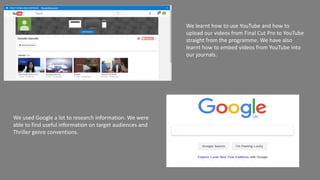
We learnt how to use YouTube and how to
upload our videos from Final Cut Pro to YouTube
straight from the programme. We have also
learnt how to embed videos from YouTube into
our journals.
We used Google a lot to research information. We were
able to find useful information on target audiences and
Thriller genre conventions.

What have you learnt about technologies

  • 1.
    What have youlearnt about technologies from the process of constructing this product?
  • 2.
    One of themost important pieces of technology we used and had to learnt how to us was the camera. We learnt how to start and stop recording and to go back and watch the shot we just took. I learnt that even though it seems really easy to start and stop recording, we all learn at least once you need to make sure you know when your recording because you can end up recording things by accident or think your recording when your not. When filming some shots we used this piece of equipment to help us make the lighting look brighter when it was too dull. It also helped to show a characters face more clearly when the lighting is bad because it reflects the light onto where you direct it. The camera stand was majorly helpful when filming because it kept the camera steady making the shots look more professional compared to someone just holding the camera and shaking. The camera stand could hold the camera at low heights and low heights because the legs could extend and unextend
  • 3.
    On filming dayI used my phone to take pictures of our sets. We also used it as a prop in on of the scenes We used the Apple Mac computers to edit our titles and opening sequence, research information, create sound tracks and to upload journals onto our portfolio. The Macs were really helpful because there were loads of useful programs we could use such as Garage Band and Final Cut Pro which we wouldn’t of been able to use on Microsoft computers. At first the Macs were a bit confusing to work but by the end we knew how to use them and the programmes on them. We also learnt loads of key board short cuts. We used an IPad we used an app to record voice overs. In the final version of our opening and titles sequence we didn’t end up using the voice overs because we had technical difficulty trying to get them from the IPad onto the Mac. Throughout our time using the cameras we became more and more confident with them as time went on. The tripod was also useful because the handle enabled us to shoot tracking and panning shots without the camera shaking. On filming day as he day went on we became better at making sure the camera didn’t shake when we were shooting these two shots.
  • 4.
    We used videoeffects in Final Cut Pro to put effects onto our opening and titles sequence. There were loads of effects to show from. Over time we learnt which effects worked best, which effects looked good over lapping each other and how to edit the effects. The effects were very important for making to sequence loom professional. We also learnt that keeping it simple was better because some times when there were too many effects it did not look professional. In Final Cut Pro we were able to chose from a huge rang of texts for our titles. We learnt how to move the text, to change he text size, colour and font and we also learnt how to change the angle of the font. For example we wants the titles to line up with walls and markings in the shots.
  • 5.
    In Final CutPro these bars showed us what the sound levels were like throughout the video. We learnt that the sound level should be a maximum of -6 other wise when the sequence is played allowed on the big screen it wont be good quality sound or it may be too loud for the audience. The yellow tips show that the sound level is over -6. In Final Cut Pro we learnt how to add sound effects to our sequence. There were loads to chose from and we also learnt how to make the sound effect repeat and how to cut it down if it was too long. We were able to make the sound effect loud or quite and we could also make it build up through time to create suspense. In Final Cut Pro we learnt that the purple bubble were the text and the green was the sound. We learnt how to move and cut them down or make them longer depending how long we wanted them on he screen and when we wanted them to show
  • 6.
    In Garage Bandyou could chose different types of instruments, for example you could chose Classic Electric Piano or Swelling Sub bass etc.. After choosing one of them we learnt you didn’t only have to only chose one you could chose several at once. Depending on what type of sound you want to produce depended on what instrument you chose. The blue panels show the sound, how long the sound goes on for and how loud the sound is. We learnt that you can make the sound as short or as long as you want, you can change the volume and change the tempo. There were loads of different sound categories to chose from which had loads of different tune and sound effects to chose from
  • 7.
    On the filmingday we used n Apple Mac Book to help us with props. We learned that we could use this to make the set look more believable. It was helpful because we were able to get a CCTV phot up onto the screen to give our audience a clue into the character Charles.
  • 8.
    We learnt howto use YouTube and how to upload our videos from Final Cut Pro to YouTube straight from the programme. We have also learnt how to embed videos from YouTube into our journals. We used Google a lot to research information. We were able to find useful information on target audiences and Thriller genre conventions.