Week 3 Office Hours notes
Week 3 Office Hours notes

     September 13, 9pm
Course Business
              Course Business
• After Saturday 4 weeks left
  –SSaturday 9/24
         d 9/24
  – Saturday 10/1
  – Saturday 10/8
  – Class done – all badges awarded 10/15!
• Set your goals
  – Finish HTML 5 Core by this weekend
  – Knock out CSS by 9/24
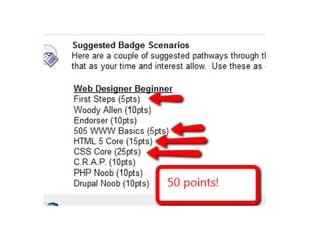
  – With First Steps and 505 Basics you will be half 
                  p                 y
    way there!
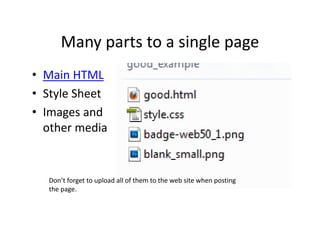
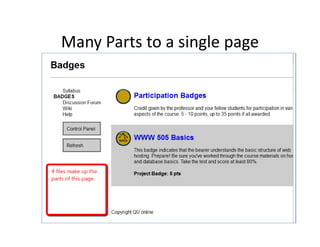
Many parts to a single page
      Many parts to a single page
• Main HTML
  Main HTML
• Style Sheet
• Images and 
            d
  other media


  Don’t forget to upload all of them to the web site when posting 
  the page.
Many Parts to a single page
Many Parts to a single page
Browser Web tools
            Browser Web tools
• Web developers tool bar ‐‐
  Web developers tool bar 
  http://chrispederick.com/work/web‐developer/
  For Firefox, Chrome.
  For Firefox, Chrome.

• Firebug – http://getfirebug com
  Firebug  http://getfirebug.com
  Full version for Firefox, Lite version for others
What the FONT?
                     What the FONT?
• Your web browser has its own build‐in styles – those will 
  display if nothing else is specified.
• Embedded/in‐line/linked styles can come with the web 
  page – these will take precedence over the local browser 
  styles.
• Different Browsers have slightly different styles for standard 
  tags (<h1>, <ul>, <p>, etc.) – one reason why a page will 
  look different on different web browsers.
• Fonts rendered by the local computer operating system
• Browser safe fonts
  http://www.ampsoft.net/webdesign‐l/WindowsMacFonts.html
• Embedded font  delivered to the browser– more control 
  BUT
   – Can slow page load process – only use in limited areas.
              p g       p            y
Reset Style Sheet
            Reset Style Sheet
• Some CSS experts recommend redefining
  Some CSS experts recommend redefining 
  every standard HTML tag to even out local 
  browser differences.
  browser differences
• http://meyerweb.com/eric/tools/css/reset/
• F
  For more on this check out the work of Eric 
                hi h k        h     k fE i
  Meyer.
Visual Design Standards Badge 
             (aka C.R.A.P )
             ( k          )
• It is meant to be a simple way to show off 
  your CSS skills AND work in an understanding 
  your CSS skills AND work in an understanding
  of basic visual design principles
• Start with a visually BAD looking web page
  Start with a visually BAD looking web page –
  your own or one you find
• Create a validated GOOD version using the
  Create a validated GOOD version, using the 
  design principles related in Robin Williams’ 
  book.
• In your nomination describe what principles 
  you used and how you arrived at your re
  you used and how you arrived at your re‐
  design ideas.

Week3 office hours

  • 1.
    Week 3 Office Hours notes Week 3 OfficeHours notes September 13, 9pm
  • 2.
    Course Business Course Business • After Saturday 4 weeks left –SSaturday 9/24 d 9/24 – Saturday 10/1 – Saturday 10/8 – Class done – all badges awarded 10/15! • Set your goals – Finish HTML 5 Core by this weekend – Knock out CSS by 9/24 – With First Steps and 505 Basics you will be half  p y way there!
  • 4.
    Many parts to a single page Many parts to a single page • Main HTML Main HTML • Style Sheet • Images and  d other media Don’t forget to upload all of them to the web site when posting  the page.
  • 5.
  • 6.
    Browser Web tools Browser Web tools • Web developers tool bar ‐‐ Web developers tool bar  http://chrispederick.com/work/web‐developer/ For Firefox, Chrome. For Firefox, Chrome. • Firebug – http://getfirebug com Firebug  http://getfirebug.com Full version for Firefox, Lite version for others
  • 7.
    What the FONT? What the FONT? • Your web browser has its own build‐in styles – those will  display if nothing else is specified. • Embedded/in‐line/linked styles can come with the web  page – these will take precedence over the local browser  styles. • Different Browsers have slightly different styles for standard  tags (<h1>, <ul>, <p>, etc.) – one reason why a page will  look different on different web browsers. • Fonts rendered by the local computer operating system • Browser safe fonts http://www.ampsoft.net/webdesign‐l/WindowsMacFonts.html • Embedded font  delivered to the browser– more control  BUT – Can slow page load process – only use in limited areas. p g p y
  • 8.
    Reset Style Sheet Reset Style Sheet • Some CSS experts recommend redefining Some CSS experts recommend redefining  every standard HTML tag to even out local  browser differences. browser differences • http://meyerweb.com/eric/tools/css/reset/ • F For more on this check out the work of Eric  hi h k h k fE i Meyer.
  • 9.
    Visual Design Standards Badge  (aka C.R.A.P ) ( k ) • It is meant to be a simple way to show off  your CSS skills AND work in an understanding  your CSS skills AND work in an understanding of basic visual design principles • Start with a visually BAD looking web page Start with a visually BAD looking web page – your own or one you find • Create a validated GOOD version using the Create a validated GOOD version, using the  design principles related in Robin Williams’  book. • In your nomination describe what principles  you used and how you arrived at your re you used and how you arrived at your re‐ design ideas.