HTML AND NAVIGATION WORKSHOP
Tutor: Lee Scott
Week 1
Building blocks of the web: servers, clients, browsers
HTML: setting up a webpage, creating headers, text, and divs
CSS: styling text and positioning elements
Week 2
Navigation: using hyperlinks
HTML: working with Image, video, and audio elements
Troubleshooting: using browsers based web inspectors
Week 3
Interactivity: HTML5 methods and an introduction to JavaScript
Advanced text: adding font files, opacity, motion
Week 4
Present ideas to group. Feedback
Begin creating your website
Week 5
Continue working on your website
INDEPENDENT LEARNING
Web based resources
w3 schools http://www.w2schools.com
Html5rocks http://www.html5rocks.com
Dive into HTML http://diveintohtml5.info
Forums
Coding Forums http://www.codingforums.com
Github https://github.com
HTML tutorials online
YouTube search HTML tutorials in YouTube
Tizag http://www.tizag.com/htmlT
ASSIGNMENT
Build a small website
The website must take the form of an interactive story
Jack and the Beanstalk
Three Little Pigs
Mr Fox
The Cat and Mouse
Use as much or as little of the text as you like
Demonstrate an interactive approach to the text using
hyperlinks, and user input events (mouse, keyboard etc)
Include a 300 word description of your approach to navigation
and the structure of your site.
Include a list of hyperlinks to a selection of web resources
(examples of work or theory) that have informed your approach.
Annotate.
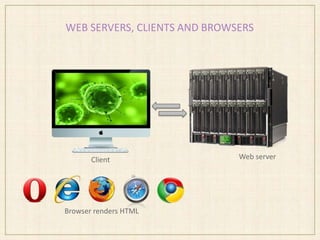
WEB SERVERS, CLIENTS AND BROWSERS
Web serverClient
Browser renders HTML
WEBSITE ANATOMY
HTML
HyperTextMarkup Language
Defines webpage structure
Contains content (text, images, sounds)
HTML building blocks are called elements
CSS
Cascading StyleSheet
Used to style HTML elements (e.g. text colour, font, size)
HTML file links to a CSS file
JavaScript
Facilitates user interactivity
Alter content after it has been displayed
Libraries: jQuery
Other Languages
PHP (server side)
MYSQL
BEGINNING TO WORK WITH HTML
HTML editor
Coda, Dreamweaver, TextEdit, BlueFish, CoffeeCup, Aracnophilia
We are using TextWrangler
Web server
We need access to some web space
Our websites will be ‘hosted’ on a bathspa server
FTP
File Transfer Protocol
A way to transfer files from one ‘host’ (computer) to another
Allows us to ‘upload’ content to our web server
BEGINNING TO WORK WITH HTML
FTP login details
Server: ftp.artbathspa.com
Username: graphics2013
Password: weareyear2
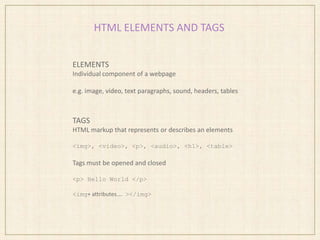
HTML ELEMENTS AND TAGS
ELEMENTS
Individual component of a webpage
e.g. image, video, text paragraphs, sound, headers, tables
TAGS
HTML markup that represents or describes an elements
<img>, <video>, <p>, <audio>, <h1>, <table>
Tags must be opened and closed
<p> Hello World </p>
<img+ attributes…. ></img>
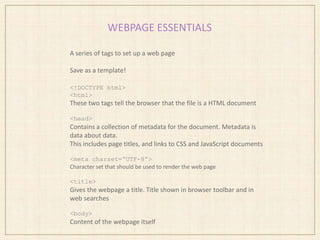
WEBPAGE ESSENTIALS
A series of tags to set up a web page
Save as a template!
<!DOCTYPE html>
<html>
These two tags tell the browser that the file is a HTML document
<head>
Contains a collection of metadata for the document. Metadata is
data about data.
This includes page titles, and links to CSS and JavaScript documents
<meta charset=“UTF-8”>
Character set that should be used to render the web page
<title>
Gives the webpage a title. Title shown in browser toolbar and in
web searches
<body>
Content of the webpage itself
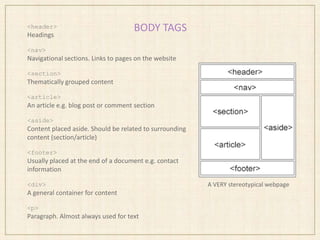
BODY TAGS<header>
Headings
<nav>
Navigational sections. Links to pages on the website
<section>
Thematically grouped content
<article>
An article e.g. blog post or comment section
<aside>
Content placed aside. Should be related to surrounding
content (section/article)
<footer>
Usually placed at the end of a document e.g. contact
information
<div>
A general container for content
<p>
Paragraph. Almost always used for text
A VERY stereotypical webpage
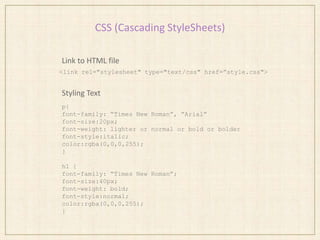
CSS (Cascading StyleSheets)
Link to HTML file
Styling Text
<link rel="stylesheet" type="text/css" href=”style.css">
p{
font-family: “Times New Roman”, “Arial”
font-size:20px;
font-weight: lighter or normal or bold or bolder
font-style:italic;
color:rgba(0,0,0,255);
}
h1 {
font-family: “Times New Roman”;
font-size:40px;
font-weight: bold;
font-style:normal;
color:rgba(0,0,0,255);
}
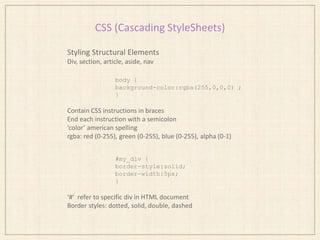
CSS (Cascading StyleSheets)
Styling Structural Elements
Div, section, article, aside, nav
body {
background-color:rgba(255,0,0,0) ;
}
Contain CSS instructions in braces
End each instruction with a semicolon
‘color’ american spelling
rgba: red (0-255), green (0-255), blue (0-255), alpha (0-1)
#my_div {
border-style:solid;
border-width:5px;
}
‘#’ refer to specific div in HTML document
Border styles: dotted, solid, double, dashed
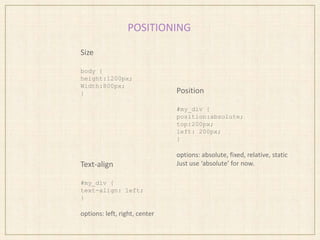
POSITIONING
Size
body {
height:1200px;
Width:800px;
} Position
#my_div {
position:absolute;
top:200px;
left: 200px;
}
options: absolute, fixed, relative, static
Just use ‘absolute’ for now.Text-align
#my_div {
text-align: left;
}
options: left, right, center
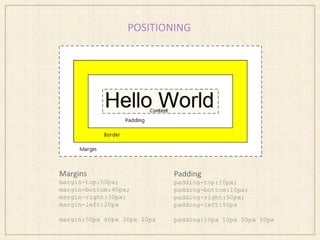
POSITIONING
Margins
margin-top:50px;
margin-bottom:40px;
margin-right:30px;
margin-left:20px
margin:50px 40px 30px 20px
Padding
padding-top:10px;
padding-bottom:10px;
padding-right:50px;
padding-left:50px
padding:10px 10px 50px 50px
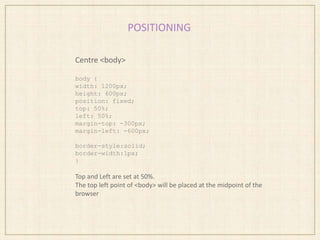
POSITIONING
Centre <body>
body {
width: 1200px;
height: 600px;
position: fixed;
top: 50%;
left: 50%;
margin-top: -300px;
margin-left: -600px;
border-style:solid;
border-width:1px;
}
Top and Left are set at 50%.
The top left point of <body> will be placed at the midpoint of the
browser

Html workshop 1

  • 1.
    HTML AND NAVIGATIONWORKSHOP Tutor: Lee Scott Week 1 Building blocks of the web: servers, clients, browsers HTML: setting up a webpage, creating headers, text, and divs CSS: styling text and positioning elements Week 2 Navigation: using hyperlinks HTML: working with Image, video, and audio elements Troubleshooting: using browsers based web inspectors Week 3 Interactivity: HTML5 methods and an introduction to JavaScript Advanced text: adding font files, opacity, motion Week 4 Present ideas to group. Feedback Begin creating your website Week 5 Continue working on your website
  • 2.
    INDEPENDENT LEARNING Web basedresources w3 schools http://www.w2schools.com Html5rocks http://www.html5rocks.com Dive into HTML http://diveintohtml5.info Forums Coding Forums http://www.codingforums.com Github https://github.com HTML tutorials online YouTube search HTML tutorials in YouTube Tizag http://www.tizag.com/htmlT
  • 3.
    ASSIGNMENT Build a smallwebsite The website must take the form of an interactive story Jack and the Beanstalk Three Little Pigs Mr Fox The Cat and Mouse Use as much or as little of the text as you like Demonstrate an interactive approach to the text using hyperlinks, and user input events (mouse, keyboard etc) Include a 300 word description of your approach to navigation and the structure of your site. Include a list of hyperlinks to a selection of web resources (examples of work or theory) that have informed your approach. Annotate.
  • 4.
    WEB SERVERS, CLIENTSAND BROWSERS Web serverClient Browser renders HTML
  • 5.
    WEBSITE ANATOMY HTML HyperTextMarkup Language Defineswebpage structure Contains content (text, images, sounds) HTML building blocks are called elements CSS Cascading StyleSheet Used to style HTML elements (e.g. text colour, font, size) HTML file links to a CSS file JavaScript Facilitates user interactivity Alter content after it has been displayed Libraries: jQuery Other Languages PHP (server side) MYSQL
  • 6.
    BEGINNING TO WORKWITH HTML HTML editor Coda, Dreamweaver, TextEdit, BlueFish, CoffeeCup, Aracnophilia We are using TextWrangler Web server We need access to some web space Our websites will be ‘hosted’ on a bathspa server FTP File Transfer Protocol A way to transfer files from one ‘host’ (computer) to another Allows us to ‘upload’ content to our web server
  • 7.
    BEGINNING TO WORKWITH HTML FTP login details Server: ftp.artbathspa.com Username: graphics2013 Password: weareyear2
  • 8.
    HTML ELEMENTS ANDTAGS ELEMENTS Individual component of a webpage e.g. image, video, text paragraphs, sound, headers, tables TAGS HTML markup that represents or describes an elements <img>, <video>, <p>, <audio>, <h1>, <table> Tags must be opened and closed <p> Hello World </p> <img+ attributes…. ></img>
  • 9.
    WEBPAGE ESSENTIALS A seriesof tags to set up a web page Save as a template! <!DOCTYPE html> <html> These two tags tell the browser that the file is a HTML document <head> Contains a collection of metadata for the document. Metadata is data about data. This includes page titles, and links to CSS and JavaScript documents <meta charset=“UTF-8”> Character set that should be used to render the web page <title> Gives the webpage a title. Title shown in browser toolbar and in web searches <body> Content of the webpage itself
  • 10.
    BODY TAGS<header> Headings <nav> Navigational sections.Links to pages on the website <section> Thematically grouped content <article> An article e.g. blog post or comment section <aside> Content placed aside. Should be related to surrounding content (section/article) <footer> Usually placed at the end of a document e.g. contact information <div> A general container for content <p> Paragraph. Almost always used for text A VERY stereotypical webpage
  • 11.
    CSS (Cascading StyleSheets) Linkto HTML file Styling Text <link rel="stylesheet" type="text/css" href=”style.css"> p{ font-family: “Times New Roman”, “Arial” font-size:20px; font-weight: lighter or normal or bold or bolder font-style:italic; color:rgba(0,0,0,255); } h1 { font-family: “Times New Roman”; font-size:40px; font-weight: bold; font-style:normal; color:rgba(0,0,0,255); }
  • 12.
    CSS (Cascading StyleSheets) StylingStructural Elements Div, section, article, aside, nav body { background-color:rgba(255,0,0,0) ; } Contain CSS instructions in braces End each instruction with a semicolon ‘color’ american spelling rgba: red (0-255), green (0-255), blue (0-255), alpha (0-1) #my_div { border-style:solid; border-width:5px; } ‘#’ refer to specific div in HTML document Border styles: dotted, solid, double, dashed
  • 13.
    POSITIONING Size body { height:1200px; Width:800px; } Position #my_div{ position:absolute; top:200px; left: 200px; } options: absolute, fixed, relative, static Just use ‘absolute’ for now.Text-align #my_div { text-align: left; } options: left, right, center
  • 14.
    POSITIONING Margins margin-top:50px; margin-bottom:40px; margin-right:30px; margin-left:20px margin:50px 40px 30px20px Padding padding-top:10px; padding-bottom:10px; padding-right:50px; padding-left:50px padding:10px 10px 50px 50px
  • 15.
    POSITIONING Centre <body> body { width:1200px; height: 600px; position: fixed; top: 50%; left: 50%; margin-top: -300px; margin-left: -600px; border-style:solid; border-width:1px; } Top and Left are set at 50%. The top left point of <body> will be placed at the midpoint of the browser

Editor's Notes

  • #4 Can use sound but be aware that the module is about interactive text, so its important to demonstrate an interactive approach to text.
  • #6 Javascript: So we could write some javascript that changes the colour of some text when it is clicked on Libraries: Prewritten javascript that simplifies the scripting process. Instead of writing long passages of javascript to say, spin some text, you can find a library that reduces this down to about one line. A very good one is jQuery. We will be using that when we look at interactivity using javascript. Jquery: javascript library that simplifies the scripting process. A good introduction to javascript. We will be using this.Other: we won’t be using them but its useful to know there are lots of other toolsPHP server side scripting language – communicating with servers (looking up data in a database)MYSQL – database management