Dennis Slade 
CSS Eye for the 
Programmer Guy 
The San Diego PHP Meetup
Who Am I? 
❖ Dennis Slade Jr. 
tennisbear@gmail.com 
❖ 20+ years experience 
implementing and supporting 
critical web and desktop 
business systems 
❖ 12+ years hands-on experience 
with *AMP web development 
projects (PHP on Linux & OS X) 
❖ 14+ years experience in 
software support and training
Why This Presentation? 
I recently ran across this Google I/O presentation from a few years 
back. The presentation made me realize that I wasn’t yet leveraging 
CSS3 and HTML5 functionalities which are now in widespread usage, 
and which could save me time and headaches in my coding projects. 
I refreshed my knowledge in these areas and I thought you might like 
to as well. 
❖ See: Google I/O 2012 - The Web Can Do That!?
What We’ll Be Covering 
❖ Better forms with CSS styling and HTML5 
validation 
❖ Semantic tags to improve page 
organization, SEO, and accessibility 
❖ Introductory regions and flexbox 
❖ Basic fancy effects (No JavaScript 
required)
What We Won’t Be Covering 
❖ Bootstrap 
❖ Less 
❖ Sass 
❖ Modernizr 
❖ jQuery 
❖ Advanced filter and transform effects
Before We Begin 
❖ Checking which browsers support which CSS3/HTML5 
features: caniuse.com 
❖ CSS Lint for analyzing problems: csslint.net 
❖ CodePen for trying stuff out: codepen.io
CSS Organization Basics 
❖ Use classes rather than element ids whenever possible. 
❖ Use style attributes only as a last resort. 
❖ Include files rather than inline except when CSS is needed in 
emails. 
❖ Use <link> tags instead of @import because of performance 
issues. 
❖ Here’s much, much more on organizing your CSS: 
engineering.appfolio.com/2012/11/16/css-architecture/ (thanks for 
the link @step_hane)
Forms: CSS styling, HTML5 
validation
For Forms You Can Style Anything 
❖ Selectors can be applied by input type: 
❖ .dashboard-edit-form input[type="text"] { margin-top:4px; } 
.dashboard-edit-form input[type="url"].uri { width:85%; } 
.dashboard-edit-form input[type="text"].name { width:80%; } 
.dashboard-edit-form input[type="file"].upload 
{ 
margin-left:0.5em; margin-top:7px; margin-bottom:16px; 
} 
❖ .dashboard-edit-form input[type="text"].location { width:60%; } 
.dashboard-edit-form select.status { float:left; margin-top:16px; } 
.dashboard-edit-form textarea.description, 
.dashboard-edit-form textarea.notes 
{ 
width:75%; height:200px; margin-top:7px; 
} 
.dashboard-edit-form textarea.notes { height:60px; } 
.detail-form input[type=“checkbox"].search { margin:9px; } 
.detail-form input[type=“email"].search { margin:inherit; }
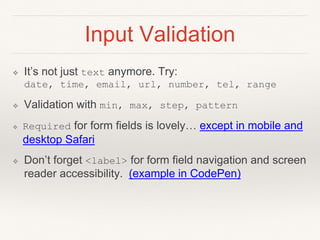
Input Validation 
❖ It’s not just text anymore. Try: 
date, time, email, url, number, tel, range 
❖ Validation with min, max, step, pattern 
❖ Required for form fields is lovely… except in mobile and 
desktop Safari 
❖ Don’t forget <label> for form field navigation and screen 
reader accessibility. (example in CodePen)
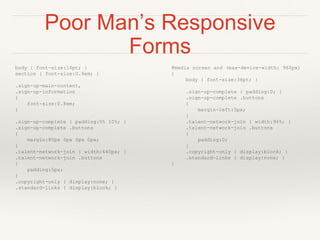
Poor Man’s Responsive 
Forms 
body { font-size:14pt; } 
section { font-size:0.9em; } 
.sign-up-main-content, 
.sign-up-information 
{ 
font-size:0.8em; 
} 
.sign-up-complete { padding:0% 10%; } 
.sign-up-complete .buttons 
{ 
margin:80px 0px 0px 0px; 
} 
.talent-network-join { width:640px; } 
.talent-network-join .buttons 
{ 
padding:5px; 
} 
.copyright-only { display:none; } 
.standard-links { display:block; } 
@media screen and (max-device-width: 960px) 
{ 
body { font-size:36pt; } 
.sign-up-complete { padding:0; } 
.sign-up-complete .buttons 
{ 
margin-left:5px; 
} 
.talent-network-join { width:94%; } 
.talent-network-join .buttons 
{ 
padding:0; 
} 
.copyright-only { display:block; } 
.standard-links { display:none; } 
}
Semantic Tags for 
SEO & 
Accessibility
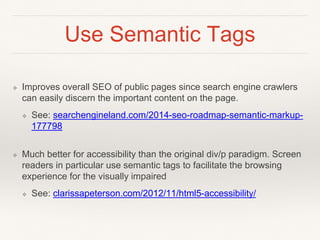
Use Semantic Tags 
❖ Your pages can use HTML5 semantic tags like: 
❖ <section> 
❖ <header>, <footer> 
❖ <nav>, <aside>, <article> 
❖ Use older HTML tags like <p>, <div>, <ul> within 
the semantic tag blocks (example in CodePen)
Use Semantic Tags 
❖ Improves overall SEO of public pages since search engine crawlers 
can easily discern the important content on the page. 
❖ See: searchengineland.com/2014-seo-roadmap-semantic-markup- 
177798 
❖ Much better for accessibility than the original div/p paradigm. Screen 
readers in particular use semantic tags to facilitate the browsing 
experience for the visually impaired 
❖ See: clarissapeterson.com/2012/11/html5-accessibility/
Poking the (flex)Box
What Is Flexbox? 
❖ The Flexbox Layout (Flexible Box or just Flexbox) module 
aims at providing a more efficient way to lay out, align and 
distribute space among items in a container, even when 
their size is unknown and/or dynamic. 
❖ Flexbox is intended to replace floats and the Box model 
which we’ve had to deal with for far too long. 
❖ There is fairly widespread support for Flexbox. IE has 
recently adopted it (previously the Grid Layout model was 
the only alternative to the Box model).
Flexbox Features 
❖ Align block elements within other blocks with easy 
spacing and justification. 
❖ Block elements height and width can be easily 
synchronized. 
❖ The order of elements can be changed via CSS without 
calls to the Apache/backend server or JavaScript. 
❖ See css-tricks.com/snippets/css/a-guide-to-flexbox/
Basic Fancy Effects 
(No JavaScript 
Required)
Regions, Transforms & Animation 
❖ Transforms 
❖ Mozilla: CSS Transforms doc 
❖ Mozilla: Using CSS transforms 
❖ Animation 
❖ Mozilla: Using CSS animations with nice live examples 
❖ Transforms with Regions 
❖ A flippable book using CSS Regions and 3D transforms
Links, Etc. 
❖ Video: Google I/O 2012 - The Web Can Do That!? 
❖ Video: Create a Responsive Website Using HTML5 and 
CSS3 
❖ A Complete Guide to Flexbox 
❖ W3C: Advanced CSS selectors 
❖ As mentioned before: caniuse.com
Notes 
❖ CSS variables aren’t yet widely adopted. When they are, they 
might look something like this. 
❖ I used to love using the text-to-speech attribute in WebKit. But 
sadly that’s deprecated now for security reasons. *sniffle* 
❖ This presentation was originally titled “CSS Eye for the PHP Guy” 
but I changed it to “Programmer Guy” after I realized there was no 
actual PHP code in the presentation. 
❖ Photo credits: (c) 2014 by Me, all from from my recent honeymoon 
in Italy. And yes, the Leaning Tower pic in the next slide is totally 
real, no photo editing at all...
My Contact Info 
❖ Dennis Slade Jr. 
❖ tennisbear@gmail.com 
❖ dennissladejr@gmail.com 
❖ @DennisSladeJr 
❖ linkedin.com/in/dennissladejr

CSS Eye for the Programmer Guy

  • 1.
    Dennis Slade CSSEye for the Programmer Guy The San Diego PHP Meetup
  • 2.
    Who Am I? ❖ Dennis Slade Jr. tennisbear@gmail.com ❖ 20+ years experience implementing and supporting critical web and desktop business systems ❖ 12+ years hands-on experience with *AMP web development projects (PHP on Linux & OS X) ❖ 14+ years experience in software support and training
  • 3.
    Why This Presentation? I recently ran across this Google I/O presentation from a few years back. The presentation made me realize that I wasn’t yet leveraging CSS3 and HTML5 functionalities which are now in widespread usage, and which could save me time and headaches in my coding projects. I refreshed my knowledge in these areas and I thought you might like to as well. ❖ See: Google I/O 2012 - The Web Can Do That!?
  • 4.
    What We’ll BeCovering ❖ Better forms with CSS styling and HTML5 validation ❖ Semantic tags to improve page organization, SEO, and accessibility ❖ Introductory regions and flexbox ❖ Basic fancy effects (No JavaScript required)
  • 5.
    What We Won’tBe Covering ❖ Bootstrap ❖ Less ❖ Sass ❖ Modernizr ❖ jQuery ❖ Advanced filter and transform effects
  • 6.
    Before We Begin ❖ Checking which browsers support which CSS3/HTML5 features: caniuse.com ❖ CSS Lint for analyzing problems: csslint.net ❖ CodePen for trying stuff out: codepen.io
  • 7.
    CSS Organization Basics ❖ Use classes rather than element ids whenever possible. ❖ Use style attributes only as a last resort. ❖ Include files rather than inline except when CSS is needed in emails. ❖ Use <link> tags instead of @import because of performance issues. ❖ Here’s much, much more on organizing your CSS: engineering.appfolio.com/2012/11/16/css-architecture/ (thanks for the link @step_hane)
  • 8.
    Forms: CSS styling,HTML5 validation
  • 9.
    For Forms YouCan Style Anything ❖ Selectors can be applied by input type: ❖ .dashboard-edit-form input[type="text"] { margin-top:4px; } .dashboard-edit-form input[type="url"].uri { width:85%; } .dashboard-edit-form input[type="text"].name { width:80%; } .dashboard-edit-form input[type="file"].upload { margin-left:0.5em; margin-top:7px; margin-bottom:16px; } ❖ .dashboard-edit-form input[type="text"].location { width:60%; } .dashboard-edit-form select.status { float:left; margin-top:16px; } .dashboard-edit-form textarea.description, .dashboard-edit-form textarea.notes { width:75%; height:200px; margin-top:7px; } .dashboard-edit-form textarea.notes { height:60px; } .detail-form input[type=“checkbox"].search { margin:9px; } .detail-form input[type=“email"].search { margin:inherit; }
  • 10.
    Input Validation ❖It’s not just text anymore. Try: date, time, email, url, number, tel, range ❖ Validation with min, max, step, pattern ❖ Required for form fields is lovely… except in mobile and desktop Safari ❖ Don’t forget <label> for form field navigation and screen reader accessibility. (example in CodePen)
  • 11.
    Poor Man’s Responsive Forms body { font-size:14pt; } section { font-size:0.9em; } .sign-up-main-content, .sign-up-information { font-size:0.8em; } .sign-up-complete { padding:0% 10%; } .sign-up-complete .buttons { margin:80px 0px 0px 0px; } .talent-network-join { width:640px; } .talent-network-join .buttons { padding:5px; } .copyright-only { display:none; } .standard-links { display:block; } @media screen and (max-device-width: 960px) { body { font-size:36pt; } .sign-up-complete { padding:0; } .sign-up-complete .buttons { margin-left:5px; } .talent-network-join { width:94%; } .talent-network-join .buttons { padding:0; } .copyright-only { display:block; } .standard-links { display:none; } }
  • 12.
    Semantic Tags for SEO & Accessibility
  • 13.
    Use Semantic Tags ❖ Your pages can use HTML5 semantic tags like: ❖ <section> ❖ <header>, <footer> ❖ <nav>, <aside>, <article> ❖ Use older HTML tags like <p>, <div>, <ul> within the semantic tag blocks (example in CodePen)
  • 14.
    Use Semantic Tags ❖ Improves overall SEO of public pages since search engine crawlers can easily discern the important content on the page. ❖ See: searchengineland.com/2014-seo-roadmap-semantic-markup- 177798 ❖ Much better for accessibility than the original div/p paradigm. Screen readers in particular use semantic tags to facilitate the browsing experience for the visually impaired ❖ See: clarissapeterson.com/2012/11/html5-accessibility/
  • 15.
  • 16.
    What Is Flexbox? ❖ The Flexbox Layout (Flexible Box or just Flexbox) module aims at providing a more efficient way to lay out, align and distribute space among items in a container, even when their size is unknown and/or dynamic. ❖ Flexbox is intended to replace floats and the Box model which we’ve had to deal with for far too long. ❖ There is fairly widespread support for Flexbox. IE has recently adopted it (previously the Grid Layout model was the only alternative to the Box model).
  • 17.
    Flexbox Features ❖Align block elements within other blocks with easy spacing and justification. ❖ Block elements height and width can be easily synchronized. ❖ The order of elements can be changed via CSS without calls to the Apache/backend server or JavaScript. ❖ See css-tricks.com/snippets/css/a-guide-to-flexbox/
  • 18.
    Basic Fancy Effects (No JavaScript Required)
  • 19.
    Regions, Transforms &Animation ❖ Transforms ❖ Mozilla: CSS Transforms doc ❖ Mozilla: Using CSS transforms ❖ Animation ❖ Mozilla: Using CSS animations with nice live examples ❖ Transforms with Regions ❖ A flippable book using CSS Regions and 3D transforms
  • 20.
    Links, Etc. ❖Video: Google I/O 2012 - The Web Can Do That!? ❖ Video: Create a Responsive Website Using HTML5 and CSS3 ❖ A Complete Guide to Flexbox ❖ W3C: Advanced CSS selectors ❖ As mentioned before: caniuse.com
  • 21.
    Notes ❖ CSSvariables aren’t yet widely adopted. When they are, they might look something like this. ❖ I used to love using the text-to-speech attribute in WebKit. But sadly that’s deprecated now for security reasons. *sniffle* ❖ This presentation was originally titled “CSS Eye for the PHP Guy” but I changed it to “Programmer Guy” after I realized there was no actual PHP code in the presentation. ❖ Photo credits: (c) 2014 by Me, all from from my recent honeymoon in Italy. And yes, the Leaning Tower pic in the next slide is totally real, no photo editing at all...
  • 22.
    My Contact Info ❖ Dennis Slade Jr. ❖ tennisbear@gmail.com ❖ dennissladejr@gmail.com ❖ @DennisSladeJr ❖ linkedin.com/in/dennissladejr