1/82
2/82
Understanding WebSphereUnderstanding WebSphere
performanceperformance
3/82
What We’ll Cover …What We’ll Cover …
• Understanding WebSphere
o Understanding WebSphere V5 packaging
o Understanding WebSphere V5 architecture
• Managing WebSphere
• Understanding WebSphere performance
3
4/82
What Is WebSphere?What Is WebSphere?
• WebSphere is not a product; it's a software
platform that includes many products
o WebSphere Application Server, or WAS,
is often referred to as WebSphere
• The WebSphere software platform is an
e-business solutions framework
o IBM uses WebSphere and Domino to provide a
runtime environment for its business solutions
o Business solutions include
• WebSphere Portal Server (WPS)
• WebSphere Commerce Suite (WCS)
• Mobile computing and more
4
Note
5/82
What Does WebSphere Do?What Does WebSphere Do?
• In this session the term WebSphere means the
WebSphere Application Server product
• WAS provides a runtime environment for
Java 2 Enterprise Edition (J2EE) applications
o J2EE defines a bunch of Java APIs for enterprise-level applications
that are portable across application servers
o Includes Java servlets, Java Server Pages (JSPs), Enterprise JavaBeans
(EJBs), and other J2EE APIs
• WAS V5 implements J2EE 1.3 APIs with extensions
o WebSphere business solutions (portal, commerce, etc.) are
implemented as J2EE applications that run on WAS
o WAS also provides proprietary extensions to J2EE 1.3
5
6/82
What We’ll Cover …What We’ll Cover …
• Understanding WebSphere
o Understanding WebSphere V5 packaging
o Understanding WebSphere V5 architecture
• Managing WebSphere
• Understanding WebSphere performance
6
7/82
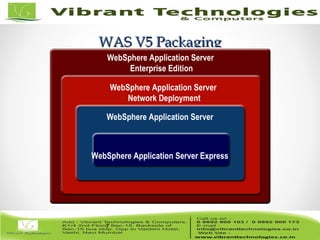
WAS V5 PackagingWAS V5 Packaging
7
WebSphere Application Server Express
WebSphere Application Server
Network Deployment
WebSphere Application Server
Enterprise Edition
8/82
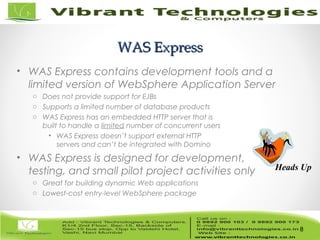
WAS ExpressWAS Express
• WAS Express contains development tools and a
limited version of WebSphere Application Server
o Does not provide support for EJBs
o Supports a limited number of database products
o WAS Express has an embedded HTTP server that is
built to handle a limited number of concurrent users
• WAS Express doesn’t support external HTTP
servers and can’t be integrated with Domino
• WAS Express is designed for development,
testing, and small pilot project activities only
o Great for building dynamic Web applications
o Lowest-cost entry-level WebSphere package
8
Heads Up
9/82
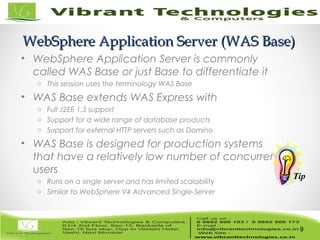
WebSphere Application Server (WAS Base)WebSphere Application Server (WAS Base)
• WebSphere Application Server is commonly
called WAS Base or just Base to differentiate it
o This session uses the terminology WAS Base
• WAS Base extends WAS Express with
o Full J2EE 1.3 support
o Support for a wide range of database products
o Support for external HTTP servers such as Domino
• WAS Base is designed for production systems
that have a relatively low number of concurrent
users
o Runs on a single server and has limited scalability
o Similar to WebSphere V4 Advanced Single-Server
9
Tip
10/82
WAS Network DeploymentWAS Network Deployment
• WAS Network Deployment extends WAS Base
with:
o Multi-server deployment for mission-critical applications
o Centralized administration model
• Servers can be clustered for high scalability
o Supports both load-balancing and failover to provide
24x7x365 operations for mission-critical applications
o Similar to WebSphere V4 Advanced Edition
• WAS Network Deployment includes WAS Base
plus
o The Deployment Manager to configure and manage multiple
instances of WebSphere on multiple servers
o Edge components that provide HTTP load balancing and Web page
caching capabilities for enhanced scalability
10
11/82
WAS Enterprise EditionWAS Enterprise Edition
• WAS Enterprise Edition provides proprietary
extensions to the J2EE programming model
o Adds sophisticated application functions like workflow
o Provides application performance enhancements
• IBM uses these capabilities to add functionality
and performance for its business solutions
o WebSphere Portal Server, WebSphere Commerce Suite
o IBM shares common services across business solutions and makes
them available to their customers (at a price)
• These extensions can save development time,
but applications are no longer portable to other
J2EE application servers (vendor lock-in)!
11
Caution
12/82
What We’ll Cover …What We’ll Cover …
• Understanding WebSphere
o Understanding WebSphere V5 packaging
o Understanding WebSphere V5 architecture
• Managing WebSphere
• Understanding WebSphere performance
12
13/82
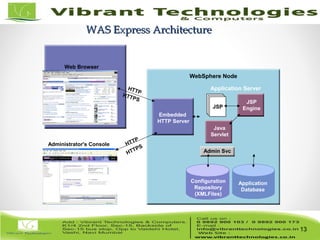
WAS Express ArchitectureWAS Express Architecture
13
Administrator's Console
Web Browser
HTTP
WebSphere Node
HTTP
HTTPS
Embedded
HTTP Server
Application Server
ccJSP
Java
Servlet
JSP
Engine
Admin Svc
Configuration
Repository
(XMLFiles)
Application
Database
HTTPS
14/82
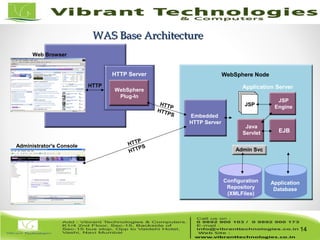
WAS Base ArchitectureWAS Base Architecture
14
Administrator's Console
Web Browser
HTTP
Configuration
Repository
(XMLFiles)
HTTP Server
HTTP
HTTPS
Application
Database
WebSphere Node
WebSphere
Plug-In
Application Server
ccJSP
Java
Servlet EJB
JSP
Engine
HTTP
HTTPS
Admin Svc
Embedded
HTTP Server
15/82
What We’ll Cover …What We’ll Cover …
• Understanding WebSphere
o Understanding WebSphere V5 packaging
o Understanding WebSphere V5 architecture
• Managing WebSphere
• Understanding WebSphere performance
15
16/82
Managing WebSphereManaging WebSphere
• Typical WebSphere administration tasks
o Starting and stopping WebSphere
o Creating and configuring application servers
o Creating and configuring virtual hosts
o Deploying WebSphere applications
• The tasks required to manage WebSphere are
the same for all of the WebSphere packages
o But the way in which you execute the tasks
differs significantly between WAS Base and
WAS Network Deployment
16
Caution
17/82
What We’ll Cover …What We’ll Cover …
• Understanding WebSphere
o Understanding WebSphere V5 packaging
o Understanding WebSphere V5 architecture
• Managing WebSphere
• Understanding WebSphere performance
17
18/82
Measuring WebSphere PerformanceMeasuring WebSphere Performance• All systems are limited by resources
o For example, cars are limited by fuel combustibility, engine size,
transmission, tire type and size, etc.
o When the resources in any system are low,
bottlenecks occur and performance is reduced
• To manage WebSphere effectively, you must
understand how to monitor its resources
o Resources have data values that you
use to determine their availability
18
19/82
Understanding WebSphere ResourcesUnderstanding WebSphere Resources
• WebSphere uses system resources such as
memory, database connections, threads, etc.
o WebSphere resources are described in Chapter 15
of the Redbook “WebSphere V5.0 Performance, Scalability and High
Availability” SG24-6198-00
• Knowing what resources WebSphere uses and
how to monitor those resources, you will:
o Understand and identify the underlying causes of
performance issues in a WebSphere environment
o Know whether to tune WebSphere or ask the
application developer to address a design issue
19
Where
to
FIND
it
20/82
Capturing the Performance DataCapturing the Performance Data
• Now that you know what to measure, you
need to know how to capture the data
o Performance monitoring and analysis
capabilities are built into WebSphere
o This feature is called the Performance
Monitoring Infrastructure, or PMI
• PMI is embedded in the application
server to capture performance data
o IBM provides tools for analyzing the data
20
Great Feature
21/82
Analyzing WebSphere PerformanceAnalyzing WebSphere Performance
• To analyze performance, use tools that can
store and display the data captured by PMI
o PMI makes performance data available
o PMI does not record or analyze the data
• IBM provides two tools for analyzing
WebSphere performance
o Tivoli Performance Viewer
• Used to be called Resource Analyzer
o Performance monitoring servlet
21
Tools
22/82
Understanding Tivoli Performance ViewerUnderstanding Tivoli Performance Viewer
• Tivoli Performance Viewer is a Java
application that records and reports data
captured by PMI
o This used to be called the Resource Analyzer in V4
• Tivoli Performance Viewer is the most useful
tool for analyzing WebSphere performance
o It helps you determine what resources are
being used up and how best to tune
o It can record and play back performance
issues to end users and developers
Functionality
23/82
Tivoli Performance Viewer Pros and ConsTivoli Performance Viewer Pros and Cons
• Pros of Tivoli Performance Viewer
o Provides a full graphical user interface
o Generates charts that make the data
easier to understand and analyze
o Contains the best analytical capabilities
• Cons of Tivoli Performance Viewer
o Uses the IIOP protocol, which may be blocked
if the administration server is behind a firewall
o Requires a client-side install
Issue
24/82
Performance Monitoring ServletPerformance Monitoring Servlet
• The Performance Monitoring servlet is a Web-
based alternative to Tivoli Performance Viewer
o Returns performance data in XML format
o Distributed with WebSphere, but you have to install it
• See Chapter 15 of “WebSphere V5.0 Performance, Scalability
and High Availability” SG24-6198-00
• Start the servlet with the URL
o http://host/wasPerfTool/servlet/perfservlet
24
Where
to
FIND
it
25/82
Performance Monitoring Servlet Pros and ConsPerformance Monitoring Servlet Pros and Cons
• Pros of the Servlet are
o Can be used to view performance data
from anywhere with a Web browser
• Cons of the Servlet are
o Does not provide a graphical interface for navigating
data items or creating charts
o Cannot store information in a log
file for later analysis or playback
25
Issue
26/82
ThankThank You !!!You !!!
For More Information click below link:
Follow Us on:
http://vibranttechnologies.co.in/websphere-classes-in-mumbai.html

websphere - Understanding web sphere performance

  • 1.
  • 2.
  • 3.
    3/82 What We’ll Cover…What We’ll Cover … • Understanding WebSphere o Understanding WebSphere V5 packaging o Understanding WebSphere V5 architecture • Managing WebSphere • Understanding WebSphere performance 3
  • 4.
    4/82 What Is WebSphere?WhatIs WebSphere? • WebSphere is not a product; it's a software platform that includes many products o WebSphere Application Server, or WAS, is often referred to as WebSphere • The WebSphere software platform is an e-business solutions framework o IBM uses WebSphere and Domino to provide a runtime environment for its business solutions o Business solutions include • WebSphere Portal Server (WPS) • WebSphere Commerce Suite (WCS) • Mobile computing and more 4 Note
  • 5.
    5/82 What Does WebSphereDo?What Does WebSphere Do? • In this session the term WebSphere means the WebSphere Application Server product • WAS provides a runtime environment for Java 2 Enterprise Edition (J2EE) applications o J2EE defines a bunch of Java APIs for enterprise-level applications that are portable across application servers o Includes Java servlets, Java Server Pages (JSPs), Enterprise JavaBeans (EJBs), and other J2EE APIs • WAS V5 implements J2EE 1.3 APIs with extensions o WebSphere business solutions (portal, commerce, etc.) are implemented as J2EE applications that run on WAS o WAS also provides proprietary extensions to J2EE 1.3 5
  • 6.
    6/82 What We’ll Cover…What We’ll Cover … • Understanding WebSphere o Understanding WebSphere V5 packaging o Understanding WebSphere V5 architecture • Managing WebSphere • Understanding WebSphere performance 6
  • 7.
    7/82 WAS V5 PackagingWASV5 Packaging 7 WebSphere Application Server Express WebSphere Application Server WebSphere Application Server Network Deployment WebSphere Application Server Enterprise Edition
  • 8.
    8/82 WAS ExpressWAS Express •WAS Express contains development tools and a limited version of WebSphere Application Server o Does not provide support for EJBs o Supports a limited number of database products o WAS Express has an embedded HTTP server that is built to handle a limited number of concurrent users • WAS Express doesn’t support external HTTP servers and can’t be integrated with Domino • WAS Express is designed for development, testing, and small pilot project activities only o Great for building dynamic Web applications o Lowest-cost entry-level WebSphere package 8 Heads Up
  • 9.
    9/82 WebSphere Application Server(WAS Base)WebSphere Application Server (WAS Base) • WebSphere Application Server is commonly called WAS Base or just Base to differentiate it o This session uses the terminology WAS Base • WAS Base extends WAS Express with o Full J2EE 1.3 support o Support for a wide range of database products o Support for external HTTP servers such as Domino • WAS Base is designed for production systems that have a relatively low number of concurrent users o Runs on a single server and has limited scalability o Similar to WebSphere V4 Advanced Single-Server 9 Tip
  • 10.
    10/82 WAS Network DeploymentWASNetwork Deployment • WAS Network Deployment extends WAS Base with: o Multi-server deployment for mission-critical applications o Centralized administration model • Servers can be clustered for high scalability o Supports both load-balancing and failover to provide 24x7x365 operations for mission-critical applications o Similar to WebSphere V4 Advanced Edition • WAS Network Deployment includes WAS Base plus o The Deployment Manager to configure and manage multiple instances of WebSphere on multiple servers o Edge components that provide HTTP load balancing and Web page caching capabilities for enhanced scalability 10
  • 11.
    11/82 WAS Enterprise EditionWASEnterprise Edition • WAS Enterprise Edition provides proprietary extensions to the J2EE programming model o Adds sophisticated application functions like workflow o Provides application performance enhancements • IBM uses these capabilities to add functionality and performance for its business solutions o WebSphere Portal Server, WebSphere Commerce Suite o IBM shares common services across business solutions and makes them available to their customers (at a price) • These extensions can save development time, but applications are no longer portable to other J2EE application servers (vendor lock-in)! 11 Caution
  • 12.
    12/82 What We’ll Cover…What We’ll Cover … • Understanding WebSphere o Understanding WebSphere V5 packaging o Understanding WebSphere V5 architecture • Managing WebSphere • Understanding WebSphere performance 12
  • 13.
    13/82 WAS Express ArchitectureWASExpress Architecture 13 Administrator's Console Web Browser HTTP WebSphere Node HTTP HTTPS Embedded HTTP Server Application Server ccJSP Java Servlet JSP Engine Admin Svc Configuration Repository (XMLFiles) Application Database HTTPS
  • 14.
    14/82 WAS Base ArchitectureWASBase Architecture 14 Administrator's Console Web Browser HTTP Configuration Repository (XMLFiles) HTTP Server HTTP HTTPS Application Database WebSphere Node WebSphere Plug-In Application Server ccJSP Java Servlet EJB JSP Engine HTTP HTTPS Admin Svc Embedded HTTP Server
  • 15.
    15/82 What We’ll Cover…What We’ll Cover … • Understanding WebSphere o Understanding WebSphere V5 packaging o Understanding WebSphere V5 architecture • Managing WebSphere • Understanding WebSphere performance 15
  • 16.
    16/82 Managing WebSphereManaging WebSphere •Typical WebSphere administration tasks o Starting and stopping WebSphere o Creating and configuring application servers o Creating and configuring virtual hosts o Deploying WebSphere applications • The tasks required to manage WebSphere are the same for all of the WebSphere packages o But the way in which you execute the tasks differs significantly between WAS Base and WAS Network Deployment 16 Caution
  • 17.
    17/82 What We’ll Cover…What We’ll Cover … • Understanding WebSphere o Understanding WebSphere V5 packaging o Understanding WebSphere V5 architecture • Managing WebSphere • Understanding WebSphere performance 17
  • 18.
    18/82 Measuring WebSphere PerformanceMeasuringWebSphere Performance• All systems are limited by resources o For example, cars are limited by fuel combustibility, engine size, transmission, tire type and size, etc. o When the resources in any system are low, bottlenecks occur and performance is reduced • To manage WebSphere effectively, you must understand how to monitor its resources o Resources have data values that you use to determine their availability 18
  • 19.
    19/82 Understanding WebSphere ResourcesUnderstandingWebSphere Resources • WebSphere uses system resources such as memory, database connections, threads, etc. o WebSphere resources are described in Chapter 15 of the Redbook “WebSphere V5.0 Performance, Scalability and High Availability” SG24-6198-00 • Knowing what resources WebSphere uses and how to monitor those resources, you will: o Understand and identify the underlying causes of performance issues in a WebSphere environment o Know whether to tune WebSphere or ask the application developer to address a design issue 19 Where to FIND it
  • 20.
    20/82 Capturing the PerformanceDataCapturing the Performance Data • Now that you know what to measure, you need to know how to capture the data o Performance monitoring and analysis capabilities are built into WebSphere o This feature is called the Performance Monitoring Infrastructure, or PMI • PMI is embedded in the application server to capture performance data o IBM provides tools for analyzing the data 20 Great Feature
  • 21.
    21/82 Analyzing WebSphere PerformanceAnalyzingWebSphere Performance • To analyze performance, use tools that can store and display the data captured by PMI o PMI makes performance data available o PMI does not record or analyze the data • IBM provides two tools for analyzing WebSphere performance o Tivoli Performance Viewer • Used to be called Resource Analyzer o Performance monitoring servlet 21 Tools
  • 22.
    22/82 Understanding Tivoli PerformanceViewerUnderstanding Tivoli Performance Viewer • Tivoli Performance Viewer is a Java application that records and reports data captured by PMI o This used to be called the Resource Analyzer in V4 • Tivoli Performance Viewer is the most useful tool for analyzing WebSphere performance o It helps you determine what resources are being used up and how best to tune o It can record and play back performance issues to end users and developers Functionality
  • 23.
    23/82 Tivoli Performance ViewerPros and ConsTivoli Performance Viewer Pros and Cons • Pros of Tivoli Performance Viewer o Provides a full graphical user interface o Generates charts that make the data easier to understand and analyze o Contains the best analytical capabilities • Cons of Tivoli Performance Viewer o Uses the IIOP protocol, which may be blocked if the administration server is behind a firewall o Requires a client-side install Issue
  • 24.
    24/82 Performance Monitoring ServletPerformanceMonitoring Servlet • The Performance Monitoring servlet is a Web- based alternative to Tivoli Performance Viewer o Returns performance data in XML format o Distributed with WebSphere, but you have to install it • See Chapter 15 of “WebSphere V5.0 Performance, Scalability and High Availability” SG24-6198-00 • Start the servlet with the URL o http://host/wasPerfTool/servlet/perfservlet 24 Where to FIND it
  • 25.
    25/82 Performance Monitoring ServletPros and ConsPerformance Monitoring Servlet Pros and Cons • Pros of the Servlet are o Can be used to view performance data from anywhere with a Web browser • Cons of the Servlet are o Does not provide a graphical interface for navigating data items or creating charts o Cannot store information in a log file for later analysis or playback 25 Issue
  • 26.
    26/82 ThankThank You !!!You!!! For More Information click below link: Follow Us on: http://vibranttechnologies.co.in/websphere-classes-in-mumbai.html