
© 2013 IBM Corporation 
Eclipse tools for 
WAS Liberty profile in Bluemix 
Vishal Charegaonkar 
IBM India Software Labs
Agenda 
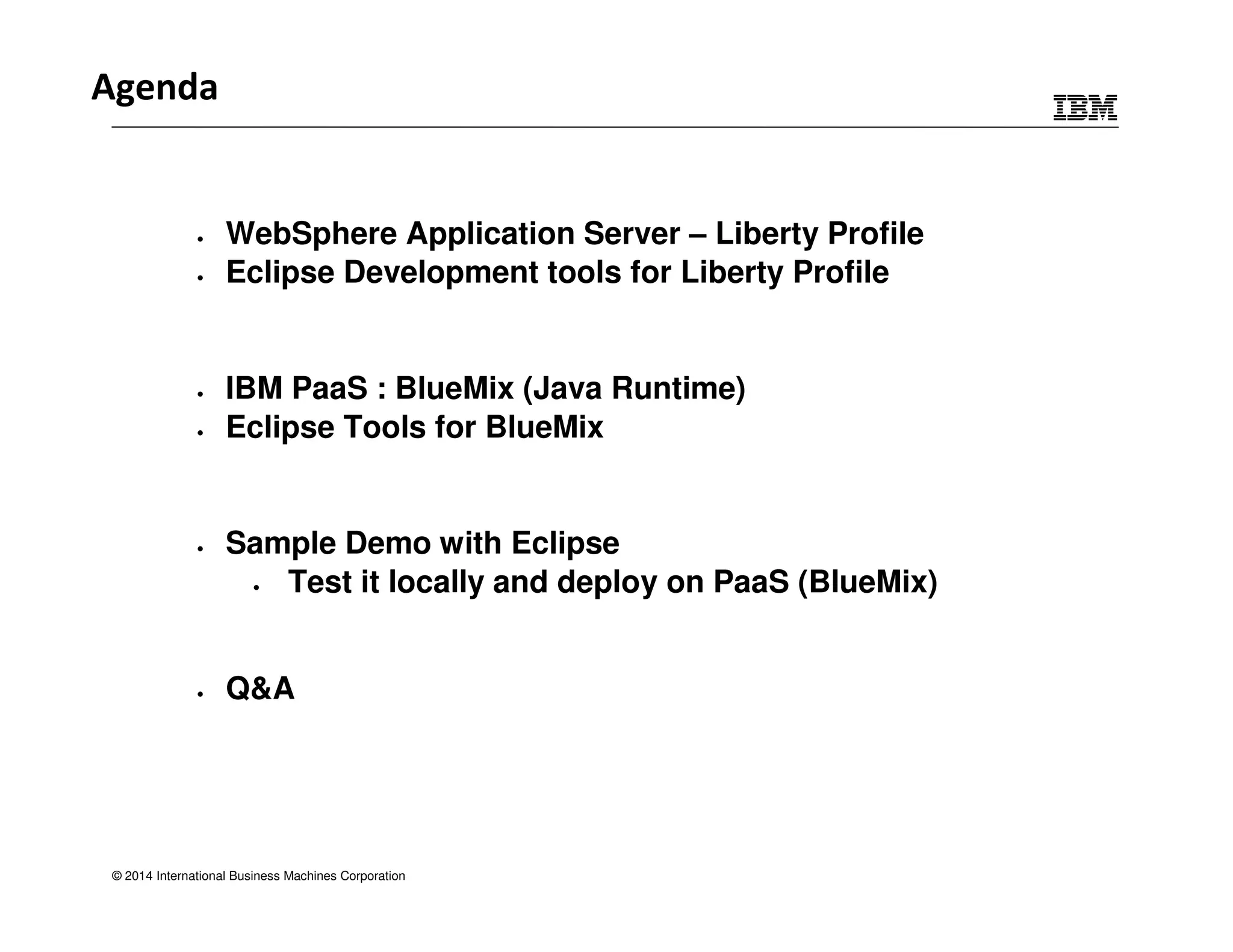
• WebSphere Application Server – Liberty Profile 
• Eclipse Development tools for Liberty Profile 
• IBM PaaS : BlueMix (Java Runtime) 
• Eclipse Tools for BlueMix 
• Sample Demo with Eclipse 
• Test it locally and deploy on PaaS (BlueMix) 
• Q&A 
© 2014 International Business Machines Corporation
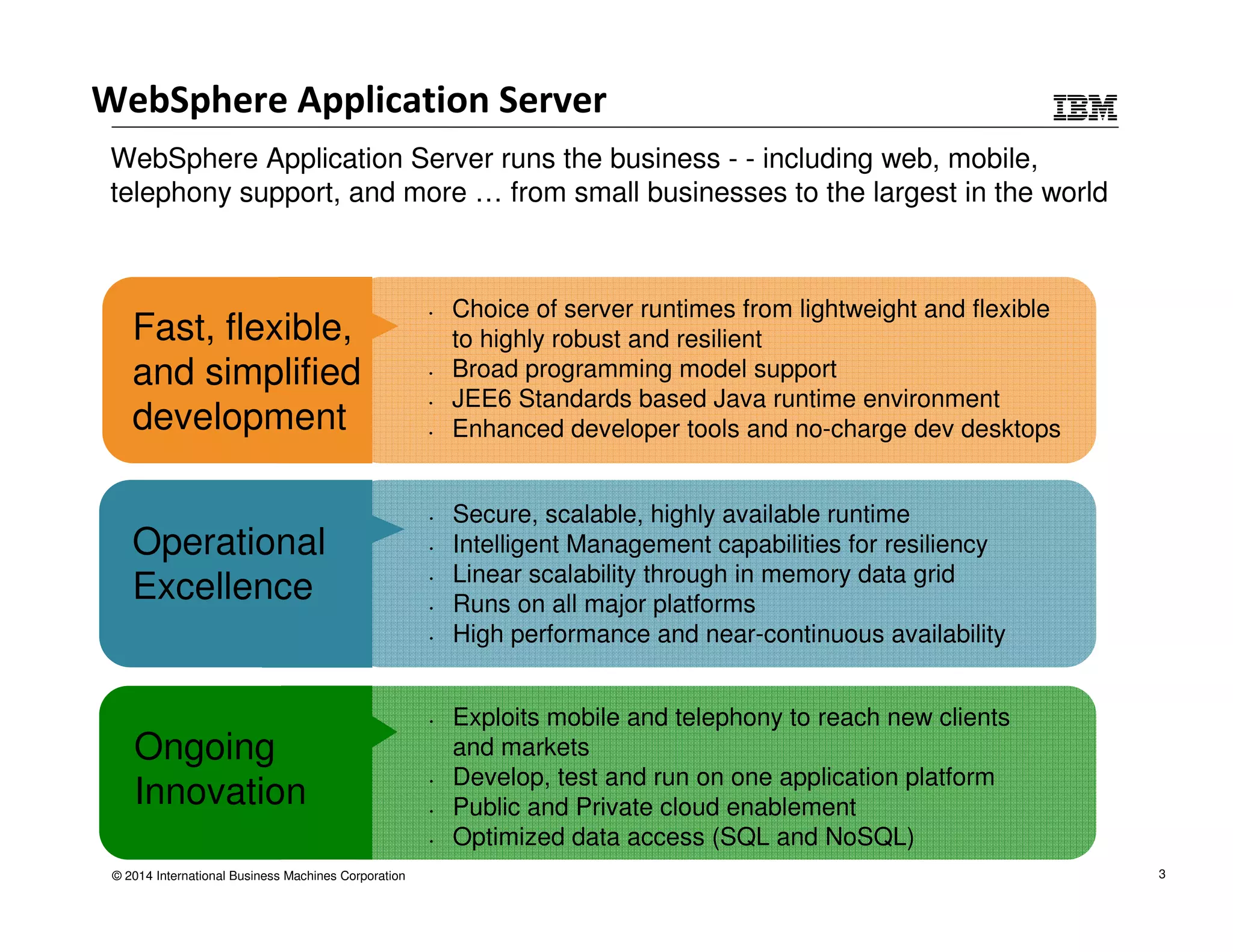
WebSphere Application Server 
WebSphere Application Server runs the business - - including web, mobile, 
telephony support, and more … from small businesses to the largest in the world 
Ongoing 
Innovation 
© 2014 International Business Machines Corporation 
• Exploits mobile and telephony to reach new clients 
and markets 
• Develop, test and run on one application platform 
• Public and Private cloud enablement 
• Optimized data access (SQL and NoSQL) 
Fast, flexible, 
and simplified 
development 
• Choice of server runtimes from lightweight and flexible 
to highly robust and resilient 
• Broad programming model support 
• JEE6 Standards based Java runtime environment 
• Enhanced developer tools and no-charge dev desktops 
Operational 
Excellence 
• Secure, scalable, highly available runtime 
• Intelligent Management capabilities for resiliency 
• Linear scalability through in memory data grid 
• Runs on all major platforms 
• High performance and near-continuous availability 
3
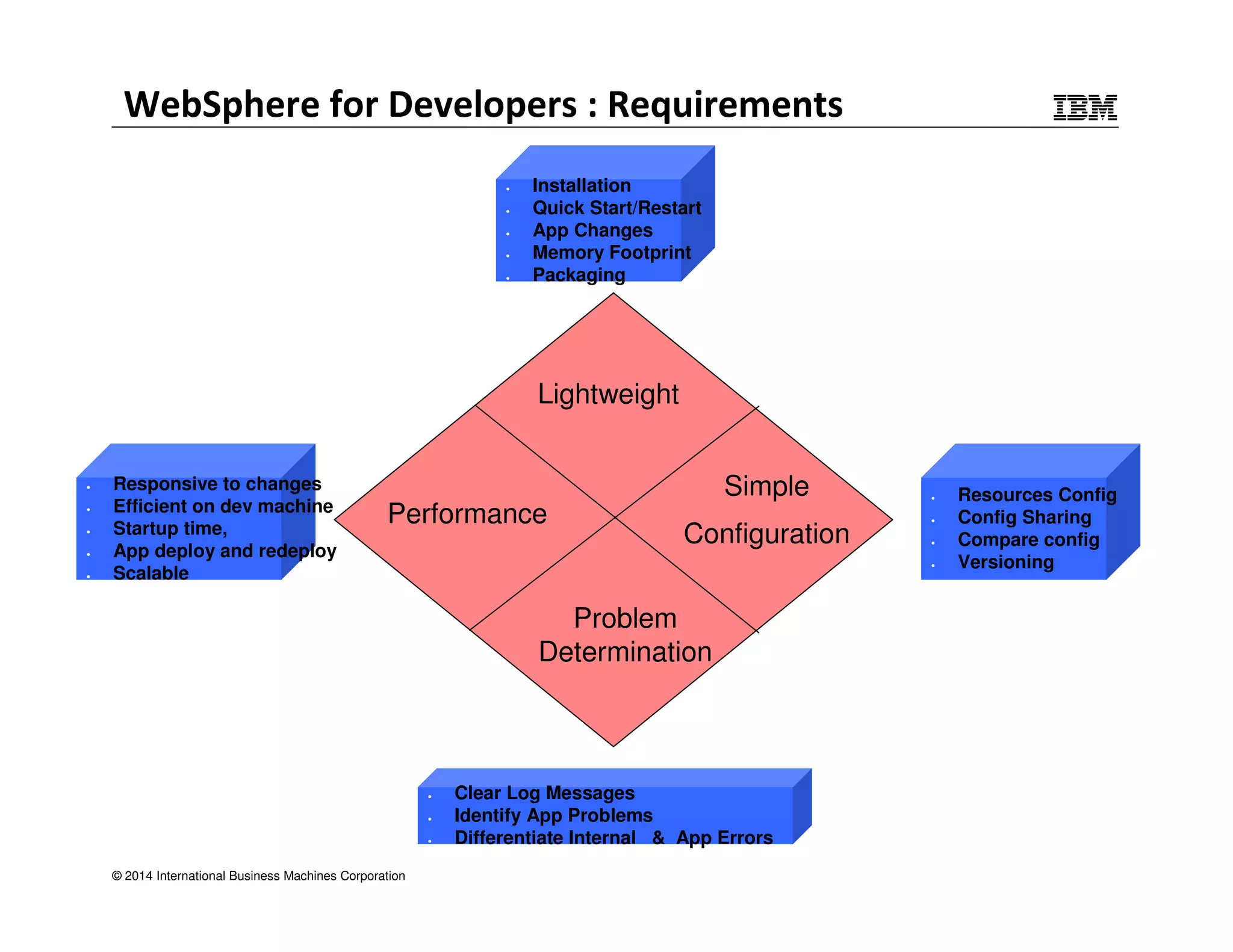
WebSphere for Developers : Requirements 
• Installation 
• Quick Start/Restart 
• App Changes 
• Memory Footprint 
• Packaging 
Performance 
© 2014 International Business Machines Corporation 
Lightweight 
Simple 
Configuration 
Problem 
Determination 
• Resources Config 
• Config Sharing 
• Compare config 
• Versioning 
• Clear Log Messages 
• Identify App Problems 
• Differentiate Internal & App Errors 
• Responsive to changes 
• Efficient on dev machine 
• Startup time, 
• App deploy and redeploy 
• Scalable
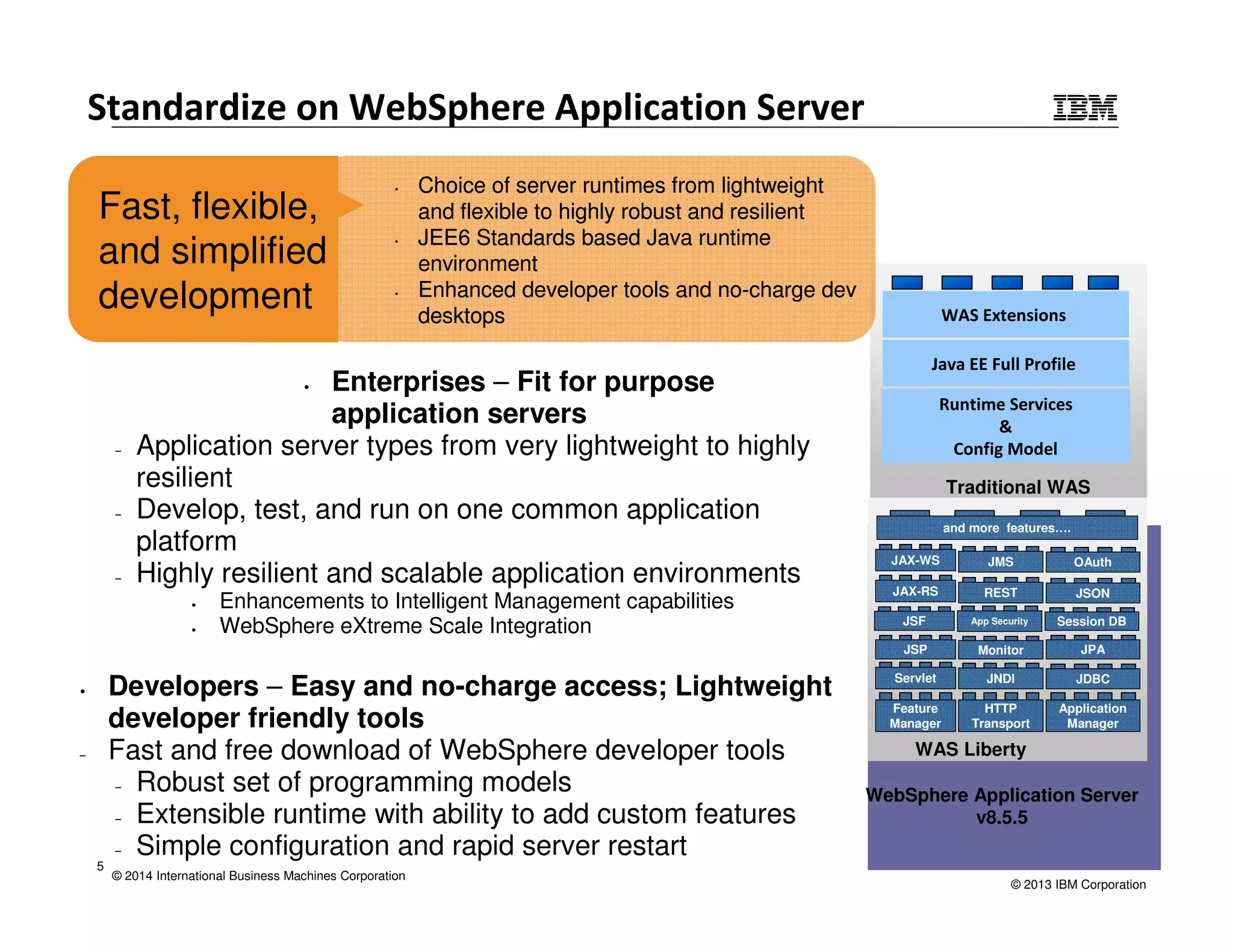
Standardize on WebSphere Application Server 
© 2014 International Business Machines Corporation 
WAS Extensions 
Java EE Full Profile 
Runtime Services 
& 
Config Model 
Traditional WAS 
JAX-WS JMS OAuth 
JAX-RS REST JSON 
JSF App Security Session DB 
JSP Monitor JPA 
Servlet JNDI JDBC 
WebSphere Application Server 
v8.5.5 
Application 
Manager 
HTTP 
Transport 
Feature 
Manager 
WAS Liberty 
• Enterprises – Fit for purpose 
application servers 
‒ Application server types from very lightweight to highly 
resilient 
‒ Develop, test, and run on one common application 
platform 
‒ Highly resilient and scalable application environments 
• Enhancements to Intelligent Management capabilities 
• WebSphere eXtreme Scale Integration 
• Developers – Easy and no-charge access; Lightweight 
developer friendly tools 
‒ Fast and free download of WebSphere developer tools 
‒ Robust set of programming models 
‒ Extensible runtime with ability to add custom features 
‒ Simple configuration and rapid server restart 
and more features…. 
5 
© 2013 IBM Corporation 
Fast, flexible, 
and simplified 
development 
• Choice of server runtimes from lightweight 
and flexible to highly robust and resilient 
• JEE6 Standards based Java runtime 
environment 
• Enhanced developer tools and no-charge dev 
desktops
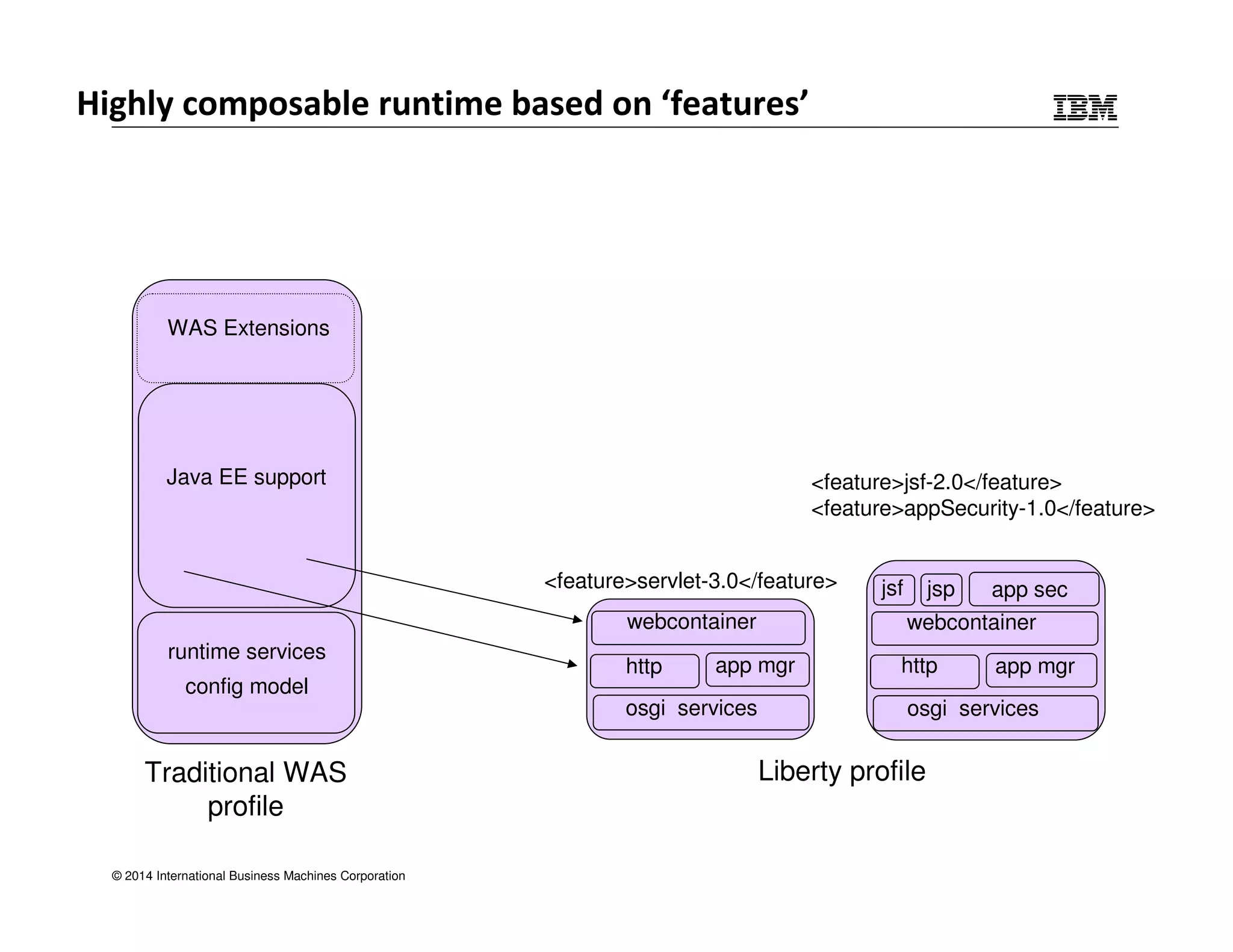
WAS Extensions 
Java EE support 
Traditional WAS 
profile 
© 2014 International Business Machines Corporation 
<feature>jsf-2.0</feature> 
<feature>appSecurity-1.0</feature> 
<feature>servlet-3.0</feature> 
http app mgr 
jsf jsp app sec 
webcontainer 
http app mgr 
Liberty profile 
runtime services 
config model 
webcontainer 
osgi services 
osgi services 
Highly composable runtime based on ‘features’
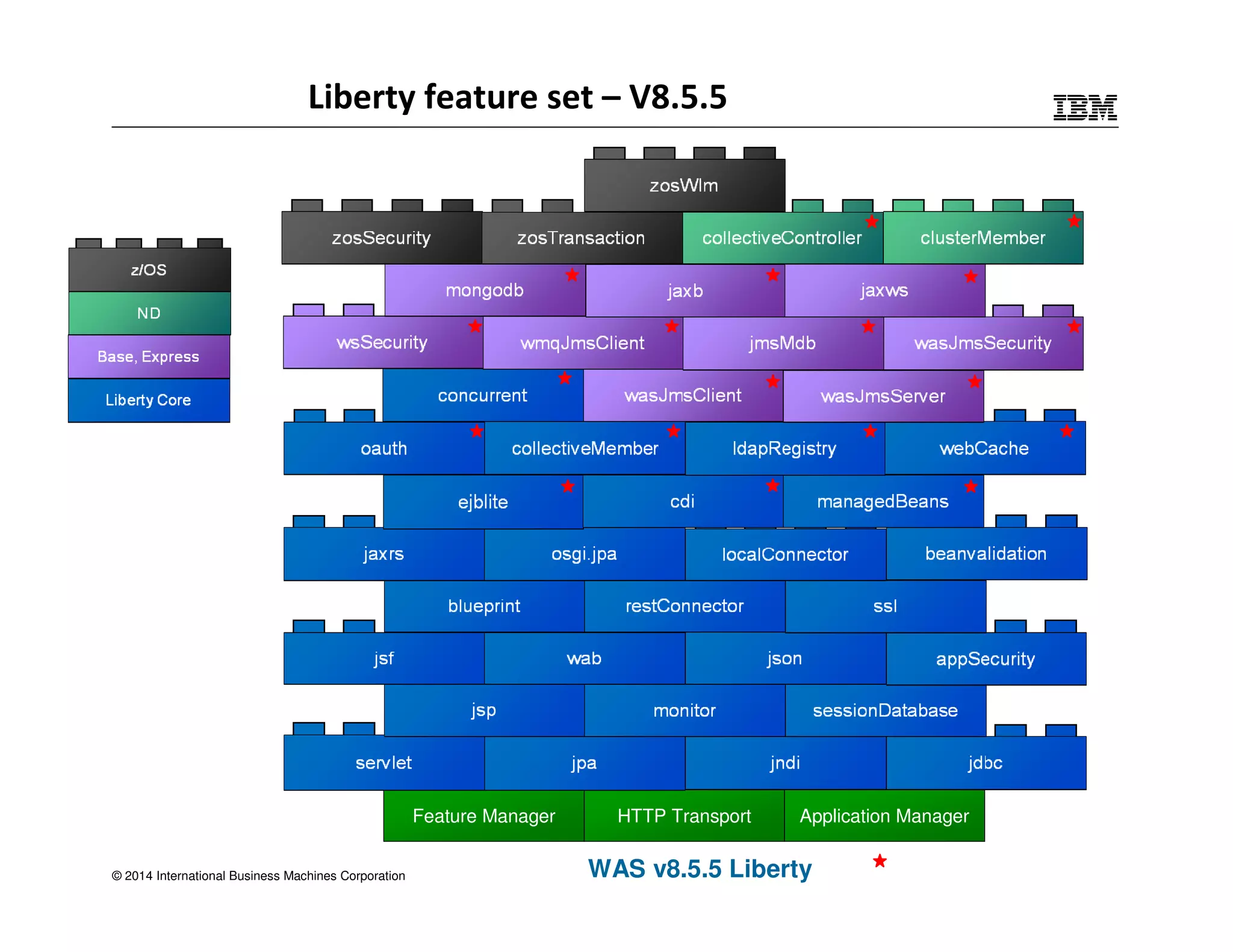
Liberty feature set – V8.5.5 
© 2014 International Business Machines Corporation 
Feature Manager HTTP Transport Application Manager 
WAS v8.5.5 Liberty
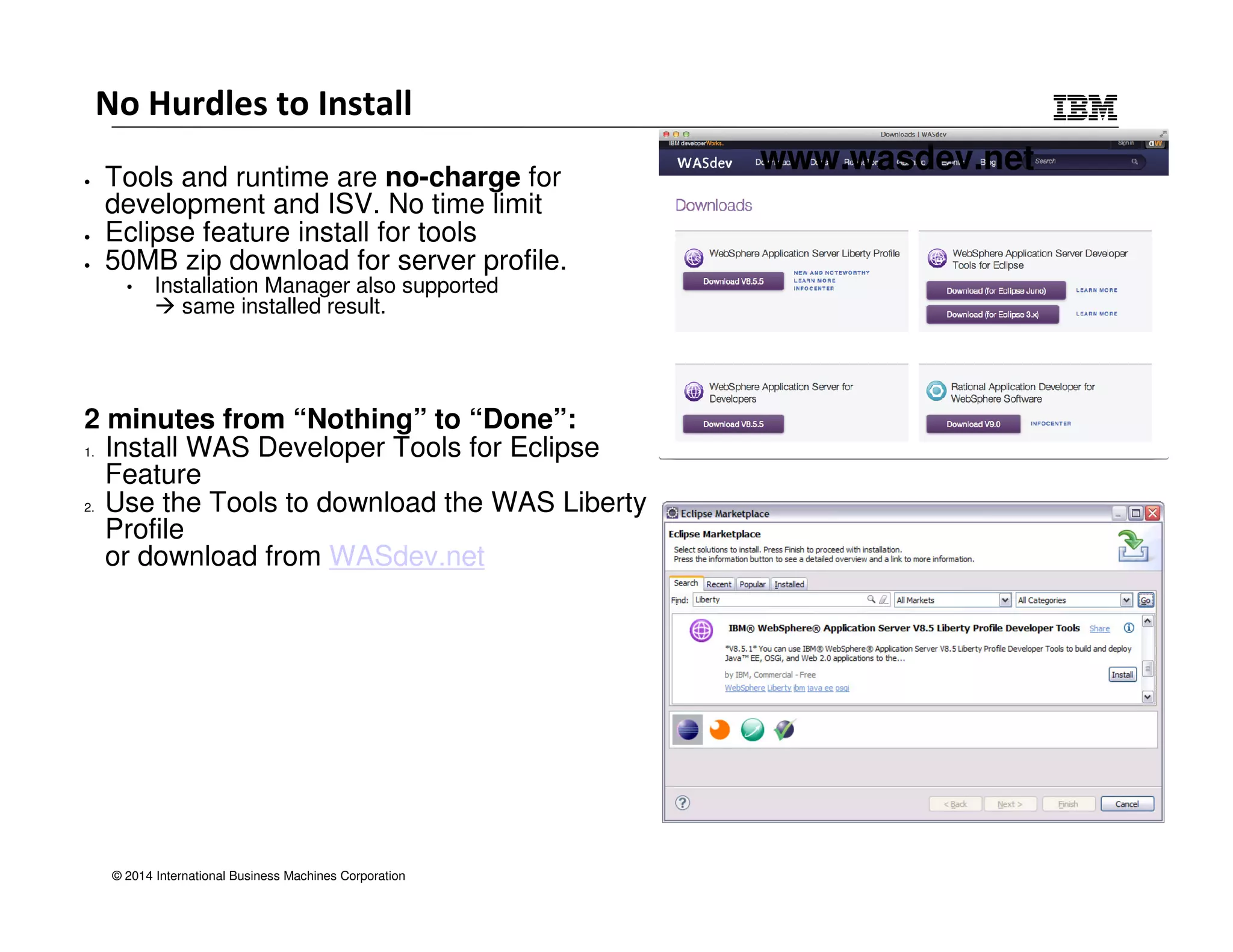
No Hurdles to Install 
• Tools and runtime are no-charge for 
development and ISV. No time limit 
• Eclipse feature install for tools 
• 50MB zip download for server profile. 
• Installation Manager also supported 
 same installed result. 
2 minutes from “Nothing” to “Done”: 
1. Install WAS Developer Tools for Eclipse 
Feature 
2. Use the Tools to download the WAS Liberty 
Profile 
or download from WASdev.net 
© 2014 International Business Machines Corporation 
www.wasdev.net
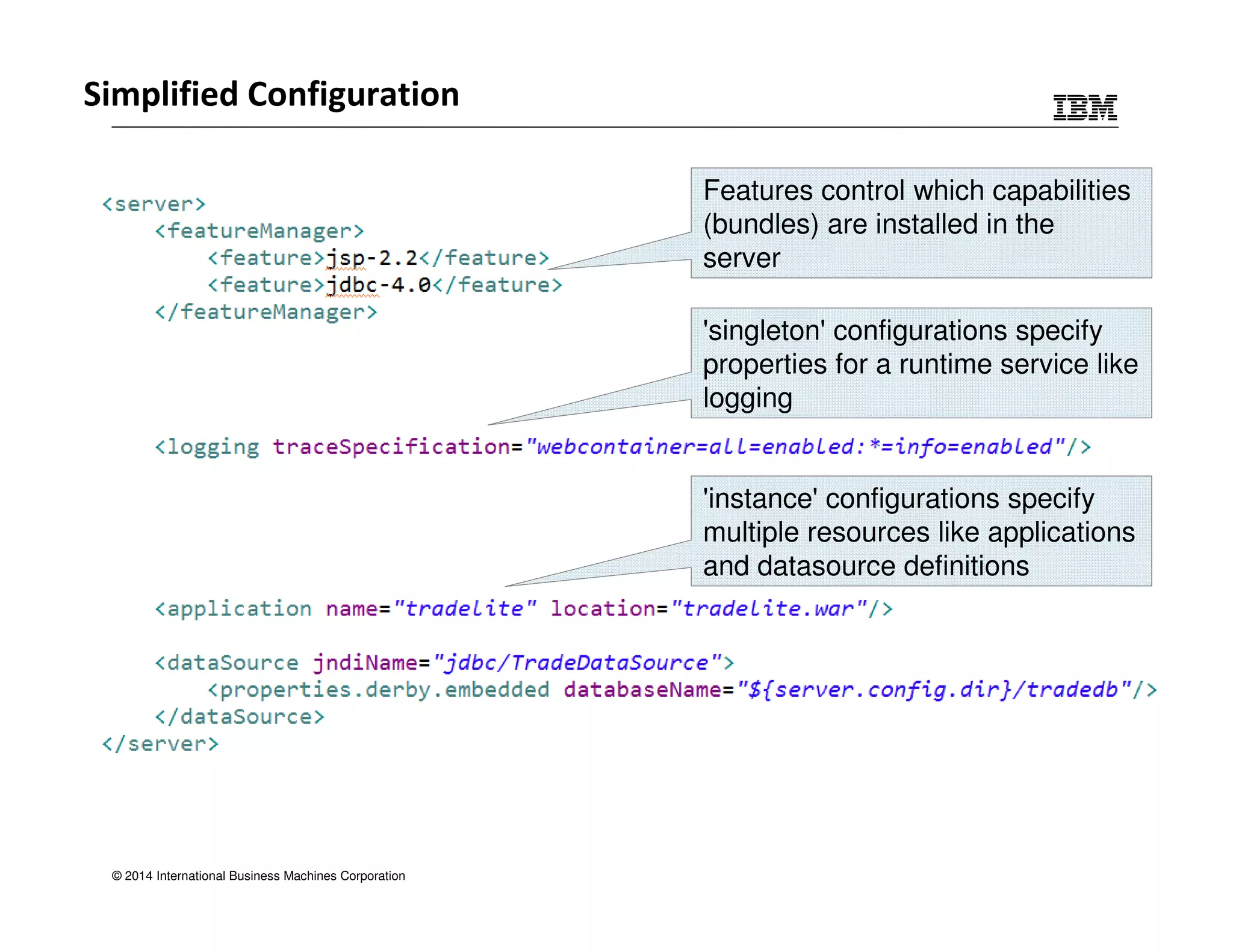
Simplified Configuration 
© 2014 International Business Machines Corporation 
Features control which capabilities 
(bundles) are installed in the 
server 
'singleton' configurations specify 
properties for a runtime service like 
logging 
'instance' configurations specify 
multiple resources like applications 
and datasource definitions
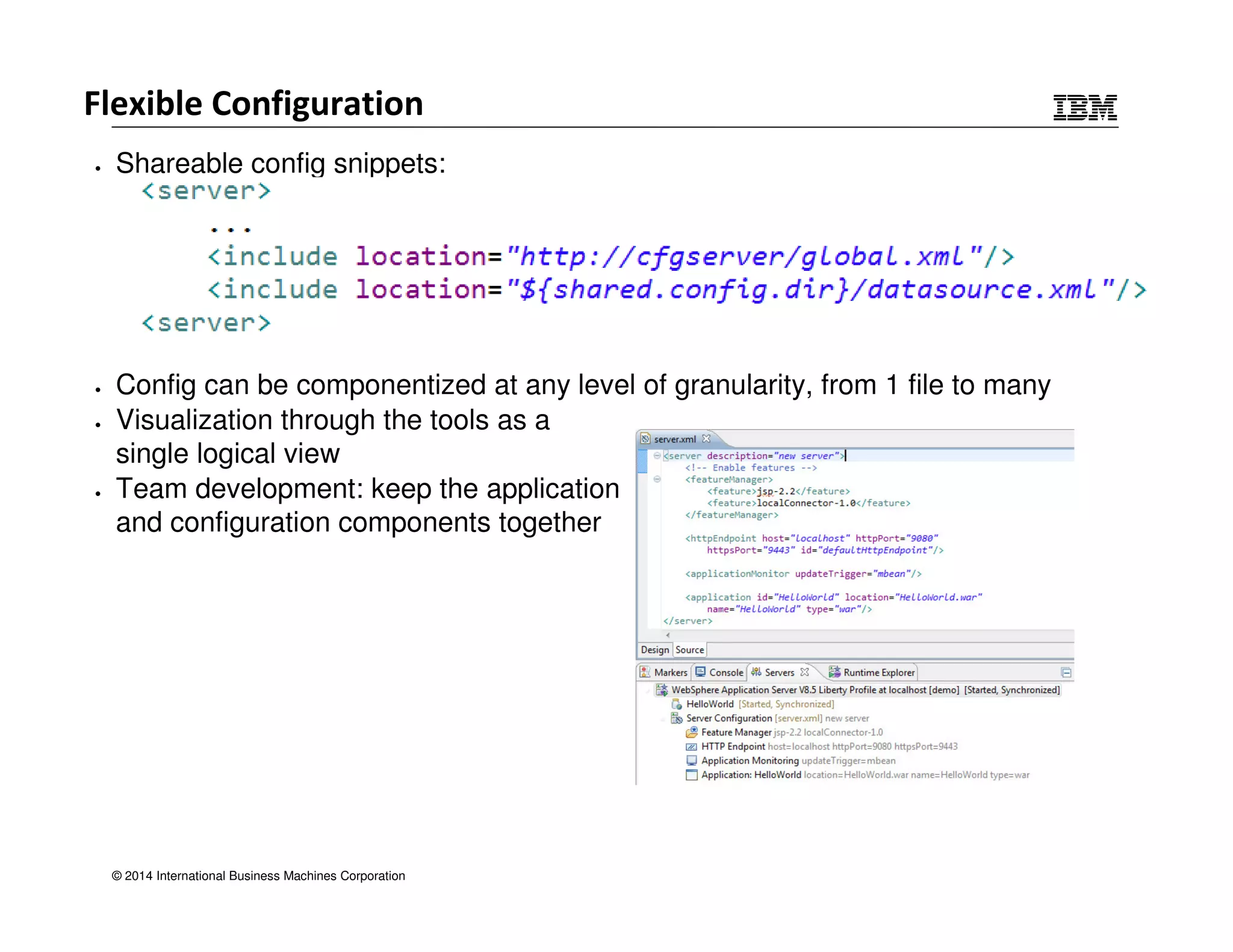
Flexible Configuration 
• Shareable config snippets: 
• Config can be componentized at any level of granularity, from 1 file to many 
• Visualization through the tools as a 
single logical view 
• Team development: keep the application 
and configuration components together 
© 2014 International Business Machines Corporation
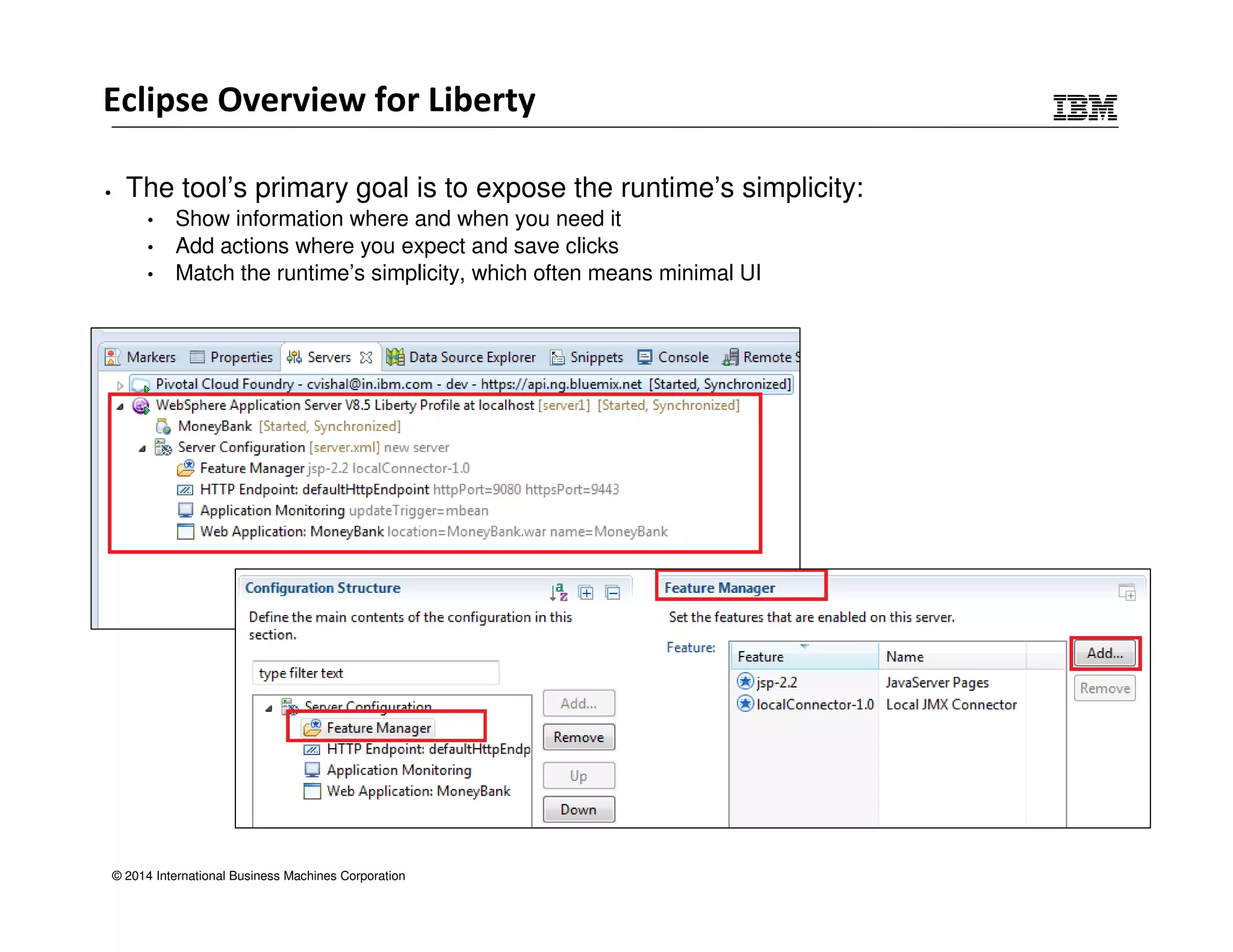
Eclipse Overview for Liberty 
• The tool’s primary goal is to expose the runtime’s simplicity: 
• Show information where and when you need it 
• Add actions where you expect and save clicks 
• Match the runtime’s simplicity, which often means minimal UI 
© 2014 International Business Machines Corporation
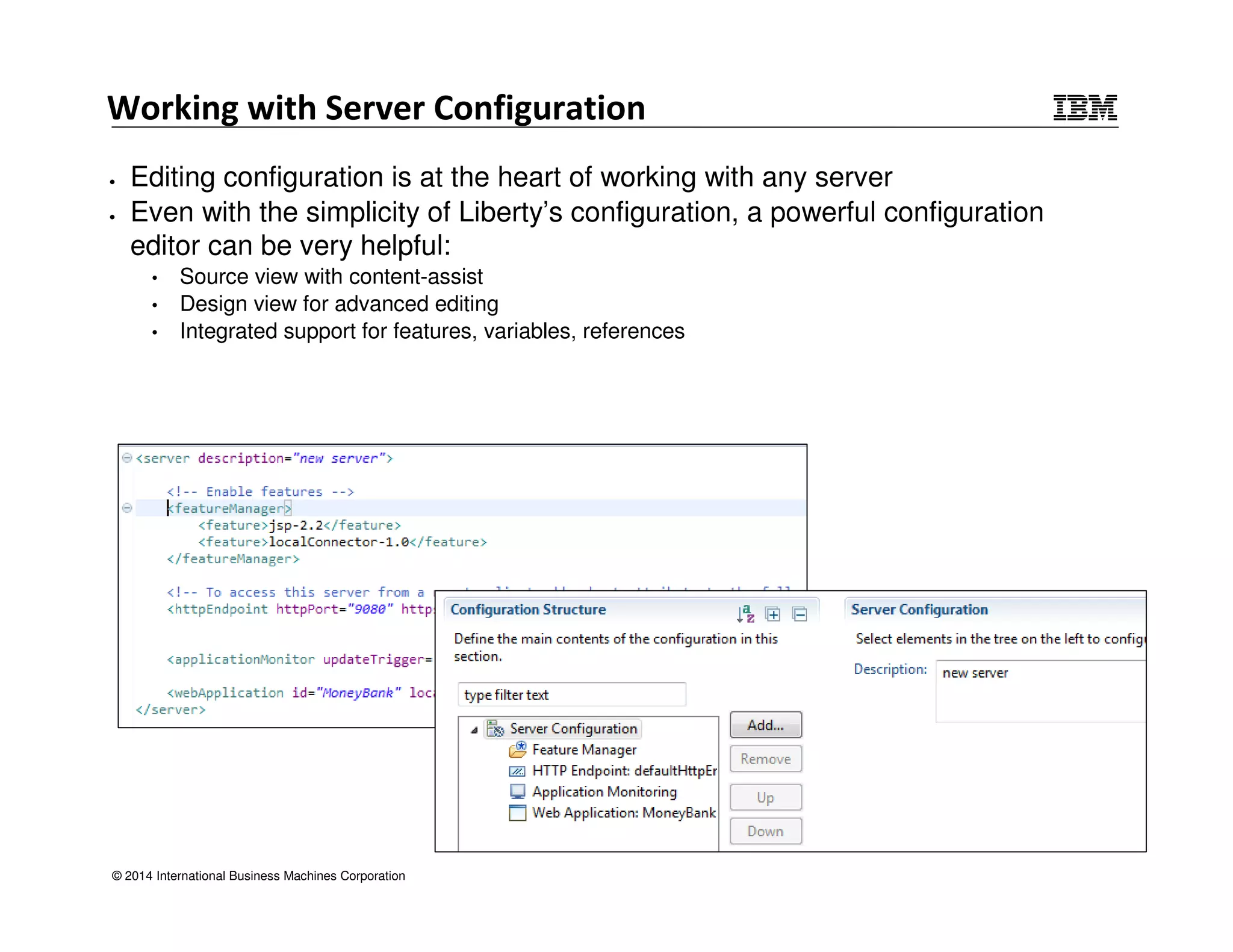
Working with Server Configuration 
• Editing configuration is at the heart of working with any server 
• Even with the simplicity of Liberty’s configuration, a powerful configuration 
editor can be very helpful: 
• Source view with content-assist 
• Design view for advanced editing 
• Integrated support for features, variables, references 
© 2014 International Business Machines Corporation
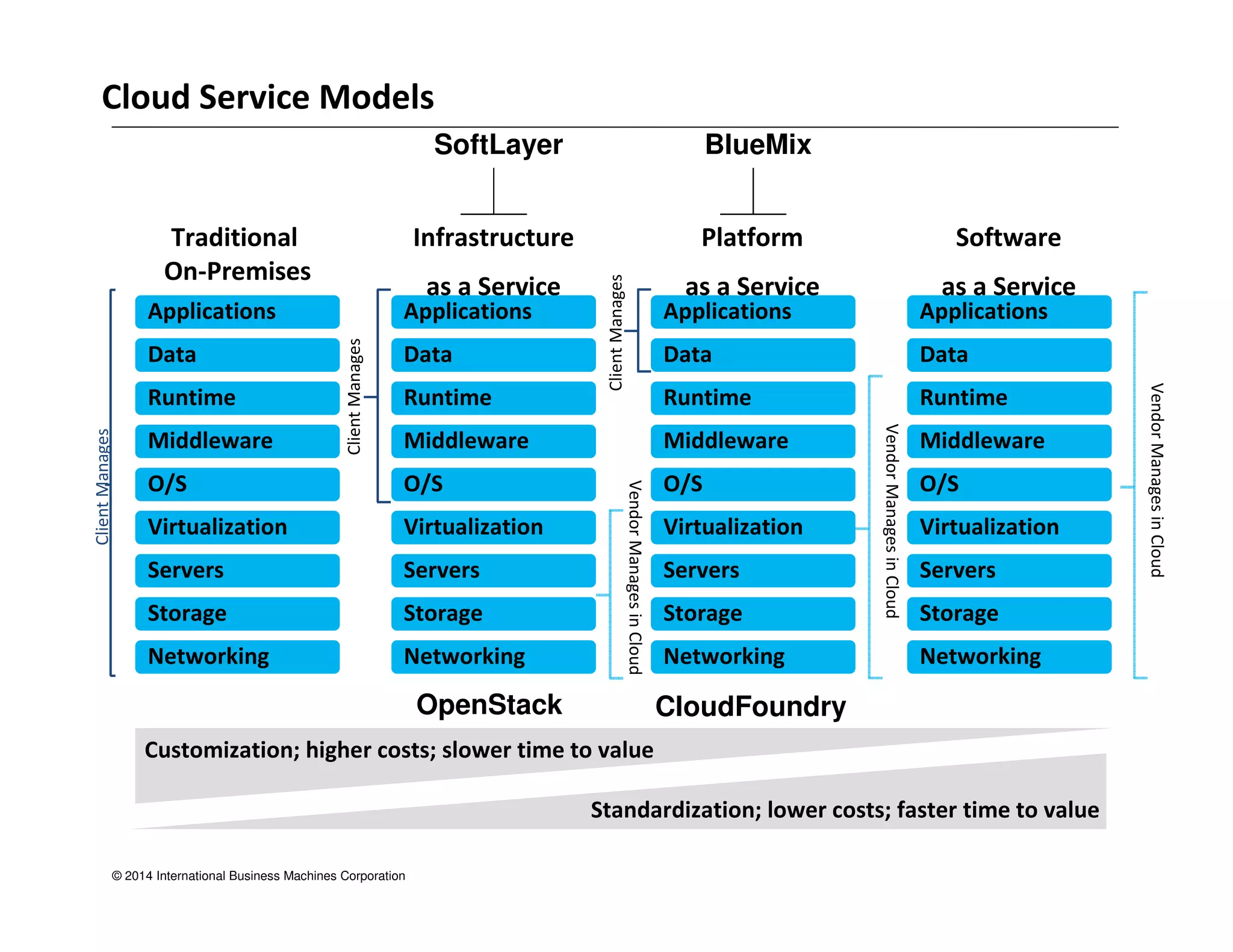
Traditional 
On-Premises 
Applications Applications Applications Applications 
Data Data Data Data 
Runtime Runtime Runtime Runtime 
Middleware Middleware Middleware Middleware 
O/S O/S O/S O/S 
Virtualization Virtualization Virtualization Virtualization 
Servers Servers Servers Servers 
Storage Storage Storage Storage 
Networking Networking Networking Networking 
© 2014 International Business Machines Corporation 
Infrastructure 
as a Service 
Platform 
as a Service 
Software 
as a Service 
Client Manages 
Vendor Manages in Cloud 
Client Manages 
Client Manages 
Customization; higher costs; slower time to value 
Standardization; lower costs; faster time to value 
Cloud Service Models 
SoftLayer BlueMix 
OpenStack CloudFoundry
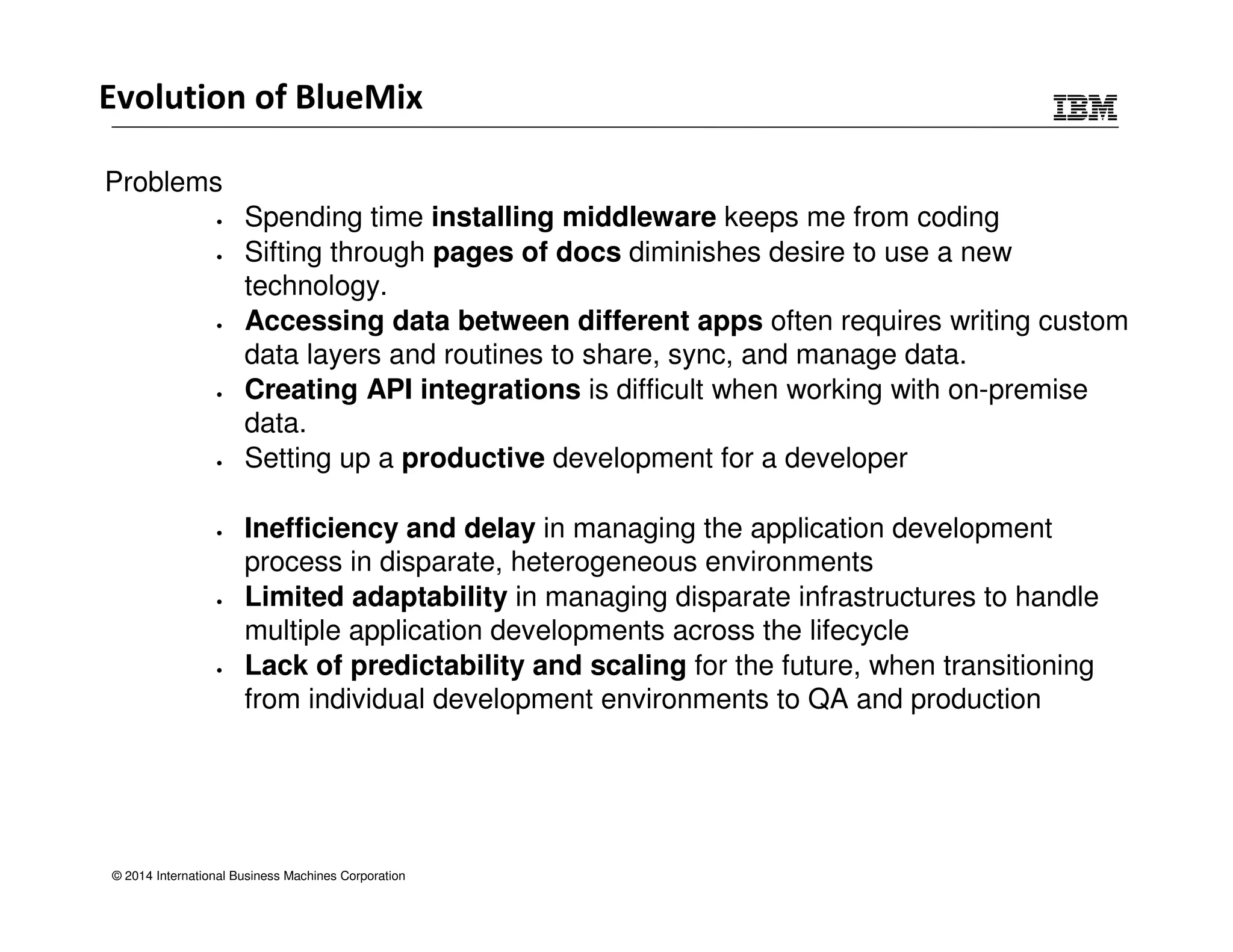
Evolution of BlueMix 
Problems 
• Spending time installing middleware keeps me from coding 
• Sifting through pages of docs diminishes desire to use a new 
technology. 
• Accessing data between different apps often requires writing custom 
data layers and routines to share, sync, and manage data. 
• Creating API integrations is difficult when working with on-premise 
data. 
• Setting up a productive development for a developer 
• Inefficiency and delay in managing the application development 
process in disparate, heterogeneous environments 
• Limited adaptability in managing disparate infrastructures to handle 
multiple application developments across the lifecycle 
• Lack of predictability and scaling for the future, when transitioning 
from individual development environments to QA and production 
© 2014 International Business Machines Corporation
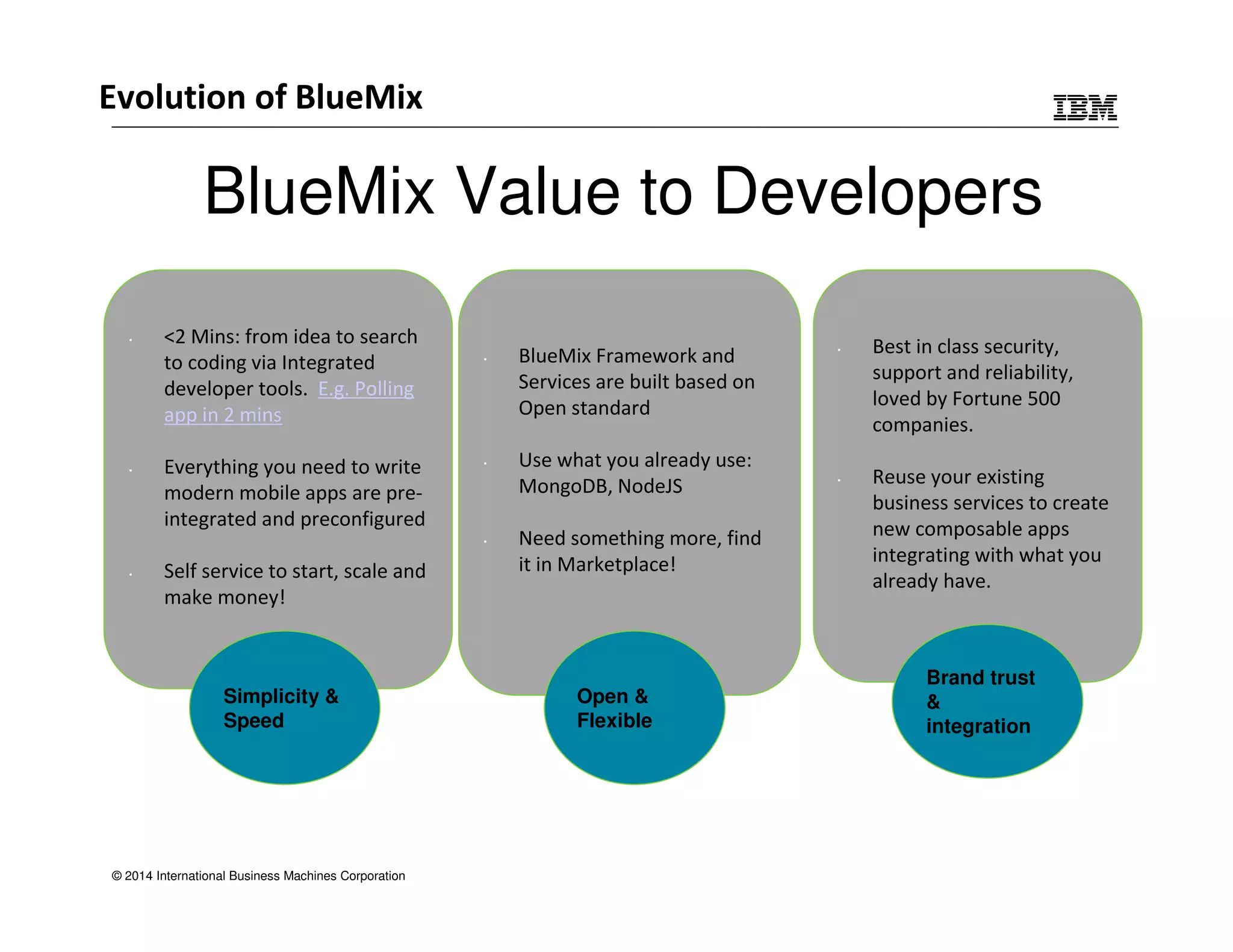
BlueMix Value to Developers 
• 2 Mins: from idea to search 
to coding via Integrated 
developer tools. E.g. Polling 
app in 2 mins 
• Everything you need to write 
modern mobile apps are pre-integrated 
and preconfigured 
• Self service to start, scale and 
make money! 
Simplicity  
Speed 
© 2014 International Business Machines Corporation 
• BlueMix Framework and 
Services are built based on 
Open standard 
• Use what you already use: 
MongoDB, NodeJS 
• Need something more, find 
it in Marketplace! 
Open  
Flexible 
• Best in class security, 
support and reliability, 
loved by Fortune 500 
companies. 
• Reuse your existing 
business services to create 
new composable apps 
integrating with what you 
already have. 
Brand trust 
 
integration 
Evolution of BlueMix
© 2014 International Business Machines Corporation
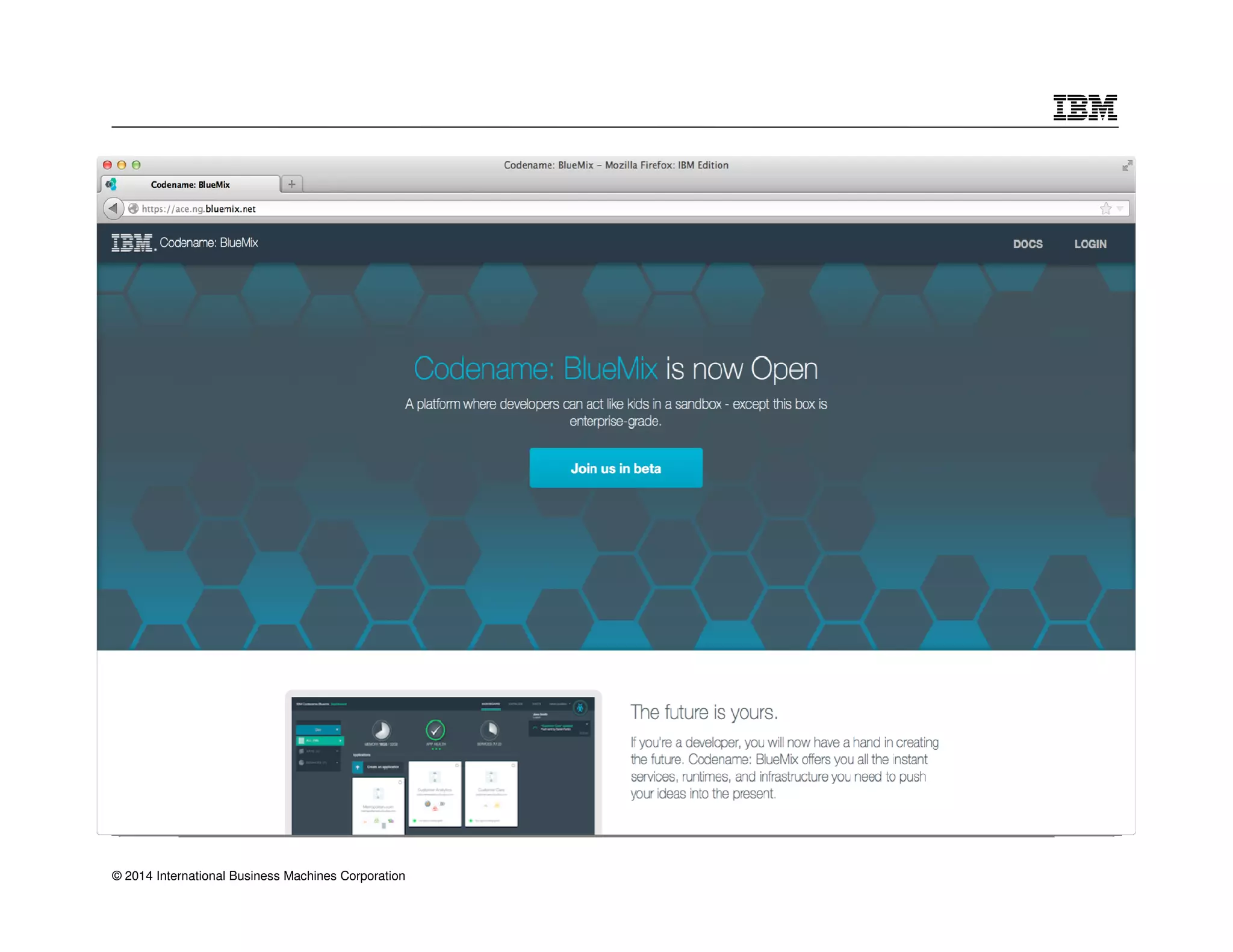
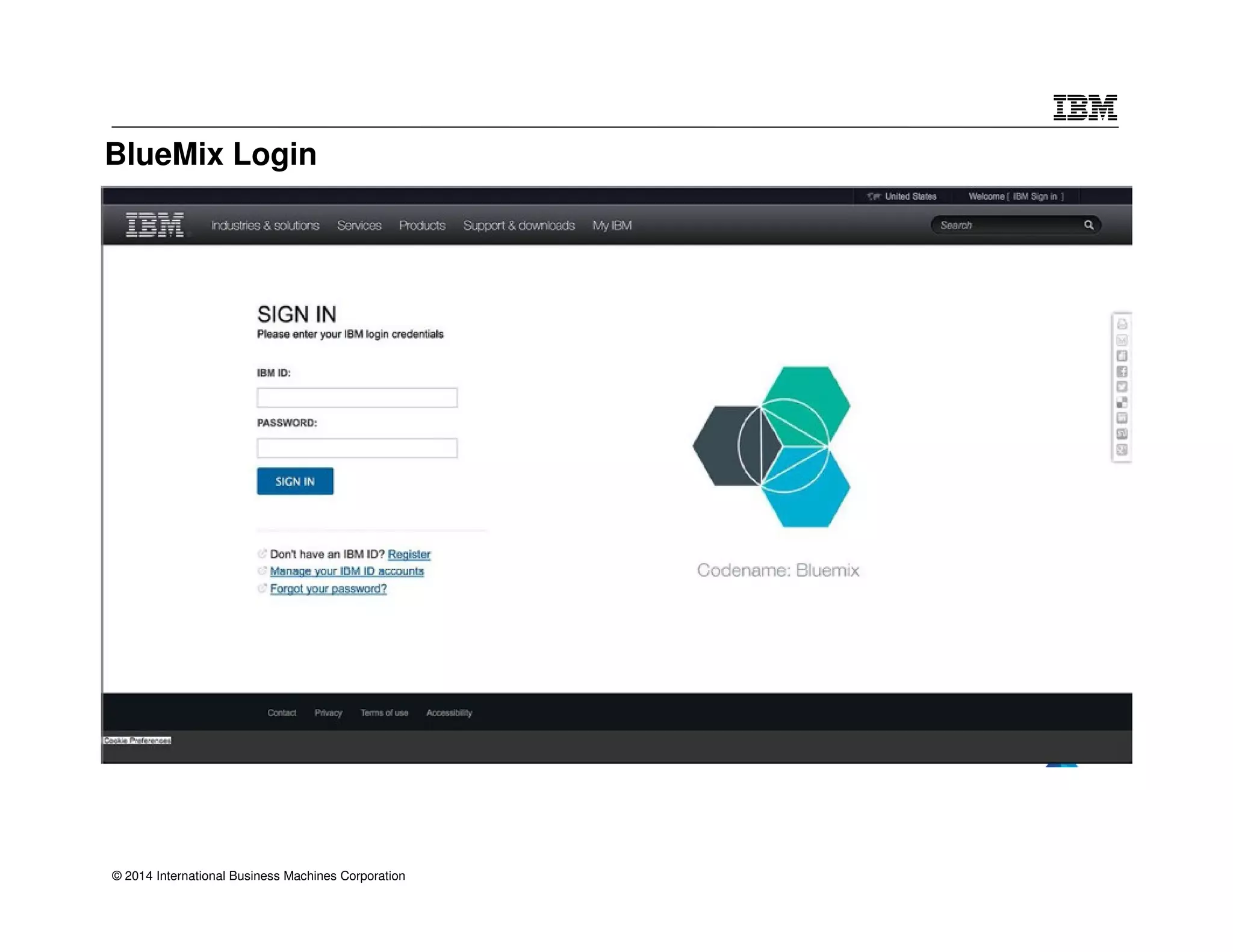
BlueMix Login 
© 2014 International Business Machines Corporation
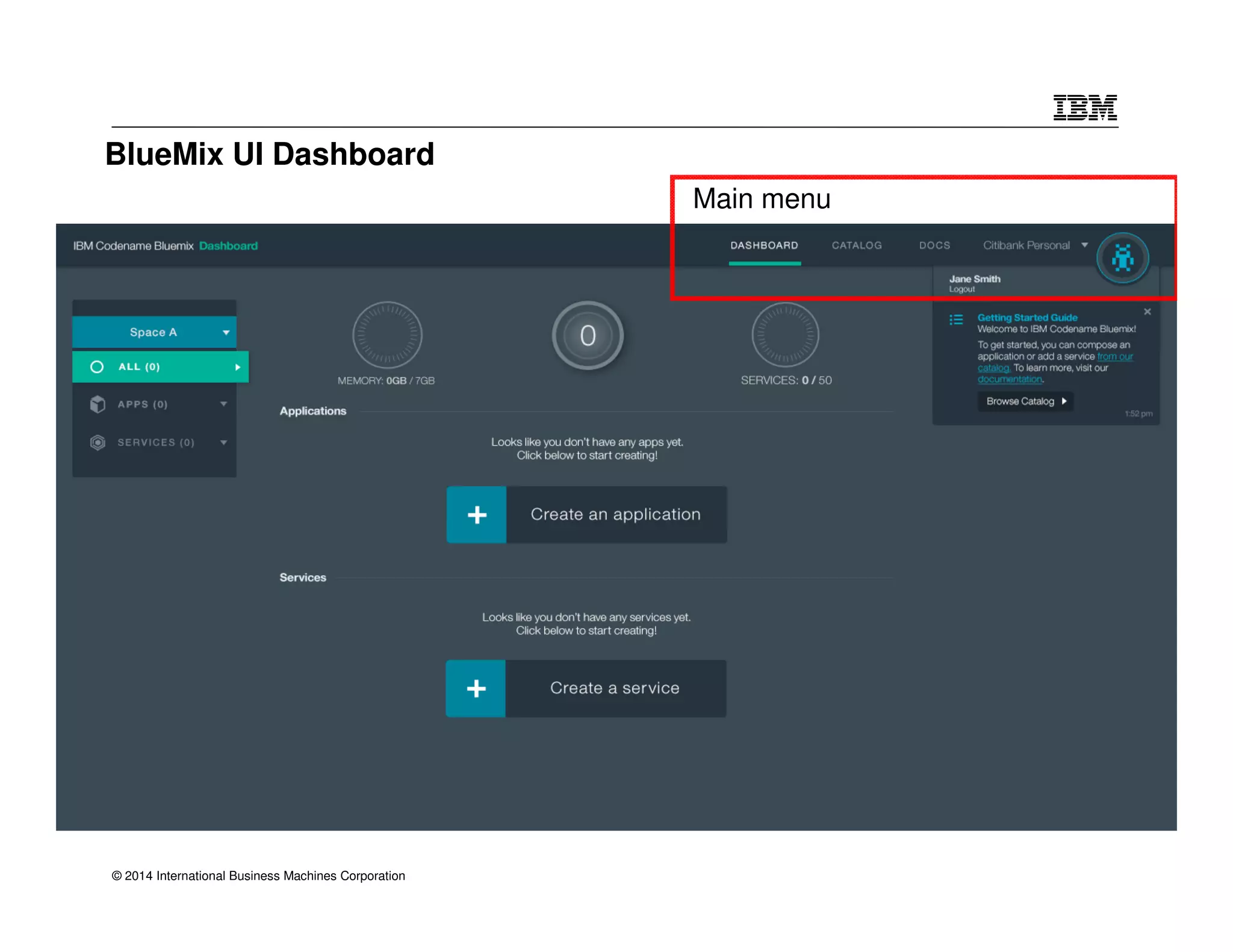
BlueMix UI Dashboard 
© 2014 International Business Machines Corporation 
Main menu
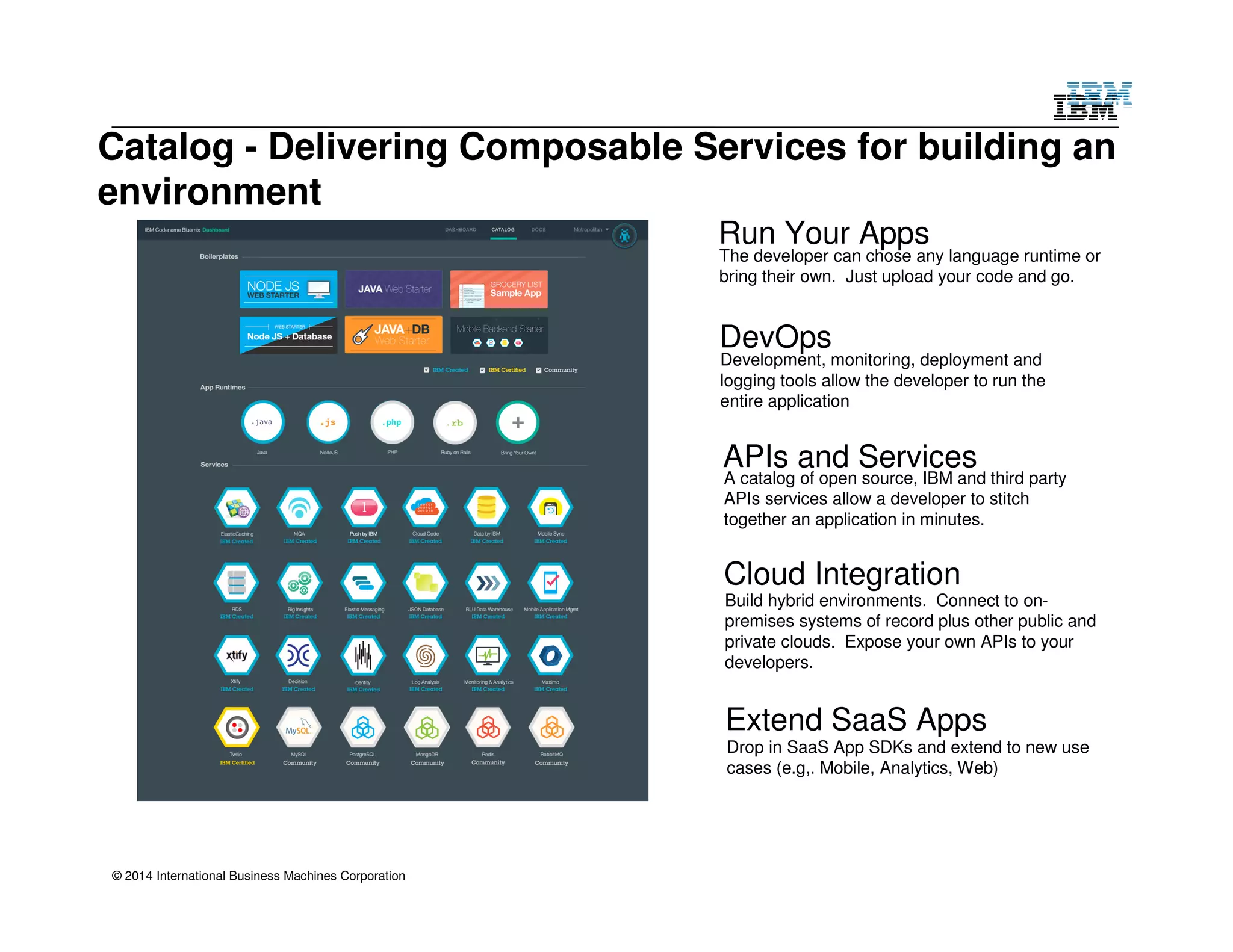
Catalog - Delivering Composable Services for building an 
environment 
© 2014 International Business Machines Corporation 
Run Your Apps 
The developer can chose any language runtime or 
bring their own. Just upload your code and go. 
DevOps 
Development, monitoring, deployment and 
logging tools allow the developer to run the 
entire application 
APIs and Services 
A catalog of open source, IBM and third party 
APIs services allow a developer to stitch 
together an application in minutes. 
Cloud Integration 
Build hybrid environments. Connect to on-premises 
systems of record plus other public and 
private clouds. Expose your own APIs to your 
developers. 
Extend SaaS Apps 
Drop in SaaS App SDKs and extend to new use 
cases (e.g,. Mobile, Analytics, Web)
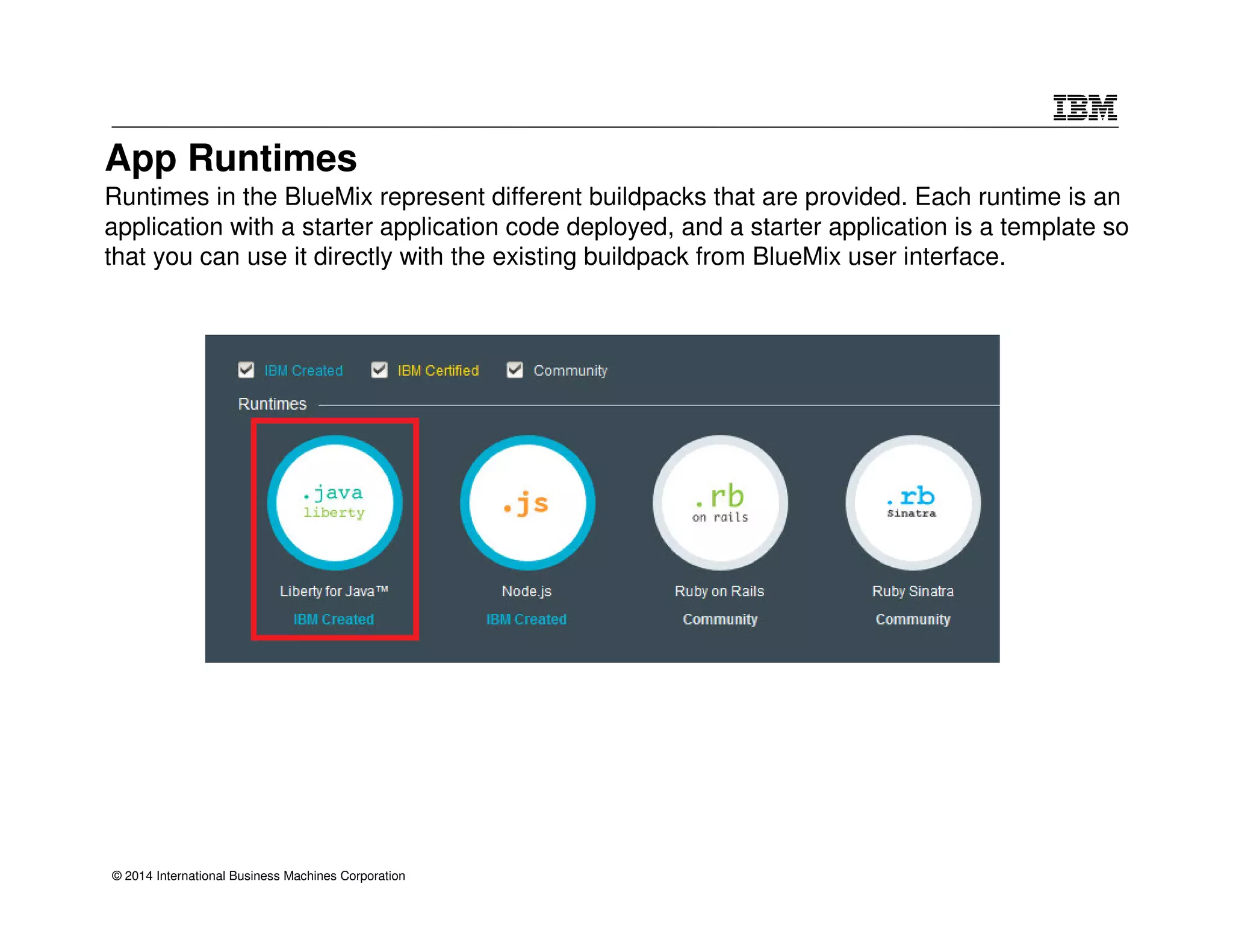
App Runtimes 
Runtimes in the BlueMix represent different buildpacks that are provided. Each runtime is an 
application with a starter application code deployed, and a starter application is a template so 
that you can use it directly with the existing buildpack from BlueMix user interface. 
© 2014 International Business Machines Corporation
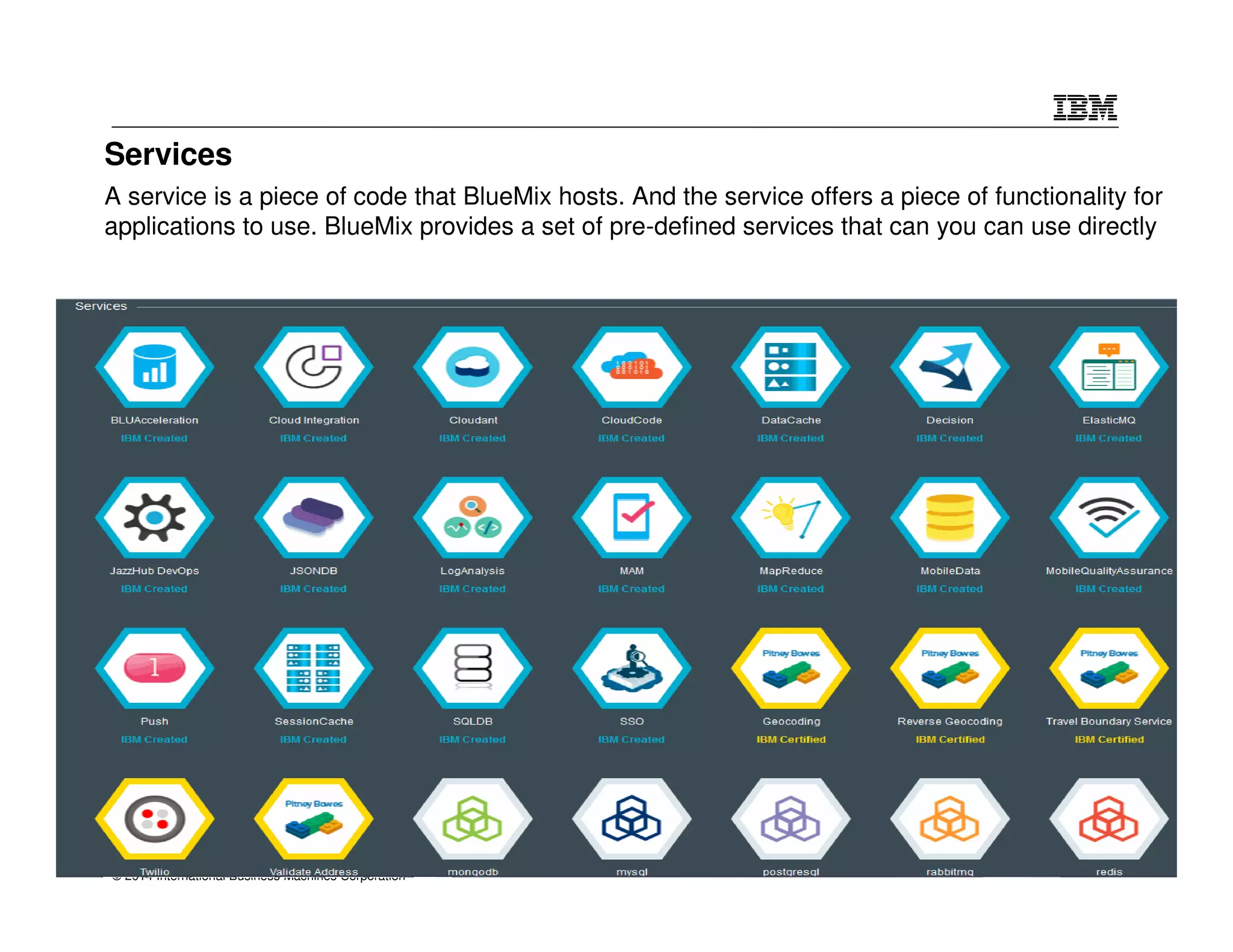
Services 
A service is a piece of code that BlueMix hosts. And the service offers a piece of functionality for 
applications to use. BlueMix provides a set of pre-defined services that can you can use directly 
© 2014 International Business Machines Corporation
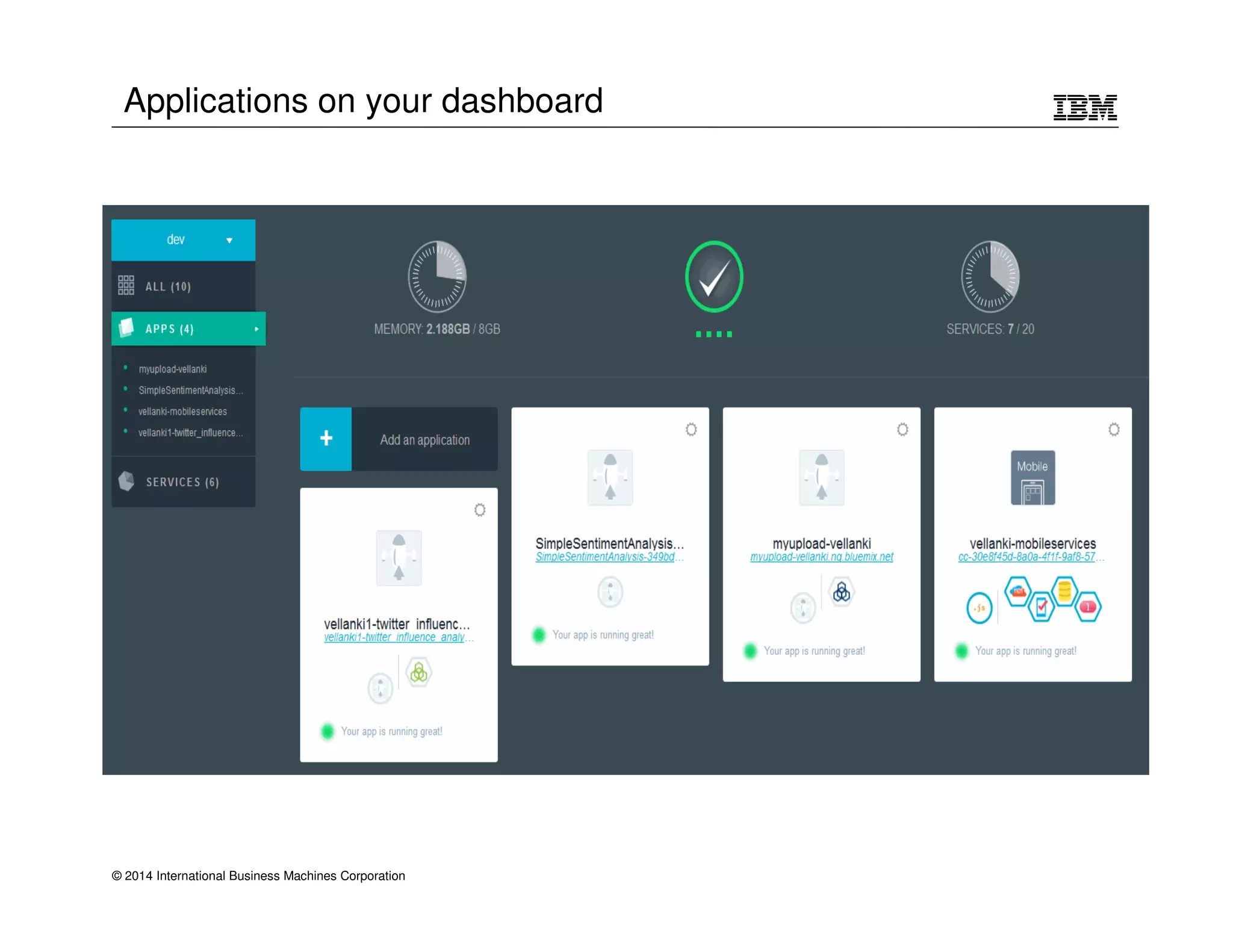
Applications on your dashboard 
© 2014 International Business Machines Corporation
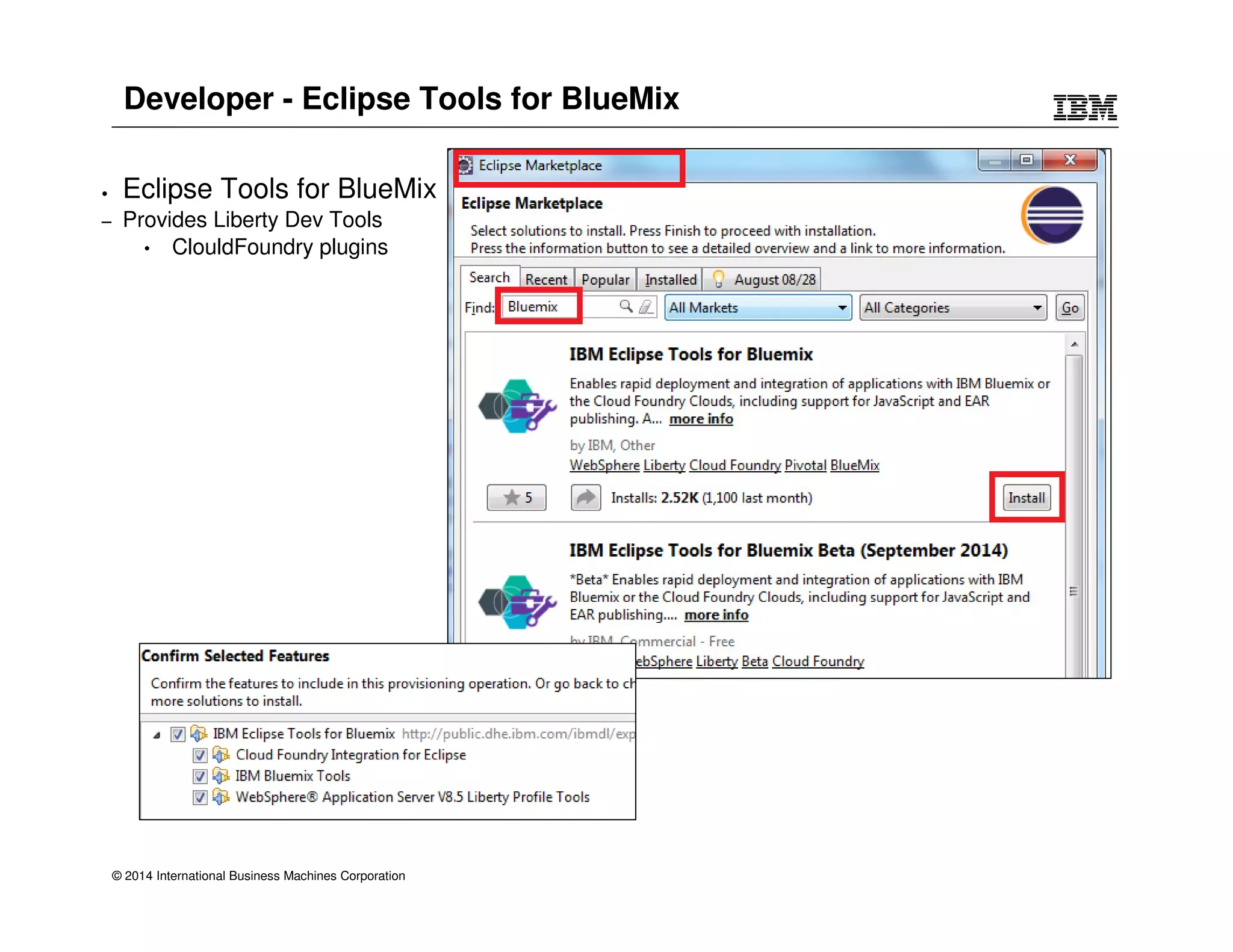
Developer - Eclipse Tools for BlueMix 
• Eclipse Tools for BlueMix 
– Provides Liberty Dev Tools 
• ClouldFoundry plugins 
© 2014 International Business Machines Corporation
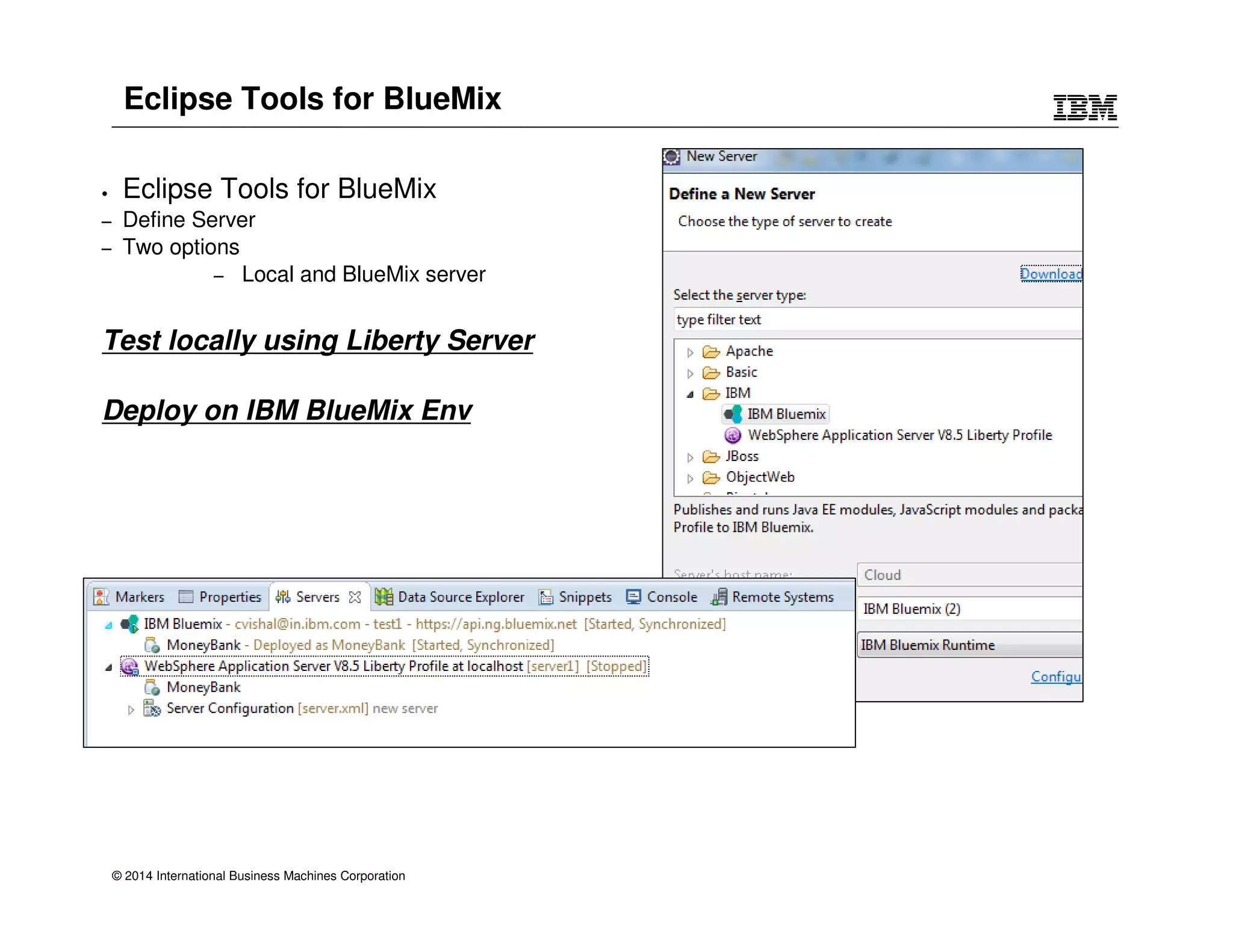
Eclipse Tools for BlueMix 
• Eclipse Tools for BlueMix 
– Define Server 
– Two options 
– Local and BlueMix server 
Test locally using Liberty Server 
Deploy on IBM BlueMix Env 
© 2014 International Business Machines Corporation
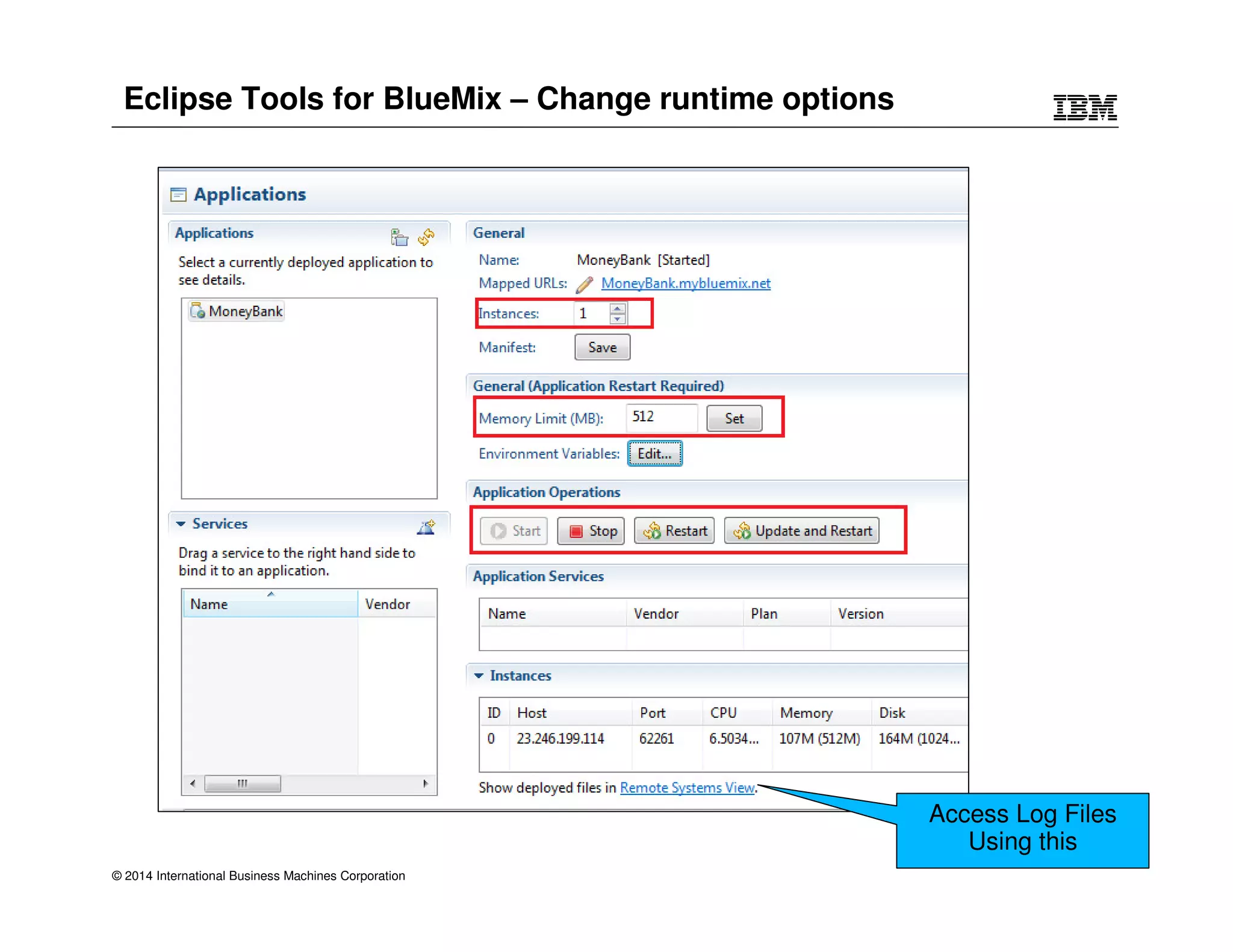
Eclipse Tools for BlueMix – Change runtime options 
© 2014 International Business Machines Corporation 
Access Log Files 
Using this
Develop an app and deploy on BlueMix using Eclipse 
© 2014 International Business Machines Corporation 
DEMO
© 2014 International Business Machines Corporation 
Q  A
© 2014 International Business Machines Corporation
Legal Disclaimer 
• © IBM Corporation 2013. All Rights Reserved. 
• The information contained in this publication is provided for informational purposes only. While efforts were made to verify the completeness and accuracy of the information contained 
in this publication, it is provided AS IS without warranty of any kind, express or implied. In addition, this information is based on IBM’s current product plans and strategy, which are 
subject to change by IBM without notice. IBM shall not be responsible for any damages arising out of the use of, or otherwise related to, this publication or any other materials. Nothing 
contained in this publication is intended to, nor shall have the effect of, creating any warranties or representations from IBM or its suppliers or licensors, or altering the terms and 
conditions of the applicable license agreement governing the use of IBM software. 
• References in this presentation to IBM products, programs, or services do not imply that they will be available in all countries in which IBM operates. Product release dates and/or 
capabilities referenced in this presentation may change at any time at IBM’s sole discretion based on market opportunities or other factors, and are not intended to be a commitment to 
future product or feature availability in any way. Nothing contained in these materials is intended to, nor shall have the effect of, stating or implying that any activities undertaken by you 
will result in any specific sales, revenue growth or other results. 
• If the text contains performance statistics or references to benchmarks, insert the following language; otherwise delete: 
Performance is based on measurements and projections using standard IBM benchmarks in a controlled environment. The actual throughput or performance that any user will 
experience will vary depending upon many factors, including considerations such as the amount of multiprogramming in the user's job stream, the I/O configuration, the storage 
configuration, and the workload processed. Therefore, no assurance can be given that an individual user will achieve results similar to those stated here. 
• If the text includes any customer examples, please confirm we have prior written approval from such customer and insert the following language; otherwise delete: 
All customer examples described are presented as illustrations of how those customers have used IBM products and the results they may have achieved. Actual environmental costs 
and performance characteristics may vary by customer. 
• Please review text for proper trademark attribution of IBM products. At first use, each product name must be the full name and include appropriate trademark symbols (e.g., IBM 
Lotus® Sametime® Unyte™). Subsequent references can drop “IBM” but should include the proper branding (e.g., Lotus Sametime Gateway, or WebSphere Application Server). 
Please refer to http://www.ibm.com/legal/copytrade.shtml for guidance on which trademarks require the ® or ™ symbol. Do not use abbreviations for IBM product names in your 
presentation. All product names must be used as adjectives rather than nouns. Please list all of the trademarks that you use in your presentation as follows; delete any not included in 
your presentation. IBM, the IBM logo, Lotus, Lotus Notes, Notes, Domino, Quickr, Sametime, WebSphere, UC2, PartnerWorld and Lotusphere are trademarks of International 
Business Machines Corporation in the United States, other countries, or both. Unyte is a trademark of WebDialogs, Inc., in the United States, other countries, or both. 
• If you reference Adobe® in the text, please mark the first use and include the following; otherwise delete: 
Adobe, the Adobe logo, PostScript, and the PostScript logo are either registered trademarks or trademarks of Adobe Systems Incorporated in the United States, and/or other countries. 
• If you reference Java™ in the text, please mark the first use and include the following; otherwise delete: 
Java and all Java-based trademarks are trademarks of Sun Microsystems, Inc. in the United States, other countries, or both. 
• If you reference Microsoft® and/or Windows® in the text, please mark the first use and include the following, as applicable; otherwise delete: 
Microsoft and Windows are trademarks of Microsoft Corporation in the United States, other countries, or both. 
• If you reference Intel® and/or any of the following Intel products in the text, please mark the first use and include those that you use as follows; otherwise delete: 
Intel, Intel Centrino, Celeron, Intel Xeon, Intel SpeedStep, Itanium, and Pentium are trademarks or registered trademarks of Intel Corporation or its subsidiaries in the United States and 
other countries. 
• If you reference UNIX® in the text, please mark the first use and include the following; otherwise delete: 
UNIX is a registered trademark of The Open Group in the United States and other countries. 
• If you reference Linux® in your presentation, please mark the first use and include the following; otherwise delete: 
Linux is a registered trademark of Linus Torvalds in the United States, other countries, or both. Other company, product, or service names may be trademarks or service marks of 
others. 
• If the text/graphics include screenshots, no actual IBM employee names may be used (even your own), if your screenshots include fictitious company names (e.g., Renovations, Zeta 
Bank, Acme) please update and insert the following; otherwise delete: All references to [insert fictitious company name] refer to a fictitious company and are used for illustration 
purposes only. 
© 2014 International Business Machines Corporation

Eclipse tools for deployment to was liberty profile in Bluemix

  • 1.
    © 2013 IBMCorporation Eclipse tools for WAS Liberty profile in Bluemix Vishal Charegaonkar IBM India Software Labs
  • 2.
    Agenda • WebSphereApplication Server – Liberty Profile • Eclipse Development tools for Liberty Profile • IBM PaaS : BlueMix (Java Runtime) • Eclipse Tools for BlueMix • Sample Demo with Eclipse • Test it locally and deploy on PaaS (BlueMix) • Q&A © 2014 International Business Machines Corporation
  • 3.
    WebSphere Application Server WebSphere Application Server runs the business - - including web, mobile, telephony support, and more … from small businesses to the largest in the world Ongoing Innovation © 2014 International Business Machines Corporation • Exploits mobile and telephony to reach new clients and markets • Develop, test and run on one application platform • Public and Private cloud enablement • Optimized data access (SQL and NoSQL) Fast, flexible, and simplified development • Choice of server runtimes from lightweight and flexible to highly robust and resilient • Broad programming model support • JEE6 Standards based Java runtime environment • Enhanced developer tools and no-charge dev desktops Operational Excellence • Secure, scalable, highly available runtime • Intelligent Management capabilities for resiliency • Linear scalability through in memory data grid • Runs on all major platforms • High performance and near-continuous availability 3
  • 4.
    WebSphere for Developers: Requirements • Installation • Quick Start/Restart • App Changes • Memory Footprint • Packaging Performance © 2014 International Business Machines Corporation Lightweight Simple Configuration Problem Determination • Resources Config • Config Sharing • Compare config • Versioning • Clear Log Messages • Identify App Problems • Differentiate Internal & App Errors • Responsive to changes • Efficient on dev machine • Startup time, • App deploy and redeploy • Scalable
  • 5.
    Standardize on WebSphereApplication Server © 2014 International Business Machines Corporation WAS Extensions Java EE Full Profile Runtime Services & Config Model Traditional WAS JAX-WS JMS OAuth JAX-RS REST JSON JSF App Security Session DB JSP Monitor JPA Servlet JNDI JDBC WebSphere Application Server v8.5.5 Application Manager HTTP Transport Feature Manager WAS Liberty • Enterprises – Fit for purpose application servers ‒ Application server types from very lightweight to highly resilient ‒ Develop, test, and run on one common application platform ‒ Highly resilient and scalable application environments • Enhancements to Intelligent Management capabilities • WebSphere eXtreme Scale Integration • Developers – Easy and no-charge access; Lightweight developer friendly tools ‒ Fast and free download of WebSphere developer tools ‒ Robust set of programming models ‒ Extensible runtime with ability to add custom features ‒ Simple configuration and rapid server restart and more features…. 5 © 2013 IBM Corporation Fast, flexible, and simplified development • Choice of server runtimes from lightweight and flexible to highly robust and resilient • JEE6 Standards based Java runtime environment • Enhanced developer tools and no-charge dev desktops
  • 6.
    WAS Extensions JavaEE support Traditional WAS profile © 2014 International Business Machines Corporation <feature>jsf-2.0</feature> <feature>appSecurity-1.0</feature> <feature>servlet-3.0</feature> http app mgr jsf jsp app sec webcontainer http app mgr Liberty profile runtime services config model webcontainer osgi services osgi services Highly composable runtime based on ‘features’
  • 7.
    Liberty feature set– V8.5.5 © 2014 International Business Machines Corporation Feature Manager HTTP Transport Application Manager WAS v8.5.5 Liberty
  • 8.
    No Hurdles toInstall • Tools and runtime are no-charge for development and ISV. No time limit • Eclipse feature install for tools • 50MB zip download for server profile. • Installation Manager also supported same installed result. 2 minutes from “Nothing” to “Done”: 1. Install WAS Developer Tools for Eclipse Feature 2. Use the Tools to download the WAS Liberty Profile or download from WASdev.net © 2014 International Business Machines Corporation www.wasdev.net
  • 9.
    Simplified Configuration ©2014 International Business Machines Corporation Features control which capabilities (bundles) are installed in the server 'singleton' configurations specify properties for a runtime service like logging 'instance' configurations specify multiple resources like applications and datasource definitions
  • 10.
    Flexible Configuration •Shareable config snippets: • Config can be componentized at any level of granularity, from 1 file to many • Visualization through the tools as a single logical view • Team development: keep the application and configuration components together © 2014 International Business Machines Corporation
  • 11.
    Eclipse Overview forLiberty • The tool’s primary goal is to expose the runtime’s simplicity: • Show information where and when you need it • Add actions where you expect and save clicks • Match the runtime’s simplicity, which often means minimal UI © 2014 International Business Machines Corporation
  • 12.
    Working with ServerConfiguration • Editing configuration is at the heart of working with any server • Even with the simplicity of Liberty’s configuration, a powerful configuration editor can be very helpful: • Source view with content-assist • Design view for advanced editing • Integrated support for features, variables, references © 2014 International Business Machines Corporation
  • 13.
    Traditional On-Premises ApplicationsApplications Applications Applications Data Data Data Data Runtime Runtime Runtime Runtime Middleware Middleware Middleware Middleware O/S O/S O/S O/S Virtualization Virtualization Virtualization Virtualization Servers Servers Servers Servers Storage Storage Storage Storage Networking Networking Networking Networking © 2014 International Business Machines Corporation Infrastructure as a Service Platform as a Service Software as a Service Client Manages Vendor Manages in Cloud Vendor Manages in Cloud Vendor Manages in Cloud Client Manages Client Manages Customization; higher costs; slower time to value Standardization; lower costs; faster time to value Cloud Service Models SoftLayer BlueMix OpenStack CloudFoundry
  • 14.
    Evolution of BlueMix Problems • Spending time installing middleware keeps me from coding • Sifting through pages of docs diminishes desire to use a new technology. • Accessing data between different apps often requires writing custom data layers and routines to share, sync, and manage data. • Creating API integrations is difficult when working with on-premise data. • Setting up a productive development for a developer • Inefficiency and delay in managing the application development process in disparate, heterogeneous environments • Limited adaptability in managing disparate infrastructures to handle multiple application developments across the lifecycle • Lack of predictability and scaling for the future, when transitioning from individual development environments to QA and production © 2014 International Business Machines Corporation
  • 15.
    BlueMix Value toDevelopers • 2 Mins: from idea to search to coding via Integrated developer tools. E.g. Polling app in 2 mins • Everything you need to write modern mobile apps are pre-integrated and preconfigured • Self service to start, scale and make money! Simplicity Speed © 2014 International Business Machines Corporation • BlueMix Framework and Services are built based on Open standard • Use what you already use: MongoDB, NodeJS • Need something more, find it in Marketplace! Open Flexible • Best in class security, support and reliability, loved by Fortune 500 companies. • Reuse your existing business services to create new composable apps integrating with what you already have. Brand trust integration Evolution of BlueMix
  • 16.
    © 2014 InternationalBusiness Machines Corporation
  • 17.
    BlueMix Login ©2014 International Business Machines Corporation
  • 18.
    BlueMix UI Dashboard © 2014 International Business Machines Corporation Main menu
  • 19.
    Catalog - DeliveringComposable Services for building an environment © 2014 International Business Machines Corporation Run Your Apps The developer can chose any language runtime or bring their own. Just upload your code and go. DevOps Development, monitoring, deployment and logging tools allow the developer to run the entire application APIs and Services A catalog of open source, IBM and third party APIs services allow a developer to stitch together an application in minutes. Cloud Integration Build hybrid environments. Connect to on-premises systems of record plus other public and private clouds. Expose your own APIs to your developers. Extend SaaS Apps Drop in SaaS App SDKs and extend to new use cases (e.g,. Mobile, Analytics, Web)
  • 20.
    App Runtimes Runtimesin the BlueMix represent different buildpacks that are provided. Each runtime is an application with a starter application code deployed, and a starter application is a template so that you can use it directly with the existing buildpack from BlueMix user interface. © 2014 International Business Machines Corporation
  • 21.
    Services A serviceis a piece of code that BlueMix hosts. And the service offers a piece of functionality for applications to use. BlueMix provides a set of pre-defined services that can you can use directly © 2014 International Business Machines Corporation
  • 22.
    Applications on yourdashboard © 2014 International Business Machines Corporation
  • 23.
    Developer - EclipseTools for BlueMix • Eclipse Tools for BlueMix – Provides Liberty Dev Tools • ClouldFoundry plugins © 2014 International Business Machines Corporation
  • 24.
    Eclipse Tools forBlueMix • Eclipse Tools for BlueMix – Define Server – Two options – Local and BlueMix server Test locally using Liberty Server Deploy on IBM BlueMix Env © 2014 International Business Machines Corporation
  • 25.
    Eclipse Tools forBlueMix – Change runtime options © 2014 International Business Machines Corporation Access Log Files Using this
  • 26.
    Develop an appand deploy on BlueMix using Eclipse © 2014 International Business Machines Corporation DEMO
  • 27.
    © 2014 InternationalBusiness Machines Corporation Q A
  • 28.
    © 2014 InternationalBusiness Machines Corporation
  • 29.
    Legal Disclaimer •© IBM Corporation 2013. All Rights Reserved. • The information contained in this publication is provided for informational purposes only. While efforts were made to verify the completeness and accuracy of the information contained in this publication, it is provided AS IS without warranty of any kind, express or implied. In addition, this information is based on IBM’s current product plans and strategy, which are subject to change by IBM without notice. IBM shall not be responsible for any damages arising out of the use of, or otherwise related to, this publication or any other materials. Nothing contained in this publication is intended to, nor shall have the effect of, creating any warranties or representations from IBM or its suppliers or licensors, or altering the terms and conditions of the applicable license agreement governing the use of IBM software. • References in this presentation to IBM products, programs, or services do not imply that they will be available in all countries in which IBM operates. Product release dates and/or capabilities referenced in this presentation may change at any time at IBM’s sole discretion based on market opportunities or other factors, and are not intended to be a commitment to future product or feature availability in any way. Nothing contained in these materials is intended to, nor shall have the effect of, stating or implying that any activities undertaken by you will result in any specific sales, revenue growth or other results. • If the text contains performance statistics or references to benchmarks, insert the following language; otherwise delete: Performance is based on measurements and projections using standard IBM benchmarks in a controlled environment. The actual throughput or performance that any user will experience will vary depending upon many factors, including considerations such as the amount of multiprogramming in the user's job stream, the I/O configuration, the storage configuration, and the workload processed. Therefore, no assurance can be given that an individual user will achieve results similar to those stated here. • If the text includes any customer examples, please confirm we have prior written approval from such customer and insert the following language; otherwise delete: All customer examples described are presented as illustrations of how those customers have used IBM products and the results they may have achieved. Actual environmental costs and performance characteristics may vary by customer. • Please review text for proper trademark attribution of IBM products. At first use, each product name must be the full name and include appropriate trademark symbols (e.g., IBM Lotus® Sametime® Unyte™). Subsequent references can drop “IBM” but should include the proper branding (e.g., Lotus Sametime Gateway, or WebSphere Application Server). Please refer to http://www.ibm.com/legal/copytrade.shtml for guidance on which trademarks require the ® or ™ symbol. Do not use abbreviations for IBM product names in your presentation. All product names must be used as adjectives rather than nouns. Please list all of the trademarks that you use in your presentation as follows; delete any not included in your presentation. IBM, the IBM logo, Lotus, Lotus Notes, Notes, Domino, Quickr, Sametime, WebSphere, UC2, PartnerWorld and Lotusphere are trademarks of International Business Machines Corporation in the United States, other countries, or both. Unyte is a trademark of WebDialogs, Inc., in the United States, other countries, or both. • If you reference Adobe® in the text, please mark the first use and include the following; otherwise delete: Adobe, the Adobe logo, PostScript, and the PostScript logo are either registered trademarks or trademarks of Adobe Systems Incorporated in the United States, and/or other countries. • If you reference Java™ in the text, please mark the first use and include the following; otherwise delete: Java and all Java-based trademarks are trademarks of Sun Microsystems, Inc. in the United States, other countries, or both. • If you reference Microsoft® and/or Windows® in the text, please mark the first use and include the following, as applicable; otherwise delete: Microsoft and Windows are trademarks of Microsoft Corporation in the United States, other countries, or both. • If you reference Intel® and/or any of the following Intel products in the text, please mark the first use and include those that you use as follows; otherwise delete: Intel, Intel Centrino, Celeron, Intel Xeon, Intel SpeedStep, Itanium, and Pentium are trademarks or registered trademarks of Intel Corporation or its subsidiaries in the United States and other countries. • If you reference UNIX® in the text, please mark the first use and include the following; otherwise delete: UNIX is a registered trademark of The Open Group in the United States and other countries. • If you reference Linux® in your presentation, please mark the first use and include the following; otherwise delete: Linux is a registered trademark of Linus Torvalds in the United States, other countries, or both. Other company, product, or service names may be trademarks or service marks of others. • If the text/graphics include screenshots, no actual IBM employee names may be used (even your own), if your screenshots include fictitious company names (e.g., Renovations, Zeta Bank, Acme) please update and insert the following; otherwise delete: All references to [insert fictitious company name] refer to a fictitious company and are used for illustration purposes only. © 2014 International Business Machines Corporation