IBM WebSphere – expensive but
effective
Most effective/expensive full stack
technology to build scalable and
productive business
What is IBM?
• International Business Machines Corporation
aka IBM is an American multinational
technology and consulting corporation. You
may look into the Wiki for more information.
In this presentation, I want to focus only on its
IT segment.
WebSphere – what is it?
• This is a brand of a computer software in the
genre of enterprise software known as
application and integration middleware. These
software products are used by end-users to
create applications and integrate applications
with other applications.
WebSphere products
• Application Server
• HTTP Server
• MQ
• Process Server
• Integration Designer
• Process Center
• Process Designer
WebSphere Application Server
• Also known as WAS. This is a base for most
WebSphere products. You may think, that it’s
used completely for every software in WebSphere
products.
• We use profiles to configure WAS. Profile – it is
not just the property in file, but separate
configuration sub-directory. This directory
contains many configuration stuff, from system
properties to internal JMS queues and more.
WebSphere Application Server
• In few words – profiles are used to make WAS
works different and not only for applications
needs.
• There are many different predefined profiles
for different needs. We will cover few of them.
• Each profile uses separated JVM process.
WAS Profiles (Deployment Manager)
• Deployment Manager profile is used to
maintain stand-alone or clustered
environment. It can deploy, uninstall, run, stop
applications. Moreover, it says for every
applications which nodes could be used for its
purposes.
• You may think that this profile – is the God
profile.
WAS Profiles (Node Agent)
• Node Agent profile is the communication
profile, which used to send commands from
central Deployment Manager to the nodes.
• If we are organizing a clustered environment,
this profile should be installed on every
physical machine.
• We could use different OS and Architecture at
the same cluster with many Node Agents.
WAS Profiles (Application Server)
• Application Server profile is used to run
business applications, this is the Leaf of
WebSphere Tree in clustered environment. It
is managed by Deployment Manager through
the Node Agent.
• Also could be installed as standalone server.
Physical Machine
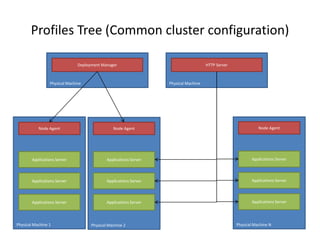
Profiles Tree (Common cluster configuration)
Deployment Manager
Physical Machine 1 Physical Machine 2 Physical Machine N
Node Agent Node Agent Node Agent
Applications Server
Applications Server
Applications Server
Applications Server
Applications Server
Applications Server
Applications Server
Applications Server
Applications Server
Physical Machine
HTTP Server
HTTP Server
• IBM HTTP Server is a web-server based on the
Apache Software Foundation’s Apache HTTP
Server. It could be run on AIX, HP-UX, Linux,
Solaris, Windows, z/OS etc.
• Used to configure clustered environment. It
filters and redirects http calls from client to
servers.
• HTTP Server should be right-configured to
know about all WAS instances.
WebSphere MQ
• Originally was called as MQSeries.
• This is an IBM Messaging solution for Enterprise
and IBM’s Message Oriented Middleware.
• It provides many APIs, such as JMS, XMS, SOAP
etc.
• Several MQs could be connected to each other to
organize clustered solution.
• Also, several MQs could work as a queue channel.
Client
WebSphere MQ Typical usage
Physical Machine 1
MQ 1
Physical Machine 1
MQ 2Network/VPN
Super fast binary protocol
Envelop
Consumer
Envelop
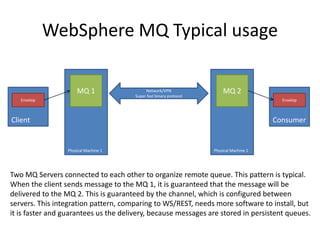
Two MQ Servers connected to each other to organize remote queue. This pattern is typical.
When the client sends message to the MQ 1, it is guaranteed that the message will be
delivered to the MQ 2. This is guaranteed by the channel, which is configured between
servers. This integration pattern, comparing to WS/REST, needs more software to install, but
it is faster and guarantees us the delivery, because messages are stored in persistent queues.
Process Server
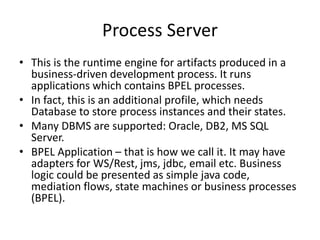
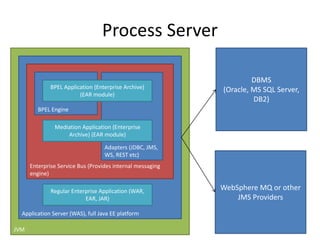
• This is the runtime engine for artifacts produced in a
business-driven development process. It runs
applications which contains BPEL processes.
• In fact, this is an additional profile, which needs
Database to store process instances and their states.
• Many DBMS are supported: Oracle, DB2, MS SQL
Server.
• BPEL Application – that is how we call it. It may have
adapters for WS/Rest, jms, jdbc, email etc. Business
logic could be presented as simple java code,
mediation flows, state machines or business processes
(BPEL).
Process Server
JVM
Application Server (WAS), full Java EE platform
Enterprise Service Bus (Provides internal messaging
engine)
BPEL Engine
Adapters (JDBC, JMS,
WS, REST etc)
BPEL Application (Enterprise Archive)
(EAR module)
DBMS
(Oracle, MS SQL Server,
DB2)
Mediation Application (Enterprise
Archive) (EAR module)
Regular Enterprise Application (WAR,
EAR, JAR)
WebSphere MQ or other
JMS Providers
Integration Designer
• This is a development tool which built on top of
Eclipse.
• It features a visual drag-and-drop programming
and test environment and integrates tightly with
WebSphere products.
• It enables business-driven development, fully
integrated with WebSphere Business Modeler.
• Allows you to visually define the sequence and
flow of business processes.
• Builds SOA solutions with support for several
SOA-based applications.

Даурен Муса “IBM WebSphere - expensive but effective”

  • 1.
    IBM WebSphere –expensive but effective Most effective/expensive full stack technology to build scalable and productive business
  • 2.
    What is IBM? •International Business Machines Corporation aka IBM is an American multinational technology and consulting corporation. You may look into the Wiki for more information. In this presentation, I want to focus only on its IT segment.
  • 3.
    WebSphere – whatis it? • This is a brand of a computer software in the genre of enterprise software known as application and integration middleware. These software products are used by end-users to create applications and integrate applications with other applications.
  • 4.
    WebSphere products • ApplicationServer • HTTP Server • MQ • Process Server • Integration Designer • Process Center • Process Designer
  • 5.
    WebSphere Application Server •Also known as WAS. This is a base for most WebSphere products. You may think, that it’s used completely for every software in WebSphere products. • We use profiles to configure WAS. Profile – it is not just the property in file, but separate configuration sub-directory. This directory contains many configuration stuff, from system properties to internal JMS queues and more.
  • 6.
    WebSphere Application Server •In few words – profiles are used to make WAS works different and not only for applications needs. • There are many different predefined profiles for different needs. We will cover few of them. • Each profile uses separated JVM process.
  • 7.
    WAS Profiles (DeploymentManager) • Deployment Manager profile is used to maintain stand-alone or clustered environment. It can deploy, uninstall, run, stop applications. Moreover, it says for every applications which nodes could be used for its purposes. • You may think that this profile – is the God profile.
  • 8.
    WAS Profiles (NodeAgent) • Node Agent profile is the communication profile, which used to send commands from central Deployment Manager to the nodes. • If we are organizing a clustered environment, this profile should be installed on every physical machine. • We could use different OS and Architecture at the same cluster with many Node Agents.
  • 9.
    WAS Profiles (ApplicationServer) • Application Server profile is used to run business applications, this is the Leaf of WebSphere Tree in clustered environment. It is managed by Deployment Manager through the Node Agent. • Also could be installed as standalone server.
  • 10.
    Physical Machine Profiles Tree(Common cluster configuration) Deployment Manager Physical Machine 1 Physical Machine 2 Physical Machine N Node Agent Node Agent Node Agent Applications Server Applications Server Applications Server Applications Server Applications Server Applications Server Applications Server Applications Server Applications Server Physical Machine HTTP Server
  • 11.
    HTTP Server • IBMHTTP Server is a web-server based on the Apache Software Foundation’s Apache HTTP Server. It could be run on AIX, HP-UX, Linux, Solaris, Windows, z/OS etc. • Used to configure clustered environment. It filters and redirects http calls from client to servers. • HTTP Server should be right-configured to know about all WAS instances.
  • 12.
    WebSphere MQ • Originallywas called as MQSeries. • This is an IBM Messaging solution for Enterprise and IBM’s Message Oriented Middleware. • It provides many APIs, such as JMS, XMS, SOAP etc. • Several MQs could be connected to each other to organize clustered solution. • Also, several MQs could work as a queue channel.
  • 13.
    Client WebSphere MQ Typicalusage Physical Machine 1 MQ 1 Physical Machine 1 MQ 2Network/VPN Super fast binary protocol Envelop Consumer Envelop Two MQ Servers connected to each other to organize remote queue. This pattern is typical. When the client sends message to the MQ 1, it is guaranteed that the message will be delivered to the MQ 2. This is guaranteed by the channel, which is configured between servers. This integration pattern, comparing to WS/REST, needs more software to install, but it is faster and guarantees us the delivery, because messages are stored in persistent queues.
  • 14.
    Process Server • Thisis the runtime engine for artifacts produced in a business-driven development process. It runs applications which contains BPEL processes. • In fact, this is an additional profile, which needs Database to store process instances and their states. • Many DBMS are supported: Oracle, DB2, MS SQL Server. • BPEL Application – that is how we call it. It may have adapters for WS/Rest, jms, jdbc, email etc. Business logic could be presented as simple java code, mediation flows, state machines or business processes (BPEL).
  • 15.
    Process Server JVM Application Server(WAS), full Java EE platform Enterprise Service Bus (Provides internal messaging engine) BPEL Engine Adapters (JDBC, JMS, WS, REST etc) BPEL Application (Enterprise Archive) (EAR module) DBMS (Oracle, MS SQL Server, DB2) Mediation Application (Enterprise Archive) (EAR module) Regular Enterprise Application (WAR, EAR, JAR) WebSphere MQ or other JMS Providers
  • 16.
    Integration Designer • Thisis a development tool which built on top of Eclipse. • It features a visual drag-and-drop programming and test environment and integrates tightly with WebSphere products. • It enables business-driven development, fully integrated with WebSphere Business Modeler. • Allows you to visually define the sequence and flow of business processes. • Builds SOA solutions with support for several SOA-based applications.