Setting up Your First Interactive Website or Blog
Ismail Fayed, info@edunile.net
Foundation Program Department of English
Portfolio: http://edunile.net – Twitter: @tweet4education
Outline
• Online presence & Web 2.0
• Why WordPress as a CMS
• Examples
• Planning your website content
• How to set up your first website/ blog
– Adding a theme
– Customizing website layout
– Adding widgets
– Adding plugins
Online presence & Web 2.0
• It is now easy to unify your web presence using
one blog/ website
– VLE (BB, Moodle, etc.)
– Blog/ RSS reader
– Twitter integration
– Facebook/ social media integration
– Posting from emails/ voice calls
– Integrate plugins
– Add comments and ratings
– Add polls
– Share media and videos!
WP can be used as..
• a personal/ professional blog
• an educational portal
• A portfolio
• E-learning course
• A class magazine
• Students blogs & reflections
• Conferences
• Professional network
• …
http://www.wpbeginner.com/showcase/21-popular-brands-that-are-using-wordpress/
Why WordPress?
Educational blogs Examples
http://emshort.wordpress.com/how-to-play/teaching-if/
http://classroom201x.wordpress.com/teaching-links/teaching-blogs
http://ifayed.net/Gdeeds/
http://is.gd/JcqUii
http://is.gd/FcPAd5
http://is.gd/DNEKsw
http://blogs.qu.edu.qa/blogs
Educational blogs Examples
http://blogs.qu.edu.qa/campustoday
http://www.qu.edu.qa/qlc
WP is about autonomy & creativity
Post – Share – Comment - Like
Website planning
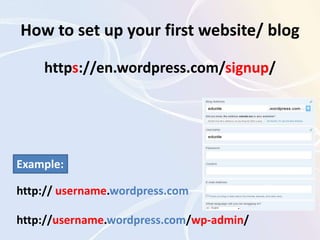
How to set up your first website/ blog
https://en.wordpress.com/signup/
http:// username.wordpress.com
http://username.wordpress.com/wp-admin/
Example:
Manage your blog menus
Choose a theme
• Upload it to the wp-content/themes/ folder
• Then activate it in the (WP admin panel –>
Appearance -> Themes).
Custom website layout
http://www.kilowordpress.com/wp-content/uploads/2011/08/eBusiness-v4.4-Wordpress-Theme.jpg
http://lesliefranke.com/2007/03/site-redesign-with-wordpress-layout-and-design/
Plugins
E.g., LePress Teacher
http://wordpress.org/extend/plugins/lepress-teacher/
Add content
• Add a page
• Add a blog
• Add a picture
– Edit post
– Publish
– Edit Image
• Turning a Blog into a Website (creating a
static page)
More WP Tutorials & Videos
A step by step guide with screenshots:
http://russ.cuipblogs.org/files/wordpress-for-teachers-1.pdf
More videos:
http://wpmu.org/teaching-wordpress-to-absolute-beginners-part-1-the-build
Thank you!
ifayed@qu.edu.qa
References
• McKeown, S. (2010).Teaching WordPress to Absolute Beginners Part 1: The
BuildRetreived from: http://wpmu.org/teaching-wordpress-to-absolute-beginners-
part-1-the-build
• Melanie Citron, M. (2011). WordPress and Teachers: How To Set Up a Website For
My Class. Retreived from: http://buildmysiteforfree.com/wordpress-and-teachers-
how-to-set-up-a-website-for-my-class
• How to use Wordpress to design to a website. Youtube URL:
http://www.youtube.com/watch?v=7vt7BleXYP8

Website Design PD Session

Editor's Notes

  • #8 Personal sites, Students blogs (College of Pharmacy), project pages, e-portfolios , the President’s Newsletter.