WordPress Websites for
Everyone
OPCUG / PATACS Joint Meeting
Osher Lifelong Learning Institute, GMU
October 20, 2018
By
Gary L. Vaughan
Intro
• Quick Poll of audience: Have website –WP, or not?
• A tool for everyone, for personal or organizational use
• My background: USAID – State Dept SharePoint, then WordPress +
craft beer/wine blog!
• WP is dynamic…and fun!
*Handouts: 1. Requirements WP.COM; 2. Self-Help; 3. Site Assistance
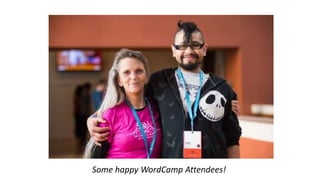
Some happy WordCamp Attendees!
Presentation Agenda
1. What is WordPress, and Why Useful?
2. WP.COM Model Site Tips to Get Started
3. My Free Coaching after presentation
Wapuu
Mascot
WordPress (WP) Definition
• 31% of Web is on WP
• Includes Bloomberg, CNN, NASA, Nat’l Park Service, Houston Zoo
• Over 50,000+ Plugins, and well over 11,000 Themes
• Free or low-cost – user friendly – backend/frontend, “modular”
• Evolution from simple blog to broad Content Mgt System (CMS)
• Less robust: simple “site builders”; More complex: Drupal, SharePoint
WP is Dynamic!
• Open Source, with Updates each quarter in Core WP
• Next big version release mid-November 2018: WP 5.0
• Will include big “Gutenberg” changes – a new editor, simpler site
building tools – See ANNEX 1 slides for further info on Gutenberg!
• Opportunity for you to get involved at various levels – community!
Basic Alternatives to WP…
• A few simple site-builders:
Wix – Review, Example: Wix Support Blog
Squarespace – Review, Example: Orchid Cellar Meadery
WordPress.Com –WP “lite”, Example: DrinkWhatYouLike Blog [more later…]
PC Magazine’s list and ranking of these and other site-builders
• Pro: avoid WP learning curve, easy starter designs (templates)
• Con: customization?, tiny communities, proprietary (except WP.COM)
We can Sketch a WireFrame for any website -per Requirements (Form!)
Why Need a Website vs Social Media (SM)
• Website a place you control content, “brand” – unlike SM
• A “hub” to connect to other info, sites, social media
• But to be useful, a website has to have a purpose and plan!
First…Do Your Business Case…and Plan!
• Why (rationale, results)
• Who (audience for site)
• What (your content, plus other links)
• When (project plan for rollout)
• How (Admins, WP Learning Curve, SM Promotion, Site Metrics)
• Action: Do site Outline and/or a Sketch…before building a WP site!
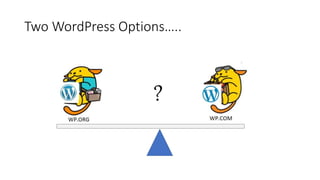
Two WordPress Options…..
?
• WP.COM (a WP starter site… and our focus today!)
• PRO
oBasic site – easy, free setup, simple Dashboard
oMainly bloggers – but CMS, business capability
oFully supported by Automatikk, and can grow (various paid plans)
oShort learning curve – a “one-stop-shop”!
• CON
oAdvertising with free site
o3 Gig Size Limit
oLimited customization – no Plugins, limited Themes with free version
oMore bloggers than business users (“Reader” blog community)
• WP.ORG (a more advanced WP option)
• PRO
oMore flexible, customizable, robust site
oWide variety of users, from bloggers to large organizations
oOpen Source, PhP scripting language
• CON
oMore expensive, requires a hosting company on Web
oLonger learning curve – for IT Developers, Designers, Site Admins
oDetailed configuration on web host important
Basic WP Concepts – a Glossary
• Site Dashboard
• Content Inputs
• By Admin: Posts, Pages, Media
• By Users: comments, surveys
• Data Location/Navigation
• Blog categories, tags
• Menu, Sidebar(s)
• WP “front end” w/ links to other
sites
• WP.COM (basic) vs WP.ORG
(custom)
• Themes (framework, “look & feel”)
• Plugins (add big functionality)
• TablePress (tables)
• Gravity Forms (surveys etc)
• MailPoet (newsletter)
• Widgets (add small features)
• Search, Events, Text Box, etc.
CONTENT FUNCTIONALITY*
*Site Usage Analytics (Jetpack Site Stats, Google Analytics)
Get Started with a Simple WP.COM site
• WP.COM is a cheap, entry-level step into Wordpress
• Simplified interface, metrics
• Easy to post, edit content
• Support community, Theme Directory
• Let’s look at our Class Site as an example…………….
Site Example: Our OPCUG / PATACS Class Site
• Purpose: for training reference and student feedback
• Functionality:
• Classic top tabs for key content
• Featured Page and Posts on Home Page
• Tags Cloud for easy reference
• Sidebar for WP ref links
• Threaded Comments, Polls for feedback
• 6 Built-in Color Schemes, Stock images
• Cost: Free!
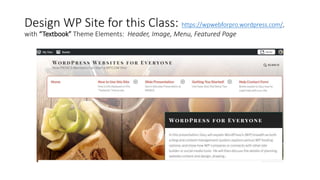
Design WP Site for this Class: https://wpwebforpro.wordpress.com/,
with “Textbook” Theme Elements: Header, Image, Menu, Featured Page
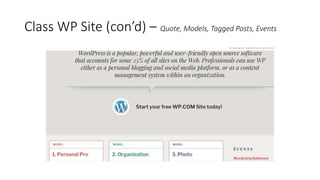
Class WP Site (con’d) – Quote, Models, Tagged Posts, Events
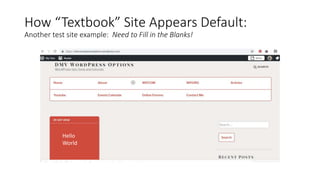
How “Textbook” Site Appears Default:
Another test site example: Need to Fill in the Blanks!
Hello
World
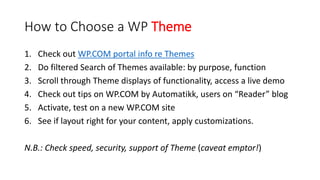
How to Choose a WP Theme
1. Check out WP.COM portal info re Themes
2. Do filtered Search of Themes available: by purpose, function
3. Scroll through Theme displays of functionality, access a live demo
4. Check out tips on WP.COM by Automatikk, users on “Reader” blog
5. Activate, test on a new WP.COM site
6. See if layout right for your content, apply customizations.
N.B.: Check speed, security, support of Theme (caveat emptor!)
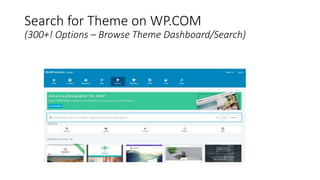
Search for Theme on WP.COM
(300+! Options – Browse Theme Dashboard/Search)
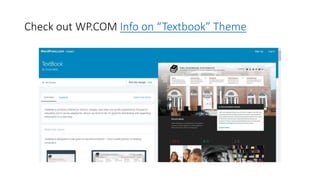
Check out WP.COM Info on “Textbook” Theme
DEMO (Tutorial): Starting a WP.COM Site –
Twenty Sixteen Default Theme
• To show typical actions that you would take in starting and
managing a new site from your “Dashboard” (ADMIN)…..
• Goal: Let’s start a TRAVEL BLOG…..
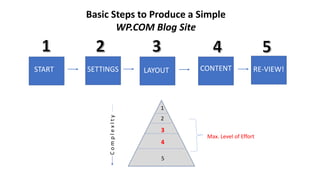
Basic Steps to Produce a Simple
WP.COM Blog Site
START CONTENTLAYOUT RE-VIEW!SETTINGS
ComplexIty
1
2
3
4
5
Max. Level of Effort
1. Start Site (WP.COM Account Regis., URL) (DEMO)
• Click “Get Started” on WP.COM site
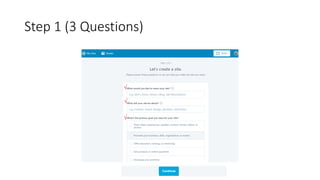
• Answer 5 (?) Questions to create account, site link
• Key Questions:
• Step 1 [Name-About-Goals-Level];
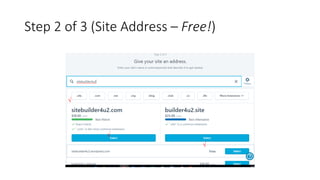
• Step 2 [Domain-Free!]
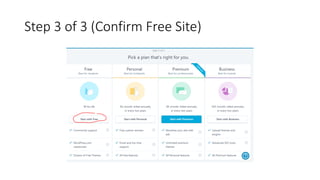
• Step 3 [Plan – Free!]
• Note handout for coached (or self) WP.COM site creation (ANNEX 3)
* Our Demo Site Link https://40PlusDemo.wordpress.com (Travel Blog)
2. Site Settings (Basic Settings, Framework) (DEMO)
• Adjust General Settings
• Select and activate Theme
• Upload Header image…tagline?
3. Layout Site (Navigation) (DEMO)
• Set up Menu (drag and drop)
• Set About “Static Front Page”
• Sample “widgets”: Text box, Search, Tag cloud
4. Site Content (Text, Images, etc.) (DEMO)
• Draft 2 Pages (static)
• “About Me”
• “Packing Tips”
• Draft/Preview/Publish…Enable Comments
• Draft Posts (dynamic)
• “Welcome”
• “Field Trip Report”
• Draft/Preview/Publish…Enable Category, Comments
5. Re-View Site (Testing) (DEMO)
• Check out “look and feel” of Home Page, etc.
• Do edits on the fly, test Reply to Post [See Comments on Dashboard]
• Toggle Admin Dashboard vs Site View
• See effect if Themes changed: Twenty Sixteen vs. Twenty Seventeen
(both default WP.ORG themes)
*See also ANNEX 3 Slides re Steps (Screenshots) for Site Creation/Migration to a new WP.COM site.
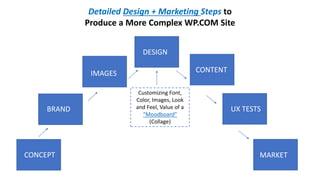
Detailed Design + Marketing Steps to
Produce a More Complex WP.COM Site
SKETCH
CONCEPT
BRAND
IMAGES
DESIGN
CONTENT
UX TESTS
MARKET
Customizing Font,
Color, Images, Look
and Feel, Value of a
“Moodboard”
(Collage)
Website Design Best Practices
• Design Impact: Clean and simple...good use of white space, limit 3
Fonts in 3 sizes, few colors...key message (call to action?)
• Navigation: Easy to find info (Visual Hierarchy), leverage
conventions, consistency, accessibility, menus max 3 levels deep.
Contact info clear
• Content: Well written, engaging, varied content for audience
• Images: Optimize size/photos, copyright ( CreativeCommons.org)
• Engagement: Build for usage/traffic on Web, SEO, check Google Tools
• Devices: cross browser/device compatibility
Site Maintenance
• No matter how great the design, Maintenance is a chore!
• Keep content fresh
• Maintain site layout, functionality
• Document design, record site problems/questions to guide Help
• Respond to user feedback
• Keep in touch with advances, issues within the WP community!
3 Possible Student Sites…
[your optional “homework”…after this presentation!]
Try 1 of 3 types of WP.COM sites w/ my help or on your own…
1. Personal Blog
2. Creative Photos
3. Organizational Site
A good starting Theme “framework” is key!
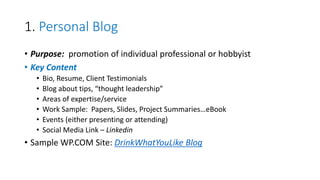
1. Personal Blog
• Purpose: promotion of individual professional or hobbyist
• Key Content
• Bio, Resume, Client Testimonials
• Blog about tips, “thought leadership”
• Areas of expertise/service
• Work Sample: Papers, Slides, Project Summaries…eBook
• Events (either presenting or attending)
• Social Media Link – Linkedin
• Sample WP.COM Site: DrinkWhatYouLike Blog
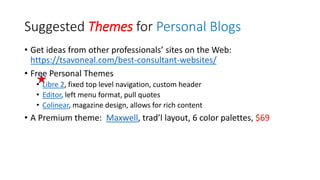
Suggested Themes for Personal Blogs
• Get ideas from other professionals’ sites on the Web:
https://tsavoneal.com/best-consultant-websites/
• Free Personal Themes
• Libre 2, fixed top level navigation, custom header
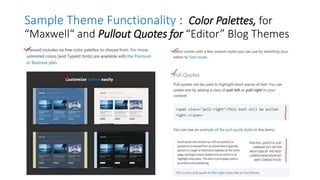
• Editor, left menu format, pull quotes
• Colinear, magazine design, allows for rich content
• A Premium theme: Maxwell, trad’l layout, 6 color palettes, $69
Sample Theme Functionality : Color Palettes, for
“Maxwell“ and Pullout Quotes for “Editor” Blog Themes
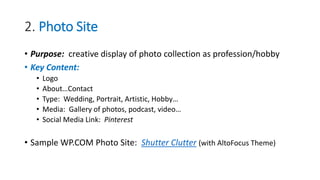
2. Photo Site
• Purpose: creative display of photo collection as profession/hobby
• Key Content:
• Logo
• About…Contact
• Type: Wedding, Portrait, Artistic, Hobby…
• Media: Gallery of photos, podcast, video…
• Social Media Link: Pinterest
• Sample WP.COM Photo Site: Shutter Clutter (with AltoFocus Theme)
Suggested Themes for Photo Sites
•  ideas of other photo sites on the Web: Vandelay Design Portfolio
or After the Coaldust
• Free Photo Themes
• AltoFocus – Clean Grid, images “pop”, scrolling from top menu
• Rebalance – 6 Color schemes, more traditional grid for photos
• Illustratr – Minimalist layout
• Premium site option: Photo blog {recommended by WP.COM] 3
layouts, 4 style packs, 26 photo filters…$36
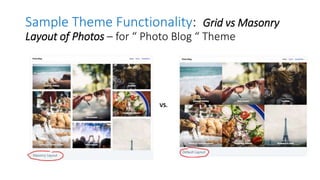
Sample Theme Functionality: Grid vs Masonry
Layout of Photos – for “ Photo Blog “ Theme
VS.
3. Organization Site
• Purpose: an info hub for non-profit or business
• Key Content for Non-Profit [Detailed Site Map/Hierarchy]
• Call to Action/Donate
• Programs
• Testimonials
• About: Staff, Board, Annual Report, Careers
• Blog: Newsletter
• Social Media Links (broad…yet targeted!): FB, Twitter, LinkedIn, etc.
• Samples: Raleigh SCORE (traditional) or Minding the Workplace (imagery)
Suggested Themes for Organization Sites
• Model sites on Web
• Free Themes:
• Canape (for restaurant) - food menu, testimonials, reservations form
• TwentySeventeen – scrolling, “one piece”, modern design; or Twenty Sixteen
– another default WP.COM theme, traditional format, can instantly change
background color
• Textbook (see this class site)
• One Premium option:…Organization, specific for non-profits, call to
action, Page templates, $69
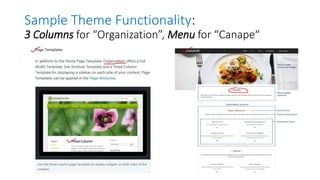
Sample Theme Functionality:
3 Columns for “Organization”, Menu for “Canape“
If you decide to “graduate” and move up in
WordPress complexity…
• WP.ORG site more complex, configuration, and you maintain the software
• Need a Host – fees vary. See my test site on American Revolution.
• Can power more modern designs – see GeneratePress Premium templates
• Selection criteria: speed, uptime, cost, support, “shared” vs “managed”
• Many hosts, but a few to consider:
• BlueHost
• DreamHost
• SiteGround
• HostGator (my recent choice – See ANNEX 2 for further info
• Note: migration from WP.COM to WP.ORG relatively easy with right tools
A quick recap of my 3 Handouts …
1. Help Contact Form (Requirements…for WP.COM or any website)
2. WP.COM Site Set-up Tips (Self-Help – See also ANNEX 3)
3. My WP.COM Coaching Content and Schedule (Assistance)
*Optional: Screenshots to Create WP.COM Site & Migration Tips (on
Table)
Optional “Homework”!
• Share feedback on my presentation in a “Poll” at the Class site.
• Create a free WP.COM site (on own, or with my help!)
• Attend a WordCamp - WC (very low cost…just your time!)*
• WC Philadelphia, Oct 27-28, 2018 (Space?)
• WC US in Nashville (National Conference), Dec 7-9, 2018
• WC Raleigh, NC, April 6-7, 2019
• Participate in informal monthly WP Meetups: DC or VA
• Get ready for big WP 5.0 Upgrade and new “Gutenberg” interface
*In our area, Baltimore WordCamp held annually in the Fall ( WP.TV video Oct 5-6)
Key WordPress References
• WP Platforms: WP.COM, WP.ORG
• WP Beginner site (how-tos)
• WordCamp Central Calendar (world-wide) WP.TV (all WordCamp
presentations on video!)
oCheck out early Nov. on WP.TV all Beginner “Classroom” track presentations
from Oct 6-7, 2018 Baltimore WordCamp (see WC Schedule for titles)
• Book: “Easy WP Guide – WordPress Manual,” by Anthony Hortin [free PDF!]
• Link to this Presentation at PATACS at the site for this Class on
Slideshare.
My Contact Info: Gary Vaughan
Thank you!
• My personal contact info and bio
Email: glvconsulting@hotmail.com
Twitter: @glvaughan
Linkedin: Gary Vaughan PMP
Blog: dcwinebrewadvisor/about
Image Credits in Presentation
• Photo Happy WordCampers, Slide 3: https://central.wordcamp.org/
• WAPUU, WP Mascot, Slides 4, 11:
https://torquemag.io/2017/08/wapuu-created-cultural-center-
wordpress/
• Source of all Theme Screenshots: https://wordpress.com/
ANNEXES and Reference
Links
ANNEX 1: What is Gutenberg?
• A new Editor Interface for WP – “catching up” with simple site
builders on the Web to help ease WP site layout and useability.
• 1st stage: Gutenberg editor and content “blocks” available for Testing
now on WP.COM, to be default once WP 5.0 released later this year
• 2 other stages on Gutenberg and other WP Core Updates: next year
Page templates and full site customization.
• Check out videos in Yoast article on What is Gutenberg (esp the quick
“Gut Guys” clips, or longer video by Morten Rand-Hendriksen)
See also my Gutenberg Demo Page to see how “Blocks” work!
Gutenberg “Test Drive” Takeaways…
• My Pros:
• General ability to more readily customize Posts and Pages
• Easier to directly embed videos, slides, buttons in Pages and Posts
• More layout flexibility similar to simple sitebuilders
• Ability to move within an article via “anchors”
• My Cons:
• “block” concept will be new to many existing users
• Flexible column block very basic, and still in beta
• Not a robust “pagebuilder” able to layout complex home pages
• Themes and Plugins will have to “catch up” and be Gutenberg-compatible
Next Steps on Gutenberg?
• While Gutenberg will be coming to WP Core, best to start your new
WP.COM site using current, classic WP editor and interface.
• Then adapt later to Gutenberg once it is not only released, but further
tested, and giving time for WP Themes and Plugins to adapt.
• Look out for future default “TwentyEighteen” Theme for Gutenberg
• You might also consider then whether to upgrade free WP.COM site
• In the meantime…
• try out Gutenberg (as an option on your premium WP.COM site – Activate or
Deactivate on your Dashboard) or as a plugin to your WP.ORG site!
• Note: now and in foreseeable future you will be able to switch back to the old
Classic editor)
ANNEX 2: HostGator as a Host for WP.ORG site
• HG Choice of PC Magazine, WP Beginner – See also HG Review
• Key Features:
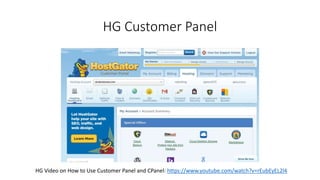
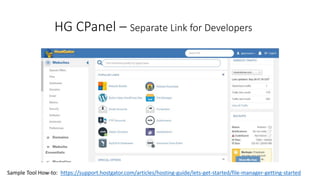
• Customer Panel (Account management) and C Panel (Developer tools)
• Easy WP site install, and lots of email tips, support articles/videos
• Free SSL Certificate; Free limited backup
• Unlimited Domains if “Baby” Plan or above
• Inexpensive: 3 year “Hatchling” Plan w/ 1 Domain and Email ($250)
• Caution: aggressive upselling of other features at added cost
• Check other hosts, web rankings, and vendor offers at WordCamps
HG Customer Panel
HG Video on How to Use Customer Panel and CPanel: https://www.youtube.com/watch?v=rEubEyEL2l4
HG CPanel – Separate Link for Developers
Sample Tool How-to: https://support.hostgator.com/articles/hosting-guide/lets-get-started/file-manager-getting-started
Screenshot of My Test WP.ORG Site:
American Revolution [Generate Press Theme]
• Testing Initial Design for my Personal Blog – see link below
• Also an experimentation with the new Gutenberg Editor
• More complex WP.ORG Dashboard – hosted on HostGator
• Free GeneratePress Theme (not available on WP.COM)
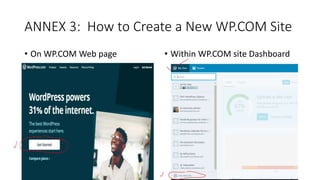
ANNEX 3: How to Create a New WP.COM Site
• On WP.COM Web page • Within WP.COM site Dashboard
Step 1 (3 Questions)
√
√
√
Step 2 of 3 (Site Address – Free!)
√
√
√
Step 3 of 3 (Confirm Free Site)
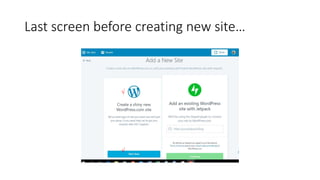
Last screen before creating new site…
√
√
WP Migration Tips
• Need to plan “export” from old site and “import” to new site
• You may need an added migration tool to minimize disruption
• Testing, backups, and redirection of former site are key
• Easiest to “copy and paste” PC content to brand new WP.COM site
• Migration Reference Links:
• How to Import Content into WP.COM
• General Site Migration Tips (and details re migration to WP.ORG)
• Graduating – Moving a site from WP.COM to WP.ORG
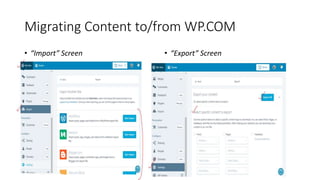
Migrating Content to/from WP.COM
• “Import” Screen
•
• “Export” Screen
Other References: WP.COM vs WP.ORG
• https://en.support.wordpress.com/com-vs-org/
Comparison of WP.COM vs WP.ORG
• https://howtomakemyblog.com/wordpress-com-org/
Comparison of 2 platforms, plus WP.COM to WP.ORG migration
tool/process
WordPress How-to Articles, Videos
• https://www.youtube.com/watch?v=8OBfr46Y0cQ (short video)
• https://www.000webhost.com/wordpress-tutorial (see middle of article re using the WP
Dashboard)
• https://www.youtube.com/watch?v=r-lqV7vyZt4 (about 20 min)
• https://www.youtube.com/watch?v=wiaT4bR3xGA (1 hr and 10 min)
• https://www.lynda.com/WordPress-tutorials/WordPress-Essential-Training/372542-2.html
This one is very popular but quite long (5 hrs 40 min). It appears to be the best, comprehensive
video for a beginner. Lynda.com is free for the first month.
Other References: UX + Photography Links
• https://blog.hubspot.com/marketing/user-testing-tools
• https://clearleft.com/posts/visual-design-explorations
• https://wordpress.tv/2015/05/01/melissa-eggleston-top-strategies-
for-better-photography-on-your-website/
Other References: Personal Blog Links
Examples of personal blog content/strategy (not
WordPress sites)
• https://www.themuse.com/author/alexandra-nuth
• https://www.ximenalarkin.com/
• http://www.pascalvangemert.nl/#/profile
Other References: Design Links
• https://optimizerwp.com/wordpress-websites-examples/
• http://www.wpbeginner.com/showcase/excellent-wordpress-website-examples/
• https://blog.hubspot.com/blog/tabid/6307/bid/30557/6-guidelines-for-
exceptional-website-design-and-usability.aspx
• https://webflow.com/blog/the-web-design-process-in-7-simple-steps
• https://www.coursera.org/specializations/graphic-design
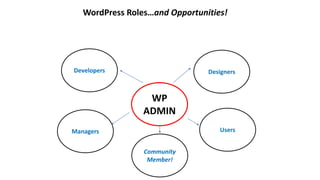
WordPress Roles…and Opportunities!
Managers
Developers Designers
Users
WP
ADMIN
Community
Member!
How to Get Involved in WordPress?
A variety of reasons for you to get involved in WP, as a…..
• User - for a personal website, or to support one where you work
• Developer – coding, IT nuts and bolts, enable WP functionality
• Designer – graphic arts, how to render best “look and feel”
• Manager – see how a WP platform can help your organization
• Volunteer! – WordCamps, Meetups…or contribute online to WP Core
• WP Community member – social, educational…a lot of fun!

Patacs wp.com slides_oct_2018_final3

  • 1.
    WordPress Websites for Everyone OPCUG/ PATACS Joint Meeting Osher Lifelong Learning Institute, GMU October 20, 2018 By Gary L. Vaughan
  • 2.
    Intro • Quick Pollof audience: Have website –WP, or not? • A tool for everyone, for personal or organizational use • My background: USAID – State Dept SharePoint, then WordPress + craft beer/wine blog! • WP is dynamic…and fun! *Handouts: 1. Requirements WP.COM; 2. Self-Help; 3. Site Assistance
  • 3.
  • 4.
    Presentation Agenda 1. Whatis WordPress, and Why Useful? 2. WP.COM Model Site Tips to Get Started 3. My Free Coaching after presentation Wapuu Mascot
  • 5.
    WordPress (WP) Definition •31% of Web is on WP • Includes Bloomberg, CNN, NASA, Nat’l Park Service, Houston Zoo • Over 50,000+ Plugins, and well over 11,000 Themes • Free or low-cost – user friendly – backend/frontend, “modular” • Evolution from simple blog to broad Content Mgt System (CMS) • Less robust: simple “site builders”; More complex: Drupal, SharePoint
  • 6.
    WP is Dynamic! •Open Source, with Updates each quarter in Core WP • Next big version release mid-November 2018: WP 5.0 • Will include big “Gutenberg” changes – a new editor, simpler site building tools – See ANNEX 1 slides for further info on Gutenberg! • Opportunity for you to get involved at various levels – community!
  • 7.
    Basic Alternatives toWP… • A few simple site-builders: Wix – Review, Example: Wix Support Blog Squarespace – Review, Example: Orchid Cellar Meadery WordPress.Com –WP “lite”, Example: DrinkWhatYouLike Blog [more later…] PC Magazine’s list and ranking of these and other site-builders • Pro: avoid WP learning curve, easy starter designs (templates) • Con: customization?, tiny communities, proprietary (except WP.COM) We can Sketch a WireFrame for any website -per Requirements (Form!)
  • 8.
    Why Need aWebsite vs Social Media (SM) • Website a place you control content, “brand” – unlike SM • A “hub” to connect to other info, sites, social media • But to be useful, a website has to have a purpose and plan!
  • 9.
    First…Do Your BusinessCase…and Plan! • Why (rationale, results) • Who (audience for site) • What (your content, plus other links) • When (project plan for rollout) • How (Admins, WP Learning Curve, SM Promotion, Site Metrics) • Action: Do site Outline and/or a Sketch…before building a WP site!
  • 10.
  • 11.
    • WP.COM (aWP starter site… and our focus today!) • PRO oBasic site – easy, free setup, simple Dashboard oMainly bloggers – but CMS, business capability oFully supported by Automatikk, and can grow (various paid plans) oShort learning curve – a “one-stop-shop”! • CON oAdvertising with free site o3 Gig Size Limit oLimited customization – no Plugins, limited Themes with free version oMore bloggers than business users (“Reader” blog community)
  • 12.
    • WP.ORG (amore advanced WP option) • PRO oMore flexible, customizable, robust site oWide variety of users, from bloggers to large organizations oOpen Source, PhP scripting language • CON oMore expensive, requires a hosting company on Web oLonger learning curve – for IT Developers, Designers, Site Admins oDetailed configuration on web host important
  • 13.
    Basic WP Concepts– a Glossary • Site Dashboard • Content Inputs • By Admin: Posts, Pages, Media • By Users: comments, surveys • Data Location/Navigation • Blog categories, tags • Menu, Sidebar(s) • WP “front end” w/ links to other sites • WP.COM (basic) vs WP.ORG (custom) • Themes (framework, “look & feel”) • Plugins (add big functionality) • TablePress (tables) • Gravity Forms (surveys etc) • MailPoet (newsletter) • Widgets (add small features) • Search, Events, Text Box, etc. CONTENT FUNCTIONALITY* *Site Usage Analytics (Jetpack Site Stats, Google Analytics)
  • 14.
    Get Started witha Simple WP.COM site • WP.COM is a cheap, entry-level step into Wordpress • Simplified interface, metrics • Easy to post, edit content • Support community, Theme Directory • Let’s look at our Class Site as an example…………….
  • 15.
    Site Example: OurOPCUG / PATACS Class Site • Purpose: for training reference and student feedback • Functionality: • Classic top tabs for key content • Featured Page and Posts on Home Page • Tags Cloud for easy reference • Sidebar for WP ref links • Threaded Comments, Polls for feedback • 6 Built-in Color Schemes, Stock images • Cost: Free!
  • 16.
    Design WP Sitefor this Class: https://wpwebforpro.wordpress.com/, with “Textbook” Theme Elements: Header, Image, Menu, Featured Page
  • 17.
    Class WP Site(con’d) – Quote, Models, Tagged Posts, Events
  • 18.
    How “Textbook” SiteAppears Default: Another test site example: Need to Fill in the Blanks! Hello World
  • 19.
    How to Choosea WP Theme 1. Check out WP.COM portal info re Themes 2. Do filtered Search of Themes available: by purpose, function 3. Scroll through Theme displays of functionality, access a live demo 4. Check out tips on WP.COM by Automatikk, users on “Reader” blog 5. Activate, test on a new WP.COM site 6. See if layout right for your content, apply customizations. N.B.: Check speed, security, support of Theme (caveat emptor!)
  • 20.
    Search for Themeon WP.COM (300+! Options – Browse Theme Dashboard/Search)
  • 21.
    Check out WP.COMInfo on “Textbook” Theme
  • 22.
    DEMO (Tutorial): Startinga WP.COM Site – Twenty Sixteen Default Theme • To show typical actions that you would take in starting and managing a new site from your “Dashboard” (ADMIN)….. • Goal: Let’s start a TRAVEL BLOG…..
  • 23.
    Basic Steps toProduce a Simple WP.COM Blog Site START CONTENTLAYOUT RE-VIEW!SETTINGS ComplexIty 1 2 3 4 5 Max. Level of Effort
  • 24.
    1. Start Site(WP.COM Account Regis., URL) (DEMO) • Click “Get Started” on WP.COM site • Answer 5 (?) Questions to create account, site link • Key Questions: • Step 1 [Name-About-Goals-Level]; • Step 2 [Domain-Free!] • Step 3 [Plan – Free!] • Note handout for coached (or self) WP.COM site creation (ANNEX 3) * Our Demo Site Link https://40PlusDemo.wordpress.com (Travel Blog)
  • 25.
    2. Site Settings(Basic Settings, Framework) (DEMO) • Adjust General Settings • Select and activate Theme • Upload Header image…tagline?
  • 26.
    3. Layout Site(Navigation) (DEMO) • Set up Menu (drag and drop) • Set About “Static Front Page” • Sample “widgets”: Text box, Search, Tag cloud
  • 27.
    4. Site Content(Text, Images, etc.) (DEMO) • Draft 2 Pages (static) • “About Me” • “Packing Tips” • Draft/Preview/Publish…Enable Comments • Draft Posts (dynamic) • “Welcome” • “Field Trip Report” • Draft/Preview/Publish…Enable Category, Comments
  • 28.
    5. Re-View Site(Testing) (DEMO) • Check out “look and feel” of Home Page, etc. • Do edits on the fly, test Reply to Post [See Comments on Dashboard] • Toggle Admin Dashboard vs Site View • See effect if Themes changed: Twenty Sixteen vs. Twenty Seventeen (both default WP.ORG themes) *See also ANNEX 3 Slides re Steps (Screenshots) for Site Creation/Migration to a new WP.COM site.
  • 29.
    Detailed Design +Marketing Steps to Produce a More Complex WP.COM Site SKETCH CONCEPT BRAND IMAGES DESIGN CONTENT UX TESTS MARKET Customizing Font, Color, Images, Look and Feel, Value of a “Moodboard” (Collage)
  • 30.
    Website Design BestPractices • Design Impact: Clean and simple...good use of white space, limit 3 Fonts in 3 sizes, few colors...key message (call to action?) • Navigation: Easy to find info (Visual Hierarchy), leverage conventions, consistency, accessibility, menus max 3 levels deep. Contact info clear • Content: Well written, engaging, varied content for audience • Images: Optimize size/photos, copyright ( CreativeCommons.org) • Engagement: Build for usage/traffic on Web, SEO, check Google Tools • Devices: cross browser/device compatibility
  • 31.
    Site Maintenance • Nomatter how great the design, Maintenance is a chore! • Keep content fresh • Maintain site layout, functionality • Document design, record site problems/questions to guide Help • Respond to user feedback • Keep in touch with advances, issues within the WP community!
  • 32.
    3 Possible StudentSites… [your optional “homework”…after this presentation!] Try 1 of 3 types of WP.COM sites w/ my help or on your own… 1. Personal Blog 2. Creative Photos 3. Organizational Site A good starting Theme “framework” is key!
  • 33.
    1. Personal Blog •Purpose: promotion of individual professional or hobbyist • Key Content • Bio, Resume, Client Testimonials • Blog about tips, “thought leadership” • Areas of expertise/service • Work Sample: Papers, Slides, Project Summaries…eBook • Events (either presenting or attending) • Social Media Link – Linkedin • Sample WP.COM Site: DrinkWhatYouLike Blog
  • 34.
    Suggested Themes forPersonal Blogs • Get ideas from other professionals’ sites on the Web: https://tsavoneal.com/best-consultant-websites/ • Free Personal Themes • Libre 2, fixed top level navigation, custom header • Editor, left menu format, pull quotes • Colinear, magazine design, allows for rich content • A Premium theme: Maxwell, trad’l layout, 6 color palettes, $69
  • 35.
    Sample Theme Functionality: Color Palettes, for “Maxwell“ and Pullout Quotes for “Editor” Blog Themes
  • 36.
    2. Photo Site •Purpose: creative display of photo collection as profession/hobby • Key Content: • Logo • About…Contact • Type: Wedding, Portrait, Artistic, Hobby… • Media: Gallery of photos, podcast, video… • Social Media Link: Pinterest • Sample WP.COM Photo Site: Shutter Clutter (with AltoFocus Theme)
  • 37.
    Suggested Themes forPhoto Sites •  ideas of other photo sites on the Web: Vandelay Design Portfolio or After the Coaldust • Free Photo Themes • AltoFocus – Clean Grid, images “pop”, scrolling from top menu • Rebalance – 6 Color schemes, more traditional grid for photos • Illustratr – Minimalist layout • Premium site option: Photo blog {recommended by WP.COM] 3 layouts, 4 style packs, 26 photo filters…$36
  • 38.
    Sample Theme Functionality:Grid vs Masonry Layout of Photos – for “ Photo Blog “ Theme VS.
  • 39.
    3. Organization Site •Purpose: an info hub for non-profit or business • Key Content for Non-Profit [Detailed Site Map/Hierarchy] • Call to Action/Donate • Programs • Testimonials • About: Staff, Board, Annual Report, Careers • Blog: Newsletter • Social Media Links (broad…yet targeted!): FB, Twitter, LinkedIn, etc. • Samples: Raleigh SCORE (traditional) or Minding the Workplace (imagery)
  • 40.
    Suggested Themes forOrganization Sites • Model sites on Web • Free Themes: • Canape (for restaurant) - food menu, testimonials, reservations form • TwentySeventeen – scrolling, “one piece”, modern design; or Twenty Sixteen – another default WP.COM theme, traditional format, can instantly change background color • Textbook (see this class site) • One Premium option:…Organization, specific for non-profits, call to action, Page templates, $69
  • 41.
    Sample Theme Functionality: 3Columns for “Organization”, Menu for “Canape“
  • 42.
    If you decideto “graduate” and move up in WordPress complexity… • WP.ORG site more complex, configuration, and you maintain the software • Need a Host – fees vary. See my test site on American Revolution. • Can power more modern designs – see GeneratePress Premium templates • Selection criteria: speed, uptime, cost, support, “shared” vs “managed” • Many hosts, but a few to consider: • BlueHost • DreamHost • SiteGround • HostGator (my recent choice – See ANNEX 2 for further info • Note: migration from WP.COM to WP.ORG relatively easy with right tools
  • 43.
    A quick recapof my 3 Handouts … 1. Help Contact Form (Requirements…for WP.COM or any website) 2. WP.COM Site Set-up Tips (Self-Help – See also ANNEX 3) 3. My WP.COM Coaching Content and Schedule (Assistance) *Optional: Screenshots to Create WP.COM Site & Migration Tips (on Table)
  • 44.
    Optional “Homework”! • Sharefeedback on my presentation in a “Poll” at the Class site. • Create a free WP.COM site (on own, or with my help!) • Attend a WordCamp - WC (very low cost…just your time!)* • WC Philadelphia, Oct 27-28, 2018 (Space?) • WC US in Nashville (National Conference), Dec 7-9, 2018 • WC Raleigh, NC, April 6-7, 2019 • Participate in informal monthly WP Meetups: DC or VA • Get ready for big WP 5.0 Upgrade and new “Gutenberg” interface *In our area, Baltimore WordCamp held annually in the Fall ( WP.TV video Oct 5-6)
  • 45.
    Key WordPress References •WP Platforms: WP.COM, WP.ORG • WP Beginner site (how-tos) • WordCamp Central Calendar (world-wide) WP.TV (all WordCamp presentations on video!) oCheck out early Nov. on WP.TV all Beginner “Classroom” track presentations from Oct 6-7, 2018 Baltimore WordCamp (see WC Schedule for titles) • Book: “Easy WP Guide – WordPress Manual,” by Anthony Hortin [free PDF!] • Link to this Presentation at PATACS at the site for this Class on Slideshare.
  • 46.
    My Contact Info:Gary Vaughan Thank you! • My personal contact info and bio Email: glvconsulting@hotmail.com Twitter: @glvaughan Linkedin: Gary Vaughan PMP Blog: dcwinebrewadvisor/about
  • 47.
    Image Credits inPresentation • Photo Happy WordCampers, Slide 3: https://central.wordcamp.org/ • WAPUU, WP Mascot, Slides 4, 11: https://torquemag.io/2017/08/wapuu-created-cultural-center- wordpress/ • Source of all Theme Screenshots: https://wordpress.com/
  • 48.
  • 49.
    ANNEX 1: Whatis Gutenberg? • A new Editor Interface for WP – “catching up” with simple site builders on the Web to help ease WP site layout and useability. • 1st stage: Gutenberg editor and content “blocks” available for Testing now on WP.COM, to be default once WP 5.0 released later this year • 2 other stages on Gutenberg and other WP Core Updates: next year Page templates and full site customization. • Check out videos in Yoast article on What is Gutenberg (esp the quick “Gut Guys” clips, or longer video by Morten Rand-Hendriksen) See also my Gutenberg Demo Page to see how “Blocks” work!
  • 50.
    Gutenberg “Test Drive”Takeaways… • My Pros: • General ability to more readily customize Posts and Pages • Easier to directly embed videos, slides, buttons in Pages and Posts • More layout flexibility similar to simple sitebuilders • Ability to move within an article via “anchors” • My Cons: • “block” concept will be new to many existing users • Flexible column block very basic, and still in beta • Not a robust “pagebuilder” able to layout complex home pages • Themes and Plugins will have to “catch up” and be Gutenberg-compatible
  • 51.
    Next Steps onGutenberg? • While Gutenberg will be coming to WP Core, best to start your new WP.COM site using current, classic WP editor and interface. • Then adapt later to Gutenberg once it is not only released, but further tested, and giving time for WP Themes and Plugins to adapt. • Look out for future default “TwentyEighteen” Theme for Gutenberg • You might also consider then whether to upgrade free WP.COM site • In the meantime… • try out Gutenberg (as an option on your premium WP.COM site – Activate or Deactivate on your Dashboard) or as a plugin to your WP.ORG site! • Note: now and in foreseeable future you will be able to switch back to the old Classic editor)
  • 52.
    ANNEX 2: HostGatoras a Host for WP.ORG site • HG Choice of PC Magazine, WP Beginner – See also HG Review • Key Features: • Customer Panel (Account management) and C Panel (Developer tools) • Easy WP site install, and lots of email tips, support articles/videos • Free SSL Certificate; Free limited backup • Unlimited Domains if “Baby” Plan or above • Inexpensive: 3 year “Hatchling” Plan w/ 1 Domain and Email ($250) • Caution: aggressive upselling of other features at added cost • Check other hosts, web rankings, and vendor offers at WordCamps
  • 53.
    HG Customer Panel HGVideo on How to Use Customer Panel and CPanel: https://www.youtube.com/watch?v=rEubEyEL2l4
  • 54.
    HG CPanel –Separate Link for Developers Sample Tool How-to: https://support.hostgator.com/articles/hosting-guide/lets-get-started/file-manager-getting-started
  • 55.
    Screenshot of MyTest WP.ORG Site: American Revolution [Generate Press Theme] • Testing Initial Design for my Personal Blog – see link below • Also an experimentation with the new Gutenberg Editor • More complex WP.ORG Dashboard – hosted on HostGator • Free GeneratePress Theme (not available on WP.COM)
  • 56.
    ANNEX 3: Howto Create a New WP.COM Site • On WP.COM Web page • Within WP.COM site Dashboard
  • 57.
    Step 1 (3Questions) √ √ √
  • 58.
    Step 2 of3 (Site Address – Free!) √ √ √
  • 59.
    Step 3 of3 (Confirm Free Site)
  • 60.
    Last screen beforecreating new site… √ √
  • 61.
    WP Migration Tips •Need to plan “export” from old site and “import” to new site • You may need an added migration tool to minimize disruption • Testing, backups, and redirection of former site are key • Easiest to “copy and paste” PC content to brand new WP.COM site • Migration Reference Links: • How to Import Content into WP.COM • General Site Migration Tips (and details re migration to WP.ORG) • Graduating – Moving a site from WP.COM to WP.ORG
  • 62.
    Migrating Content to/fromWP.COM • “Import” Screen • • “Export” Screen
  • 63.
    Other References: WP.COMvs WP.ORG • https://en.support.wordpress.com/com-vs-org/ Comparison of WP.COM vs WP.ORG • https://howtomakemyblog.com/wordpress-com-org/ Comparison of 2 platforms, plus WP.COM to WP.ORG migration tool/process
  • 64.
    WordPress How-to Articles,Videos • https://www.youtube.com/watch?v=8OBfr46Y0cQ (short video) • https://www.000webhost.com/wordpress-tutorial (see middle of article re using the WP Dashboard) • https://www.youtube.com/watch?v=r-lqV7vyZt4 (about 20 min) • https://www.youtube.com/watch?v=wiaT4bR3xGA (1 hr and 10 min) • https://www.lynda.com/WordPress-tutorials/WordPress-Essential-Training/372542-2.html This one is very popular but quite long (5 hrs 40 min). It appears to be the best, comprehensive video for a beginner. Lynda.com is free for the first month.
  • 65.
    Other References: UX+ Photography Links • https://blog.hubspot.com/marketing/user-testing-tools • https://clearleft.com/posts/visual-design-explorations • https://wordpress.tv/2015/05/01/melissa-eggleston-top-strategies- for-better-photography-on-your-website/
  • 66.
    Other References: PersonalBlog Links Examples of personal blog content/strategy (not WordPress sites) • https://www.themuse.com/author/alexandra-nuth • https://www.ximenalarkin.com/ • http://www.pascalvangemert.nl/#/profile
  • 67.
    Other References: DesignLinks • https://optimizerwp.com/wordpress-websites-examples/ • http://www.wpbeginner.com/showcase/excellent-wordpress-website-examples/ • https://blog.hubspot.com/blog/tabid/6307/bid/30557/6-guidelines-for- exceptional-website-design-and-usability.aspx • https://webflow.com/blog/the-web-design-process-in-7-simple-steps • https://www.coursera.org/specializations/graphic-design
  • 68.
    WordPress Roles…and Opportunities! Managers DevelopersDesigners Users WP ADMIN Community Member!
  • 69.
    How to GetInvolved in WordPress? A variety of reasons for you to get involved in WP, as a….. • User - for a personal website, or to support one where you work • Developer – coding, IT nuts and bolts, enable WP functionality • Designer – graphic arts, how to render best “look and feel” • Manager – see how a WP platform can help your organization • Volunteer! – WordCamps, Meetups…or contribute online to WP Core • WP Community member – social, educational…a lot of fun!

Editor's Notes

  • #3 “Cool” – each big new version named in honor of jazz artist Meet people from variety of backgrounds at events
  • #5 See my brief handout: 1 pg self help tips/links; 2 pg my coaching sequence (optional!); 3 pg Requirements Form for you to fill out, if interest. Re 3., Two options: tips for self-help, or my personal coaching after presentation…and later at Nov. WP Meetups (deadlines!)
  • #8 Wix, or Squarespace, or Other site-builder setup up to you (simple!)…but I will explain later beginner advantages of WP.COM and my added coaching