Windows Application Management - May 3 2016
Windows Application Management
with Puppet
Automating Windows
Windows Application Management - May 3 2016
Who Am I
• Kaustubh Chaudhari Working as DevOps Consultant and
Puppet Trainer in OlinData
Windows Application Management - May 3 2016
Overview
• What is puppet?
• Puppet Architecture
• Understanding Windows Application Management
• Puppet Code for Windows
• Puppet Forge
• Questions
Windows Application Management - May 3 2016
What is Puppet?
• Configuration management software
• http://www.olindata.com/blog/2014/08/puppet-master-agent-setup
• http://olindata.com/blog/2015/03/setup-puppet-server-centos-70
• Scales very well (from 1 to 200k+ nodes)
• Multi-platform (windows, *nix, Mac OS, BSD)
• Commercially supported Open Source
• Infrastructure as code
Windows Application Management - May 3 2016
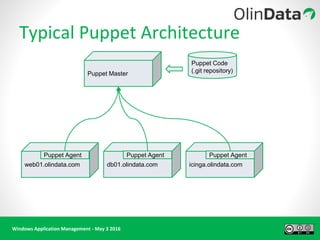
Typical Puppet Architecture
Puppet Master
Puppet Code
(.git repository)
web01.olindata.com icinga.olindata.comdb01.olindata.com
Puppet Agent Puppet AgentPuppet Agent
Windows Application Management - May 3 2016
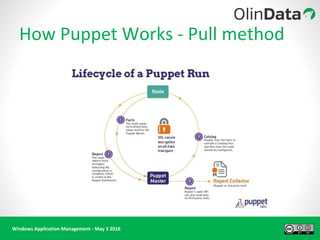
How Puppet Works - Pull method
Windows Application Management - May 3 2016
•Way of execution - no difference
•Architectural no difference
•Way of writing code - Yes that’s the key
What the Difference with Windows
Windows Application Management - May 3 2016
Windows Code
class windowsdemo {
file {'C:/Windows/Automation':
ensure => directory,
mode => '0755',
before => File['C:/Windows/Automation/puppet'],
}
file {'C:/Windows/Automation/puppet':
ensure => directory,
mode => '0755',
}
Is this the way windows file looks
like?
Or
C:WindowsAutomationpuppet
Which is correct ?
Windows Application Management - May 3 2016
More Code
exec { 'sepstatus.bat':
command => "C:WindowsSystem32cmd.exe /c cd C:WindowsAutomationpuppet && sepstatus.bat",
}
exec { 'ConfigureNetworkSettings.bat':
command => "C:WindowsSystem32cmd.exe /c cd C:WindowsAutomationpuppet &&
ConfigureNetworkSettings.bat",
onlyif => "C:WindowsSystem32cmd.exe /c dir C:WindowsAutomationpuppetdisableipv6.txt",
returns => [ '0' ],
}
A quick talk on EXEC and Idempotency !
Windows Application Management - May 3 2016
More Code!!
package { 'Symantec Endpoint Protection':
ensure => installed,
name => 'Symantec Endpoint Protection',
source => 'C:WindowsAutomationpuppetsepSEP.exe',
install_options => ['/S'],
require => File['C:/Windows/Automation/puppet/sep/SEP.exe'],
}
Package installation :
Supported types:
msi
exe
chocolaty
Installation options
It’s always a good idea to have a self
extracting packages.
Refer to the Package installation
documentation for silent installation.
If you can do it through command line. You
can do it through Puppet.
Windows Application Management - May 3 2016
Still More Code!!
if $symantec == 'false' {
file {'C:/Windows/Automation/puppet/sep':
ensure => directory,
mode => '0755',
before => File['C:/Windows/Automation/puppet/sep/SEP.exe'],
}
file {'C:/Windows/Automation/puppet/sep/SEP.exe':
ensure => 'file',
source => 'puppet:///modules/win642012hardning/SEP.exe',
mode => '0755',
}
package { 'Symantec Endpoint Protection':
ensure => installed,
name => 'Symantec Endpoint Protection',
source => 'C:WindowsAutomationpuppetsepSEP.exe',
install_options => ['/S'],
require => File['C:/Windows/Automation/puppet/sep/SEP.exe'],
}
service { 'SepMasterService':
ensure => running,
enable => true,
require => Package['Symantec Endpoint Protection'],
before => Exec['sepstatus.bat'],
}
Windows Application Management - May 3 2016
Still More and More Code!!
file { 'C:/Windows/Automation/puppet/sepstatus.bat':
ensure => file,
source => 'puppet:///modules/win642012hardning/sepstatus.bat',
mode => '0755',
before => Exec['sepstatus.bat'],
}
exec { 'sepstatus.bat':
command => "C:WindowsSystem32cmd.exe /c cd C:WindowsAutomationpuppet && sepstatus.bat",
}
}
else {
service { 'SepMasterService':
ensure => running,
enable => true,
}
}
Windows Application Management - May 3 2016
Windows Tips to Remember
● Filesystem redirection with Windows 32 bit and 64 bit is different
If you are running a 32-bit version of Puppet on a 64-bit version of Windows, the File System Redirector will silently
redirect all file system access of the %windir%system32 directory to %windir%SysWOW64 instead.
The ProgramFiles environment variable resolves to C:Program Files in a 64-bit native application, and C:Program Files
(x86) in a 32-bit process running on a 64-bit version of Windows.
File system redirection is not an issue, as long as you are running the architecture-appropriate Puppet version on a
recent version of Windows.
● When using backslashes in a double-quoted string, you must always use two backslashes for each literal backslash.
There are no exceptions and no special cases.
Example:
"C:Program FilesPuppetLabs"
Windows Application Management - May 3 2016
Demo Time !!
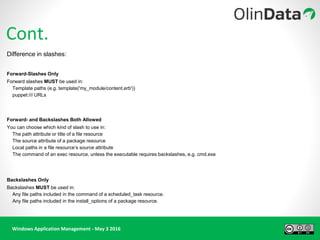
Cont.
Difference in slashes:
Forward-Slashes Only
Forward slashes MUST be used in:
Template paths (e.g. template('my_module/content.erb'))
puppet:/// URLs
Forward- and Backslashes Both Allowed
You can choose which kind of slash to use in:
The path attribute or title of a file resource
The source attribute of a package resource
Local paths in a file resource’s source attribute
The command of an exec resource, unless the executable requires backslashes, e.g. cmd.exe
Backslashes Only
Backslashes MUST be used in:
Any file paths included in the command of a scheduled_task resource.
Any file paths included in the install_options of a package resource.
Windows Application Management - May 3 2016
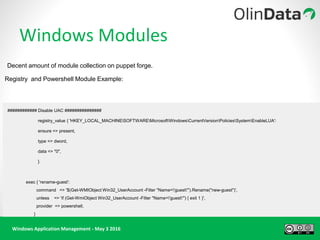
Windows Modules
Decent amount of module collection on puppet forge.
Registry and Powershell Module Example:
############ Disable UAC ###############
registry_value { 'HKEY_LOCAL_MACHINESOFTWAREMicrosoftWindowsCurrentVersionPoliciesSystemEnableLUA':
ensure => present,
type => dword,
data => "0",
}
exec { 'rename-guest':
command => '$(Get-WMIObject Win32_UserAccount -Filter "Name='guest'").Rename("new-guest")',
unless => 'if (Get-WmiObject Win32_UserAccount -Filter "Name='guest'") { exit 1 }',
provider => powershell,
}
Windows Application Management - May 3 2016
Windows Modules
# Using built-in provider
package { "Git version 1.8.4-preview20130916":
ensure => installed,
source => 'C:tempGit-1.8.4-preview20130916.exe',
install_options => ['/VERYSILENT']
}
# Using Chocolatey
package { 'git':
ensure => latest,
}
Windows Chocolaty module.
It's just like Yum/dnf/apt-get for windows. Chocolaty repository needs to be configured before using it.
Windows Application Management - May 3 2016
More details on windows module can be found on
https://forge.puppet.com/
I recommend you to look at :
https://forge.puppet.com/puppetlabs/windows
This is a collection of few windows module useful in day to day life.
Windows Modules
Windows Application Management - May 3 2016
Questions?
http://www.olindata.com
kaustubh@olindata.com
OpsTheater
Windows Application Management - May 3 2016
Thankyou

Webinar - Windows Application Management with Puppet

  • 1.
    Windows Application Management- May 3 2016 Windows Application Management with Puppet Automating Windows
  • 2.
    Windows Application Management- May 3 2016 Who Am I • Kaustubh Chaudhari Working as DevOps Consultant and Puppet Trainer in OlinData
  • 3.
    Windows Application Management- May 3 2016 Overview • What is puppet? • Puppet Architecture • Understanding Windows Application Management • Puppet Code for Windows • Puppet Forge • Questions
  • 4.
    Windows Application Management- May 3 2016 What is Puppet? • Configuration management software • http://www.olindata.com/blog/2014/08/puppet-master-agent-setup • http://olindata.com/blog/2015/03/setup-puppet-server-centos-70 • Scales very well (from 1 to 200k+ nodes) • Multi-platform (windows, *nix, Mac OS, BSD) • Commercially supported Open Source • Infrastructure as code
  • 5.
    Windows Application Management- May 3 2016 Typical Puppet Architecture Puppet Master Puppet Code (.git repository) web01.olindata.com icinga.olindata.comdb01.olindata.com Puppet Agent Puppet AgentPuppet Agent
  • 6.
    Windows Application Management- May 3 2016 How Puppet Works - Pull method
  • 7.
    Windows Application Management- May 3 2016 •Way of execution - no difference •Architectural no difference •Way of writing code - Yes that’s the key What the Difference with Windows
  • 8.
    Windows Application Management- May 3 2016 Windows Code class windowsdemo { file {'C:/Windows/Automation': ensure => directory, mode => '0755', before => File['C:/Windows/Automation/puppet'], } file {'C:/Windows/Automation/puppet': ensure => directory, mode => '0755', } Is this the way windows file looks like? Or C:WindowsAutomationpuppet Which is correct ?
  • 9.
    Windows Application Management- May 3 2016 More Code exec { 'sepstatus.bat': command => "C:WindowsSystem32cmd.exe /c cd C:WindowsAutomationpuppet && sepstatus.bat", } exec { 'ConfigureNetworkSettings.bat': command => "C:WindowsSystem32cmd.exe /c cd C:WindowsAutomationpuppet && ConfigureNetworkSettings.bat", onlyif => "C:WindowsSystem32cmd.exe /c dir C:WindowsAutomationpuppetdisableipv6.txt", returns => [ '0' ], } A quick talk on EXEC and Idempotency !
  • 10.
    Windows Application Management- May 3 2016 More Code!! package { 'Symantec Endpoint Protection': ensure => installed, name => 'Symantec Endpoint Protection', source => 'C:WindowsAutomationpuppetsepSEP.exe', install_options => ['/S'], require => File['C:/Windows/Automation/puppet/sep/SEP.exe'], } Package installation : Supported types: msi exe chocolaty Installation options It’s always a good idea to have a self extracting packages. Refer to the Package installation documentation for silent installation. If you can do it through command line. You can do it through Puppet.
  • 11.
    Windows Application Management- May 3 2016 Still More Code!! if $symantec == 'false' { file {'C:/Windows/Automation/puppet/sep': ensure => directory, mode => '0755', before => File['C:/Windows/Automation/puppet/sep/SEP.exe'], } file {'C:/Windows/Automation/puppet/sep/SEP.exe': ensure => 'file', source => 'puppet:///modules/win642012hardning/SEP.exe', mode => '0755', } package { 'Symantec Endpoint Protection': ensure => installed, name => 'Symantec Endpoint Protection', source => 'C:WindowsAutomationpuppetsepSEP.exe', install_options => ['/S'], require => File['C:/Windows/Automation/puppet/sep/SEP.exe'], } service { 'SepMasterService': ensure => running, enable => true, require => Package['Symantec Endpoint Protection'], before => Exec['sepstatus.bat'], }
  • 12.
    Windows Application Management- May 3 2016 Still More and More Code!! file { 'C:/Windows/Automation/puppet/sepstatus.bat': ensure => file, source => 'puppet:///modules/win642012hardning/sepstatus.bat', mode => '0755', before => Exec['sepstatus.bat'], } exec { 'sepstatus.bat': command => "C:WindowsSystem32cmd.exe /c cd C:WindowsAutomationpuppet && sepstatus.bat", } } else { service { 'SepMasterService': ensure => running, enable => true, } }
  • 13.
    Windows Application Management- May 3 2016 Windows Tips to Remember ● Filesystem redirection with Windows 32 bit and 64 bit is different If you are running a 32-bit version of Puppet on a 64-bit version of Windows, the File System Redirector will silently redirect all file system access of the %windir%system32 directory to %windir%SysWOW64 instead. The ProgramFiles environment variable resolves to C:Program Files in a 64-bit native application, and C:Program Files (x86) in a 32-bit process running on a 64-bit version of Windows. File system redirection is not an issue, as long as you are running the architecture-appropriate Puppet version on a recent version of Windows. ● When using backslashes in a double-quoted string, you must always use two backslashes for each literal backslash. There are no exceptions and no special cases. Example: "C:Program FilesPuppetLabs"
  • 14.
    Windows Application Management- May 3 2016 Demo Time !! Cont. Difference in slashes: Forward-Slashes Only Forward slashes MUST be used in: Template paths (e.g. template('my_module/content.erb')) puppet:/// URLs Forward- and Backslashes Both Allowed You can choose which kind of slash to use in: The path attribute or title of a file resource The source attribute of a package resource Local paths in a file resource’s source attribute The command of an exec resource, unless the executable requires backslashes, e.g. cmd.exe Backslashes Only Backslashes MUST be used in: Any file paths included in the command of a scheduled_task resource. Any file paths included in the install_options of a package resource.
  • 15.
    Windows Application Management- May 3 2016 Windows Modules Decent amount of module collection on puppet forge. Registry and Powershell Module Example: ############ Disable UAC ############### registry_value { 'HKEY_LOCAL_MACHINESOFTWAREMicrosoftWindowsCurrentVersionPoliciesSystemEnableLUA': ensure => present, type => dword, data => "0", } exec { 'rename-guest': command => '$(Get-WMIObject Win32_UserAccount -Filter "Name='guest'").Rename("new-guest")', unless => 'if (Get-WmiObject Win32_UserAccount -Filter "Name='guest'") { exit 1 }', provider => powershell, }
  • 16.
    Windows Application Management- May 3 2016 Windows Modules # Using built-in provider package { "Git version 1.8.4-preview20130916": ensure => installed, source => 'C:tempGit-1.8.4-preview20130916.exe', install_options => ['/VERYSILENT'] } # Using Chocolatey package { 'git': ensure => latest, } Windows Chocolaty module. It's just like Yum/dnf/apt-get for windows. Chocolaty repository needs to be configured before using it.
  • 17.
    Windows Application Management- May 3 2016 More details on windows module can be found on https://forge.puppet.com/ I recommend you to look at : https://forge.puppet.com/puppetlabs/windows This is a collection of few windows module useful in day to day life. Windows Modules
  • 18.
    Windows Application Management- May 3 2016 Questions? http://www.olindata.com kaustubh@olindata.com OpsTheater
  • 19.
    Windows Application Management- May 3 2016 Thankyou