Windows Patch Management
With Puppet Enterprise
Greg Sarjeant
Manager of Professional Services
Kenaz Kwa
Senior Engineering Product
Manager
Agenda
• How Puppet Enterprise works
• What is Patch Management?
• The Puppet Approach
• Demo
• Puppet Labs Windows support
• Resources
• Q&A
Our software
automates the provisioning,
configuration &
ongoing management
of your machines & the applications,
services & software running on them.
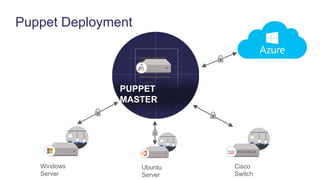
Puppet Deployment
Ubuntu
Server
PUPPET
MASTER
Windows
Server
Cisco
Switch
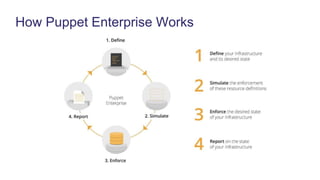
How Puppet Enterprise Works
What is Patch Management?
And what is it becoming?
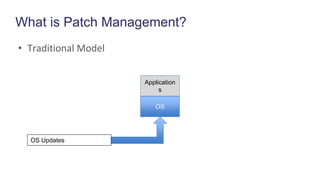
What is Patch Management?
• Traditional Model
Application
s
OS
OS Updates
Windows Server Patch Management Today
• Patches stored in a central repository
– Windows Update (Internet)
– Internally hosted
• Distributed to end user systems on a schedule
• Microsoft Technologies
– Windows Server Update Services (WSUS)
– System Center Configuration Manager (SCCM)
– Extensive research and experience
Windows Server Update Services (WSUS)
• Updates distributed via Microsoft Update
• WSUS Server stages updates
• Updates pulled by clients
– Similar to Automatic Updates on desktops
System Center Configuration Manager (SCCM)
• Integrates with WSUS for software updates
• Wizard-driven configuration
– Deployment targets
– Update Rules
• Manages WSUS client behind the scenes. Can initiate WSUS
runs
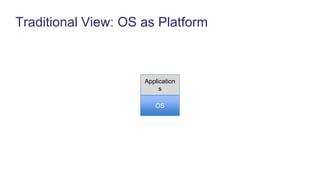
Traditional View: OS as Platform
Application
s
OS
Can we alleviate this tension?
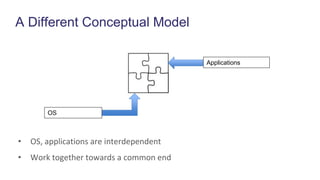
A Different Conceptual Model
OS
Applications
• OS, applications are interdependent
• Work together towards a common end
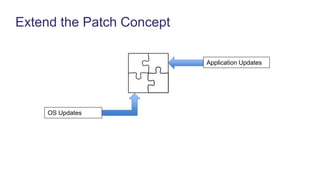
Extend the Patch Concept
OS Updates
Application Updates
Application Update Challenges
• Inconsistent formats
– .zip, .exe, .msi
• No central location
• No unified delivery mechanism
Package Management
• Package Management
– Centralized distribution of packages from curated repositories
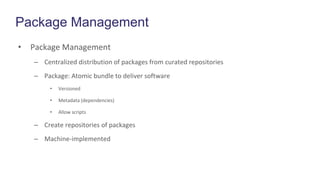
– Package: Atomic bundle to deliver software
• Versioned
• Metadata (dependencies)
• Allow scripts
– Create repositories of packages
– Machine-implemented
Chocolatey
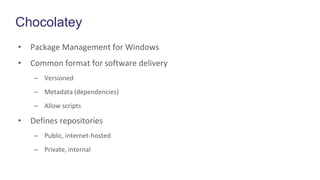
• Package Management for Windows
• Common format for software delivery
– Versioned
– Metadata (dependencies)
– Allow scripts
• Defines repositories
– Public, internet-hosted
– Private, internal
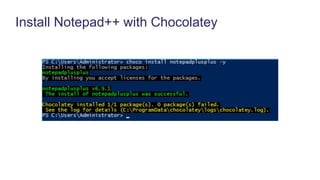
Install Notepad++ with Chocolatey
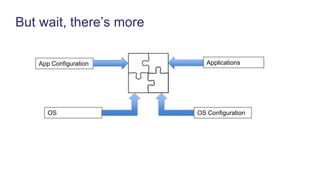
But wait, there’s more
OS
ApplicationsApp Configuration
OS Configuration
How do we patch configuration?
Configuration Patch Requirements
• Versioned
• Coupled to OS, App versions
• Machine-driven delivery mechanism
Puppet Enterprise
Enabling Technologies
• Infrastructure as Code
• Package Management
Puppet: Infrastructure as Code
• System state defined in software
– Stored in Version Control System (VCS)
• Microsoft Team Foundation Server (TFC), Git
• Centralized location
– Versionable
• Commit hash
– Dependency resolution
• System state implemented by machine
– Puppet agent
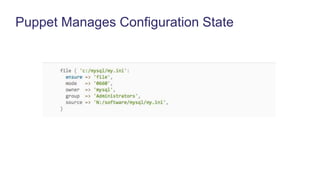
Puppet Manages Configuration State
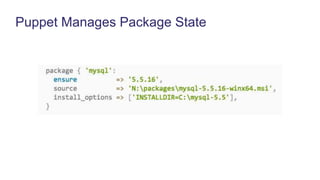
Puppet Manages Package State
Desired State Configuration (DSC)
• Windows PowerShell Desired State Configuration
• Microsoft Implementation of Infrastructure as Code
• Native support for many core types
– Users, Files, Registry settings, etc.
• Active development of extensions
• Integration with Puppet
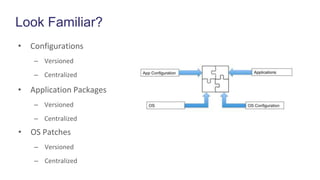
Look Familiar?
• Configurations
– Versioned
– Centralized
• Application Packages
– Versioned
– Centralized
• OS Patches
– Versioned
– Centralized
What’s missing?
• Unified management
• Visibility
• Security and Compliance
• Heterogeneous Environments
Puppet Enterprise Ties it all Together
Convergence of Functionality
• Infrastructure and Applications look like OS Patching
• WSUS client
– Query Windows Update service for new packages on a schedule
– Apply new updates when available
• Puppet agent
– Query puppet master for new configuration on a schedule
• New versions of application packages
– Apply new configuration when available
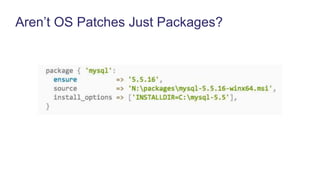
Aren’t OS Patches Just Packages?
Use the Right Tool for the Job
• Using package management is not a replacement for
Windows OS patch management
– Reinventing the wheel
– Increased burden on Operations personnel
• Manage OS patches individually
• Maintain Puppet code to manage OS patches individually
Rich Ecosystem of Windows Resources
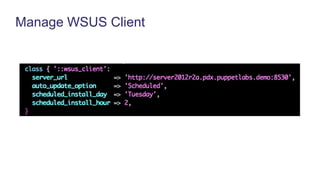
• WSUS Client Module
– Manage configuration of Windows Updates
• Chocolatey
– Manage application updates
• Desired State Configuration (DSC)
– Manage Windows State
• PowerShell support
– Automate arbitrary configuration requirements
Manage WSUS Client
The Puppet Approach
• Define OS update policies in Puppet code
• Manage OS patch policy as part of overall system
– Application versions
– System, application configuration
• Native Puppet Types
• DSC
• Continually enforce state of OS patching policy
• Report on changes to update policies
Puppet Enterprise allows you to more
effectively use proven Microsoft technologies
to integrate OS patch management into a more
unified approach to platform management.
DEMO
Puppet Labs Windows Support
• 32- & 64-bit Support – Native MSI packages for x64 as of Puppet
Enterprise 3.7
• Broad Platform Support - Windows 2008, 2012, 7, 8
• Windows Provisioning - Provision Windows OSes with Razor
• Puppet Supported & Approved Modules for Windows – Including
Windows Module Pack, Supported SQL Sever & DSC modules
• Azure Integration – Microsoft Azure extension handler for
bootstrapping Puppet installs. Supported Azure module.
Puppet Supported Modules
• SQL Server – Installs & manages MS SQL Server 2012 & 2014 on
Windows systems
• WSUS Client – Configure clients to point to update servers; schedule
updates
• DSC – Manages PowerShell DSC resources
• Azure – Provision and manage Azure VMs
• ACL – manage permissions with Windows ACLs
• Registry – manage Registry keys and values
• PowerShell – execute PowerShell commands with Puppet
• Reboot – Automatically reboot after install
Puppet Approved Modules
• IIS – install and manage IIS
• Chocolatey – package manager
• windows_env – manage Windows environment variables
• Windows Java – Install and manage Oracle Java on Windows
• pget – PowerShell alternative to wget or curl
Windows Webinar Series
Register for upcoming webinars at: http://info.puppetlabs.com/1885-
Windows-Series-Main_LP-Registration.html
• Deploying IIS and ASP.NET with Puppet
• Package Management on Windows with Chocolatey
• Managing PowerShell DSC with Puppet
• Patch Management on Windows with Puppet
• Setting up Windows for System and Application Monitoring
• Getting Up and Running with the Windows Module Pack
• Get Started on Azure with Puppet
Questions &
Answers
Resources
PuppetConf 2015 Windows Track
• Chocolatey and Puppet - Rob Reynolds
• Azure for the Non-Microsoft Person - Rob Reynolds & Scott Hanselman, MSFT
• Better Together: Managing Windows with Puppet and DSC - Ethan Brown & Bruce Payette,
MSFT
• Beyond the Registry - Matthew Stone, T-Mobile
• The Wild World of Windows: Developing for Puppet on Windows - Travis Fields, Nike
Blog
• Chocolatey blog series
• PowerShell DSC blog series
Docs
• Managing Windows Configurations
Education
• Learning VM
• Puppet Essentials for Windows – Instructor-led
• Puppet Essentials for Windows - Virtual
Manage System State with DSC
Manage Packages with Chocolatey
Manage Configuration with PowerShell
Bringing it all Together
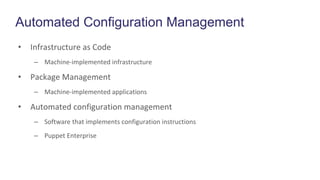
Automated Configuration Management
• Infrastructure as Code
– Machine-implemented infrastructure
• Package Management
– Machine-implemented applications
• Automated configuration management
– Software that implements configuration instructions
– Puppet Enterprise

Patch Management on Windows with Puppet

  • 1.
    Windows Patch Management WithPuppet Enterprise Greg Sarjeant Manager of Professional Services Kenaz Kwa Senior Engineering Product Manager
  • 2.
    Agenda • How PuppetEnterprise works • What is Patch Management? • The Puppet Approach • Demo • Puppet Labs Windows support • Resources • Q&A
  • 3.
    Our software automates theprovisioning, configuration & ongoing management of your machines & the applications, services & software running on them.
  • 4.
  • 5.
  • 6.
    What is PatchManagement? And what is it becoming?
  • 7.
    What is PatchManagement? • Traditional Model Application s OS OS Updates
  • 8.
    Windows Server PatchManagement Today • Patches stored in a central repository – Windows Update (Internet) – Internally hosted • Distributed to end user systems on a schedule • Microsoft Technologies – Windows Server Update Services (WSUS) – System Center Configuration Manager (SCCM) – Extensive research and experience
  • 9.
    Windows Server UpdateServices (WSUS) • Updates distributed via Microsoft Update • WSUS Server stages updates • Updates pulled by clients – Similar to Automatic Updates on desktops
  • 10.
    System Center ConfigurationManager (SCCM) • Integrates with WSUS for software updates • Wizard-driven configuration – Deployment targets – Update Rules • Manages WSUS client behind the scenes. Can initiate WSUS runs
  • 11.
    Traditional View: OSas Platform Application s OS
  • 12.
    Can we alleviatethis tension?
  • 13.
    A Different ConceptualModel OS Applications • OS, applications are interdependent • Work together towards a common end
  • 14.
    Extend the PatchConcept OS Updates Application Updates
  • 15.
    Application Update Challenges •Inconsistent formats – .zip, .exe, .msi • No central location • No unified delivery mechanism
  • 16.
    Package Management • PackageManagement – Centralized distribution of packages from curated repositories – Package: Atomic bundle to deliver software • Versioned • Metadata (dependencies) • Allow scripts – Create repositories of packages – Machine-implemented
  • 17.
    Chocolatey • Package Managementfor Windows • Common format for software delivery – Versioned – Metadata (dependencies) – Allow scripts • Defines repositories – Public, internet-hosted – Private, internal
  • 18.
  • 19.
    But wait, there’smore OS ApplicationsApp Configuration OS Configuration
  • 20.
    How do wepatch configuration?
  • 21.
    Configuration Patch Requirements •Versioned • Coupled to OS, App versions • Machine-driven delivery mechanism
  • 22.
  • 23.
    Enabling Technologies • Infrastructureas Code • Package Management
  • 24.
    Puppet: Infrastructure asCode • System state defined in software – Stored in Version Control System (VCS) • Microsoft Team Foundation Server (TFC), Git • Centralized location – Versionable • Commit hash – Dependency resolution • System state implemented by machine – Puppet agent
  • 25.
  • 26.
  • 27.
    Desired State Configuration(DSC) • Windows PowerShell Desired State Configuration • Microsoft Implementation of Infrastructure as Code • Native support for many core types – Users, Files, Registry settings, etc. • Active development of extensions • Integration with Puppet
  • 28.
    Look Familiar? • Configurations –Versioned – Centralized • Application Packages – Versioned – Centralized • OS Patches – Versioned – Centralized
  • 29.
    What’s missing? • Unifiedmanagement • Visibility • Security and Compliance • Heterogeneous Environments
  • 30.
    Puppet Enterprise Tiesit all Together
  • 31.
    Convergence of Functionality •Infrastructure and Applications look like OS Patching • WSUS client – Query Windows Update service for new packages on a schedule – Apply new updates when available • Puppet agent – Query puppet master for new configuration on a schedule • New versions of application packages – Apply new configuration when available
  • 32.
    Aren’t OS PatchesJust Packages?
  • 33.
    Use the RightTool for the Job • Using package management is not a replacement for Windows OS patch management – Reinventing the wheel – Increased burden on Operations personnel • Manage OS patches individually • Maintain Puppet code to manage OS patches individually
  • 34.
    Rich Ecosystem ofWindows Resources • WSUS Client Module – Manage configuration of Windows Updates • Chocolatey – Manage application updates • Desired State Configuration (DSC) – Manage Windows State • PowerShell support – Automate arbitrary configuration requirements
  • 35.
  • 36.
    The Puppet Approach •Define OS update policies in Puppet code • Manage OS patch policy as part of overall system – Application versions – System, application configuration • Native Puppet Types • DSC • Continually enforce state of OS patching policy • Report on changes to update policies
  • 37.
    Puppet Enterprise allowsyou to more effectively use proven Microsoft technologies to integrate OS patch management into a more unified approach to platform management.
  • 38.
  • 39.
    Puppet Labs WindowsSupport • 32- & 64-bit Support – Native MSI packages for x64 as of Puppet Enterprise 3.7 • Broad Platform Support - Windows 2008, 2012, 7, 8 • Windows Provisioning - Provision Windows OSes with Razor • Puppet Supported & Approved Modules for Windows – Including Windows Module Pack, Supported SQL Sever & DSC modules • Azure Integration – Microsoft Azure extension handler for bootstrapping Puppet installs. Supported Azure module.
  • 40.
    Puppet Supported Modules •SQL Server – Installs & manages MS SQL Server 2012 & 2014 on Windows systems • WSUS Client – Configure clients to point to update servers; schedule updates • DSC – Manages PowerShell DSC resources • Azure – Provision and manage Azure VMs • ACL – manage permissions with Windows ACLs • Registry – manage Registry keys and values • PowerShell – execute PowerShell commands with Puppet • Reboot – Automatically reboot after install
  • 41.
    Puppet Approved Modules •IIS – install and manage IIS • Chocolatey – package manager • windows_env – manage Windows environment variables • Windows Java – Install and manage Oracle Java on Windows • pget – PowerShell alternative to wget or curl
  • 42.
    Windows Webinar Series Registerfor upcoming webinars at: http://info.puppetlabs.com/1885- Windows-Series-Main_LP-Registration.html • Deploying IIS and ASP.NET with Puppet • Package Management on Windows with Chocolatey • Managing PowerShell DSC with Puppet • Patch Management on Windows with Puppet • Setting up Windows for System and Application Monitoring • Getting Up and Running with the Windows Module Pack • Get Started on Azure with Puppet
  • 43.
  • 44.
    Resources PuppetConf 2015 WindowsTrack • Chocolatey and Puppet - Rob Reynolds • Azure for the Non-Microsoft Person - Rob Reynolds & Scott Hanselman, MSFT • Better Together: Managing Windows with Puppet and DSC - Ethan Brown & Bruce Payette, MSFT • Beyond the Registry - Matthew Stone, T-Mobile • The Wild World of Windows: Developing for Puppet on Windows - Travis Fields, Nike Blog • Chocolatey blog series • PowerShell DSC blog series Docs • Managing Windows Configurations Education • Learning VM • Puppet Essentials for Windows – Instructor-led • Puppet Essentials for Windows - Virtual
  • 45.
  • 46.
  • 47.
  • 48.
  • 50.
    Automated Configuration Management •Infrastructure as Code – Machine-implemented infrastructure • Package Management – Machine-implemented applications • Automated configuration management – Software that implements configuration instructions – Puppet Enterprise