Policy in Practice
Webinar:
Introducing UBBC 3.0
Wednesday 15 March 2016
Housekeeping
• Audio check
• Please ask questions
• Polls and a survey
• Finish by 11:30
Speakers
Deven Ghelani
Policy in Practice
Zoe Charlesworth
Policy in Practice
Leonardo Kellaway
Policy in Practice
444
Over to Deven
Agenda
• Brief introduction to Policy in Practice
• The need for a benefit calculator
• Evolution of our software
• What’s new
• Let’s look at 3 cases
• Questions and answers
• Next steps
We make the welfare system
simple to understand, so that
people can make the decisions
that are right for them
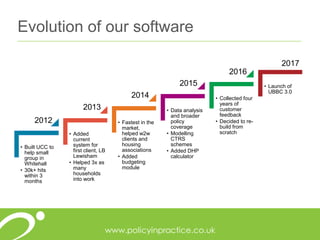
Evolution of our software
• Built UCC to
help small
group in
Whitehall
• 30k+ hits
within 3
months
• Added
current
system for
first client, LB
Lewisham
• Helped 3x as
many
households
into work
• Fastest in the
market,
helped w2w
clients and
housing
associations
• Added
budgeting
module
• Data analysis
and broader
policy
coverage
• Modelling
CTRS
schemes
• Added DHP
calculator
• Collected four
years of
customer
feedback
• Decided to re-
build from
scratch
• Launch of
UBBC 3.0
2012
2013
2014
2015
2016
2017
Background: why the upgrade?
• The welfare system is as complex as ever, and changing all of the time
• Broader than the current system, or UC - discretionary support, free school meals,
support for disabled people – desire to be comprehensive
• Flexibility for users, employment advisors and welfare rights experts across a range of
sectors (back to work, housing providers, local government)
• Greater demand for guidance, in addition to job search and links to local support
• Link into to our analytical tools, helping local authorities and others to target support to
individual households.
• Future proof the infrastructure and the UI for new integrations and modules
• A modern intuitive user experience
Search is only 5% solved – why stop now?
Larry Page and Sergey Brin, Google
101010
Poll 1: What are the most important
uses of a calculator for your
organisation?
111111
Powerful software
Helping people make decisions that are right for
them
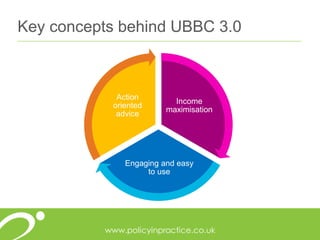
Key concepts behind UBBC 3.0
Income
maximisation
Engaging and easy
to use
Action
oriented
advice
How these concepts are supported
Incomemaximisation
Accurate calculation
of benefit income
Individual actions for
maximising income
Budgeting that
shows where you
can make savings
Quick links to
benefit application
and job search
Engagingand
easytouse
Visual charts and
engaging User
interface
Compare different
scenarios side by
side
Benefit breakdown
for advocacy
Customised for
organisations and
advisors
Actionoriented
advice
Personalised action
list for user and
adviser
Better off calculation
linked to job search
Budgeting that
shows how to
reduce cost
Identify barriers and
sources of support
Calendar for UC
payments
Meeting the needs of your organisation
Better engagement between organisation and customers
Improve the situation of your customers
Decrease rent arrears
Increase income / revenue
Optimise staff time
Income maximisation
Engaging and
easy to use
Action oriented
advice
Meeting the needs of your clients
of tenants
require no
support
30% of clients
require some
support
50% of clients
require a lot
of support
(and take up
80% of staff
time)
20%
Source: Curo Group, 2017
16
Over to Leonardo
171717
Let’s look at some cases
Case 1: Abby
Abby is an unemployed single parent
who is considering returning to work
but concerned about childcare costs.
Will Abby be better off in work?
Case 2: Belinda and Carl
Belinda and Carl are a couple with 2
young children currently living with
their family. They want to move to their
own property but are not sure if they
can afford it.
What rent can Belinda and Carl afford?
Case 3: Deborah
Deborah is a single parent with 3
children. Another older child, and their
partner, also live at home. She has
moved to Universal Credit and doesn’t
understand why her household’s
income has reduced.
Why has Deborah’s household income
reduced?
How can she improve her situation?
Deborah
This is a more complex case and illustrates:
• How the calculator can be used to examine benefit levels in complex cases
• How the calculator supports the role of organisations in benefit support and
advocacy.
• This is of particular importance given the increasing amount of time that
organisations need to spend on this role under Universal Credit.
New features
• New features to meet the core roles of income maximisation, support and
engagement:
• Actions
• Barriers and support
• Budgeting calendar
• Prints
Clear, actionable print layouts
Select your scenario
Show current system or UC
Show information for advisor or user
Select print, email or download
• Assessment
• Detailed breakdown
• Actions
• Benefit actions and information
• Budget actions
• Support action
• Calendar
www.policyinpractice.co.uk
292929
Poll 2: From a management
perspective what are the most useful
features of the software?
303030
“Any software is only as good as its
implementation and the support we’ve had from
the team to bed in the new service has been a
massive benefit to us.”
Jemma Johnstone, Serco
3131
“Our tenants are facing increased pressure on
their budgets as a result of welfare reforms. This is
one of the key reasons why we chose Policy in
Practice's Universal Benefit and Budgeting
Calculator software. It allows us to provide better
income and budgeting support to our tenants.”
Linda Tookey, First Wessex Housing Association
32
Questions
www.policyinpractice.co.uk
Thank you
Zoe Charlesworth
zoe@policyinpractice.co.uk
Leonardo Kellaway
leonardo@policyinpractice.co.uk
0330 088 9242
hello@policyinpractice.co.uk

Webinar: Introducing UBBC 3.0

  • 1.
    Policy in Practice Webinar: IntroducingUBBC 3.0 Wednesday 15 March 2016
  • 2.
    Housekeeping • Audio check •Please ask questions • Polls and a survey • Finish by 11:30
  • 3.
    Speakers Deven Ghelani Policy inPractice Zoe Charlesworth Policy in Practice Leonardo Kellaway Policy in Practice
  • 4.
  • 5.
    Agenda • Brief introductionto Policy in Practice • The need for a benefit calculator • Evolution of our software • What’s new • Let’s look at 3 cases • Questions and answers • Next steps
  • 6.
    We make thewelfare system simple to understand, so that people can make the decisions that are right for them
  • 7.
    Evolution of oursoftware • Built UCC to help small group in Whitehall • 30k+ hits within 3 months • Added current system for first client, LB Lewisham • Helped 3x as many households into work • Fastest in the market, helped w2w clients and housing associations • Added budgeting module • Data analysis and broader policy coverage • Modelling CTRS schemes • Added DHP calculator • Collected four years of customer feedback • Decided to re- build from scratch • Launch of UBBC 3.0 2012 2013 2014 2015 2016 2017
  • 9.
    Background: why theupgrade? • The welfare system is as complex as ever, and changing all of the time • Broader than the current system, or UC - discretionary support, free school meals, support for disabled people – desire to be comprehensive • Flexibility for users, employment advisors and welfare rights experts across a range of sectors (back to work, housing providers, local government) • Greater demand for guidance, in addition to job search and links to local support • Link into to our analytical tools, helping local authorities and others to target support to individual households. • Future proof the infrastructure and the UI for new integrations and modules • A modern intuitive user experience Search is only 5% solved – why stop now? Larry Page and Sergey Brin, Google
  • 10.
    101010 Poll 1: Whatare the most important uses of a calculator for your organisation?
  • 11.
    111111 Powerful software Helping peoplemake decisions that are right for them
  • 12.
    Key concepts behindUBBC 3.0 Income maximisation Engaging and easy to use Action oriented advice
  • 13.
    How these conceptsare supported Incomemaximisation Accurate calculation of benefit income Individual actions for maximising income Budgeting that shows where you can make savings Quick links to benefit application and job search Engagingand easytouse Visual charts and engaging User interface Compare different scenarios side by side Benefit breakdown for advocacy Customised for organisations and advisors Actionoriented advice Personalised action list for user and adviser Better off calculation linked to job search Budgeting that shows how to reduce cost Identify barriers and sources of support Calendar for UC payments
  • 14.
    Meeting the needsof your organisation Better engagement between organisation and customers Improve the situation of your customers Decrease rent arrears Increase income / revenue Optimise staff time Income maximisation Engaging and easy to use Action oriented advice
  • 15.
    Meeting the needsof your clients of tenants require no support 30% of clients require some support 50% of clients require a lot of support (and take up 80% of staff time) 20% Source: Curo Group, 2017
  • 16.
  • 17.
  • 18.
    Case 1: Abby Abbyis an unemployed single parent who is considering returning to work but concerned about childcare costs. Will Abby be better off in work?
  • 19.
    Case 2: Belindaand Carl Belinda and Carl are a couple with 2 young children currently living with their family. They want to move to their own property but are not sure if they can afford it. What rent can Belinda and Carl afford?
  • 20.
    Case 3: Deborah Deborahis a single parent with 3 children. Another older child, and their partner, also live at home. She has moved to Universal Credit and doesn’t understand why her household’s income has reduced. Why has Deborah’s household income reduced? How can she improve her situation?
  • 21.
    Deborah This is amore complex case and illustrates: • How the calculator can be used to examine benefit levels in complex cases • How the calculator supports the role of organisations in benefit support and advocacy. • This is of particular importance given the increasing amount of time that organisations need to spend on this role under Universal Credit.
  • 22.
    New features • Newfeatures to meet the core roles of income maximisation, support and engagement: • Actions • Barriers and support • Budgeting calendar • Prints
  • 27.
    Clear, actionable printlayouts Select your scenario Show current system or UC Show information for advisor or user Select print, email or download • Assessment • Detailed breakdown • Actions • Benefit actions and information • Budget actions • Support action • Calendar
  • 28.
  • 29.
    292929 Poll 2: Froma management perspective what are the most useful features of the software?
  • 30.
    303030 “Any software isonly as good as its implementation and the support we’ve had from the team to bed in the new service has been a massive benefit to us.” Jemma Johnstone, Serco
  • 31.
    3131 “Our tenants arefacing increased pressure on their budgets as a result of welfare reforms. This is one of the key reasons why we chose Policy in Practice's Universal Benefit and Budgeting Calculator software. It allows us to provide better income and budgeting support to our tenants.” Linda Tookey, First Wessex Housing Association
  • 32.
  • 33.
    www.policyinpractice.co.uk Thank you Zoe Charlesworth zoe@policyinpractice.co.uk LeonardoKellaway leonardo@policyinpractice.co.uk 0330 088 9242 hello@policyinpractice.co.uk

Editor's Notes

  • #3 [Are we using polls?]
  • #7 I founded Policy in Practice back in 2012 to help people to make the decisions that were right for them. The biggest challenge in policy is not legislation or implementation, it is how policy is communicated and understood. We model the policies of four different government departments combined, over 9,000 equations to show how policy affects the individual.
  • #10 NB. Merge with slide 13 as appropriate
  • #11 Poll 1: What are the most important uses of a calculator for your organisation? 1. Assisting claimant transfer to UC 2. Helping people in to work 3. Carrying out a pre-tenancy check 4. Improve customer’s circumstances 5. Helping advisers to engage with customers
  • #15 Better engagement between organisation and customers Improve the situation of your customers Decrease rent arrears Increase income / revenue Optimise staff time
  • #16 30% = self serve / guidance 50% = information and advice 20% = support and advocacy
  • #19 To show speed of a simple calculation To show scenarios to assist decision-making To show slider Illustrates use to organisations for getting people back to work Case: Single parent with 3 children. Youngest is now 4 so she is looking at returning to work. In addition to the free childcare available for her 4 year old she will need wrap around care for the children. She is concerned that it will not be worthwhile returning to work. Data input: DOB 1980 Children 2008, 2009, 2012 Private rent, 3 beds, £400/month Scenario 1: no income Scenario 2: Childcare £300/month. Job £15,000 30 hours [5 mins]
  • #20 To show: Use to lettings Budgeting – cover selection of databases Scenarios Surplus/deficit Useful to organisations for sustainable lettings Case: Couple with 2 infants (boy and girl) currently living with family are wondering whether they could afford to live in their own place. Offered a HA tenancy but not sure if it will leave them with enough after rent and housing costs. He is disabled and she is his carer. DOB 1980, 1980 Children DOB: 2017, 2016 User: Carers Allowance Partner: ESA support/ DLA care middle Scenario 1: no housing costs Scenario 2: housing costs: 2 bed social rent, CT, Postcode(?), electricity, water rates, insurance Scenario 3: Scenario 4: offer same number beds in different locations [10 mins]
  • #21 To show: More complex case Use in support and advocacy Discussion of actions and barriers Using scenarios to change benefits to maximise income The case: Single parent with 3 children and older child and their partner living in her home. She has moved to UC and doesn’t understand why her income has reduced. She works part time in a self-employed capacity. DOB 1978 Child DOB 2001/2002/2003 Non-deps DOB: 1995 – 1. earning £150/week. 2. earnings £120/week Earnings: self-employed working 20 hours week for £100/month Rent £400/month social housing 4 bed 1st scenario: explain difference between current v UC showing MIF and non-dep changes Discussion indicates that she is also caring for her parents who live near by for more than 35 hours/week. Her father receives DLA at the middle rate Scenario 2: input CA. Show that if she claims CA her MIF will reduce and she can still carry on being self-employed for up to 16 hours/week. Result: Printout to show non-deps their expected contribution Information on how to apply for CA Actions agreed by adviser and user around claiming CA, updating her journal, talking with non-deps and arranging greater contributions. Further meeting planned to check on actions and arrange arrears repayments. [15 mins]
  • #22 To show: More complex case Discuss actions and barriers Using scenarios to change benefits to maximise income
  • #23 To show: More complex case Discuss actions and barriers Using scenarios to change benefits to maximise income
  • #30 Poll 2: From a management perspective what are the most useful features of the software? Ability to record and monitor customer’s outcomes Management info to prove ROI and staff efficiency Ability to save staff time Maximising organisation revenue by helping customers make decisions Providing debt and budgeting services in same conversation
  • #33 Q: How long would a typical case take to assess? Q: How long does it take to get started with this software? Q: What customisations can you do for me? Q: What training and support do you give for clients? Account management story: training (webinars, Olark) / on boarding / roll out / usage monitoring