Program 1
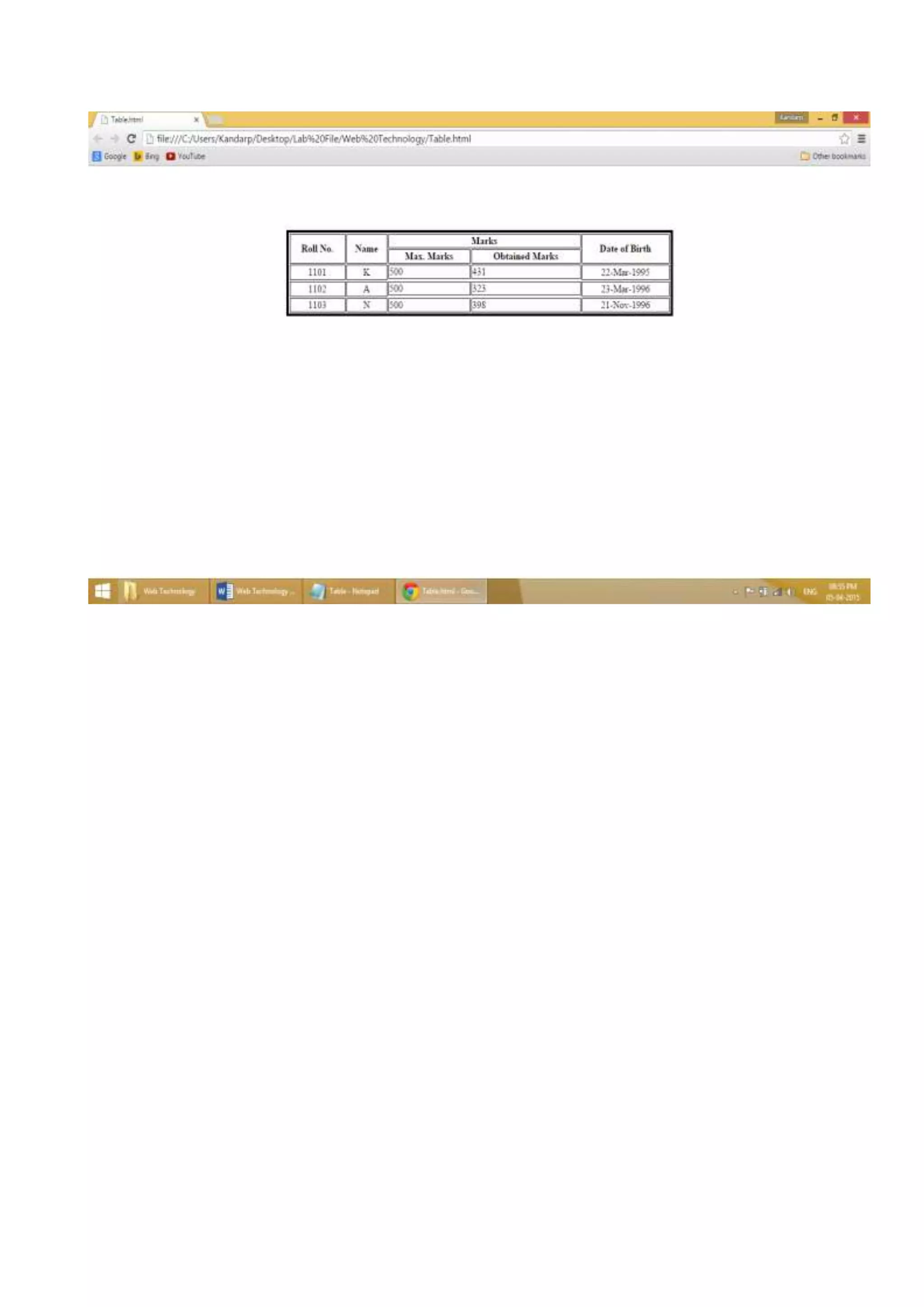
Create a table to implement with rowspan and columnspan.
<HTML>
<BODY>
<Table border="4" bordercolor="Black" bgcolor="lavender" width="45%" align="center">
<tr>
<TH align="center" rowspan="2">Roll No.</th>
<TH align="center" rowspan="2">Name</th>
<TH align="center" colspan="2">Marks</th>
<TH align="center" rowspan="2">Date of Birth</th>
</tr>
<tr>
<th>Max. Marks</th>
<th>Obtained Marks</th>
</tr>
<tr>
<Td align="center" rowspan="2">1101</td>
<Td align="center" rowspan="2">K</td>
<td>500</td>
<td>431</td>
<Td align="center" rowspan="2">22-Mar-1995</td>
</tr>
<tr>
<tr>
<Td align="center" rowspan="2">1102</td>
<Td align="center" rowspan="2">A</td>
<td>500</td>
<td>323</td>
<Td align="center" rowspan="2">23-Mar-1996</td>
</tr>
</tr>
<tr>
<tr>
<Td align="center" rowspan="2">1103</td>
<Td align="center" rowspan="2">N</td>
<td>500</td>
<td>398</td>
<Td align="center" rowspan="2">21-Nov-1996</td>
</tr>
</tr>
</table>
</body>
</html>
Program 2
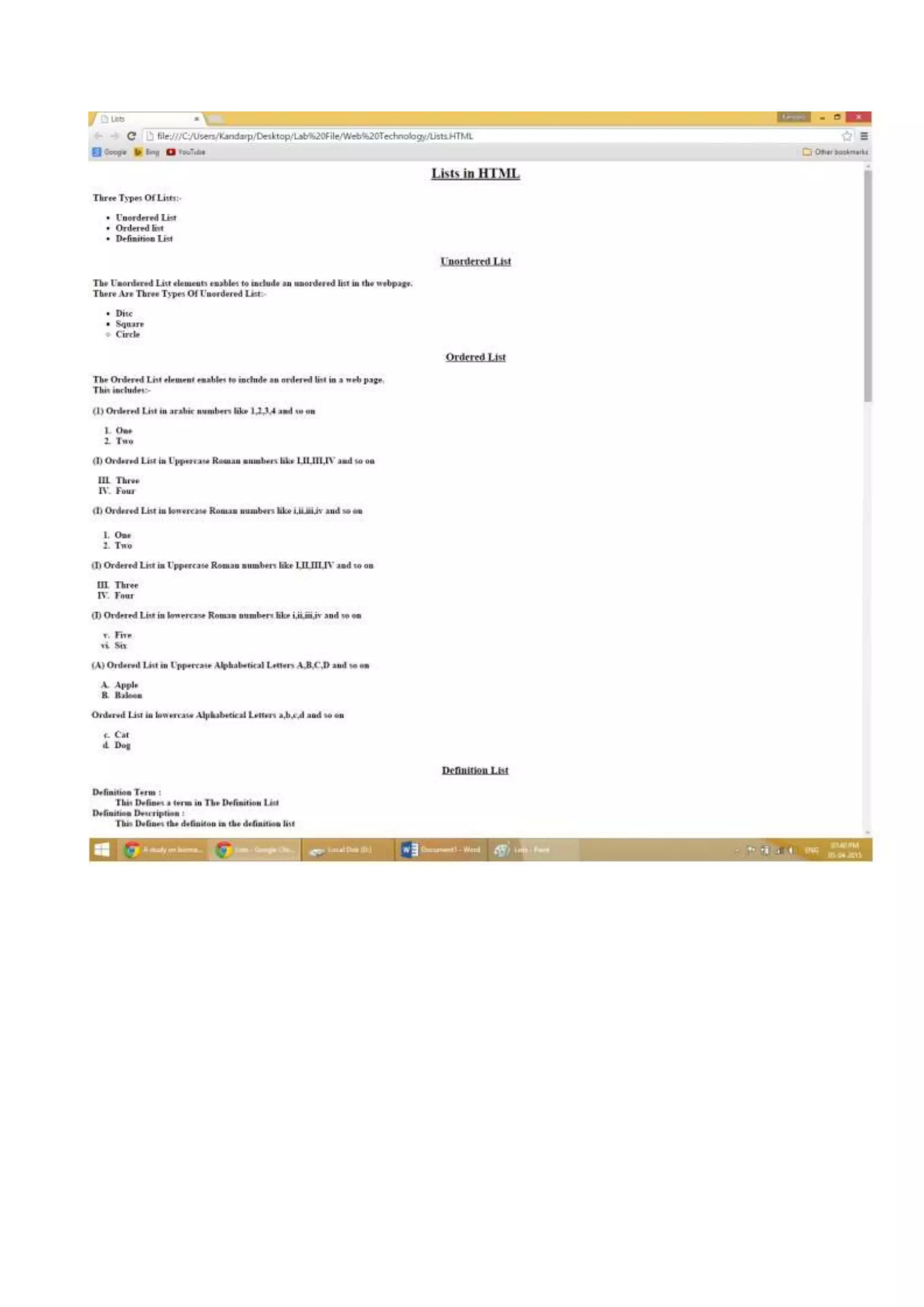
Implement all types of list.
<HTML>
<HEAD>
<TITLE>Lists</TITLE>
</head>
<body>
<H2 align="center"><U>Lists in HTML</U></h2>
<b>
Three Types of Lists:-
<ul>
<LI>Unordered List
<LI>Ordered list
<LI>Definition List
</ul>
<H3 align="center"><U>Unordered List</U></H3>
The Unordered List elements enables to include an unordered list in the webpage.
<br>
There Are Three Types of Unordered List:-
<UL>
<li type="disc">Disc
<li type="square">Square
<li type="Circle">Circle
</UL>
<H3 align="center"><U>Ordered List</U></H3>
The Ordered List element enables to include an ordered list in a web page.
<br>This includes:-
<br><br>
(1) Ordered List in Arabic numbers like 1,2,3,4 and so on
<OL>
<LI>One
<LI>Two
</Ol>
(I) Ordered List in Uppercase Roman numbers like I, II, III, IV and so on
<OL type="I" Start="3">
<LI>Three
<LI>Four
</OL>
(I) Ordered List in lowercase Roman numbers like i, ii, iii, iv and so on
<OL type="i" Start="5">
<LI>Five
<LI>Six
</OL>
(A) Ordered List in Uppercase Alphabetical Letters A, B, C, D and so on
<OL type="A">
<LI>Apple
<LI>Balloon
</OL>
Ordered List in lowercase Alphabetical Letters a, b, c, d and so on
<OL type="a" Start="3">
<LI>Cat
<LI>Dog
</OL>
<H3 align="center"><U>Definition List</U></H3>
<DL>
<DT><B>Definition Term :< /B>
<DD>This Defines a term in The Definition List
<DT><B>Definition Description :< /B>
<DD>This Defines the definition in the definition list
</DL>
</b>
</body>
</html>
Program 3
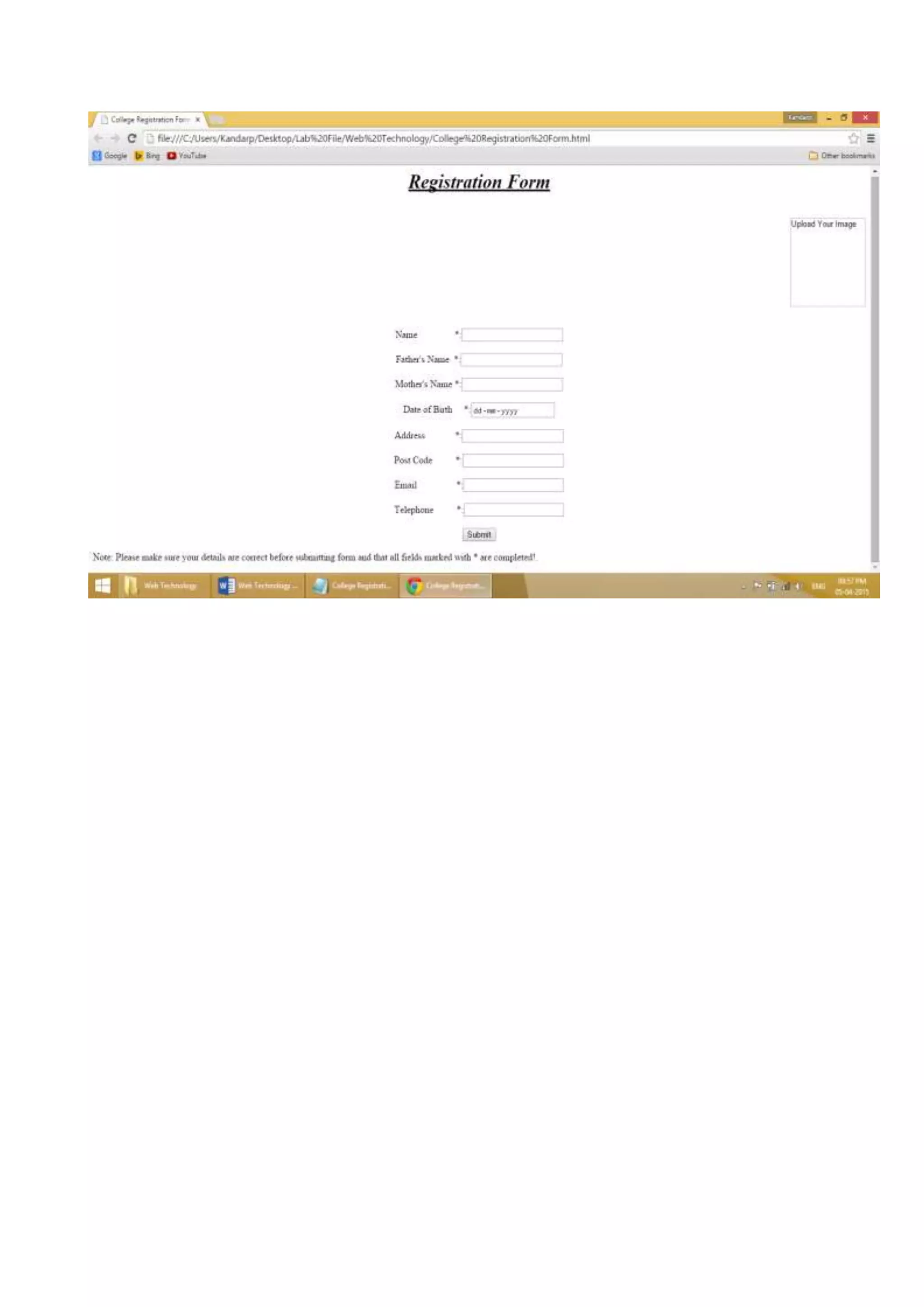
Create a college registration form.
<html>
<head><title>College Registration Form</title>
</head>
<body>
<h1 align="center"><u><i>Registration Form</i></u></h1>
<br>
<form action="" method="post" enctype="multipart/form-data">
<div align="right">
<input type="image" height="140" width="130" alt="Upload Your Image"
align="center">
</div>
</form>
<form tag="Create Logon">
<div align="center">
<br>
</b>
Name
&nbsp;&nbsp;&nbsp;&nbsp;&nbsp;&nbsp;&nbsp;&nbsp;&nbsp;&nbsp;&nbsp;&nbsp;&n
bsp;&nbsp;&nbsp;*:<input type="username" name="username" /><br><br>
Father's Name&nbsp; &nbsp;*:< input type="username" name="username" /><br><br>
Mother's Name *:<input type="username" name="username" /><br><br>
Date of Birth &nbsp;&nbsp;&nbsp;&nbsp;*:<input type="date" name="dob" /><br><br>
Address
&nbsp;&nbsp;&nbsp;&nbsp;&nbsp;&nbsp;&nbsp;&nbsp;&nbsp;&nbsp;&nbsp;&nbsp;*:<i
nput type="address" name="add" /><br><br>
Post Code &nbsp;&nbsp;&nbsp;&nbsp;&nbsp;&nbsp;&nbsp;&nbsp;&nbsp;*:<input
type="postcode" name="ptc" /><br><br>
Email
&nbsp;&nbsp;&nbsp;&nbsp;&nbsp;&nbsp;&nbsp;&nbsp;&nbsp;&nbsp;&nbsp;&nbsp;&n
bsp;&nbsp;&nbsp;&nbsp;*:<input type="email" name="email" /><br><br>
Telephone &nbsp;&nbsp;&nbsp;&nbsp;&nbsp;&nbsp;&nbsp;&nbsp;&nbsp;*:<input
type="tel" name="telephone" /><br><br>
<input type="submit" value="Submit" /><br>
</div>
</b>
</form>
<p>Note: Please make sure your details are correct before submitting form and that all
fields marked with * are completed! </p>
</body>
</html>
Program 4
Create 4 frames in a page & display 4 images in those frames.
<HTML>
<Head>
<Title>Framed Images</Title>
<Frameset rows="25%, 75%">
<Frame src="IEC 1.jpg" Scrolling="Auto">
<Frameset cols="100%,100%">
<Frame src="IEC 2.jpg" Scrolling="Auto">
<Frameset rows="100%,100%">
<Frame src="IEC 3.jpg" Scrolling="Auto">
<Frameset cols="100%,">
<Frame src="IEC 4.jpg" Scrolling="Auto">
</Frameset>
</Frameset>
</Frameset>
</Frameset>
</head>
</HTML>
Program 5
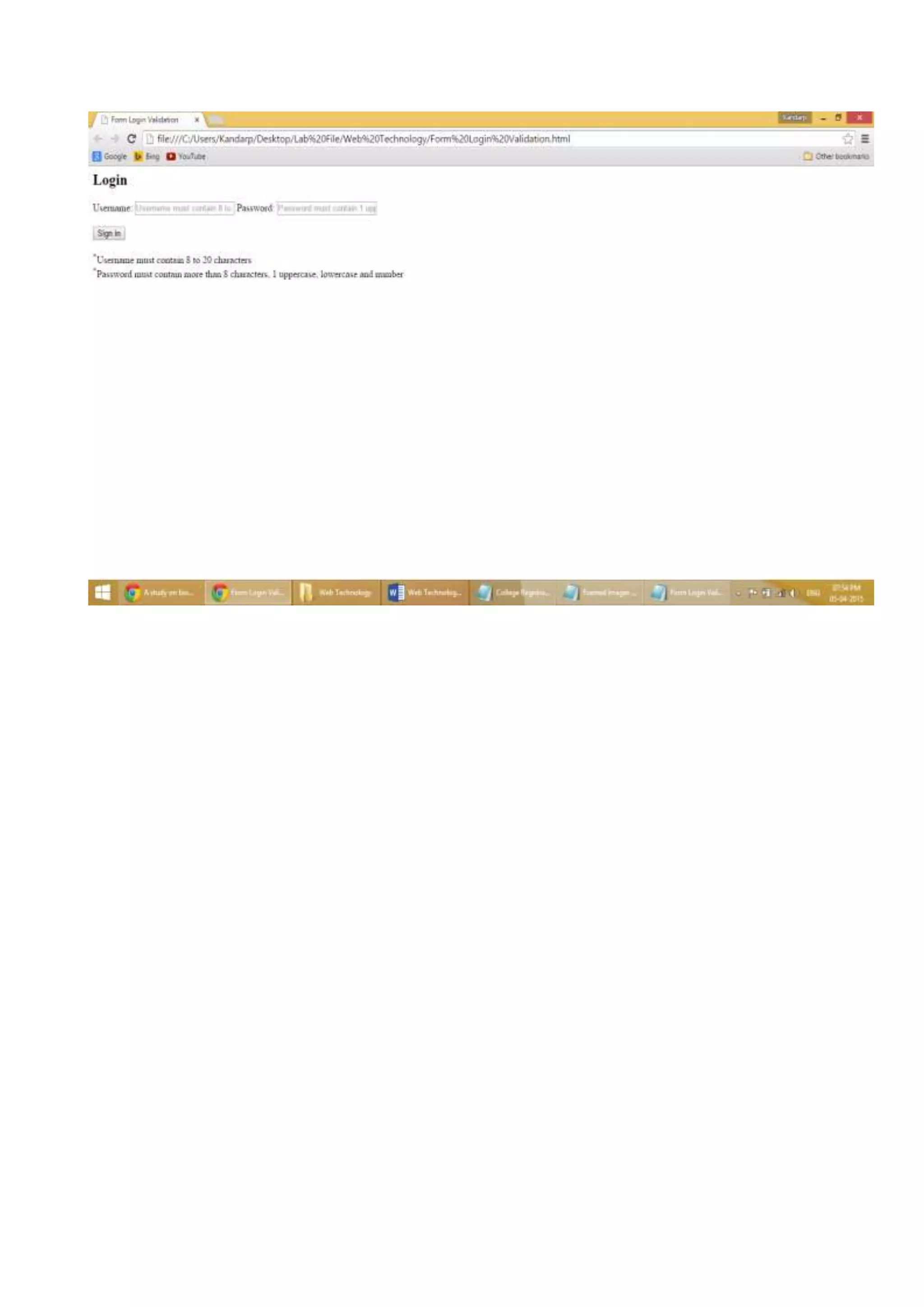
Create login page with validation.
<html>
<head>
<title>Form Login Validation
</title>
</head>
<body>
<h2>Login</h2>
<form method="post">
<label for="username">
Username:
<input type="text" name="Username" placeholder="Username must contain 8 to 20
characters"
pattern="^[a-zA-Z][a-zA-Z0-9-_.]{7,19}$" required="REQUIRED" />
</label>
<label for="password">
Password:
<input type="password" name="password" id="password" placeholder="Password must
contain 1 uppercase, lowercase and number and more than 8 characters"
pattern="(?=^.{8,}$)((?=.*d)|(?=.*W+))(?![.n])(?=.*[A-Z])(?=.*[a-z]).*$"
required="required" />
</label>
<br><br>
<Button type="submit">Sign in</button>
<br>
<br>
<sup>*</sup>Username must contain 8 to 20 characters
<br>
<sup>*</sup>Password must contain more than 8 characters, 1 uppercase, lowercase and
number
</form>
</body>
</html>
Program 6
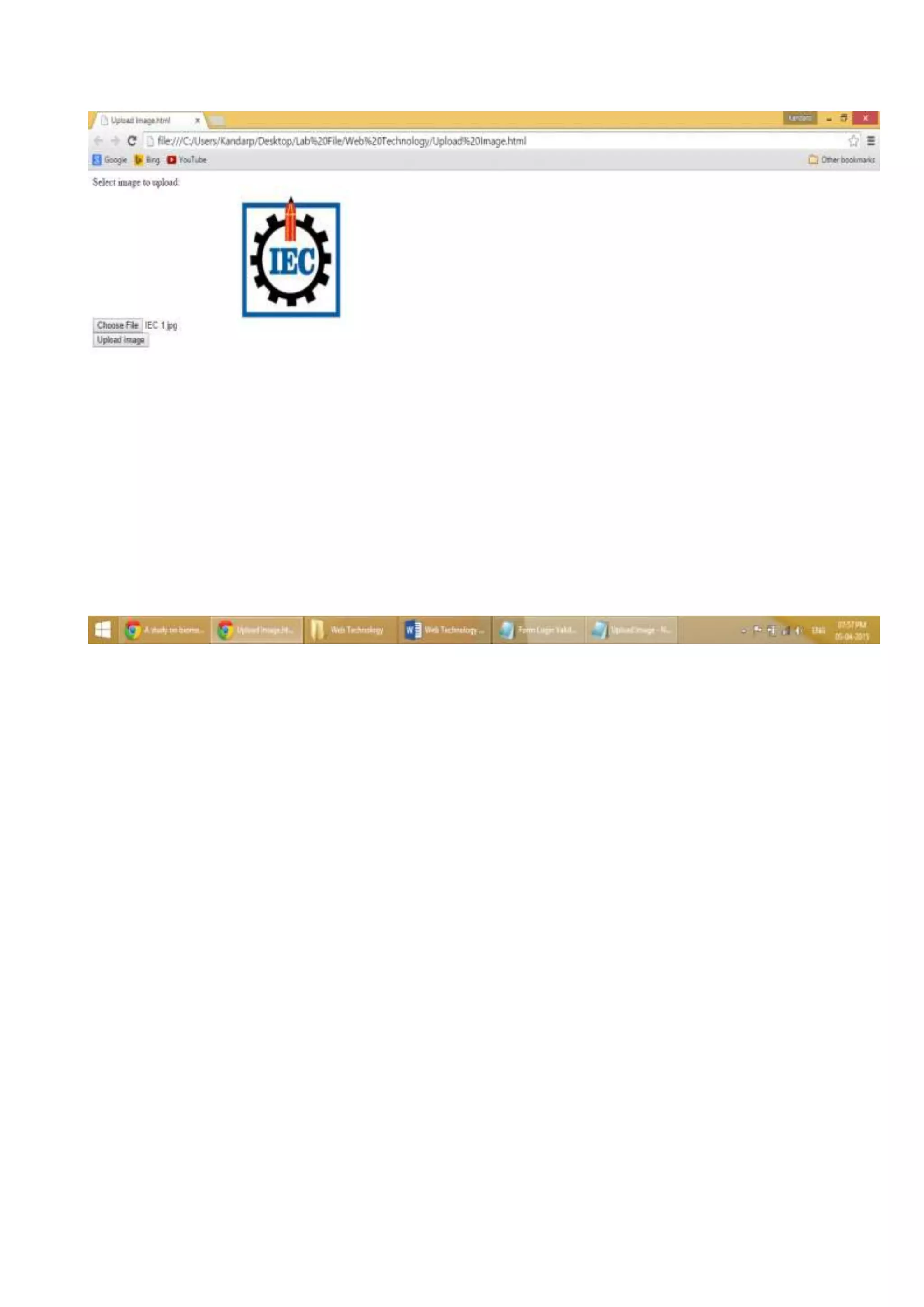
Implement and load image in an html page.
<html>
<body>
<form action="" method="post" enctype="multipart/form-data">
Select image to upload:
<div class="info">
<input type="file" id="files" />
<output id="list"></output>
<script>
function handleFileSelect(evt)
{
var files = evt.target.files;
var f = files[0];
var reader = new FileReader();
reader.onload = (function(theFile)
{
return function(e)
{
document.getElementById('list').innerHTML = ['<img src="', e.target.result,'" title="',
theFile.name, '" width="200" />'].join('');
};
})(f);
reader.readAsDataURL(f);
}
document.getElementById('files').addEventListener('change', handleFileSelect, false);
</script>
</div>
<input type="submit" value="Upload Image" name="submit">
</form>
</body>
</html>
Program 7
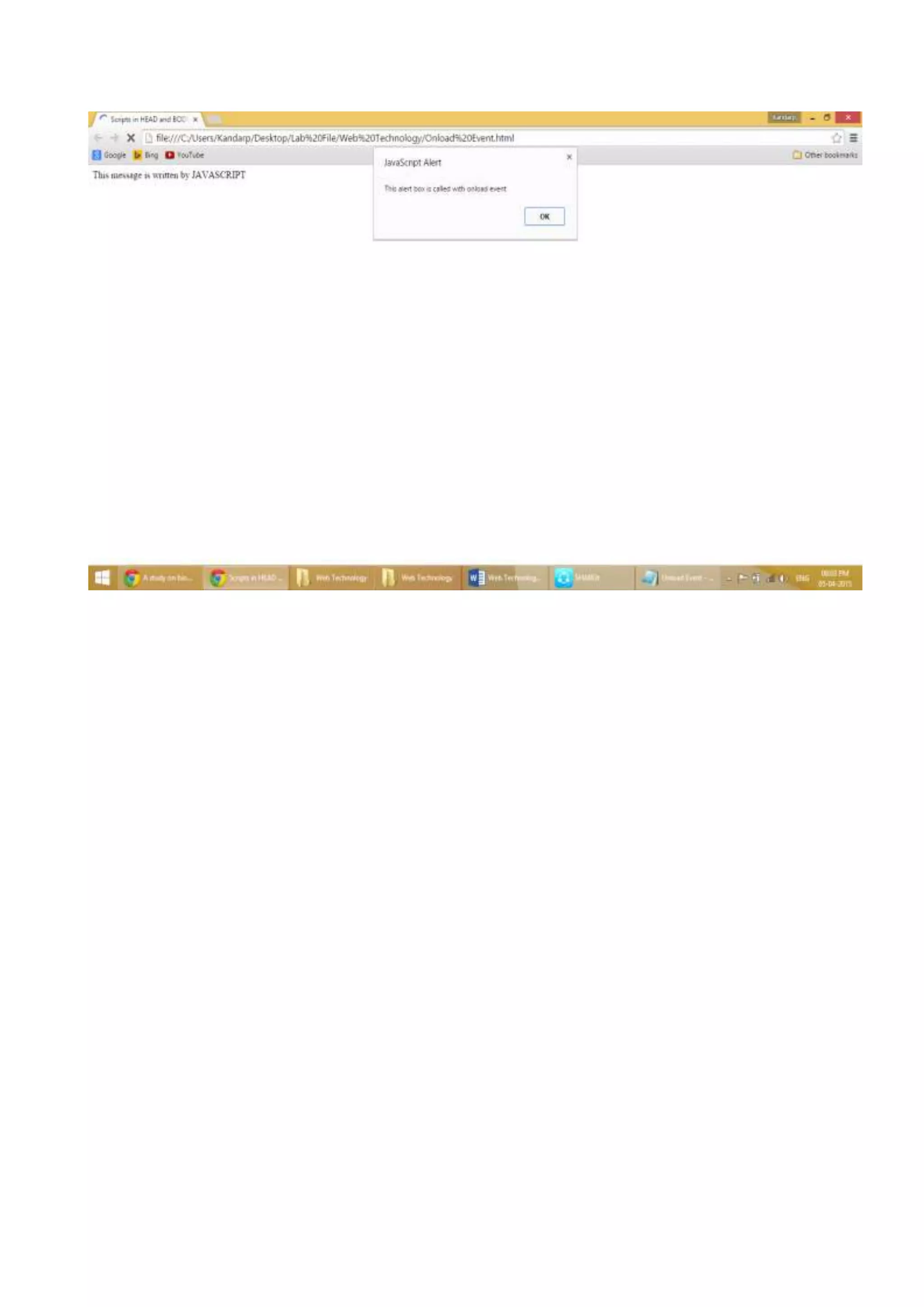
Implement onload event in an html page.
<HTML>
<HEAD>
<Title>Onload Event</Title>
<script type="text/javascript">
function message()
{
alert("This alert box is called with onload event");
}
</script>
</head>
<body onload=message()>
<script type="text/javascript">
document.write("This message is written by JAVASCRIPT");
</script>
</body>
</HTML>
Program 8
Insert a node & attribute in html page to DOM.
<html>
<head>
<style>.democlass{color:red;}</style>
</head>
<body>
<ul id="myList">
<li>Coffee</li>
<li>Tea</li>
</ul>
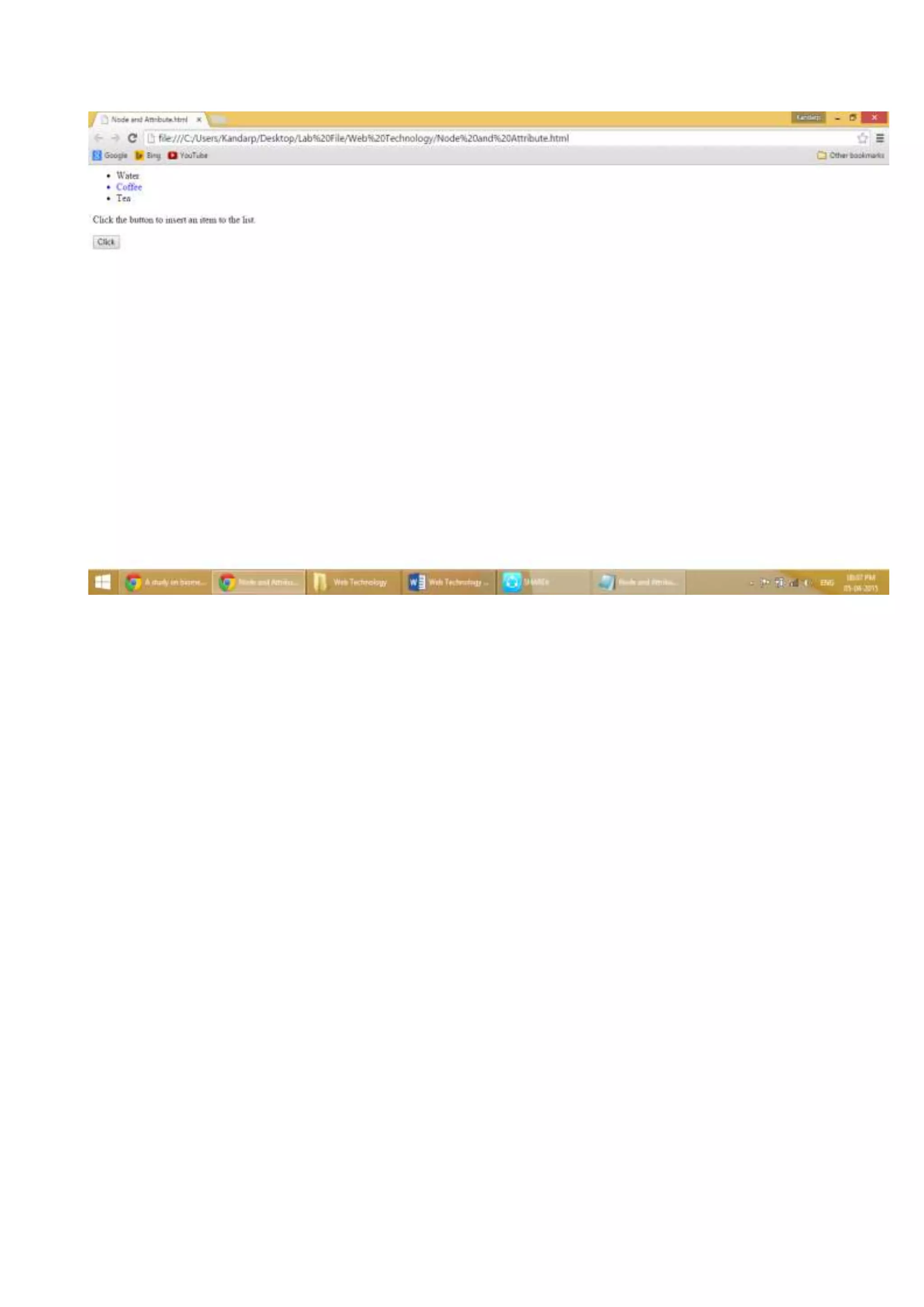
<p>Click the button to insert an item to the list.</p>
<button onclick="myFunction()">Click</button>
<script>
function myFunction()
{
document.getElementsByTagName("li")[0].setAttribute("class", "democlass");
var newItem = document.createElement("li");
var textnode = document.createTextNode("Water");
newItem.appendChild(textnode);
var list = document.getElementById("myList");
list.insertBefore(newItem, list.childNodes[0]);
}
</script>
</body>
</html>
Program 9
Implement a JAVASCRIPT to file with regular expression.
<html>
<head><title>Javascript With Regular Expressions</title></head>
<body>
<p>Replace "One" with "All" in the paragraph below:</p>
<button onclick="myFunction()">Click</button>
<p id="demo">Pick One Book!</p>
<script>
function myFunction()
{
var str = document.getElementById("demo").innerHTML;
var txt = str.replace(/One/i,"All");
document.getElementById("demo").innerHTML = txt;
}
</script>
</body>
</html>
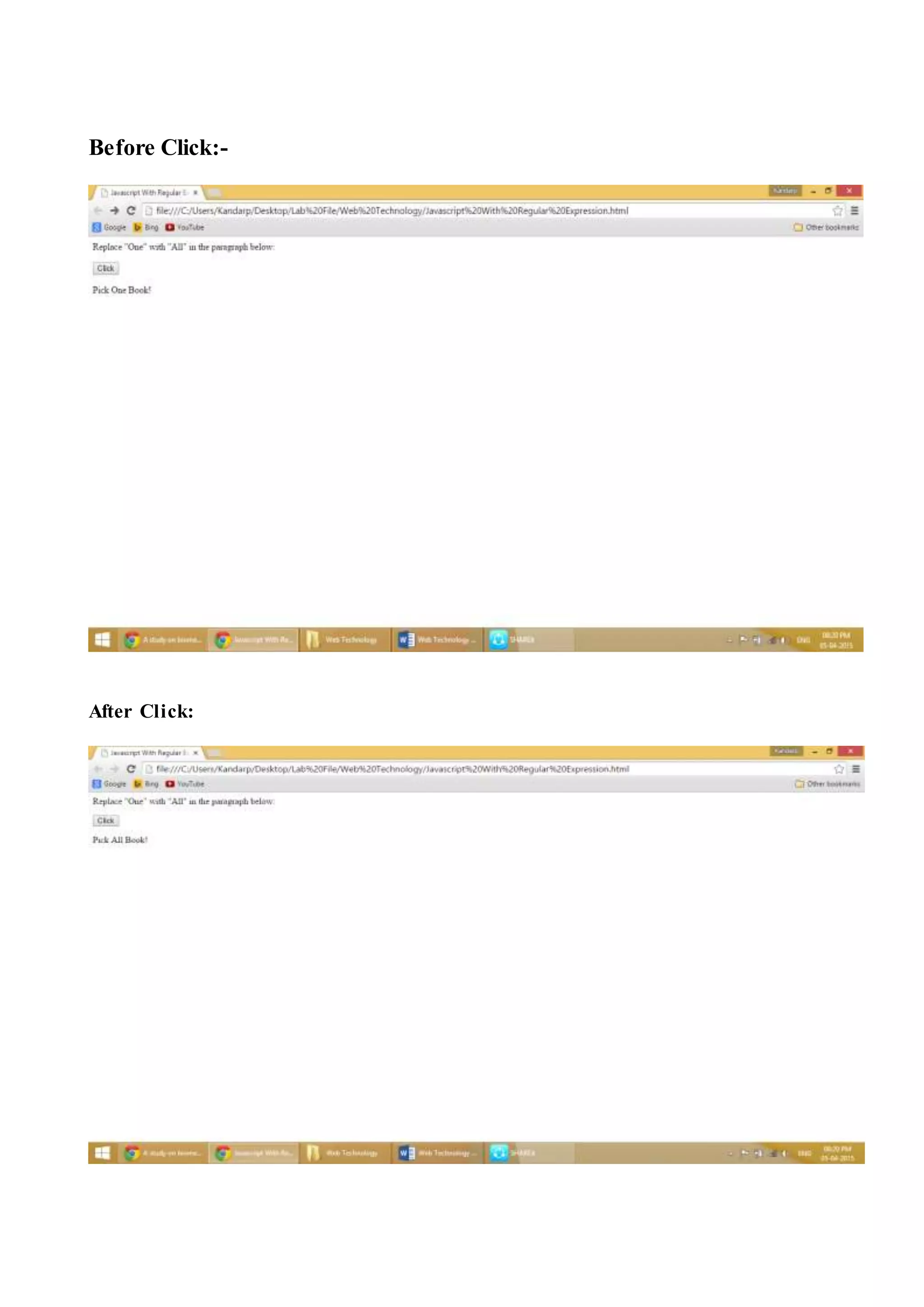
Before Click:-
After Click:
Web technology

Web technology

  • 1.
    Program 1 Create atable to implement with rowspan and columnspan. <HTML> <BODY> <Table border="4" bordercolor="Black" bgcolor="lavender" width="45%" align="center"> <tr> <TH align="center" rowspan="2">Roll No.</th> <TH align="center" rowspan="2">Name</th> <TH align="center" colspan="2">Marks</th> <TH align="center" rowspan="2">Date of Birth</th> </tr> <tr> <th>Max. Marks</th> <th>Obtained Marks</th> </tr> <tr> <Td align="center" rowspan="2">1101</td> <Td align="center" rowspan="2">K</td> <td>500</td> <td>431</td> <Td align="center" rowspan="2">22-Mar-1995</td> </tr> <tr> <tr> <Td align="center" rowspan="2">1102</td> <Td align="center" rowspan="2">A</td> <td>500</td> <td>323</td> <Td align="center" rowspan="2">23-Mar-1996</td> </tr> </tr> <tr> <tr> <Td align="center" rowspan="2">1103</td> <Td align="center" rowspan="2">N</td> <td>500</td> <td>398</td> <Td align="center" rowspan="2">21-Nov-1996</td> </tr> </tr> </table> </body> </html>
  • 3.
    Program 2 Implement alltypes of list. <HTML> <HEAD> <TITLE>Lists</TITLE> </head> <body> <H2 align="center"><U>Lists in HTML</U></h2> <b> Three Types of Lists:- <ul> <LI>Unordered List <LI>Ordered list <LI>Definition List </ul> <H3 align="center"><U>Unordered List</U></H3> The Unordered List elements enables to include an unordered list in the webpage. <br> There Are Three Types of Unordered List:- <UL> <li type="disc">Disc <li type="square">Square <li type="Circle">Circle </UL> <H3 align="center"><U>Ordered List</U></H3> The Ordered List element enables to include an ordered list in a web page. <br>This includes:- <br><br> (1) Ordered List in Arabic numbers like 1,2,3,4 and so on <OL> <LI>One <LI>Two </Ol> (I) Ordered List in Uppercase Roman numbers like I, II, III, IV and so on <OL type="I" Start="3"> <LI>Three <LI>Four </OL> (I) Ordered List in lowercase Roman numbers like i, ii, iii, iv and so on <OL type="i" Start="5"> <LI>Five <LI>Six </OL>
  • 4.
    (A) Ordered Listin Uppercase Alphabetical Letters A, B, C, D and so on <OL type="A"> <LI>Apple <LI>Balloon </OL> Ordered List in lowercase Alphabetical Letters a, b, c, d and so on <OL type="a" Start="3"> <LI>Cat <LI>Dog </OL> <H3 align="center"><U>Definition List</U></H3> <DL> <DT><B>Definition Term :< /B> <DD>This Defines a term in The Definition List <DT><B>Definition Description :< /B> <DD>This Defines the definition in the definition list </DL> </b> </body> </html>
  • 6.
    Program 3 Create acollege registration form. <html> <head><title>College Registration Form</title> </head> <body> <h1 align="center"><u><i>Registration Form</i></u></h1> <br> <form action="" method="post" enctype="multipart/form-data"> <div align="right"> <input type="image" height="140" width="130" alt="Upload Your Image" align="center"> </div> </form> <form tag="Create Logon"> <div align="center"> <br> </b> Name &nbsp;&nbsp;&nbsp;&nbsp;&nbsp;&nbsp;&nbsp;&nbsp;&nbsp;&nbsp;&nbsp;&nbsp;&n bsp;&nbsp;&nbsp;*:<input type="username" name="username" /><br><br> Father's Name&nbsp; &nbsp;*:< input type="username" name="username" /><br><br> Mother's Name *:<input type="username" name="username" /><br><br> Date of Birth &nbsp;&nbsp;&nbsp;&nbsp;*:<input type="date" name="dob" /><br><br> Address &nbsp;&nbsp;&nbsp;&nbsp;&nbsp;&nbsp;&nbsp;&nbsp;&nbsp;&nbsp;&nbsp;&nbsp;*:<i nput type="address" name="add" /><br><br> Post Code &nbsp;&nbsp;&nbsp;&nbsp;&nbsp;&nbsp;&nbsp;&nbsp;&nbsp;*:<input type="postcode" name="ptc" /><br><br> Email &nbsp;&nbsp;&nbsp;&nbsp;&nbsp;&nbsp;&nbsp;&nbsp;&nbsp;&nbsp;&nbsp;&nbsp;&n bsp;&nbsp;&nbsp;&nbsp;*:<input type="email" name="email" /><br><br> Telephone &nbsp;&nbsp;&nbsp;&nbsp;&nbsp;&nbsp;&nbsp;&nbsp;&nbsp;*:<input type="tel" name="telephone" /><br><br> <input type="submit" value="Submit" /><br> </div> </b> </form> <p>Note: Please make sure your details are correct before submitting form and that all fields marked with * are completed! </p> </body> </html>
  • 8.
    Program 4 Create 4frames in a page & display 4 images in those frames. <HTML> <Head> <Title>Framed Images</Title> <Frameset rows="25%, 75%"> <Frame src="IEC 1.jpg" Scrolling="Auto"> <Frameset cols="100%,100%"> <Frame src="IEC 2.jpg" Scrolling="Auto"> <Frameset rows="100%,100%"> <Frame src="IEC 3.jpg" Scrolling="Auto"> <Frameset cols="100%,"> <Frame src="IEC 4.jpg" Scrolling="Auto"> </Frameset> </Frameset> </Frameset> </Frameset> </head> </HTML>
  • 10.
    Program 5 Create loginpage with validation. <html> <head> <title>Form Login Validation </title> </head> <body> <h2>Login</h2> <form method="post"> <label for="username"> Username: <input type="text" name="Username" placeholder="Username must contain 8 to 20 characters" pattern="^[a-zA-Z][a-zA-Z0-9-_.]{7,19}$" required="REQUIRED" /> </label> <label for="password"> Password: <input type="password" name="password" id="password" placeholder="Password must contain 1 uppercase, lowercase and number and more than 8 characters" pattern="(?=^.{8,}$)((?=.*d)|(?=.*W+))(?![.n])(?=.*[A-Z])(?=.*[a-z]).*$" required="required" /> </label> <br><br> <Button type="submit">Sign in</button> <br> <br> <sup>*</sup>Username must contain 8 to 20 characters <br> <sup>*</sup>Password must contain more than 8 characters, 1 uppercase, lowercase and number </form> </body> </html>
  • 12.
    Program 6 Implement andload image in an html page. <html> <body> <form action="" method="post" enctype="multipart/form-data"> Select image to upload: <div class="info"> <input type="file" id="files" /> <output id="list"></output> <script> function handleFileSelect(evt) { var files = evt.target.files; var f = files[0]; var reader = new FileReader(); reader.onload = (function(theFile) { return function(e) { document.getElementById('list').innerHTML = ['<img src="', e.target.result,'" title="', theFile.name, '" width="200" />'].join(''); }; })(f); reader.readAsDataURL(f); } document.getElementById('files').addEventListener('change', handleFileSelect, false); </script> </div> <input type="submit" value="Upload Image" name="submit"> </form> </body> </html>
  • 14.
    Program 7 Implement onloadevent in an html page. <HTML> <HEAD> <Title>Onload Event</Title> <script type="text/javascript"> function message() { alert("This alert box is called with onload event"); } </script> </head> <body onload=message()> <script type="text/javascript"> document.write("This message is written by JAVASCRIPT"); </script> </body> </HTML>
  • 16.
    Program 8 Insert anode & attribute in html page to DOM. <html> <head> <style>.democlass{color:red;}</style> </head> <body> <ul id="myList"> <li>Coffee</li> <li>Tea</li> </ul> <p>Click the button to insert an item to the list.</p> <button onclick="myFunction()">Click</button> <script> function myFunction() { document.getElementsByTagName("li")[0].setAttribute("class", "democlass"); var newItem = document.createElement("li"); var textnode = document.createTextNode("Water"); newItem.appendChild(textnode); var list = document.getElementById("myList"); list.insertBefore(newItem, list.childNodes[0]); } </script> </body> </html>
  • 18.
    Program 9 Implement aJAVASCRIPT to file with regular expression. <html> <head><title>Javascript With Regular Expressions</title></head> <body> <p>Replace "One" with "All" in the paragraph below:</p> <button onclick="myFunction()">Click</button> <p id="demo">Pick One Book!</p> <script> function myFunction() { var str = document.getElementById("demo").innerHTML; var txt = str.replace(/One/i,"All"); document.getElementById("demo").innerHTML = txt; } </script> </body> </html>
  • 19.