Program 1.
Objective: - Creating an image-map - An image with clickable regions
Program:
<!DOCTYPE html>
<html lang="en">
<head>
<title>Example of HTML image map</title>
</head>
<body>
<h1>Click on a shape to see how it works:</h1>
<img src="/examples/images/shapes.png" alt="Geometrical Shapes" usemap="#shapes">
<map name="shapes">
<area shape="circle" coords="40,40,40" href="/examples/html/circle.html" alt="Circle">
<area shape="poly" coords="148,2,104,80,193,80" href="/examples/html/triangle.html"
alt="Triangle">
<area shape="rect" coords="226,2,323,80" href="/examples/html/rectangle.html"
alt="Rectangle">
<area shape="poly" coords="392,2,352,32,366,80,418,80,432,32"
href="/examples/html/pentagon.html" alt="Pentagon">
</map>
</body>
</html>
Output:
 On clicking the rectangle, it becomes big and other images are removed.
Program 2.
Objective: - Creating Table cells that span more than one row/column - The rowspan/colspan
attribute
Program:
<!DOCTYPE html>
<html lang="en">
<head>
<title>Example of HTML Table Rowspan and Colspan</title>
</head>
<body>
<h2>Example of Table Rowspan</h2>
<table border="1" cellpadding="10">
<tr>
<th rowspan="4">Users Info</th>
</tr>
<tr>
<td>1</td>
<td>John Carter</td>
<td>johncarter@mail.com</td>
</tr>
<tr>
<td>2</td>
<td>Peter Parker</td>
<td>peterparker@mail.com</td>
</tr>
<tr>
<td>3</td>
<td>John Rambo</td>
<td>johnrambo@mail.com</td>
</tr>
</table>
<h2>Example of Table Colspan</h2>
<table border="1" cellpadding="10">
<tr>
<th colspan="3">Users Info</th>
</tr>
<tr>
<td>1</td>
<td>John Carter</td>
<td>johncarter@mail.com</td>
</tr>
<tr>
<td>2</td>
<td>Peter Parker</td>
<td>peterparker@mail.com</td>
</tr>
<tr>
<td>3</td>
<td>John Rambo</td>
<td>johnrambo@mail.com</td>
</tr>
</table>
</body>
</html>
Output:
Program 3.
Objective: - Getting current location of a visitor using HTML5 geolocation
Program:
<!DOCTYPE html>
<html lang="en">
<head>
<meta charset="utf-8">
<title>Getting Current Position</title>
<script>
// Set global variable
var watchID;
function showPosition() {
if(navigator.geolocation) {
watchID = navigator.geolocation.watchPosition(successCallback);
} else {
alert("Sorry, your browser does not support HTML5 geolocation.");
}
}
function successCallback(position) {
toggleWatchBtn.innerHTML = "Stop Watching";
// Check position has been changed or not before doing anything
if(prevLat != position.coords.latitude || prevLong != position.coords.longitude) {
// Set previous location
var prevLat = position.coords.latitude;
var prevLong = position.coords.longitude;
// Get current position
var positionInfo = "Your current position is (" + "Latitude: " + position.coords.latitude + ",
" + "Longitude: " + position.coords.longitude + ")";
document.getElementById("result").innerHTML = positionInfo;
}
}
function startWatch() {
var result = document.getElementById("result");
var toggleWatchBtn = document.getElementById("toggleWatchBtn");
toggleWatchBtn.onclick = function() {
if(watchID) {
toggleWatchBtn.innerHTML = "Start Watching";
navigator.geolocation.clearWatch(watchID);
watchID = false;
} else {
toggleWatchBtn.innerHTML = "Aquiring Geo Location...";
showPosition();
}
}
}
// Initialise the whole system (above)
window.onload = startWatch;
</script>
</head>
<body>
<button type="button" id="toggleWatchBtn">Start Watching</button>
<div id="result">
<!--Position information will be inserted here-->
</div>
</body>
</html>
Output:
On clicking:
Program 4:
Objective:- Applying multiple 3D transformation to an element in CSS
Program:
<!DOCTYPE html>
<html lang="en">
<head>
<title>Example of CSS3 Multiple 3D Transformation</title>
<style type="text/css">
.container{
margin: 50px;
width: 125px;
height: 125px;
perspective: 300px;
border: 4px solid #d14e46;
background: #fddddb;
}
.transformed {
-webkit-transform: translate3d(0, 0, 60px) rotate3d(0, 1, 0, -60deg) scale3d(1, 1, 2); /* Chrome, Safari,
Opera */
transform: translate3d(0, 0, 60px) rotate3d(0, 1, 0, -60deg) scale3d(1, 1, 2); /* Standard syntax */
}
</style>
</head>
<body>
<h2>Before Transform:</h2>
<div class="container">
<img src="/examples/images/heart.jpg" alt="Heart Card">
</div>
<h2>After Transform:</h2>
<div class="container">
<img src="/examples/images/heart.jpg" class="transformed" alt="Heart Card">
</div>
</body>
</html>
Output:
Program 5:
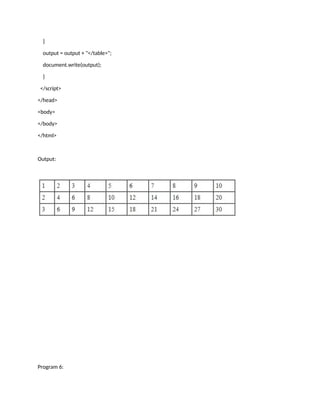
Objective: Create a simple multiplication table asking the user the number of rows and columns user
wants.
Program:
<html>
<head>
<title>Multiplication Table</title>
<script type="text/javascript">
var rows = prompt("How many rows for your multiplication table?");
var cols = prompt("How many columns for your multiplication table?");
if(rows == "" || rows == null)
rows = 10;
if(cols== "" || cols== null)
cols = 10;
createTable(rows, cols);
function createTable(rows, cols)
{
var j=1;
var output = "<table border='1' width='500' cellspacing='0'cellpadding='5'>";
for(i=1;i<=rows;i++)
{
output = output + "<tr>";
while(j<=cols)
{
output = output + "<td>" + i*j + "</td>";
j = j+1;
}
output = output + "</tr>";
j = 1;
}
output = output + "</table>";
document.write(output);
}
</script>
</head>
<body>
</body>
</html>
Output:
Program 6:
Objective: Create a sample form program that collects the first name, last name, email, user id,
password and confirms password from the user. All the inputs are mandatory and email address entered
should be in correct format. Also, the values entered in the password and confirm password textboxes
should be the same. After validating using JavaScript, In output display proper error messages in red
color just next to the textbox where there is an error.
Program:
<html>
<head>
<title>Form Validation</title>
<script type="text/javascript">
var divs = new Array();
divs[0] = "errFirst";
divs[1] = "errLast";
divs[2] = "errEmail";
divs[3] = "errUid";
divs[4] = "errPassword";
divs[5] = "errConfirm";
function validate()
{
var inputs = new Array();
inputs[0] = document.getElementById('first').value;
inputs[1] = document.getElementById('last').value;
inputs[2] = document.getElementById('email').value;
inputs[3] = document.getElementById('uid').value;
inputs[4] = document.getElementById('password').value;
inputs[5] = document.getElementById('confirm').value;
var errors = new Array();
errors[0] = "<span style='color:red'>Please enter your first name!</span>";
errors[1] = "<span style='color:red'>Please enter your last name!</span>";
errors[2] = "<span style='color:red'>Please enter your email!</span>";
errors[3] = "<span style='color:red'>Please enter your user id!</span>";
errors[4] = "<span style='color:red'>Please enter your password!</span>";
errors[5] = "<span style='color:red'>Please confirm your password!</span>";
for (i in inputs)
{
var errMessage = errors[i];
var div = divs[i];
if (inputs[i] == "")
document.getElementById(div).innerHTML = errMessage;
else if (i==2)
{
var atpos=inputs[i].indexOf("@");
var dotpos=inputs[i].lastIndexOf(".");
if (atpos<1 || dotpos<atpos+2 || dotpos+2>=inputs[i].length)
document.getElementById('errEmail').innerHTML = "<span style='color: red'>Enter a
valid email address!</span>";
else
document.getElementById(div).innerHTML = "OK!";
}
else if (i==5)
{
var first = document.getElementById('password').value;
var second = document.getElementById('confirm').value;
if (second != first)
document.getElementById('errConfirm').innerHTML = "<span style='color: red'>Your
passwords don't match!</span>";
else
document.getElementById(div).innerHTML = "OK!";
}
else
document.getElementById(div).innerHTML = "OK!";
}
}
function finalValidate()
{
var count = 0;
for(i=0;i<6;i++)
{
var div = divs[i];
if(document.getElementById(div).innerHTML == "OK!")
count = count + 1;
}
if(count == 6)
document.getElementById("errFinal").innerHTML = "All the data you entered is
correct!!!";
}
</script>
</head>
<body>
<table id="table1">
<tr>
<td>First Name:</td>
<td><input type="text" id="first" onkeyup="validate();" /></td>
<td><div id="errFirst"></div></td>
</tr>
<tr>
<td>Last Name:</td>
<td><input type="text" id="last" onkeyup="validate();"/></td>
<td><div id="errLast"></div></td>
</tr>
<tr>
<td>Email:</td>
<td><input type="text" id="email" onkeyup="validate();"/></td>
<td><div id="errEmail"></div></td>
</tr>
<tr>
<td>User Id:</td>
<td><input type="text" id="uid" onkeyup="validate();"/></td>
<td><div id="errUid"></div></td>
</tr>
<tr>
<td>Password:</td>
<td><input type="password" id="password" onkeyup="validate();"/></td>
<td><div id="errPassword"></div></td>
</tr>
<tr>
<td>Confirm Password:</td>
<td><input type="password" id="confirm" onkeyup="validate();"/></td>
<td><div id="errConfirm"></div></td>
</tr>
<tr>
<td><input type="button" id="create" value="Create" onclick="validate();finalValidate();"/></td>
<td><div id="errFinal"></div></td>
</tr>
</table>
</body>
</html>
Output:
Program 7:
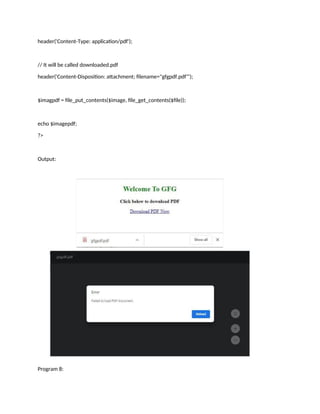
Objective: Write a program to make PDF file downloadable in HTML link using PHP
Program:
HTML CODE:
<!DOCTYPE html>
<html>
<head>
<title>Download PDF using PHP from HTML Link</title>
</head>
<body>
<center>
<h2 style="color:green;">Welcome To GFG</h2>
<p><b>Click below to download PDF</b>
</p>
<a href="gfgpdf.php?file=gfgpdf">Download PDF Now</a></center>
</body>
</html>
PHP CODE:
<?php
$file = $_GET["file"] .".pdf";
// We will be outputting a PDF
header('Content-Type: application/pdf');
// It will be called downloaded.pdf
header('Content-Disposition: attachment; filename="gfgpdf.pdf"');
$imagpdf = file_put_contents($image, file_get_contents($file));
echo $imagepdf;
?>
Output:
Program 8:
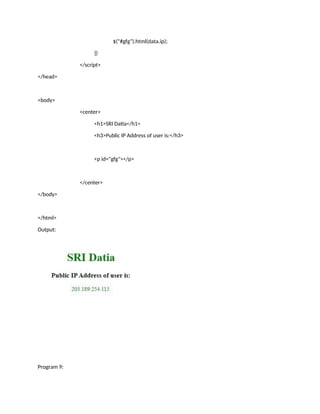
Objective: get client IP address using JavaScript
Program:
<!DOCTYPE html>
<html>
<head>
<title>Getting Clients IP</title>
<style>
p, h1 {
color: green;
}
</style>
<script src=
"https://ajax.googleapis.com/ajax/libs/jquery/3.2.1/jquery.min.js">
</script>
<script>
/* Add "https://api.ipify.org?format=json" statement
this will communicate with the ipify servers in
order to retrieve the IP address $.getJSON will
load JSON-encoded data from the server using a
GET HTTP request */
$.getJSON("https://api.ipify.org?format=json",
function(data) {
// Setting text of element P with id gfg
$("#gfg").html(data.ip);
})
</script>
</head>
<body>
<center>
<h1>SRI Datia</h1>
<h3>Public IP Address of user is:</h3>
<p id="gfg"></p>
</center>
</body>
</html>
Output:
Program 9:
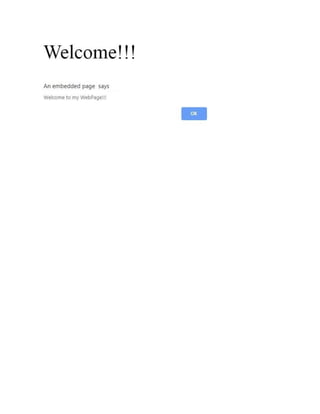
Objective: POPUP Message using Event in Javascript
Program:
<html>
<head>
<title>Event!!!</title>
<script type="text/javascript">
function trigger()
{
document.getElementById("hover").addEventListener("mouseover", popup);
function popup()
{
alert("Welcome to my WebPage!!!");
}
}
</script>
<style>
p
{
font-size:50px;
position: fixed;
left: 550px;
top: 300px;
}
</style>
</head>
<body onload="trigger();">
<p id="hover">Welcome!!!</p>
</body>
</html>
Output:
Program 10:
Objective:
Program:
<!DOCTYPE html>
<html>
<head>
<title>JavaScript Mouse Event</title>
<style>
body {
text-align:center;
}
.gfg {
font-size:40px;
font-weight:bold;
color:green;
}
</style>
</head>
<body>
<div class = "gfg">SRI Datia</div>
<h2>Mouse click event</h2>
<button onclick="click(event)">Click me</button>
<p id="demo"></p>
<script>
document.onmousedown = click
// click function called
function click(event) {
// Condition to disable left click
if (event.button == 0) {
alert("Left click not allowed");
}
}
</script>
</body>
</html>
Output:

Internet & Web Technology Lab Manual.docx

  • 1.
    Program 1. Objective: -Creating an image-map - An image with clickable regions Program: <!DOCTYPE html> <html lang="en"> <head> <title>Example of HTML image map</title> </head> <body> <h1>Click on a shape to see how it works:</h1> <img src="/examples/images/shapes.png" alt="Geometrical Shapes" usemap="#shapes"> <map name="shapes"> <area shape="circle" coords="40,40,40" href="/examples/html/circle.html" alt="Circle"> <area shape="poly" coords="148,2,104,80,193,80" href="/examples/html/triangle.html" alt="Triangle"> <area shape="rect" coords="226,2,323,80" href="/examples/html/rectangle.html" alt="Rectangle"> <area shape="poly" coords="392,2,352,32,366,80,418,80,432,32" href="/examples/html/pentagon.html" alt="Pentagon"> </map> </body> </html>
  • 2.
    Output:  On clickingthe rectangle, it becomes big and other images are removed.
  • 3.
    Program 2. Objective: -Creating Table cells that span more than one row/column - The rowspan/colspan attribute Program: <!DOCTYPE html> <html lang="en"> <head> <title>Example of HTML Table Rowspan and Colspan</title> </head> <body> <h2>Example of Table Rowspan</h2> <table border="1" cellpadding="10"> <tr> <th rowspan="4">Users Info</th> </tr> <tr> <td>1</td> <td>John Carter</td> <td>johncarter@mail.com</td> </tr> <tr> <td>2</td> <td>Peter Parker</td> <td>peterparker@mail.com</td> </tr> <tr> <td>3</td> <td>John Rambo</td>
  • 4.
    <td>johnrambo@mail.com</td> </tr> </table> <h2>Example of TableColspan</h2> <table border="1" cellpadding="10"> <tr> <th colspan="3">Users Info</th> </tr> <tr> <td>1</td> <td>John Carter</td> <td>johncarter@mail.com</td> </tr> <tr> <td>2</td> <td>Peter Parker</td> <td>peterparker@mail.com</td> </tr> <tr> <td>3</td> <td>John Rambo</td> <td>johnrambo@mail.com</td> </tr> </table> </body> </html> Output:
  • 6.
    Program 3. Objective: -Getting current location of a visitor using HTML5 geolocation Program: <!DOCTYPE html> <html lang="en"> <head> <meta charset="utf-8"> <title>Getting Current Position</title> <script> // Set global variable var watchID; function showPosition() { if(navigator.geolocation) { watchID = navigator.geolocation.watchPosition(successCallback); } else { alert("Sorry, your browser does not support HTML5 geolocation."); } } function successCallback(position) { toggleWatchBtn.innerHTML = "Stop Watching"; // Check position has been changed or not before doing anything if(prevLat != position.coords.latitude || prevLong != position.coords.longitude) {
  • 7.
    // Set previouslocation var prevLat = position.coords.latitude; var prevLong = position.coords.longitude; // Get current position var positionInfo = "Your current position is (" + "Latitude: " + position.coords.latitude + ", " + "Longitude: " + position.coords.longitude + ")"; document.getElementById("result").innerHTML = positionInfo; } } function startWatch() { var result = document.getElementById("result"); var toggleWatchBtn = document.getElementById("toggleWatchBtn"); toggleWatchBtn.onclick = function() { if(watchID) { toggleWatchBtn.innerHTML = "Start Watching"; navigator.geolocation.clearWatch(watchID); watchID = false; } else { toggleWatchBtn.innerHTML = "Aquiring Geo Location..."; showPosition(); } } }
  • 8.
    // Initialise thewhole system (above) window.onload = startWatch; </script> </head> <body> <button type="button" id="toggleWatchBtn">Start Watching</button> <div id="result"> <!--Position information will be inserted here--> </div> </body> </html> Output: On clicking: Program 4:
  • 9.
    Objective:- Applying multiple3D transformation to an element in CSS Program: <!DOCTYPE html> <html lang="en"> <head> <title>Example of CSS3 Multiple 3D Transformation</title> <style type="text/css"> .container{ margin: 50px; width: 125px; height: 125px; perspective: 300px; border: 4px solid #d14e46; background: #fddddb; } .transformed { -webkit-transform: translate3d(0, 0, 60px) rotate3d(0, 1, 0, -60deg) scale3d(1, 1, 2); /* Chrome, Safari, Opera */ transform: translate3d(0, 0, 60px) rotate3d(0, 1, 0, -60deg) scale3d(1, 1, 2); /* Standard syntax */ } </style> </head> <body> <h2>Before Transform:</h2> <div class="container"> <img src="/examples/images/heart.jpg" alt="Heart Card"> </div> <h2>After Transform:</h2>
  • 10.
    <div class="container"> <img src="/examples/images/heart.jpg"class="transformed" alt="Heart Card"> </div> </body> </html> Output: Program 5:
  • 11.
    Objective: Create asimple multiplication table asking the user the number of rows and columns user wants. Program: <html> <head> <title>Multiplication Table</title> <script type="text/javascript"> var rows = prompt("How many rows for your multiplication table?"); var cols = prompt("How many columns for your multiplication table?"); if(rows == "" || rows == null) rows = 10; if(cols== "" || cols== null) cols = 10; createTable(rows, cols); function createTable(rows, cols) { var j=1; var output = "<table border='1' width='500' cellspacing='0'cellpadding='5'>"; for(i=1;i<=rows;i++) { output = output + "<tr>"; while(j<=cols) { output = output + "<td>" + i*j + "</td>"; j = j+1; } output = output + "</tr>"; j = 1;
  • 12.
    } output = output+ "</table>"; document.write(output); } </script> </head> <body> </body> </html> Output: Program 6:
  • 13.
    Objective: Create asample form program that collects the first name, last name, email, user id, password and confirms password from the user. All the inputs are mandatory and email address entered should be in correct format. Also, the values entered in the password and confirm password textboxes should be the same. After validating using JavaScript, In output display proper error messages in red color just next to the textbox where there is an error. Program: <html> <head> <title>Form Validation</title> <script type="text/javascript"> var divs = new Array(); divs[0] = "errFirst"; divs[1] = "errLast"; divs[2] = "errEmail"; divs[3] = "errUid"; divs[4] = "errPassword"; divs[5] = "errConfirm"; function validate() { var inputs = new Array(); inputs[0] = document.getElementById('first').value; inputs[1] = document.getElementById('last').value; inputs[2] = document.getElementById('email').value; inputs[3] = document.getElementById('uid').value; inputs[4] = document.getElementById('password').value; inputs[5] = document.getElementById('confirm').value; var errors = new Array(); errors[0] = "<span style='color:red'>Please enter your first name!</span>"; errors[1] = "<span style='color:red'>Please enter your last name!</span>";
  • 14.
    errors[2] = "<spanstyle='color:red'>Please enter your email!</span>"; errors[3] = "<span style='color:red'>Please enter your user id!</span>"; errors[4] = "<span style='color:red'>Please enter your password!</span>"; errors[5] = "<span style='color:red'>Please confirm your password!</span>"; for (i in inputs) { var errMessage = errors[i]; var div = divs[i]; if (inputs[i] == "") document.getElementById(div).innerHTML = errMessage; else if (i==2) { var atpos=inputs[i].indexOf("@"); var dotpos=inputs[i].lastIndexOf("."); if (atpos<1 || dotpos<atpos+2 || dotpos+2>=inputs[i].length) document.getElementById('errEmail').innerHTML = "<span style='color: red'>Enter a valid email address!</span>"; else document.getElementById(div).innerHTML = "OK!"; } else if (i==5) { var first = document.getElementById('password').value; var second = document.getElementById('confirm').value; if (second != first) document.getElementById('errConfirm').innerHTML = "<span style='color: red'>Your passwords don't match!</span>"; else document.getElementById(div).innerHTML = "OK!";
  • 15.
    } else document.getElementById(div).innerHTML = "OK!"; } } functionfinalValidate() { var count = 0; for(i=0;i<6;i++) { var div = divs[i]; if(document.getElementById(div).innerHTML == "OK!") count = count + 1; } if(count == 6) document.getElementById("errFinal").innerHTML = "All the data you entered is correct!!!"; } </script> </head> <body> <table id="table1"> <tr> <td>First Name:</td> <td><input type="text" id="first" onkeyup="validate();" /></td> <td><div id="errFirst"></div></td> </tr> <tr> <td>Last Name:</td>
  • 16.
    <td><input type="text" id="last"onkeyup="validate();"/></td> <td><div id="errLast"></div></td> </tr> <tr> <td>Email:</td> <td><input type="text" id="email" onkeyup="validate();"/></td> <td><div id="errEmail"></div></td> </tr> <tr> <td>User Id:</td> <td><input type="text" id="uid" onkeyup="validate();"/></td> <td><div id="errUid"></div></td> </tr> <tr> <td>Password:</td> <td><input type="password" id="password" onkeyup="validate();"/></td> <td><div id="errPassword"></div></td> </tr> <tr> <td>Confirm Password:</td> <td><input type="password" id="confirm" onkeyup="validate();"/></td> <td><div id="errConfirm"></div></td> </tr> <tr> <td><input type="button" id="create" value="Create" onclick="validate();finalValidate();"/></td> <td><div id="errFinal"></div></td> </tr> </table> </body>
  • 17.
  • 18.
    Objective: Write aprogram to make PDF file downloadable in HTML link using PHP Program: HTML CODE: <!DOCTYPE html> <html> <head> <title>Download PDF using PHP from HTML Link</title> </head> <body> <center> <h2 style="color:green;">Welcome To GFG</h2> <p><b>Click below to download PDF</b> </p> <a href="gfgpdf.php?file=gfgpdf">Download PDF Now</a></center> </body> </html> PHP CODE: <?php $file = $_GET["file"] .".pdf"; // We will be outputting a PDF
  • 19.
    header('Content-Type: application/pdf'); // Itwill be called downloaded.pdf header('Content-Disposition: attachment; filename="gfgpdf.pdf"'); $imagpdf = file_put_contents($image, file_get_contents($file)); echo $imagepdf; ?> Output: Program 8:
  • 20.
    Objective: get clientIP address using JavaScript Program: <!DOCTYPE html> <html> <head> <title>Getting Clients IP</title> <style> p, h1 { color: green; } </style> <script src= "https://ajax.googleapis.com/ajax/libs/jquery/3.2.1/jquery.min.js"> </script> <script> /* Add "https://api.ipify.org?format=json" statement this will communicate with the ipify servers in order to retrieve the IP address $.getJSON will load JSON-encoded data from the server using a GET HTTP request */ $.getJSON("https://api.ipify.org?format=json", function(data) { // Setting text of element P with id gfg
  • 21.
    $("#gfg").html(data.ip); }) </script> </head> <body> <center> <h1>SRI Datia</h1> <h3>Public IPAddress of user is:</h3> <p id="gfg"></p> </center> </body> </html> Output: Program 9:
  • 22.
    Objective: POPUP Messageusing Event in Javascript Program: <html> <head> <title>Event!!!</title> <script type="text/javascript"> function trigger() { document.getElementById("hover").addEventListener("mouseover", popup); function popup() { alert("Welcome to my WebPage!!!"); } } </script>
  • 23.
    <style> p { font-size:50px; position: fixed; left: 550px; top:300px; } </style> </head> <body onload="trigger();"> <p id="hover">Welcome!!!</p> </body> </html> Output:
  • 25.
    Program 10: Objective: Program: <!DOCTYPE html> <html> <head> <title>JavaScriptMouse Event</title> <style> body { text-align:center; } .gfg { font-size:40px; font-weight:bold; color:green; } </style> </head> <body> <div class = "gfg">SRI Datia</div> <h2>Mouse click event</h2> <button onclick="click(event)">Click me</button> <p id="demo"></p> <script> document.onmousedown = click
  • 26.
    // click functioncalled function click(event) { // Condition to disable left click if (event.button == 0) { alert("Left click not allowed"); } } </script> </body> </html> Output: