Web Servers & Log Analysis What can we learn from looking at Web server logs? What server resources were requested When the files were requested Who requested them (where IP address = who) How they requested them (browser types & OS) Some assumptions A request for a resource means the user did receive it A resource is viewable & understandable to each user Users are identified within a loose set of parameters How does knowing request patterns affect or help IA?
Types of Web Server Logs Proxy-based Web access servers to control access or cache popular files Client-based Local cache files Browser History file(s) Network-based Routers, firewalls & access points Server-based Web servers to serve content
Using Web Servers The Apache Software Foundation Microsoft Internet Information Server (Services) These applications “Serve” Text - HTML, XML, plain text Graphics - jpeg, gif, png CGI, servlets,  XMLHttpRequest  & other logic other  MIME types  such as movies & sound Most servers can log these files Daily, weekly or monthly Can not always log CGI or related logic (specifically or “out of the box”)
How Servers Work Hypertext Transfer Protocol - http A file is requested from the browser The request is transferred via the network The server receives the request (& logs it) The server provides the file (& logs it) The browser displays the file Almost all Web servers work this way
Types of Server Logs Access Log Logs information such as page served or time served Referer Log Logs name of the server and page that links to current served page Not always Can be from any Web site Agent Log Logs browser type and operating system Mozilla Windows
Log File Format Extended Log File Format -  W3C Working Draft WD-logfile-960323   key advantage: computer storage cost decreases while paper cost rises every server generates  slightly  different logs
Extended Log File Formats WWW Consortium Standards Will automatically record much of what is programmatically done now. faster more accurate standard baselines for comparison  graphics standards
What is a log file? A delimited, text file with information about what the server is doing IP Address or Domain name Date/Time Method used & Page Requested Protocol, Response Code & Bytes Returned Referring Page (sometimes) UserAgent & Operating System p0016c74ea.us.kpmg.com - - [01/Sep/2004:08:17:21 -0500] "GET /images/sanchez.jpg HTTP/1.1" 200 - "http://www.ischool.utexas.edu/research/" "Mozilla/4.0 (compatible; MSIE 6.0; Windows XP)"
In search of Reliable Data Not as Foolproof as Paper You can see when someone is reading a page You can know the page is turned You can know the book is checked out No State Information The same person or another person could be reading pages 1 then page 2 You really can’t tell how many users you have Server Hits not perfectly Representative Counters inaccurate Caching & Robots can influence + & - Floods/Bandwidth can Stop “intended” usage
What is a “hit”? Technically, a hit is simply any file requested from the server That is logged That represents (usually) part of a request to “see” a whole Web page Hits combine to represent a “page view” Page views combine to represent an “episode” or “session” Episode is one activity or question a user perfoms or requests on a Web site Session is a series of episodes that embodies all the interactions a user undertakes using a Web site (per time, based on averages around 30 min.)
Making Servers More Reliable Keep system setups simple unique file and directory names clear, consistent structure Configure CMS for logging/serving  Use an FTP server for file transfer frees up logs and server! Judicious use of links Wise MIME types some hard/impossible to log
Clever Web Server Setup Redirect CGI to find referrer Use a database store web content record usage data create state information with programming NSAPI ActiveX Have contact information Have purpose statements
Managing Log Files Backup Store Results or Logs? Beginning New Logs Posting Results
Log Analysis Tools Analog Webalizer Sawmill WebTrends AWStats WWWStat GetStats Perl Scripts Data Mining & Business Intelligence tools
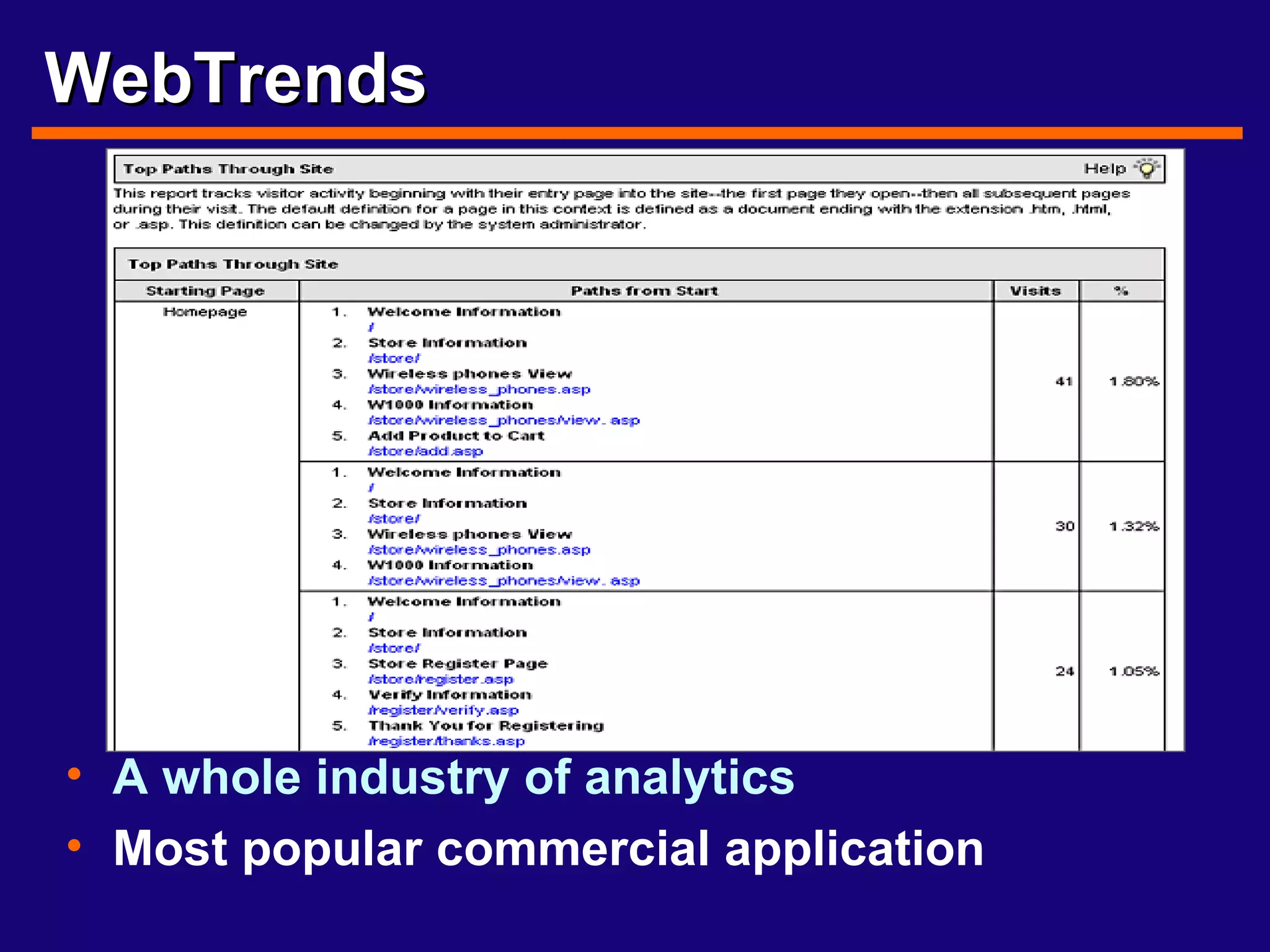
WebTrends A whole industry of analytics Most popular commercial application
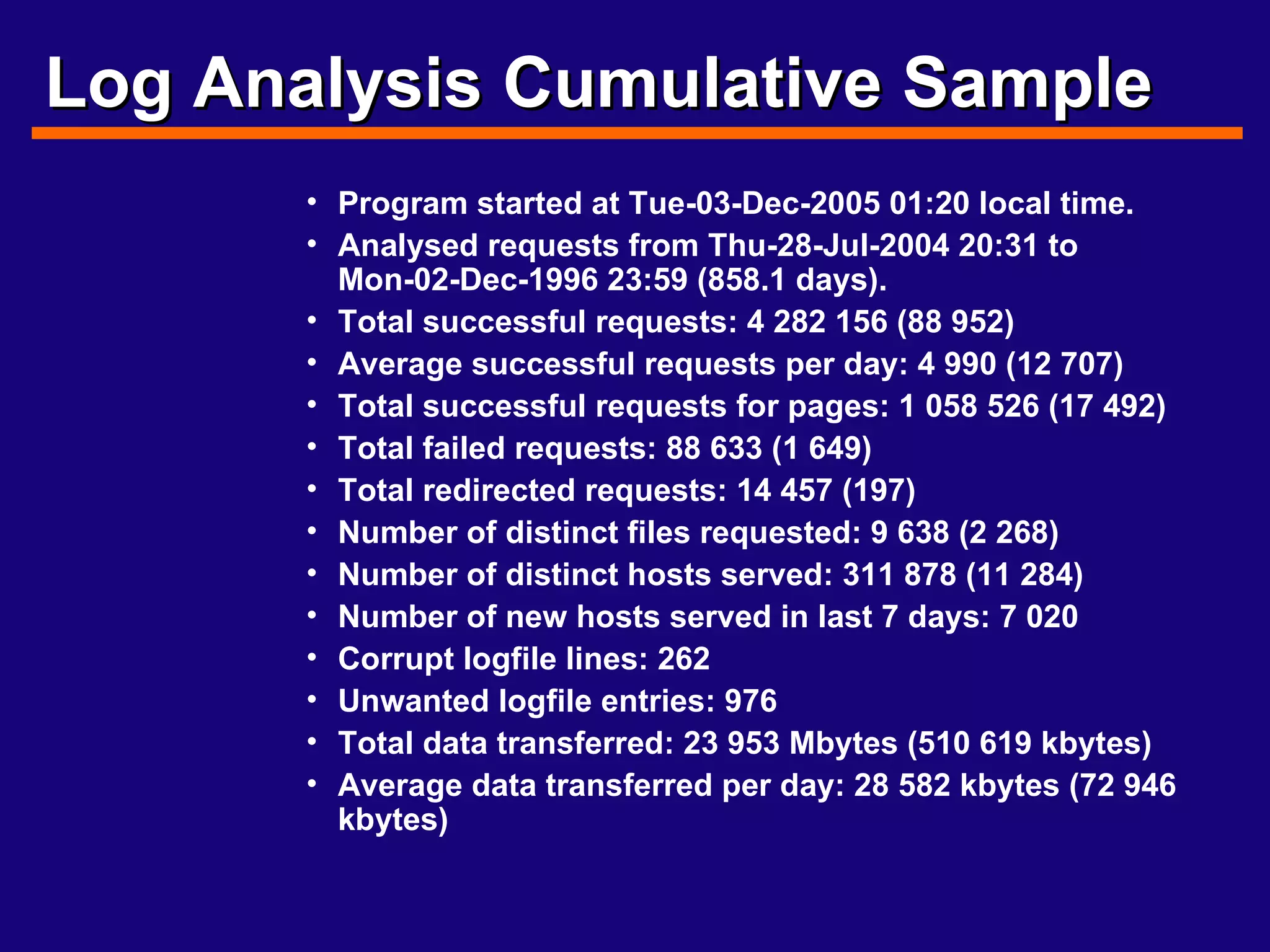
Log Analysis Cumulative Sample Program started at Tue-03-Dec-2005 01:20 local time.  Analysed requests from Thu-28-Jul-2004 20:31 to Mon-02-Dec-1996 23:59 (858.1 days).  Total successful requests: 4 282 156 (88 952)  Average successful requests per day: 4 990 (12 707)  Total successful requests for pages: 1 058 526 (17 492)  Total failed requests: 88 633 (1 649)  Total redirected requests: 14 457 (197)  Number of distinct files requested: 9 638 (2 268)  Number of distinct hosts served: 311 878 (11 284)  Number of new hosts served in last 7 days: 7 020  Corrupt logfile lines: 262  Unwanted logfile entries: 976  Total data transferred: 23 953 Mbytes (510 619 kbytes)  Average data transferred per day: 28 582 kbytes (72 946 kbytes)
How about the iSchool Web site? Our server files are collected constantly Daily   Weekly Monthly Even  yearly What does a quick look tell us? How well is the server working? Uptime, server errors, logging errors How popular is our site? Number of hits, popular files Who is visiting the site? Countries, types of companies What searches led people here?
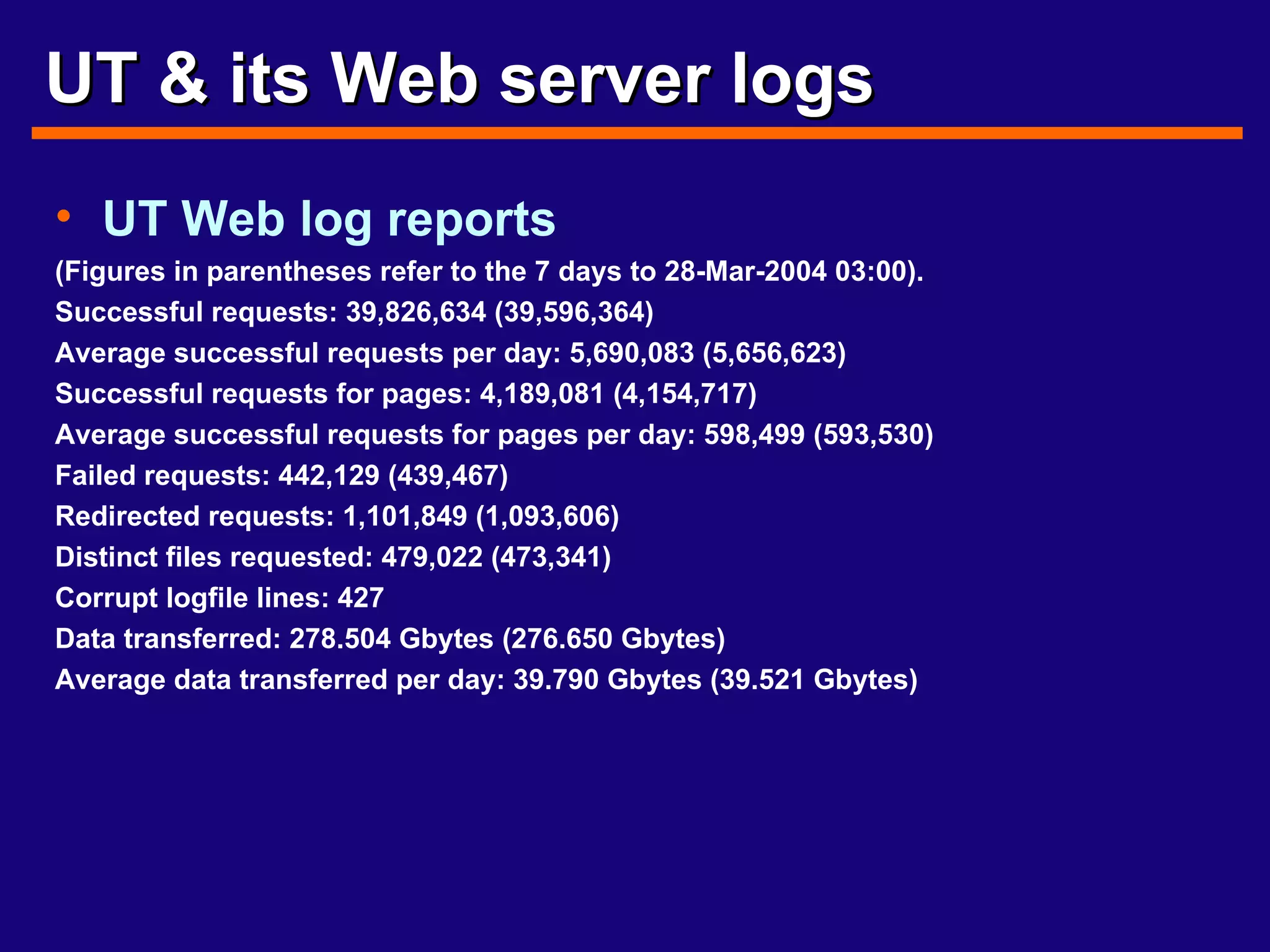
UT & its Web server logs UT Web log reports (Figures in parentheses refer to the 7 days to 28-Mar-2004 03:00). Successful requests: 39,826,634 (39,596,364) Average successful requests per day: 5,690,083 (5,656,623) Successful requests for pages: 4,189,081 (4,154,717) Average successful requests for pages per day: 598,499 (593,530) Failed requests: 442,129 (439,467) Redirected requests: 1,101,849 (1,093,606) Distinct files requested: 479,022 (473,341) Corrupt logfile lines: 427 Data transferred: 278.504 Gbytes (276.650 Gbytes) Average data transferred per day: 39.790 Gbytes (39.521 Gbytes)
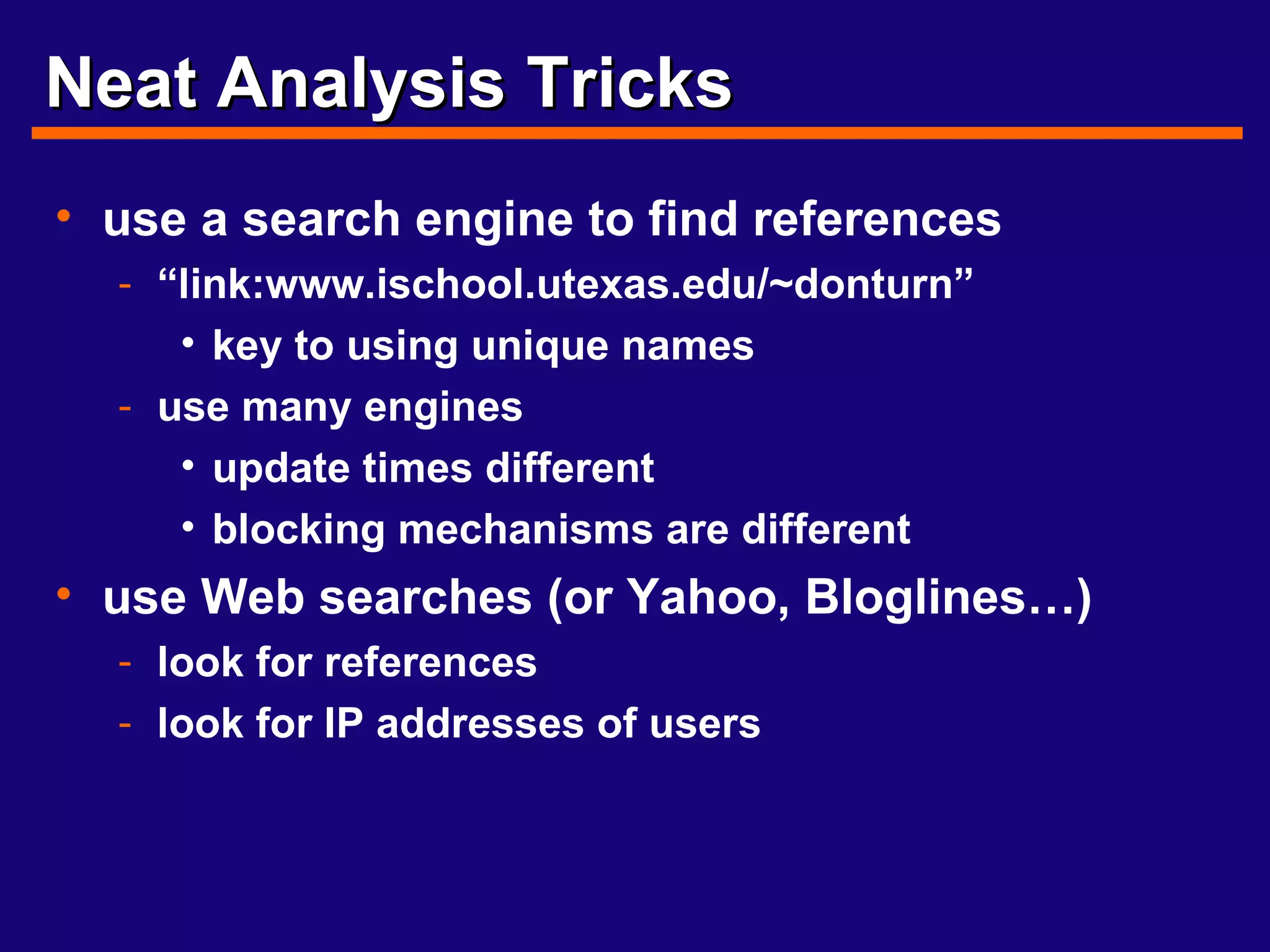
Neat Analysis Tricks use a search engine to find references “ link:www.ischool.utexas.edu/~donturn” key to using unique names use many engines update times different blocking mechanisms are different use Web searches (or Yahoo, Bloglines…) look for references look for IP addresses of users
Neat Tricks, cont. Walking up the Links follow URL’s upward Reverse Sort look for relations Use your own robot to index Test
Web Surveys, an alternative Surveys actually  ask  users what they did, what they sought & if it helped GVU, Nielsen and GNN Qualitative questions phone web forms Self-selected sample problems random selection oversample
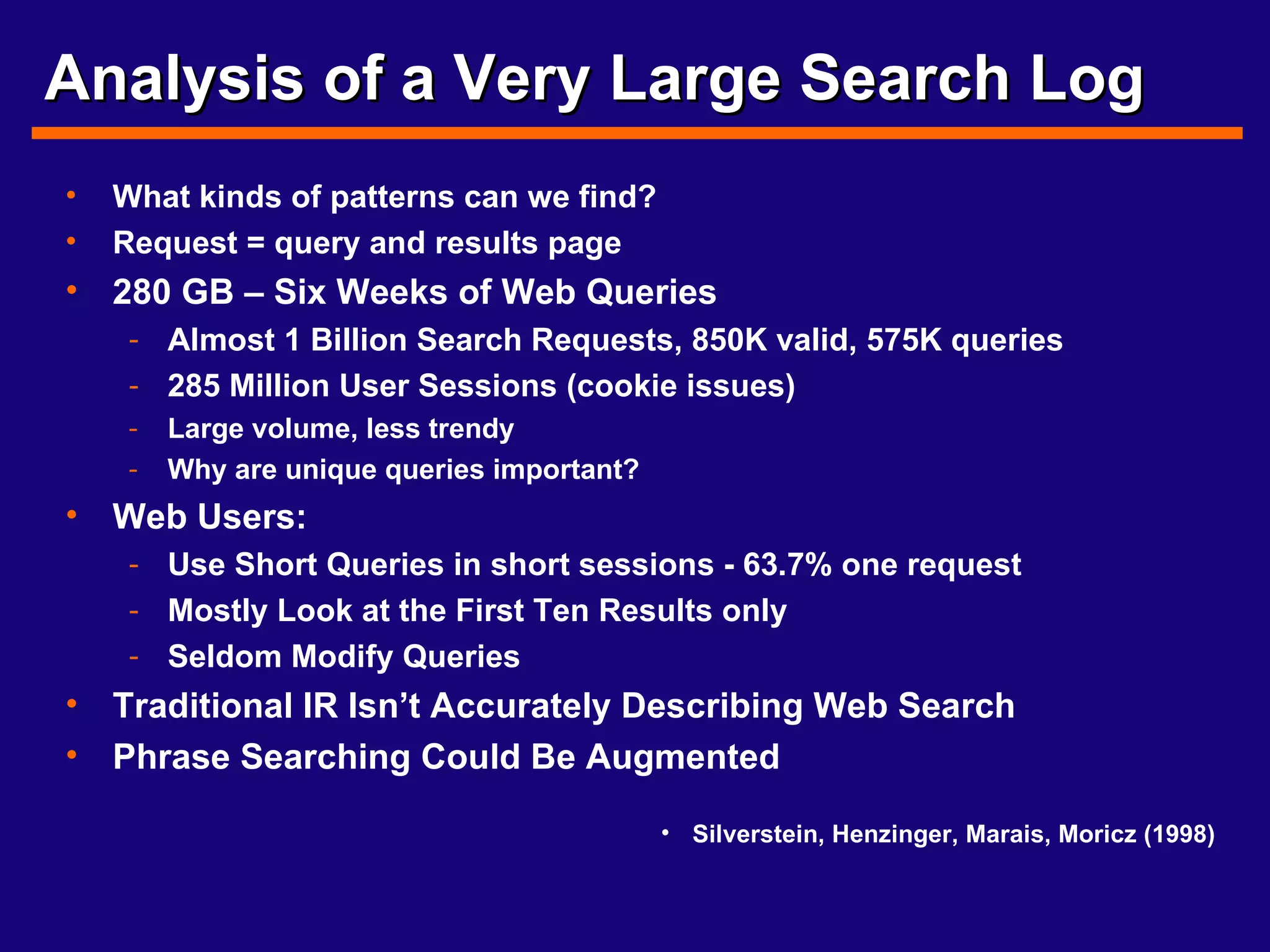
Analysis of a Very Large Search Log What kinds of patterns can we find? Request = query and results page 280 GB – Six Weeks of Web Queries Almost 1 Billion Search Requests, 850K valid, 575K queries 285 Million User Sessions (cookie issues) Large volume, less trendy Why are unique queries important? Web Users: Use Short Queries in short sessions - 63.7% one request Mostly Look at the First Ten Results only Seldom Modify Queries Traditional IR Isn’t Accurately Describing Web Search Phrase Searching Could Be Augmented Silverstein, Henzinger, Marais, Moricz (1998)
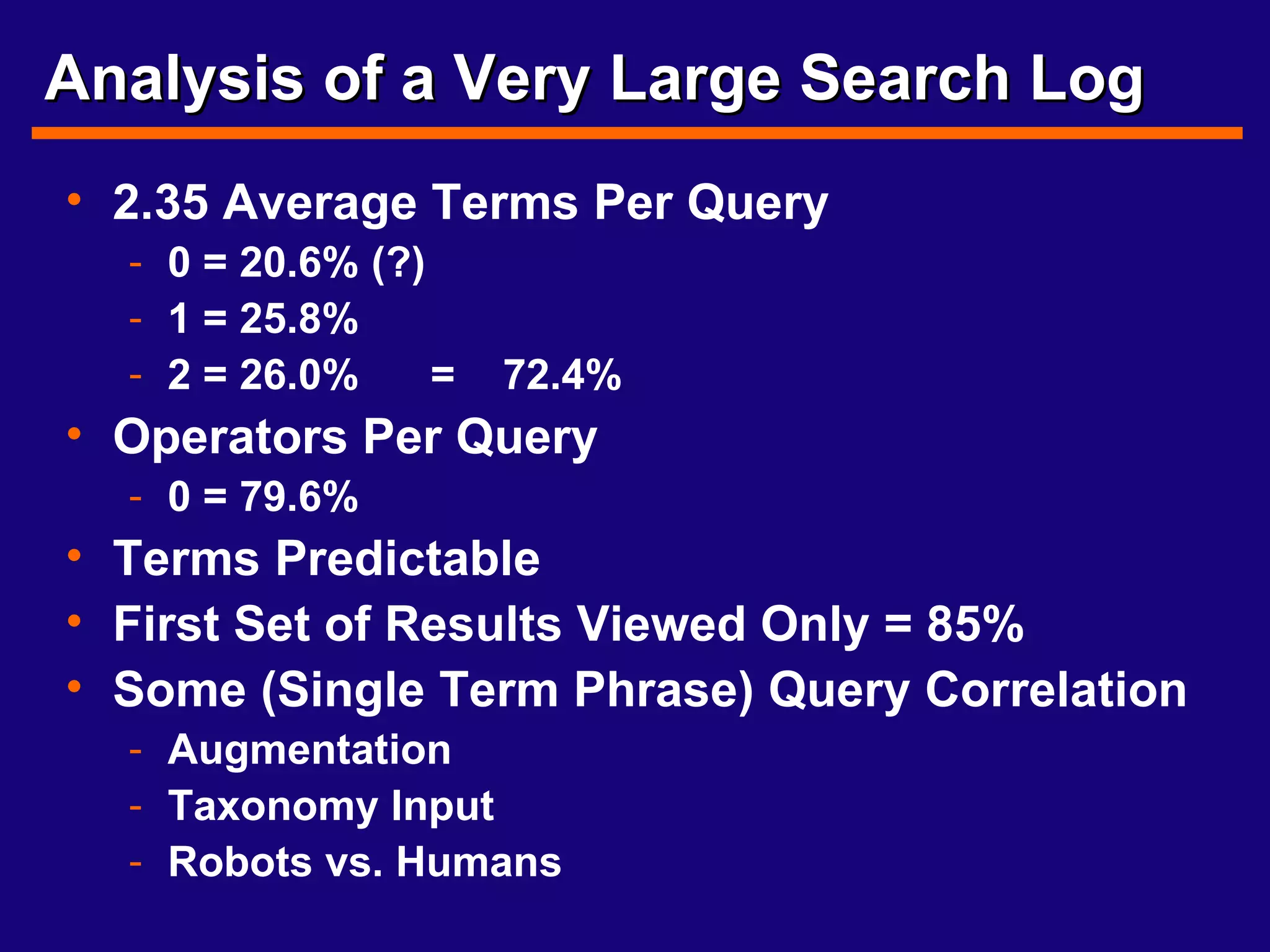
Analysis of a Very Large Search Log 2.35 Average Terms Per Query 0 = 20.6% (?) 1 = 25.8% 2 = 26.0%  =  72.4% Operators Per Query 0 = 79.6% Terms Predictable First Set of Results Viewed Only = 85% Some (Single Term Phrase) Query Correlation  Augmentation Taxonomy Input Robots vs. Humans
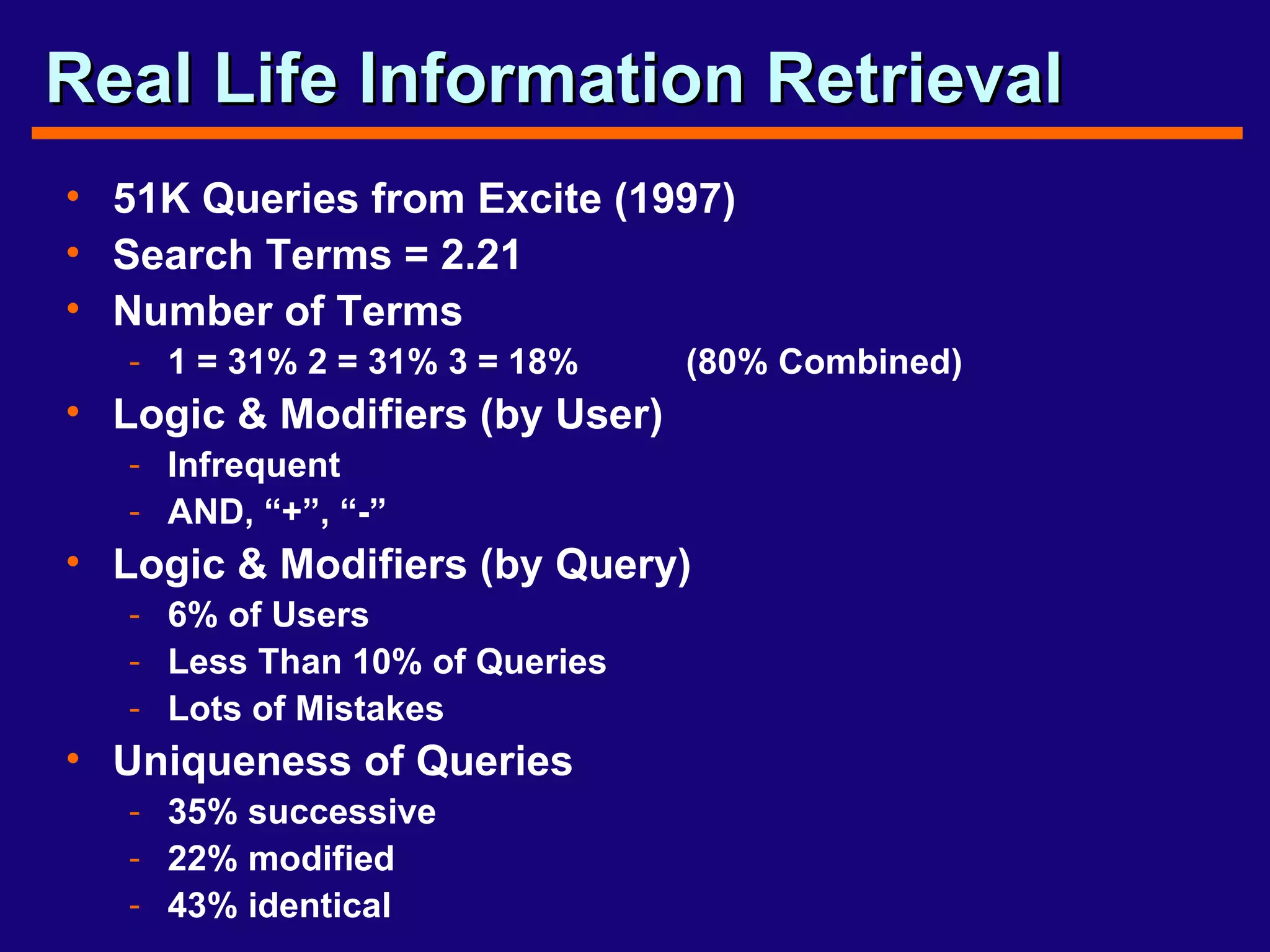
Real Life Information Retrieval 51K Queries from Excite (1997) Search Terms = 2.21 Number of Terms 1 = 31% 2 = 31% 3 = 18%  (80% Combined) Logic & Modifiers (by User) Infrequent AND, “+”, “-” Logic & Modifiers (by Query) 6% of Users Less Than 10% of Queries Lots of Mistakes Uniqueness of Queries 35% successive 22% modified 43% identical
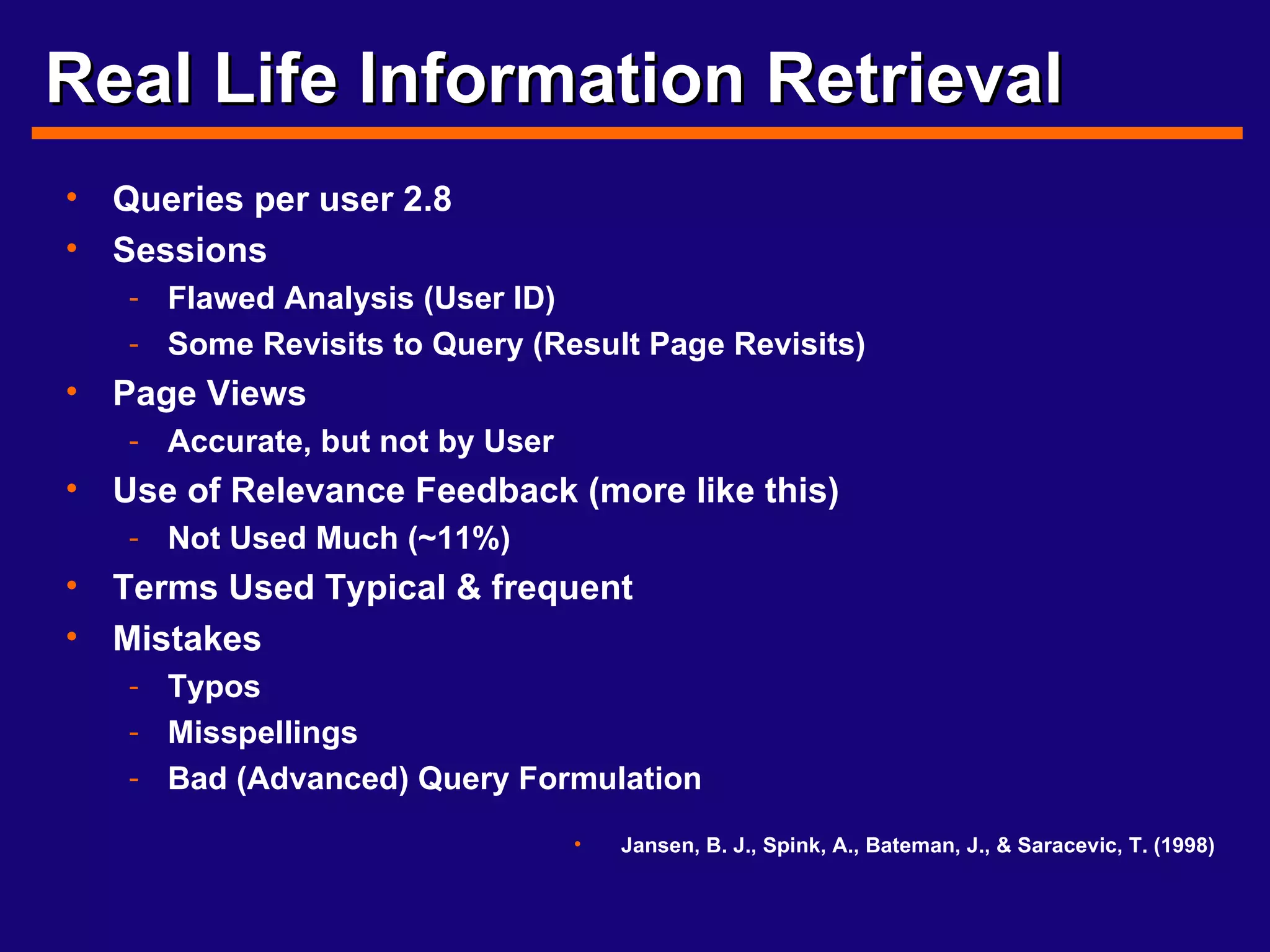
Real Life Information Retrieval Queries per user 2.8 Sessions Flawed Analysis (User ID) Some Revisits to Query (Result Page Revisits) Page Views Accurate, but not by User Use of Relevance Feedback (more like this) Not Used Much (~11%) Terms Used Typical & frequent Mistakes Typos Misspellings Bad (Advanced) Query Formulation Jansen, B. J., Spink, A., Bateman, J., & Saracevic, T. (1998)
Downie & Web Usage Server logs are like library usage User-based analyses who where what File-based analyses amount Request analyses conform (loosely) to Zipf’s Law Byte-based analyses
Web use analysis & IA? Another tool to begin to understand how people use your Web provided resources With a small amount of setup, you can learn a large amount Server use can be integrated into site usage for users Lists of popular pages & more interlinking pages Adding search terms that found the page to related pages Adjust metadata to reflect searches that find pages Add pages to the site index or site map First-cut usability information Pages 1 & 2 were accessed, but not 3 - Why? Navigation usage, link ordering and design understanding Knowing what browsers & OS helps tailor design and media types
BREAK! No Presentation this week Next week: Asset management, content management & version control Break up media development work Examine current pages, style sheets & designs Set up next set of pair & individual deliverables
Media Development work We need to find & create graphics for the new site Content about: Austin UT iSchool People at the iSchool Students at work in the iSchool (classes, labs) Screen grab from videos Search the Web for copyright free images Take our own pictures
Current Pages & Designs First version of main  iSchool  page template  and CSS complete Secondary page template & CSS complete Some secondary pages already   built Index page template set Site map page initially set Big Map Main pages map
Next steps In class Test & evaluate current CSS and templates Improvise secondary home page based on initial design Examine new Alumni section Examine  new   Course Listing page For homework Complete secondary page migration to new design Rotate design work Alumni Site Map Home page design ideas Picture/Media creation work

Web Servers

  • 1.
    Web Servers &Log Analysis What can we learn from looking at Web server logs? What server resources were requested When the files were requested Who requested them (where IP address = who) How they requested them (browser types & OS) Some assumptions A request for a resource means the user did receive it A resource is viewable & understandable to each user Users are identified within a loose set of parameters How does knowing request patterns affect or help IA?
  • 2.
    Types of WebServer Logs Proxy-based Web access servers to control access or cache popular files Client-based Local cache files Browser History file(s) Network-based Routers, firewalls & access points Server-based Web servers to serve content
  • 3.
    Using Web ServersThe Apache Software Foundation Microsoft Internet Information Server (Services) These applications “Serve” Text - HTML, XML, plain text Graphics - jpeg, gif, png CGI, servlets, XMLHttpRequest & other logic other MIME types such as movies & sound Most servers can log these files Daily, weekly or monthly Can not always log CGI or related logic (specifically or “out of the box”)
  • 4.
    How Servers WorkHypertext Transfer Protocol - http A file is requested from the browser The request is transferred via the network The server receives the request (& logs it) The server provides the file (& logs it) The browser displays the file Almost all Web servers work this way
  • 5.
    Types of ServerLogs Access Log Logs information such as page served or time served Referer Log Logs name of the server and page that links to current served page Not always Can be from any Web site Agent Log Logs browser type and operating system Mozilla Windows
  • 6.
    Log File FormatExtended Log File Format - W3C Working Draft WD-logfile-960323 key advantage: computer storage cost decreases while paper cost rises every server generates slightly different logs
  • 7.
    Extended Log FileFormats WWW Consortium Standards Will automatically record much of what is programmatically done now. faster more accurate standard baselines for comparison graphics standards
  • 8.
    What is alog file? A delimited, text file with information about what the server is doing IP Address or Domain name Date/Time Method used & Page Requested Protocol, Response Code & Bytes Returned Referring Page (sometimes) UserAgent & Operating System p0016c74ea.us.kpmg.com - - [01/Sep/2004:08:17:21 -0500] "GET /images/sanchez.jpg HTTP/1.1" 200 - "http://www.ischool.utexas.edu/research/" "Mozilla/4.0 (compatible; MSIE 6.0; Windows XP)"
  • 9.
    In search ofReliable Data Not as Foolproof as Paper You can see when someone is reading a page You can know the page is turned You can know the book is checked out No State Information The same person or another person could be reading pages 1 then page 2 You really can’t tell how many users you have Server Hits not perfectly Representative Counters inaccurate Caching & Robots can influence + & - Floods/Bandwidth can Stop “intended” usage
  • 10.
    What is a“hit”? Technically, a hit is simply any file requested from the server That is logged That represents (usually) part of a request to “see” a whole Web page Hits combine to represent a “page view” Page views combine to represent an “episode” or “session” Episode is one activity or question a user perfoms or requests on a Web site Session is a series of episodes that embodies all the interactions a user undertakes using a Web site (per time, based on averages around 30 min.)
  • 11.
    Making Servers MoreReliable Keep system setups simple unique file and directory names clear, consistent structure Configure CMS for logging/serving Use an FTP server for file transfer frees up logs and server! Judicious use of links Wise MIME types some hard/impossible to log
  • 12.
    Clever Web ServerSetup Redirect CGI to find referrer Use a database store web content record usage data create state information with programming NSAPI ActiveX Have contact information Have purpose statements
  • 13.
    Managing Log FilesBackup Store Results or Logs? Beginning New Logs Posting Results
  • 14.
    Log Analysis ToolsAnalog Webalizer Sawmill WebTrends AWStats WWWStat GetStats Perl Scripts Data Mining & Business Intelligence tools
  • 15.
    WebTrends A wholeindustry of analytics Most popular commercial application
  • 16.
    Log Analysis CumulativeSample Program started at Tue-03-Dec-2005 01:20 local time. Analysed requests from Thu-28-Jul-2004 20:31 to Mon-02-Dec-1996 23:59 (858.1 days). Total successful requests: 4 282 156 (88 952) Average successful requests per day: 4 990 (12 707) Total successful requests for pages: 1 058 526 (17 492) Total failed requests: 88 633 (1 649) Total redirected requests: 14 457 (197) Number of distinct files requested: 9 638 (2 268) Number of distinct hosts served: 311 878 (11 284) Number of new hosts served in last 7 days: 7 020 Corrupt logfile lines: 262 Unwanted logfile entries: 976 Total data transferred: 23 953 Mbytes (510 619 kbytes) Average data transferred per day: 28 582 kbytes (72 946 kbytes)
  • 17.
    How about theiSchool Web site? Our server files are collected constantly Daily Weekly Monthly Even yearly What does a quick look tell us? How well is the server working? Uptime, server errors, logging errors How popular is our site? Number of hits, popular files Who is visiting the site? Countries, types of companies What searches led people here?
  • 18.
    UT & itsWeb server logs UT Web log reports (Figures in parentheses refer to the 7 days to 28-Mar-2004 03:00). Successful requests: 39,826,634 (39,596,364) Average successful requests per day: 5,690,083 (5,656,623) Successful requests for pages: 4,189,081 (4,154,717) Average successful requests for pages per day: 598,499 (593,530) Failed requests: 442,129 (439,467) Redirected requests: 1,101,849 (1,093,606) Distinct files requested: 479,022 (473,341) Corrupt logfile lines: 427 Data transferred: 278.504 Gbytes (276.650 Gbytes) Average data transferred per day: 39.790 Gbytes (39.521 Gbytes)
  • 19.
    Neat Analysis Tricksuse a search engine to find references “ link:www.ischool.utexas.edu/~donturn” key to using unique names use many engines update times different blocking mechanisms are different use Web searches (or Yahoo, Bloglines…) look for references look for IP addresses of users
  • 20.
    Neat Tricks, cont.Walking up the Links follow URL’s upward Reverse Sort look for relations Use your own robot to index Test
  • 21.
    Web Surveys, analternative Surveys actually ask users what they did, what they sought & if it helped GVU, Nielsen and GNN Qualitative questions phone web forms Self-selected sample problems random selection oversample
  • 22.
    Analysis of aVery Large Search Log What kinds of patterns can we find? Request = query and results page 280 GB – Six Weeks of Web Queries Almost 1 Billion Search Requests, 850K valid, 575K queries 285 Million User Sessions (cookie issues) Large volume, less trendy Why are unique queries important? Web Users: Use Short Queries in short sessions - 63.7% one request Mostly Look at the First Ten Results only Seldom Modify Queries Traditional IR Isn’t Accurately Describing Web Search Phrase Searching Could Be Augmented Silverstein, Henzinger, Marais, Moricz (1998)
  • 23.
    Analysis of aVery Large Search Log 2.35 Average Terms Per Query 0 = 20.6% (?) 1 = 25.8% 2 = 26.0% = 72.4% Operators Per Query 0 = 79.6% Terms Predictable First Set of Results Viewed Only = 85% Some (Single Term Phrase) Query Correlation Augmentation Taxonomy Input Robots vs. Humans
  • 24.
    Real Life InformationRetrieval 51K Queries from Excite (1997) Search Terms = 2.21 Number of Terms 1 = 31% 2 = 31% 3 = 18% (80% Combined) Logic & Modifiers (by User) Infrequent AND, “+”, “-” Logic & Modifiers (by Query) 6% of Users Less Than 10% of Queries Lots of Mistakes Uniqueness of Queries 35% successive 22% modified 43% identical
  • 25.
    Real Life InformationRetrieval Queries per user 2.8 Sessions Flawed Analysis (User ID) Some Revisits to Query (Result Page Revisits) Page Views Accurate, but not by User Use of Relevance Feedback (more like this) Not Used Much (~11%) Terms Used Typical & frequent Mistakes Typos Misspellings Bad (Advanced) Query Formulation Jansen, B. J., Spink, A., Bateman, J., & Saracevic, T. (1998)
  • 26.
    Downie & WebUsage Server logs are like library usage User-based analyses who where what File-based analyses amount Request analyses conform (loosely) to Zipf’s Law Byte-based analyses
  • 27.
    Web use analysis& IA? Another tool to begin to understand how people use your Web provided resources With a small amount of setup, you can learn a large amount Server use can be integrated into site usage for users Lists of popular pages & more interlinking pages Adding search terms that found the page to related pages Adjust metadata to reflect searches that find pages Add pages to the site index or site map First-cut usability information Pages 1 & 2 were accessed, but not 3 - Why? Navigation usage, link ordering and design understanding Knowing what browsers & OS helps tailor design and media types
  • 28.
    BREAK! No Presentationthis week Next week: Asset management, content management & version control Break up media development work Examine current pages, style sheets & designs Set up next set of pair & individual deliverables
  • 29.
    Media Development workWe need to find & create graphics for the new site Content about: Austin UT iSchool People at the iSchool Students at work in the iSchool (classes, labs) Screen grab from videos Search the Web for copyright free images Take our own pictures
  • 30.
    Current Pages &Designs First version of main iSchool page template and CSS complete Secondary page template & CSS complete Some secondary pages already built Index page template set Site map page initially set Big Map Main pages map
  • 31.
    Next steps Inclass Test & evaluate current CSS and templates Improvise secondary home page based on initial design Examine new Alumni section Examine new Course Listing page For homework Complete secondary page migration to new design Rotate design work Alumni Site Map Home page design ideas Picture/Media creation work

Editor's Notes

  • #4 explain CGI not much logging because typical system logs can help on UNIX systems. notthe case as much anymore now that we’ve gone GUI on XWindows and server are paired for performance. not the typical setup.
  • #8 Working Draft 960323, March 23, 1996. Will get HTTP referer Will help show how often an event occurred. Will help show how ISP’s can setup caches and many users.
  • #27 Downie, Stephen J. 1996. Informetrics and the World Wide Web: a case study and discussion. Paper read at Canadian Association for Information Science, June 2-3, at University of Toronto. The power of these techniques is that they can be merged to develop a detailed scenario of a user's visit(s) to the Web site and their preferences, problems and actions. When using bibliometric analysis techniques, Downie discovered via a rank-frequency table that requests conformed to a Zipfian distribution (Downie 1996) Other results confirm that poor Web server configuration and lack of access or use of full log files can hinder further results. It is also worth noting that Downie attends to ethical observation issues that many Webmasters and information system professionals don't normally consider. I hope a growing awareness of these issues continue. User based shows by domain, country, institution, and individual user. Shows us who thinks what is important to them. File based - low use means poorly indexed or linked document. Graphic files can throw this off however. Request - what users are looking at Byte is pure throughput, might show that usage is different at times of day (robots). Point to server problems. Session based can show a whole user visit with the site - Log Tools are great at examining this.