Safety and Responsibility
Online
Shashauna Watson
Introduction
• Digital citizenship
• Safety on the computer
• Safety on the Internet
• Netiquette
• Copyright and Fair Use
• Plagiarism
• Reference
Ask yourself these questions
• How safe am I online?
• What information do I give online?
• Do I really know my online friends?
Become a Digital Citizen
• What is Digital Citizen
• Is the rule of
appropriate, responsible
technology use.
• How you act when you
are online
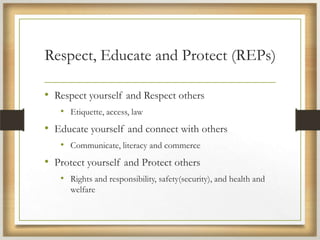
Respect, Educate and Protect (REPs)
• Respect yourself and Respect others
• Etiquette, access, law
• Educate yourself and connect with others
• Communicate, literacy and commerce
• Protect yourself and Protect others
• Rights and responsibility, safety(security), and health and
welfare
Safety on the Computer
• Protect your identity
• Protect your computer and
stay up to date with software
• Protect your accounts and
don’t choose obvious
password.
• Never use bad language or
send mean messages online.
• People online are not always
who they say they are.
• Report harassing harassing or
inappropriate behaviors.
• Do not open emails or
attachments from unknown.
• Do not send pictures of
yourself to strangers.
Internet Safety Rules
• Never give personal
information
• Do not meet in person
someone you met online
• Do not give password to
anyone
• Use a non-gender specific name
• Do not links or files from
people you do not know
• Never respond to email with
inappropriate materials
• Think before you post
• Respect other people online
• Be careful when meeting online
friends in person
• Protect yourself online
Netiquette
• What is netiquette?
• A guide to online communication
• Do not write in all caps
• IT IS LIKE YOU ARE SHOUTING AT THEM
• Use common abbreviation to shorten messages
• For example: btw- by the way
Netiquette
• Be specific, clear and precise.
Avoid a lengthy text
• Be careful what you post
online as a status or a
comment. It can be copy an
spread around.
• Be sure that the subject of
the email describe the body
o the email
• Read before you ask
• Think before you send a
email. You can never truly
delete them. They are saved
on a mail server.
Copyright and Fair use
• What is Copyright?
• in law, the right, belonging exclusively to the author or his
assignees to sell or produce multiple copies of
work, literature or work that conveys information or ideas.
• To give the author who create the work and
economic incentive o create new works
• Anything tangible can be copyrighted
Fair Use
• Fair use is the most significant limitation on the
copyright holder’s exclusive rights
• Individuals who wants to use copyrighted work must
weigh three factors
• Is the new work a copy of the original?
• Is the new work about and beyond the original?
• Is the use for educational or nonprofit purposes?
Plagiarism
• Are you using ones ideas, thoughts with consent or
authorization?
• Are you taking someone work and assuming it to be
your own?
• If your answers to the above questions are yes then
you are plagiarizing. This is an act that is punishable
by law and one should take great care in giving
reference/credits to the rightful owner of any work
or thoughts being used.
Reference
Ribble, M. (2013, September 08). Nine Themes of Digital Citizenship. Retrieved from Digital
Citizenship using Technology Appropriately: http://www.digitalcitizenship.net/Nine_Elements.html
1911 Encyclopædia Britannica/Copyright. (2013, September 7). In Wikisource, . Retrieved 01:48, September 8,
2013, from http://en.wikisource.org/w/index.php?title=1911_Encyclop%C3%A6dia_Britannica/
Copyright&oldid=4577798
University of Maryland University College. (2011, January 28). Copyright and Fair Use in the UMUC Online or Face-to-Face
Classroom. Retrieved from University Of Maryland University College:
http://www.umuc.edu/library/libhow/copyright.cfm

Safety and Responsibilty Online

  • 1.
  • 2.
    Introduction • Digital citizenship •Safety on the computer • Safety on the Internet • Netiquette • Copyright and Fair Use • Plagiarism • Reference
  • 3.
    Ask yourself thesequestions • How safe am I online? • What information do I give online? • Do I really know my online friends?
  • 4.
    Become a DigitalCitizen • What is Digital Citizen • Is the rule of appropriate, responsible technology use. • How you act when you are online
  • 5.
    Respect, Educate andProtect (REPs) • Respect yourself and Respect others • Etiquette, access, law • Educate yourself and connect with others • Communicate, literacy and commerce • Protect yourself and Protect others • Rights and responsibility, safety(security), and health and welfare
  • 6.
    Safety on theComputer • Protect your identity • Protect your computer and stay up to date with software • Protect your accounts and don’t choose obvious password. • Never use bad language or send mean messages online. • People online are not always who they say they are. • Report harassing harassing or inappropriate behaviors. • Do not open emails or attachments from unknown. • Do not send pictures of yourself to strangers.
  • 7.
    Internet Safety Rules •Never give personal information • Do not meet in person someone you met online • Do not give password to anyone • Use a non-gender specific name • Do not links or files from people you do not know • Never respond to email with inappropriate materials • Think before you post • Respect other people online • Be careful when meeting online friends in person • Protect yourself online
  • 8.
    Netiquette • What isnetiquette? • A guide to online communication • Do not write in all caps • IT IS LIKE YOU ARE SHOUTING AT THEM • Use common abbreviation to shorten messages • For example: btw- by the way
  • 9.
    Netiquette • Be specific,clear and precise. Avoid a lengthy text • Be careful what you post online as a status or a comment. It can be copy an spread around. • Be sure that the subject of the email describe the body o the email • Read before you ask • Think before you send a email. You can never truly delete them. They are saved on a mail server.
  • 10.
    Copyright and Fairuse • What is Copyright? • in law, the right, belonging exclusively to the author or his assignees to sell or produce multiple copies of work, literature or work that conveys information or ideas. • To give the author who create the work and economic incentive o create new works • Anything tangible can be copyrighted
  • 11.
    Fair Use • Fairuse is the most significant limitation on the copyright holder’s exclusive rights • Individuals who wants to use copyrighted work must weigh three factors • Is the new work a copy of the original? • Is the new work about and beyond the original? • Is the use for educational or nonprofit purposes?
  • 12.
    Plagiarism • Are youusing ones ideas, thoughts with consent or authorization? • Are you taking someone work and assuming it to be your own? • If your answers to the above questions are yes then you are plagiarizing. This is an act that is punishable by law and one should take great care in giving reference/credits to the rightful owner of any work or thoughts being used.
  • 13.
    Reference Ribble, M. (2013,September 08). Nine Themes of Digital Citizenship. Retrieved from Digital Citizenship using Technology Appropriately: http://www.digitalcitizenship.net/Nine_Elements.html 1911 Encyclopædia Britannica/Copyright. (2013, September 7). In Wikisource, . Retrieved 01:48, September 8, 2013, from http://en.wikisource.org/w/index.php?title=1911_Encyclop%C3%A6dia_Britannica/ Copyright&oldid=4577798 University of Maryland University College. (2011, January 28). Copyright and Fair Use in the UMUC Online or Face-to-Face Classroom. Retrieved from University Of Maryland University College: http://www.umuc.edu/library/libhow/copyright.cfm