DIGITAL
CITIZENSHIP
ED 505
Created By:
Danielle McDaniel
NETIQUETTE ON SOCIAL MEDIA SITES
 Netiquette on social media is defined as the social code of
using social media. Most individuals consider this the way
people say what they would like to say to their friends.
 It is a code that people communicate by. It is not a politically
correct form of communication.
 Social media is user generated content.
 Netiquette is the social code of the internet.
DO’S AND DON’TS OF NETIQUETTE ON
SOCIAL MEDIA SITES
DO’S of Netiquette on Social
Media Sites
1. Share accurate
information
2. Sharing is caring for
others
3. Show love
4. Respect privacy
5. Place everything in
moderation
6. Correct your mistakes
 DON’TS of Netiquette on
Social Media Sites
1. Don’t lie
2. Don’t hate
3. No cursing
4. No disrespect
COPYRIGHT AND FAIR USE
 Copyright- This is a legal concept, enacted by most governments, giving
the creator of an original work exclusive rights to it, usually for a limited
time. Generally, it is “the right to copy”, but also gives the copyright holder
the right to be credited for the work, to determine who may adapt the
work to other forms, who may perform the work, who any financially
benefit from it, and other related rights.
 Fair Use-A legal principle that provides certain limitations on the
exclusive rights of copyright holders. The purpose of these guidelines is
to provide guidance on the application of fair use principles by
educational institutions, educators, scholars, and students who wish to
copy, perform, or create a digital copy of a print musical score or record,
copy, or download a recorded performance or recorded song under fair
use rather than by seeking authorization from the copyright owners for
non-commercial educational purposes.
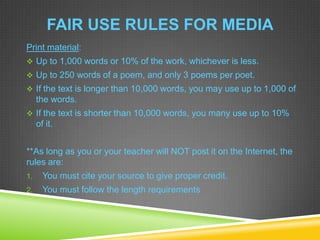
FAIR USE RULES FOR MEDIA
Print material:
 Up to 1,000 words or 10% of the work, whichever is less.
 Up to 250 words of a poem, and only 3 poems per poet.
 If the text is longer than 10,000 words, you may use up to 1,000 of
the words.
 If the text is shorter than 10,000 words, you many use up to 10%
of it.
**As long as you or your teacher will NOT post it on the Internet, the
rules are:
1. You must cite your source to give proper credit.
2. You must follow the length requirements
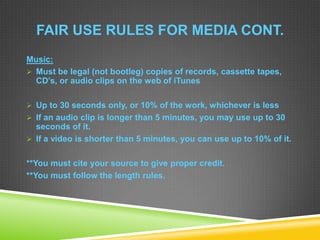
FAIR USE RULES FOR MEDIA CONT.
Music:
 Must be legal (not bootleg) copies of records, cassette tapes,
CD’s, or audio clips on the web of iTunes
 Up to 30 seconds only, or 10% of the work, whichever is less
 If an audio clip is longer than 5 minutes, you may use up to 30
seconds of it.
 If a video is shorter than 5 minutes, you can use up to 10% of it.
**You must cite your source to give proper credit.
**You must follow the length rules.
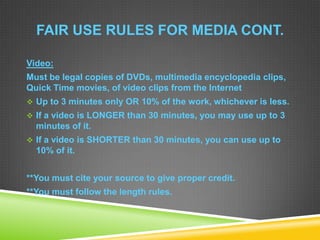
FAIR USE RULES FOR MEDIA CONT.
Video:
Must be legal copies of DVDs, multimedia encyclopedia clips,
Quick Time movies, of video clips from the Internet
 Up to 3 minutes only OR 10% of the work, whichever is less.
 If a video is LONGER than 30 minutes, you may use up to 3
minutes of it.
 If a video is SHORTER than 30 minutes, you can use up to
10% of it.
**You must cite your source to give proper credit.
**You must follow the length rules.
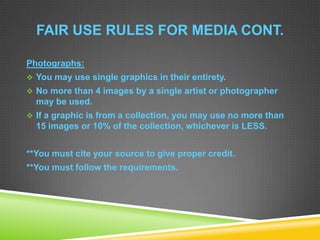
FAIR USE RULES FOR MEDIA CONT.
Photographs:
 You may use single graphics in their entirety.
 No more than 4 images by a single artist or photographer
may be used.
 If a graphic is from a collection, you may use no more than
15 images or 10% of the collection, whichever is LESS.
**You must cite your source to give proper credit.
**You must follow the requirements.
PLAGIARISM
Plagiarism is the act of taking another person’s writing,
conversation, song, or even idea and passing it off as your
own. This includes information from web pages, books, songs,
television shows, email messages, interviews, articles,
artworks or any other medium.
PLAGIARISM CONT.
Examples of Committing Plagiarism:
 Turning in someone else’s work as your own.
 Copying words or ideas from someone else without giving
credit.
 Failing to put a quotation in quotation marks.
 Giving incorrect information about the source of a quotation.
 Changing words but copying the sentence structure of a
source without giving credit.
 Copying so many words or ideas from a source that it makes
up the majority of your world, whether you give credit or not.
WAYS TO AVOID PLAGIARISM
When using secondary sources in papers, you can avoid
plagiarism by knowing what must be documented.
Specific words or phrases
If you use an author’s specific word or words, you must place
those words within quotation marks and you must credit the
source.
Information and Ideas
Even if you use your own words, if you obtained the information or
ideas you are presenting from a source, you must document the
source.
WAYS TO AVOID PLAGIARISM CONT.
Common Knowledge
You do not need to cite a source for material considered
common knowledge:
 General common knowledge
 Field-specific common knowledge
***When in doubt, be cautious and cite the source. In the case
of both general and field-specific common knowledge, if you
use the exact words of the reference source, you must use
quotation marks and credit the source.
WAYS THAT TECHNOLOGY HELPS
TEACHERS IDENTIFY PLAGIARISM
Websites Available to Identify Plagiarism
www.plagiarismdetection.org
www.grammarly.com
www.turnitin.com
www.dustball.com/cs/plagiarism.checker
www.copyscape.com
www.antiplagiarism.sf.net
Also Available:
Google Alerts
SAFETY ON THE INTERNET
Identity Theft
Computers store all kids of information about you and stores it
in files hidden deep on your hard drive. These files store
information like logins and passwords, names addresses, and
even credit card numbers.
A thief can get this information either by grabbing it when it is
being sent over an unsecured transmission, or he can install
malicious software on your computer that will collect
everything he needs and automatically send it back to him.
SAFETY ON THE INTERNET CONT.
Identity Theft
The best way to protect
yourself from identity theft is
to secure your web
browser!!
SAFETY ON THE INTERNET
Reputation Management
Reputation management is the practice of understanding or
influencing an individual's or business's reputation.
In order to ensure a safe reputation on social media, individuals
should manage their social media reputation.
SAFETY ON THE INTERNET
To manage your reputation on social media, here is a guide to
help ensure safety.
 Decide what you want to track
 Set up accounts with free social media monitoring tools
 Set up your alerts and searches
 Set up your own social media accounts
 Engage-Act quickly, be nice, and be pro-active
SAFETY ON THE INTERNET
Passwords
Passwords are an important aspect of computer safety. They
provide protection for your online user accounts. If someone
else has your password, your electronic life becomes available
to others.
Your password gives others the power to:
 Modify or destroy your files
 Send malicious e-mail in your name
 Commit fraud while masquerading as you
 Use your computer to illegally distribute things
SAFETY ON THE INTERNET
Helpful Tips for Passwords
 Keep your password private
 Change you password regularly
 Create a complex password
By doing these things, you are providing a better defense
against account intrusion.
SAFETY ON THE INTERNET
Cyberbullying
Cyberbullying is when a child, preteen or teen is tormented,
threatened, harassed, humiliated, embarrassed or otherwise
targeted by another child, preteen or teen using the Internet,
interactive and digital technologies or mobile phones.
It has to have a minor on both sides, or at least have been
instigated by a minor against another minor.
SAFETY ON THE INTERNET
Cyberbullying
Steps to Preventing Cyberbullying:
1. Educate kids about what cyberbullying is
2. Educate kids about the consequences of cyberbullying
(loosing online accounts).
3. Teach kids to respect others and take a stand against
bullying of all kids
Schools and parents need to partner together stop
cyberbullying by educating the students on cyberethics and
laws.
SAFETY ON THE INTERNET
Cyberstalking
Cyberstalking is online stalking. It is the use of technology,
mainly the Internet, to harass someone. Common
characteristics include false accusations, monitoring, threats,
identity theft, and destroying data. Cyberstalking also includes
exploitation of minors, be it sexual or otherwise.
Cyberstalking can damage many things. It can destroy
friendships, credit, careers, self-image, and confidence.
SAFETY ON THE INTERNET
Cyberstalking
Anti-Stalking Tips:
 Maintain physical access to your computer and other Web-
enabled devices like cell phones
 Be sure to always log off your computer
 Use good password management
 Use the privacy settings on your computer
 Use good updated security software
 Teach your children to never provide any personal information
on the computer
 Any suspicions of cyberstalking should be reported
SAFETY ON THE INTERNET
VIRUSES
A virus can compromise your personal
information and even destroy your computer
completely.
In order to prevent viruses from attacking
your computer, there are several things you
can do.
SAFETY ON THE INTERNET
How to Avoid Viruses on Your Computer
1. Install a reliable anti virus program.
2. Install anti-spyware and anti-malware programs
3. Avoid suspicious websites
4. Never open email attachments without scanning them first
5. Set up automatic scans
6. Watch your downloads
7. Updates, Updates, Updates
8. Know what to look for
9. Stay away from cracked software
10. Install a firewall
11. Be prepared to lock down
SAFETY ON THE INTERNET
Phishing
Phishing scams are scams that try to get valuable information from
individuals.
Things to do to avoid phishing scams:
1. Stay alert and be cautious with e-mail and on Web sites
2. Don’t get scared by the content of e-mail
3. Don’t give out information they should have
4. Never use links in e-mail to get to any page on the Web
5. Make sure the Web site you’re on is truly secure
6. Check your hosts file and your accounts regularly
7. Keep your software secure
SAFETY ON THE INTERNET
Trojan Horses
Trojan horses are harmful programs disguised as
helpful programs. They may be attached to and
hiding behind a legitimate program or be a program
who intent is misrepresented. Trojans do not self-
replicate, but can be used to spread, activate, or hide
other viruses.
SAFETY ON THE INTERNET
Worms
A worm is a stand-alone program that does not need
a host program to replicate and spread. It typically
modifies the operating system to become part of the
boot process and it can also write changes to the
registry. Worms can travel and spread via networks.
SAFETY ON THE INTERNET
Things to do to prevent Trojans and Worms
 Install an antivirus software and keep it up-to-date
 Use complex passwords
 Install and use a firewall
 Be a suspicious user
 Be a cautious Internet surfer
 Be a conservative and informed downloader
 Recognize the signs!!

Digital citizenship project

  • 1.
  • 2.
    NETIQUETTE ON SOCIALMEDIA SITES  Netiquette on social media is defined as the social code of using social media. Most individuals consider this the way people say what they would like to say to their friends.  It is a code that people communicate by. It is not a politically correct form of communication.  Social media is user generated content.  Netiquette is the social code of the internet.
  • 3.
    DO’S AND DON’TSOF NETIQUETTE ON SOCIAL MEDIA SITES DO’S of Netiquette on Social Media Sites 1. Share accurate information 2. Sharing is caring for others 3. Show love 4. Respect privacy 5. Place everything in moderation 6. Correct your mistakes  DON’TS of Netiquette on Social Media Sites 1. Don’t lie 2. Don’t hate 3. No cursing 4. No disrespect
  • 4.
    COPYRIGHT AND FAIRUSE  Copyright- This is a legal concept, enacted by most governments, giving the creator of an original work exclusive rights to it, usually for a limited time. Generally, it is “the right to copy”, but also gives the copyright holder the right to be credited for the work, to determine who may adapt the work to other forms, who may perform the work, who any financially benefit from it, and other related rights.  Fair Use-A legal principle that provides certain limitations on the exclusive rights of copyright holders. The purpose of these guidelines is to provide guidance on the application of fair use principles by educational institutions, educators, scholars, and students who wish to copy, perform, or create a digital copy of a print musical score or record, copy, or download a recorded performance or recorded song under fair use rather than by seeking authorization from the copyright owners for non-commercial educational purposes.
  • 5.
    FAIR USE RULESFOR MEDIA Print material:  Up to 1,000 words or 10% of the work, whichever is less.  Up to 250 words of a poem, and only 3 poems per poet.  If the text is longer than 10,000 words, you may use up to 1,000 of the words.  If the text is shorter than 10,000 words, you many use up to 10% of it. **As long as you or your teacher will NOT post it on the Internet, the rules are: 1. You must cite your source to give proper credit. 2. You must follow the length requirements
  • 6.
    FAIR USE RULESFOR MEDIA CONT. Music:  Must be legal (not bootleg) copies of records, cassette tapes, CD’s, or audio clips on the web of iTunes  Up to 30 seconds only, or 10% of the work, whichever is less  If an audio clip is longer than 5 minutes, you may use up to 30 seconds of it.  If a video is shorter than 5 minutes, you can use up to 10% of it. **You must cite your source to give proper credit. **You must follow the length rules.
  • 7.
    FAIR USE RULESFOR MEDIA CONT. Video: Must be legal copies of DVDs, multimedia encyclopedia clips, Quick Time movies, of video clips from the Internet  Up to 3 minutes only OR 10% of the work, whichever is less.  If a video is LONGER than 30 minutes, you may use up to 3 minutes of it.  If a video is SHORTER than 30 minutes, you can use up to 10% of it. **You must cite your source to give proper credit. **You must follow the length rules.
  • 8.
    FAIR USE RULESFOR MEDIA CONT. Photographs:  You may use single graphics in their entirety.  No more than 4 images by a single artist or photographer may be used.  If a graphic is from a collection, you may use no more than 15 images or 10% of the collection, whichever is LESS. **You must cite your source to give proper credit. **You must follow the requirements.
  • 9.
    PLAGIARISM Plagiarism is theact of taking another person’s writing, conversation, song, or even idea and passing it off as your own. This includes information from web pages, books, songs, television shows, email messages, interviews, articles, artworks or any other medium.
  • 10.
    PLAGIARISM CONT. Examples ofCommitting Plagiarism:  Turning in someone else’s work as your own.  Copying words or ideas from someone else without giving credit.  Failing to put a quotation in quotation marks.  Giving incorrect information about the source of a quotation.  Changing words but copying the sentence structure of a source without giving credit.  Copying so many words or ideas from a source that it makes up the majority of your world, whether you give credit or not.
  • 11.
    WAYS TO AVOIDPLAGIARISM When using secondary sources in papers, you can avoid plagiarism by knowing what must be documented. Specific words or phrases If you use an author’s specific word or words, you must place those words within quotation marks and you must credit the source. Information and Ideas Even if you use your own words, if you obtained the information or ideas you are presenting from a source, you must document the source.
  • 12.
    WAYS TO AVOIDPLAGIARISM CONT. Common Knowledge You do not need to cite a source for material considered common knowledge:  General common knowledge  Field-specific common knowledge ***When in doubt, be cautious and cite the source. In the case of both general and field-specific common knowledge, if you use the exact words of the reference source, you must use quotation marks and credit the source.
  • 13.
    WAYS THAT TECHNOLOGYHELPS TEACHERS IDENTIFY PLAGIARISM Websites Available to Identify Plagiarism www.plagiarismdetection.org www.grammarly.com www.turnitin.com www.dustball.com/cs/plagiarism.checker www.copyscape.com www.antiplagiarism.sf.net Also Available: Google Alerts
  • 14.
    SAFETY ON THEINTERNET Identity Theft Computers store all kids of information about you and stores it in files hidden deep on your hard drive. These files store information like logins and passwords, names addresses, and even credit card numbers. A thief can get this information either by grabbing it when it is being sent over an unsecured transmission, or he can install malicious software on your computer that will collect everything he needs and automatically send it back to him.
  • 15.
    SAFETY ON THEINTERNET CONT. Identity Theft The best way to protect yourself from identity theft is to secure your web browser!!
  • 16.
    SAFETY ON THEINTERNET Reputation Management Reputation management is the practice of understanding or influencing an individual's or business's reputation. In order to ensure a safe reputation on social media, individuals should manage their social media reputation.
  • 17.
    SAFETY ON THEINTERNET To manage your reputation on social media, here is a guide to help ensure safety.  Decide what you want to track  Set up accounts with free social media monitoring tools  Set up your alerts and searches  Set up your own social media accounts  Engage-Act quickly, be nice, and be pro-active
  • 18.
    SAFETY ON THEINTERNET Passwords Passwords are an important aspect of computer safety. They provide protection for your online user accounts. If someone else has your password, your electronic life becomes available to others. Your password gives others the power to:  Modify or destroy your files  Send malicious e-mail in your name  Commit fraud while masquerading as you  Use your computer to illegally distribute things
  • 19.
    SAFETY ON THEINTERNET Helpful Tips for Passwords  Keep your password private  Change you password regularly  Create a complex password By doing these things, you are providing a better defense against account intrusion.
  • 20.
    SAFETY ON THEINTERNET Cyberbullying Cyberbullying is when a child, preteen or teen is tormented, threatened, harassed, humiliated, embarrassed or otherwise targeted by another child, preteen or teen using the Internet, interactive and digital technologies or mobile phones. It has to have a minor on both sides, or at least have been instigated by a minor against another minor.
  • 21.
    SAFETY ON THEINTERNET Cyberbullying Steps to Preventing Cyberbullying: 1. Educate kids about what cyberbullying is 2. Educate kids about the consequences of cyberbullying (loosing online accounts). 3. Teach kids to respect others and take a stand against bullying of all kids Schools and parents need to partner together stop cyberbullying by educating the students on cyberethics and laws.
  • 22.
    SAFETY ON THEINTERNET Cyberstalking Cyberstalking is online stalking. It is the use of technology, mainly the Internet, to harass someone. Common characteristics include false accusations, monitoring, threats, identity theft, and destroying data. Cyberstalking also includes exploitation of minors, be it sexual or otherwise. Cyberstalking can damage many things. It can destroy friendships, credit, careers, self-image, and confidence.
  • 23.
    SAFETY ON THEINTERNET Cyberstalking Anti-Stalking Tips:  Maintain physical access to your computer and other Web- enabled devices like cell phones  Be sure to always log off your computer  Use good password management  Use the privacy settings on your computer  Use good updated security software  Teach your children to never provide any personal information on the computer  Any suspicions of cyberstalking should be reported
  • 24.
    SAFETY ON THEINTERNET VIRUSES A virus can compromise your personal information and even destroy your computer completely. In order to prevent viruses from attacking your computer, there are several things you can do.
  • 25.
    SAFETY ON THEINTERNET How to Avoid Viruses on Your Computer 1. Install a reliable anti virus program. 2. Install anti-spyware and anti-malware programs 3. Avoid suspicious websites 4. Never open email attachments without scanning them first 5. Set up automatic scans 6. Watch your downloads 7. Updates, Updates, Updates 8. Know what to look for 9. Stay away from cracked software 10. Install a firewall 11. Be prepared to lock down
  • 26.
    SAFETY ON THEINTERNET Phishing Phishing scams are scams that try to get valuable information from individuals. Things to do to avoid phishing scams: 1. Stay alert and be cautious with e-mail and on Web sites 2. Don’t get scared by the content of e-mail 3. Don’t give out information they should have 4. Never use links in e-mail to get to any page on the Web 5. Make sure the Web site you’re on is truly secure 6. Check your hosts file and your accounts regularly 7. Keep your software secure
  • 27.
    SAFETY ON THEINTERNET Trojan Horses Trojan horses are harmful programs disguised as helpful programs. They may be attached to and hiding behind a legitimate program or be a program who intent is misrepresented. Trojans do not self- replicate, but can be used to spread, activate, or hide other viruses.
  • 28.
    SAFETY ON THEINTERNET Worms A worm is a stand-alone program that does not need a host program to replicate and spread. It typically modifies the operating system to become part of the boot process and it can also write changes to the registry. Worms can travel and spread via networks.
  • 29.
    SAFETY ON THEINTERNET Things to do to prevent Trojans and Worms  Install an antivirus software and keep it up-to-date  Use complex passwords  Install and use a firewall  Be a suspicious user  Be a cautious Internet surfer  Be a conservative and informed downloader  Recognize the signs!!