Inventory &
Warehouse
Management
Warehouses
 Store inventory for a period of time
 storage
 Protection
 Inventory may be turned over rapidly
 distribution center
 customer service
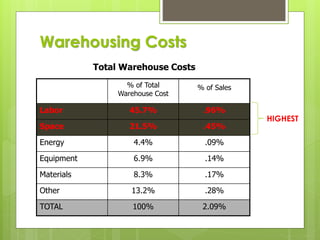
% of Total
Warehouse Cost
% of Sales
Labor 45.7% .96%
Space 21.5% .45%
Energy 4.4% .09%
Equipment 6.9% .14%
Materials 8.3% .17%
Other 13.2% .28%
TOTAL 100% 2.09%
Total Warehouse Costs
Warehousing Costs
HIGHEST
“Senior level executives now realize that the
automated warehouse is as much a part of
e-commerce and e-fulfillment as the Internet.”
- Supply Chain Yearbook
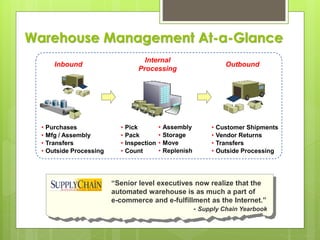
Inbound
Internal
Processing
Outbound
• Purchases
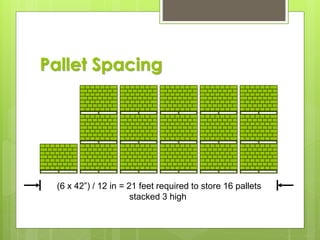
• Mfg / Assembly
• Transfers
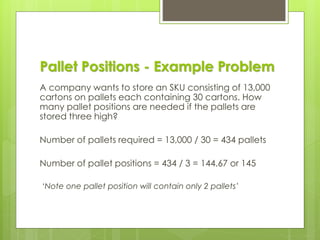
• Outside Processing
• Customer Shipments
• Vendor Returns
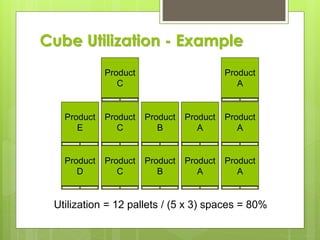
• Transfers
• Outside Processing
• Pick
• Pack
• Inspection
• Count
• Assembly
• Storage
• Move
• Replenish
Warehouse Management At-a-Glance
Stores
Perform the same function as a warehouse for a
factory.
✓ raw materials
✓ finished goods
✓ supplies
✓ repair parts
Goods Identification
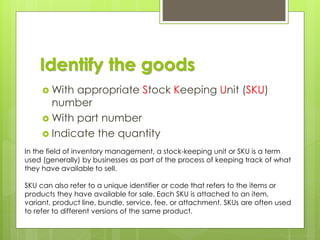
Identify the goods
 With appropriate Stock Keeping Unit (SKU)
number
 With part number
 Indicate the quantity
In the field of inventory management, a stock-keeping unit or SKU is a term
used (generally) by businesses as part of the process of keeping track of what
they have available to sell.
SKU can also refer to a unique identifier or code that refers to the items or
products they have available for sale. Each SKU is attached to an item,
variant, product line, bundle, service, fee, or attachment. SKUs are often used
to refer to different versions of the same product.
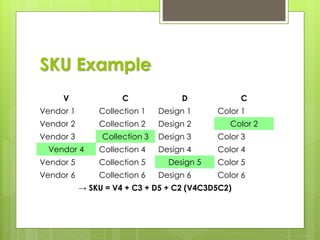
SKU Example
V C D C
Vendor 1 Collection 1 Design 1 Color 1
Vendor 2 Collection 2 Design 2 Color 2
Vendor 3 Collection 3 Design 3 Color 3
Vendor 4 Collection 4 Design 4 Color 4
Vendor 5 Collection 5 Design 5 Color 5
Vendor 6 Collection 6 Design 6 Color 6
→ SKU = V4 + C3 + D5 + C2 (V4C3D5C2)
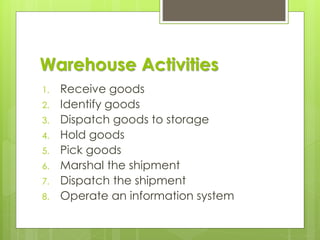
Warehouse Activities
1. Receive goods
2. Identify goods
3. Dispatch goods to storage
4. Hold goods
5. Pick goods
6. Marshal the shipment
7. Dispatch the shipment
8. Operate an information system
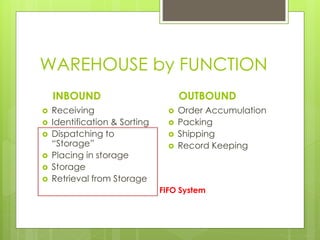
WAREHOUSE by FUNCTION
INBOUND
 Receiving
 Identification & Sorting
 Dispatching to
“Storage”
 Placing in storage
 Storage
 Retrieval from Storage
OUTBOUND
 Order Accumulation
 Packing
 Shipping
 Record Keeping
FIFO System
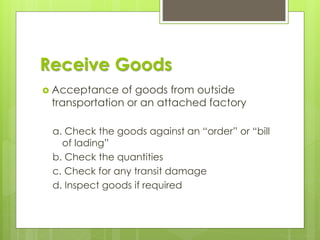
Receive Goods
 Acceptance of goods from outside
transportation or an attached factory
a. Check the goods against an “order” or “bill
of lading”
b. Check the quantities
c. Check for any transit damage
d. Inspect goods if required
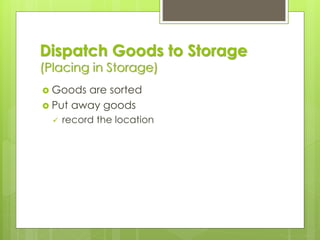
Dispatch Goods to Storage
(Placing in Storage)
 Goods are sorted
 Put away goods
✓ record the location
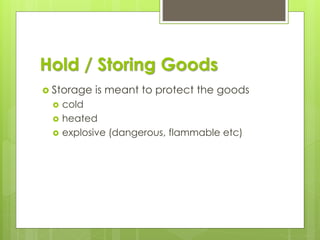
Hold / Storing Goods
 Storage is meant to protect the goods
 cold
 heated
 explosive (dangerous, flammable etc)
Pick Goods
 Goods are picked from storage
 must be accessible
 location records
 Brought to marshalling (Inspection) area
Marshal the Shipment
 All goods for an order are brought
together
✓ check for missing items
✓ check for correct items
✓ change order information if required
Dispatch the Shipment
 The order is prepared for shipment and
loaded on the right vehicle
✓ protective packaging for shipment
✓ documents prepared
✓ loaded and secured
Warehouse “Information System”
 Need to know what is in the warehouse
✓ quantity on hand
✓ quantity received
✓ quantity issued
✓ location of goods
 Computer based or manual system
Optimizing Picking Process
Future Warehouse (1)
Future Warehouse (2)
Warehouse Management
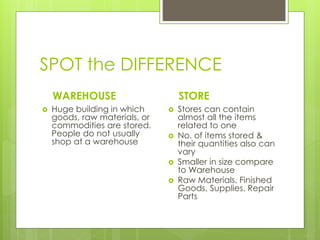
SPOT the DIFFERENCE
WAREHOUSE
 Huge building in which
goods, raw materials, or
commodities are stored.
People do not usually
shop at a warehouse
STORE
 Stores can contain
almost all the items
related to one
 No. of items stored &
their quantities also can
vary
 Smaller in size compare
to Warehouse
 Raw Materials, Finished
Goods, Supplies, Repair
Parts
Warehouse Management
 Make maximum use of space
✓ capital cost of space is very high
 Make effective use of labor and
equipment
✓ material handling equipment is the second
largest capital cost
✓ need best mix of equipment and labor
✓ all SKU’s should be easy to find
✓ move goods efficiently
Palletized Storage Systems
 Block Stacking
 Drive-in and Drive-through racking
 Push back Racking
 Adjustable Pallet Racking (APR)
 Double Deep Racking
 Powered Mobile Racking
 Pallet Live Storage
 Small item storage system
Warehouse Effectiveness
1. Cube utilization and accessibility
2. Stock location
3. Order picking & “Assembly” : option requirement
4. Accessibility
 The ability to get goods with a minimum of effort
✓ without moving other goods
✓ can be a problem with multiple SKU’s in one
area
5. Packaging
Cube Utilization and
Accessibility
 Goods are stored on the floor and in the
space above
 Space also required for:
aisles offices
receiving order picking
shipping docks order assembly
 Need to know the maximum space
required
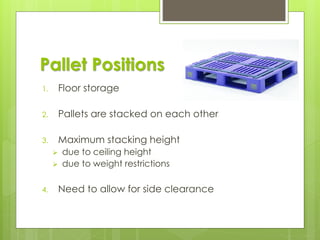
Pallet Positions
1. Floor storage
2. Pallets are stacked on each other
3. Maximum stacking height
➢ due to ceiling height
➢ due to weight restrictions
4. Need to allow for side clearance
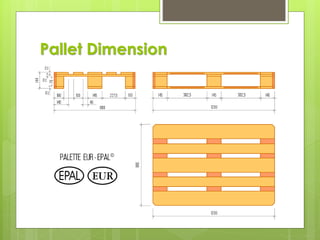
Pallet Dimension
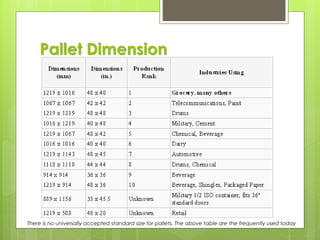
Pallet Dimension
There is no universally accepted standard size for pallets. The above table are the frequently used today
DISCUSSION
 Why Pallet spacing is important ?
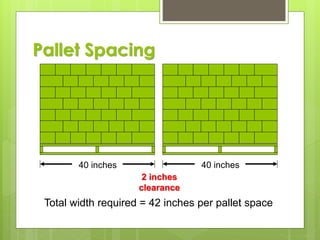
2 inches
clearance
40 inches 40 inches
Total width required = 42 inches per pallet space
Pallet Spacing
Pallet Spacing
(6 x 42”) / 12 in = 21 feet required to store 16 pallets
stacked 3 high
Pallet Positions - Example Problem
A company wants to store an SKU consisting of 13,000
cartons on pallets each containing 30 cartons. How
many pallet positions are needed if the pallets are
stored three high?
Number of pallets required = 13,000 / 30 = 434 pallets
Number of pallet positions = 434 / 3 = 144.67 or 145
‘Note one pallet position will contain only 2 pallets’
Accessibility
 The ability to get goods with a minimum of
effort
✓ without moving other goods
✓ can be a problem with multiple SKU’s in one
area
Cube Utilization
 A measure of how well space is utilized
 Should also consider accessibility
✓ see product D in next slide
 Racking allows accessibility to all goods
while improving utilization
Cube Utilization - Example
Product
A
Product
A
Product
A
Product
A
Product
A
Product
B
Product
B
Product
C
Product
C
Product
C
Product
D
Product
E
Utilization = 12 pallets / (5 x 3) spaces = 80%
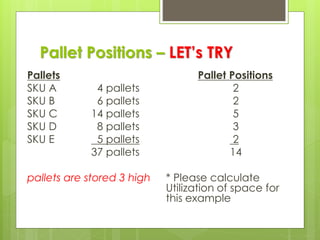
Pallet Positions – LET’s TRY
Pallets
SKU A 4 pallets
SKU B 6 pallets
SKU C 14 pallets
SKU D 8 pallets
SKU E 5 pallets
37 pallets
pallets are stored 3 high
Pallet Positions
2
2
5
3
2
14
* Please calculate
Utilization of space for
this example
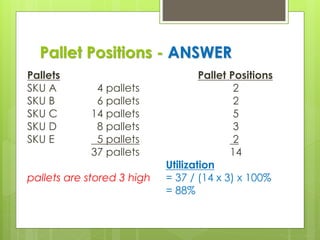
Pallet Positions - ANSWER
Pallets
SKU A 4 pallets
SKU B 6 pallets
SKU C 14 pallets
SKU D 8 pallets
SKU E 5 pallets
37 pallets
pallets are stored 3 high
Pallet Positions
2
2
5
3
2
14
Utilization
= 37 / (14 x 3) x 100%
= 88%
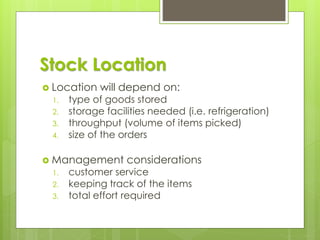
Stock Location
 Location will depend on:
1. type of goods stored
2. storage facilities needed (i.e. refrigeration)
3. throughput (volume of items picked)
4. size of the orders
 Management considerations
1. customer service
2. keeping track of the items
3. total effort required
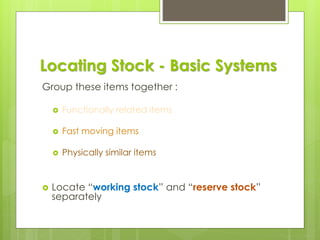
Locating Stock - Basic Systems
Group these items together :
 Functionally related items
 Fast moving items
 Physically similar items
 Locate “working stock” and “reserve stock”
separately
Locating Stock -
Functionally Related Items
Items that are similar in their use or
characteristics
1. warehouse staff become familiar with the
items
2. similar order processing needs
3. often ordered together
✓ hardware items
✓ bulk items
✓ security?
Locating Stock -
Fast Moving Items
 Close to receiving (IN) or shipping (OUT)
 Reduces travel time
 Slower moving items can be further away
Locating Stock -
Physically Similar Items
 May have similar storage requirements
 refrigeration
 shelving
 Use similar handling equipment
 drums vs small items
 steel tubing vs cartons
Locating Stock -
Working Stock & Reserve Stock
 Pick orders from a single location
✓ ‘HOME’ location
 Allows more compact picking area
✓ closer to marshalling area
✓ reduces order picking travel time
 Reserve stock is handled in bulk
Let’s Draw
 A new warehouse will be created. Draw
the ideal Space Layout.
 Assumption of product mixed is required
 Explain
Fixed Location
 “A place for everything and everything in
its place”
 Reduces amount of record keeping
 Usually results in poor cube utilization
✓ space must be available for the
replenishment order quantity
✓ average of 50% utilization
Floating Location
 Goods are stored wherever appropriate
space is available
 Requires good record keeping
 Improves cube utilization
 Often used for reserve stock
Point-of-Use Storage
 JIT and repetitive manufacturing
✓ materials are readily accessible to users
✓ material handling is reduced
✓ central storage costs are reduced
✓ materials are accessible at all times
 Floor stock
✓ small ‘C’ items
✓ inventory is adjusted when stock is
replenished
Central Storage
 All items are kept in one location
 The opposite of point-of-use storage
✓ ease of control
✓ accurate inventory control is easier
✓ makes use of specialized storage
✓ reduces safety stock
Order Picking and Assembly
 Once an order is received it must be:
✓ retrieved
✓ assembled
✓ prepared for shipment
 Involves:
✓ labor
✓ movement of goods
 To provide the desired level of customer
service
Area System
 Used in small warehouses
 The order picker moves through the
warehouse and takes all the goods to
shipping
✓ self marshalling
✓ order is complete when the picker is
finished
Zone System
 Warehouse is divided into zones
 Order pickers work in their own area
✓ deliver goods to the marshalling area
 Zones are established by related items
✓ type of storage
✓ type of material handling required
 Marshalling area then organizes orders for
shipment
Multi-order System
 Similar to zone system
 Multiple orders are picked together
 Marshalling area then sorts orders by
shipment
 Used where there are many items or
many small orders
Working Stock and Reserve Stock
 Used in all systems
 area, zone, multi-order
 Working stock located close to shipping
 Replenishment is done by separate workforce
 Improves order picking efficiency and
customer service
QUALITY Culture
Your Quality Support for Production
Linkage (Warehouse, FIFO, Traceability)
 Greatest Impact
 Quality Monitoring
 Productivity Monitoring
 ISO System
 Countermeasure
 Preventive Measure
 Handling Customer
Warranty
FIFO for WAREHOUSE
How to Arrange Product on Pallets
PRINCIPLES
FIFO
 First In First Out
 Material which is
received earlier will
be dispatched
earlier
OFFO
 Oldest Pack First Out
 Material which is
having earlier date
of manufacturing will
be dispatched first
(Old Pack)
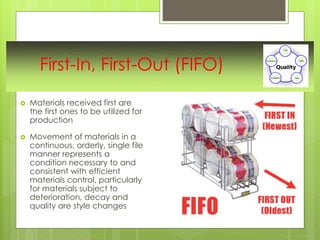
First-In, First-Out (FIFO)
 Materials received first are
the first ones to be utilized for
production
 Movement of materials in a
continuous, orderly, single file
manner represents a
condition necessary to and
consistent with efficient
materials control, particularly
for materials subject to
deterioration, decay and
quality are style changes
Warehouse FIFO System
Traceability (Documentation & Product)
 ability to verify the history,
location, or application of an
item by means of documented
recorded identification
 capability (and
implementation) of keeping
track of a given set or type of
information to a given degree,
or the ability to chronologically
interrelate uniquely identifiable
entities in a way that is
verifiable
LAYOUT CONFIGURATION
 Generally, our goal is to rotate stoke & get
oldest out
 Keep similar items grouped near each
other
 Layout Optimization is like Route
Optimization
(Streamline; Save Time, Save Money)
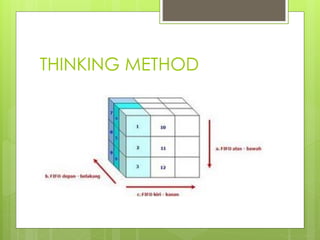
THINKING METHOD
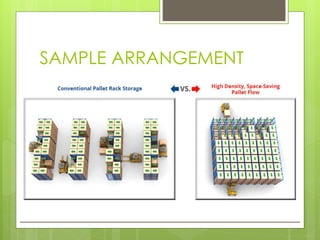
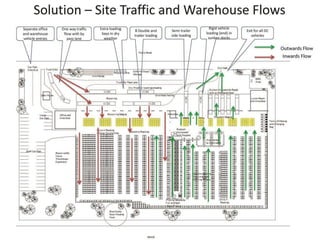
SAMPLE ARRANGEMENT
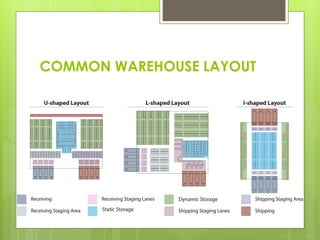
COMMON WAREHOUSE LAYOUT
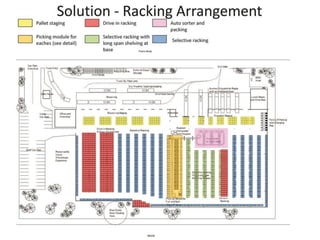
RACKING ARRAGEMENT
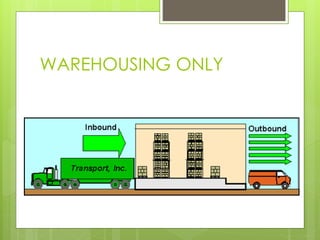
WAREHOUSING ONLY
Inventory Control
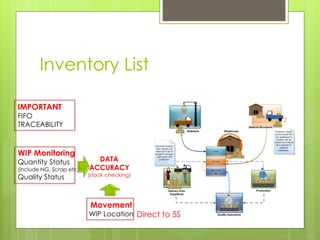
Inventory List
IMPORTANT
FIFO
TRACEABILITY
WIP Monitoring
Quantity Status
(include NG, Scrap etc)
Quality Status
DATA
ACCURACY
(stock checking)
Movement
WIP Location Direct to 5S
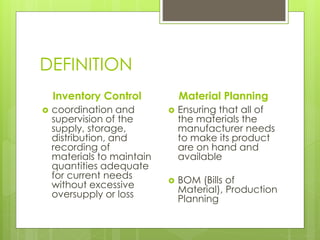
DEFINITION
Inventory Control
 coordination and
supervision of the
supply, storage,
distribution, and
recording of
materials to maintain
quantities adequate
for current needs
without excessive
oversupply or loss
Material Planning
 Ensuring that all of
the materials the
manufacturer needs
to make its product
are on hand and
available
 BOM (Bills of
Material), Production
Planning
Physical Control and Security
 Need a system to make it difficult for
people to make mistakes or forget to
update inventory records
 What you NEED is :
✓ a good part numbering system
✓ a simple well documented transaction
system
Part Numbering
 Each part has a unique number used only
for that part
1. Descriptive part numbers
• assist in order picking and service
• difficult to keep current
2. Non-descriptive part numbers
• easier to keep up-to-date
Transaction System
1. Identify the item
 quantity, location, part number
2. Verify quantity
 standard size containers if possible
3. Record the transaction
 manual or computerized
4. Physically execute the transaction
 move the goods
Physical Control and Security
 Limited access
✓ locked
✓ to ensure transactions are completed
 A well trained workforce
✓ to ensure transactions are completed
✓ familiar with handling the goods
Physical Control and Security
Need a system to make it difficult
for people to make mistakes or
forget to update inventory records
What you NEED is :
✓ a good part numbering system
✓ a simple well documented transaction
system
Inventory Record Accuracy
 Accurate on-hand balances are needed
to:
1. avoid shortages
2. maintain schedules
3. avoid excess inventory
 (of the wrong goods)
4. provide good customer service
Inventory Record Accuracy
 Operate an effective materials management
system
 Maintain customer service
 Operate effectively and efficiently
 Analyse inventory
 The system is only as good as the data used
Inaccurate Inventories
 Result in:
✓ Lost sales
✓ Disrupted schedules
✓ Excess inventory of the wrong things
✓ Low productivity
✓ Poor delivery performance
✓ Excess expediting
Causes of Inventory Errors
1. Unauthorized withdrawal of material
2. Unsecure stockroom
3. Poorly trained personnel
4. Inaccurate transaction recording
5. Poor transaction recording system
✓ system should reduce the likelihood of
human error
6. Lack of audit capability
Measuring Inventory Record
Accuracy
 Ideal is 100%
✓ banks
✓ ‘A’ items
 A tolerance may be allowed for some
items
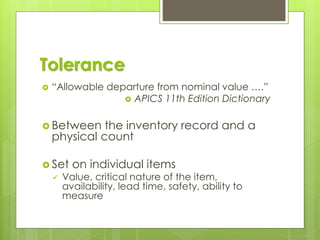
Tolerance
 “Allowable departure from nominal value ….”
 APICS 11th Edition Dictionary
 Between the inventory record and a
physical count
 Set on individual items
✓ Value, critical nature of the item,
availability, lead time, safety, ability to
measure
Tolerance
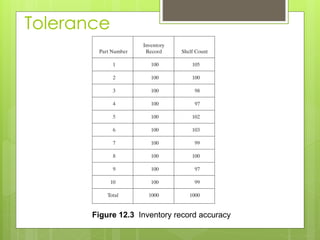
Figure 12.3 Inventory record accuracy
Tolerance
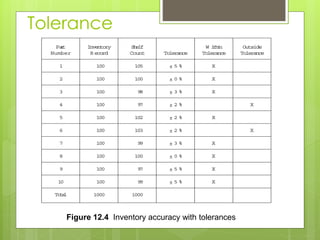
Figure 12.4 Inventory accuracy with tolerances
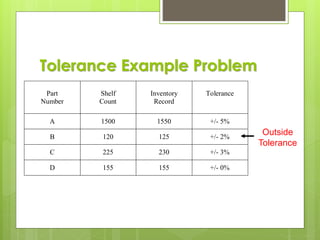
Tolerance Example Problem
Part
Number
Shelf
Count
Inventory
Record
Tolerance
A 1500 1550 +/- 5%
B 120 125 +/- 2%
C 225 230 +/- 3%
D 155 155 +/- 0%
Outside
Tolerance
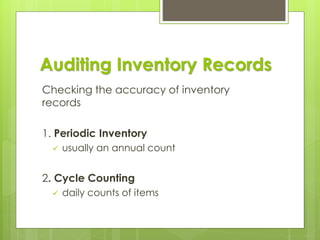
Auditing Inventory Records
Checking the accuracy of inventory
records
1. Periodic Inventory
✓ usually an annual count
2. Cycle Counting
✓ daily counts of items
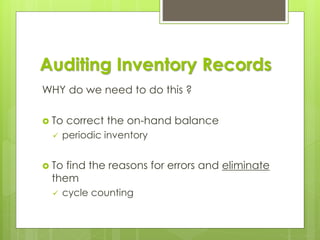
Auditing Inventory Records
WHY do we need to do this ?
 To correct the on-hand balance
✓ periodic inventory
 To find the reasons for errors and eliminate
them
✓ cycle counting
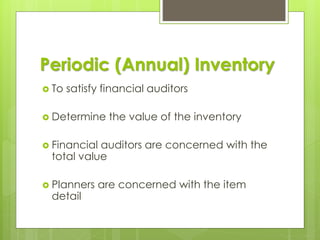
Periodic (Annual) Inventory
 To satisfy financial auditors
 Determine the value of the inventory
 Financial auditors are concerned with the
total value
 Planners are concerned with the item
detail
Taking the Physical Inventory
Taking a physical inventory is like painting;
the results depend on good preparation
 George Plossl
Housekeeping
 sort items, pre-count and seal
Identification
 identify and tag items
 use personnel familiar with the items
Training in procedures
Physical Inventory - Process
1. Count the items and record the count on tickets
left with the item
2. Verify the count, sampling may be used
3. Collect the tickets and list all items
4. Reconcile the inventory
update financial records
correct inventory balances
Investigate reasons for discrepancies
Physical Inventory - Problems
 Production may be shut down
 Labor and paperwork effort
 Pressure to get the inventory completed
 People doing the inventory may not be familiar
with the items
 Errors may be introduced
Cycle Counting
 Count inventory continually throughout
the year
 Predetermined schedule
 some items counted frequently
 depending on value
 past history of problems
 Count some items every day
Cycle Counting- Advantages
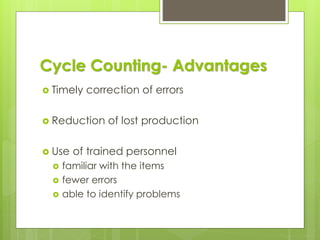
 Timely correction of errors
 Reduction of lost production
 Use of trained personnel
 familiar with the items
 fewer errors
 able to identify problems
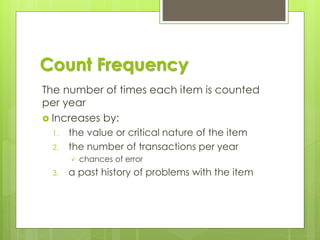
Count Frequency
The number of times each item is counted
per year
 Increases by:
1. the value or critical nature of the item
2. the number of transactions per year
✓ chances of error
3. a past history of problems with the item
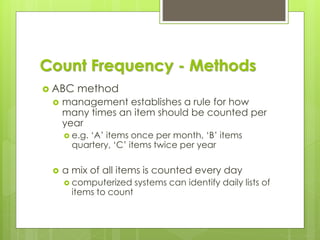
Count Frequency - Methods
 ABC method
 management establishes a rule for how
many times an item should be counted per
year
 e.g. ‘A’ items once per month, ‘B’ items
quartery, ‘C’ items twice per year
 a mix of all items is counted every day
 computerized systems can identify daily lists of
items to count
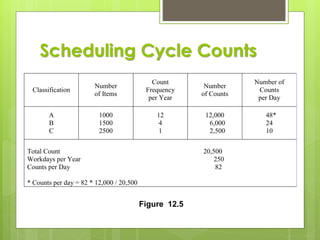
Scheduling Cycle Counts
Classification
Number
of Items
Count
Frequency
per Year
Number
of Counts
Number of
Counts
per Day
A
B
C
1000
1500
2500
12
4
1
12,000
6,000
2,500
48*
24
10
Total Count 20,500
Workdays per Year 250
Counts per Day 82
* Counts per day = 82 * 12,000 / 20,500
Figure 12.5
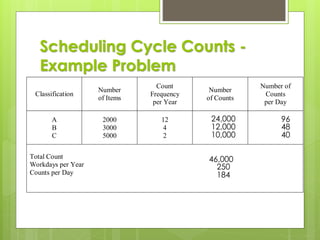
Scheduling Cycle Counts -
Example Problem
Classification
Number
of Items
Count
Frequency
per Year
Number
of Counts
Number of
Counts
per Day
A
B
C
2000
3000
5000
12
4
2
Total Count
Workdays per Year
Counts per Day
24,000
12,000
10,000
46,000
250
184
96
48
40
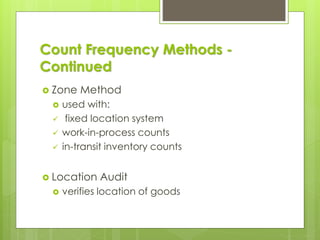
Count Frequency Methods -
Continued
 Zone Method
 used with:
✓ fixed location system
✓ work-in-process counts
✓ in-transit inventory counts
 Location Audit
 verifies location of goods
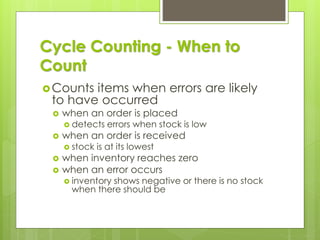
Cycle Counting - When to
Count
Counts items when errors are likely
to have occurred
 when an order is placed
 detects errors when stock is low
 when an order is received
 stock is at its lowest
 when inventory reaches zero
 when an error occurs
 inventory shows negative or there is no stock
when there should be
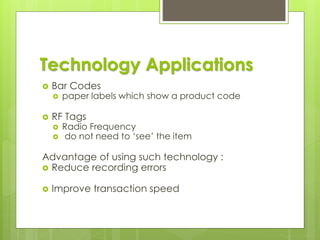
Technology Applications
 Bar Codes
 paper labels which show a product code
 RF Tags
 Radio Frequency
 do not need to ‘see’ the item
Advantage of using such technology :
 Reduce recording errors
 Improve transaction speed
RFID for Accuracy
DISCUSSION
Session 2
How to Control Inventory
- Accurately
- Fast Time
- FIFO Simple
- NO High Investment eg. RFID
Public Bicycle Storage
Best Practices
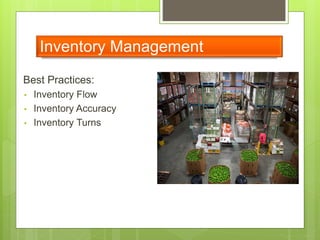
Warehouse Management
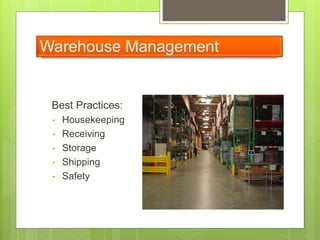
Best Practices:
• Housekeeping
• Receiving
• Storage
• Shipping
• Safety
Warehouse Management
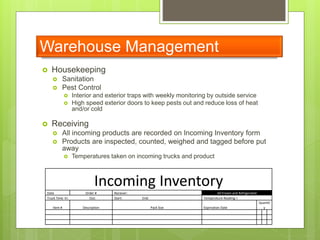
 Housekeeping
 Sanitation
 Pest Control
 Interior and exterior traps with weekly monitoring by outside service
 High speed exterior doors to keep pests out and reduce loss of heat
and/or cold
 Receiving
 All incoming products are recorded on Incoming Inventory form
 Products are inspected, counted, weighed and tagged before put
away
 Temperatures taken on incoming trucks and product
Incoming Inventory
Date Order # Reciever: All Frozen and Refrigerated
Truck Time In: Out: Start: End: Temperature Reading =
Item # Description Pack Size Expriration Date
Quantit
y
Warehouse Management
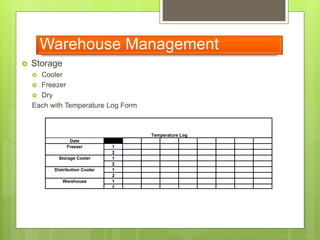
 Storage
 Cooler
 Freezer
 Dry
Each with Temperature Log Form
Temperature Log
Date
Freezer 1
2
Storage Cooler 1
2
Distribution Cooler 1
2
Warehouse 1
2
Warehouse Management
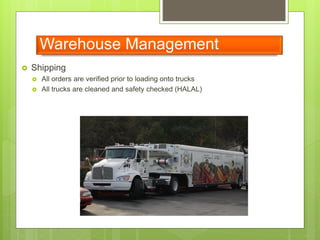
 Shipping
 All orders are verified prior to loading onto trucks
 All trucks are cleaned and safety checked (HALAL)
Warehouse Management
 Safety
 Warehouse
 Racks are bolted to cement ground with protectors, wire mesh shelving and netting
 In ground scales: Calibrated Quarterly
 Enclosed lighting fixtures
 Cooler/Freezer have Plastic strip doors for efficiency
 Material safety data sheet (MSDS)
 Training – Forklift certification and Material handling
 In house mechanic
 Food Handling
 Products are stored based on requirement, ie. cooler, freezer or dry
 Salvage is segregated away from inventory
 All plastic bins are washed with high pressure hot water
 Training – ServSafe certification
Best Practices:
• Inventory Flow
• Inventory Accuracy
• Inventory Turns
Inventory Management
 Inventory Accuracy
 Inventory Management System
 Bar coding: Both Pallet tags and rack locations
 Management
 Not just sitting behind computers, knowing the daily warehouse activity
 Audited yearly by regulated bodies
 Receiving/Inventory are separate departments for Financial Controls
 Cycle Count: Warehouse scans, inventory reconciles
Inventory Management
 Inventory Accuracy
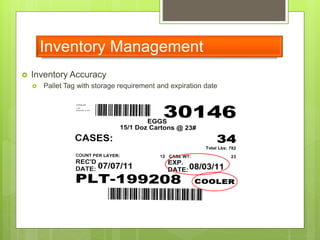
 Pallet Tag with storage requirement and expiration date
Inventory Management
• Inventory Turns
– FIFO/FEFO
– Measure Produce turns and Non Produce
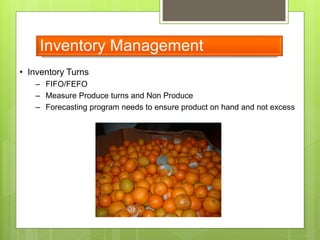
– Forecasting program needs to ensure product on hand and not excess
 The organization shall ensure that there is a
PHYSICAL Segregation of Halal cargo from non-
Halal cargo throughout the warehouse processes
 The Halal products have a dedicated storage
zone (floor storage) or racks, which are clearly
separated by color and / or marking
 A dedicated cold room is available, or
segregation from non-Halal through physical
barrier or container (insulated box) is required for
the storage of Halal products in case of
refrigerated storage
HALAL Warehouse
SAFETY CULTURE
Volunteer Safety is our #1 PRIORITY
Forklift Accident
How to open a box?
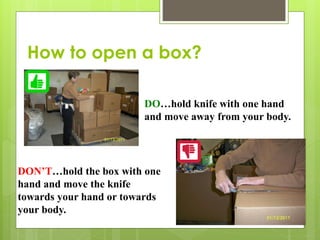
 DO
DO…hold knife with one hand
and move away from your body.
DON’T…hold the box with one
hand and move the knife
towards your hand or towards
your body.
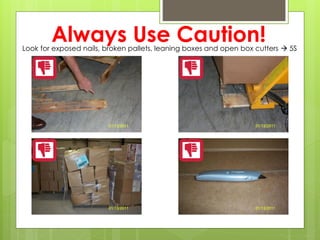
Always Use Caution!Look for exposed nails, broken pallets, leaning boxes and open box cutters → 5S
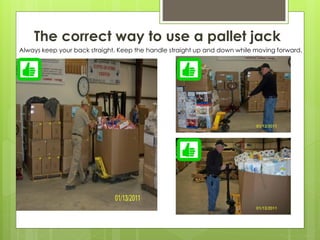
The correct way to use a pallet jack
Always keep your back straight. Keep the handle straight up and down while moving forward.
The wrong way to use a pallet jack!
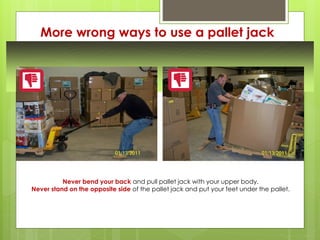
More wrong ways to use a pallet jack
Never bend your back and pull pallet jack with your upper body.
Never stand on the opposite side of the pallet jack and put your feet under the pallet.
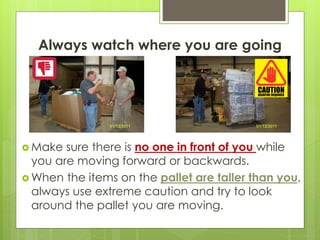
Always watch where you are going
 Make sure there is no one in front of you while
you are moving forward or backwards.
 When the items on the pallet are taller than you,
always use extreme caution and try to look
around the pallet you are moving.
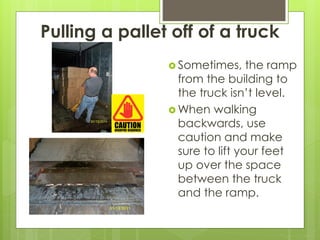
Pulling a pallet off of a truck
 Sometimes, the ramp
from the building to
the truck isn’t level.
 When walking
backwards, use
caution and make
sure to lift your feet
up over the space
between the truck
and the ramp.
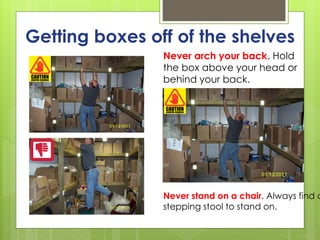
Getting boxes off of the shelves
Never stand on a chair. Always find a
stepping stool to stand on.
Never arch your back. Hold
the box above your head or
behind your back.
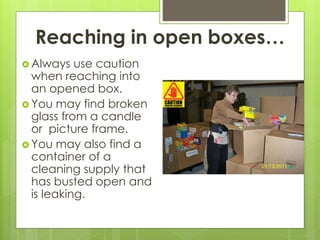
Reaching in open boxes…
 Always use caution
when reaching into
an opened box.
 You may find broken
glass from a candle
or picture frame.
 You may also find a
container of a
cleaning supply that
has busted open and
is leaking.
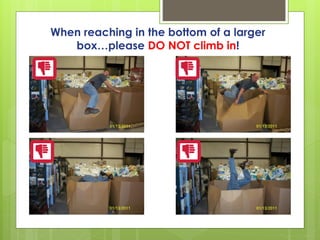
When reaching in the bottom of a larger
box…please DO NOT climb in!
The correct way to reach the
bottom of a large box
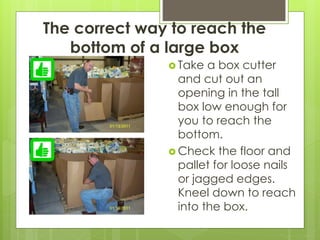
 Take a box cutter
and cut out an
opening in the tall
box low enough for
you to reach the
bottom.
 Check the floor and
pallet for loose nails
or jagged edges.
Kneel down to reach
into the box.
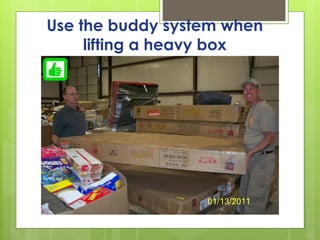
Use the buddy system when
lifting a heavy box
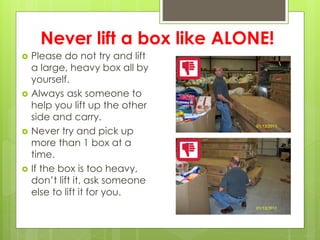
Never lift a box like ALONE!
 Please do not try and lift
a large, heavy box all by
yourself.
 Always ask someone to
help you lift up the other
side and carry.
 Never try and pick up
more than 1 box at a
time.
 If the box is too heavy,
don’t lift it, ask someone
else to lift it for you.
In case of rainy weather, watery …
always use caution when going in
and out of the warehouse
Taking your Health
 Always stay hydrated!
 Take breaks when needed.
 Always wear comfortable clothing
 ALWAYS wear closed toed shoes!
Although it looks tempting, please don’t
wrap YOURSELF up in the outbound pallets!
Please make sure there is no one standing between you and the pallet.
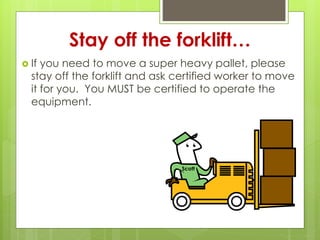
Stay off the forklift…
 If you need to move a super heavy pallet, please
stay off the forklift and ask certified worker to move
it for you. You MUST be certified to operate the
equipment.
Scott
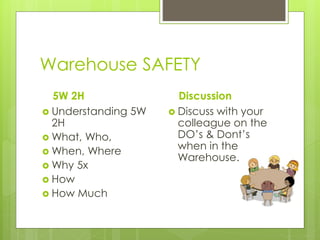
Warehouse SAFETY
5W 2H
 Understanding 5W
2H
 What, Who,
 When, Where
 Why 5x
 How
 How Much
Discussion
 Discuss with your
colleague on the
DO’s & Dont’s
when in the
Warehouse.
Business
Challenges
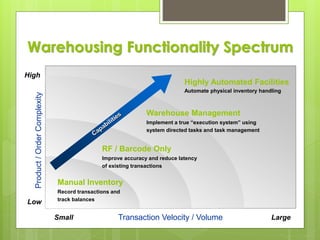
Transaction Velocity / VolumeSmall Large
Product/OrderComplexity
Low
Manual Inventory
Record transactions and
track balances
RF / Barcode Only
Improve accuracy and reduce latency
of existing transactions
High
Warehouse Management
Implement a true “execution system” using
system directed tasks and task management
Highly Automated Facilities
Automate physical inventory handling
Warehousing Functionality Spectrum
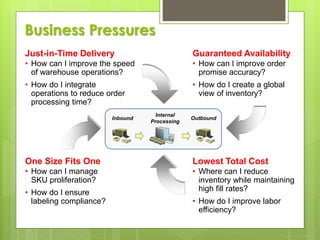
Just-in-Time Delivery
• How can I improve the speed
of warehouse operations?
• How do I integrate
operations to reduce order
processing time?
Guaranteed Availability
• How can I improve order
promise accuracy?
• How do I create a global
view of inventory?
One Size Fits One
• How can I manage
SKU proliferation?
• How do I ensure
labeling compliance?
Lowest Total Cost
• Where can I reduce
inventory while maintaining
high fill rates?
• How do I improve labor
efficiency?
Internal
Processing
Inbound Outbound
Business Pressures
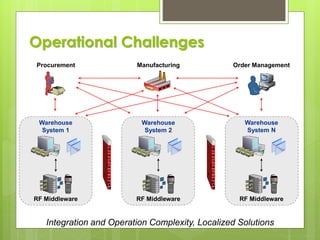
Warehouse
System 1
ManufacturingProcurement Order Management
Warehouse
System 2
Warehouse
System N
RF Middleware RF Middleware RF Middleware
Integration and Operation Complexity, Localized Solutions
Operational Challenges
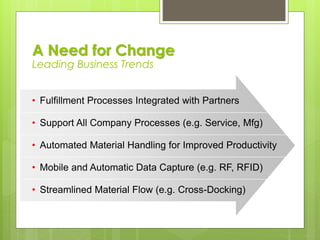
• Fulfillment Processes Integrated with Partners
• Support All Company Processes (e.g. Service, Mfg)
• Automated Material Handling for Improved Productivity
• Mobile and Automatic Data Capture (e.g. RF, RFID)
• Streamlined Material Flow (e.g. Cross-Docking)
A Need for Change
Leading Business Trends
Solution
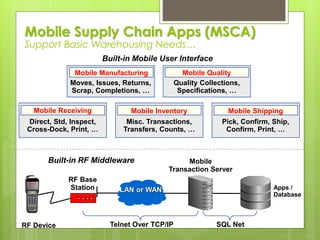
Apps /
Database
RF Base
Station
SQL NetTelnet Over TCP/IPRF Device
Built-in RF Middleware
Built-in Mobile User Interface
Mobile
Transaction Server
Mobile Supply Chain Apps (MSCA)
Support Basic Warehousing Needs…
Moves, Issues, Returns,
Scrap, Completions, …
Quality Collections,
Specifications, …
Misc. Transactions,
Transfers, Counts, …
Pick, Confirm, Ship,
Confirm, Print, …
Direct, Std, Inspect,
Cross-Dock, Print, …
Mobile Manufacturing Mobile Quality
Mobile Receiving Mobile Inventory Mobile Shipping
LAN or WAN
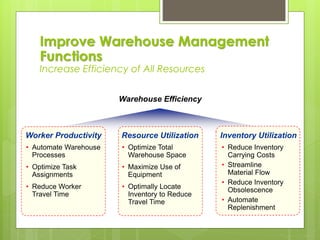
Worker Productivity
• Automate Warehouse
Processes
• Optimize Task
Assignments
• Reduce Worker
Travel Time
Resource Utilization
• Optimize Total
Warehouse Space
• Maximize Use of
Equipment
• Optimally Locate
Inventory to Reduce
Travel Time
Warehouse Efficiency
Inventory Utilization
• Reduce Inventory
Carrying Costs
• Streamline
Material Flow
• Reduce Inventory
Obsolescence
• Automate
Replenishment
Improve Warehouse Management
Functions
Increase Efficiency of All Resources
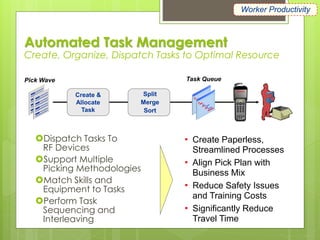
Automated Task Management
Create, Organize, Dispatch Tasks to Optimal Resource
Dispatch Tasks To
RF Devices
Support Multiple
Picking Methodologies
Match Skills and
Equipment to Tasks
Perform Task
Sequencing and
Interleaving
Pick Wave Task Queue
• Create Paperless,
Streamlined Processes
• Align Pick Plan with
Business Mix
• Reduce Safety Issues
and Training Costs
• Significantly Reduce
Travel Time
Split
Merge
Sort
Create &
Allocate
Task
Worker Productivity
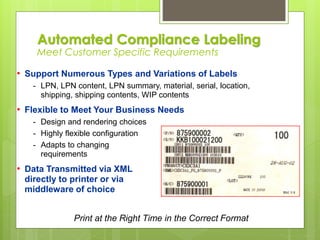
• Support Numerous Types and Variations of Labels
- LPN, LPN content, LPN summary, material, serial, location,
shipping, shipping contents, WIP contents
• Flexible to Meet Your Business Needs
- Design and rendering choices
- Highly flexible configuration
- Adapts to changing
requirements
• Data Transmitted via XML
directly to printer or via
middleware of choice
Print at the Right Time in the Correct Format
Automated Compliance Labeling
Meet Customer Specific Requirements
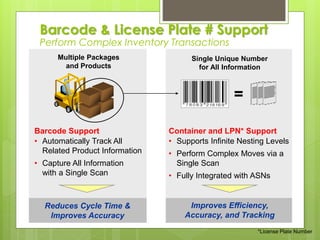
Container and LPN* Support
• Supports Infinite Nesting Levels
• Perform Complex Moves via a
Single Scan
• Fully Integrated with ASNs
Improves Efficiency,
Accuracy, and Tracking
Barcode Support
• Automatically Track All
Related Product Information
• Capture All Information
with a Single Scan
Reduces Cycle Time &
Improves Accuracy
Single Unique Number
for All Information
Multiple Packages
and Products
=
*License Plate Number
Barcode & License Plate # Support
Perform Complex Inventory Transactions
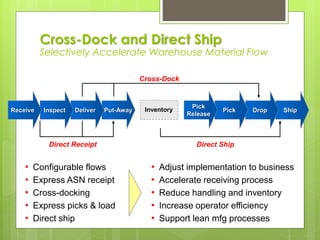
ShipDropPut-AwayDeliverInspect
Cross-Dock
Inventory
Direct Ship
Pick
Pick
Release
Receive
Direct Receipt
• Configurable flows
• Express ASN receipt
• Cross-docking
• Express picks & load
• Direct ship
• Adjust implementation to business
• Accelerate receiving process
• Reduce handling and inventory
• Increase operator efficiency
• Support lean mfg processes
Cross-Dock and Direct Ship
Selectively Accelerate Warehouse Material Flow
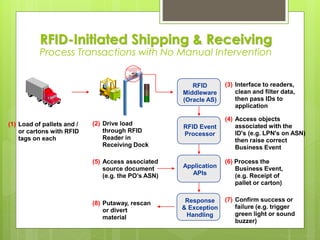
(1) Load of pallets and /
or cartons with RFID
tags on each
(2) Drive load
through RFID
Reader in
Receiving Dock
(3) Interface to readers,
clean and filter data,
then pass IDs to
application
(4) Access objects
associated with the
ID's (e.g. LPN's on ASN)
then raise correct
Business Event
(6) Process the
Business Event,
(e.g. Receipt of
pallet or carton)
(5) Access associated
source document
(e.g. the PO’s ASN)
(7) Confirm success or
failure (e.g. trigger
green light or sound
buzzer)
(8) Putaway, rescan
or divert
material
RFID-Initiated Shipping & Receiving
Process Transactions with No Manual Intervention
RFID
Middleware
(Oracle AS)
RFID Event
Processor
Application
APIs
Response
& Exception
Handling
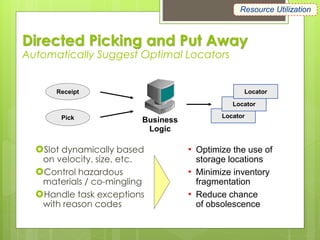
Directed Picking and Put Away
Automatically Suggest Optimal Locators
Slot dynamically based
on velocity, size, etc.
Control hazardous
materials / co-mingling
Handle task exceptions
with reason codes
• Optimize the use of
storage locations
• Minimize inventory
fragmentation
• Reduce chance
of obsolescence
Receipt
Business
Logic
Locator
Locator
Locator
Pick
Resource Utilization
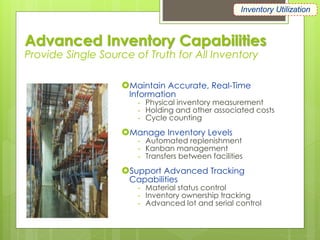
Advanced Inventory Capabilities
Provide Single Source of Truth for All Inventory
Maintain Accurate, Real-Time
Information
- Physical inventory measurement
- Holding and other associated costs
- Cycle counting
Manage Inventory Levels
- Automated replenishment
- Kanban management
- Transfers between facilities
Support Advanced Tracking
Capabilities
- Material status control
- Inventory ownership tracking
- Advanced lot and serial control
Inventory Utilization
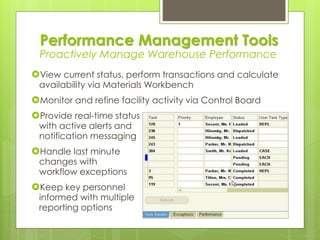
Performance Management Tools
Proactively Manage Warehouse Performance
View current status, perform transactions and calculate
availability via Materials Workbench
Monitor and refine facility activity via Control Board
Provide real-time status
with active alerts and
notification messaging
Handle last minute
changes with
workflow exceptions
Keep key personnel
informed with multiple
reporting options
LEAN in
Warehousing
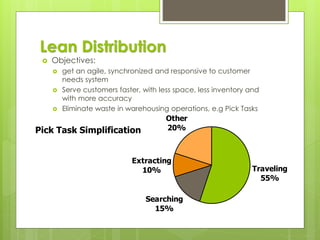
Lean Distribution
 Objectives:
 get an agile, synchronized and responsive to customer
needs system
 Serve customers faster, with less space, less inventory and
with more accuracy
 Eliminate waste in warehousing operations, e.g Pick Tasks
Traveling
55%
Searching
15%
Extracting
10%
Other
20%Pick Task Simplification
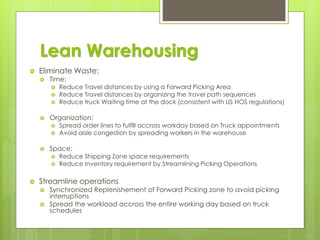
Lean Warehousing
 Eliminate Waste:
 Time:
 Reduce Travel distances by using a Forward Picking Area
 Reduce Travel distances by organizing the travel path sequences
 Reduce truck Waiting time at the dock (consistent with US HOS regulations)
 Organization:
 Spread order lines to fulfill accross workday based on Truck appointments
 Avoid aisle congestion by spreading workers in the warehouse
 Space:
 Reduce Shipping Zone space requirements
 Reduce Inventory requirement by Streamlining Picking Operations
 Streamline operations
 Synchronized Replenishement of Forward Picking zone to avoid picking
interruptions
 Spread the workload accross the entire working day based on truck
schedules
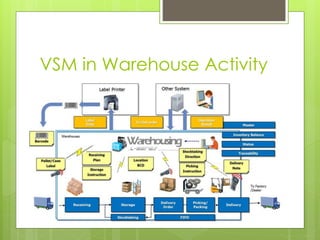
VSM in Warehouse Activity
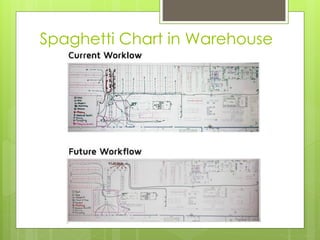
Spaghetti Chart in Warehouse
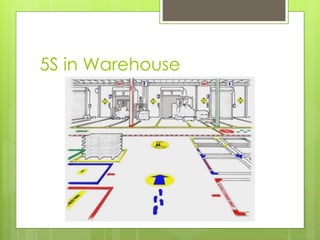
5S in Warehouse

Warehousing & Inventory management (2018)

  • 1.
  • 2.
    Warehouses  Store inventoryfor a period of time  storage  Protection  Inventory may be turned over rapidly  distribution center  customer service
  • 3.
    % of Total WarehouseCost % of Sales Labor 45.7% .96% Space 21.5% .45% Energy 4.4% .09% Equipment 6.9% .14% Materials 8.3% .17% Other 13.2% .28% TOTAL 100% 2.09% Total Warehouse Costs Warehousing Costs HIGHEST
  • 4.
    “Senior level executivesnow realize that the automated warehouse is as much a part of e-commerce and e-fulfillment as the Internet.” - Supply Chain Yearbook Inbound Internal Processing Outbound • Purchases • Mfg / Assembly • Transfers • Outside Processing • Customer Shipments • Vendor Returns • Transfers • Outside Processing • Pick • Pack • Inspection • Count • Assembly • Storage • Move • Replenish Warehouse Management At-a-Glance
  • 5.
    Stores Perform the samefunction as a warehouse for a factory. ✓ raw materials ✓ finished goods ✓ supplies ✓ repair parts
  • 6.
  • 7.
    Identify the goods With appropriate Stock Keeping Unit (SKU) number  With part number  Indicate the quantity In the field of inventory management, a stock-keeping unit or SKU is a term used (generally) by businesses as part of the process of keeping track of what they have available to sell. SKU can also refer to a unique identifier or code that refers to the items or products they have available for sale. Each SKU is attached to an item, variant, product line, bundle, service, fee, or attachment. SKUs are often used to refer to different versions of the same product.
  • 8.
    SKU Example V CD C Vendor 1 Collection 1 Design 1 Color 1 Vendor 2 Collection 2 Design 2 Color 2 Vendor 3 Collection 3 Design 3 Color 3 Vendor 4 Collection 4 Design 4 Color 4 Vendor 5 Collection 5 Design 5 Color 5 Vendor 6 Collection 6 Design 6 Color 6 → SKU = V4 + C3 + D5 + C2 (V4C3D5C2)
  • 9.
  • 10.
    Warehouse Activities 1. Receivegoods 2. Identify goods 3. Dispatch goods to storage 4. Hold goods 5. Pick goods 6. Marshal the shipment 7. Dispatch the shipment 8. Operate an information system
  • 11.
    WAREHOUSE by FUNCTION INBOUND Receiving  Identification & Sorting  Dispatching to “Storage”  Placing in storage  Storage  Retrieval from Storage OUTBOUND  Order Accumulation  Packing  Shipping  Record Keeping FIFO System
  • 12.
    Receive Goods  Acceptanceof goods from outside transportation or an attached factory a. Check the goods against an “order” or “bill of lading” b. Check the quantities c. Check for any transit damage d. Inspect goods if required
  • 13.
    Dispatch Goods toStorage (Placing in Storage)  Goods are sorted  Put away goods ✓ record the location
  • 14.
    Hold / StoringGoods  Storage is meant to protect the goods  cold  heated  explosive (dangerous, flammable etc)
  • 15.
    Pick Goods  Goodsare picked from storage  must be accessible  location records  Brought to marshalling (Inspection) area
  • 16.
    Marshal the Shipment All goods for an order are brought together ✓ check for missing items ✓ check for correct items ✓ change order information if required
  • 17.
    Dispatch the Shipment The order is prepared for shipment and loaded on the right vehicle ✓ protective packaging for shipment ✓ documents prepared ✓ loaded and secured
  • 18.
    Warehouse “Information System” Need to know what is in the warehouse ✓ quantity on hand ✓ quantity received ✓ quantity issued ✓ location of goods  Computer based or manual system
  • 19.
  • 20.
  • 21.
  • 22.
  • 23.
    SPOT the DIFFERENCE WAREHOUSE Huge building in which goods, raw materials, or commodities are stored. People do not usually shop at a warehouse STORE  Stores can contain almost all the items related to one  No. of items stored & their quantities also can vary  Smaller in size compare to Warehouse  Raw Materials, Finished Goods, Supplies, Repair Parts
  • 24.
    Warehouse Management  Makemaximum use of space ✓ capital cost of space is very high  Make effective use of labor and equipment ✓ material handling equipment is the second largest capital cost ✓ need best mix of equipment and labor ✓ all SKU’s should be easy to find ✓ move goods efficiently
  • 25.
    Palletized Storage Systems Block Stacking  Drive-in and Drive-through racking  Push back Racking  Adjustable Pallet Racking (APR)  Double Deep Racking  Powered Mobile Racking  Pallet Live Storage  Small item storage system
  • 26.
    Warehouse Effectiveness 1. Cubeutilization and accessibility 2. Stock location 3. Order picking & “Assembly” : option requirement 4. Accessibility  The ability to get goods with a minimum of effort ✓ without moving other goods ✓ can be a problem with multiple SKU’s in one area 5. Packaging
  • 27.
    Cube Utilization and Accessibility Goods are stored on the floor and in the space above  Space also required for: aisles offices receiving order picking shipping docks order assembly  Need to know the maximum space required
  • 28.
    Pallet Positions 1. Floorstorage 2. Pallets are stacked on each other 3. Maximum stacking height ➢ due to ceiling height ➢ due to weight restrictions 4. Need to allow for side clearance
  • 29.
  • 30.
    Pallet Dimension There isno universally accepted standard size for pallets. The above table are the frequently used today
  • 31.
    DISCUSSION  Why Palletspacing is important ?
  • 32.
    2 inches clearance 40 inches40 inches Total width required = 42 inches per pallet space Pallet Spacing
  • 33.
    Pallet Spacing (6 x42”) / 12 in = 21 feet required to store 16 pallets stacked 3 high
  • 34.
    Pallet Positions -Example Problem A company wants to store an SKU consisting of 13,000 cartons on pallets each containing 30 cartons. How many pallet positions are needed if the pallets are stored three high? Number of pallets required = 13,000 / 30 = 434 pallets Number of pallet positions = 434 / 3 = 144.67 or 145 ‘Note one pallet position will contain only 2 pallets’
  • 35.
    Accessibility  The abilityto get goods with a minimum of effort ✓ without moving other goods ✓ can be a problem with multiple SKU’s in one area
  • 36.
    Cube Utilization  Ameasure of how well space is utilized  Should also consider accessibility ✓ see product D in next slide  Racking allows accessibility to all goods while improving utilization
  • 37.
    Cube Utilization -Example Product A Product A Product A Product A Product A Product B Product B Product C Product C Product C Product D Product E Utilization = 12 pallets / (5 x 3) spaces = 80%
  • 38.
    Pallet Positions –LET’s TRY Pallets SKU A 4 pallets SKU B 6 pallets SKU C 14 pallets SKU D 8 pallets SKU E 5 pallets 37 pallets pallets are stored 3 high Pallet Positions 2 2 5 3 2 14 * Please calculate Utilization of space for this example
  • 39.
    Pallet Positions -ANSWER Pallets SKU A 4 pallets SKU B 6 pallets SKU C 14 pallets SKU D 8 pallets SKU E 5 pallets 37 pallets pallets are stored 3 high Pallet Positions 2 2 5 3 2 14 Utilization = 37 / (14 x 3) x 100% = 88%
  • 40.
    Stock Location  Locationwill depend on: 1. type of goods stored 2. storage facilities needed (i.e. refrigeration) 3. throughput (volume of items picked) 4. size of the orders  Management considerations 1. customer service 2. keeping track of the items 3. total effort required
  • 41.
    Locating Stock -Basic Systems Group these items together :  Functionally related items  Fast moving items  Physically similar items  Locate “working stock” and “reserve stock” separately
  • 42.
    Locating Stock - FunctionallyRelated Items Items that are similar in their use or characteristics 1. warehouse staff become familiar with the items 2. similar order processing needs 3. often ordered together ✓ hardware items ✓ bulk items ✓ security?
  • 43.
    Locating Stock - FastMoving Items  Close to receiving (IN) or shipping (OUT)  Reduces travel time  Slower moving items can be further away
  • 44.
    Locating Stock - PhysicallySimilar Items  May have similar storage requirements  refrigeration  shelving  Use similar handling equipment  drums vs small items  steel tubing vs cartons
  • 45.
    Locating Stock - WorkingStock & Reserve Stock  Pick orders from a single location ✓ ‘HOME’ location  Allows more compact picking area ✓ closer to marshalling area ✓ reduces order picking travel time  Reserve stock is handled in bulk
  • 46.
    Let’s Draw  Anew warehouse will be created. Draw the ideal Space Layout.  Assumption of product mixed is required  Explain
  • 47.
    Fixed Location  “Aplace for everything and everything in its place”  Reduces amount of record keeping  Usually results in poor cube utilization ✓ space must be available for the replenishment order quantity ✓ average of 50% utilization
  • 48.
    Floating Location  Goodsare stored wherever appropriate space is available  Requires good record keeping  Improves cube utilization  Often used for reserve stock
  • 49.
    Point-of-Use Storage  JITand repetitive manufacturing ✓ materials are readily accessible to users ✓ material handling is reduced ✓ central storage costs are reduced ✓ materials are accessible at all times  Floor stock ✓ small ‘C’ items ✓ inventory is adjusted when stock is replenished
  • 50.
    Central Storage  Allitems are kept in one location  The opposite of point-of-use storage ✓ ease of control ✓ accurate inventory control is easier ✓ makes use of specialized storage ✓ reduces safety stock
  • 51.
    Order Picking andAssembly  Once an order is received it must be: ✓ retrieved ✓ assembled ✓ prepared for shipment  Involves: ✓ labor ✓ movement of goods  To provide the desired level of customer service
  • 52.
    Area System  Usedin small warehouses  The order picker moves through the warehouse and takes all the goods to shipping ✓ self marshalling ✓ order is complete when the picker is finished
  • 53.
    Zone System  Warehouseis divided into zones  Order pickers work in their own area ✓ deliver goods to the marshalling area  Zones are established by related items ✓ type of storage ✓ type of material handling required  Marshalling area then organizes orders for shipment
  • 54.
    Multi-order System  Similarto zone system  Multiple orders are picked together  Marshalling area then sorts orders by shipment  Used where there are many items or many small orders
  • 55.
    Working Stock andReserve Stock  Used in all systems  area, zone, multi-order  Working stock located close to shipping  Replenishment is done by separate workforce  Improves order picking efficiency and customer service
  • 56.
    QUALITY Culture Your QualitySupport for Production
  • 57.
    Linkage (Warehouse, FIFO,Traceability)  Greatest Impact  Quality Monitoring  Productivity Monitoring  ISO System  Countermeasure  Preventive Measure  Handling Customer Warranty
  • 58.
    FIFO for WAREHOUSE Howto Arrange Product on Pallets
  • 59.
    PRINCIPLES FIFO  First InFirst Out  Material which is received earlier will be dispatched earlier OFFO  Oldest Pack First Out  Material which is having earlier date of manufacturing will be dispatched first (Old Pack)
  • 60.
    First-In, First-Out (FIFO) Materials received first are the first ones to be utilized for production  Movement of materials in a continuous, orderly, single file manner represents a condition necessary to and consistent with efficient materials control, particularly for materials subject to deterioration, decay and quality are style changes
  • 61.
  • 62.
    Traceability (Documentation &Product)  ability to verify the history, location, or application of an item by means of documented recorded identification  capability (and implementation) of keeping track of a given set or type of information to a given degree, or the ability to chronologically interrelate uniquely identifiable entities in a way that is verifiable
  • 63.
    LAYOUT CONFIGURATION  Generally,our goal is to rotate stoke & get oldest out  Keep similar items grouped near each other  Layout Optimization is like Route Optimization (Streamline; Save Time, Save Money)
  • 64.
  • 65.
  • 66.
  • 67.
  • 69.
  • 70.
  • 71.
    Inventory List IMPORTANT FIFO TRACEABILITY WIP Monitoring QuantityStatus (include NG, Scrap etc) Quality Status DATA ACCURACY (stock checking) Movement WIP Location Direct to 5S
  • 72.
    DEFINITION Inventory Control  coordinationand supervision of the supply, storage, distribution, and recording of materials to maintain quantities adequate for current needs without excessive oversupply or loss Material Planning  Ensuring that all of the materials the manufacturer needs to make its product are on hand and available  BOM (Bills of Material), Production Planning
  • 73.
    Physical Control andSecurity  Need a system to make it difficult for people to make mistakes or forget to update inventory records  What you NEED is : ✓ a good part numbering system ✓ a simple well documented transaction system
  • 74.
    Part Numbering  Eachpart has a unique number used only for that part 1. Descriptive part numbers • assist in order picking and service • difficult to keep current 2. Non-descriptive part numbers • easier to keep up-to-date
  • 75.
    Transaction System 1. Identifythe item  quantity, location, part number 2. Verify quantity  standard size containers if possible 3. Record the transaction  manual or computerized 4. Physically execute the transaction  move the goods
  • 76.
    Physical Control andSecurity  Limited access ✓ locked ✓ to ensure transactions are completed  A well trained workforce ✓ to ensure transactions are completed ✓ familiar with handling the goods
  • 77.
    Physical Control andSecurity Need a system to make it difficult for people to make mistakes or forget to update inventory records What you NEED is : ✓ a good part numbering system ✓ a simple well documented transaction system
  • 78.
    Inventory Record Accuracy Accurate on-hand balances are needed to: 1. avoid shortages 2. maintain schedules 3. avoid excess inventory  (of the wrong goods) 4. provide good customer service
  • 79.
    Inventory Record Accuracy Operate an effective materials management system  Maintain customer service  Operate effectively and efficiently  Analyse inventory  The system is only as good as the data used
  • 80.
    Inaccurate Inventories  Resultin: ✓ Lost sales ✓ Disrupted schedules ✓ Excess inventory of the wrong things ✓ Low productivity ✓ Poor delivery performance ✓ Excess expediting
  • 81.
    Causes of InventoryErrors 1. Unauthorized withdrawal of material 2. Unsecure stockroom 3. Poorly trained personnel 4. Inaccurate transaction recording 5. Poor transaction recording system ✓ system should reduce the likelihood of human error 6. Lack of audit capability
  • 82.
    Measuring Inventory Record Accuracy Ideal is 100% ✓ banks ✓ ‘A’ items  A tolerance may be allowed for some items
  • 83.
    Tolerance  “Allowable departurefrom nominal value ….”  APICS 11th Edition Dictionary  Between the inventory record and a physical count  Set on individual items ✓ Value, critical nature of the item, availability, lead time, safety, ability to measure
  • 84.
  • 85.
    Tolerance Figure 12.4 Inventoryaccuracy with tolerances
  • 86.
    Tolerance Example Problem Part Number Shelf Count Inventory Record Tolerance A1500 1550 +/- 5% B 120 125 +/- 2% C 225 230 +/- 3% D 155 155 +/- 0% Outside Tolerance
  • 87.
    Auditing Inventory Records Checkingthe accuracy of inventory records 1. Periodic Inventory ✓ usually an annual count 2. Cycle Counting ✓ daily counts of items
  • 88.
    Auditing Inventory Records WHYdo we need to do this ?  To correct the on-hand balance ✓ periodic inventory  To find the reasons for errors and eliminate them ✓ cycle counting
  • 89.
    Periodic (Annual) Inventory To satisfy financial auditors  Determine the value of the inventory  Financial auditors are concerned with the total value  Planners are concerned with the item detail
  • 90.
    Taking the PhysicalInventory Taking a physical inventory is like painting; the results depend on good preparation  George Plossl Housekeeping  sort items, pre-count and seal Identification  identify and tag items  use personnel familiar with the items Training in procedures
  • 91.
    Physical Inventory -Process 1. Count the items and record the count on tickets left with the item 2. Verify the count, sampling may be used 3. Collect the tickets and list all items 4. Reconcile the inventory update financial records correct inventory balances Investigate reasons for discrepancies
  • 92.
    Physical Inventory -Problems  Production may be shut down  Labor and paperwork effort  Pressure to get the inventory completed  People doing the inventory may not be familiar with the items  Errors may be introduced
  • 93.
    Cycle Counting  Countinventory continually throughout the year  Predetermined schedule  some items counted frequently  depending on value  past history of problems  Count some items every day
  • 94.
    Cycle Counting- Advantages Timely correction of errors  Reduction of lost production  Use of trained personnel  familiar with the items  fewer errors  able to identify problems
  • 95.
    Count Frequency The numberof times each item is counted per year  Increases by: 1. the value or critical nature of the item 2. the number of transactions per year ✓ chances of error 3. a past history of problems with the item
  • 96.
    Count Frequency -Methods  ABC method  management establishes a rule for how many times an item should be counted per year  e.g. ‘A’ items once per month, ‘B’ items quartery, ‘C’ items twice per year  a mix of all items is counted every day  computerized systems can identify daily lists of items to count
  • 97.
    Scheduling Cycle Counts Classification Number ofItems Count Frequency per Year Number of Counts Number of Counts per Day A B C 1000 1500 2500 12 4 1 12,000 6,000 2,500 48* 24 10 Total Count 20,500 Workdays per Year 250 Counts per Day 82 * Counts per day = 82 * 12,000 / 20,500 Figure 12.5
  • 98.
    Scheduling Cycle Counts- Example Problem Classification Number of Items Count Frequency per Year Number of Counts Number of Counts per Day A B C 2000 3000 5000 12 4 2 Total Count Workdays per Year Counts per Day 24,000 12,000 10,000 46,000 250 184 96 48 40
  • 99.
    Count Frequency Methods- Continued  Zone Method  used with: ✓ fixed location system ✓ work-in-process counts ✓ in-transit inventory counts  Location Audit  verifies location of goods
  • 100.
    Cycle Counting -When to Count Counts items when errors are likely to have occurred  when an order is placed  detects errors when stock is low  when an order is received  stock is at its lowest  when inventory reaches zero  when an error occurs  inventory shows negative or there is no stock when there should be
  • 101.
    Technology Applications  BarCodes  paper labels which show a product code  RF Tags  Radio Frequency  do not need to ‘see’ the item Advantage of using such technology :  Reduce recording errors  Improve transaction speed
  • 102.
  • 103.
    DISCUSSION Session 2 How toControl Inventory - Accurately - Fast Time - FIFO Simple - NO High Investment eg. RFID
  • 104.
  • 105.
  • 106.
    Warehouse Management Best Practices: •Housekeeping • Receiving • Storage • Shipping • Safety
  • 107.
    Warehouse Management  Housekeeping Sanitation  Pest Control  Interior and exterior traps with weekly monitoring by outside service  High speed exterior doors to keep pests out and reduce loss of heat and/or cold  Receiving  All incoming products are recorded on Incoming Inventory form  Products are inspected, counted, weighed and tagged before put away  Temperatures taken on incoming trucks and product Incoming Inventory Date Order # Reciever: All Frozen and Refrigerated Truck Time In: Out: Start: End: Temperature Reading = Item # Description Pack Size Expriration Date Quantit y
  • 108.
    Warehouse Management  Storage Cooler  Freezer  Dry Each with Temperature Log Form Temperature Log Date Freezer 1 2 Storage Cooler 1 2 Distribution Cooler 1 2 Warehouse 1 2
  • 109.
    Warehouse Management  Shipping All orders are verified prior to loading onto trucks  All trucks are cleaned and safety checked (HALAL)
  • 110.
    Warehouse Management  Safety Warehouse  Racks are bolted to cement ground with protectors, wire mesh shelving and netting  In ground scales: Calibrated Quarterly  Enclosed lighting fixtures  Cooler/Freezer have Plastic strip doors for efficiency  Material safety data sheet (MSDS)  Training – Forklift certification and Material handling  In house mechanic  Food Handling  Products are stored based on requirement, ie. cooler, freezer or dry  Salvage is segregated away from inventory  All plastic bins are washed with high pressure hot water  Training – ServSafe certification
  • 111.
    Best Practices: • InventoryFlow • Inventory Accuracy • Inventory Turns Inventory Management
  • 112.
    Inventory Management  InventoryAccuracy  Inventory Management System  Bar coding: Both Pallet tags and rack locations  Management  Not just sitting behind computers, knowing the daily warehouse activity  Audited yearly by regulated bodies  Receiving/Inventory are separate departments for Financial Controls  Cycle Count: Warehouse scans, inventory reconciles
  • 113.
    Inventory Management  InventoryAccuracy  Pallet Tag with storage requirement and expiration date
  • 114.
    Inventory Management • InventoryTurns – FIFO/FEFO – Measure Produce turns and Non Produce – Forecasting program needs to ensure product on hand and not excess
  • 115.
     The organizationshall ensure that there is a PHYSICAL Segregation of Halal cargo from non- Halal cargo throughout the warehouse processes  The Halal products have a dedicated storage zone (floor storage) or racks, which are clearly separated by color and / or marking  A dedicated cold room is available, or segregation from non-Halal through physical barrier or container (insulated box) is required for the storage of Halal products in case of refrigerated storage HALAL Warehouse
  • 116.
  • 117.
  • 118.
    How to opena box?  DO DO…hold knife with one hand and move away from your body. DON’T…hold the box with one hand and move the knife towards your hand or towards your body.
  • 119.
    Always Use Caution!Lookfor exposed nails, broken pallets, leaning boxes and open box cutters → 5S
  • 120.
    The correct wayto use a pallet jack Always keep your back straight. Keep the handle straight up and down while moving forward.
  • 121.
    The wrong wayto use a pallet jack!
  • 122.
    More wrong waysto use a pallet jack Never bend your back and pull pallet jack with your upper body. Never stand on the opposite side of the pallet jack and put your feet under the pallet.
  • 123.
    Always watch whereyou are going  Make sure there is no one in front of you while you are moving forward or backwards.  When the items on the pallet are taller than you, always use extreme caution and try to look around the pallet you are moving.
  • 124.
    Pulling a palletoff of a truck  Sometimes, the ramp from the building to the truck isn’t level.  When walking backwards, use caution and make sure to lift your feet up over the space between the truck and the ramp.
  • 125.
    Getting boxes offof the shelves Never stand on a chair. Always find a stepping stool to stand on. Never arch your back. Hold the box above your head or behind your back.
  • 126.
    Reaching in openboxes…  Always use caution when reaching into an opened box.  You may find broken glass from a candle or picture frame.  You may also find a container of a cleaning supply that has busted open and is leaking.
  • 127.
    When reaching inthe bottom of a larger box…please DO NOT climb in!
  • 128.
    The correct wayto reach the bottom of a large box  Take a box cutter and cut out an opening in the tall box low enough for you to reach the bottom.  Check the floor and pallet for loose nails or jagged edges. Kneel down to reach into the box.
  • 129.
    Use the buddysystem when lifting a heavy box
  • 130.
    Never lift abox like ALONE!  Please do not try and lift a large, heavy box all by yourself.  Always ask someone to help you lift up the other side and carry.  Never try and pick up more than 1 box at a time.  If the box is too heavy, don’t lift it, ask someone else to lift it for you.
  • 131.
    In case ofrainy weather, watery … always use caution when going in and out of the warehouse
  • 132.
    Taking your Health Always stay hydrated!  Take breaks when needed.  Always wear comfortable clothing  ALWAYS wear closed toed shoes!
  • 133.
    Although it lookstempting, please don’t wrap YOURSELF up in the outbound pallets! Please make sure there is no one standing between you and the pallet.
  • 134.
    Stay off theforklift…  If you need to move a super heavy pallet, please stay off the forklift and ask certified worker to move it for you. You MUST be certified to operate the equipment. Scott
  • 135.
    Warehouse SAFETY 5W 2H Understanding 5W 2H  What, Who,  When, Where  Why 5x  How  How Much Discussion  Discuss with your colleague on the DO’s & Dont’s when in the Warehouse.
  • 136.
  • 137.
    Transaction Velocity /VolumeSmall Large Product/OrderComplexity Low Manual Inventory Record transactions and track balances RF / Barcode Only Improve accuracy and reduce latency of existing transactions High Warehouse Management Implement a true “execution system” using system directed tasks and task management Highly Automated Facilities Automate physical inventory handling Warehousing Functionality Spectrum
  • 138.
    Just-in-Time Delivery • Howcan I improve the speed of warehouse operations? • How do I integrate operations to reduce order processing time? Guaranteed Availability • How can I improve order promise accuracy? • How do I create a global view of inventory? One Size Fits One • How can I manage SKU proliferation? • How do I ensure labeling compliance? Lowest Total Cost • Where can I reduce inventory while maintaining high fill rates? • How do I improve labor efficiency? Internal Processing Inbound Outbound Business Pressures
  • 139.
    Warehouse System 1 ManufacturingProcurement OrderManagement Warehouse System 2 Warehouse System N RF Middleware RF Middleware RF Middleware Integration and Operation Complexity, Localized Solutions Operational Challenges
  • 140.
    • Fulfillment ProcessesIntegrated with Partners • Support All Company Processes (e.g. Service, Mfg) • Automated Material Handling for Improved Productivity • Mobile and Automatic Data Capture (e.g. RF, RFID) • Streamlined Material Flow (e.g. Cross-Docking) A Need for Change Leading Business Trends
  • 141.
  • 142.
    Apps / Database RF Base Station SQLNetTelnet Over TCP/IPRF Device Built-in RF Middleware Built-in Mobile User Interface Mobile Transaction Server Mobile Supply Chain Apps (MSCA) Support Basic Warehousing Needs… Moves, Issues, Returns, Scrap, Completions, … Quality Collections, Specifications, … Misc. Transactions, Transfers, Counts, … Pick, Confirm, Ship, Confirm, Print, … Direct, Std, Inspect, Cross-Dock, Print, … Mobile Manufacturing Mobile Quality Mobile Receiving Mobile Inventory Mobile Shipping LAN or WAN
  • 143.
    Worker Productivity • AutomateWarehouse Processes • Optimize Task Assignments • Reduce Worker Travel Time Resource Utilization • Optimize Total Warehouse Space • Maximize Use of Equipment • Optimally Locate Inventory to Reduce Travel Time Warehouse Efficiency Inventory Utilization • Reduce Inventory Carrying Costs • Streamline Material Flow • Reduce Inventory Obsolescence • Automate Replenishment Improve Warehouse Management Functions Increase Efficiency of All Resources
  • 144.
    Automated Task Management Create,Organize, Dispatch Tasks to Optimal Resource Dispatch Tasks To RF Devices Support Multiple Picking Methodologies Match Skills and Equipment to Tasks Perform Task Sequencing and Interleaving Pick Wave Task Queue • Create Paperless, Streamlined Processes • Align Pick Plan with Business Mix • Reduce Safety Issues and Training Costs • Significantly Reduce Travel Time Split Merge Sort Create & Allocate Task Worker Productivity
  • 145.
    • Support NumerousTypes and Variations of Labels - LPN, LPN content, LPN summary, material, serial, location, shipping, shipping contents, WIP contents • Flexible to Meet Your Business Needs - Design and rendering choices - Highly flexible configuration - Adapts to changing requirements • Data Transmitted via XML directly to printer or via middleware of choice Print at the Right Time in the Correct Format Automated Compliance Labeling Meet Customer Specific Requirements
  • 146.
    Container and LPN*Support • Supports Infinite Nesting Levels • Perform Complex Moves via a Single Scan • Fully Integrated with ASNs Improves Efficiency, Accuracy, and Tracking Barcode Support • Automatically Track All Related Product Information • Capture All Information with a Single Scan Reduces Cycle Time & Improves Accuracy Single Unique Number for All Information Multiple Packages and Products = *License Plate Number Barcode & License Plate # Support Perform Complex Inventory Transactions
  • 147.
    ShipDropPut-AwayDeliverInspect Cross-Dock Inventory Direct Ship Pick Pick Release Receive Direct Receipt •Configurable flows • Express ASN receipt • Cross-docking • Express picks & load • Direct ship • Adjust implementation to business • Accelerate receiving process • Reduce handling and inventory • Increase operator efficiency • Support lean mfg processes Cross-Dock and Direct Ship Selectively Accelerate Warehouse Material Flow
  • 148.
    (1) Load ofpallets and / or cartons with RFID tags on each (2) Drive load through RFID Reader in Receiving Dock (3) Interface to readers, clean and filter data, then pass IDs to application (4) Access objects associated with the ID's (e.g. LPN's on ASN) then raise correct Business Event (6) Process the Business Event, (e.g. Receipt of pallet or carton) (5) Access associated source document (e.g. the PO’s ASN) (7) Confirm success or failure (e.g. trigger green light or sound buzzer) (8) Putaway, rescan or divert material RFID-Initiated Shipping & Receiving Process Transactions with No Manual Intervention RFID Middleware (Oracle AS) RFID Event Processor Application APIs Response & Exception Handling
  • 149.
    Directed Picking andPut Away Automatically Suggest Optimal Locators Slot dynamically based on velocity, size, etc. Control hazardous materials / co-mingling Handle task exceptions with reason codes • Optimize the use of storage locations • Minimize inventory fragmentation • Reduce chance of obsolescence Receipt Business Logic Locator Locator Locator Pick Resource Utilization
  • 150.
    Advanced Inventory Capabilities ProvideSingle Source of Truth for All Inventory Maintain Accurate, Real-Time Information - Physical inventory measurement - Holding and other associated costs - Cycle counting Manage Inventory Levels - Automated replenishment - Kanban management - Transfers between facilities Support Advanced Tracking Capabilities - Material status control - Inventory ownership tracking - Advanced lot and serial control Inventory Utilization
  • 151.
    Performance Management Tools ProactivelyManage Warehouse Performance View current status, perform transactions and calculate availability via Materials Workbench Monitor and refine facility activity via Control Board Provide real-time status with active alerts and notification messaging Handle last minute changes with workflow exceptions Keep key personnel informed with multiple reporting options
  • 152.
  • 153.
    Lean Distribution  Objectives: get an agile, synchronized and responsive to customer needs system  Serve customers faster, with less space, less inventory and with more accuracy  Eliminate waste in warehousing operations, e.g Pick Tasks Traveling 55% Searching 15% Extracting 10% Other 20%Pick Task Simplification
  • 154.
    Lean Warehousing  EliminateWaste:  Time:  Reduce Travel distances by using a Forward Picking Area  Reduce Travel distances by organizing the travel path sequences  Reduce truck Waiting time at the dock (consistent with US HOS regulations)  Organization:  Spread order lines to fulfill accross workday based on Truck appointments  Avoid aisle congestion by spreading workers in the warehouse  Space:  Reduce Shipping Zone space requirements  Reduce Inventory requirement by Streamlining Picking Operations  Streamline operations  Synchronized Replenishement of Forward Picking zone to avoid picking interruptions  Spread the workload accross the entire working day based on truck schedules
  • 155.
  • 157.
  • 158.