VoIP : PROS &
CONS
SUMIYA KHANAM 15-005
NADIA SHAHRIN CHANDNI 16-044
ZAKARIA HASAN 17-006
NUSA FARHA 18-041
SUCHISMITA BARUA 18-079
What is VoIP?
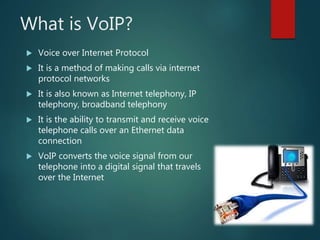
 Voice over Internet Protocol
 It is a method of making calls via internet
protocol networks
 It is also known as Internet telephony, IP
telephony, broadband telephony
 It is the ability to transmit and receive voice
telephone calls over an Ethernet data
connection
 VoIP converts the voice signal from our
telephone into a digital signal that travels
over the Internet
How Does VoIP Work?
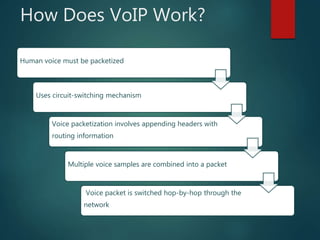
Human voice must be packetized
Uses circuit-switching mechanism
Voice packetization involves appending headers with
routing information
Multiple voice samples are combined into a packet
Voice packet is switched hop-by-hop through the
network
Protocols of VoIP
 H.323
 Media Gateway Control Protocol
(MGCP)
 Session Initiation Protocol (SIP)
 H.248 (also known as Media Gateway
Control (Megaco))
 Real-time Transport Protocol (RTP)
 Real-time Transport Control Protocol
(RTCP)
 Secure Real-time Transport Protocol
(SRTP)
 Session Description Protocol (SDP)
 Inter-Asterisk eXchange (IAX)
 Jingle XMPP VoIP extensions
 Skype protocol
 Teamspeak
 The H.323 protocol was one of the
first VoIP protocols that found
widespread implementation for
long-distance traffic, as well as
local area network services
Network Design for VoIP
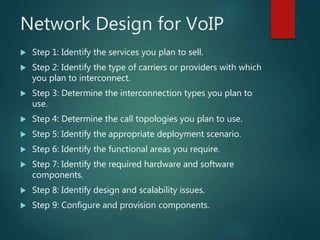
 Step 1: Identify the services you plan to sell.
 Step 2: Identify the type of carriers or providers with which
you plan to interconnect.
 Step 3: Determine the interconnection types you plan to
use.
 Step 4: Determine the call topologies you plan to use.
 Step 5: Identify the appropriate deployment scenario.
 Step 6: Identify the functional areas you require.
 Step 7: Identify the required hardware and software
components.
 Step 8: Identify design and scalability issues.
 Step 9: Configure and provision components.
Quality of Service (QoS) in
VoIP Systems
 Delay
 Jitter
 Packet loss
 Echo
 Throughput
Advantages of VoIP
i. Cost savings
ii. Rich media service
iii. Portability
iv. Low Taxes
v. Low Cabling cost
vi. Features
vii. Flexibility
viii. Video-Conferencing
ix. Human Resource Leveraging
x. Scale
xi. Diversity
xii. Single Network/Cable
xiii. Remote Maintenance
xiv. Connecting to Internet
xv. Computer telephony integration
xvi. Multiple Lines
xvii. User Control Interface
xviii. No geographical boundary
Disadvantages of VoIP
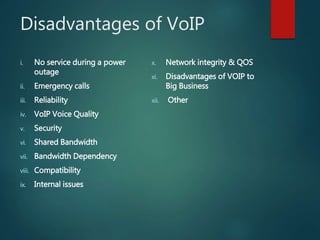
i. No service during a power
outage
ii. Emergency calls
iii. Reliability
iv. VoIP Voice Quality
v. Security
vi. Shared Bandwidth
vii. Bandwidth Dependency
viii. Compatibility
ix. Internal issues
x. Network integrity & QOS
xi. Disadvantages of VOIP to
Big Business
xii. Other
VOIP Pros & Cons
VOIP Pros & Cons

VOIP Pros & Cons

  • 1.
    VoIP : PROS& CONS SUMIYA KHANAM 15-005 NADIA SHAHRIN CHANDNI 16-044 ZAKARIA HASAN 17-006 NUSA FARHA 18-041 SUCHISMITA BARUA 18-079
  • 2.
    What is VoIP? Voice over Internet Protocol  It is a method of making calls via internet protocol networks  It is also known as Internet telephony, IP telephony, broadband telephony  It is the ability to transmit and receive voice telephone calls over an Ethernet data connection  VoIP converts the voice signal from our telephone into a digital signal that travels over the Internet
  • 3.
    How Does VoIPWork? Human voice must be packetized Uses circuit-switching mechanism Voice packetization involves appending headers with routing information Multiple voice samples are combined into a packet Voice packet is switched hop-by-hop through the network
  • 4.
    Protocols of VoIP H.323  Media Gateway Control Protocol (MGCP)  Session Initiation Protocol (SIP)  H.248 (also known as Media Gateway Control (Megaco))  Real-time Transport Protocol (RTP)  Real-time Transport Control Protocol (RTCP)  Secure Real-time Transport Protocol (SRTP)  Session Description Protocol (SDP)  Inter-Asterisk eXchange (IAX)  Jingle XMPP VoIP extensions  Skype protocol  Teamspeak  The H.323 protocol was one of the first VoIP protocols that found widespread implementation for long-distance traffic, as well as local area network services
  • 5.
    Network Design forVoIP  Step 1: Identify the services you plan to sell.  Step 2: Identify the type of carriers or providers with which you plan to interconnect.  Step 3: Determine the interconnection types you plan to use.  Step 4: Determine the call topologies you plan to use.  Step 5: Identify the appropriate deployment scenario.  Step 6: Identify the functional areas you require.  Step 7: Identify the required hardware and software components.  Step 8: Identify design and scalability issues.  Step 9: Configure and provision components.
  • 6.
    Quality of Service(QoS) in VoIP Systems  Delay  Jitter  Packet loss  Echo  Throughput
  • 7.
    Advantages of VoIP i.Cost savings ii. Rich media service iii. Portability iv. Low Taxes v. Low Cabling cost vi. Features vii. Flexibility viii. Video-Conferencing ix. Human Resource Leveraging x. Scale xi. Diversity xii. Single Network/Cable xiii. Remote Maintenance xiv. Connecting to Internet xv. Computer telephony integration xvi. Multiple Lines xvii. User Control Interface xviii. No geographical boundary
  • 8.
    Disadvantages of VoIP i.No service during a power outage ii. Emergency calls iii. Reliability iv. VoIP Voice Quality v. Security vi. Shared Bandwidth vii. Bandwidth Dependency viii. Compatibility ix. Internal issues x. Network integrity & QOS xi. Disadvantages of VOIP to Big Business xii. Other