Jarvis
-The voice
assistant
~ Guide: Mr. S.
SRINIVAS
VADNALA NARENDRA VARDHAN
PONAGANTI SHIRISH KUMAR
LINGAMPELLI SRINIVAS
ARIGE SRIRAMTEJA
MALLUPALLY DEEPIKA REDDY
~TEAM JARVIS
INTRODUCTION
Problem Statement
Existing
Our Project
Purpose, Scope,
Applicability
Techniques
Work flow
Features
Comparison
Conclusion
Introduction
• Artificial Intelligence when used with machines, it shows us the capability of
thinking like humans. We have Smartphone in hands and it is nothing less
than having world at our finger tips. These days we aren’t even using
fingers. We just speak of the task and it is done. As the voice assistant is
using Artificial Intelligence hence the result that it is providing are highly
accurate and efficient. The assistant can help to reduce human effort and
physical contact with the machine.
Z
01
ABSTRACT
We are familiar with many existing voice assistants like Alexa, Siri, Google
Assistant, Cortona which uses concept of language processing, and voice
recognition. They listens the command given by the user as per their
requirements and performs that specific function in a very efficient
manner.
But for using these assistants one should have an account( like Google
account for Google assistants, Microsoft account for Cortona) and can
use it with internet connection only because these assistants are going to
work with internet connectivity. They are integrated with many devices like
phones, laptops, and speakers etc.
Jarvis is different from other traditional assistants in terms that it is specific to
desktop and user does not need to make an account To use this, it does
not require any internet connection while getting the instructions to
perform any offline task
Problem Statement
Z
02
 The existing assistants only work when there is
internet connection.
 And the email account is mandatory to use it
 These assistants does provide some additional
features like virtual mouse, password encryption and
user’s to personalize according to their
convenient(Basic self learn ).
Existing projects
03
 There are number of voice assistants in the market with
their own features. But these doesn’t run at offline
 These assistants runs when one should have an account
(like Google account for Google assistant, Microsoft
account for Cortana).
 And can use it with internet connection only because
these assistants are going to work with internet
connectivity.
PROPOSED
 Jarvis is different from other traditional voice assistants
in terms that it is specific to desktops and the user does
not need to make an account to use this, it does not
require any internet connection while getting the
instructions to perform any specific offline task.
 With the advancement JARVIS can perform any task
with same effectiveness.
 It became easier to send emails without typing any word,
Search on Google without opening the browser, and
perform many other activities with single voice
command.
04
Purpose
 Being capable of voice
interaction
 Performing tasks with
voice
 Enables users to
speak natural
language
 To Work at comfort
Zone
 Moving towards less
interaction
Scope
 Offers more
individualized
experiences as they
get better
 Need to focus on
maintaining a user
experience
 Users simply cannot
see or touch a voice
interface
 Adoption of AI in our
lives, shifting towards
voice assistants
 IOT are giving V.A
more utility in users life
 Industry experts are
predicts that every app
will integrate voice
technology in next 5
years
 Smart speakers are
example of voice being
used
Applicability
05
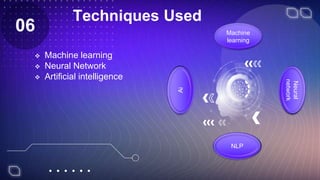
Techniques Used
 Machine learning
 Neural Network
 Artificial intelligence
06 Machine
learning
NLP
Ai
Neural
network
Machine learning
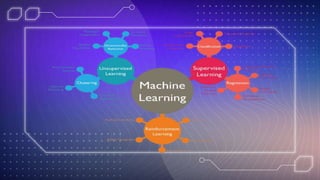
 ML Is an AI technique that teaches
computers to learn from experiences.
 ML algorithms use computational methods to
learn information directly from data without
relying on a predetermined equation as a
model.
 Types of Machine learning algorithms
 Supervised learning
 Unsupervised learning
 Reinforcement learning
 Neural network is a collection of methods
used in machine learning
Neural Network
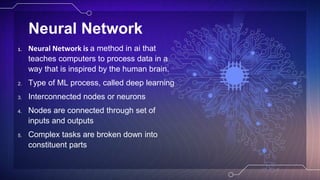
1. Neural Network is a method in ai that
teaches computers to process data in a
way that is inspired by the human brain.
2. Type of ML process, called deep learning
3. Interconnected nodes or neurons
4. Nodes are connected through set of
inputs and outputs
5. Complex tasks are broken down into
constituent parts
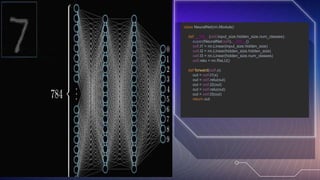
class NeuralNet(nn.Module):
def __init__(self,input_size,hidden_size,num_classes):
super(NeuralNet,self).__init__()
self.l1 = nn.Linear(input_size,hidden_size)
self.l2 = nn.Linear(hidden_size,hidden_size)
self.l3 = nn.Linear(hidden_size,num_classes)
self.relu = nn.ReLU()
def forward(self,x):
out = self.l1(x)
out = self.relu(out)
out = self.l2(out)
out = self.relu(out)
out = self.l3(out)
return out
Artificial intelligence
1. AI refers to systems that are machines that mimic human intelligence and
perform tasks and can iteratively improve themselves based on the
information they collect.
2. Ai is a process of programming a computer to make decisions for itself. This
can be done through a process of learning from data, which is then used to
make predictions or recommendations.
3. Here in our project the machine is learning and predicting output based on
the input this is the way how the AI is used.
4. face recognition and virtual mouse.
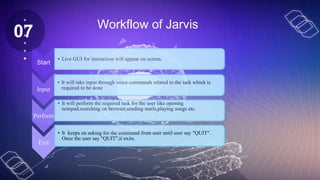
Start
• Live GUI for interaction will appear on screen.
Input
• It will take input through voice commands related to the task which is
required to be done
Perform
• It will perform the required task for the user like opening
notepad,searching on browser,sending mails,playing songs etc.
Exit
• It keeps on asking for the command from user until user say "QUIT".
Once the user say "QUIT",it exits.
Workflow of Jarvis
07
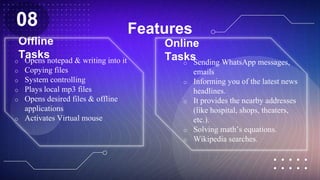
Features
Offline
Tasks
o Opens notepad & writing into it
o Copying files
o System controlling
o Plays local mp3 files
o Opens desired files & offline
applications
o Activates Virtual mouse
Online
Tasks
o Sending WhatsApp messages,
emails
o Informing you of the latest news
headlines.
o It provides the nearby addresses
(like hospital, shops, theaters,
etc.).
o Solving math’s equations.
o Wikipedia searches.
Z
08
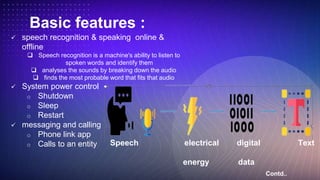
Basic features :
 speech recognition & speaking online &
offline
 Speech recognition is a machine's ability to listen to
spoken words and identify them
 analyses the sounds by breaking down the audio
 finds the most probable word that fits that audio
 System power control
o Shutdown
o Sleep
o Restart
 messaging and calling
o Phone link app
o Calls to an entity
Contd..
Speech electrical digital Text
energy data
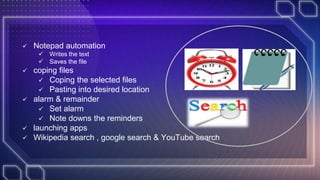
 Notepad automation
 Writes the text
 Saves the file
 coping files
 Coping the selected files
 Pasting into desired location
 alarm & remainder
 Set alarm
 Note downs the reminders
 launching apps
 Wikipedia search , google search & YouTube search
Advanced features:
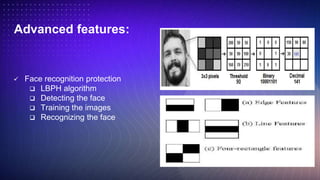
 Face recognition protection
 LBPH algorithm
 Detecting the face
 Training the images
 Recognizing the face
s
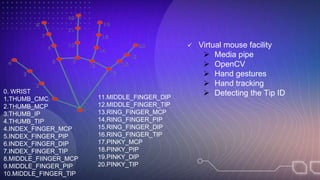
 Virtual mouse facility
 Media pipe
 OpenCV
 Hand gestures
 Hand tracking
 Detecting the Tip ID
0. WRIST
1.THUMB_CMC
2.THUMB_MCP
3.THUMB_IP
4.THUMB_TIP
4.INDEX_FINGER_MCP
5.INDEX_FINGER_PIP
6.INDEX_FINGER_DIP
7.INDEX_FINGER_TIP
8.MIDDLE_FIINGER_MCP
9.MIDDLE_FINGER_PIP
10.MIDDLE_FINGER_TIP
11.MIDDLE_FINGER_DIP
12.MIDDLE_FINGER_TIP
13.RING_FINGER_MCP
14.RING_FINGER_PIP
15.RING_FINGER_DIP
16.RING_FINGER_TIP
17.PINKY_MCP
18.PINKY_PIP
19.PINKY_DIP
20.PINKY_TIP
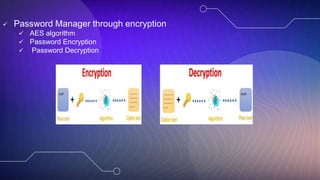
 Password Manager through encryption
 AES algorithm
 Password Encryption
 Password Decryption
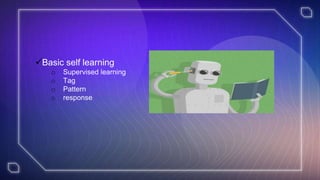
Basic self learning
o Supervised learning
o Tag
o Pattern
o response
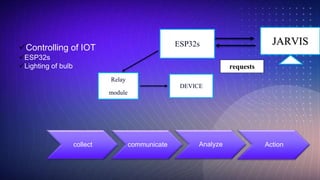
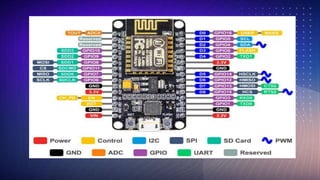
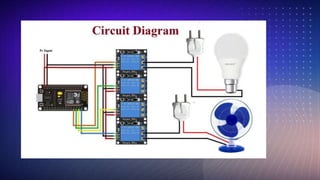
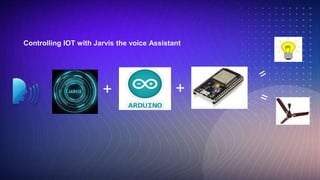
Controlling of IOT
ESP32s
Lighting of bulb
Relay
module
ESP32s JARVIS
requests
DEVICE
collect communicate Analyze Action
+ +
Controlling IOT with Jarvis the voice Assistant
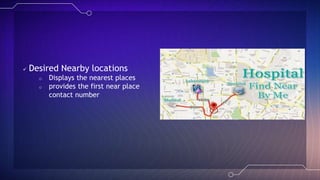
 Desired Nearby locations
o Displays the nearest places
o provides the first near place
contact number
Future work
 1)In motor field.
 2)Electric field and so on.
 3)Improving efficiency of offline model.
 4) Have to improve security.
 5) Available for Androids
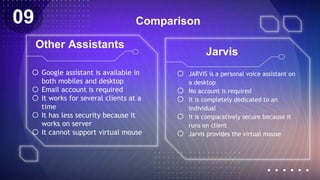
Comparison
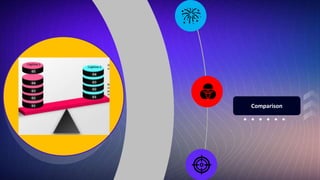
o JARVIS is a personal voice assistant on
a desktop
o No account is required
o It is completely dedicated to an
individual
o It is comparatively secure because it
runs on client
o Jarvis provides the virtual mouse
o Google assistant is available in
both mobiles and desktop
o Email account is required
o It works for several clients at a
time
o It has less security because it
works on server
o It cannot support virtual mouse
Other Assistants
Jarvis
09
Conclusion
JARVIS is a very helpful voice assistant without any doubt as it saves
time for the user through conversational interactions, effectiveness, and
efficiency. Jarvis is a digital life assistant. It is open-source software.
Jarvis records the voice and matches it with available commands, If it
is available then the proper response is provided. This is the first voice
assistant that works in offline and self learn from the user .
Z
10
From Team Jarvis
THANK YOU…

JARVIS.pptx

  • 1.
  • 2.
    VADNALA NARENDRA VARDHAN PONAGANTISHIRISH KUMAR LINGAMPELLI SRINIVAS ARIGE SRIRAMTEJA MALLUPALLY DEEPIKA REDDY ~TEAM JARVIS
  • 3.
  • 4.
  • 5.
  • 6.
  • 7.
  • 8.
  • 9.
  • 10.
  • 11.
  • 12.
  • 13.
    Introduction • Artificial Intelligencewhen used with machines, it shows us the capability of thinking like humans. We have Smartphone in hands and it is nothing less than having world at our finger tips. These days we aren’t even using fingers. We just speak of the task and it is done. As the voice assistant is using Artificial Intelligence hence the result that it is providing are highly accurate and efficient. The assistant can help to reduce human effort and physical contact with the machine. Z 01
  • 14.
    ABSTRACT We are familiarwith many existing voice assistants like Alexa, Siri, Google Assistant, Cortona which uses concept of language processing, and voice recognition. They listens the command given by the user as per their requirements and performs that specific function in a very efficient manner. But for using these assistants one should have an account( like Google account for Google assistants, Microsoft account for Cortona) and can use it with internet connection only because these assistants are going to work with internet connectivity. They are integrated with many devices like phones, laptops, and speakers etc. Jarvis is different from other traditional assistants in terms that it is specific to desktop and user does not need to make an account To use this, it does not require any internet connection while getting the instructions to perform any offline task
  • 15.
    Problem Statement Z 02  Theexisting assistants only work when there is internet connection.  And the email account is mandatory to use it  These assistants does provide some additional features like virtual mouse, password encryption and user’s to personalize according to their convenient(Basic self learn ).
  • 16.
    Existing projects 03  Thereare number of voice assistants in the market with their own features. But these doesn’t run at offline  These assistants runs when one should have an account (like Google account for Google assistant, Microsoft account for Cortana).  And can use it with internet connection only because these assistants are going to work with internet connectivity.
  • 17.
    PROPOSED  Jarvis isdifferent from other traditional voice assistants in terms that it is specific to desktops and the user does not need to make an account to use this, it does not require any internet connection while getting the instructions to perform any specific offline task.  With the advancement JARVIS can perform any task with same effectiveness.  It became easier to send emails without typing any word, Search on Google without opening the browser, and perform many other activities with single voice command. 04
  • 18.
    Purpose  Being capableof voice interaction  Performing tasks with voice  Enables users to speak natural language  To Work at comfort Zone  Moving towards less interaction Scope  Offers more individualized experiences as they get better  Need to focus on maintaining a user experience  Users simply cannot see or touch a voice interface  Adoption of AI in our lives, shifting towards voice assistants  IOT are giving V.A more utility in users life  Industry experts are predicts that every app will integrate voice technology in next 5 years  Smart speakers are example of voice being used Applicability 05
  • 19.
    Techniques Used  Machinelearning  Neural Network  Artificial intelligence 06 Machine learning NLP Ai Neural network
  • 20.
    Machine learning  MLIs an AI technique that teaches computers to learn from experiences.  ML algorithms use computational methods to learn information directly from data without relying on a predetermined equation as a model.  Types of Machine learning algorithms  Supervised learning  Unsupervised learning  Reinforcement learning  Neural network is a collection of methods used in machine learning
  • 22.
    Neural Network 1. NeuralNetwork is a method in ai that teaches computers to process data in a way that is inspired by the human brain. 2. Type of ML process, called deep learning 3. Interconnected nodes or neurons 4. Nodes are connected through set of inputs and outputs 5. Complex tasks are broken down into constituent parts
  • 23.
    class NeuralNet(nn.Module): def __init__(self,input_size,hidden_size,num_classes): super(NeuralNet,self).__init__() self.l1= nn.Linear(input_size,hidden_size) self.l2 = nn.Linear(hidden_size,hidden_size) self.l3 = nn.Linear(hidden_size,num_classes) self.relu = nn.ReLU() def forward(self,x): out = self.l1(x) out = self.relu(out) out = self.l2(out) out = self.relu(out) out = self.l3(out) return out
  • 24.
    Artificial intelligence 1. AIrefers to systems that are machines that mimic human intelligence and perform tasks and can iteratively improve themselves based on the information they collect. 2. Ai is a process of programming a computer to make decisions for itself. This can be done through a process of learning from data, which is then used to make predictions or recommendations. 3. Here in our project the machine is learning and predicting output based on the input this is the way how the AI is used. 4. face recognition and virtual mouse.
  • 25.
    Start • Live GUIfor interaction will appear on screen. Input • It will take input through voice commands related to the task which is required to be done Perform • It will perform the required task for the user like opening notepad,searching on browser,sending mails,playing songs etc. Exit • It keeps on asking for the command from user until user say "QUIT". Once the user say "QUIT",it exits. Workflow of Jarvis 07
  • 26.
    Features Offline Tasks o Opens notepad& writing into it o Copying files o System controlling o Plays local mp3 files o Opens desired files & offline applications o Activates Virtual mouse Online Tasks o Sending WhatsApp messages, emails o Informing you of the latest news headlines. o It provides the nearby addresses (like hospital, shops, theaters, etc.). o Solving math’s equations. o Wikipedia searches. Z 08
  • 27.
    Basic features : speech recognition & speaking online & offline  Speech recognition is a machine's ability to listen to spoken words and identify them  analyses the sounds by breaking down the audio  finds the most probable word that fits that audio  System power control o Shutdown o Sleep o Restart  messaging and calling o Phone link app o Calls to an entity Contd.. Speech electrical digital Text energy data
  • 28.
     Notepad automation Writes the text  Saves the file  coping files  Coping the selected files  Pasting into desired location  alarm & remainder  Set alarm  Note downs the reminders  launching apps  Wikipedia search , google search & YouTube search
  • 29.
    Advanced features:  Facerecognition protection  LBPH algorithm  Detecting the face  Training the images  Recognizing the face s
  • 30.
     Virtual mousefacility  Media pipe  OpenCV  Hand gestures  Hand tracking  Detecting the Tip ID 0. WRIST 1.THUMB_CMC 2.THUMB_MCP 3.THUMB_IP 4.THUMB_TIP 4.INDEX_FINGER_MCP 5.INDEX_FINGER_PIP 6.INDEX_FINGER_DIP 7.INDEX_FINGER_TIP 8.MIDDLE_FIINGER_MCP 9.MIDDLE_FINGER_PIP 10.MIDDLE_FINGER_TIP 11.MIDDLE_FINGER_DIP 12.MIDDLE_FINGER_TIP 13.RING_FINGER_MCP 14.RING_FINGER_PIP 15.RING_FINGER_DIP 16.RING_FINGER_TIP 17.PINKY_MCP 18.PINKY_PIP 19.PINKY_DIP 20.PINKY_TIP
  • 31.
     Password Managerthrough encryption  AES algorithm  Password Encryption  Password Decryption
  • 32.
    Basic self learning oSupervised learning o Tag o Pattern o response
  • 33.
    Controlling of IOT ESP32s Lightingof bulb Relay module ESP32s JARVIS requests DEVICE collect communicate Analyze Action
  • 36.
    + + Controlling IOTwith Jarvis the voice Assistant
  • 37.
     Desired Nearbylocations o Displays the nearest places o provides the first near place contact number
  • 38.
    Future work  1)Inmotor field.  2)Electric field and so on.  3)Improving efficiency of offline model.  4) Have to improve security.  5) Available for Androids
  • 39.
    Comparison o JARVIS isa personal voice assistant on a desktop o No account is required o It is completely dedicated to an individual o It is comparatively secure because it runs on client o Jarvis provides the virtual mouse o Google assistant is available in both mobiles and desktop o Email account is required o It works for several clients at a time o It has less security because it works on server o It cannot support virtual mouse Other Assistants Jarvis 09
  • 40.
    Conclusion JARVIS is avery helpful voice assistant without any doubt as it saves time for the user through conversational interactions, effectiveness, and efficiency. Jarvis is a digital life assistant. It is open-source software. Jarvis records the voice and matches it with available commands, If it is available then the proper response is provided. This is the first voice assistant that works in offline and self learn from the user . Z 10
  • 41.

Editor's Notes

  • #21 Machine learning is a process of teaching computers to learn from data, without being explicitly programmed. This process can be used to solve various tasks, such as classification, prediction, and optimization. Machine learning algorithms can be divided into three main groups: supervised learning, unsupervised learning, and reinforcement learning. Supervised learning algorithms are used when the training data contains labels that indicate the desired output for each example. Unsupervised learning algorithms are used when the training data does not contain any labels. Reinforcement learning algorithms are used when the goal is to learn how to take actions in an environment in order to maximize some reward. There are many different types of machine learning algorithms, each with its own advantages and disadvantages. Some of the most popular algorithms include support vector machines, decision trees, and neural networks. The success of machine learning depends heavily on the quality of the data used for training. If the data is of poor quality, the resulting models will be inaccurate. In addition, the choice of algorithm is important. Some algorithms are better suited for certain tasks than others. Machine learning is a rapidly growing field with many potential applications. It has been used to develop systems that can recognize objects in images, translate languages, and even beat humans at
  • #23 Neural networks are a type of machine learning algorithm that are used to model complex patterns in data. Neural networks are similar to other machine learning algorithms, but they are composed of a large number of interconnected processing nodes, or neurons, that can learn to recognize patterns of input data. Neural networks are particularly well suited for tasks that are difficult for traditional machine learning algorithms, such as image recognition, natural language processing, and pattern recognition. Neural networks are composed of a large number of interconnected processing nodes, or neurons, that can learn to recognize patterns of input data. Neural networks are particularly well suited for tasks that are difficult for traditional machine learning algorithms, such as image recognition, natural language processing, and pattern recognition.
  • #32 hello