Virtual Router in CloudStack 4.4
Sheng Yang
Virtual Router in CloudStack 4.4
Sheng Yang
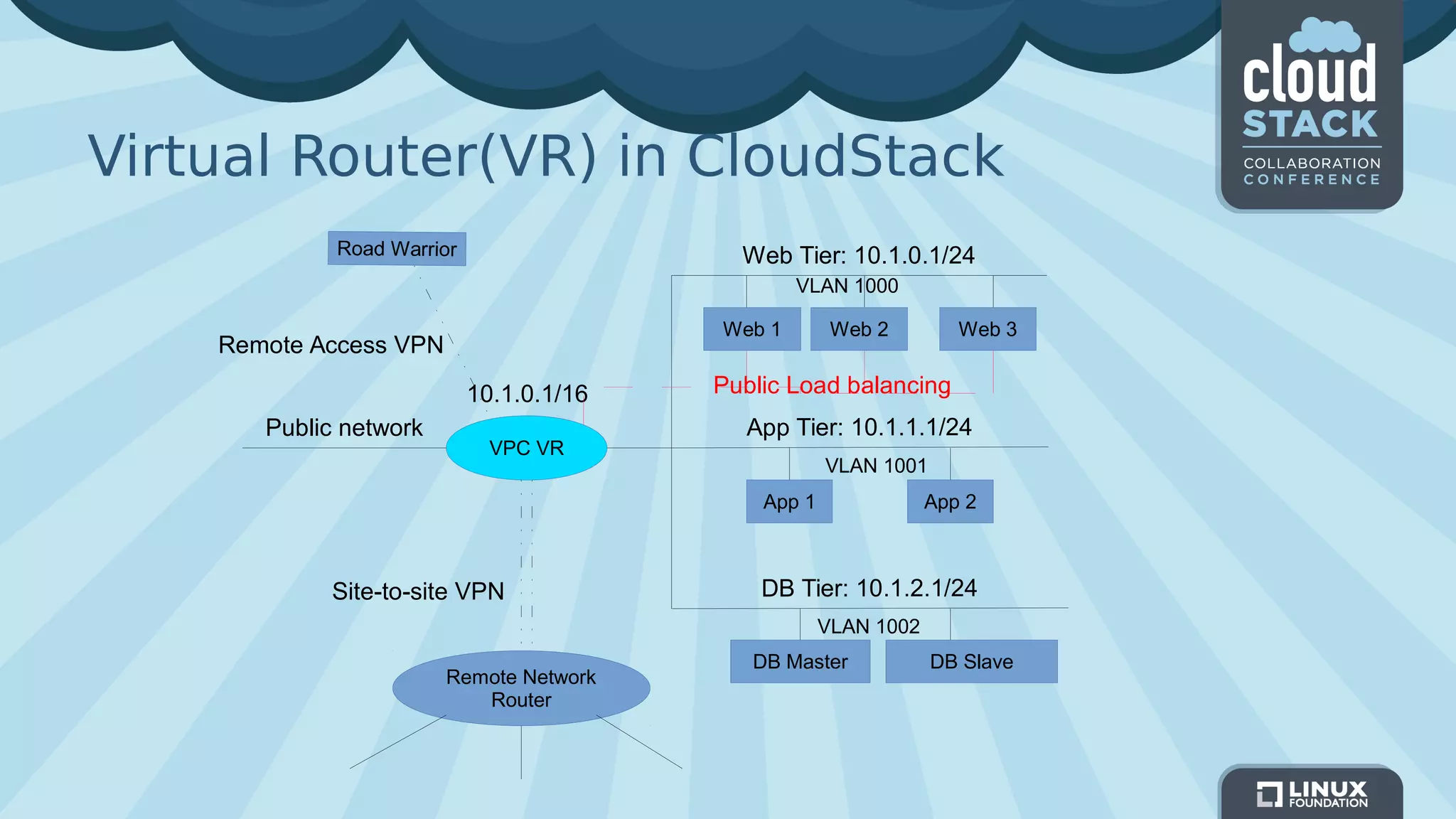
Virtual Router(VR) in CloudStack
VPC VR
Public network
Web Tier: 10.1.0.1/24
App Tier: 10.1.1.1/24
DB Tier: 10.1.2.1/24
Web 1 Web 3Web 2
App 1 App 2
DB Master DB Slave
10.1.0.1/16
Site-to-site VPN
Remote Access VPN
Public Load balancing
VLAN 1001
VLAN 1000
VLAN 1002
Remote Network
Router
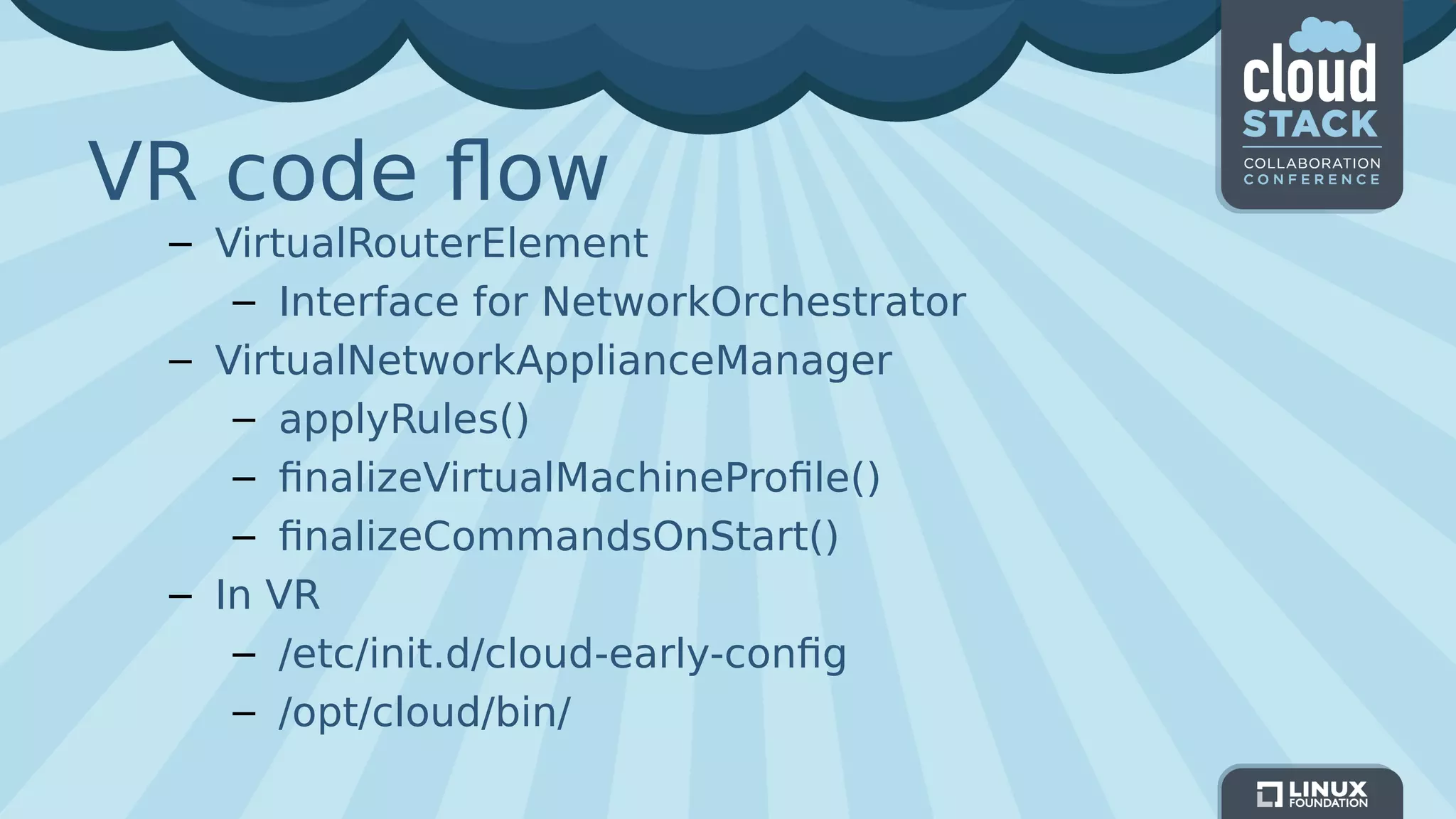
VR code flow
– VirtualRouterElement
– Interface for NetworkOrchestrator
– VirtualNetworkApplianceManager
– applyRules()
– finalizeVirtualMachineProfile()
– finalizeCommandsOnStart()
– In VR
– /etc/init.d/cloud-early-config
– /opt/cloud/bin/
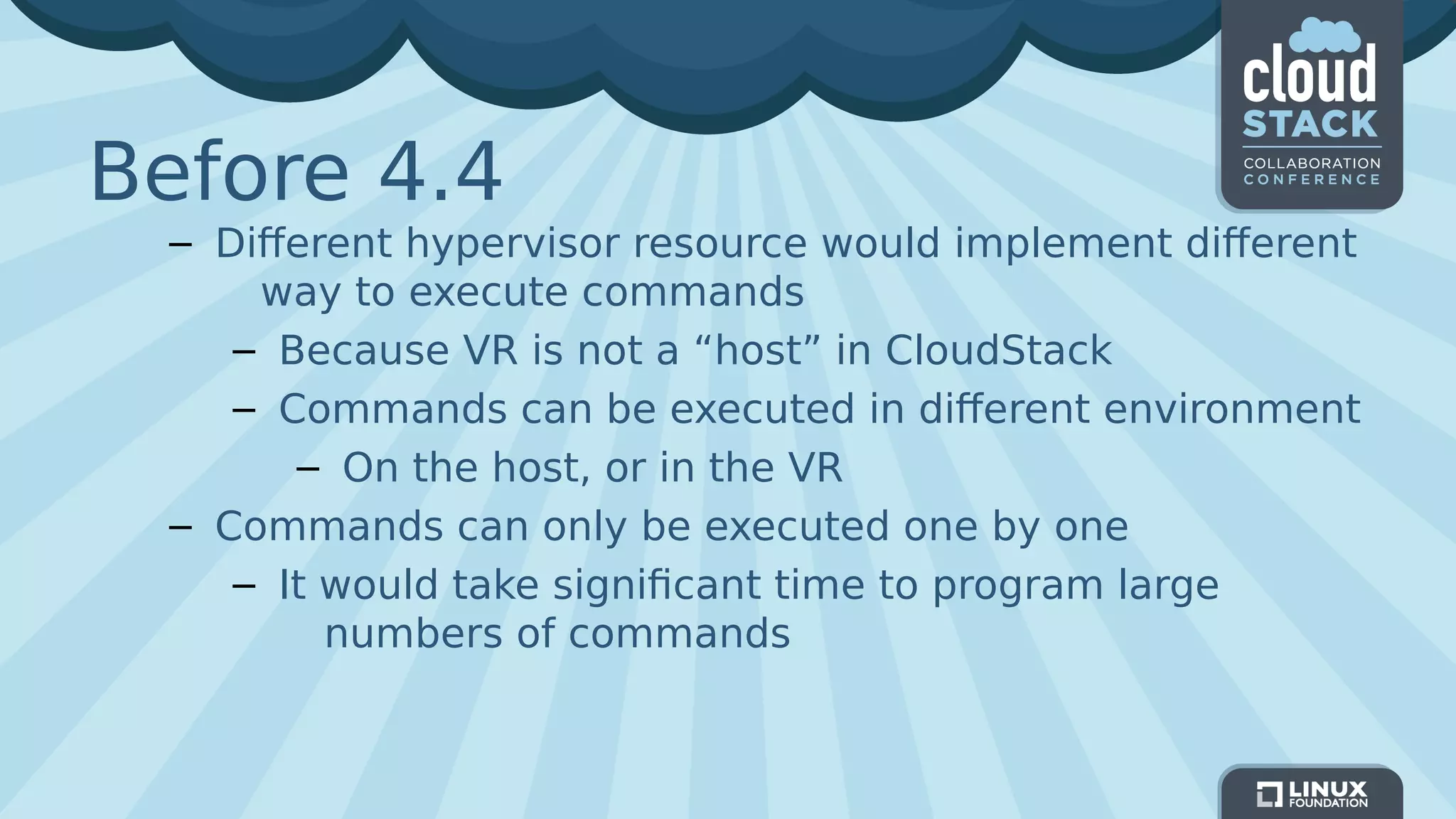
Before 4.4
– Different hypervisor resource would implement different
way to execute commands
– Because VR is not a “host” in CloudStack
– Commands can be executed in different environment
– On the host, or in the VR
– Commands can only be executed one by one
– It would take significant time to program large
numbers of commands
New in 4.4
– Introduce the new VirtualRoutingResource
– Handle all the commands for VR
– One instance for one hypervisor resource
– All execution would be done inside VR
– A new VirtualRouterDeployer interface for hypervisor
which need to programming VR
– PrepareCommand()
– ExecuteInVR()
– CopyFileToVR()
– CleanupCommand()
New in 4.4 (cont.)
– Introducing aggregation mechanism to accelerate
commands execution in VR
– Involved when VR booting/recreating
– Delay and merge all the commands execution at
VirtualRoutingResource level
– One SSH for all initialization commands
AggregationControlCommand
– Action
– Start, Finish, Cleanup
– Delay execution initialization commands to a queue
after start
– Return success immediately for commands during
the aggregated period
– Merge and execute the commands when finish
– By generating and applying a single configuration file
to VR
– Clean up the queue at last
– In case things goes wrong in merge commands
AggregationControlCommand (cont.)
– Only support commands return true or false
– No query command
– Only used when boot up or recreate VR
– One failure fails all the following commands
– No rollback available
– Detail logs in /var/log/cloud.log
– Rotated
Performance measurement
– Create a unit test for performance testing
– Implement VirtualRouterDeployer interface
– Using VirtualRoutingResource
– Test against pre-created VR
– Execute a large numbers of commands
– Simulate different command execution flow for
hypervisors
– Direct access to VR for VMware
– One hop on host for XenServer
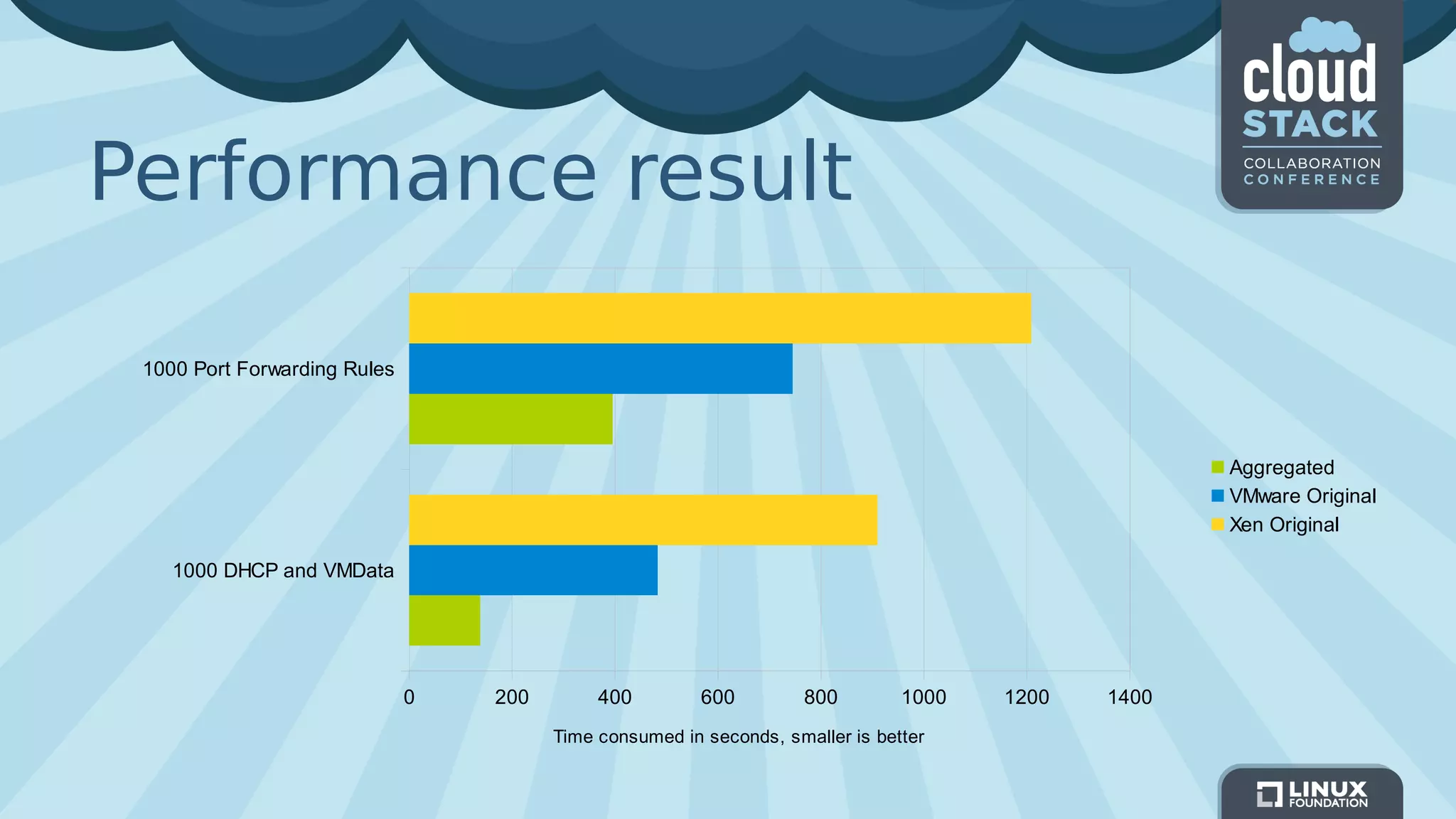
Performance result
1000 DHCP and VMData
1000 Port Forwarding Rules
0 200 400 600 800 1000 1200 1400
Aggregated
VMware Original
Xen Original
Time consumed in seconds, smaller is better
More in the plan
– Further optimize VR configuration
– Current implementation is simply execute the
command queue in the VR
– In the future the configuration file can be generated
in mgmt server then replace in VR, which make VR
update an almost O(1) action
– Better way to update software on VR
– Debian repository may would be the choice
Thanks!Thanks!

Virtual Router in CloudStack 4.4

  • 1.
    Virtual Router inCloudStack 4.4 Sheng Yang Virtual Router in CloudStack 4.4 Sheng Yang
  • 2.
    Virtual Router(VR) inCloudStack VPC VR Public network Web Tier: 10.1.0.1/24 App Tier: 10.1.1.1/24 DB Tier: 10.1.2.1/24 Web 1 Web 3Web 2 App 1 App 2 DB Master DB Slave 10.1.0.1/16 Site-to-site VPN Remote Access VPN Public Load balancing VLAN 1001 VLAN 1000 VLAN 1002 Remote Network Router
  • 3.
    VR code flow –VirtualRouterElement – Interface for NetworkOrchestrator – VirtualNetworkApplianceManager – applyRules() – finalizeVirtualMachineProfile() – finalizeCommandsOnStart() – In VR – /etc/init.d/cloud-early-config – /opt/cloud/bin/
  • 4.
    Before 4.4 – Differenthypervisor resource would implement different way to execute commands – Because VR is not a “host” in CloudStack – Commands can be executed in different environment – On the host, or in the VR – Commands can only be executed one by one – It would take significant time to program large numbers of commands
  • 5.
    New in 4.4 –Introduce the new VirtualRoutingResource – Handle all the commands for VR – One instance for one hypervisor resource – All execution would be done inside VR – A new VirtualRouterDeployer interface for hypervisor which need to programming VR – PrepareCommand() – ExecuteInVR() – CopyFileToVR() – CleanupCommand()
  • 6.
    New in 4.4(cont.) – Introducing aggregation mechanism to accelerate commands execution in VR – Involved when VR booting/recreating – Delay and merge all the commands execution at VirtualRoutingResource level – One SSH for all initialization commands
  • 7.
    AggregationControlCommand – Action – Start,Finish, Cleanup – Delay execution initialization commands to a queue after start – Return success immediately for commands during the aggregated period – Merge and execute the commands when finish – By generating and applying a single configuration file to VR – Clean up the queue at last – In case things goes wrong in merge commands
  • 8.
    AggregationControlCommand (cont.) – Onlysupport commands return true or false – No query command – Only used when boot up or recreate VR – One failure fails all the following commands – No rollback available – Detail logs in /var/log/cloud.log – Rotated
  • 9.
    Performance measurement – Createa unit test for performance testing – Implement VirtualRouterDeployer interface – Using VirtualRoutingResource – Test against pre-created VR – Execute a large numbers of commands – Simulate different command execution flow for hypervisors – Direct access to VR for VMware – One hop on host for XenServer
  • 10.
    Performance result 1000 DHCPand VMData 1000 Port Forwarding Rules 0 200 400 600 800 1000 1200 1400 Aggregated VMware Original Xen Original Time consumed in seconds, smaller is better
  • 11.
    More in theplan – Further optimize VR configuration – Current implementation is simply execute the command queue in the VR – In the future the configuration file can be generated in mgmt server then replace in VR, which make VR update an almost O(1) action – Better way to update software on VR – Debian repository may would be the choice
  • 12.