Virtual Personal
Assistant (VPA)
Personal Assistants
 People hired Personal Assistants
 What is Personal Assistant?
 A secretary working exclusive for one particular Person.
 They keep all the information about their boss like:
 When he wake up?
 When he is going to sleep?
 When he attending a meeting?
 All about his/her calendar times.
 etc.
Trying to Make a Good Assistant
 Different companies try to make Personal Assistants in the form of
application as the computer was making rapidly progress.
 The Application, which almost meets all the needs of their boss.
 They made some applications.
 But they were not so sufficient because they were just for specific
purpose.
Competition
 As there is a lot of competition, many companies are trying to make
a carrier which is more efficient, reliable, easy to use and friendly.
 The new services they made has the potential for all those things.
 They are called Virtual Personal Assistants (VPA).
 There are many kind of VPAs. But we are going to describe VPAs for
Mobile which are for General Purpose.
Virtual Personal Assistant (VPA)
 What is Virtual Personal Assistant?
 A Virtual Personal Assistant is an application program that understand the
natural language and complete the electronic task for end user.
 Such Tasks, which might have been performed by a personal
assistant, including:
 Reading text or E-mail messages aloud.
 Looking up phone numbers.
 Placing calls & reminding the end user about appointments.
Virtual Personal Assistant (VPA)
 VPA allows mobile professionals to remotely access and manage
information over telephones like:
 Messaging: Mobile professionals can manage voice-mail, email and
faxes.
 It can take over all book keeping, bills and account payables.
 It can plan your next company event or outing for an enjoyable &
memorable time for all.
VPA in Artificial Intelligence (AI)
 Today, VPAs are programmed with Artificial Intelligence.
 It is programmed with Machine Learning.
 It is programmed with Voice Recognition Technology.
 It uses sophisticated Algorithms to learn from data input & become
better at predicting the end user’s needs.
Virtual Personal Assistants (VPAs)
 Popular VPAs currently include:
 Apple’s Siri
 Google Now
 Microsoft’s Cortana
 Many more.
Working of VPA
 Features of all VPAs are almost same but the working of VPAs is
different.
 I will discuss the working of Siri.
 Siri recognize:
 Your voice
 Understand your commands
 Communicate with server
 Interpret your request
 Retrieve information for you.
Siri’s Working
 Siri Basically consists of three layers.
 Speech to text
 Text Analysing
 Interpret commands
Siri’s Working (First Layer):
 Speech to text:
 A Piece of software that converts audio to text.
 It doesn’t understand just anything you might say.
 Siri has much easier job than Dragon or Mac’s speech recognition
facility.
 It has to understand the words & sentences that are related to
appointment contacts, messages, maps etc.
 Example:
 When we say “Car to Aftab”, it will write it as “Call to Aftab”.
Siri’s Working (Second Layer):
 Text Analysing:
 Converted text is just letters for computer.
 A piece of software convert text to something that is understandable for
computer.
 Computer understand the command, so Siri convert this text to
computer command.
 Computer command consists of functions & the parameters of these
functions.
 Example:
 What will be the function & parameters of “Set Reminder” command.
(Second Layer) Continue…
 Siri maps the words to functions and parameters to create a
command that computer can understand.
 Example of Reminder.
 Ambiguous or Half command
 Get more information to clarify if command is ambiguous.
 Full Command
 Auto generated Parameter
Siri’s Working (Third Layer):
 Interpret commands:
 In this level Siri isn’t doing much.
 Example:
 You already have calendar app & you press button to view & create
appointments & meetings. Siri will push these button for you.
 In this layer, that mapped computer command, go to server through
internet.
 Simultaneously, your speech evaluated locally.
 A local recogniser communicate with server to judge whether
command will be best handle locally or not.
 Example:
 Play Music, Restaurant reservation, Movie Rating.
Features
 Make Phone Calls:
 Call to Faisal Ali, Call to University of Gujrat
 Get Direction
 Direct me to Fawara Chok, Take me to Fawara Chok
 Send Messages
 Email to Aftab Subject Hello, Send SMS to Aftab where are you?,
Message Aftab
 Set Reminders
 Remind me to go for walk at 7AM, Remind me to study when I’m at
home.
Features Continue….
 Ask Questions
 Will it rain today?, What is 34 times 86?, How many Pakistani rupees are
in One Dollar?, Tell me the height of Minar-e-Pakistan.
 Schedule meetings & Appointments
 Schedule a meeting tomorrow morning with Aftab
 Play Music & Videos
 Play Life of Pie, Play songs from (album name)
 Set Alarms
 Wake me up at 6.30AM
Feature Comparison
 Features of all VPAs are almost common.
 But there are some features which some VPAs doesn’t have.
 And these features make some VPAs more reliable, sufficient and
attract to customer.
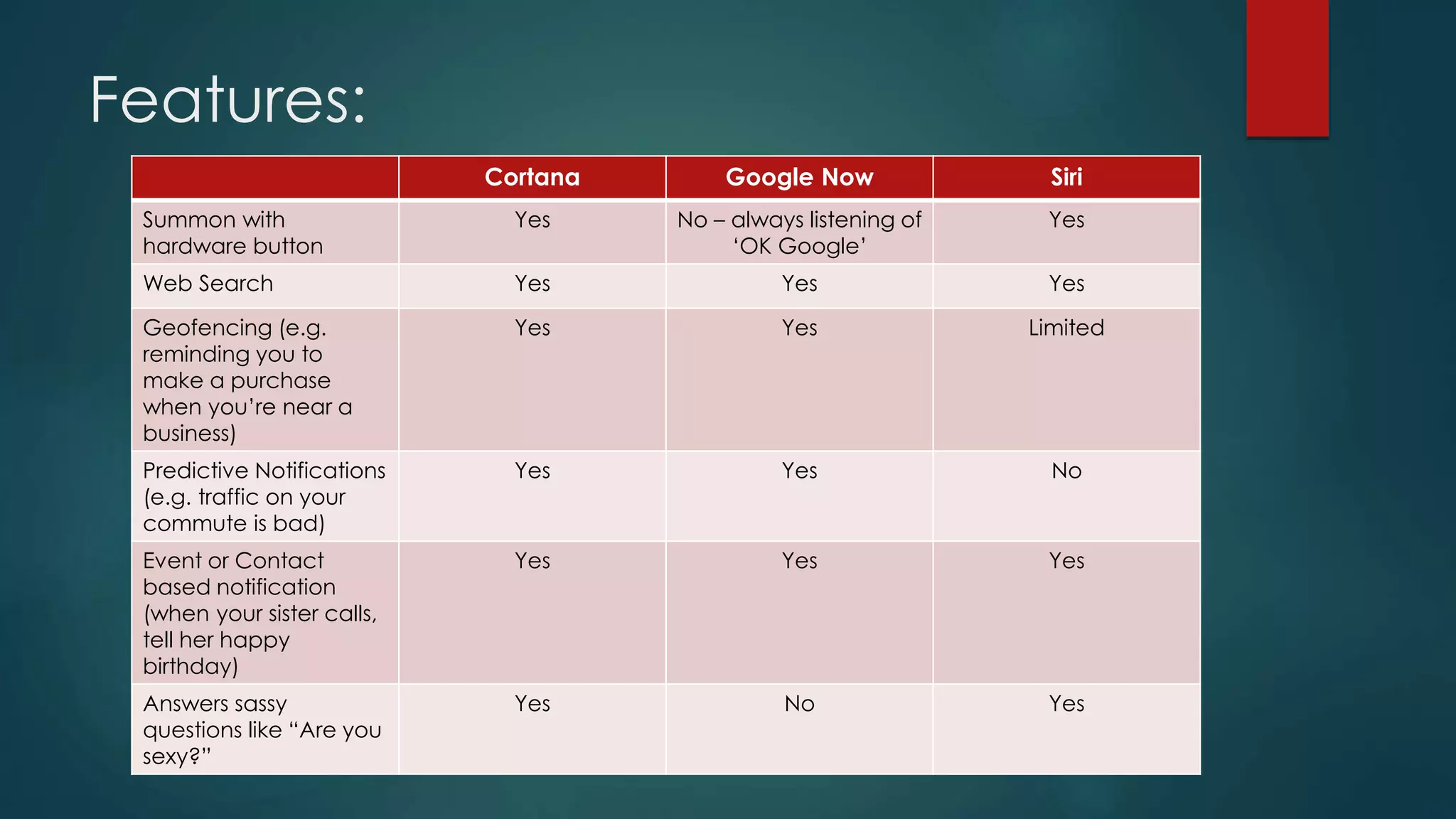
 Features of some VPAs are:
Features:
Cortana Google Now Siri
Summon with
hardware button
Yes No – always listening of
‘OK Google’
Yes
Web Search Yes Yes Yes
Geofencing (e.g.
reminding you to
make a purchase
when you’re near a
business)
Yes Yes Limited
Predictive Notifications
(e.g. traffic on your
commute is bad)
Yes Yes No
Event or Contact
based notification
(when your sister calls,
tell her happy
birthday)
Yes Yes Yes
Answers sassy
questions like “Are you
sexy?”
Yes No Yes
Timing & Accuracy:
 We asked all three assistants the same series of questions, to
measure which one performed the best.
 “Where can I see the movie The Equalizer?”
 Siri (3.5 seconds)
 Cortana (6 seconds)
 Google Now (5.47 seconds)
 Best Answer: Google Now: While Siri was faster, Google offered a
more comprehensive listing of theatres.
Timing & Accuracy:
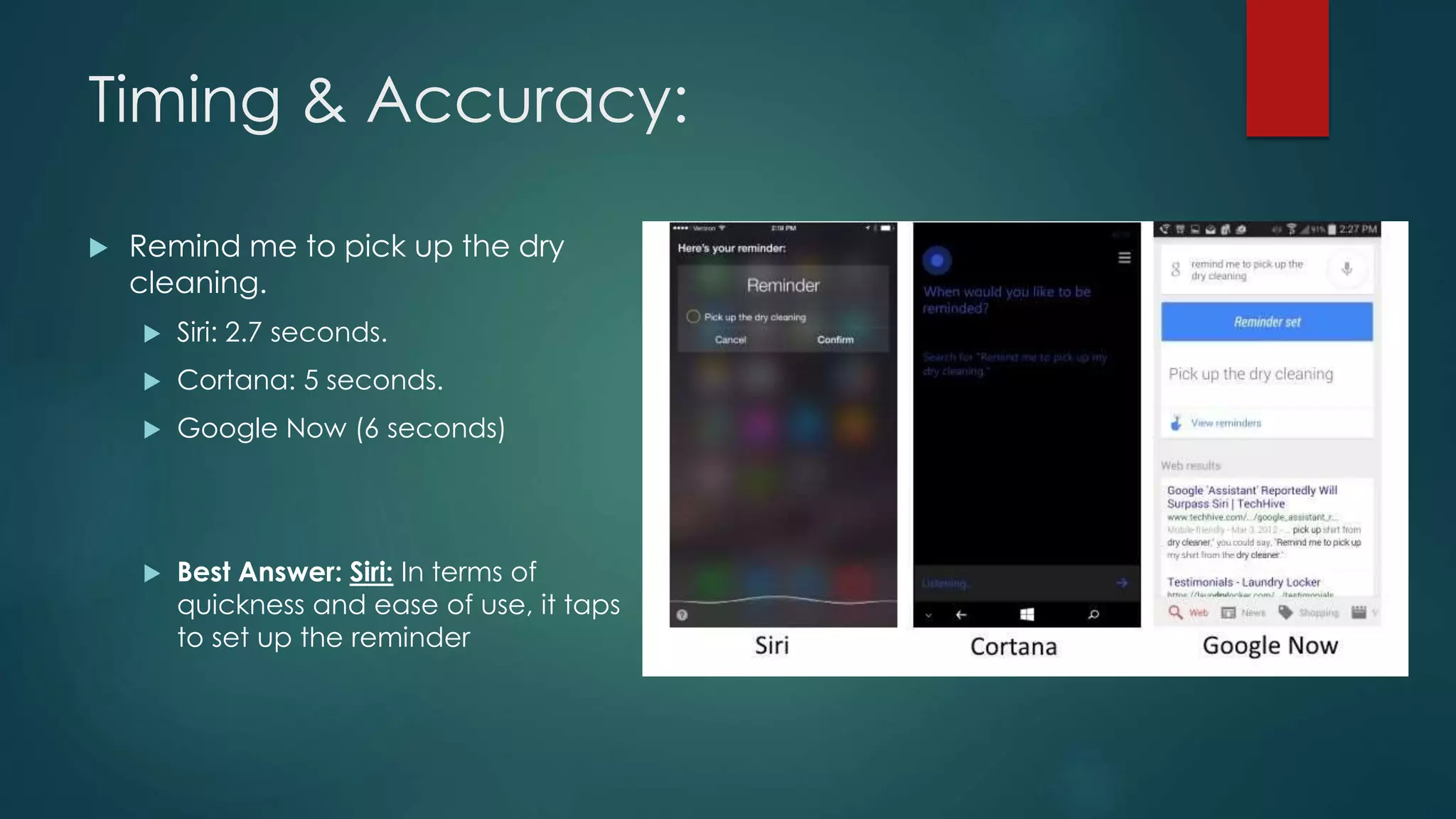
 Remind me to pick up the dry
cleaning.
 Siri: 2.7 seconds.
 Cortana: 5 seconds.
 Google Now (6 seconds)
 Best Answer: Siri: In terms of
quickness and ease of use, it taps
to set up the reminder
Conclusion:
 So, these questions show that Siri is the fastest VPA than others.
 Google Now is the VPA which almost give accurate and to the
point answers most of the time.
Interface
 Cortana & Siri’s interfaces look similar.
 Google Now is a bit More involved.
 Google Now involves a cards layout that tries to anticipate what
you might want.
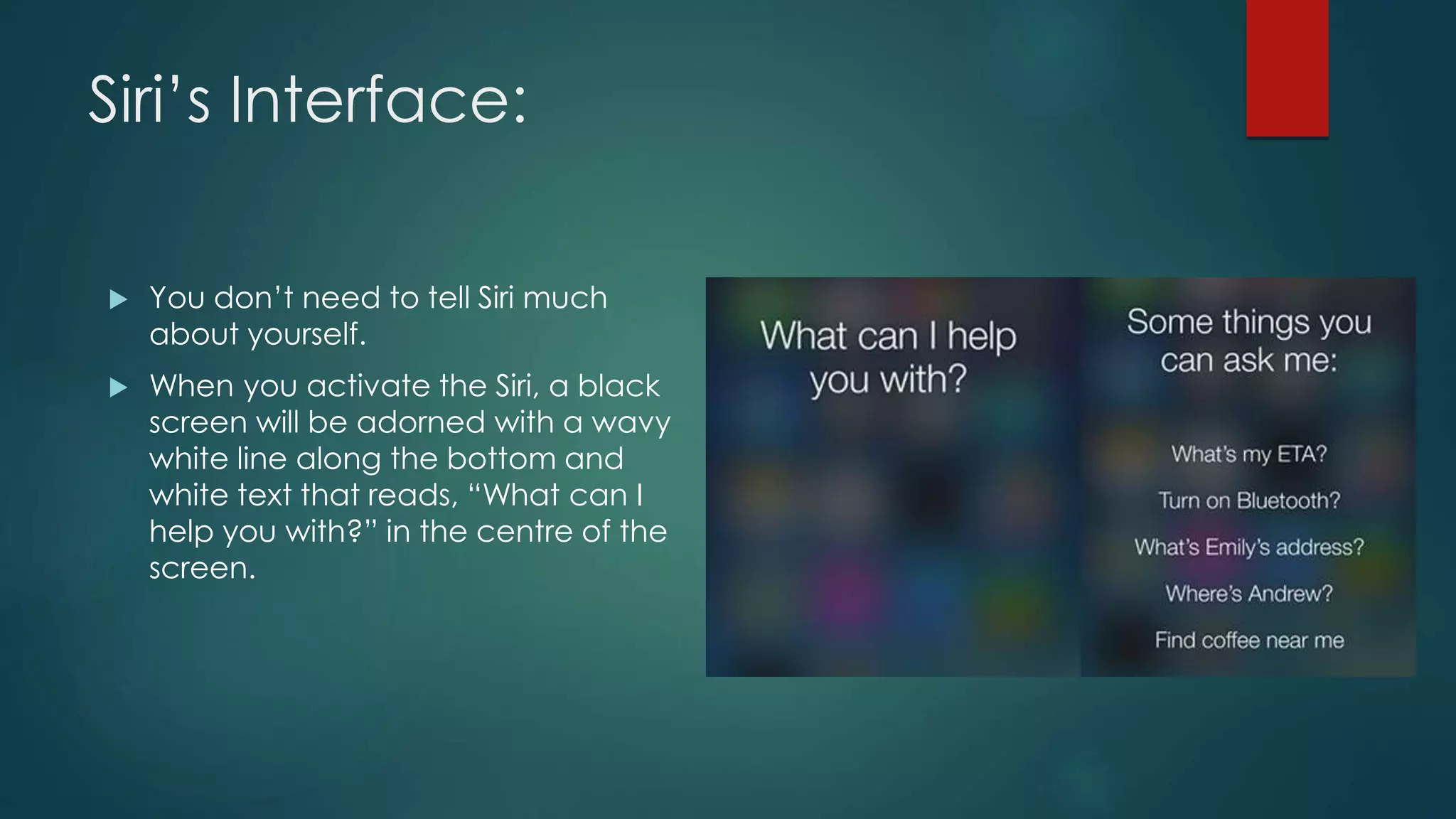
Siri’s Interface:
 You don’t need to tell Siri much
about yourself.
 When you activate the Siri, a black
screen will be adorned with a wavy
white line along the bottom and
white text that reads, “What can I
help you with?” in the centre of the
screen.
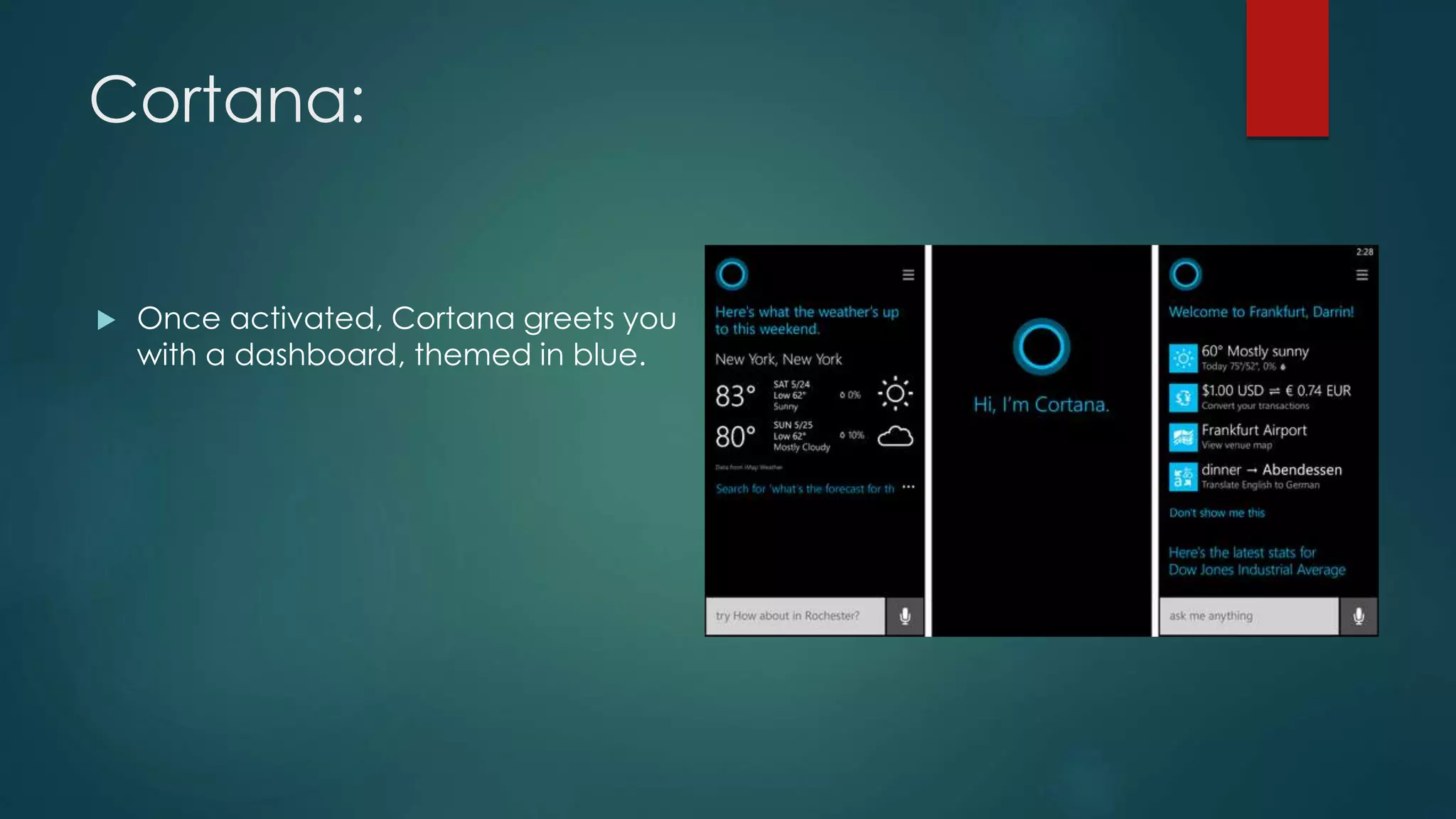
Cortana:
 Once activated, Cortana greets you
with a dashboard, themed in blue.
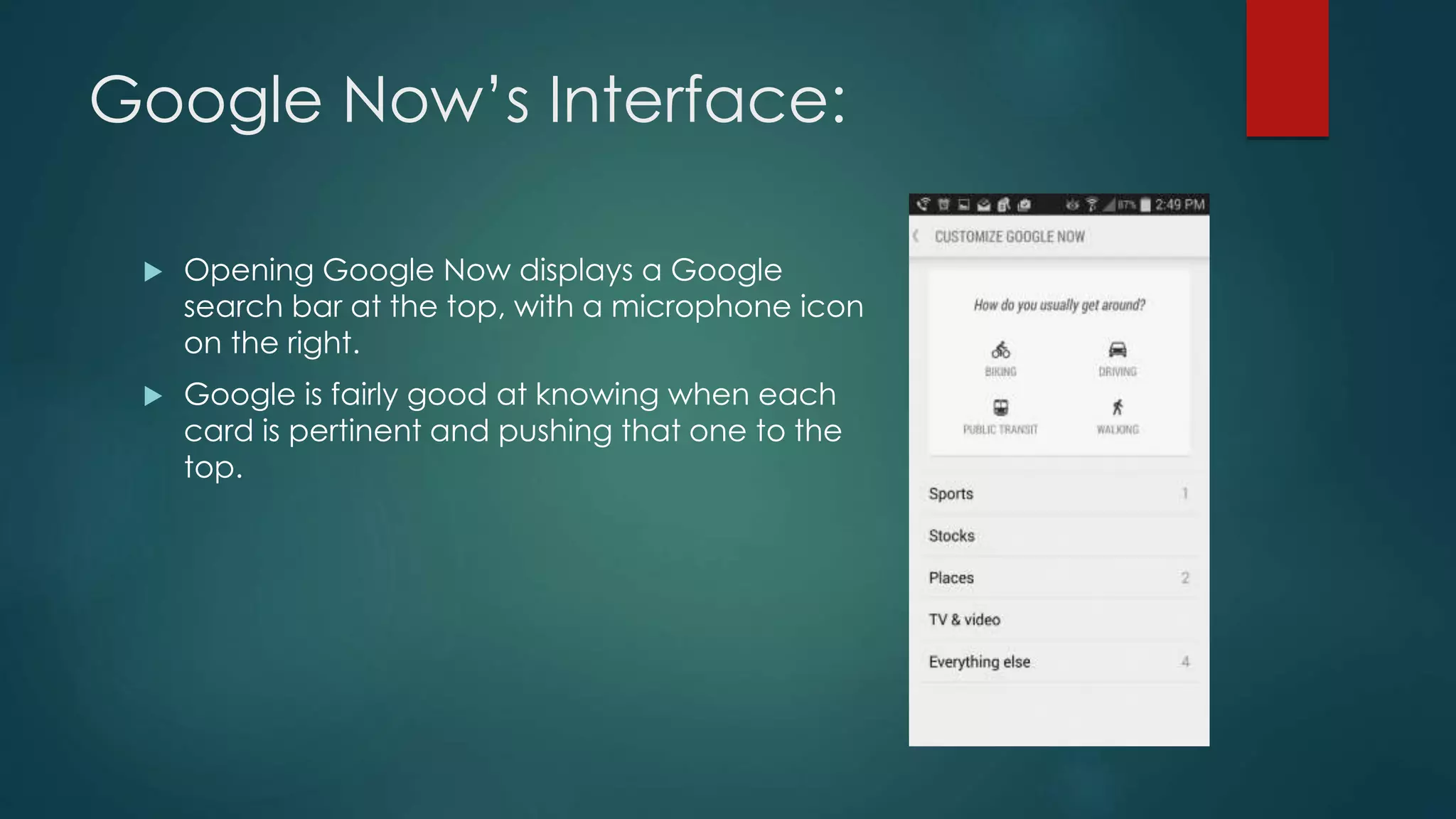
Google Now’s Interface:
 Opening Google Now displays a Google
search bar at the top, with a microphone icon
on the right.
 Google is fairly good at knowing when each
card is pertinent and pushing that one to the
top.
Interface Winner:
 Google Now:
 The Android assistant offers information you want before you can even
ask. Plus, it can better sort your results.
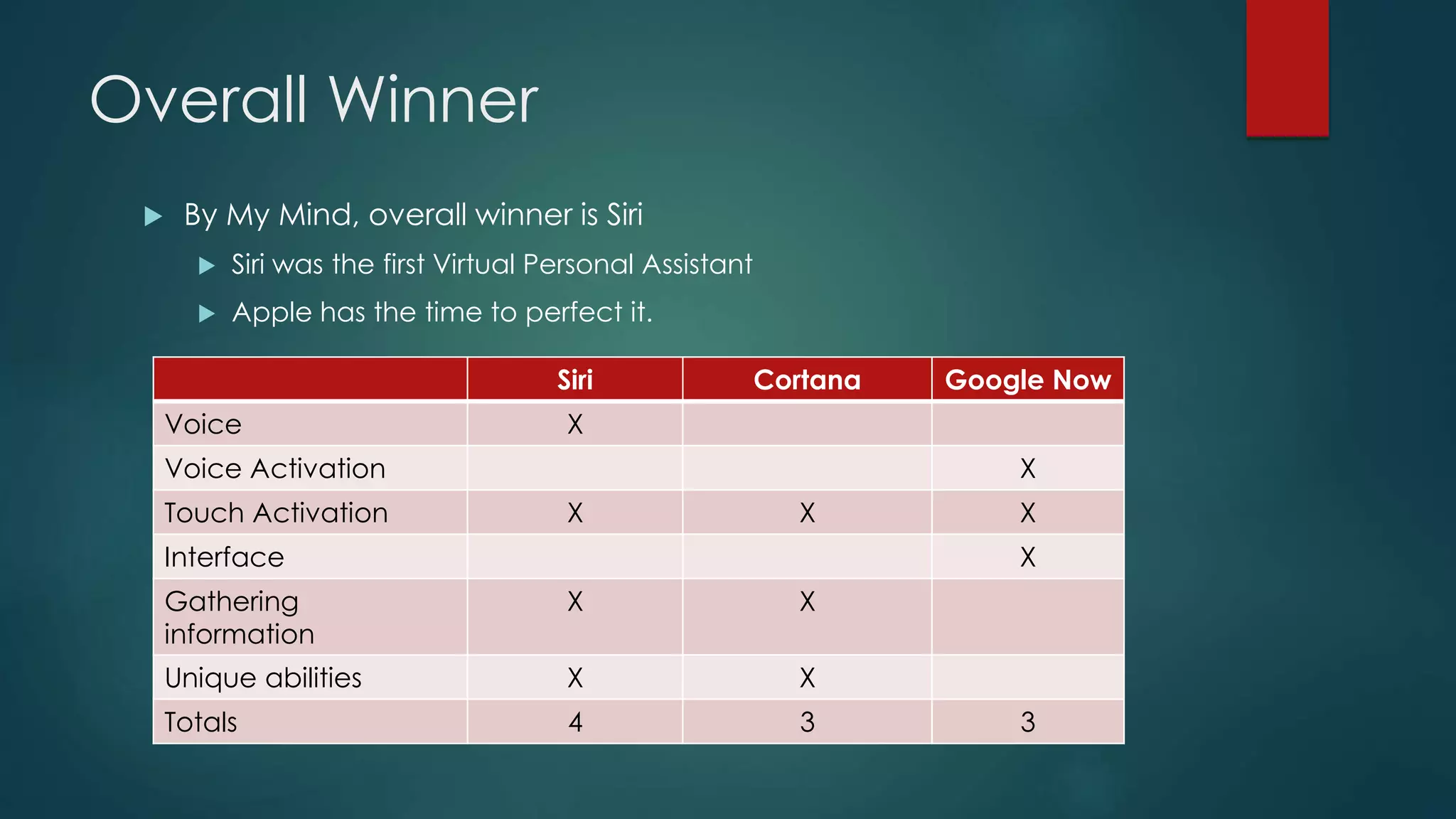
Overall Winner
 By My Mind, overall winner is Siri
 Siri was the first Virtual Personal Assistant
 Apple has the time to perfect it.
Siri Cortana Google Now
Voice X
Voice Activation X
Touch Activation X X X
Interface X
Gathering
information
X X
Unique abilities X X
Totals 4 3 3
Thank You…

Virtual Personal Assistant

  • 1.
  • 2.
    Personal Assistants  Peoplehired Personal Assistants  What is Personal Assistant?  A secretary working exclusive for one particular Person.  They keep all the information about their boss like:  When he wake up?  When he is going to sleep?  When he attending a meeting?  All about his/her calendar times.  etc.
  • 3.
    Trying to Makea Good Assistant  Different companies try to make Personal Assistants in the form of application as the computer was making rapidly progress.  The Application, which almost meets all the needs of their boss.  They made some applications.  But they were not so sufficient because they were just for specific purpose.
  • 4.
    Competition  As thereis a lot of competition, many companies are trying to make a carrier which is more efficient, reliable, easy to use and friendly.  The new services they made has the potential for all those things.  They are called Virtual Personal Assistants (VPA).  There are many kind of VPAs. But we are going to describe VPAs for Mobile which are for General Purpose.
  • 5.
    Virtual Personal Assistant(VPA)  What is Virtual Personal Assistant?  A Virtual Personal Assistant is an application program that understand the natural language and complete the electronic task for end user.  Such Tasks, which might have been performed by a personal assistant, including:  Reading text or E-mail messages aloud.  Looking up phone numbers.  Placing calls & reminding the end user about appointments.
  • 6.
    Virtual Personal Assistant(VPA)  VPA allows mobile professionals to remotely access and manage information over telephones like:  Messaging: Mobile professionals can manage voice-mail, email and faxes.  It can take over all book keeping, bills and account payables.  It can plan your next company event or outing for an enjoyable & memorable time for all.
  • 7.
    VPA in ArtificialIntelligence (AI)  Today, VPAs are programmed with Artificial Intelligence.  It is programmed with Machine Learning.  It is programmed with Voice Recognition Technology.  It uses sophisticated Algorithms to learn from data input & become better at predicting the end user’s needs.
  • 8.
    Virtual Personal Assistants(VPAs)  Popular VPAs currently include:  Apple’s Siri  Google Now  Microsoft’s Cortana  Many more.
  • 9.
    Working of VPA Features of all VPAs are almost same but the working of VPAs is different.  I will discuss the working of Siri.  Siri recognize:  Your voice  Understand your commands  Communicate with server  Interpret your request  Retrieve information for you.
  • 10.
    Siri’s Working  SiriBasically consists of three layers.  Speech to text  Text Analysing  Interpret commands
  • 11.
    Siri’s Working (FirstLayer):  Speech to text:  A Piece of software that converts audio to text.  It doesn’t understand just anything you might say.  Siri has much easier job than Dragon or Mac’s speech recognition facility.  It has to understand the words & sentences that are related to appointment contacts, messages, maps etc.  Example:  When we say “Car to Aftab”, it will write it as “Call to Aftab”.
  • 12.
    Siri’s Working (SecondLayer):  Text Analysing:  Converted text is just letters for computer.  A piece of software convert text to something that is understandable for computer.  Computer understand the command, so Siri convert this text to computer command.  Computer command consists of functions & the parameters of these functions.  Example:  What will be the function & parameters of “Set Reminder” command.
  • 13.
    (Second Layer) Continue… Siri maps the words to functions and parameters to create a command that computer can understand.  Example of Reminder.  Ambiguous or Half command  Get more information to clarify if command is ambiguous.  Full Command  Auto generated Parameter
  • 14.
    Siri’s Working (ThirdLayer):  Interpret commands:  In this level Siri isn’t doing much.  Example:  You already have calendar app & you press button to view & create appointments & meetings. Siri will push these button for you.  In this layer, that mapped computer command, go to server through internet.  Simultaneously, your speech evaluated locally.  A local recogniser communicate with server to judge whether command will be best handle locally or not.  Example:  Play Music, Restaurant reservation, Movie Rating.
  • 15.
    Features  Make PhoneCalls:  Call to Faisal Ali, Call to University of Gujrat  Get Direction  Direct me to Fawara Chok, Take me to Fawara Chok  Send Messages  Email to Aftab Subject Hello, Send SMS to Aftab where are you?, Message Aftab  Set Reminders  Remind me to go for walk at 7AM, Remind me to study when I’m at home.
  • 16.
    Features Continue….  AskQuestions  Will it rain today?, What is 34 times 86?, How many Pakistani rupees are in One Dollar?, Tell me the height of Minar-e-Pakistan.  Schedule meetings & Appointments  Schedule a meeting tomorrow morning with Aftab  Play Music & Videos  Play Life of Pie, Play songs from (album name)  Set Alarms  Wake me up at 6.30AM
  • 17.
    Feature Comparison  Featuresof all VPAs are almost common.  But there are some features which some VPAs doesn’t have.  And these features make some VPAs more reliable, sufficient and attract to customer.  Features of some VPAs are:
  • 18.
    Features: Cortana Google NowSiri Summon with hardware button Yes No – always listening of ‘OK Google’ Yes Web Search Yes Yes Yes Geofencing (e.g. reminding you to make a purchase when you’re near a business) Yes Yes Limited Predictive Notifications (e.g. traffic on your commute is bad) Yes Yes No Event or Contact based notification (when your sister calls, tell her happy birthday) Yes Yes Yes Answers sassy questions like “Are you sexy?” Yes No Yes
  • 19.
    Timing & Accuracy: We asked all three assistants the same series of questions, to measure which one performed the best.  “Where can I see the movie The Equalizer?”  Siri (3.5 seconds)  Cortana (6 seconds)  Google Now (5.47 seconds)  Best Answer: Google Now: While Siri was faster, Google offered a more comprehensive listing of theatres.
  • 20.
    Timing & Accuracy: Remind me to pick up the dry cleaning.  Siri: 2.7 seconds.  Cortana: 5 seconds.  Google Now (6 seconds)  Best Answer: Siri: In terms of quickness and ease of use, it taps to set up the reminder
  • 21.
    Conclusion:  So, thesequestions show that Siri is the fastest VPA than others.  Google Now is the VPA which almost give accurate and to the point answers most of the time.
  • 22.
    Interface  Cortana &Siri’s interfaces look similar.  Google Now is a bit More involved.  Google Now involves a cards layout that tries to anticipate what you might want.
  • 23.
    Siri’s Interface:  Youdon’t need to tell Siri much about yourself.  When you activate the Siri, a black screen will be adorned with a wavy white line along the bottom and white text that reads, “What can I help you with?” in the centre of the screen.
  • 24.
    Cortana:  Once activated,Cortana greets you with a dashboard, themed in blue.
  • 25.
    Google Now’s Interface: Opening Google Now displays a Google search bar at the top, with a microphone icon on the right.  Google is fairly good at knowing when each card is pertinent and pushing that one to the top.
  • 26.
    Interface Winner:  GoogleNow:  The Android assistant offers information you want before you can even ask. Plus, it can better sort your results.
  • 27.
    Overall Winner  ByMy Mind, overall winner is Siri  Siri was the first Virtual Personal Assistant  Apple has the time to perfect it. Siri Cortana Google Now Voice X Voice Activation X Touch Activation X X X Interface X Gathering information X X Unique abilities X X Totals 4 3 3
  • 28.