“Multimodal Virtual Assistant”
Presentation By :
Vivek Kumar(2170171)
Vishal Kumar Behera(2170170)
Under the Guidance of:
Dr. Sumit Kumar Tetarave Post-doc(UTSA,USA) Assistant Professor-II
School of Computer Applications
Bhubaneswar, Odisha May 2023
1.1 INTRODUCTION
In today’s era almost all tasks are digitalized. We have Smartphone in hands and it is nothing less than having world at your
fingertips. These days we aren’t even using fingers. We just speak of the task and it is done. There exist systems where
we can say Text Dad, “I’ll be late today.” And the text is sent. That is the task of a Virtual Assistant. It also supports
specialized task such as booking a flight, or finding cheapest book online from various e- commerce sites and then
providing an interface to book an order are helping automate search, discovery and online order operations.
Virtual Assistants are software programs that help you ease your day to day tasks, such as showing weather report, creating
reminders, making shopping lists etc. They can take commands via text (online chat bots) or by voice. Voice based
intelligent assistants need an invoking word or wake word to activate the listener, followed by the command. For my
project the wake word is JIA. We have so many virtual assistants, such as Apple’s Siri, Amazon’s Alexa and Microsoft’s
Cortana. For this project, wake word was chosen JIA.
This system is designed to be used efficiently on desktops. Personal assistant software improves user productivity by
managing routine tasks of the user and by providing information from online sources to the user. JIA is effortless to use.
Call the wake word ‘JIA’ followed by the command. And within seconds, it gets executed.
Voice searches have dominated over text search. Web searches conducted via mobile devices have only just overtaken those
carried out using a computer and the analysts are already predicting that 50% of searches will be via voice by
2020.Virtual assistants are turning out to be smarter than ever. Allow your intelligent assistant to make email work for you.
Detect intent, pick out important information, automate processes, and deliver personalized responses.
This project was started on the premise that there is sufficient amount of openly available data and information on the web
that can be utilized to build a virtual assistant that has access to making intelligent decisions for routine user activities.
ABSTRACT
The project aims to develop a personal Multimodal Virtual assistant for windows- based system. Jarvis draws its
inspiration from virtual assistants like Cortana for Windows, and Siri for iOS. It has been designed to provide a user-
friendly interface for carrying out a variety of tasks by employing certain well-defined commands. Users can interact
with the assistant either through voice commands or using keyboard input. As a personal assistant, Jarvis assists the end-
user with day-to-day activities like general human conversation, searching queries in google or yahoo, searching for
videos, playing songs, live weather conditions, word meanings, searching for medicine details and reminding the user
about the scheduled events and tasks. The Multimodal virtual assistant takes the voice input through our microphone
and it converts our voice into computer understandable language and gives the required solutions and answers which are
asked by the user. This assistant connects with the world wide web to provide results that the user has questioned. This
project works on voice input and gives output through voice and displays the text on the screen. The main agenda of our
virtual assistant is that it makes people smart and give instant and computed results.
1.1 BACKGROUND
There already exist a number of desktop virtual assistants. A few examples of current virtual assistants available in market are discussed
in this section along with the tasks they can provide and their drawbacks.
SIRI from Apple
SIRI is personal assistant software that interfaces with the user thru voice interface, recognizes commands and acts on them. It learns to
adapt to user’s speech and thus improves voice recognition over time. It also tries to converse with the user when it does not identify
the user request.
It integrates with calendar, contacts and music library applications on the device and also integrates with GPS and camera on the device. It
uses location, temporal, social and task-based contexts, to personalize the agent behavior specifically to the user at a given point of
time.
Supported Tasks
• Call someone from my contacts list
• Launch an application on my iPhone
• Send a text message to someone
• Set up a meeting on my calendar for 9am tomorrow
• Set an alarm for 5am tomorrow morning
• Play a specific song in my iTunes library
• Enter a new note
Drawback
SIRI does not maintain a knowledge database of its own and its understanding
OBJECTIVE OF THE PROJECT
The development of technology allows introducing more advanced solutions in everyday life. This makes work less exhausting for employees, and also increases the
work safety. As the technology is developing day by day people are becoming more dependent on it, one of the mostly used platform is computer. We all want to
make the use of these computers more comfortable, traditional way to give a command to the computer is through keyboard but a more convenient way is to input
the command through voice. Giving input through voice is not only beneficial for the normal people but also for those who are visually impaired who are not able
to give the input by using a keyboard. For this purpose, there is a need of a virtual assistant which can not only take command through voice but also execute the
desired instructions and give output either in the form of voice or any other means.
A Multimodal Virtual Assistant is the software that can perform task and provide different services to the individual as per the individual’s dictated commands. This is
done through a synchronous process involving recognition of speech patterns and then, responding via synthetic speech. Through these assistants a user can
automate tasks ranging from but not limited to mailing, tasks management and media playback. It
understands natural language voice commands and complete the tasks for the user. It is typically a cloud-based program that requires internet connected devices and/or
applications to work. The technologies that power virtual assistants are machine learning, natural language processing and speech recognition platforms. It uses
sophisticated algorithms to learn from data input and become better at predicting the end user's needs.
Main objective of building personal assistant software (a virtual assistant) is using semantic data sources available on the web, user generated content and providing
knowledge from knowledge databases. The main purpose of an intelligent virtual assistant is to answer questions that users may have. This may be done in a
business environment, for example, on the business website, with a chat interface. On the mobile platform, the intelligent virtual assistant is available as a call-
button operated service where a voice asks the user “What can I do for you?” and then responds to verbal input.
Multimodal Virtual Assistants can tremendously save you time. We spend hours in online research and then making the report in our terms of understanding. JIA can do
that for you. Provide a topic for research and continue with your tasks while JIA does the research. Another difficult task is to remember test dates, birthdates or
anniversaries. It comes with a surprise when you enter the class and realize it is class test today. Just tell JIA in advance about your tests and she reminds you well
in advance so you can prepare for the test.
One of the main advantages of voice searches is their rapidity. In fact, voice is reputed to be four times faster than a written search: whereas we can write about 40
words per minute, we are capable of speaking around 150 during the same period of time15. In this respect, the ability of personal assistants to accurately
recognize spoken words is a prerequisite for them to be adopted by consumers.
1.1 SCOPE OF THE PROJECT
Virtual Assistants will continue to offer more individualized experiences as they get better at differentiating between voices.
However, it’s not just developers that need to address the complexity of developing for voice as brands also need to understand
the capabilities of each device and integration and if it makes sense for their specific brand. They will also need to focus on
maintaining a user experience that is consistent within the coming years as complexity becomes more of a concern. This is
because the visual interface with virtual assistants is missing. Users simply cannot see or touch a voice interface. Virtual
Assistants are software programs that help you ease your day- to-day tasks, such as showing weather report, playing music etc.
They can take commands via text (online chat bots) or by voice.
The main purpose of this project is to build a program that will be able to service to humans like a personal assistant. This is an
interesting concept and many people around the globe are working it. Today, time and security are the two main things to
which people are more sensitive, no one has the time to spoil; nobody would like their security breach, and this project is
mainly for those kinds of people.
This system is designed to be used efficiently on desktops. Virtual Assistants software improves user productivity by managing
routine tasks of the user and by providing information from an online source to the user. This project was started on the
premise that there is a sufficient amount of openly available data and information on the web that can be utilized to build a
virtual assistant that has access to making intelligent decisions for routine user activities.
VIRTUAL ASSISTANT
PURPOSE:
Purpose of virtual assistant is to being capable of voice interaction, music playback, making to-do lists, setting alarms, streaming
podcasts, playing audiobooks, and providing weather, traffic, sports, and other real-time information, such as news. Virtual
assistants enable users to speak natural language voice commands in order to operate the device and its apps.
There is an increased overall awareness and a higher level of comfort demonstrated specifically by millennial consumers. In this
ever-evolving digital world where speed, efficiency, and convenience are constantly being optimized, it’s clear that we are
moving towards less screen interaction.
SYSTEM IMPLEMENTATION
MODULES
• Pyttsx3
• Sapi5
• Speech recognition
• Pyaudio
• Wikipedia
• Webbrowser
• Cv2
• Stmp lib
• Image
• Numpy
• Os
System Architecture
The underlying multimodal assis- tant architecture supporting the MVA app. The user interacts with a native iOS client. When
the user taps the microphone icon, this initiates the flow of audio interleaved with gesture and context information
streamed over a WebSocket connec- tion to the platform.
This stream of interleaved data is handled at the server by a multimodal natural language pro- cessing pipeline. This fields
incoming packets ofdata from the client, demuxes the incoming data stream, and sends audio, ink traces, and context
information to three modules that operate in par- allel. The audio is processed using the AT&T WatsonSM speech
recognition engine (Goffin et al., 2005). Recognition is performed using a dy- namic hierarchical language model (Gilbert et
al., 2011) that combines a statistical N-gram language model with weighted sub- grammars. Ink traces are classified into
gestures using a linear classi- fier. Speech recognition results serve as input to two NLU modules. A discriminative stochastic
se- quence tagger assigns tags to phrases within the input, and then the overall string with tags is as- signed by a statistical
intent classifier to one of a number of intents handled by the system e.g. search(music event), refine(location).
The NLU results are passed along with gesture recognition results and the GUI and device context to a multimodal dialog
manager. The contextual resolution component determines if the input is a query refinement or correction. In either case, it
retrieves the previous command from a user con- text store and combines the new content with the context through
destructive unification (Ehlen and Johnston, 2012). A location salience component then applies to handle cases where a
location is not specified verbally. This component uses a su- pervised classifier to select from among a series of candidate
locations, including the gesture (if present), the current device location, or the current map location
Implementation details
2.4.1 Objectives and experimental variants
The purpose of this research is to evaluate if adding a visual component to the voice- only virtual assistants would actually enhance the user experience. We hypothesized that providing a
higher level of visual/auditory immersion would enhance the quality of user experience. In order to test this hypothesis, first stage involved the development of four different variants
(sometimes referred to as treatments [35]) of virtual assistant, each with a different audio/visual level of immersion. Developed VPA systems were the following; audio only, audio and
2D visual display, audio and 3D visual display, and audio immersive 3D visual display. The detailed explanation of each of the aforementioned variants is given below:
Variant 1: voice-only display The first version of the prototype was an audio only version. We used an existing AI and voice recognition system as the foundation for the functionality of the
virtual assistant. The primary objective was to test the interaction modality, not the development of a better AI. The development of the first version was actually the development of a
benchmark with which we compared our next versions that involved different output techniques. The audio only version acted similar to Siri or Google-Now where it took an audio
input and gave an audio output. The user was able to perform a certain task, using Dragon Naturally Speaking.
Variant 2: audio and 2D visual display The second version of the prototype included adding a 2D visual display to the audio only virtual assistant. At this stage, we gave the virtual assistant some
visual identity using the 2D avatar developed by SitePal [27]. The user was able to interact with a virtual assistant that had some kind of physical manifestation. The 2D display of the
virtual assistant was provided in the users laptop or computer screen.
Variant 3: audio and 3D visual display The third version of the prototype brought about a paradigm shift from 2D visual display to a 3D visual display. At this stage we developed a visual
representation of the virtual assistant and projected it using a 3D
projection technique called peppers ghost [24]. A snapshot of the 3D virtual assistant for variant 3 is shown in Fig..
Variant 4: audio and immersive 3D display The fourth version of the prototype further moved the virtual assistant from 3D (with peppers ghost) to an immersive 3D display with the Oculus Rift.
The virtual assistant was projected to the users eyes through the Oculus Rift virtual reality glasses. Both the third and the fourth variants of the system enabled us to dig deeper into
understanding the questions posed in our hypothesis by using different mediums of displays for the virtual assistant.
2.4.2 Overview of system implementation
Figure shows the system implementation architecture overview. The following subsections describe representative pieces of the system implementation. The architecture consists of three
overalls components: the input systems (Gmail, Calendar, Dragon NaturallySpeaking), the intermediate processing system (Processing, Web server, Web front-end, SitePal API,
Microsoft Windows, Oculus HMD), and the output system (one of the four variants).
ReQall
ReQall is personal assistant software that runs on smartphones running Apple iOS or Google Android operating
system. It helps user to recall notes as well as tasks within a location and time context. It records user inputs and
converts them into commands, and monitors current stack of user tasks to proactively suggest actions while
considering any changes in the environment. It also presents information based on the context of the user, as well as
filter information to the user based on its learned understanding of the priority of that information.
Supported Tasks
• Reminders
• Email
• Calendar, Google Calendar
• Outlook
• Facebook, LinkedIn
• News Feeds
• Evernote
Drawback
Will take some time to put all of the to-do items in – you could spend more time putting the entries in than actually
doing the revision.
3.1 EXISTING SYSTEM
This project describes one of the most efficient ways for voice recognition. It overcomes many of the drawbacks
in the existing solutions to make the Virtual Assistant more efficient. It uses natural language processing to
carry out the specified tasks. It has various functionalities like network connection and managing activities by
just voice commands. It reduces the utilization of input devices like keyboard.
This project describes the method to implement a virtual assistant for desktop using the APIs. In this module, the
voice commands are converted to text through Google Speech API. Text input is just stored in the database for
further process. It is recognized and matched with the commands available in database. Once the command is
found, its respective task is executed as voice, text or through user interface as output.
3.1.1 DISADVANTAGES
3.1.1.1 They propose a new detection scheme that gets two similar results which could cause confusions to the
user on deciding the actual/desired output.
3.1.1.2 Though the efficiency is high of the proposed module, the time consumption for each task to complete is
higher and also the complexity of the algorithms would make it very tough to tweak it if needed in the future.
3.1 PROPOSED SYSTEM
1. QUERIES FROM THE WEB:
Making queries is an essential part of one’s life. We have addressed the essential part of a netizen’s life by enabling our voice assistant to
search the web. Virtual
Assistant supports a plethora of search engine like Google displays the result by scraping the searched queries.
2. ACCESSING NEWS:
Being up-to-date in this modern world is very much important. In that way news plays a big crucial role in keeping ourselves updated. News
keeps you informed and also helps in spreading knowledge.
3. TO SEARCH SOMETHING ON WIKIPEDIA:
Wikipedia's purpose is to benefit readers by acting as a widely accessible and free encyclopedia; a comprehensive written compendium that
contains information on all branches of knowledge.
4. ACCESSING MUSIC PLAYLIST:
Music have remained as a main source of entertainment, one of the most prioritized tasks of virtual assistants. you can play any song of your
choice. However, you can also play a random song with the help of a random module. Every time you command to play music, the Virtual
Assistant will play any random song from the song directory.
5. OPENING CODE EDITOR:
Virtual Assistant is capable of opening your code editor or IDE with a single voice command.
3.1.1 ADVANTAGES
• Platform independence
• Increased flexibility
• Saves time by automating repetitive tasks
• Accessibility options for Mobility and the visually impaired
• Reducing our dependence on screens
• Adding personality to our daily lives
• More human touch
• Coordination of IoT devices
• Accessible and inclusive
• Aids hands free operation
SYSTEM SPECIFICATIONS
5.1 HARDWARE REQUIREMENTS
• Processor - Intel Pentium 4
• RAM - 512 MB
• Hardware capacity:80GB
• Monitor type- 15inch colour monitor
• CD-Drive type- 52xmax
• Mouse
• Microphone
• Personal Computer / Laptop
5.2 SOFTWARE REQUIREMENTS
5.2.1 Operating System - Windows
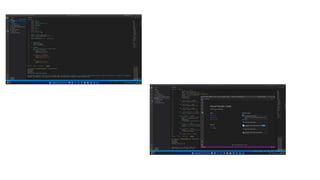
5.2.2 Simulation Tools - Visual Studio Code
5.2.3 Python - Version 3.9.6
5.2.4 Packages - 1.
Pyttsx3
2. Speech Recognition
3. Wikipedia
4. Pyaudio
5. Webbrowser
6. Face_Recognition
7. Smtplib
8. Cv2
9. Datetime
10. OS
ARCHITECTURE DIAGRAM
An architectural diagram is a diagram of a system that is used to abstract the overall outline of the
software system and the relationships, constraints, and boundaries between components. It is an
important tool as it provides an overall view of the physical deployment of the software system and its
evolution roadmap. An architecture description is a formal description and representation of a system,
organized in a way that supports reasoning about the structures and behaviors of the system. After
going through the above process, we have successfully enabled the model to understand the features.
UML DIAGRAM
The Unified Modeling Language is a general-purpose, developmental, modeling language in the field of software
engineering that is intended to provide a standard way to visualize the design of a system.
A UML diagram is a diagram based on the UML (Unified Modeling Language) with the purpose of visually
representing a system along with its main actors, roles, actions, artifacts or classes, in order to better understand,
alter, maintain, or document information about the system.
UML defines several models for representing systems
1. The class model captures the static structure
2. The state model expresses the dynamic behavior of objects
3. The use case model describes the requirements the requirements of the user
4. The interaction model represents the scenarios and messages flows
5. The implementation model shows the work unit
ADVANTAGES
• Most used and flexible
• Development time is reduced
• Provides standard for software development
• It has large visual elements to construct and easy to follow
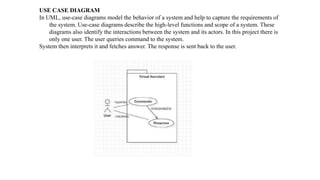
USE CASE DIAGRAM
In UML, use-case diagrams model the behavior of a system and help to capture the requirements of
the system. Use-case diagrams describe the high-level functions and scope of a system. These
diagrams also identify the interactions between the system and its actors. In this project there is
only one user. The user queries command to the system.
System then interprets it and fetches answer. The response is sent back to the user.
CLASS DIAGRAM
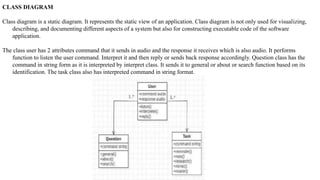
Class diagram is a static diagram. It represents the static view of an application. Class diagram is not only used for visualizing,
describing, and documenting different aspects of a system but also for constructing executable code of the software
application.
The class user has 2 attributes command that it sends in audio and the response it receives which is also audio. It performs
function to listen the user command. Interpret it and then reply or sends back response accordingly. Question class has the
command in string form as it is interpreted by interpret class. It sends it to general or about or search function based on its
identification. The task class also has interpreted command in string format.
ACTIVITY DIAGRAM
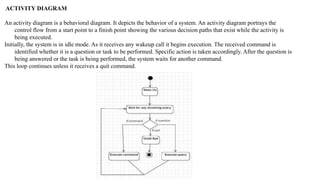
An activity diagram is a behavioral diagram. It depicts the behavior of a system. An activity diagram portrays the
control flow from a start point to a finish point showing the various decision paths that exist while the activity is
being executed.
Initially, the system is in idle mode. As it receives any wakeup call it begins execution. The received command is
identified whether it is a question or task to be performed. Specific action is taken accordingly. After the question is
being answered or the task is being performed, the system waits for another command.
This loop continues unless it receives a quit command.
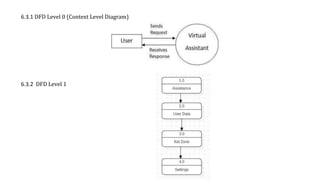
6.3.1 DFD Level 0 (Context Level Diagram)
6.3.2 DFD Level 1
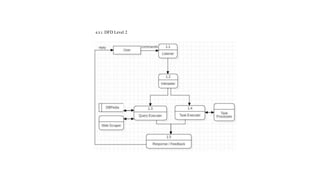
6.3.1 DFD Level 2
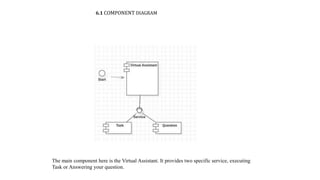
6.1 COMPONENT DIAGRAM
The main component here is the Virtual Assistant. It provides two specific service, executing
Task or Answering your question.
7.1 FEASIBILITY STUDY
Feasibility study can help you determine whether or not you should proceed with your project. It is essential to evaluate cost and benefit of
the proposed system.
Three key considerations involved in the feasibility analysis are:
• Economical feasibility
• Technical feasibility
• Social feasibility
7.2 ECONOMICAL FEASIBILITY
Here, we find the total cost and benefit of the proposed system over current system. For this project, the main cost is documentation cost.
User also would have to pay for microphones and speakers. Again, they are cheap and available.
7.3 TECHNICAL FEASIBILITY
It includes finding out technologies for the project, both hardware and software. For virtual assistant, user must have microphone to convey
their message and a speaker to listen what system speaks. These are very cheap now a days and everyone generally possess them.
Besides, system needs internet connection. It is also not an issue in this era where almost every home or office has Wi-Fi.
7.4 SOCIAL FEASIBILITY
The aspect of study is to check the level of acceptance of the system by the user. This includes the process of training the user to use the
system efficiently. The user must not feel threatened by the system, instead must accept it as a necessity.
The level of acceptance by the users solely depends on the methods that are employed to educate the user about the system and to make him
familiar with it. His level of confidence must be raised so that he is also able to make some constructive criticism.
8.1.1 FUNCTIONAL TESTING
Functional tests provide systematic demonstrations that functions tested are available as specified by the business and technical 29 requirements,
system documentation, and user manuals. Functional testing is centered on the following items:
• Valid input: identified classes of valid input must be accepted identified classes of valid input must be accepted.
• Invalid output: identified classes of valid input must be accepted.
• Functions: Identified functions must be exercised • Output: identified classes of application outputs must be exercised.
8.1.2 SYSTEM TESTING
System testing ensures that the entire integrated software system. It tests a configuration to ensure known and predictable results. System testing
is based on the process descriptions, flows, emphasizing pre-driven process links and integration points.
8.1.3 WHITE BOX TESTING
White Box Testing is a testing in which in which the software tester has knowledge of the inner workings, structure and language of the 30
software, or at least its purpose. It is purpose. It is used to test areas that cannot be reached from a black box level.
8.1.4 BLACK BOX TESTING
Black Box Testing is testing the software without any knowledge of the inner workings, structure or language of the module being tested. Black
box tests, as most other kinds of tests, must be written from a definitive source document, such as specification or requirements document.
8. 3 TEST RESULTS
All the test cases mentioned above have passed successfully. No defects encountered.
8.1 TESTING
CHAPTER 8 SYSTEM TESTING
The purpose of testing is to discover errors. Testing is the process of trying to discover every conceivable fault or weakness
in a work product. It provides a way to check the functionality of components, sub – assemblies, assemblies and/or a
finished product It is the process of exercising software with the intent of ensuring that the Software system meets its
requirements and user expectations and does not fail in an unacceptable manner. There are various types of tests. Each test
type addresses a specific testing requirement.
8.2 TYPES OF TESTING UNIT TESTING
8.2.1 UNIT TESTING
Unit testing involves the design of test cases that validate that the internal program logic is functioning properly, and that
program inputs produce valid outputs. It is the testing of individual software units of the application. It is done after the
completion of an individual unit before integration. This is a structural testing, that relies on knowledge of its construction
and is invasive. Unit tests perform basic tests at component level and test a specific business process, application, and/or
system configuration.
8.2.2 INTEGRATION TESTING
Integration tests are designed to test integrated software components to determine if they actually run as one program.
Testing is event driven and is more concerned with the basic outcome of screens or fields. Integration tests demonstrate
that although the components were individually satisfaction, as shown by successfully unit testing, the combination of
components is correct and consistent. Integration testing is specifically aimed at exposing the problems that arise from the
combination of components.
CONCLUSION
Through this virtual assistant, we have automated various services using a single line command. It eases most of the tasks of the
user like searching the web, playing music and doing Wikipedia searches. We aim to make this project a complete server
assistant and make it smart enough to act as a replacement for a general server administration. The project is built using
available open-source software modules with visual studio code community backing which can accommodate any updates in
future. The modular nature of this project makes it more flexible and easier to add additional features without disturbing
current system functionalities. It not only works on human commands but also give responses to the user based on the query
being asked or the words spoken by the user such as opening tasks and operations. The application should also eliminate any
kind of unnecessary manual work required in the user life of performing every task.
9.1 FUTURE WORK
The virtual assistants which are currently available are fast and responsive but we still have to go a long way. The
understanding and reliability of the current systems need to be improved a lot. The assistants available
nowadays are still not reliable in critical scenarios. The future plans include integrating our virtual assistant with
mobile using React Native to provide a synchronized experience between the two connected devices. Further, in
the long run, our virtual assistant is planned to feature auto deployment supporting elastic beanstalk, backup
files, and all operations which a general Server Administrator does. The future of these assistants will have the
virtual assistants incorporated with Artificial Intelligence which includes Machine Learning, Neural Networks,
etc. and IOT.
THANK YOU

Multimodal virtual assistant(2170171).pptx

  • 1.
    “Multimodal Virtual Assistant” PresentationBy : Vivek Kumar(2170171) Vishal Kumar Behera(2170170) Under the Guidance of: Dr. Sumit Kumar Tetarave Post-doc(UTSA,USA) Assistant Professor-II School of Computer Applications Bhubaneswar, Odisha May 2023
  • 2.
    1.1 INTRODUCTION In today’sera almost all tasks are digitalized. We have Smartphone in hands and it is nothing less than having world at your fingertips. These days we aren’t even using fingers. We just speak of the task and it is done. There exist systems where we can say Text Dad, “I’ll be late today.” And the text is sent. That is the task of a Virtual Assistant. It also supports specialized task such as booking a flight, or finding cheapest book online from various e- commerce sites and then providing an interface to book an order are helping automate search, discovery and online order operations. Virtual Assistants are software programs that help you ease your day to day tasks, such as showing weather report, creating reminders, making shopping lists etc. They can take commands via text (online chat bots) or by voice. Voice based intelligent assistants need an invoking word or wake word to activate the listener, followed by the command. For my project the wake word is JIA. We have so many virtual assistants, such as Apple’s Siri, Amazon’s Alexa and Microsoft’s Cortana. For this project, wake word was chosen JIA. This system is designed to be used efficiently on desktops. Personal assistant software improves user productivity by managing routine tasks of the user and by providing information from online sources to the user. JIA is effortless to use. Call the wake word ‘JIA’ followed by the command. And within seconds, it gets executed. Voice searches have dominated over text search. Web searches conducted via mobile devices have only just overtaken those carried out using a computer and the analysts are already predicting that 50% of searches will be via voice by 2020.Virtual assistants are turning out to be smarter than ever. Allow your intelligent assistant to make email work for you. Detect intent, pick out important information, automate processes, and deliver personalized responses. This project was started on the premise that there is sufficient amount of openly available data and information on the web that can be utilized to build a virtual assistant that has access to making intelligent decisions for routine user activities.
  • 3.
    ABSTRACT The project aimsto develop a personal Multimodal Virtual assistant for windows- based system. Jarvis draws its inspiration from virtual assistants like Cortana for Windows, and Siri for iOS. It has been designed to provide a user- friendly interface for carrying out a variety of tasks by employing certain well-defined commands. Users can interact with the assistant either through voice commands or using keyboard input. As a personal assistant, Jarvis assists the end- user with day-to-day activities like general human conversation, searching queries in google or yahoo, searching for videos, playing songs, live weather conditions, word meanings, searching for medicine details and reminding the user about the scheduled events and tasks. The Multimodal virtual assistant takes the voice input through our microphone and it converts our voice into computer understandable language and gives the required solutions and answers which are asked by the user. This assistant connects with the world wide web to provide results that the user has questioned. This project works on voice input and gives output through voice and displays the text on the screen. The main agenda of our virtual assistant is that it makes people smart and give instant and computed results.
  • 4.
    1.1 BACKGROUND There alreadyexist a number of desktop virtual assistants. A few examples of current virtual assistants available in market are discussed in this section along with the tasks they can provide and their drawbacks. SIRI from Apple SIRI is personal assistant software that interfaces with the user thru voice interface, recognizes commands and acts on them. It learns to adapt to user’s speech and thus improves voice recognition over time. It also tries to converse with the user when it does not identify the user request. It integrates with calendar, contacts and music library applications on the device and also integrates with GPS and camera on the device. It uses location, temporal, social and task-based contexts, to personalize the agent behavior specifically to the user at a given point of time. Supported Tasks • Call someone from my contacts list • Launch an application on my iPhone • Send a text message to someone • Set up a meeting on my calendar for 9am tomorrow • Set an alarm for 5am tomorrow morning • Play a specific song in my iTunes library • Enter a new note Drawback SIRI does not maintain a knowledge database of its own and its understanding
  • 5.
    OBJECTIVE OF THEPROJECT The development of technology allows introducing more advanced solutions in everyday life. This makes work less exhausting for employees, and also increases the work safety. As the technology is developing day by day people are becoming more dependent on it, one of the mostly used platform is computer. We all want to make the use of these computers more comfortable, traditional way to give a command to the computer is through keyboard but a more convenient way is to input the command through voice. Giving input through voice is not only beneficial for the normal people but also for those who are visually impaired who are not able to give the input by using a keyboard. For this purpose, there is a need of a virtual assistant which can not only take command through voice but also execute the desired instructions and give output either in the form of voice or any other means. A Multimodal Virtual Assistant is the software that can perform task and provide different services to the individual as per the individual’s dictated commands. This is done through a synchronous process involving recognition of speech patterns and then, responding via synthetic speech. Through these assistants a user can automate tasks ranging from but not limited to mailing, tasks management and media playback. It understands natural language voice commands and complete the tasks for the user. It is typically a cloud-based program that requires internet connected devices and/or applications to work. The technologies that power virtual assistants are machine learning, natural language processing and speech recognition platforms. It uses sophisticated algorithms to learn from data input and become better at predicting the end user's needs. Main objective of building personal assistant software (a virtual assistant) is using semantic data sources available on the web, user generated content and providing knowledge from knowledge databases. The main purpose of an intelligent virtual assistant is to answer questions that users may have. This may be done in a business environment, for example, on the business website, with a chat interface. On the mobile platform, the intelligent virtual assistant is available as a call- button operated service where a voice asks the user “What can I do for you?” and then responds to verbal input. Multimodal Virtual Assistants can tremendously save you time. We spend hours in online research and then making the report in our terms of understanding. JIA can do that for you. Provide a topic for research and continue with your tasks while JIA does the research. Another difficult task is to remember test dates, birthdates or anniversaries. It comes with a surprise when you enter the class and realize it is class test today. Just tell JIA in advance about your tests and she reminds you well in advance so you can prepare for the test. One of the main advantages of voice searches is their rapidity. In fact, voice is reputed to be four times faster than a written search: whereas we can write about 40 words per minute, we are capable of speaking around 150 during the same period of time15. In this respect, the ability of personal assistants to accurately recognize spoken words is a prerequisite for them to be adopted by consumers.
  • 6.
    1.1 SCOPE OFTHE PROJECT Virtual Assistants will continue to offer more individualized experiences as they get better at differentiating between voices. However, it’s not just developers that need to address the complexity of developing for voice as brands also need to understand the capabilities of each device and integration and if it makes sense for their specific brand. They will also need to focus on maintaining a user experience that is consistent within the coming years as complexity becomes more of a concern. This is because the visual interface with virtual assistants is missing. Users simply cannot see or touch a voice interface. Virtual Assistants are software programs that help you ease your day- to-day tasks, such as showing weather report, playing music etc. They can take commands via text (online chat bots) or by voice. The main purpose of this project is to build a program that will be able to service to humans like a personal assistant. This is an interesting concept and many people around the globe are working it. Today, time and security are the two main things to which people are more sensitive, no one has the time to spoil; nobody would like their security breach, and this project is mainly for those kinds of people. This system is designed to be used efficiently on desktops. Virtual Assistants software improves user productivity by managing routine tasks of the user and by providing information from an online source to the user. This project was started on the premise that there is a sufficient amount of openly available data and information on the web that can be utilized to build a virtual assistant that has access to making intelligent decisions for routine user activities.
  • 7.
  • 8.
    PURPOSE: Purpose of virtualassistant is to being capable of voice interaction, music playback, making to-do lists, setting alarms, streaming podcasts, playing audiobooks, and providing weather, traffic, sports, and other real-time information, such as news. Virtual assistants enable users to speak natural language voice commands in order to operate the device and its apps. There is an increased overall awareness and a higher level of comfort demonstrated specifically by millennial consumers. In this ever-evolving digital world where speed, efficiency, and convenience are constantly being optimized, it’s clear that we are moving towards less screen interaction. SYSTEM IMPLEMENTATION MODULES • Pyttsx3 • Sapi5 • Speech recognition • Pyaudio • Wikipedia • Webbrowser • Cv2 • Stmp lib • Image • Numpy • Os
  • 9.
    System Architecture The underlyingmultimodal assis- tant architecture supporting the MVA app. The user interacts with a native iOS client. When the user taps the microphone icon, this initiates the flow of audio interleaved with gesture and context information streamed over a WebSocket connec- tion to the platform. This stream of interleaved data is handled at the server by a multimodal natural language pro- cessing pipeline. This fields incoming packets ofdata from the client, demuxes the incoming data stream, and sends audio, ink traces, and context information to three modules that operate in par- allel. The audio is processed using the AT&T WatsonSM speech recognition engine (Goffin et al., 2005). Recognition is performed using a dy- namic hierarchical language model (Gilbert et al., 2011) that combines a statistical N-gram language model with weighted sub- grammars. Ink traces are classified into gestures using a linear classi- fier. Speech recognition results serve as input to two NLU modules. A discriminative stochastic se- quence tagger assigns tags to phrases within the input, and then the overall string with tags is as- signed by a statistical intent classifier to one of a number of intents handled by the system e.g. search(music event), refine(location). The NLU results are passed along with gesture recognition results and the GUI and device context to a multimodal dialog manager. The contextual resolution component determines if the input is a query refinement or correction. In either case, it retrieves the previous command from a user con- text store and combines the new content with the context through destructive unification (Ehlen and Johnston, 2012). A location salience component then applies to handle cases where a location is not specified verbally. This component uses a su- pervised classifier to select from among a series of candidate locations, including the gesture (if present), the current device location, or the current map location
  • 10.
    Implementation details 2.4.1 Objectivesand experimental variants The purpose of this research is to evaluate if adding a visual component to the voice- only virtual assistants would actually enhance the user experience. We hypothesized that providing a higher level of visual/auditory immersion would enhance the quality of user experience. In order to test this hypothesis, first stage involved the development of four different variants (sometimes referred to as treatments [35]) of virtual assistant, each with a different audio/visual level of immersion. Developed VPA systems were the following; audio only, audio and 2D visual display, audio and 3D visual display, and audio immersive 3D visual display. The detailed explanation of each of the aforementioned variants is given below: Variant 1: voice-only display The first version of the prototype was an audio only version. We used an existing AI and voice recognition system as the foundation for the functionality of the virtual assistant. The primary objective was to test the interaction modality, not the development of a better AI. The development of the first version was actually the development of a benchmark with which we compared our next versions that involved different output techniques. The audio only version acted similar to Siri or Google-Now where it took an audio input and gave an audio output. The user was able to perform a certain task, using Dragon Naturally Speaking. Variant 2: audio and 2D visual display The second version of the prototype included adding a 2D visual display to the audio only virtual assistant. At this stage, we gave the virtual assistant some visual identity using the 2D avatar developed by SitePal [27]. The user was able to interact with a virtual assistant that had some kind of physical manifestation. The 2D display of the virtual assistant was provided in the users laptop or computer screen. Variant 3: audio and 3D visual display The third version of the prototype brought about a paradigm shift from 2D visual display to a 3D visual display. At this stage we developed a visual representation of the virtual assistant and projected it using a 3D projection technique called peppers ghost [24]. A snapshot of the 3D virtual assistant for variant 3 is shown in Fig.. Variant 4: audio and immersive 3D display The fourth version of the prototype further moved the virtual assistant from 3D (with peppers ghost) to an immersive 3D display with the Oculus Rift. The virtual assistant was projected to the users eyes through the Oculus Rift virtual reality glasses. Both the third and the fourth variants of the system enabled us to dig deeper into understanding the questions posed in our hypothesis by using different mediums of displays for the virtual assistant. 2.4.2 Overview of system implementation Figure shows the system implementation architecture overview. The following subsections describe representative pieces of the system implementation. The architecture consists of three overalls components: the input systems (Gmail, Calendar, Dragon NaturallySpeaking), the intermediate processing system (Processing, Web server, Web front-end, SitePal API, Microsoft Windows, Oculus HMD), and the output system (one of the four variants).
  • 12.
    ReQall ReQall is personalassistant software that runs on smartphones running Apple iOS or Google Android operating system. It helps user to recall notes as well as tasks within a location and time context. It records user inputs and converts them into commands, and monitors current stack of user tasks to proactively suggest actions while considering any changes in the environment. It also presents information based on the context of the user, as well as filter information to the user based on its learned understanding of the priority of that information. Supported Tasks • Reminders • Email • Calendar, Google Calendar • Outlook • Facebook, LinkedIn • News Feeds • Evernote Drawback Will take some time to put all of the to-do items in – you could spend more time putting the entries in than actually doing the revision.
  • 13.
    3.1 EXISTING SYSTEM Thisproject describes one of the most efficient ways for voice recognition. It overcomes many of the drawbacks in the existing solutions to make the Virtual Assistant more efficient. It uses natural language processing to carry out the specified tasks. It has various functionalities like network connection and managing activities by just voice commands. It reduces the utilization of input devices like keyboard. This project describes the method to implement a virtual assistant for desktop using the APIs. In this module, the voice commands are converted to text through Google Speech API. Text input is just stored in the database for further process. It is recognized and matched with the commands available in database. Once the command is found, its respective task is executed as voice, text or through user interface as output. 3.1.1 DISADVANTAGES 3.1.1.1 They propose a new detection scheme that gets two similar results which could cause confusions to the user on deciding the actual/desired output. 3.1.1.2 Though the efficiency is high of the proposed module, the time consumption for each task to complete is higher and also the complexity of the algorithms would make it very tough to tweak it if needed in the future.
  • 14.
    3.1 PROPOSED SYSTEM 1.QUERIES FROM THE WEB: Making queries is an essential part of one’s life. We have addressed the essential part of a netizen’s life by enabling our voice assistant to search the web. Virtual Assistant supports a plethora of search engine like Google displays the result by scraping the searched queries. 2. ACCESSING NEWS: Being up-to-date in this modern world is very much important. In that way news plays a big crucial role in keeping ourselves updated. News keeps you informed and also helps in spreading knowledge. 3. TO SEARCH SOMETHING ON WIKIPEDIA: Wikipedia's purpose is to benefit readers by acting as a widely accessible and free encyclopedia; a comprehensive written compendium that contains information on all branches of knowledge. 4. ACCESSING MUSIC PLAYLIST: Music have remained as a main source of entertainment, one of the most prioritized tasks of virtual assistants. you can play any song of your choice. However, you can also play a random song with the help of a random module. Every time you command to play music, the Virtual Assistant will play any random song from the song directory. 5. OPENING CODE EDITOR: Virtual Assistant is capable of opening your code editor or IDE with a single voice command.
  • 15.
    3.1.1 ADVANTAGES • Platformindependence • Increased flexibility • Saves time by automating repetitive tasks • Accessibility options for Mobility and the visually impaired • Reducing our dependence on screens • Adding personality to our daily lives • More human touch • Coordination of IoT devices • Accessible and inclusive • Aids hands free operation
  • 16.
    SYSTEM SPECIFICATIONS 5.1 HARDWAREREQUIREMENTS • Processor - Intel Pentium 4 • RAM - 512 MB • Hardware capacity:80GB • Monitor type- 15inch colour monitor • CD-Drive type- 52xmax • Mouse • Microphone • Personal Computer / Laptop 5.2 SOFTWARE REQUIREMENTS 5.2.1 Operating System - Windows 5.2.2 Simulation Tools - Visual Studio Code 5.2.3 Python - Version 3.9.6 5.2.4 Packages - 1. Pyttsx3 2. Speech Recognition 3. Wikipedia 4. Pyaudio 5. Webbrowser 6. Face_Recognition 7. Smtplib 8. Cv2 9. Datetime 10. OS
  • 17.
    ARCHITECTURE DIAGRAM An architecturaldiagram is a diagram of a system that is used to abstract the overall outline of the software system and the relationships, constraints, and boundaries between components. It is an important tool as it provides an overall view of the physical deployment of the software system and its evolution roadmap. An architecture description is a formal description and representation of a system, organized in a way that supports reasoning about the structures and behaviors of the system. After going through the above process, we have successfully enabled the model to understand the features.
  • 19.
    UML DIAGRAM The UnifiedModeling Language is a general-purpose, developmental, modeling language in the field of software engineering that is intended to provide a standard way to visualize the design of a system. A UML diagram is a diagram based on the UML (Unified Modeling Language) with the purpose of visually representing a system along with its main actors, roles, actions, artifacts or classes, in order to better understand, alter, maintain, or document information about the system. UML defines several models for representing systems 1. The class model captures the static structure 2. The state model expresses the dynamic behavior of objects 3. The use case model describes the requirements the requirements of the user 4. The interaction model represents the scenarios and messages flows 5. The implementation model shows the work unit ADVANTAGES • Most used and flexible • Development time is reduced • Provides standard for software development • It has large visual elements to construct and easy to follow
  • 20.
    USE CASE DIAGRAM InUML, use-case diagrams model the behavior of a system and help to capture the requirements of the system. Use-case diagrams describe the high-level functions and scope of a system. These diagrams also identify the interactions between the system and its actors. In this project there is only one user. The user queries command to the system. System then interprets it and fetches answer. The response is sent back to the user.
  • 21.
    CLASS DIAGRAM Class diagramis a static diagram. It represents the static view of an application. Class diagram is not only used for visualizing, describing, and documenting different aspects of a system but also for constructing executable code of the software application. The class user has 2 attributes command that it sends in audio and the response it receives which is also audio. It performs function to listen the user command. Interpret it and then reply or sends back response accordingly. Question class has the command in string form as it is interpreted by interpret class. It sends it to general or about or search function based on its identification. The task class also has interpreted command in string format.
  • 22.
    ACTIVITY DIAGRAM An activitydiagram is a behavioral diagram. It depicts the behavior of a system. An activity diagram portrays the control flow from a start point to a finish point showing the various decision paths that exist while the activity is being executed. Initially, the system is in idle mode. As it receives any wakeup call it begins execution. The received command is identified whether it is a question or task to be performed. Specific action is taken accordingly. After the question is being answered or the task is being performed, the system waits for another command. This loop continues unless it receives a quit command.
  • 23.
    6.3.1 DFD Level0 (Context Level Diagram) 6.3.2 DFD Level 1
  • 24.
  • 25.
    6.1 COMPONENT DIAGRAM Themain component here is the Virtual Assistant. It provides two specific service, executing Task or Answering your question.
  • 26.
    7.1 FEASIBILITY STUDY Feasibilitystudy can help you determine whether or not you should proceed with your project. It is essential to evaluate cost and benefit of the proposed system. Three key considerations involved in the feasibility analysis are: • Economical feasibility • Technical feasibility • Social feasibility 7.2 ECONOMICAL FEASIBILITY Here, we find the total cost and benefit of the proposed system over current system. For this project, the main cost is documentation cost. User also would have to pay for microphones and speakers. Again, they are cheap and available. 7.3 TECHNICAL FEASIBILITY It includes finding out technologies for the project, both hardware and software. For virtual assistant, user must have microphone to convey their message and a speaker to listen what system speaks. These are very cheap now a days and everyone generally possess them. Besides, system needs internet connection. It is also not an issue in this era where almost every home or office has Wi-Fi. 7.4 SOCIAL FEASIBILITY The aspect of study is to check the level of acceptance of the system by the user. This includes the process of training the user to use the system efficiently. The user must not feel threatened by the system, instead must accept it as a necessity. The level of acceptance by the users solely depends on the methods that are employed to educate the user about the system and to make him familiar with it. His level of confidence must be raised so that he is also able to make some constructive criticism.
  • 27.
    8.1.1 FUNCTIONAL TESTING Functionaltests provide systematic demonstrations that functions tested are available as specified by the business and technical 29 requirements, system documentation, and user manuals. Functional testing is centered on the following items: • Valid input: identified classes of valid input must be accepted identified classes of valid input must be accepted. • Invalid output: identified classes of valid input must be accepted. • Functions: Identified functions must be exercised • Output: identified classes of application outputs must be exercised. 8.1.2 SYSTEM TESTING System testing ensures that the entire integrated software system. It tests a configuration to ensure known and predictable results. System testing is based on the process descriptions, flows, emphasizing pre-driven process links and integration points. 8.1.3 WHITE BOX TESTING White Box Testing is a testing in which in which the software tester has knowledge of the inner workings, structure and language of the 30 software, or at least its purpose. It is purpose. It is used to test areas that cannot be reached from a black box level. 8.1.4 BLACK BOX TESTING Black Box Testing is testing the software without any knowledge of the inner workings, structure or language of the module being tested. Black box tests, as most other kinds of tests, must be written from a definitive source document, such as specification or requirements document. 8. 3 TEST RESULTS All the test cases mentioned above have passed successfully. No defects encountered.
  • 28.
    8.1 TESTING CHAPTER 8SYSTEM TESTING The purpose of testing is to discover errors. Testing is the process of trying to discover every conceivable fault or weakness in a work product. It provides a way to check the functionality of components, sub – assemblies, assemblies and/or a finished product It is the process of exercising software with the intent of ensuring that the Software system meets its requirements and user expectations and does not fail in an unacceptable manner. There are various types of tests. Each test type addresses a specific testing requirement. 8.2 TYPES OF TESTING UNIT TESTING 8.2.1 UNIT TESTING Unit testing involves the design of test cases that validate that the internal program logic is functioning properly, and that program inputs produce valid outputs. It is the testing of individual software units of the application. It is done after the completion of an individual unit before integration. This is a structural testing, that relies on knowledge of its construction and is invasive. Unit tests perform basic tests at component level and test a specific business process, application, and/or system configuration. 8.2.2 INTEGRATION TESTING Integration tests are designed to test integrated software components to determine if they actually run as one program. Testing is event driven and is more concerned with the basic outcome of screens or fields. Integration tests demonstrate that although the components were individually satisfaction, as shown by successfully unit testing, the combination of components is correct and consistent. Integration testing is specifically aimed at exposing the problems that arise from the combination of components.
  • 29.
    CONCLUSION Through this virtualassistant, we have automated various services using a single line command. It eases most of the tasks of the user like searching the web, playing music and doing Wikipedia searches. We aim to make this project a complete server assistant and make it smart enough to act as a replacement for a general server administration. The project is built using available open-source software modules with visual studio code community backing which can accommodate any updates in future. The modular nature of this project makes it more flexible and easier to add additional features without disturbing current system functionalities. It not only works on human commands but also give responses to the user based on the query being asked or the words spoken by the user such as opening tasks and operations. The application should also eliminate any kind of unnecessary manual work required in the user life of performing every task. 9.1 FUTURE WORK The virtual assistants which are currently available are fast and responsive but we still have to go a long way. The understanding and reliability of the current systems need to be improved a lot. The assistants available nowadays are still not reliable in critical scenarios. The future plans include integrating our virtual assistant with mobile using React Native to provide a synchronized experience between the two connected devices. Further, in the long run, our virtual assistant is planned to feature auto deployment supporting elastic beanstalk, backup files, and all operations which a general Server Administrator does. The future of these assistants will have the virtual assistants incorporated with Artificial Intelligence which includes Machine Learning, Neural Networks, etc. and IOT.
  • 30.