SREE CHAITANYA COLLEGE OF ENGINEERING
DEPARTMENT OF COMPUTER SCIENCE & ENGINEERING
( Approved by AICTE, New Delhi and Affiliated to JNTUH, Telangana
ISO-9001-2008 Certified
VIRTUAL MOUSE USING HAND
GESTURE
BY Under the guidance of
M. Pranayvas Mrs. M. SHAILAJA
19N01A0571 Assistant Professor
IV CSE-B Department Of Computer
Science And Engineering
CONTENTS
 Abstract
 Introduction
 Existing System and Drawbacks
 Proposed System and Advantages
 Hardware and Software Specifications
 Design(Block Diagram/UML/Modules)
 Implementation(Technology used)
 Testing
 Results
 Conclusion and Future work
 References/Bibliography
ABSTRACT
 The mouse is one of the marvelous inventions of Human Computer Interaction (HCI) technology.
 Currently, wireless mouse still uses devices and is not free of devices completely, since it is using a battery for power and a
dongle to connect it to the PC.
 In the proposed AI virtual mouse system, this limitation can be overcome by employing a simple webcam for capturing of
hand gestures using computer vision.
 The Virtual Mouse provides an infrastructure between the user and the system.
 This study presents a method for controlling the cursor’s position without the need of any electronic equipment. While
actions such as clicking and dragging things will be carried out using various hand gestures.
 The suggested system will make use of OpenCV , Media pipe and Python as well as other Packages.
INTRODUCTION
 Virtual Mouse using Hand Gesture goes to be a commendable change within the world of
technology, in this system we are employing our fingers to manage the mouse.
 The initial setup includes a camera that can be used for providing the input to the system.
 The process is divided into 4 steps: Frame-capturing, Image-processing, Region, and Feature
extraction, Feature-matching.
 Python programming language is used for developing the virtual mouse system and also,
OpenCV stands for open-source computer vision, it is a library used for image processing.
 This model makes use of the MediaPipe package for tracking of the hands and for tracking the
tip of the hands.
 PyAutoGUI packages were used for moving around the window screen of the computer for
performing functions.
EXISTING SYSTEM AND DRAWBACKS
 The Mechanical mouse known as the trackball mouse that is commonly used in the 1990s, the ball within
the mouse are supported by two rotating rollers in order to detect the movement made by the ball itself
 Optical and Laser mouse that commonly used in these days, the motions of optical mouse rely on the
Light Emitting Diodes (LEDs) to detect movements relative to the underlying surface.
 Wireless mice are connected to the computer with the help of mouse receiver.
 Physical mouse is subjected to mechanical wear and tear and also, requires special hardware and surface
to operate.
 It is not easily adaptable to different environments and its performance varies depending on the
environment.
PROPOSED SYSTEM AND ADVANTAGES
 This project promotes an approach for the Human-Computer Interaction (HCI) where
cursor motion can be managed using real-time digital camera.
 It enables user to simulate Mouse operations such as Click, Double Click, Dragging,
Volume using Hand Gestures without any Hardware.
 Provides greater flexibility, easier to adapt and less prone to physical damage.
 Convenient and Cost effective.
 People who are physically challenged and unable to use their hands on physical mouse so
we try to give them an easy method to go their task easily and effortlessly.
HARDWARE AND SOFTWARE
REQUIREMENTS
 Processor Needed : i3 or above.
 RAM : 8 GB or more.
 Webcam: 720p HD Webcam
 Resolution: 1920 X 1080
 Operating System : Windows XP,7 or Higher
windows OS.
 IDLE : PyCharm
 Programming Language : Python and
Packages in python.
DESIGN
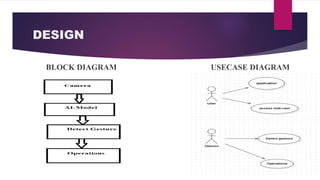
BLOCK DIAGRAM USECASE DIAGRAM
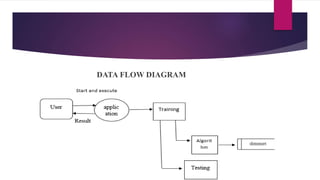
DATA FLOW DIAGRAM
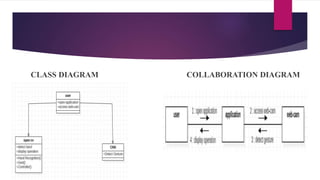
CLASS DIAGRAM COLLABORATION DIAGRAM
ACTIVITY DIAGRAM SEQUENCE DIAGRAM
MODULES
 OpenCV
 Mediapipe
 PyautoGui
 Pycaw
IMPLEMENTATION
 Camera used in proposed AI Virtual Mouse System:
The proposed AI virtual mouse system is based on the frames that have been
captured by the webcam in a laptop or PC. By using the Python computer vision library
OpenCV.
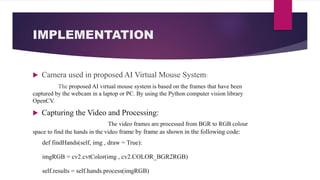
 Capturing the Video and Processing:
The video frames are processed from BGR to RGB colour
space to find the hands in the video frame by frame as shown in the following code:
def findHands(self, img , draw = True):
imgRGB = cv2.cvtColor(img , cv2.COLOR_BGR2RGB)
self.results = self.hands.process(imgRGB)
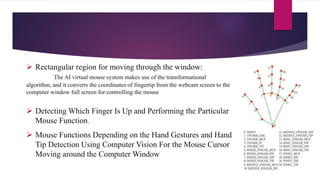
 Rectangular region for moving through the window:
The AI virtual mouse system makes use of the transformational
algorithm, and it converts the coordinates of fingertip from the webcam screen to the
computer window full screen for controlling the mouse
 Detecting Which Finger Is Up and Performing the Particular
Mouse Function.
 Mouse Functions Depending on the Hand Gestures and Hand
Tip Detection Using Computer Vision For the Mouse Cursor
Moving around the Computer Window
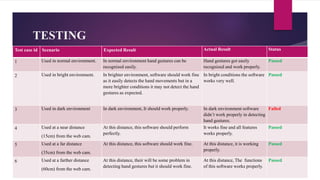
TESTING
Test case id Scenario Expected Result Actual Result Status
1 Used in normal environment. In normal environment hand gestures can be
recognized easily.
Hand gestures got easily
recognized and work properly.
Passed
2 Used in bright environment. In brighter environment, software should work fine
as it easily detects the hand movements but in a
more brighter conditions it may not detect the hand
gestures as expected.
In bright conditions the software
works very well.
Passed
3 Used in dark environment In dark environment, It should work properly. In dark environment software
didn’t work properly in detecting
hand gestures.
Failed
4 Used at a near distance
(15cm) from the web cam.
At this distance, this software should perform
perfectly.
It works fine and all features
works properly.
Passed
5 Used at a far distance
(35cm) from the web cam.
At this distance, this software should work fine. At this distance, it is working
properly.
Passed
6 Used at a farther distance
(60cm) from the web cam.
At this distance, their will be some problem in
detecting hand gestures but it should work fine.
At this distance, The functions
of this software works properly.
Passed
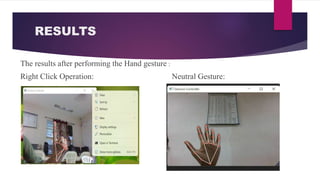
RESULTS
The results after performing the Hand gesture :
Right Click Operation: Neutral Gesture:
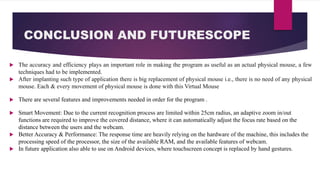
CONCLUSION AND FUTURESCOPE
 The accuracy and efficiency plays an important role in making the program as useful as an actual physical mouse, a few
techniques had to be implemented.
 After implanting such type of application there is big replacement of physical mouse i.e., there is no need of any physical
mouse. Each & every movement of physical mouse is done with this Virtual Mouse
 There are several features and improvements needed in order for the program .
 Smart Movement: Due to the current recognition process are limited within 25cm radius, an adaptive zoom in/out
functions are required to improve the covered distance, where it can automatically adjust the focus rate based on the
distance between the users and the webcam.
 Better Accuracy & Performance: The response time are heavily relying on the hardware of the machine, this includes the
processing speed of the processor, the size of the available RAM, and the available features of webcam.
 In future application also able to use on Android devices, where touchscreen concept is replaced by hand gestures.
REFERENCES /BIBILIOGRAPHY
 OpenCV Website – www.opencv.org
 S. Shriram” Deep Learning-Based Real-Time AI Virtual Mouse System Using Computer Vision to Avoid
COVID-19 Spread”, Applied Sciences, Volume 2021, Article ID 8133076, 31 Jul 2021, View at: Publisher
Site Hindawi.
THANK YOU

virtual mouse using hand gesture.pptx

  • 1.
    SREE CHAITANYA COLLEGEOF ENGINEERING DEPARTMENT OF COMPUTER SCIENCE & ENGINEERING ( Approved by AICTE, New Delhi and Affiliated to JNTUH, Telangana ISO-9001-2008 Certified VIRTUAL MOUSE USING HAND GESTURE BY Under the guidance of M. Pranayvas Mrs. M. SHAILAJA 19N01A0571 Assistant Professor IV CSE-B Department Of Computer Science And Engineering
  • 2.
    CONTENTS  Abstract  Introduction Existing System and Drawbacks  Proposed System and Advantages  Hardware and Software Specifications  Design(Block Diagram/UML/Modules)  Implementation(Technology used)  Testing  Results  Conclusion and Future work  References/Bibliography
  • 3.
    ABSTRACT  The mouseis one of the marvelous inventions of Human Computer Interaction (HCI) technology.  Currently, wireless mouse still uses devices and is not free of devices completely, since it is using a battery for power and a dongle to connect it to the PC.  In the proposed AI virtual mouse system, this limitation can be overcome by employing a simple webcam for capturing of hand gestures using computer vision.  The Virtual Mouse provides an infrastructure between the user and the system.  This study presents a method for controlling the cursor’s position without the need of any electronic equipment. While actions such as clicking and dragging things will be carried out using various hand gestures.  The suggested system will make use of OpenCV , Media pipe and Python as well as other Packages.
  • 4.
    INTRODUCTION  Virtual Mouseusing Hand Gesture goes to be a commendable change within the world of technology, in this system we are employing our fingers to manage the mouse.  The initial setup includes a camera that can be used for providing the input to the system.  The process is divided into 4 steps: Frame-capturing, Image-processing, Region, and Feature extraction, Feature-matching.  Python programming language is used for developing the virtual mouse system and also, OpenCV stands for open-source computer vision, it is a library used for image processing.  This model makes use of the MediaPipe package for tracking of the hands and for tracking the tip of the hands.  PyAutoGUI packages were used for moving around the window screen of the computer for performing functions.
  • 5.
    EXISTING SYSTEM ANDDRAWBACKS  The Mechanical mouse known as the trackball mouse that is commonly used in the 1990s, the ball within the mouse are supported by two rotating rollers in order to detect the movement made by the ball itself  Optical and Laser mouse that commonly used in these days, the motions of optical mouse rely on the Light Emitting Diodes (LEDs) to detect movements relative to the underlying surface.  Wireless mice are connected to the computer with the help of mouse receiver.  Physical mouse is subjected to mechanical wear and tear and also, requires special hardware and surface to operate.  It is not easily adaptable to different environments and its performance varies depending on the environment.
  • 6.
    PROPOSED SYSTEM ANDADVANTAGES  This project promotes an approach for the Human-Computer Interaction (HCI) where cursor motion can be managed using real-time digital camera.  It enables user to simulate Mouse operations such as Click, Double Click, Dragging, Volume using Hand Gestures without any Hardware.  Provides greater flexibility, easier to adapt and less prone to physical damage.  Convenient and Cost effective.  People who are physically challenged and unable to use their hands on physical mouse so we try to give them an easy method to go their task easily and effortlessly.
  • 7.
    HARDWARE AND SOFTWARE REQUIREMENTS Processor Needed : i3 or above.  RAM : 8 GB or more.  Webcam: 720p HD Webcam  Resolution: 1920 X 1080  Operating System : Windows XP,7 or Higher windows OS.  IDLE : PyCharm  Programming Language : Python and Packages in python.
  • 8.
  • 9.
  • 10.
  • 11.
  • 12.
  • 13.
    IMPLEMENTATION  Camera usedin proposed AI Virtual Mouse System: The proposed AI virtual mouse system is based on the frames that have been captured by the webcam in a laptop or PC. By using the Python computer vision library OpenCV.  Capturing the Video and Processing: The video frames are processed from BGR to RGB colour space to find the hands in the video frame by frame as shown in the following code: def findHands(self, img , draw = True): imgRGB = cv2.cvtColor(img , cv2.COLOR_BGR2RGB) self.results = self.hands.process(imgRGB)
  • 14.
     Rectangular regionfor moving through the window: The AI virtual mouse system makes use of the transformational algorithm, and it converts the coordinates of fingertip from the webcam screen to the computer window full screen for controlling the mouse  Detecting Which Finger Is Up and Performing the Particular Mouse Function.  Mouse Functions Depending on the Hand Gestures and Hand Tip Detection Using Computer Vision For the Mouse Cursor Moving around the Computer Window
  • 15.
    TESTING Test case idScenario Expected Result Actual Result Status 1 Used in normal environment. In normal environment hand gestures can be recognized easily. Hand gestures got easily recognized and work properly. Passed 2 Used in bright environment. In brighter environment, software should work fine as it easily detects the hand movements but in a more brighter conditions it may not detect the hand gestures as expected. In bright conditions the software works very well. Passed 3 Used in dark environment In dark environment, It should work properly. In dark environment software didn’t work properly in detecting hand gestures. Failed 4 Used at a near distance (15cm) from the web cam. At this distance, this software should perform perfectly. It works fine and all features works properly. Passed 5 Used at a far distance (35cm) from the web cam. At this distance, this software should work fine. At this distance, it is working properly. Passed 6 Used at a farther distance (60cm) from the web cam. At this distance, their will be some problem in detecting hand gestures but it should work fine. At this distance, The functions of this software works properly. Passed
  • 16.
    RESULTS The results afterperforming the Hand gesture : Right Click Operation: Neutral Gesture:
  • 17.
    CONCLUSION AND FUTURESCOPE The accuracy and efficiency plays an important role in making the program as useful as an actual physical mouse, a few techniques had to be implemented.  After implanting such type of application there is big replacement of physical mouse i.e., there is no need of any physical mouse. Each & every movement of physical mouse is done with this Virtual Mouse  There are several features and improvements needed in order for the program .  Smart Movement: Due to the current recognition process are limited within 25cm radius, an adaptive zoom in/out functions are required to improve the covered distance, where it can automatically adjust the focus rate based on the distance between the users and the webcam.  Better Accuracy & Performance: The response time are heavily relying on the hardware of the machine, this includes the processing speed of the processor, the size of the available RAM, and the available features of webcam.  In future application also able to use on Android devices, where touchscreen concept is replaced by hand gestures.
  • 18.
    REFERENCES /BIBILIOGRAPHY  OpenCVWebsite – www.opencv.org  S. Shriram” Deep Learning-Based Real-Time AI Virtual Mouse System Using Computer Vision to Avoid COVID-19 Spread”, Applied Sciences, Volume 2021, Article ID 8133076, 31 Jul 2021, View at: Publisher Site Hindawi.
  • 19.