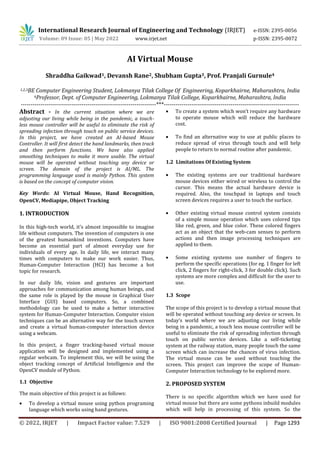
© 2022, IRJET | Impact Factor value: 7.529 | ISO 9001:2008 Certified Journal | Page 1293
AI Virtual Mouse
Shraddha Gaikwad1, Devansh Rane2, Shubham Gupta3, Prof. Pranjali Gurnule4
1,2,3BE Computer Engineering Student, Lokmanya Tilak College Of Engineering, Koparkhairne, Maharashtra, India
4Professor, Dept. of Computer Engineering, Lokmanya Tilak College, Koparkhairne, Maharashtra, India
---------------------------------------------------------------------***---------------------------------------------------------------------
Abstract - In the current situation where we are
adjusting our living while being in the pandemic, a touch-
less mouse controller will be useful to eliminate the risk of
spreading infection through touch on public service devices.
In this project, we have created an AI-based Mouse
Controller. It will first detect the hand landmarks, then track
and then perform functions. We have also applied
smoothing techniques to make it more usable. The virtual
mouse will be operated without touching any device or
screen. The domain of the project is AI/ML. The
programming language used is mainly Python. This system
is based on the concept of computer vision.
Key Words: AI Virtual Mouse, Hand Recognition,
OpenCV, Mediapipe, Object Tracking
1. INTRODUCTION
In this high-tech world, it’s almost impossible to imagine
life without computers. The invention of computers is one
of the greatest humankind inventions. Computers have
become an essential part of almost everyday use for
individuals of every age. In daily life, we interact many
times with computers to make our work easier. Thus,
Human-Computer Interaction (HCI) has become a hot
topic for research.
In our daily life, vision and gestures are important
approaches for communication among human beings, and
the same role is played by the mouse in Graphical User
Interface (GUI) based computers. So, a combined
methodology can be used to make a better interactive
system for Human-Computer Interaction. Computer vision
techniques can be an alternative way for the touch screen
and create a virtual human-computer interaction device
using a webcam.
In this project, a finger tracking-based virtual mouse
application will be designed and implemented using a
regular webcam. To implement this, we will be using the
object tracking concept of Artificial Intelligence and the
OpenCV module of Python.
1.1 Objective
The main objective of this project is as follows:
 To develop a virtual mouse using python programing
language which works using hand gestures.
 To create a system which won’t require any hardware
to operate mouse which will reduce the hardware
cost.
 To find an alternative way to use at public places to
reduce spread of virus through touch and will help
people to return to normal routine after pandemic.
1.2 Limitations Of Existing System
 The existing systems are our traditional hardware
mouse devices either wired or wireless to control the
cursor. This means the actual hardware device is
required. Also, the touchpad in laptops and touch
screen devices requires a user to touch the surface.
 Other existing virtual mouse control system consists
of a simple mouse operation which uses colored tips
like red, green, and blue color. These colored fingers
act as an object that the web-cam senses to perform
actions and then image processing techniques are
applied to them.
 Some existing systems use number of fingers to
perform the specific operations (for eg. 1 finger for left
click, 2 fingers for right-click, 3 for double click). Such
systems are more complex and difficult for the user to
use.
1.3 Scope
The scope of this project is to develop a virtual mouse that
will be operated without touching any device or screen. In
today’s world where we are adjusting our living while
being in a pandemic, a touch less mouse controller will be
useful to eliminate the risk of spreading infection through
touch on public service devices. Like a self-ticketing
system at the railway station, many people touch the same
screen which can increase the chances of virus infection.
The virtual mouse can be used without touching the
screen. This project can improve the scope of Human-
Computer Interaction technology to be explored more.
2. PROPOSED SYSTEM
There is no specific algorithm which we have used for
virtual mouse but there are some pythons inbuild modules
which will help in processing of this system. So the
International Research Journal of Engineering and Technology (IRJET) e-ISSN: 2395-0056
Volume: 09 Issue: 05 | May 2022 www.irjet.net p-ISSN: 2395-0072
International Research Journal of Engineering and Technology (IRJET) e-ISSN: 2395-0056
Volume: 09 Issue: 05 | May 2022 www.irjet.net p-ISSN: 2395-0072
© 2022, IRJET | Impact Factor value: 7.529 | ISO 9001:2008 Certified Journal | Page 1294
modules which we will be using are opencv, mediapipe,
numpy, autopy, time, maths.
2.1 Design Details
The system will be taking the real-time video input from
the webcam and converting it into array form to find the
coordinates of the frame. These coordinates will help the
program to locate the fingers in an accurate position and
detect which fingers are raised. By identifying which
finger is up system will perform certain functions assigned
like moving or clicking.
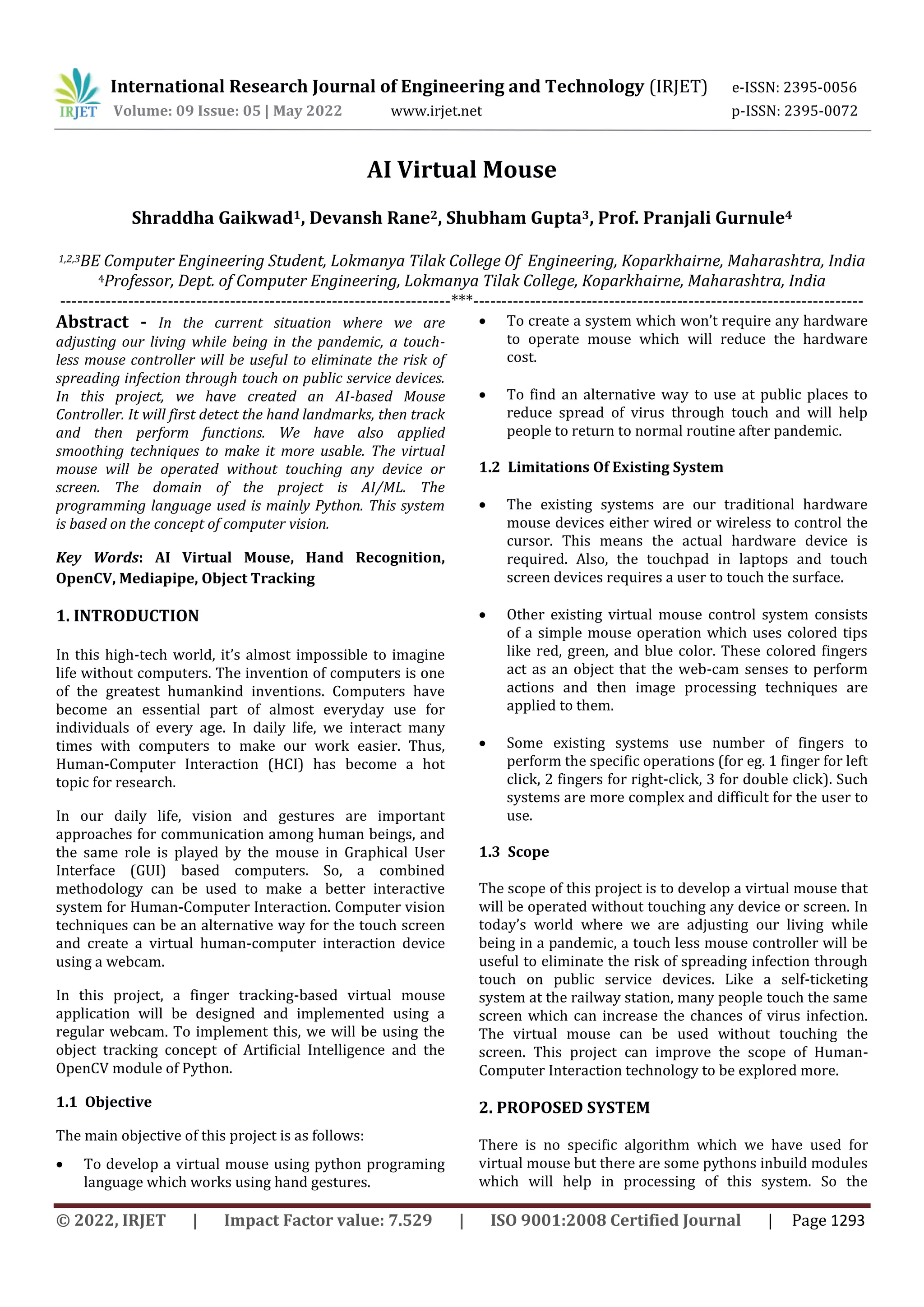
Fig -1: Working Of System
The use of the OpenCV module is to capture the real-
time video using a webcam which acts as an input for
further processing.
ii. Find hand landmarks
Using Python libraries like CV2 and MediaPipe we
coded the program to locate the hand landmarks. After
recognizing hand it will locate 21 points as shown in
the figure.
Fig -2: Hand Landmarks
iii. Get the tip of the index and middle finger
We also included different functions in a library
named “HandTrackingModule” for simplicity. This
module includes the functions for detecting hands,
locating fingers, counting which fingers are up,
finding the distance between fingers, etc.
iv. Check which fingers are up
Program checks which fingers are up.
 Index fingers: If only the index finger is up that
means the mouse is in moving mode. Users can
move their finger to move the cursor on the
screen.
 Index finger and Middle finger: If both of these
fingers are up then the mouse is in clicking mode.
When the distance between these two fingers is
short, the clicking function will be performed.
Fig -3: Moving Mode Fig -4: Performing Click
Function
2.2 Methodology
i. Capturing video
International Research Journal of Engineering and Technology (IRJET) e-ISSN: 2395-0056
Volume: 09 Issue: 05 | May 2022 www.irjet.net p-ISSN: 2395-0072
© 2022, IRJET | Impact Factor value: 7.529 | ISO 9001:2008 Certified Journal | Page 1295
v. Convert the coordinates to get the correct
positioning
Accurate location tracking of the cursor on the screen
is important for the exact working of the mouse.
vi. Implement the functions
By locating the coordinates and tracking the fingers
we perform the mouse functions virtually i.e. without
any physical contact with the device.
vii. Frame rate
Frame rate helps us to check if the movements of the
cursor are smooth or not.
viii. Smoothen the values so the mouse is not jittery
By observing the change in frame rate and movement
of cursor we applied some smoothing technique to
mouse so that it is easy to use for user.
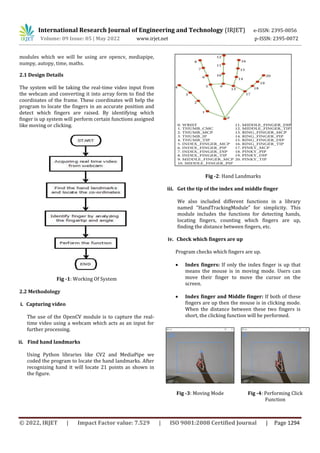
ix. Display
We also displayed the tracking by webcam to show
implementation properly.
Fig -5: Display
3. CONCLUSIONS
We have developed an AI virtual mouse system using
python which can control the mouse functions by using
hand gestures instead of using a physical mouse. Our
system uses a webcam or a built-in camera which detects
the hand gestures and fingertips and processes these
frames to perform the particular mouse functions.
REFERENCES
[1] Vision based Computer Mouse Control using Hand
Gestures, Sandeep Thakur, IEEE research paper
(2015)
[2] Virtual Mouse Using Hand Gesture, Mr. Gajendra
Moroliya , Mr. Sahil Patweka, Prof. S.P. Gopnarayan,
Journal of Emerging Technologies and Innovative
Research (2018)
[3] Mouse on Finger Tips using ML and AI, Nilesh Patil,
Gaurav Sali, Nikhil Lokhande, International Research
Journal of Engineering and Technology (2019
[4] Real-time virtual mouse system using RGB-D images
and fingertip detection, Dinh-Son Tran, Ngoc- Huynh
Ho, Hyung-Jeong Yang, Soo-Hyung Kim, Guee Sang
Lee, Springer Link (2020)

AI Virtual Mouse

  • 1.
    © 2022, IRJET| Impact Factor value: 7.529 | ISO 9001:2008 Certified Journal | Page 1293 AI Virtual Mouse Shraddha Gaikwad1, Devansh Rane2, Shubham Gupta3, Prof. Pranjali Gurnule4 1,2,3BE Computer Engineering Student, Lokmanya Tilak College Of Engineering, Koparkhairne, Maharashtra, India 4Professor, Dept. of Computer Engineering, Lokmanya Tilak College, Koparkhairne, Maharashtra, India ---------------------------------------------------------------------***--------------------------------------------------------------------- Abstract - In the current situation where we are adjusting our living while being in the pandemic, a touch- less mouse controller will be useful to eliminate the risk of spreading infection through touch on public service devices. In this project, we have created an AI-based Mouse Controller. It will first detect the hand landmarks, then track and then perform functions. We have also applied smoothing techniques to make it more usable. The virtual mouse will be operated without touching any device or screen. The domain of the project is AI/ML. The programming language used is mainly Python. This system is based on the concept of computer vision. Key Words: AI Virtual Mouse, Hand Recognition, OpenCV, Mediapipe, Object Tracking 1. INTRODUCTION In this high-tech world, it’s almost impossible to imagine life without computers. The invention of computers is one of the greatest humankind inventions. Computers have become an essential part of almost everyday use for individuals of every age. In daily life, we interact many times with computers to make our work easier. Thus, Human-Computer Interaction (HCI) has become a hot topic for research. In our daily life, vision and gestures are important approaches for communication among human beings, and the same role is played by the mouse in Graphical User Interface (GUI) based computers. So, a combined methodology can be used to make a better interactive system for Human-Computer Interaction. Computer vision techniques can be an alternative way for the touch screen and create a virtual human-computer interaction device using a webcam. In this project, a finger tracking-based virtual mouse application will be designed and implemented using a regular webcam. To implement this, we will be using the object tracking concept of Artificial Intelligence and the OpenCV module of Python. 1.1 Objective The main objective of this project is as follows:  To develop a virtual mouse using python programing language which works using hand gestures.  To create a system which won’t require any hardware to operate mouse which will reduce the hardware cost.  To find an alternative way to use at public places to reduce spread of virus through touch and will help people to return to normal routine after pandemic. 1.2 Limitations Of Existing System  The existing systems are our traditional hardware mouse devices either wired or wireless to control the cursor. This means the actual hardware device is required. Also, the touchpad in laptops and touch screen devices requires a user to touch the surface.  Other existing virtual mouse control system consists of a simple mouse operation which uses colored tips like red, green, and blue color. These colored fingers act as an object that the web-cam senses to perform actions and then image processing techniques are applied to them.  Some existing systems use number of fingers to perform the specific operations (for eg. 1 finger for left click, 2 fingers for right-click, 3 for double click). Such systems are more complex and difficult for the user to use. 1.3 Scope The scope of this project is to develop a virtual mouse that will be operated without touching any device or screen. In today’s world where we are adjusting our living while being in a pandemic, a touch less mouse controller will be useful to eliminate the risk of spreading infection through touch on public service devices. Like a self-ticketing system at the railway station, many people touch the same screen which can increase the chances of virus infection. The virtual mouse can be used without touching the screen. This project can improve the scope of Human- Computer Interaction technology to be explored more. 2. PROPOSED SYSTEM There is no specific algorithm which we have used for virtual mouse but there are some pythons inbuild modules which will help in processing of this system. So the International Research Journal of Engineering and Technology (IRJET) e-ISSN: 2395-0056 Volume: 09 Issue: 05 | May 2022 www.irjet.net p-ISSN: 2395-0072
  • 2.
    International Research Journalof Engineering and Technology (IRJET) e-ISSN: 2395-0056 Volume: 09 Issue: 05 | May 2022 www.irjet.net p-ISSN: 2395-0072 © 2022, IRJET | Impact Factor value: 7.529 | ISO 9001:2008 Certified Journal | Page 1294 modules which we will be using are opencv, mediapipe, numpy, autopy, time, maths. 2.1 Design Details The system will be taking the real-time video input from the webcam and converting it into array form to find the coordinates of the frame. These coordinates will help the program to locate the fingers in an accurate position and detect which fingers are raised. By identifying which finger is up system will perform certain functions assigned like moving or clicking. Fig -1: Working Of System The use of the OpenCV module is to capture the real- time video using a webcam which acts as an input for further processing. ii. Find hand landmarks Using Python libraries like CV2 and MediaPipe we coded the program to locate the hand landmarks. After recognizing hand it will locate 21 points as shown in the figure. Fig -2: Hand Landmarks iii. Get the tip of the index and middle finger We also included different functions in a library named “HandTrackingModule” for simplicity. This module includes the functions for detecting hands, locating fingers, counting which fingers are up, finding the distance between fingers, etc. iv. Check which fingers are up Program checks which fingers are up.  Index fingers: If only the index finger is up that means the mouse is in moving mode. Users can move their finger to move the cursor on the screen.  Index finger and Middle finger: If both of these fingers are up then the mouse is in clicking mode. When the distance between these two fingers is short, the clicking function will be performed. Fig -3: Moving Mode Fig -4: Performing Click Function 2.2 Methodology i. Capturing video
  • 3.
    International Research Journalof Engineering and Technology (IRJET) e-ISSN: 2395-0056 Volume: 09 Issue: 05 | May 2022 www.irjet.net p-ISSN: 2395-0072 © 2022, IRJET | Impact Factor value: 7.529 | ISO 9001:2008 Certified Journal | Page 1295 v. Convert the coordinates to get the correct positioning Accurate location tracking of the cursor on the screen is important for the exact working of the mouse. vi. Implement the functions By locating the coordinates and tracking the fingers we perform the mouse functions virtually i.e. without any physical contact with the device. vii. Frame rate Frame rate helps us to check if the movements of the cursor are smooth or not. viii. Smoothen the values so the mouse is not jittery By observing the change in frame rate and movement of cursor we applied some smoothing technique to mouse so that it is easy to use for user. ix. Display We also displayed the tracking by webcam to show implementation properly. Fig -5: Display 3. CONCLUSIONS We have developed an AI virtual mouse system using python which can control the mouse functions by using hand gestures instead of using a physical mouse. Our system uses a webcam or a built-in camera which detects the hand gestures and fingertips and processes these frames to perform the particular mouse functions. REFERENCES [1] Vision based Computer Mouse Control using Hand Gestures, Sandeep Thakur, IEEE research paper (2015) [2] Virtual Mouse Using Hand Gesture, Mr. Gajendra Moroliya , Mr. Sahil Patweka, Prof. S.P. Gopnarayan, Journal of Emerging Technologies and Innovative Research (2018) [3] Mouse on Finger Tips using ML and AI, Nilesh Patil, Gaurav Sali, Nikhil Lokhande, International Research Journal of Engineering and Technology (2019 [4] Real-time virtual mouse system using RGB-D images and fingertip detection, Dinh-Son Tran, Ngoc- Huynh Ho, Hyung-Jeong Yang, Soo-Hyung Kim, Guee Sang Lee, Springer Link (2020)