Who Benefits
from VDI?
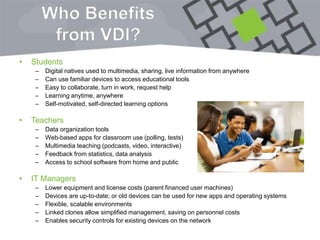
• Students
– Digital natives used to multimedia, sharing, live information from anywhere
– Can use familiar devices to access educational tools
– Easy to collaborate, turn in work, request help
– Learning anytime, anywhere
– Self-motivated, self-directed learning options
• Teachers
– Data organization tools
– Web-based apps for classroom use (polling, tests)
– Multimedia teaching (podcasts, video, interactive)
– Feedback from statistics, data analysis
– Access to school software from home and public
• IT Managers
– Lower equipment and license costs (parent financed user machines)
– Devices are up-to-date; or old devices can be used for new apps and operating systems
– Flexible, scalable environments
– Linked clones allow simplified management, saving on personnel costs
– Enables security controls for existing devices on the network
Bring Your Own
Device (BYOD)
• By 2015 the number of mobile devices will have grown to over 2 billion
worldwide, a 300% increase from 2009
• 85% of educational institutions currently allow students, faculty and staff to
use personal devices on their school networks
• 2012 survey found 31% of those ages 14 to 17 have a smartphone
– These devices are already in the hands of students – one survey found 2.38 devices for
every 1 student
• Only 46% require an antivirus product to be installed before connecting to a
school network
– Virtual desktops create an easy-to-maintain system that is more secure and includes
universal software and applications
VDI for Education
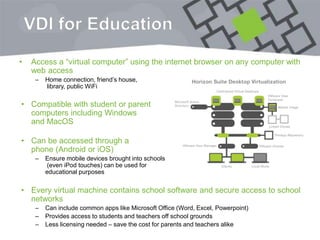
• Access a “virtual computer” using the internet browser on any computer with
web access
– Home connection, friend’s house,
library, public WiFi
• Compatible with student or parent
computers including Windows
and MacOS
• Can be accessed through a
phone (Android or iOS)
– Ensure mobile devices brought into schools
(even iPod touches) can be used for
educational purposes
• Every virtual machine contains school software and secure access to school
networks
– Can include common apps like Microsoft Office (Word, Excel, Powerpoint)
– Provides access to students and teachers off school grounds
– Less licensing needed – save the cost for parents and teachers alike
VDI for Education
• Collaborate and save work in the cloud
– Each user can sync files across the network, so if a teacher logs out from the computer lab,
their work is waiting when they login at home
– Encourage student group learning
– “The cloud ate my homework!” teachers have insight into student work habits. They can
collect, grade, and report all from cloud apps
• Reduce or eliminate desktop replacement and procurement cost
– Necessary computing resources come from the data center instead of new machines
– ThinApp terminals can be run on older, out-of-date-hardware
– Increased use of data center can be solved with hybrid, public, or private cloud
• Lower energy use and less management
saves money and time

Virtual Desktop for Education

  • 1.
    Who Benefits from VDI? •Students – Digital natives used to multimedia, sharing, live information from anywhere – Can use familiar devices to access educational tools – Easy to collaborate, turn in work, request help – Learning anytime, anywhere – Self-motivated, self-directed learning options • Teachers – Data organization tools – Web-based apps for classroom use (polling, tests) – Multimedia teaching (podcasts, video, interactive) – Feedback from statistics, data analysis – Access to school software from home and public • IT Managers – Lower equipment and license costs (parent financed user machines) – Devices are up-to-date; or old devices can be used for new apps and operating systems – Flexible, scalable environments – Linked clones allow simplified management, saving on personnel costs – Enables security controls for existing devices on the network
  • 2.
    Bring Your Own Device(BYOD) • By 2015 the number of mobile devices will have grown to over 2 billion worldwide, a 300% increase from 2009 • 85% of educational institutions currently allow students, faculty and staff to use personal devices on their school networks • 2012 survey found 31% of those ages 14 to 17 have a smartphone – These devices are already in the hands of students – one survey found 2.38 devices for every 1 student • Only 46% require an antivirus product to be installed before connecting to a school network – Virtual desktops create an easy-to-maintain system that is more secure and includes universal software and applications
  • 3.
    VDI for Education •Access a “virtual computer” using the internet browser on any computer with web access – Home connection, friend’s house, library, public WiFi • Compatible with student or parent computers including Windows and MacOS • Can be accessed through a phone (Android or iOS) – Ensure mobile devices brought into schools (even iPod touches) can be used for educational purposes • Every virtual machine contains school software and secure access to school networks – Can include common apps like Microsoft Office (Word, Excel, Powerpoint) – Provides access to students and teachers off school grounds – Less licensing needed – save the cost for parents and teachers alike
  • 4.
    VDI for Education •Collaborate and save work in the cloud – Each user can sync files across the network, so if a teacher logs out from the computer lab, their work is waiting when they login at home – Encourage student group learning – “The cloud ate my homework!” teachers have insight into student work habits. They can collect, grade, and report all from cloud apps • Reduce or eliminate desktop replacement and procurement cost – Necessary computing resources come from the data center instead of new machines – ThinApp terminals can be run on older, out-of-date-hardware – Increased use of data center can be solved with hybrid, public, or private cloud • Lower energy use and less management saves money and time