© 2014 VMware Inc. All rights reserved.
VMdir Deep Dive
Frank Buechsel
November 25th 2014
Agenda
• SSO Architecture Recap
• Multi-Master-Replication
• Service Endpoints
• Solution users
• Backup and Restore
• Performance impacts
• Q & A
2
SSO Architecture Recap
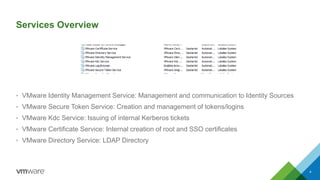
Services Overview
• VMware Identity Management Service: Management and communication to Identity Sources
• VMware Secure Token Service: Creation and management of tokens/logins
• VMware Kdc Service: Issuing of internal Kerberos tickets
• VMware Certificate Service: Internal creation of root and SSO certificates
• VMware Directory Service: LDAP Directory
4
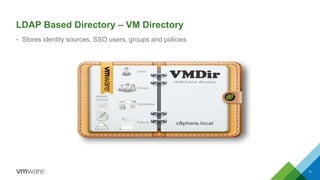
LDAP Based Directory – VM Directory
• Stores identity sources, SSO users, groups and policies
5
• http://jxplorer.org free tool
– LDAP style schema
– Do not modify without taking prior backups or without GSS assistance
• vSphere Web Client SSO administration pages
– Solution Users
– SSO users and groups
– Identity Source Configuration
– Password Policies
• ssolscli
– Lookupservice front end
– Service and Solution User registrations
GUI Front Ends to view SSO data
6
Multi-Master-Replication
Replication Agreements
• Replication happens inter- and intra-site
• 1 default replication agreement set up during install
• Replication interval: 30 seconds
– Solution users
– Service registrations
– SSO users
– SSO groups
• Used ports 11711 & 11712
8
Palo Alto
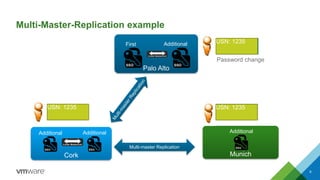
Multi-Master-Replication example
First
Cork
Additional
Munich
Additional
Multi-master Replication
Additional
Additional
9
USN:1234
USN: 1234
USN: 1234
Password change
USN: 1235
USN: 1235 USN: 1235
Troubleshooting Replication Issues
• Main Issues seen
– Firewall
– DNS
– Stale partner certificate
– No replication agreement
• Proposed remediation
– Delete partner certificate C:ProgramDataVMwareCIScfgvmdird
– If not auto pulled within 2 minutes manually copy the certificate from the partner node
– Create a new replication agreement (Open SR and leverage GSS guidance)
10
Service Endpoints
Service Endpoints
• Main properties:
– Protocol type
– Endpoint service URL
– Trustanchor (SSL certificate)
• Usage:
– Used by SSO to determine the API interface of each solution / registered service within SSO
12
Troubleshooting Service Endpoint Issues
• Main issues seen
– Outdated certificate information during failed rollback
– URL change due to host rename
– Stale information due to incomplete uninstalls
– Expired certificates
• Proposed remediation
– Removal of solution user and service endpoint
– Repointing of the specific solution if still active
– Validating and correcting errors for an upgraded VMware vCenter Server using the SSL Certificate
Automation Tool
http://kb.vmware.com/kb/2048202
– Re-pointing and re-registering VMware vCenter Server 5.1 / 5.5 and components
http://kb.vmware.com/kb/2033620
13
Solution Users
Solution Users
• Principals used to authenticate registered solutions
• vCenter stack solution users
– Web Client
– Inventory Service
– vCenter Server
– vCenter Orchestrator
• Members of the “Solution Users” group by default but hidden in the GUI
• Identifies in SSO by certificate authentication
• Usually maps to a Service Endpoint
15
Troubleshooting Solution User Issues
• Main Issues seen
– During repointing Solution User loses mapping to “Solution Users” group
– Duplicate Solution User certificates after upgrades
– Expired certificates
– Replication not working correctly
• Proposed remediation
– Re-add to Solution Users group
– Removal of solution user and service endpoint
– Repointing of the specific solution if still active
– Validating and correcting errors for an upgraded VMware vCenter Server using the SSL Certificate
Automation Tool
http://kb.vmware.com/kb/2048202
– Re-pointing and re-registering VMware vCenter Server 5.1 / 5.5 and components
http://kb.vmware.com/kb/2033620
16
Backup and Restore
Backup Procedure Single Instance
• Backing up and restoring the VMware vCenter Single Sign-On 5.5 configuration
http://kb.vmware.com/kb/2057353
1. Gather SSO log bundle
2. Backup vmdir registry keys
HKEY_LOCAL_MACHINESYSTEMCurrentControlSetservicesVMwareDirectoryService
3. Backup SSL certificate
C:ProgramDataVMwareCISruntimeVMwareSTSconf
C:ProgramDataVMwareCISdatavmca
C:ProgramDataVMwareCIScfgvmkdcd
C:ProgramDataMITKerberos5
4. Backup vmdir database
C:Program FilesVMwareInfrastructureVMwareCISvmdirdvdcbackup
C:ProgramDataVMwarecisdatavmdird C:<target_folder>
18
Restore Procedure Single Instance
• Guest OS can be restored
1. Stop all SSO services (STS->IDM->VMCA->KDC->vmdir)
2. Copy data.mdb and lock.mdb from backup to C:ProgramDataVMwarecisdatavmdird
• Guest OS can not be restored
1. Install SSO with same hostname and IP on fresh system
2. Stop all SSO services
3. Restore registry backup
4. Restore certificates from step 3 last slide
5. Copy data.mdb and lock.mdb from backup to C:ProgramDataVMwarecisdatavmdird
19
Restore Procedure Multiple Instances
• Possible vSphere.local domain inconsistencies after restoring a vCenter Server Single Sign-On
5.5 node
http://kb.vmware.com/kb/2086001
1. Restore Guest OS
2. Uninstall and Reinstall SSO using the same host name and IP address
3. Restore SSL certificates using SSL automation tool
4. Replication will restore all solution users, SSO users and groups and service endpoints
20
Performance Impacts
Troubleshooting Performance Issues
• Main Issues seen
– User member of many groups (200+)
– Large directory service structure (millions of objects)
– Large number of trusted domains
– DNS issues
– Firewall issues
– Stale Service Endpoints
• Proposed Remediation
– Limit number of group memberships
– Increase AD timeout settings in vCenter Server settings
– Fix stale DNS entries
– Delete unnecessary Service Endpoints using ssolscli
– If feasible adding AD users to “SSO administrators” can improve login performance
22

vCenter Server 5.5 Single Sign-On VMDir deep dive

  • 1.
    © 2014 VMwareInc. All rights reserved. VMdir Deep Dive Frank Buechsel November 25th 2014
  • 2.
    Agenda • SSO ArchitectureRecap • Multi-Master-Replication • Service Endpoints • Solution users • Backup and Restore • Performance impacts • Q & A 2
  • 3.
  • 4.
    Services Overview • VMwareIdentity Management Service: Management and communication to Identity Sources • VMware Secure Token Service: Creation and management of tokens/logins • VMware Kdc Service: Issuing of internal Kerberos tickets • VMware Certificate Service: Internal creation of root and SSO certificates • VMware Directory Service: LDAP Directory 4
  • 5.
    LDAP Based Directory– VM Directory • Stores identity sources, SSO users, groups and policies 5
  • 6.
    • http://jxplorer.org freetool – LDAP style schema – Do not modify without taking prior backups or without GSS assistance • vSphere Web Client SSO administration pages – Solution Users – SSO users and groups – Identity Source Configuration – Password Policies • ssolscli – Lookupservice front end – Service and Solution User registrations GUI Front Ends to view SSO data 6
  • 7.
  • 8.
    Replication Agreements • Replicationhappens inter- and intra-site • 1 default replication agreement set up during install • Replication interval: 30 seconds – Solution users – Service registrations – SSO users – SSO groups • Used ports 11711 & 11712 8
  • 9.
    Palo Alto Multi-Master-Replication example First Cork Additional Munich Additional Multi-masterReplication Additional Additional 9 USN:1234 USN: 1234 USN: 1234 Password change USN: 1235 USN: 1235 USN: 1235
  • 10.
    Troubleshooting Replication Issues •Main Issues seen – Firewall – DNS – Stale partner certificate – No replication agreement • Proposed remediation – Delete partner certificate C:ProgramDataVMwareCIScfgvmdird – If not auto pulled within 2 minutes manually copy the certificate from the partner node – Create a new replication agreement (Open SR and leverage GSS guidance) 10
  • 11.
  • 12.
    Service Endpoints • Mainproperties: – Protocol type – Endpoint service URL – Trustanchor (SSL certificate) • Usage: – Used by SSO to determine the API interface of each solution / registered service within SSO 12
  • 13.
    Troubleshooting Service EndpointIssues • Main issues seen – Outdated certificate information during failed rollback – URL change due to host rename – Stale information due to incomplete uninstalls – Expired certificates • Proposed remediation – Removal of solution user and service endpoint – Repointing of the specific solution if still active – Validating and correcting errors for an upgraded VMware vCenter Server using the SSL Certificate Automation Tool http://kb.vmware.com/kb/2048202 – Re-pointing and re-registering VMware vCenter Server 5.1 / 5.5 and components http://kb.vmware.com/kb/2033620 13
  • 14.
  • 15.
    Solution Users • Principalsused to authenticate registered solutions • vCenter stack solution users – Web Client – Inventory Service – vCenter Server – vCenter Orchestrator • Members of the “Solution Users” group by default but hidden in the GUI • Identifies in SSO by certificate authentication • Usually maps to a Service Endpoint 15
  • 16.
    Troubleshooting Solution UserIssues • Main Issues seen – During repointing Solution User loses mapping to “Solution Users” group – Duplicate Solution User certificates after upgrades – Expired certificates – Replication not working correctly • Proposed remediation – Re-add to Solution Users group – Removal of solution user and service endpoint – Repointing of the specific solution if still active – Validating and correcting errors for an upgraded VMware vCenter Server using the SSL Certificate Automation Tool http://kb.vmware.com/kb/2048202 – Re-pointing and re-registering VMware vCenter Server 5.1 / 5.5 and components http://kb.vmware.com/kb/2033620 16
  • 17.
  • 18.
    Backup Procedure SingleInstance • Backing up and restoring the VMware vCenter Single Sign-On 5.5 configuration http://kb.vmware.com/kb/2057353 1. Gather SSO log bundle 2. Backup vmdir registry keys HKEY_LOCAL_MACHINESYSTEMCurrentControlSetservicesVMwareDirectoryService 3. Backup SSL certificate C:ProgramDataVMwareCISruntimeVMwareSTSconf C:ProgramDataVMwareCISdatavmca C:ProgramDataVMwareCIScfgvmkdcd C:ProgramDataMITKerberos5 4. Backup vmdir database C:Program FilesVMwareInfrastructureVMwareCISvmdirdvdcbackup C:ProgramDataVMwarecisdatavmdird C:<target_folder> 18
  • 19.
    Restore Procedure SingleInstance • Guest OS can be restored 1. Stop all SSO services (STS->IDM->VMCA->KDC->vmdir) 2. Copy data.mdb and lock.mdb from backup to C:ProgramDataVMwarecisdatavmdird • Guest OS can not be restored 1. Install SSO with same hostname and IP on fresh system 2. Stop all SSO services 3. Restore registry backup 4. Restore certificates from step 3 last slide 5. Copy data.mdb and lock.mdb from backup to C:ProgramDataVMwarecisdatavmdird 19
  • 20.
    Restore Procedure MultipleInstances • Possible vSphere.local domain inconsistencies after restoring a vCenter Server Single Sign-On 5.5 node http://kb.vmware.com/kb/2086001 1. Restore Guest OS 2. Uninstall and Reinstall SSO using the same host name and IP address 3. Restore SSL certificates using SSL automation tool 4. Replication will restore all solution users, SSO users and groups and service endpoints 20
  • 21.
  • 22.
    Troubleshooting Performance Issues •Main Issues seen – User member of many groups (200+) – Large directory service structure (millions of objects) – Large number of trusted domains – DNS issues – Firewall issues – Stale Service Endpoints • Proposed Remediation – Limit number of group memberships – Increase AD timeout settings in vCenter Server settings – Fix stale DNS entries – Delete unnecessary Service Endpoints using ssolscli – If feasible adding AD users to “SSO administrators” can improve login performance 22