


Windows 10 – Modern Device Management
Co-Management
Per Larsen
Microsoft MVP - Enterprise Mobility
@Perlarsen1975
What is modern management
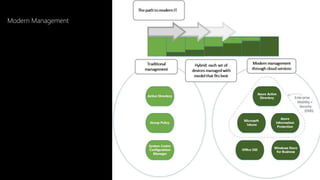
Modern Management
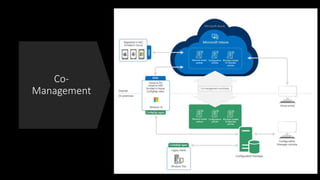
What is CO-management
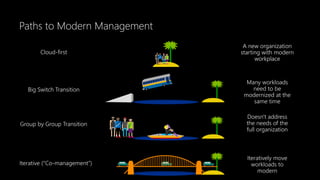
Paths to Modern Management
Big Switch Transition
Group by Group Transition
Iterative (“Co-management”)
Many workloads
need to be
modernized at the
same time
Doesn't address
the needs of the
full organization
Iteratively move
workloads to
modern
Cloud-first
A new organization
starting with modern
workplace
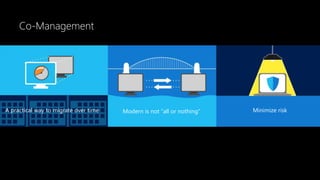
Co-Management
A practical way to migrate over time Modern is not “all or nothing” Minimize risk
Co-
Management
CO-management prerequisites
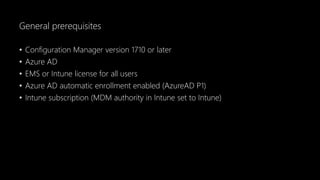
General prerequisites
• Configuration Manager version 1710 or later
• Azure AD
• EMS or Intune license for all users
• Azure AD automatic enrollment enabled (AzureAD P1)
• Intune subscription (MDM authority in Intune set to Intune)
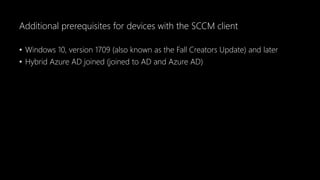
Additional prerequisites for devices with the SCCM client
• Windows 10, version 1709 (also known as the Fall Creators Update) and later
• Hybrid Azure AD joined (joined to AD and Azure AD)
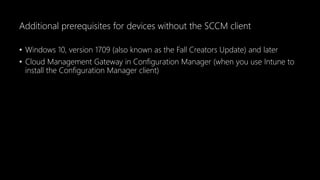
Additional prerequisites for devices without the SCCM client
• Windows 10, version 1709 (also known as the Fall Creators Update) and later
• Cloud Management Gateway in Configuration Manager (when you use Intune to
install the Configuration Manager client)
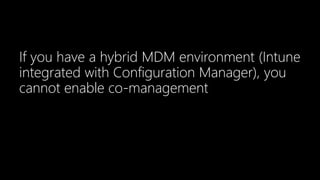
If you have a hybrid MDM environment (Intune
integrated with Configuration Manager), you
cannot enable co-management
Mobile Device Management Authority
• Microsoft Intune and Office 365
• Microsoft Intune
• Configuration Manager
• Mixed Authority Microsoft Intune and Configuration Manager
Compliance policies
Compliance policies
• Device Health
• Device properties
• System Security
Let’s have a closer look
Compliance Policies – Conditional Access
Windows Update for Business Policies
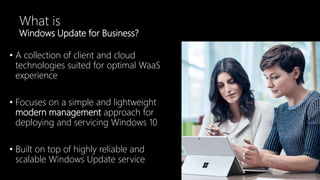
What is
Windows Update for Business?
• A collection of client and cloud
technologies suited for optimal WaaS
experience
• Focuses on a simple and lightweight
modern management approach for
deploying and servicing Windows 10
• Built on top of highly reliable and
scalable Windows Update service
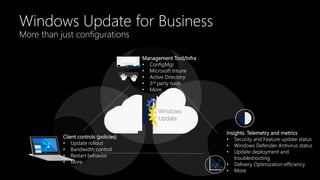
Windows Update for Business
More than just configurations
Client controls (policies)
• Update rollout
• Bandwidth control
• Restart behavior
• More
Insights: Telemetry and metrics
• Security and Feature update status
• Windows Defender Antivirus status
• Update deployment and
troubleshooting
• Delivery Optimization efficiency
• More
Management Tool/Infra
• ConfigMgr
• Microsoft Intune
• Active Directory
• 3rd party tools
• More
Windows
Update
Let’s have a closer look
Windows Update for Business Integration with Intune
Resource access policies
• VPN
• Wi-FI
• Email
• Certificate
Let’s have a closer look
Resource access policies
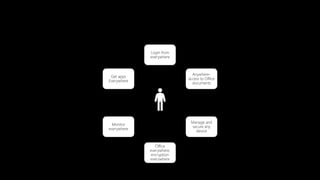
Login from
everywhere
Anywhere-
access to Office
documents
Manage and
secure any
device
Monitor
everywhere
Get apps
Everywhere
Office
everywhere,
encryption
everywhere
Thank you

Ewug 1711 co management

  • 1.
    Windows 10 –Modern Device Management Co-Management
  • 2.
    Per Larsen Microsoft MVP- Enterprise Mobility @Perlarsen1975
  • 3.
    What is modernmanagement
  • 4.
  • 5.
  • 6.
    Paths to ModernManagement Big Switch Transition Group by Group Transition Iterative (“Co-management”) Many workloads need to be modernized at the same time Doesn't address the needs of the full organization Iteratively move workloads to modern Cloud-first A new organization starting with modern workplace
  • 7.
    Co-Management A practical wayto migrate over time Modern is not “all or nothing” Minimize risk
  • 8.
  • 9.
  • 10.
    General prerequisites • ConfigurationManager version 1710 or later • Azure AD • EMS or Intune license for all users • Azure AD automatic enrollment enabled (AzureAD P1) • Intune subscription (MDM authority in Intune set to Intune)
  • 11.
    Additional prerequisites fordevices with the SCCM client • Windows 10, version 1709 (also known as the Fall Creators Update) and later • Hybrid Azure AD joined (joined to AD and Azure AD)
  • 12.
    Additional prerequisites fordevices without the SCCM client • Windows 10, version 1709 (also known as the Fall Creators Update) and later • Cloud Management Gateway in Configuration Manager (when you use Intune to install the Configuration Manager client)
  • 13.
    If you havea hybrid MDM environment (Intune integrated with Configuration Manager), you cannot enable co-management
  • 14.
    Mobile Device ManagementAuthority • Microsoft Intune and Office 365 • Microsoft Intune • Configuration Manager • Mixed Authority Microsoft Intune and Configuration Manager
  • 15.
  • 16.
    Compliance policies • DeviceHealth • Device properties • System Security
  • 17.
    Let’s have acloser look Compliance Policies – Conditional Access
  • 18.
    Windows Update forBusiness Policies
  • 19.
    What is Windows Updatefor Business? • A collection of client and cloud technologies suited for optimal WaaS experience • Focuses on a simple and lightweight modern management approach for deploying and servicing Windows 10 • Built on top of highly reliable and scalable Windows Update service
  • 20.
    Windows Update forBusiness More than just configurations Client controls (policies) • Update rollout • Bandwidth control • Restart behavior • More Insights: Telemetry and metrics • Security and Feature update status • Windows Defender Antivirus status • Update deployment and troubleshooting • Delivery Optimization efficiency • More Management Tool/Infra • ConfigMgr • Microsoft Intune • Active Directory • 3rd party tools • More Windows Update
  • 21.
    Let’s have acloser look Windows Update for Business Integration with Intune
  • 22.
  • 23.
    Resource access policies •VPN • Wi-FI • Email • Certificate
  • 24.
    Let’s have acloser look Resource access policies
  • 25.
    Login from everywhere Anywhere- access toOffice documents Manage and secure any device Monitor everywhere Get apps Everywhere Office everywhere, encryption everywhere
  • 26.