Active Directory Basic
and Azure AD
Outline
• What is Active Directory
• Active Directory Domain Service (AD DS) and Structure
• AD DS Benefits
• Azure AD and Features
• Comparison and Licensing
Active Directory (AD)
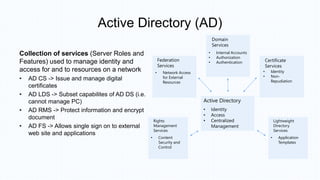
Collection of services (Server Roles and
Features) used to manage identity and
access for and to resources on a network
• AD CS -> Issue and manage digital
certificates
• AD LDS -> Subset capabilites of AD DS (i.e.
cannot manage PC)
• AD RMS -> Protect information and encrypt
document
• AD FS -> Allows single sign on to external
web site and applications
Domain
Services
• Internal Accounts
• Authorization
• Authentication
Federation
Services
• Network Access
for External
Resources
Certificate
Services
• Identity
• Non-
Repudiation
Rights
Management
Services
• Content
Security and
Control
Lightweight
Directory
Services
• Application
Templates
Active Directory
• Identity
• Access
• Centralized
Management
Active Directory Domain Services (AD DS)
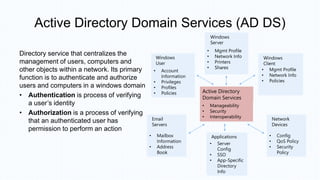
Directory service that centralizes the
management of users, computers and
other objects within a network. Its primary
function is to authenticate and authorize
users and computers in a windows domain
• Authentication is process of verifying
a user’s identity
• Authorization is a process of verifying
that an authenticated user has
permission to perform an action
Windows
Server
• Mgmt Profile
• Network Info
• Printers
• Shares
Windows
User
• Account
Information
• Privileges
• Profiles
• Policies
Windows
Client
• Mgmt Profile
• Network Info
• Policies
Email
Servers
• Mailbox
Information
• Address
Book
Applications
• Server
Config
• SSO
• App-Specific
Directory
Info
Network
Devices
• Config
• QoS Policy
• Security
Policy
Active Directory
Domain Services
• Manageability
• Security
• Interoperability
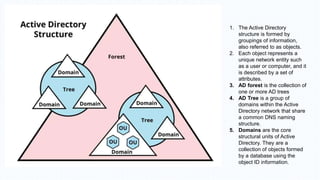
1. The Active Directory
structure is formed by
groupings of information,
also referred to as objects.
2. Each object represents a
unique network entity such
as a user or computer, and it
is described by a set of
attributes.
3. AD forest is the collection of
one or more AD trees
4. AD Tree is a group of
domains within the Active
Directory network that share
a common DNS naming
structure.
5. Domains are the core
structural units of Active
Directory. They are a
collection of objects formed
by a database using the
object ID information.
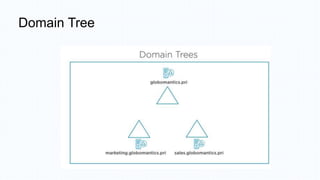
Domain Tree
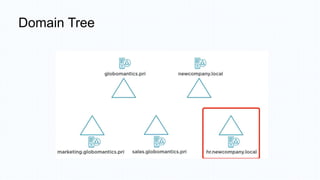
Domain Tree
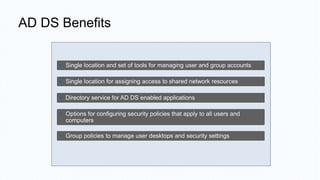
AD DS Benefits
• Single location and set of tools for managing user and group accounts
• Single location for assigning access to shared network resources
• Directory service for AD DS enabled applications
• Options for configuring security policies that apply to all users and
computers
• Group policies to manage user desktops and security settings
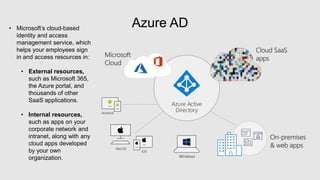
Azure AD
• Microsoft’s cloud-based
identity and access
management service, which
helps your employees sign
in and access resources in:
• External resources,
such as Microsoft 365,
the Azure portal, and
thousands of other
SaaS applications.
• Internal resources,
such as apps on your
corporate network and
intranet, along with any
cloud apps developed
by your own
organization.
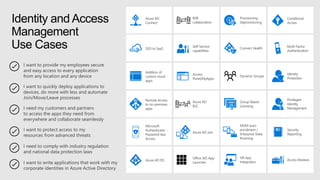
I want to provide my employees secure
and easy access to every application
from any location and any device
I need my customers and partners
to access the apps they need from
everywhere and collaborate seamlessly
I want to quickly deploy applications to
devices, do more with less and automate
Join/Move/Leave processes
I want to write applications that work with my
corporate identities in Azure Active Directory
I want to protect access to my
resources from advanced threats
I need to comply with industry regulation
and national data protection laws
Conditional
Access
Multi-Factor
Authentication
Addition of
custom cloud
apps
Remote Access
to on-premises
apps
Privileged
Identity
Management
Dynamic Groups
Identity
Protection
Azure AD DS
Office 365 App
Launcher
Group-Based
Licensing
Access
Panel/MyApps
Azure AD
Connect
Connect Health
Provisioning-
Deprovisioning
Azure AD Join
Self-Service
capabilities
MDM-auto
enrollment /
Enterprise State
Roaming
Security
Reporting
Access Reviews
HR App
Integration
B2B
collaboration
Azure AD
B2C
SSO to SaaS
Microsoft
Authenticator -
Password-less
Access
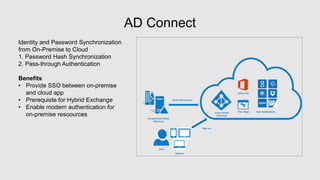
AD Connect
Identity and Password Synchronization
from On-Premise to Cloud
1. Password Hash Synchronization
2. Pass-through Authentication
Benefits
• Provide SSO between on-premise
and cloud app
• Prerequiste for Hybrid Exchange
• Enable modern authentication for
on-premise resoources
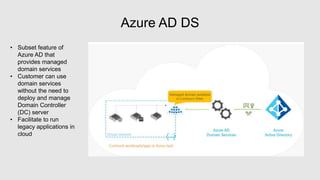
Azure AD DS
• Subset feature of
Azure AD that
provides managed
domain services
• Customer can use
domain services
without the need to
deploy and manage
Domain Controller
(DC) server
• Facilitate to run
legacy applications in
cloud
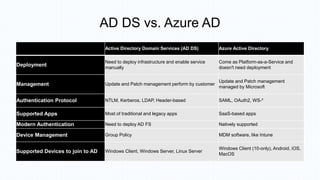
AD DS vs. Azure AD
Active Directory Domain Services (AD DS) Azure Active Directory
Deployment
Need to deploy infrastructure and enable service
manually
Come as Platform-as-a-Service and
doesn't need deployment
Management Update and Patch management perform by customer
Update and Patch management
managed by Microsoft
Authentication Protocol NTLM, Kerberos, LDAP, Header-based SAML, OAuth2, WS-*
Supported Apps Most of traditional and legacy apps SaaS-based apps
Modern Authentication Need to deploy AD FS Natively supported
Device Management Group Policy MDM software, like Intune
Supported Devices to join to AD Windows Client, Windows Server, Linux Server
Windows Client (10-only), Android, iOS,
MacOS
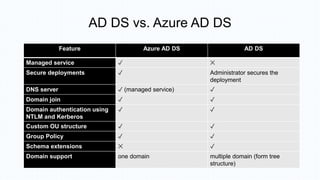
AD DS vs. Azure AD DS
Feature Azure AD DS AD DS
Managed service ✓ ✕
Secure deployments ✓ Administrator secures the
deployment
DNS server ✓ (managed service) ✓
Domain join ✓ ✓
Domain authentication using
NTLM and Kerberos
✓ ✓
Custom OU structure ✓ ✓
Group Policy ✓ ✓
Schema extensions ✕ ✓
Domain support one domain multiple domain (form tree
structure)
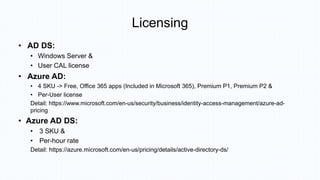
Licensing
• AD DS:
• Windows Server &
• User CAL license
• Azure AD:
• 4 SKU -> Free, Office 365 apps (Included in Microsoft 365), Premium P1, Premium P2 &
• Per-User license
Detail: https://www.microsoft.com/en-us/security/business/identity-access-management/azure-ad-
pricing
• Azure AD DS:
• 3 SKU &
• Per-hour rate
Detail: https://azure.microsoft.com/en-us/pricing/details/active-directory-ds/
THANK YOU

AD Basic and Azure AD.pptx

  • 1.
  • 2.
    Outline • What isActive Directory • Active Directory Domain Service (AD DS) and Structure • AD DS Benefits • Azure AD and Features • Comparison and Licensing
  • 3.
    Active Directory (AD) Collectionof services (Server Roles and Features) used to manage identity and access for and to resources on a network • AD CS -> Issue and manage digital certificates • AD LDS -> Subset capabilites of AD DS (i.e. cannot manage PC) • AD RMS -> Protect information and encrypt document • AD FS -> Allows single sign on to external web site and applications Domain Services • Internal Accounts • Authorization • Authentication Federation Services • Network Access for External Resources Certificate Services • Identity • Non- Repudiation Rights Management Services • Content Security and Control Lightweight Directory Services • Application Templates Active Directory • Identity • Access • Centralized Management
  • 4.
    Active Directory DomainServices (AD DS) Directory service that centralizes the management of users, computers and other objects within a network. Its primary function is to authenticate and authorize users and computers in a windows domain • Authentication is process of verifying a user’s identity • Authorization is a process of verifying that an authenticated user has permission to perform an action Windows Server • Mgmt Profile • Network Info • Printers • Shares Windows User • Account Information • Privileges • Profiles • Policies Windows Client • Mgmt Profile • Network Info • Policies Email Servers • Mailbox Information • Address Book Applications • Server Config • SSO • App-Specific Directory Info Network Devices • Config • QoS Policy • Security Policy Active Directory Domain Services • Manageability • Security • Interoperability
  • 5.
    1. The ActiveDirectory structure is formed by groupings of information, also referred to as objects. 2. Each object represents a unique network entity such as a user or computer, and it is described by a set of attributes. 3. AD forest is the collection of one or more AD trees 4. AD Tree is a group of domains within the Active Directory network that share a common DNS naming structure. 5. Domains are the core structural units of Active Directory. They are a collection of objects formed by a database using the object ID information.
  • 6.
  • 7.
  • 8.
    AD DS Benefits •Single location and set of tools for managing user and group accounts • Single location for assigning access to shared network resources • Directory service for AD DS enabled applications • Options for configuring security policies that apply to all users and computers • Group policies to manage user desktops and security settings
  • 9.
    Azure AD • Microsoft’scloud-based identity and access management service, which helps your employees sign in and access resources in: • External resources, such as Microsoft 365, the Azure portal, and thousands of other SaaS applications. • Internal resources, such as apps on your corporate network and intranet, along with any cloud apps developed by your own organization.
  • 10.
    I want toprovide my employees secure and easy access to every application from any location and any device I need my customers and partners to access the apps they need from everywhere and collaborate seamlessly I want to quickly deploy applications to devices, do more with less and automate Join/Move/Leave processes I want to write applications that work with my corporate identities in Azure Active Directory I want to protect access to my resources from advanced threats I need to comply with industry regulation and national data protection laws Conditional Access Multi-Factor Authentication Addition of custom cloud apps Remote Access to on-premises apps Privileged Identity Management Dynamic Groups Identity Protection Azure AD DS Office 365 App Launcher Group-Based Licensing Access Panel/MyApps Azure AD Connect Connect Health Provisioning- Deprovisioning Azure AD Join Self-Service capabilities MDM-auto enrollment / Enterprise State Roaming Security Reporting Access Reviews HR App Integration B2B collaboration Azure AD B2C SSO to SaaS Microsoft Authenticator - Password-less Access
  • 11.
    AD Connect Identity andPassword Synchronization from On-Premise to Cloud 1. Password Hash Synchronization 2. Pass-through Authentication Benefits • Provide SSO between on-premise and cloud app • Prerequiste for Hybrid Exchange • Enable modern authentication for on-premise resoources
  • 12.
    Azure AD DS •Subset feature of Azure AD that provides managed domain services • Customer can use domain services without the need to deploy and manage Domain Controller (DC) server • Facilitate to run legacy applications in cloud
  • 13.
    AD DS vs.Azure AD Active Directory Domain Services (AD DS) Azure Active Directory Deployment Need to deploy infrastructure and enable service manually Come as Platform-as-a-Service and doesn't need deployment Management Update and Patch management perform by customer Update and Patch management managed by Microsoft Authentication Protocol NTLM, Kerberos, LDAP, Header-based SAML, OAuth2, WS-* Supported Apps Most of traditional and legacy apps SaaS-based apps Modern Authentication Need to deploy AD FS Natively supported Device Management Group Policy MDM software, like Intune Supported Devices to join to AD Windows Client, Windows Server, Linux Server Windows Client (10-only), Android, iOS, MacOS
  • 14.
    AD DS vs.Azure AD DS Feature Azure AD DS AD DS Managed service ✓ ✕ Secure deployments ✓ Administrator secures the deployment DNS server ✓ (managed service) ✓ Domain join ✓ ✓ Domain authentication using NTLM and Kerberos ✓ ✓ Custom OU structure ✓ ✓ Group Policy ✓ ✓ Schema extensions ✕ ✓ Domain support one domain multiple domain (form tree structure)
  • 15.
    Licensing • AD DS: •Windows Server & • User CAL license • Azure AD: • 4 SKU -> Free, Office 365 apps (Included in Microsoft 365), Premium P1, Premium P2 & • Per-User license Detail: https://www.microsoft.com/en-us/security/business/identity-access-management/azure-ad- pricing • Azure AD DS: • 3 SKU & • Per-hour rate Detail: https://azure.microsoft.com/en-us/pricing/details/active-directory-ds/
  • 16.

Editor's Notes