VCE Word Template                                               Table of Contents
                                                                              www.vce.com


VBLOCK™ SOLUTION FOR TRUSTED
MULTI-TENANCY: DESIGN GUIDE
June 2012


Solution Authors
Saif Khan, Manager, Solution Architect
Shreekant Das, Lead Principal Architect
Kailin Chen, Solutions Architect
Bilal Syed, Sr. Solutions Architect
Jason Videll, Sr. Solutions Architect
Ted Balman, Solutions Architect


   © 2012 VCE Company, LLC. All Rights Reserved.                        1
                                                   © 2012 VCE Company, LLC. All Rights Reserved.
Contents
Introduction ...............................................................................................................................6
  About This Guide .....................................................................................................................6
   Audience .................................................................................................................................7
   Scope ......................................................................................................................................7
   Feedback .................................................................................................................................7

Trusted Multi-Tenancy Foundational Elements ...................................................................... 8
  Secure Separation ...................................................................................................................9
   Service Assurance ...................................................................................................................9
   Security and Compliance ....................................................................................................... 10
   Availability and Data Protection ............................................................................................. 10
   Tenant Management and Control .......................................................................................... 10
   Service Provider Management and Control ........................................................................... 11

Technology Overview ............................................................................................................. 12
  Management and Orchestration............................................................................................. 13
    Advanced Management Pod .............................................................................................. 13
    EMC Ionix Unified Infrastructure Manager/Provisioning ...................................................... 14
   Compute Technologies .......................................................................................................... 14
     Cisco Unified Computing System ....................................................................................... 14
     VMware vSphere ................................................................................................................ 14
     VMware vCenter Server ..................................................................................................... 15
     VMware vCloud Director ..................................................................................................... 15
     VMware vCenter Chargeback ............................................................................................. 15
     VMware vShield ................................................................................................................. 15
   Storage Technologies ............................................................................................................ 16
    EMC Fully Automated Storage Tiering................................................................................ 16
    EMC FAST Cache .............................................................................................................. 16
    EMC PowerPath/VE ........................................................................................................... 17
    EMC Unified Storage .......................................................................................................... 17
    EMC Unisphere Management Suite ................................................................................... 17
    EMC Unisphere Quality of Service Manager ...................................................................... 17
   Network Technologies ........................................................................................................... 18
      Cisco Nexus 1000V Series ................................................................................................. 18
      Cisco Nexus 5000 Series ................................................................................................... 18
      Cisco Nexus 7000 Series ................................................................................................... 18
      Cisco MDS ......................................................................................................................... 18

     © 2012 VCE Company, LLC. All Rights Reserved.                                                                                         2
Cisco Data Center Network Manager ................................................................................. 18
  Security Technologies ........................................................................................................... 19
     RSA Archer eGRC.............................................................................................................. 19
     RSA enVision ..................................................................................................................... 19
Design Framework .................................................................................................................. 20
 End-to-End Topology ............................................................................................................. 20
    Virtual Machine and Cloud Resources Layer ...................................................................... 21
    Virtual Access Layer/vSwitch .............................................................................................. 22
    Storage and SAN Layer ...................................................................................................... 22
    Compute Layer ................................................................................................................... 22
    Network Layers .................................................................................................................. 23
  Logical Topology ................................................................................................................... 23
    Tenant Traffic Flow Representation .................................................................................... 26
    VMware vSphere Logical Framework Overview ................................................................. 28
  Logical Design ....................................................................................................................... 32
    Cloud Management Cluster Logical Design ........................................................................ 32
    vSphere Cluster Specifications ........................................................................................... 33
    Host Logical Design Specifications for Cloud Management Cluster .................................... 33
    Host Logical Configuration for Resource Groups ................................................................ 34
    vSphere Cluster Host Design Specification for Resource Groups ....................................... 34
    Security .............................................................................................................................. 34
  Tenant Anatomy Overview..................................................................................................... 35

Design Considerations for Management and Orchestration ............................................... 36
 Configuration ......................................................................................................................... 37
  Enabling Services .................................................................................................................. 38
     Creating a Service Offering ................................................................................................ 40
     Provisioning a Service ........................................................................................................ 40
Design Considerations for Compute ..................................................................................... 41
 Design Considerations for Secure Separation ....................................................................... 42
   Cisco UCS .......................................................................................................................... 42
   VMware vCloud Director ..................................................................................................... 51
  Design Considerations for Service Assurance ....................................................................... 57
   Cisco UCS .......................................................................................................................... 57
   VMware vCloud Director ..................................................................................................... 59
  Design Considerations for Security and Compliance ............................................................. 61
   Cisco UCS .......................................................................................................................... 61
   VMware vCloud Director ..................................................................................................... 64
   VMware vCenter Server ..................................................................................................... 66
  Design Considerations for Availability and Data Protection .................................................... 66

    © 2012 VCE Company, LLC. All Rights Reserved.                                                                                        3
Cisco UCS .......................................................................................................................... 67
   Virtualization ....................................................................................................................... 68
  Design Considerations for Tenant Management and Control ................................................. 71
   VMware vCloud Director ..................................................................................................... 71
  Design Considerations for Service Provider Management and Control .................................. 73
     Virtualization ....................................................................................................................... 73
Design Considerations for Storage ....................................................................................... 77
 Design Considerations for Secure Separation ....................................................................... 77
   Segmentation by VSAN and Zoning ................................................................................... 77
   Separation of Data at Rest ................................................................................................. 79
   Address Space Separation ................................................................................................. 79
   Separation of Data Access ................................................................................................. 82
  Design Considerations for Service Assurance ....................................................................... 88
   Dedication of Runtime Resources ...................................................................................... 88
   Quality of Service Control ................................................................................................... 88
   EMC VNX FAST VP ........................................................................................................... 89
   EMC FAST Cache .............................................................................................................. 91
   EMC Unisphere Management Suite ................................................................................... 91
   VMware vCloud Director ..................................................................................................... 91
  Design Considerations for Security and Compliance ............................................................. 92
   Authentication with LDAP or Active Directory ..................................................................... 92
   VNX and RSA enVision ...................................................................................................... 95
  Design Considerations for Availability and Data Protection .................................................... 96
   High Availability .................................................................................................................. 96
   Local and Remote Data Protection ..................................................................................... 98
  Design Considerations for Service Provider Management and Control ................................ 100

Design Considerations for Networking ............................................................................... 101
 Design Considerations for Secure Separation ..................................................................... 101
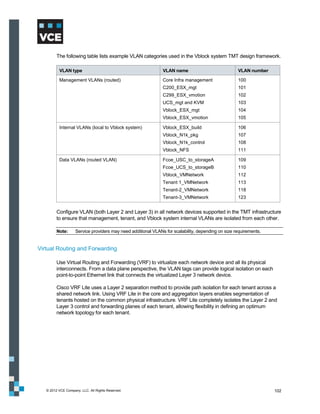
   VLANs .............................................................................................................................. 101
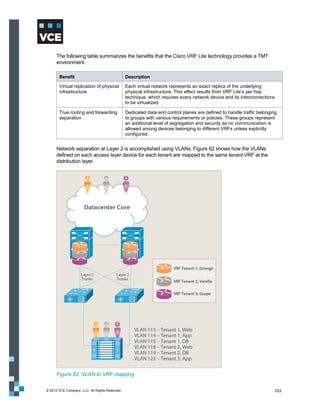
   Virtual Routing and Forwarding ........................................................................................ 102
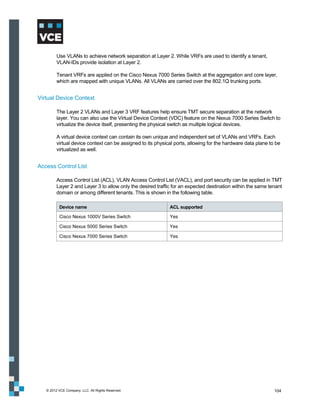
   Virtual Device Context ...................................................................................................... 104
   Access Control List ........................................................................................................... 104
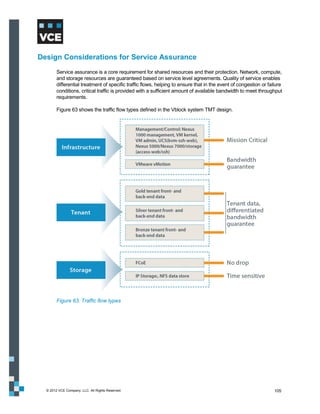
  Design Considerations for Service Assurance ..................................................................... 105
  Design Considerations for Security and Compliance ........................................................... 107
     Data Center Firewalls ....................................................................................................... 108
     Services Layer .................................................................................................................. 111
     Cisco Application Control Engine...................................................................................... 111
     Cisco Intrusion Prevention System ................................................................................... 113
     Cisco ACE, Cisco ACE Web Application Firewall, Cisco IPS Traffic Flows ....................... 116

    © 2012 VCE Company, LLC. All Rights Reserved.                                                                                        4
Access Layer .................................................................................................................... 117
    Security Recommendations .............................................................................................. 122
    Threats Mitigated .............................................................................................................. 123
    Vblock™ Systems Security Features ................................................................................ 123
   Design Considerations for Availability and Data Protection .................................................. 124
    Physical Redundancy Design Consideration .................................................................... 124
   Design Considerations for Service Provider Management and Control ................................ 128

Design Considerations for Additional Security Technologies .......................................... 129
 Design Considerations for Secure Separation ..................................................................... 130
    RSA Archer eGRC............................................................................................................ 130
    RSA enVision ................................................................................................................... 130
   Design Considerations for Service Assurance ..................................................................... 130
    RSA Archer eGRC............................................................................................................ 130
    RSA enVision ................................................................................................................... 131
   Design Considerations for Security and Compliance ........................................................... 132
    RSA Archer eGRC............................................................................................................ 132
    RSA enVision ................................................................................................................... 133
   Design Considerations for Availability and Data Protection .................................................. 133
    RSA Archer eGRC............................................................................................................ 133
    RSA enVision ................................................................................................................... 134
   Design Considerations for Tenant Management and Control ............................................... 134
    RSA Archer eGRC............................................................................................................ 134
    RSA enVision ................................................................................................................... 134
   Design Considerations for Service Provider Management and Control ................................ 135
     RSA Archer eGRC............................................................................................................ 135
     RSA enVision ................................................................................................................... 135
Conclusion ............................................................................................................................ 136
Next Steps ............................................................................................................................. 138
Acronym Glossary ................................................................................................................ 139


    © 2012 VCE Company, LLC. All Rights Reserved.                                                                                      5
Introduction
        The Vblock™ Solution for Trusted Multi-Tenancy (TMT) Design Guide describes how Vblock™
        Systems allow enterprises and service providers to rapidly build virtualized data centers that support
        the unique challenges of provisioning Infrastructure as a Service (IaaS) to multiple tenants.

        The TMT solution comprises six foundational elements that address the unique requirements of the
        IaaS cloud service model:

            Secure separation
            Service assurance
            Security and compliance
            Availability and data protection
            Tenant management and control
            Service provider management and control

        The TMT solution deploys compute, storage, network, security, and management Vblock system
        components that address each element while offering service providers and tenants numerous
        benefits. The following table summarizes these benefits.

         Provider Benefits                                  Tenant Benefits

         Lower cost-to-serve                                Cost savings transferred to tenants

         Standardized offerings                             Faster incident resolution with standardized services

         Easier growth and scale using standard             Secure isolation of resources and data
         infrastructures

         More predictable planning around capacity and      Usage-based services model, such as backup and
         workloads                                          storage


About This Guide
        This design guide explains how service providers can use specific products in the compute, network,
        storage, security, and management component layers of Vblock systems to support the six
        foundational elements of TMT. By meeting these objectives, Vblock systems offer service providers
        and enterprises an ideal business model and IT infrastructure to securely provision IaaS to multiple
        tenants.

        This guide demonstrates processes for:

            Designing and managing Vblock systems to deliver infrastructure multi-tenancy and service
             multi-tenancy
            Managing and operating Vblock systems securely and reliably


  © 2012 VCE Company, LLC. All Rights Reserved.                                                               6
The specific goal of this guide is to describe the design of and rationale behind the TMT solution. The
        guide looks at each layer of the Vblock system and shows how to achieve trusted multi-tenancy at
        each layer. The design includes many issues that must be addressed prior to deployment, as no two
        environments are alike.


Audience
        The target audience for this guide is highly technical, including technical consultants, professional
        services personnel, IT managers, infrastructure architects, partner engineers, sales engineers, and
        service providers deploying a TMT environment with leading technologies from VCE.


Scope
        TMT can be used to offer dedicated IaaS (compute, storage, network, management, and virtualization
        resources) or leverage single instances of services and applications for multiple consumers. This
        guide only addresses design considerations for offering dedicated IaaS to multiple tenants.

        While this design guide describes how Vblock systems can be designed, operated, and managed to
        support TMT, it does not provide specific configuration information, which must be specifically
        considered for each unique deployment.

        In this guide, the terms “Tenant” and “Consumer” refer to the consumers of the services provided by a
        service provider.


Feedback
        To suggest documentation changes and provide feedback on this guide, send email to
        docfeedback@vce.com. Include the title of this guide, the name of the topic to which your comment
        applies, and your feedback.


  © 2012 VCE Company, LLC. All Rights Reserved.                                                                 7
Trusted Multi-Tenancy Foundational Elements
        The TMT solution comprises six foundational elements that address the unique requirements of the
        IaaS cloud service model:

            Secure separation
            Service assurance
            Security and compliance
            Availability and data protection
            Tenant management and control
            Service provider management and control


        Figure 1. Six elements of the Vblock Solution for Trusted Multi-Tenancy


  © 2012 VCE Company, LLC. All Rights Reserved.                                                        8
Secure Separation
        Secure separation refers to the effective segmentation and isolation of tenants and their assets within
        the multi-tenant environment. Adequate secure separation ensures that the resources of existing
        tenants remain untouched and the integrity of the applications, workloads, and data remains
        uncompromised when the service provider provisions new tenants. Each tenant might have access to
        different amounts of network, compute, and storage resources in the converged stack. The tenant
        sees only those resources allocated to them.

        From the standpoint of the service provider, secure separation requires the systematic deployment of
        various security control mechanisms throughout the infrastructure to ensure the confidentiality,
        integrity, and availability of tenant data, services, and applications. The logical segmentation and
        isolation of tenant assets and information is essential for providing confidentiality in a multi-tenant
        environment. In fact, ensuring the privacy and security of each tenant becomes a key design
        requirement in the decision to adopt cloud services.


Service Assurance
        Service assurance plays a vital role in providing tenants with consistent, enforceable, and reliable
        service levels. Unlike physical resources, virtual resources are highly scalable and easy to allocate
        and reallocate on demand. In a multi-tenant virtualized environment, the service provider prioritizes
        virtual resources to accommodate the growth and changing business needs of tenants. Service level
        agreements (SLA) define the level of service agreed to by the tenant and service provider. The
        service assurance element of TMT provides technologies and methods to ensure that tenants receive
        the agreed-upon level of service.

        Various methods are available to deliver consistent SLAs across the network, compute, and storage
        components of the Vblock system, including:

            Quality of service in the Cisco Unified Computing System (UCS) and Cisco Nexus platforms
            EMC Symmetrix Quality of Service tools
            EMC Unisphere Quality of Service Manager (UQM)
            VMware Distributed Resource Scheduler (DRS)

        Without the correct mix of service assurance features and capabilities, it can be difficult to maintain
        uptime, throughput, quality of service, and availability SLAs.


  © 2012 VCE Company, LLC. All Rights Reserved.                                                                   9
Security and Compliance
        Security and compliance refers to the confidentiality, integrity, and availability of each tenant’s
        environment at every layer of the TMT stack. TMT ensures security and compliance using
        technologies like identity management and access control, encryption and key management, firewalls,
        malware protection, and intrusion prevention. This is a primary concern for both service provider and
        tenant.

        The TMT solution ensures that all activities performed in the provisioning, configuration, and
        management of the multi-tenant environment, as well as day-to-day activities and events for individual
        tenants, are verified and continuously monitored. It is also important that all operational events are
        recorded and that these records are available as evidence during audits.

        As regulatory requirements expand, the private cloud environment will become increasingly subject to
        security and compliance standards, such as Payment Card Industry Data Security Standards (PCI-
        DSS), HIPAA, Sarbanes-Oxley (SOX), and Gramm-Leach-Bliley Act (GLBA). With the proper tools,
        achieving and demonstrating compliance is not only possible, but it can often become easier than in a
        non-virtualized environment.


Availability and Data Protection
        Resources and data must be available for use by the tenant. High availability means that resources
        such as network bandwidth, memory, CPU, or data storage are always online and available to users
        when needed. Redundant systems, configurations, and architecture can minimize or eliminate points
        of failure that adversely affect availability to the tenant.

        Data protection is a key ingredient in a resilient architecture. Cloud computing imposes a resource
        trade-off from high performance. Increasingly robust security and data classification requirements are
        an essential tool for balancing that equation. Enterprises need to know what data is important and
        where it is located as prerequisites to making performance cost-benefit decisions, as well as ensuring
        focus on the most critical areas for data loss prevention procedures.


Tenant Management and Control
        In every cloud services model there are elements of control that the service provider delegates to the
        tenant. The tenant’s administrative, management, monitoring, and reporting capabilities need to be
        restricted to the delegated resources. Reasons for delegating control include convenience, new
        revenue opportunities, security, compliance, or tenant requirement. In all cases, the goal of the TMT
        model is to allow for and simplify the management, visibility, and reporting of this delegation.

        Tenants should have control over relevant portions of their service. Specifically, tenants should be
        able to:

            Provision allocated resources
            Manage the state of all virtualized objects
            View change management status for the infrastructure component
            Add and remove administrative contacts


  © 2012 VCE Company, LLC. All Rights Reserved.                                                                10
 Request more services as needed

        In addition, tenants taking advantage of data protection or data backup services should be able to
        manage this capability on their own, including setting schedules and backup types, initiating jobs, and
        running reports.

        This tenant-in-control model allows tenants to dynamically change the environment to suit their
        workloads as resource requirements change.


Service Provider Management and Control
        Another goal of TMT is to simplify management of resources at every level of the infrastructure and to
        provide the functionality to provision, monitor, troubleshoot, and charge back the resources used by
        tenants. Management of multi-tenant environments comes with challenges, from reporting and
        alerting to capacity management and tenant control delegation. The Vblock system helps address
        these challenges by providing scalable, integrated management solutions inherent to the
        infrastructure, and a rich, fully developed application programming interface (API) stack for adding
        additional service provider value.

        Providers of infrastructure services in a multi-tenant environment require comprehensive control and
        complete visibility of the shared infrastructure to provide the availability, data protection, security, and
        service levels expected by tenants. The ability to control, manage, and monitor resources at all levels
        of the infrastructure requires a dynamic, efficient, and flexible design that allows the service provider to
        access, provision, and then release computing resources from a shared pool – quickly, easily, and
        with minimal effort.


  © 2012 VCE Company, LLC. All Rights Reserved.                                                                 11
Technology Overview
       With Vblock systems, VCE delivers the industry's first completely integrated IT offering that combines
       best-of-breed virtualization, networking, compute, storage, security, and management technologies
       with end-to-end vendor accountability. Vblock systems are characterized by:

           Repeatable units of construction based on matched performance, operational characteristics,
            and discrete requirements of power, space, and cooling
           Repeatable design patterns that facilitate rapid deployment, integration, and scalability
           An architecture that can be scaled for the highest efficiencies in virtualization
           An extensible management and orchestration model based on industry-standard tools, APIs,
            and methods
           A design that contains, manages, and mitigates failure scenarios in hardware and software
            environments

       Vblock systems provide pre-engineered, production ready (fully tested) virtualized infrastructure
       components, including industry-leading technologies from Cisco, EMC, and VMware. Vblock systems
       are designed and built to satisfy a broad range of specific customer implementation requirements. To
       design TMT, you need to understand each layer (compute, network, and storage) of the Vblock
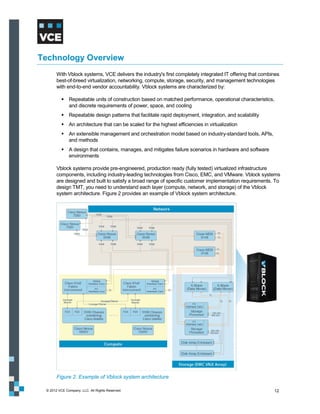
       system architecture. Figure 2 provides an example of Vblock system architecture.


       Figure 2. Example of Vblock system architecture

 © 2012 VCE Company, LLC. All Rights Reserved.                                                            12
Note:      Cisco Nexus 7000 is not part of the Vblock system architecture.

        For more information on the Vblock system architecture, refer to the Vblock systems Architecture
        Overview documentation located at http://www.vce.com/vblock/.

        This section describes the technologies at each layer of the Vblock system addressed in this guide to
        achieve TMT.


Management and Orchestration
        Management and orchestration technologies include Advanced Management Pod (AMP) and EMC
        Ionix Unified Infrastructure Manager/Provisioning (UIM/P).


Advanced Management Pod

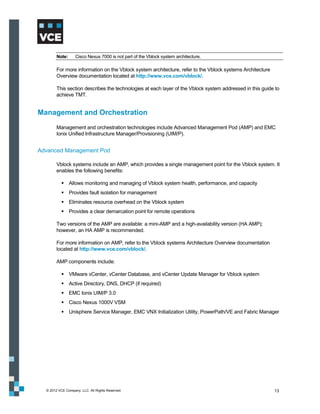
        Vblock systems include an AMP, which provides a single management point for the Vblock system. It
        enables the following benefits:

            Allows monitoring and managing of Vblock system health, performance, and capacity
            Provides fault isolation for management
            Eliminates resource overhead on the Vblock system
            Provides a clear demarcation point for remote operations

        Two versions of the AMP are available: a mini-AMP and a high-availability version (HA AMP);
        however, an HA AMP is recommended.

        For more information on AMP, refer to the Vblock systems Architecture Overview documentation
        located at http://www.vce.com/vblock/.

        AMP components include:

            VMware vCenter, vCenter Database, and vCenter Update Manager for Vblock system
            Active Directory, DNS, DHCP (if required)
            EMC Ionix UIM/P 3.0
            Cisco Nexus 1000V VSM
            Unisphere Service Manager, EMC VNX Initialization Utility, PowerPath/VE and Fabric Manager


  © 2012 VCE Company, LLC. All Rights Reserved.                                                            13
EMC Ionix Unified Infrastructure Manager/Provisioning

         EMC Ionix UIM/P enables automated provisioning capabilities for the Vblock system in a TMT
         environment by combining provisioning with configuration, change, and compliance management.
         With UIM/P, you can speed service delivery and reduce errors with policy-based, automated
         converged infrastructure provisioning. Key features include the ability to:

             Easily define and create infrastructure service profiles to match business requirements
             Separate planning from execution to optimize senior IT technical staff
             Respond to dynamic business needs with infrastructure service life cycle management
             Maintain Vblock system compliance through policy-based management
             Integrate with VMware vCenter and VMware vCloud Director for extended management
              capabilities


Compute Technologies
         Within the computing infrastructure of the Vblock system, multi-tenancy concerns at multiple levels
         must be addressed, including the UCS server infrastructure and the VMware vSphere Hypervisor.


Cisco Unified Computing System

         The Cisco UCS is a next-generation data center platform that unites network, compute, storage, and
         virtualization into a cohesive system designed to reduce total cost of ownership and increase business
         agility. The system integrates a low-latency, lossless, 10 Gb Ethernet (GbE) unified network fabric with
         enterprise class x86 architecture servers. The system is an integrated, scalable, multi-chassis platform
         in which all resources participate in a unified management domain. Whether it has only one server or
         many servers with thousands of virtual machines (VM), the Cisco UCS is managed as a single
         system, thereby decoupling scale from complexity.

         Cisco UCS Manager provides unified, centralized, embedded management of all software and
         hardware components of the Cisco UCS across multiple chassis and thousands of virtual machines.
         The entire UCS is managed as a single logical entity through an intuitive graphical user interface
         (GUI), a command-line interface (CLI), or an XML API. UCS Manager delivers greater agility and
         scale for server operations while reducing complexity and risk. It provides flexible role- and policy-
         based management using service profiles and templates, and it facilitates processes based on IT
         Infrastructure Library (ITIL) concepts.


VMware vSphere

         VMware vSphere is a complete, scalable, and powerful virtualization platform, delivering the
         infrastructure and application services that organizations need to transform their information
         technology and deliver IT as a service. VMware vSphere is a host operating system that runs directly
         on the Cisco UCS infrastructure and fully virtualizes the underlying hardware, allowing multiple virtual
         machine guest operating systems to share the UCS physical resources.


   © 2012 VCE Company, LLC. All Rights Reserved.                                                               14
VMware vCenter Server

         VMware vCenter Server is a simple and efficient way to manage VMware vSphere. It provides unified
         management of all the hosts and virtual machines in your data center from a single console with
         aggregate performance monitoring of clusters, hosts and virtual machines. VMware vCenter Server
         gives administrators deep insight into the status and configuration of clusters, hosts, virtual machines,
         storage, the guest operating system, and other critical components of a virtual infrastructure. It plays a
         key role in helping achieve secure separation, availability, tenant management and control, and
         service provider management and control.


VMware vCloud Director

         VMware vCloud Director gives customers the ability to build secure private clouds that dramatically
         increase data center efficiency and business agility. With VMware vSphere, VMware vCloud Director
         delivers cloud computing for existing data centers by pooling virtual infrastructure resources and
         delivering them to users as catalog-based services.


VMware vCenter Chargeback

         VMware vCenter Chargeback is an end-to-end metering and cost reporting solution for virtual
         environments that enables accurate cost measurement, analysis, and reporting of virtual machines
         using VMware vSphere. Virtual machine resource consumption data is collected from VMware
         vCenter Server. Integration with VMware vCloud Director also enables automated chargeback for
         private cloud environments.


VMware vShield

         The VMware vShield family of security solutions provides virtualization-aware protection for virtual
         data centers and cloud environments. VMware vShield products strengthen application and data
         security, enable TMT, improve visibility and control, and accelerate IT compliance efforts across the
         organization.

         VMware vShield products include vShield App and vShield Edge. vShield App provides firewall
         capability between virtual machines by placing a firewall filter on every virtual network adapter. It
         allows for easy application of firewall policies. vShield Edge virtualizes data center perimeters and
         offers firewall, VPN, Web load balancer, NAT, and DCHP services.


   © 2012 VCE Company, LLC. All Rights Reserved.                                                                 15
Storage Technologies
         The features of multi-tenancy offerings can be combined with standard security methods such as
         storage area network (SAN) zoning and Ethernet virtual local area networks (VLAN) to segregate,
         control, and manage storage resources among the infrastructure tenants.


EMC Fully Automated Storage Tiering

         EMC Fully Automated Storage Tiering (FAST) automates the movement and placement of data
         across storage resources as needed. FAST enables continuous optimization of your applications by
         eliminating trade-offs between capacity and performance, while simultaneously lowering cost and
         delivering higher service levels.

         EMC VNX FAST VP

         EMC VNX FAST VP is a policy-based auto-tiering solution that efficiently utilizes storage tiers by
         moving slices of colder data to high-capacity disks. It increases performance by keeping hotter slices
         of data on performance drives.

         In a VMware vCloud environment, FAST VP enables providers to offer a blended storage offering,
         reducing the cost of a traditional single-type offering while allowing for a wider range of customer use
         cases. This helps accommodate a larger cross-section of virtual machines with different performance
         characteristics.


EMC FAST Cache

         FAST Cache is an industry-leading feature supported by Vblock systems. It extends the VNX array’s
         read-write cache and ensures that unpredictable I/O spikes are serviced at enterprise flash drive
         (EFD) speeds, which is of particular benefit in a VMware vCloud Director environment. Multiple virtual
         machines on multiple virtual machine file system (VMFS) data stores spread across multiple hosts can
         generate a very random I/O pattern, placing stress on both the storage processors as well as the
         DRAM cache. FAST Cache, a standard feature on all Vblock systems, mitigates the effects of this
         kind of I/O by extending the DRAM cache for reads and writes, increasing the overall cache
         performance of the array, improving l/O during usage spikes, and dramatically reducing the overall
         number of dirty pages and cache misses.

         Because FAST Cache is aware of EFD disk tiers available in the array, FAST VP and FAST Cache
         work together to improve array performance. Data that has been promoted to an EFD tier is never
         cached inside FAST Cache, ensuring that both options are leveraged in the most efficient way.


   © 2012 VCE Company, LLC. All Rights Reserved.                                                              16
EMC PowerPath/VE

         EMC PowerPath/VE delivers PowerPath multipathing features to optimize storage access in VMware
         vSphere virtual environments by removing the administrative overhead associated with load balancing
         and failover. Use PowerPath/VE to standardize path management across heterogeneous physical
         and virtual environments. PowerPath/VE enables you to automate optimal server, storage, and path
         utilization in a dynamic virtual environment.

         PowerPath/VE works with VMware ESXi as a multipathing plug-in that provides enhanced path
         management capabilities to ESXi hosts. It installs as a kernel module on the vSphere host and plugs
         in to the vSphere I/O stack framework to bring the advanced multipathing capabilities of PowerPath–
         dynamic load balancing and automatic failover–to the VMware vSphere platform.


EMC Unified Storage

         The EMC Unified Storage system is a highly available architecture capable of five nines availability.
         The Unified Storage arrays achieve five nines availability by eliminating single points of failure
         throughout the physical storage stack, using technologies such as dual-ported drives, hot spares,
         redundant back-end loops, redundant front-end and back-end ports, dual storage processors,
         redundant fans and power supplies, and cache battery backup.


EMC Unisphere Management Suite

         EMC Unisphere provides a simple, integrated experience for managing EMC Unified Storage through
         both a storage and VMware lens. Key features include a Web-based management interface to
         discover, monitor, and configure EMC Unified Storage; self-service support ecosystem to gain quick
         access to realtime online support tools; automatic event notification to proactively manage critical
         status changes; and customizable dashboard views and reporting.


EMC Unisphere Quality of Service Manager

         EMC Unisphere Quality of Service (QoS) Manager enables dynamic allocation of storage resources to
         meet service level requirements for critical applications. QoS Manager monitors storage system
         performance on an appliance-by-application basis, providing a logical view of application performance
         on the storage system. In addition to displaying real-time data, performance data can be archived for
         offline trending and data analysis.


   © 2012 VCE Company, LLC. All Rights Reserved.                                                             17
Network Technologies
         Multi-tenancy concerns must be addressed at multiple levels within the network infrastructure of the
         Vblock system. Various methods, including zoning and VLANs, can enforce network separation.
         Internet Protocol Security (IPsec) also provides application-independent network encryption at the IP
         layer for additional security.


Cisco Nexus 1000V Series

         The Cisco Nexus 1000V is a software switch embedded in the software kernel of VMware vSphere.
         The Nexus 1000V provides virtual machine-level network visibility, isolation, and security for VMware
         server virtualization. With the Nexus 1000V Series, virtual machines can leverage the same network
         configuration, security policy, diagnostic tools, and operational models as their physical server
         counterparts attached to dedicated physical network ports. Virtualization administrators can access
         predefined network policies that follow mobile virtual machines to ensure proper connectivity, saving
         valuable resources for virtual machine administration.


Cisco Nexus 5000 Series

         Cisco Nexus 5000 Series switches are data center class, high performance, standards-based
         Ethernet and Fibre Channel over Ethernet (FCoE) switches that enable the consolidation of LAN,
         SAN, and cluster network environments onto a single unified fabric.


Cisco Nexus 7000 Series

         Cisco Nexus 7000 Series switches are modular switching systems designed for use in the data
         center. Nexus 7000 switches deliver the scalability, continuous systems operation, and transport
         flexibility required for 10 GB/s Ethernet networks today. In addition, the system architecture is capable
         of supporting future 40 GB/s Ethernet, 100 GB/s Ethernet, and unified I/O modules.


Cisco MDS

         The Cisco MDS 9000 Series helps build highly available, scalable storage networks with advanced
         security and unified management. The Cisco MDS 9000 family facilitates secure separation at the
         network layer with virtual storage area networks (VSAN) and zoning. VSANs help achieve higher
         security and greater stability in fibre channel (FC) fabrics by providing isolation among devices that are
         physically connected to the same fabric. The zoning service within a fibre channel fabric provides
         security between devices sharing the same fabric.


Cisco Data Center Network Manager

         Cisco Data Center Network Manager provides an effective tool to manage the Cisco data center
         infrastructure and actively monitor the SAN and LAN.


   © 2012 VCE Company, LLC. All Rights Reserved.                                                               18
Security Technologies
        RSA Archer eGRC and RSA enVision security technologies can be used to achieve security and
        compliance.


RSA Archer eGRC

        The RSA Archer eGRC Platform for enterprise governance, risk, and compliance has the industry’s
        most comprehensive library of policies, control standards, procedures, and assessments mapped to
        current global regulations and industry guidelines. The flexibility of the RSA Archer framework,
        coupled with this library, provides the service providers and tenants in a trusted multi-tenant
        environment the mechanism to successfully implement a governance, risk, and compliance program
        over the Vblock system. This addresses both the components and technologies comprising the
        Vblock system and the virtualized services and resources it hosts.

        Organizations can deploy the RSA Archer eGRC Platform in a variety of configurations, based on the
        expected user load, utilization, and availability requirements. As business needs evolve, the
        environment can adapt and scale to meet the new demands. Regardless of the size and solution
        architecture, the RSA Archer eGRC Platform consists of three logical layers: a .NET Web-enabled
        interface, the application layer, and a Microsoft SQL database backend.


RSA enVision

        The RSA enVision platform is a security information and event management (SIEM) solution that
        offers a scalable, distributed architecture to collect, store, manage, and correlate event logs generated
        from all the components comprising the Vblock system–from the physical devices and software
        products to the management and orchestration and security solutions.

        By seamlessly integrating with RSA Archer eGRC, RSA enVision provides both service providers and
        tenants a powerful solution to collect and correlate raw data into actionable information. Not only does
        RSA enVision satisfy regulatory compliance requirements, it helps ensure stability and integrity
        through robust incident management capabilities.


  © 2012 VCE Company, LLC. All Rights Reserved.                                                              19
Design Framework
        This section provides the following information:

            End-to-end topology
            Logical topology
            Logical design details
            Overview of tenant anatomy


End-to-End Topology
        Secure separation creates trusted zones that shield each tenant’s applications, virtual machines,
        compute, network, and storage from compromise and resource effects caused by adjacent tenants
        and external threats. The solution framework presented in this guide considers additional technologies
        that comprehensively provide appropriate in-depth defense. A combination of protective, detective,
        and reactive controls and solid operational processes are required to deliver protection against
        internal and external threats.

        Key layers include:

            Virtual machine and cloud resources (VMware vSphere and VMware vCloud Director)
            Virtual access/vSwitch (Cisco Nexus 1000V)
            Storage and SAN (Cisco MDS and EMC storage)
            Compute (Cisco UCS)
            Access and aggregation (Nexus 5000 and Nexus 7000)

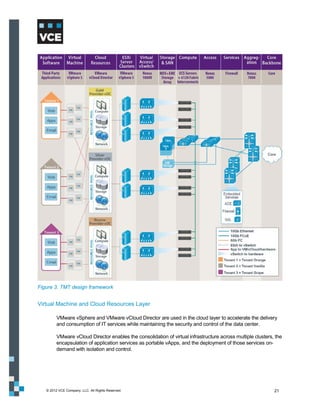
        Figure 3 illustrates the design framework.


  © 2012 VCE Company, LLC. All Rights Reserved.                                                           20
Figure 3. TMT design framework


Virtual Machine and Cloud Resources Layer

         VMware vSphere and VMware vCloud Director are used in the cloud layer to accelerate the delivery
         and consumption of IT services while maintaining the security and control of the data center.

         VMware vCloud Director enables the consolidation of virtual infrastructure across multiple clusters, the
         encapsulation of application services as portable vApps, and the deployment of those services on-
         demand with isolation and control.


   © 2012 VCE Company, LLC. All Rights Reserved.                                                             21
Virtual Access Layer/vSwitch

         Cisco Nexus 1000V vSphere Distributed Switch (vDS) acts as the virtual network access layer for the
         virtual machines. Edge LAN policies such as quality of service marking and vNIC ACLs are
         implemented at this layer in Nexus 1000V port-profiles.

         The following table describes the virtual access layer:

          Component                        Description

          One data center                  One primary Nexus 1000V Virtual Supervisor Module (VSM)
                                           One secondary Nexus 1000V VSM

          ESXi servers                     Each running an instance of the Nexus 1000V Virtual Ethernet Module (VEM)

          Tenant                           Multiple virtual machines, which have different applications such as Web
                                           server, database, and so forth, for each tenant


Storage and SAN Layer

         The TMT design framework is based on the use of storage arrays supporting fibre channel
         connectivity. The storage arrays connect through MDS SAN switches to the UCS 6120 switches in the
         access layer. Several layers of security (including zoning, access controls at the guest operating
         system and ESXi level, and logical unit number (LUN) masking within the VNX) tightly control access
         to data on the storage system.


Compute Layer

         The following table provides an example of the components of a multi-tenant environment virtual
         compute farm:

         Note:      A Vblock system may have more resources than what is described here.


          Component                                      Description

          Three UCS 5108 chassis                            11 UCS B200 servers (dual quad-core Intel Xeon X5570 CPU at
                                                             2.93 GHZ and 96 GB RAM)
                                                            Four UCS B440 servers (four Intel Xeon 7500 series processors
                                                             and 32 dual in-line memory module slots with 256 GB memory)
                                                            Ten GbE Cisco VIC converged network adapters (CNA)
                                                             organized into a VMware ESXi cluster
          15 servers (4 clusters)                           Each server has two CNAs and are dual-attached to the UCS
                                                             6100 fabric interconnect
                                                            The CNAs provide:
                                                             -   LAN and SAN connectivity to the servers, which run
                                                                 VMware ESXi 5.0 hypervisor
                                                             -   LAN and SAN services to the hypervisor


   © 2012 VCE Company, LLC. All Rights Reserved.                                                                         22
Network Layers

         Access Layer

         Nexus 5000 is used at the access layer and connects to the Cisco UCS 6120s. In the Layer 2 access
         layer, redundant pairs of Cisco UCS 6120 switches aggregate VLANs from the Nexus 1000V vDS.
         FCoE SAN traffic from virtual machines is handed off as FC traffic to a pair of MDS SAN switches,
         and then to a pair of storage array controllers. FC expansion modules in the UCS 6120 switch provide
         SAN interconnects to dual SAN fabrics. The UCS 6120 switches are in N Port virtualization (NPV)
         mode to interoperate with the SAN fabric.

         Aggregation Layer

         Nexus 7000 is used at the aggregation layer. The virtual device context (VDC) feature in the Nexus
         7000 separates it into sub-aggregation and aggregation virtual device contexts for Layer 3 routing.
         The aggregation virtual device context connects to the core network to route the internal data center
         traffic to the Internet and from the Internet back to the internal data center.


Logical Topology
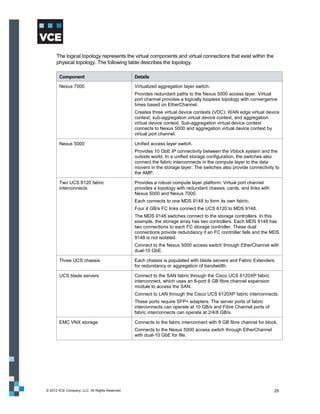
         Figure 4 shows the logical topology for the TMT design framework.


   © 2012 VCE Company, LLC. All Rights Reserved.                                                            23
Figure 4. TMT logical topology


© 2012 VCE Company, LLC. All Rights Reserved.   24
The logical topology represents the virtual components and virtual connections that exist within the
      physical topology. The following table describes the topology.

       Component                                Details

       Nexus 7000                               Virtualized aggregation layer switch.
                                                Provides redundant paths to the Nexus 5000 access layer. Virtual
                                                port channel provides a logically loopless topology with convergence
                                                times based on EtherChannel.
                                                Creates three virtual device contexts (VDC): WAN edge virtual device
                                                context, sub-aggregation virtual device context, and aggregation
                                                virtual device context. Sub-aggregation virtual device context
                                                connects to Nexus 5000 and aggregation virtual device context by
                                                virtual port channel.

       Nexus 5000                               Unified access layer switch.
                                                Provides 10 GbE IP connectivity between the Vblock system and the
                                                outside world. In a unified storage configuration, the switches also
                                                connect the fabric interconnects in the compute layer to the data
                                                movers in the storage layer. The switches also provide connectivity to
                                                the AMP.

       Two UCS 6120 fabric                      Provides a robust compute layer platform. Virtual port channel
       interconnects                            provides a topology with redundant chassis, cards, and links with
                                                Nexus 5000 and Nexus 7000.
                                                Each connects to one MDS 9148 to form its own fabric.
                                                Four 4 GB/s FC links connect the UCS 6120 to MDS 9148.
                                                The MDS 9148 switches connect to the storage controllers. In this
                                                example, the storage array has two controllers. Each MDS 9148 has
                                                two connections to each FC storage controller. These dual
                                                connections provide redundancy if an FC controller fails and the MDS
                                                9148 is not isolated.
                                                Connect to the Nexus 5000 access switch through EtherChannel with
                                                dual-10 GbE.

       Three UCS chassis                        Each chassis is populated with blade servers and Fabric Extenders
                                                for redundancy or aggregation of bandwidth.

       UCS blade servers                        Connect to the SAN fabric through the Cisco UCS 6120XP fabric
                                                interconnect, which uses an 8-port 8 GB fibre channel expansion
                                                module to access the SAN.
                                                Connect to LAN through the Cisco UCS 6120XP fabric interconnects.
                                                These ports require SFP+ adapters. The server ports of fabric
                                                interconnects can operate at 10 GB/s and Fibre Channel ports of
                                                fabric interconnects can operate at 2/4/8 GB/s.

       EMC VNX storage                          Connects to the fabric interconnect with 8 GB fibre channel for block.
                                                Connects to the Nexus 5000 access switch through EtherChannel
                                                with dual-10 GbE for file.


© 2012 VCE Company, LLC. All Rights Reserved.                                                                       25
Tenant Traffic Flow Representation

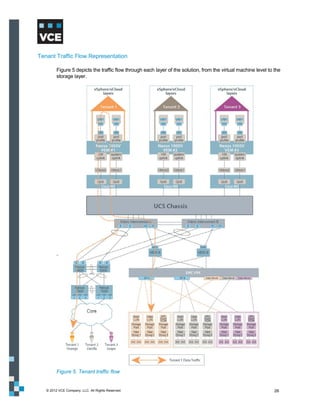
         Figure 5 depicts the traffic flow through each layer of the solution, from the virtual machine level to the
         storage layer.


         Figure 5. Tenant traffic flow


   © 2012 VCE Company, LLC. All Rights Reserved.                                                                 26
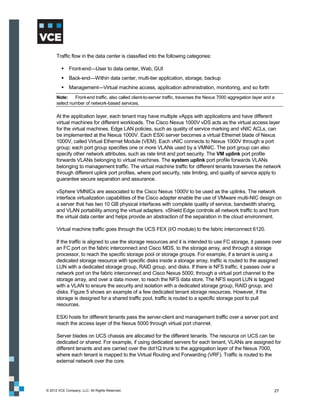
Traffic flow in the data center is classified into the following categories:

          Front-end—User to data center, Web, GUI
          Back-end—Within data center, multi-tier application, storage, backup
          Management—Virtual machine access, application administration, monitoring, and so forth
      Note:    Front-end traffic, also called client-to-server traffic, traverses the Nexus 7000 aggregation layer and a
      select number of network-based services.

      At the application layer, each tenant may have multiple vApps with applications and have different
      virtual machines for different workloads. The Cisco Nexus 1000V vDS acts as the virtual access layer
      for the virtual machines. Edge LAN policies, such as quality of service marking and vNIC ACLs, can
      be implemented at the Nexus 1000V. Each ESXi server becomes a virtual Ethernet blade of Nexus
      1000V, called Virtual Ethernet Module (VEM). Each vNIC connects to Nexus 1000V through a port
      group; each port group specifies one or more VLANs used by a VMNIC. The port group can also
      specify other network attributes, such as rate limit and port security. The VM uplink port profile
      forwards VLANs belonging to virtual machines. The system uplink port profile forwards VLANs
      belonging to management traffic. The virtual machine traffic for different tenants traverses the network
      through different uplink port profiles, where port security, rate limiting, and quality of service apply to
      guarantee secure separation and assurance.

      vSphere VMNICs are associated to the Cisco Nexus 1000V to be used as the uplinks. The network
      interface virtualization capabilities of the Cisco adapter enable the use of VMware multi-NIC design on
      a server that has two 10 GB physical interfaces with complete quality of service, bandwidth sharing,
      and VLAN portability among the virtual adapters. vShield Edge controls all network traffic to and from
      the virtual data center and helps provide an abstraction of the separation in the cloud environment.

      Virtual machine traffic goes through the UCS FEX (I/O module) to the fabric interconnect 6120.

      If the traffic is aligned to use the storage resources and it is intended to use FC storage, it passes over
      an FC port on the fabric interconnect and Cisco MDS, to the storage array, and through a storage
      processor, to reach the specific storage pool or storage groups. For example, if a tenant is using a
      dedicated storage resource with specific disks inside a storage array, traffic is routed to the assigned
      LUN with a dedicated storage group, RAID group, and disks. If there is NFS traffic, it passes over a
      network port on the fabric interconnect and Cisco Nexus 5000, through a virtual port channel to the
      storage array, and over a data mover, to reach the NFS data store. The NFS export LUN is tagged
      with a VLAN to ensure the security and isolation with a dedicated storage group, RAID group, and
      disks. Figure 5 shows an example of a few dedicated tenant storage resources. However, if the
      storage is designed for a shared traffic pool, traffic is routed to a specific storage pool to pull
      resources.

      ESXi hosts for different tenants pass the server-client and management traffic over a server port and
      reach the access layer of the Nexus 5000 through virtual port channel.

      Server blades on UCS chassis are allocated for the different tenants. The resource on UCS can be
      dedicated or shared. For example, if using dedicated servers for each tenant, VLANs are assigned for
      different tenants and are carried over the dot1Q trunk to the aggregation layer of the Nexus 7000,
      where each tenant is mapped to the Virtual Routing and Forwarding (VRF). Traffic is routed to the
      external network over the core.


© 2012 VCE Company, LLC. All Rights Reserved.                                                                          27
VMware vSphere Logical Framework Overview

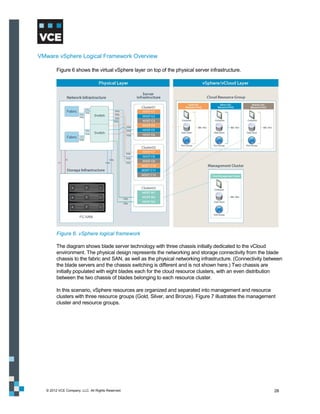
        Figure 6 shows the virtual vSphere layer on top of the physical server infrastructure.


        Figure 6. vSphere logical framework

        The diagram shows blade server technology with three chassis initially dedicated to the vCloud
        environment. The physical design represents the networking and storage connectivity from the blade
        chassis to the fabric and SAN, as well as the physical networking infrastructure. (Connectivity between
        the blade servers and the chassis switching is different and is not shown here.) Two chassis are
        initially populated with eight blades each for the cloud resource clusters, with an even distribution
        between the two chassis of blades belonging to each resource cluster.

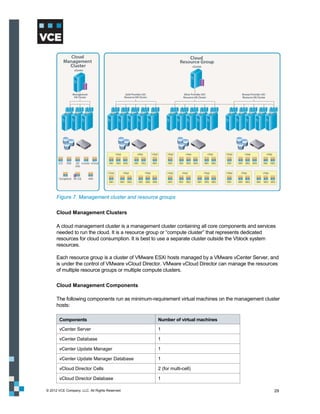
        In this scenario, vSphere resources are organized and separated into management and resource
        clusters with three resource groups (Gold, Silver, and Bronze). Figure 7 illustrates the management
        cluster and resource groups.


  © 2012 VCE Company, LLC. All Rights Reserved.                                                            28
Figure 7. Management cluster and resource groups

      Cloud Management Clusters

      A cloud management cluster is a management cluster containing all core components and services
      needed to run the cloud. It is a resource group or “compute cluster” that represents dedicated
      resources for cloud consumption. It is best to use a separate cluster outside the Vblock system
      resources.

      Each resource group is a cluster of VMware ESXi hosts managed by a VMware vCenter Server, and
      is under the control of VMware vCloud Director. VMware vCloud Director can manage the resources
      of multiple resource groups or multiple compute clusters.

      Cloud Management Components

      The following components run as minimum-requirement virtual machines on the management cluster
      hosts:

       Components                                 Number of virtual machines

       vCenter Server                             1

       vCenter Database                           1

       vCenter Update Manager                     1

       vCenter Update Manager Database            1

       vCloud Director Cells                      2 (for multi-cell)

       vCloud Director Database                   1

© 2012 VCE Company, LLC. All Rights Reserved.                                                       29
Components                                        Number of virtual machines

       vCenter Chargeback Server                         1

       vCenter Chargeback Database                       1

       vShield Manager                                   1


      Note:     A vCloud Director cluster contains one or more vCloud Director servers; these servers are referred to as
      cells and form the basis of the VMware cloud. A cloud can be formed from multiple cells. The number of vCloud
      Director cells depends on the size of the vCloud environment and the level of redundancy.

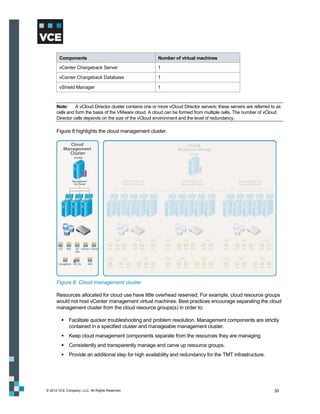
      Figure 8 highlights the cloud management cluster.


      Figure 8. Cloud management cluster

      Resources allocated for cloud use have little overhead reserved. For example, cloud resource groups
      would not host vCenter management virtual machines. Best practices encourage separating the cloud
      management cluster from the cloud resource groups(s) in order to:

          Facilitate quicker troubleshooting and problem resolution. Management components are strictly
           contained in a specified cluster and manageable management cluster.
          Keep cloud management components separate from the resources they are managing.
          Consistently and transparently manage and carve up resource groups.
          Provide an additional step for high availability and redundancy for the TMT infrastructure.


© 2012 VCE Company, LLC. All Rights Reserved.                                                                       30
Resource Groups

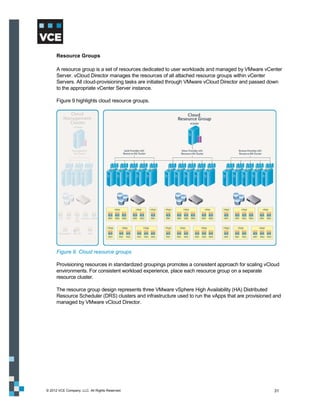
      A resource group is a set of resources dedicated to user workloads and managed by VMware vCenter
      Server. vCloud Director manages the resources of all attached resource groups within vCenter
      Servers. All cloud-provisioning tasks are initiated through VMware vCloud Director and passed down
      to the appropriate vCenter Server instance.

      Figure 9 highlights cloud resource groups.


      Figure 9. Cloud resource groups

      Provisioning resources in standardized groupings promotes a consistent approach for scaling vCloud
      environments. For consistent workload experience, place each resource group on a separate
      resource cluster.

      The resource group design represents three VMware vSphere High Availability (HA) Distributed
      Resource Scheduler (DRS) clusters and infrastructure used to run the vApps that are provisioned and
      managed by VMware vCloud Director.


© 2012 VCE Company, LLC. All Rights Reserved.                                                         31
Logical Design
         This section provides information about the logical design, including:

             Cloud management cluster logical design
             vSphere cluster specifications
             Host logical design specifications
             Host logical configurations for resource groups
             vSphere cluster host design specifications for resource groups
             Security


Cloud Management Cluster Logical Design

         The compute design encompasses the VMware ESXi hosts contained in the management cluster.
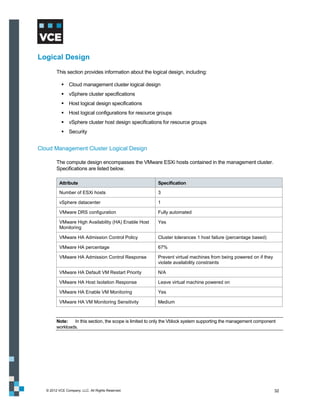
         Specifications are listed below.

          Attribute                                       Specification

          Number of ESXi hosts                            3

          vSphere datacenter                              1

          VMware DRS configuration                        Fully automated

          VMware High Availability (HA) Enable Host       Yes
          Monitoring

          VMware HA Admission Control Policy              Cluster tolerances 1 host failure (percentage based)

          VMware HA percentage                            67%

          VMware HA Admission Control Response            Prevent virtual machines from being powered on if they
                                                          violate availability constraints

          VMware HA Default VM Restart Priority           N/A

          VMware HA Host Isolation Response               Leave virtual machine powered on

          VMware HA Enable VM Monitoring                  Yes

          VMware HA VM Monitoring Sensitivity             Medium


         Note:   In this section, the scope is limited to only the Vblock system supporting the management component
         workloads.


   © 2012 VCE Company, LLC. All Rights Reserved.                                                                   32
vSphere Cluster Specifications

         Each VMware ESXi host in the management cluster has the following specifications.

          Attribute                                Specification

          Host type and version                    VMware ESXi installable – version 5.0

          Processors                               x86 compatible

          Storage presented                        SAN boot for ESXi – 20 GB
                                                   SAN LUN for virtual machines – 2 TB
                                                   NFS shared LUN for vCloud Director cells – 1 TB

          Networking                               Connectivity to all needed VLANs

          Memory                                   Size to support all management virtual machines. In this case, 96 GB
                                                   memory in each host.


         Note:      VMware vCloud Director deployment requires storage for several elements of the overall framework.
         The first is the storage needed to house the vCloud Director management cluster. This includes the repository for
         configuration information, organizations, and allocations that are stored in an Oracle database. The second is the
         vSphere storage objects presented to vCloud Director as data stores accessed by ESXi servers in the vCloud
         Director configuration. This storage is managed by the vSphere administrator and consumed by vCloud Director
         users depending on vCloud Director configuration. The third is the existence of a single NFS data store to serve
         as a staging area for vApps to be uploaded to a catalog.


Host Logical Design Specifications for Cloud Management Cluster

         The following table identifies management components that rely on high availability and fault tolerance
         for redundancy.

          Management Component                               High Availability Enabled?

          vCenter Server                                     Yes

          VMware vCloud Director                             Yes

          vCenter Chargeback Server                          Yes

          vShield Manager                                    Yes


   © 2012 VCE Company, LLC. All Rights Reserved.                                                                        33
Host Logical Configuration for Resource Groups

         The following table identifies the specifications for each VMware ESXi host in the resource cluster.

           Attribute                               Specification

           Host type and version                   VMware ESXi Installable – version 5.0

           Processors                              x86 compatible

           Storage presented                       SAN boot for ESXi – 20 GB
                                                   SAN LUN for virtual machines – 2 TB

           Networking                              Connectivity to all needed VLANs

           Memory                                  Size to support virtual machine workloads


vSphere Cluster Host Design Specification for Resource Groups

         All vSphere resource clusters are configured similarly with the following specifications.

           Attribute                                      Specification

           VMware DRS configuration                       Fully automated

           VMware DRS Migration Threshold                 3 stars

           VMware HA Enable Host Monitoring               Yes

           VMware HA Admission Control Policy             Cluster tolerances 1 host failure (percentage based)

           VMware HA percentage                           83%

           VMware HA Admission Control Response           Prevent virtual machines from being powered on if they
                                                          violate availability constraints

           VMware HA Default VM Restart Priority          N/A

           VMware HA Host Isolation Response              Leave virtual machine powered on


Security

         The RSA Archer eGRC Platform can be run on a single server, with the application and database
         components running on the same server. This configuration is suitable for organizations:

             With fewer than 50 concurrent users
             That do not require a high-performance or high availability solution

         For the TMT framework, RSA enVision can be deployed as a virtual appliance in the AMP. Each
         Vblock system component can be configured to utilize it as its centralized event manager through its
         identified collection method. RSA enVision can then be integrated with RSA Archer eGRC per the
         RSA Security Incident Management Solution configuration guidelines.


   © 2012 VCE Company, LLC. All Rights Reserved.                                                                   34
Tenant Anatomy Overview
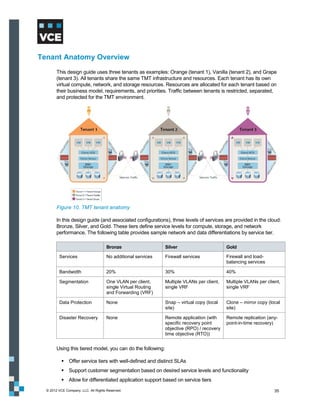
        This design guide uses three tenants as examples: Orange (tenant 1), Vanilla (tenant 2), and Grape
        (tenant 3). All tenants share the same TMT infrastructure and resources. Each tenant has its own
        virtual compute, network, and storage resources. Resources are allocated for each tenant based on
        their business model, requirements, and priorities. Traffic between tenants is restricted, separated,
        and protected for the TMT environment.


        Figure 10. TMT tenant anatomy

        In this design guide (and associated configurations), three levels of services are provided in the cloud:
        Bronze, Silver, and Gold. These tiers define service levels for compute, storage, and network
        performance. The following table provides sample network and data differentiations by service tier.

                                     Bronze                   Silver                       Gold

         Services                    No additional services   Firewall services            Firewall and load-
                                                                                           balancing services

         Bandwidth                   20%                      30%                          40%

         Segmentation                One VLAN per client,     Multiple VLANs per client,   Multiple VLANs per client,
                                     single Virtual Routing   single VRF                   single VRF
                                     and Forwarding (VRF)

         Data Protection             None                     Snap – virtual copy (local   Clone – mirror copy (local
                                                              site)                        site)

         Disaster Recovery           None                     Remote application (with     Remote replication (any-
                                                              specific recovery point      point-in-time recovery)
                                                              objective (RPO) / recovery
                                                              time objective (RTO))


        Using this tiered model, you can do the following:

            Offer service tiers with well-defined and distinct SLAs
            Support customer segmentation based on desired service levels and functionality
            Allow for differentiated application support based on service tiers
  © 2012 VCE Company, LLC. All Rights Reserved.                                                                   35
Design Considerations for Management and Orchestration
        Service providers can leverage Unified Infrastructure Manager/Provisioning to provision the Vblock
        system in a TMT environment. The AMP cluster of hosts holds UIM/P, which is accessed through a
        Web browser.

        Use UIM/P as a domain manager to provision Vblock systems as a single entity. UIM/P interacts with
        the individual element managers for compute, storage, SAN, and virtualization to automate the most
        common and repetitive operational tasks required to provision services. It also interacts with vCloud
        Director to automate cloud operations, such as the creation of a virtual data center.

        For provisioning, this guide focuses on the functional capabilities provided by UIM/P in a TMT
        environment.

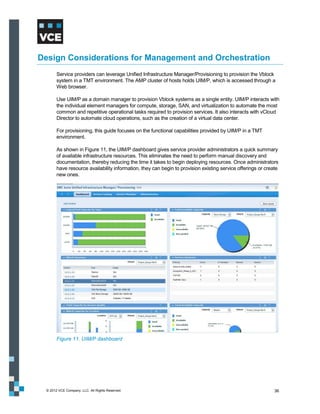
        As shown in Figure 11, the UIM/P dashboard gives service provider administrators a quick summary
        of available infrastructure resources. This eliminates the need to perform manual discovery and
        documentation, thereby reducing the time it takes to begin deploying resources. Once administrators
        have resource availability information, they can begin to provision existing service offerings or create
        new ones.


        Figure 11. UIM/P dashboard


  © 2012 VCE Company, LLC. All Rights Reserved.                                                               36
Figure 12. UIM/P Service Offerings


Configuration
        While UIM/P automates the operational tasks involved in building services on Vblock systems,
        administrators need to perform initial task sets on each domain manager before beginning service
        provisioning. This section describes both key initial tasks to perform on the individual domain
        managers and operational tasks managed through UIM/P.

        The following table shows what is configured as part of initial device configuration and what is
        configured through UIM/P.


  © 2012 VCE Company, LLC. All Rights Reserved.                                                            37
Device manager                    Initial configuration                        Operational configuration
                                                                                        completed with UIM/P

         UCS Manager                             Management configuration (IP and          LAN
                                                  credentials                               MAC pool
                                                 Chassis discovery                         SAN
                                                 Enable ports                              World Wide Name (WWN)
                                                 KVMIP pool                                 pool
                                                 Create VLANs                              WWPN pool
                                                 Assign VLANs                              Boot policies
                                                 VSANs                                     Service templates
                                                                                            Select pools
                                                                                            Select boot policy
                                                                                            Server
                                                                                            UUID pool
                                                                                            Create service profile
                                                                                            Associate profile to server
                                                                                            Install vSphere ESXi

         Unisphere MDS/Nexus                     Management configuration (IP and          Create storage group
                                                  credentials)                              Associate host and LUN
                                                 RAID group, storage pool, or both         Zone
                                                 Create LUNs                               Aliases
                                                                                            Zone sets
         vCenter                                 Create Windows virtual machine            Create data center
                                                 Create database                           Create clusters
                                                 Install vCenter software                  High availability policy
                                                                                            DRS policy
                                                                                            Distributed power
                                                                                             management (DPM) policy
                                                                                            Add hosts to cluster
                                                                                            Create data stores
                                                                                            Create networks


Enabling Services
        After completing the initial configurations, use the following high-level workflow to enable services.

         Stage        Workflow action                      Description

         1            Vblock system discovery              Gather data for Vblock system devices, interconnectivity, and
                                                           external networks, and populate data in UIM database.

         2            Service planning                     Collect service resource requirements, including:
                                                              The number of servers and server attributes
                                                              Amount of boot and data storage and storage attributes
                                                              Networks to be used for connectivity between the service
                                                               resources and external networks
                                                              vCenter Server and VMware ESXi cluster information

  © 2012 VCE Company, LLC. All Rights Reserved.                                                                            38
Stage        Workflow action             Description

       3            Service provisioning        Reserve resources based on the server and storage
                                                requirements defined for the service during service planning.
                                                Install VMware ESXi on the servers. Configure connectivity
                                                between the cluster and external networks.

       4            Service activation          Turn on the system, start up Cisco UCS service profiles, activate
                                                network paths, and make resources available for use. The
                                                workflow separates provisioning and activation, to allow
                                                activation of the service as needed.

       5            vCenter synchronization     Synchronize the VMware ESXi clusters with the vCenter Server.
                                                Once you provision and activate a service, the synchronizing
                                                process includes adding the VMware ESXi cluster to the vCenter
                                                server data store and registering the cluster hosts provisioned
                                                with vCenter Server.

       6            vCloud synchronization      Discover vCloud and build a connection to the vCenter servers.
                                                The clusters created in vCenter Server are pushed to the
                                                appropriate vCloud. UIM/P integrates with vCloud Director in the
                                                same way it integrates with vCenter Server.


      Figure 13 describes the provisioning, activation, and synchronization process, including key sub-steps
      during the provisioning process.


      Figure 13. Provisioning, activation, and synchronization process flow


© 2012 VCE Company, LLC. All Rights Reserved.                                                                   39
Creating a Service Offering

         To create a service offering:

         1. Select the operating system.
         2. Define server characteristics.
         3. Define storage characteristics for startup.
         4. Define storage characteristics for application data.
         5. Create network profile.


Provisioning a Service

         To provision a service:

         1. Select the service offering.
         2. Select Vblock system.
         3. Select servers.
         4. Configure IP and provide DNS hostname for operating system installation.
         5. Select storage.
         6. Select and configure network profile and vNICs.
         7. Configure vCenter cluster settings.
         8. Configure vCloud Director settings.


   © 2012 VCE Company, LLC. All Rights Reserved.                                       40
Design Considerations for Compute
       Within the computing infrastructure of Vblock systems, multi-tenancy concerns can be managed at
       multiple levels, from the central processing unit (CPU), through the Cisco Unified Computing System
       (UCS) server infrastructure, and within the VMware solution elements.

       This section describes the design of and rationale behind the TMT framework. The design includes
       many issues that must be addressed prior to deployment, as no two environments are alike. Design
       considerations are provided for the components listed in the following table.

        Component                            Version   Description

        Cisco UCS                            2.0       Core component of the Vblock system that provides compute
                                                       resources in the cloud. It helps achieve secure separation,
                                                       service assurance, security, availability, and service provider
                                                       management in the TMT framework.

        VMware vSphere                       5.0       Foundation of underlying cloud infrastructure and components.
                                                       Includes:
                                                          VMware ESXi hosts
                                                          VMware vCenter Server
                                                          Resource pools
                                                          VMware High Availability (HA) and Distributed Resource
                                                           Scheduler (DRS)
                                                          VMware vMotion
        VMware vCloud Director               1.5       Builds on VMware vSphere to provide a complete multi-tenant
                                                       infrastructure. It delivers on-demand cloud infrastructure so
                                                       users can consume virtual resources with maximum agility. It
                                                       consolidates data centers and deploys workloads on shared
                                                       infrastructure with built-in security and role-based access
                                                       control. Includes:
                                                          VMware vCloud Director Server (two instances, each
                                                           installed on a Red Hat Linux virtual machine and referred to
                                                           as a “cell”)
                                                          VMware vCloud Director Database (one instance per
                                                           clustered set of VMware vCloud Director cells)
        VMware vShield                       5.0       Provides network security services, including NAT and firewall.
                                                       Includes:
                                                          vShield Edge (deployed automatically on hosts as virtual
                                                           appliances by VMware vCloud Director to separate tenants)
                                                          vShield App (deployed on ESXi host layer to zone and
                                                           secure virtual machine traffic)
                                                          vShield Manager (one instance per vCenter Server in the
                                                           cloud resource groups to manage vShield Edge and vShield
                                                           App)
        VMware vCenter                       1.6.2     Provides resource metering and chargeback models. Includes:
        Chargeback                                        VMware vCenter Chargeback Server
                                                          VMware Chargeback Data Collector
                                                          VMware vCloud Data Collector
                                                          VMware vShield Manager Data Collector


 © 2012 VCE Company, LLC. All Rights Reserved.                                                                            41
Design Considerations for Secure Separation
        This section discusses using the following technologies to achieve secure separation at the compute
        layer:

            Cisco UCS
            VMware vCloud Director


Cisco UCS

        The UCS blade servers contain a pair of Cisco Virtual Interface Card (VIC) Ethernet uplinks. Cisco
        VIC presents virtual interfaces (UCS vNIC) to the VMware ESXi host, which allow for further traffic
        segmentation and categorization across all traffic types based on vNIC network policies.

        Using port aggregation between the fabric interconnect vNIC pairs enhances the availability and
        capacity of each traffic category. All inbound traffic is stripped of its VLAN header and switched to the
        appropriate destination’s virtual Ethernet interface. In addition, the Cisco VIC allows for the creation of
        multiple virtual host bus adapters (vHBA), permitting FC-enabled startup across the same physical
        infrastructure.

        Each VMware virtual interface type, VMkernel, and individual virtual machine interface connects
        directly to the Cisco Nexus 1000V software distributed virtual switch. At this layer, packets are tagged
        with the appropriate VLAN header and all outbound traffic is aggregated to the two Cisco fabric
        interconnects.

        This section contains information about the high-level UCS features that help achieve secure
        separation in the TMT framework:

            UCS service profiles
            UCS organizations
            VLAN considerations
            VSAN considerations

        UCS Service Profiles

        Use UCS service profiles to ensure secure separation at the compute layer. Hardware can be
        presented in a stateless manner that is completely transparent to the operating system and the
        applications that run on it. A service profile creates a hardware overlay that contains specific
        information sensitive to the operating system:

            MAC addresses
            WWN values
            UUID
            BIOS
            Firmware versions


  © 2012 VCE Company, LLC. All Rights Reserved.                                                                 42
In a multi-tenant environment, the service provider can define a service profile giving access to any
      server in a predefined server resource with specific processor, memory, or other administrator-defined
      characteristics. The service provider can then provision one or more servers through service profiles,
      which can be used for an organization or a tenant. Service profiles are particularly useful when
      deployed with UCS Role-Based Access Control (RBAC), which provides granular administrative
      access control to UCS system resources based on administrative roles in a service provider
      environment.

      Servers instantiated by service profiles start up from a LUN that is tied to the specified WWPN,
      allowing an installed operating system instance to be locked with the service profile. The
      independence from server hardware allows installed systems to be re-deployed between blades.
      Through the use of pools and templates, UCS hardware can be quickly deployed and scaled.

      The TMT framework uses three distinct server roles to segregate and classify UCS blade servers.
      This helps identify and associate specific service profiles depending on their purpose and policy. The
      following table describes these roles.

       Role                       Description

       Management                 These servers can be associated with a service profile that is meant only for cloud
                                  management or any type of service provider infrastructure workload.

       Dedicated                  These servers can be associated with different service profiles, server pools, and
                                  roles with VLAN policy; for example, for a specific tenant VLAN allowed access to
                                  those servers that are meant only for specific tenants.
                                  The TMT framework considers a few tenants who strongly want to have a dedicated
                                  UCS cluster to further segregate workloads in the virtualization layer as needed. It
                                  also considers tenants who want dedicated workload throughput from the underlying
                                  compute infrastructure, which maps to the VMware DRS cluster.

       Mixed                      These servers can be associated with a different service profile meant for shared
                                  resource clusters for the VMware DRS cluster. Depending on tenant requirements,
                                  UCS can be designed to use a dedicated compute resource or a shared resource.
                                  The TMT framework uses mixed servers for shared resource clusters as an
                                  example.


      These servers can be spread across the UCS fabric to minimize the impact of a single point of failure
      or a single chassis failure.


© 2012 VCE Company, LLC. All Rights Reserved.                                                                          43
Figure 14 shows an example of how the three servers are designed in the TMT framework.


      Figure 14. TMT framework server design


© 2012 VCE Company, LLC. All Rights Reserved.                                                  44
Figure 15 shows an example of three tenants (Orange, Vanilla, and Grape) using three service
      profiles on three different physical blades to ensure secure separation at the blade level.


      Figure 15. Secure separation at the blade level


© 2012 VCE Company, LLC. All Rights Reserved.                                                        45
UCS Organizations

      The Cisco UCS organizations feature helps with multi-tenancy by logically segmenting physical
      system resources. Organizations are logically isolated in the UCS fabric. UCS hardware and policies
      can be assigned to different organizations so that the appropriate tenant or organizational unit can
      access the assigned compute resources. A rich set of policies in UCS can be applied per organization
      to ensure that the right sets of attributes and I/O policies are assigned to the correct organization.
      Each organization can have its own pool of resources, including the following:

          Resource pools (server, MAC, UUID, WWPN, and so forth)
          Policies
          Service profiles
          Service profile templates

      UCS organizations are hierarchical. Root is the top-level organization. System-wide policies and pools
      in root are available to all organizations in the system. Any policies and pools created in other
      organizations are available only to organizations below it in the same hierarchy.

      The functional isolation provided by UCS is helpful for a multi-tenant environment. Use the UCS
      features of RBAC and locales (a UCS feature to isolate tenant compute resources) on top of
      organizations to assign or restrict user privileges and roles by organization.

      Figure 16 shows the hierarchical organization of UCS clusters starting from Root. It shows three types
      of cluster configurations (Management, Dedicated, and Mixed). Below that are the three tenants
      (Orange, Vanilla, and Grape) with their service levels (Gold, Silver, and Bronze).


      Figure 16. UCS cluster hierarchical organization


© 2012 VCE Company, LLC. All Rights Reserved.                                                           46
UCS allows the creation of resource pools to ensure secure separation between tenants. Use the
      following:

          LAN resources
          IP pool
          MAC pool
          VLAN pool
          Management resources
          KVM addresses pool
          VLAN pool
          SAN resources
          WWN addresses pool
          VSANs
          Identity resources
          UUID pool
          Compute resources
          Server pools

      Figure 17 illustrates how creating separate resource pools for the three tenants helps with secure
      separation at the compute layer.


      Figure 17. Resource pools


© 2012 VCE Company, LLC. All Rights Reserved.                                                              47
Figure 18 is an example of a UCS Service Profile workflow diagram for three tenants.


      Figure 18. UCS Service Profile workflow

      VLAN Considerations

      In Cisco UCS, a named VLAN creates a connection to a specific management LAN and tenant-
      specific VLANs. The VLAN isolates traffic, including broadcast traffic, to that external LAN. The name
      assigned to a VLAN ID adds a layer of abstraction that you can use to globally update all servers
      associated with service profiles using the named VLAN. You do not need to reconfigure servers
      individually to maintain communication with the external LAN. For example, if a service provider
      wanted to isolate a group of compute clusters for a specific tenant, the specific tenant VLAN needs to
      be allowed in the service profile of that tenant. This provides another layer of abstraction in secure
      separation.

      To illustrate, if Tenant Orange has dedicated UCS blades, it is recommended to allow only Tenant
      Orange–specific VLANs to ensure that only Tenant Orange has access to those blades. Figure 19
      shows a dedicated service profile for Tenant Orange that uses a vNIC template as Orange. Tenant

© 2012 VCE Company, LLC. All Rights Reserved.                                                            48
Orange VLANs are allowed to use that specific vNIC template. However, a global vNIC template can
      still be used for all blades, providing the ability to allow or disallow specific VLANs from updating
      service profile templates.


      Figure 19. Dedicated service profile for Tenant Orange

      VSAN Considerations in UCS

      A named VSAN creates a connection to a specific external SAN. The VSAN isolates traffic, including
      broadcast traffic, to that external SAN. The traffic on one named VSAN knows that the traffic on
      another named VSAN exists, but it cannot read or access that traffic.

      The name assigned to a VSAN ID adds a layer of abstraction that allows you to globally update all
      servers associated with service profiles that use the named VSAN. You do not need to individually
      reconfigure servers to maintain communication with the external SAN. You can create more than one
      named VSAN with the same VSAN ID.

      In a cluster configuration, a named VSAN is configured to be accessible to only the FC uplinks on
      both fabric interconnects.


© 2012 VCE Company, LLC. All Rights Reserved.                                                             49
Figure 20 shows that VSAN 10 and VSAN 11 are configured in UCS SAN Cloud and uplinked to an
      FC port.


      Figure 20. VSAN configuration in UCS

      Figure 21 shows how an FC port is assigned to a VSAN ID in UCS. In this case, uplink FC Port 1 is
      assigned to VSAN10.


      Figure 21. Assigning a VSAN to FC ports


© 2012 VCE Company, LLC. All Rights Reserved.                                                         50
VMware vCloud Director

         VMware vCloud Director introduces logical constructs to facilitate multi-tenancy and provide
         interoperability between vCloud instances built to the vCloud API standard.

         VMware vCloud Director helps administer tenants—such as a business unit, organization, or
         division—by policy. In the TMT framework, each organization has isolated virtual resources,
         independent LDAP-based authentication, specific policy controls, and unique catalogs. To ensure
         secure separation in a TMT environment where multiple organizations share Vblock system
         resources, the TMT framework includes VMware vCloud Director along with VMware vShield
         perimeter protection, port-level firewall, and NAT and DHCP services.

         Figure 22 shows a logical separation of organizations in VMware vCloud Director.


         Figure 22. Organization separation


   © 2012 VCE Company, LLC. All Rights Reserved.                                                           51
A service provider may want to view all the listed tenants or organizations in vCloud Director to easily
      manage them. Figure 23 shows the service provider’s tenant view in VMware vCloud Director.


      Figure 23. Tenant view in vCloud Director

      Organizations are the unit of multi-tenancy within vCloud Director. They represent a single logical
      security boundary. Each organization contains a collection of users, computing resources, catalogs,
      and vApp workloads. Organization users can be local users or imported from an LDAP server. LDAP
      integration can be specific to an organization, or it can leverage an organizational unit within the
      system LDAP configuration, as defined by the vCloud system administrator. The name of the
      organization, specified during creation time, maps to a unique URL that allows access to the GUI for
      that organization. For example, Figure 24 shows that Tenant Orange maps to a specific default
      organization URL. Each tenant accesses the resource using its own URL and authentication.


      Figure 24. Organization unique identifier URL


© 2012 VCE Company, LLC. All Rights Reserved.                                                              52
The vCloud Director network provides an extra layer of separation. vCloud Director has three different
      types of networking, each with a specific purpose:

          External network
          Organization network
          vApp network

      External Network

      The external network is the connection to the outside world. An external network always needs a port
      group, meaning that a port group needs to be available within VMware vSphere and the distributed
      switch.

      Tenants commonly require direct connections from inside the vCloud environment into the service
      provider networking backbone. This is analogous to extending a wire from the network switch
      containing the network or VLAN to be used, all the way through the vCloud layers into the vApp. Each
      organization in the TMT environment has an internal organization network and a direct connect
      external organization network.

      Organization Network

      An organization network provides network connectivity to vApp workloads within an organization.
      Users in an organization have no visibility into external networks and connect to outside networks
      through external organization networks. This is analogous to users in an organization connecting to a
      corporate network that is uplinked to a service provider for Internet access.

      The following table lists connectivity options for organization networks.

       Network Type                                      Connectivity

       External organization                             Direct connection

       External organization                             NAT/routed

       Internal organization                             Isolated


      A directly connected external organization network places the vApp virtual machines in the port group
      of the external network. IP address assignments for vApps follow the external network IP addressing.

      Internal and routed external organization networks are instantiated through network pools by vCloud
      system administrators. Organization administrators do not have the ability to provision organization
      networks but can configure network services such as firewall, NAT, DHCP, VPN, and static routing.

      Note:      Organization network is meant only for the intra-organization network and is specific to an organization.


© 2012 VCE Company, LLC. All Rights Reserved.                                                                          53
Figure 25 shows an example of an internal and external network configuration.


      Figure 25. Internal and external organization networks

      Service providers provision organization networks using network pools. Figure 26 shows the service
      provider’s administrator view of the organization networks.


      Figure 26. Administrator view of organization networks


© 2012 VCE Company, LLC. All Rights Reserved.                                                         54
vApp Network

      A vApp network is similar to an organization network. It is meant for a vApp internal network. It acts as
      a boundary for isolating specific virtual machines within a vApp. A vApp network is an isolated
      segment created for a particular application stack within an organization’s network to enable multi-tier
      applications to communicate with each other and, at the same time, isolate the intra-vApp traffic from
      other applications within the organization. The resources to create the isolation are managed by the
      organization administrator and allocated from a pool provided by the vCloud administrator.

      Figure 27 shows a vApp configuration for Tenant Grape.


      Figure 27. Micro-segmentation of virtual workloads

      Network Pools

      All three network classes can be backed using the virtual network features of the Nexus 1000V. It is
      important to understand the relationship between the virtual networking features of the Nexus 1000V
      and the classes of networks defined and implemented in a vCloud Director environment. Typically, a
      network class (specifically, an organization and vApp) is described as being backed by an allocation of
      isolated networks. For an organization administrator to create an isolated vApp network, the
      administrator must have a free isolation resource to consume and use in order to provide that isolated
      network for the vApp.


© 2012 VCE Company, LLC. All Rights Reserved.                                                              55
To deploy an organization or vApp network, you need a network pool in vCloud Director. Network
      pools contain network definitions used to instantiate private/routed organization and vApp networks.
      Networks created from network pools are isolated at Layer 2. You can create three types of network
      pools in vCloud Director, as shown in the following table.

       Network Pool Type                        Description

       vSphere port group backed                Network pools are backed by pre-provisioned port groups in Cisco Nexus
                                                1000V or VMware distributed switch.

       VLAN backed                              A range of pre-provisioned VLAN IDs back network pools. This assumes
                                                all VLANs specified are trunked.

       vCloud Director network                  Network pools are backed by vCloud isolated networks, which are an
       isolation backed                         overlay network uniquely identified by a fence ID implemented through
                                                encapsulation techniques that span hosts and provide traffic isolation from
                                                other networks. It requires a distributed switch. vCloud Director creates
                                                port groups automatically on distributed switches as needed.


      Figure 28 shows how network pool types are presented in VMware vCloud Director.


      Figure 28. Network pools


© 2012 VCE Company, LLC. All Rights Reserved.                                                                           56
Each pool has specific requirements, limitations, and recommendations. The TMT framework uses a
        port group backed network pool with a Cisco Nexus 1000V Distributed switch. Each port group is
        isolated to its own VLAN ID. Each tenant (network, in this case) is associated with its own network
        pool, each backed by a set of port groups.

        VMware vCloud Director automatically deploys vShield Edge devices to facilitate routed network
        connections. vShield Edge uses MAC encapsulation for NAT routing, which helps prevent Layer 2
        network information from being seen by other organizations in the environment. vShield Edge also
        provides a firewall service that can be configured to block inbound traffic to virtual machines
        connected to a public access organization network.


Design Considerations for Service Assurance
        This section discusses using the following technologies to achieve service assurance at the compute
        layer:

            Cisco UCS
            VMware vCloud Director


Cisco UCS

        The following UCS features support service assurance:

            Quality of service
            Port channels
            Server pools
            Redundant UCS fabrics

        Compute, storage, and network resources need to be categorized in order to provide a differential
        service model for a multi-tenant environment. The following table shows an example of Gold, Silver,
        and Bronze service levels for compute resources.

         Level                               Compute Resource

         Gold                                UCS B440 blades

         Silver                              UCS B200 and B440 blades

         Bronze                              UCS B200 blades


        System classes in the UCS specify the bandwidth allocated for traffic types across the entire system.
        Each system class reserves a specific segment of the bandwidth for a specific type of traffic. Using
        quality of service policies, the UCS assigns a system class to the outgoing traffic and then matches a
        quality of service policy to the class of service (CoS) value marked by the Nexus 1000V Series switch
        for each virtual machine.

        UCS quality of service configuration can help achieve service assurance for multiple tenants. A best
        practice to ensure guaranteed quality of service throughout a multi-tenant environment is to configure
        quality of service for different service levels on the UCS.

  © 2012 VCE Company, LLC. All Rights Reserved.                                                            57
Figure 29 shows different quality of service weight values configured for different class of service
      values that correspond to Gold, Silver, and Bronze service levels. This helps ensure traffic priority for
      tenants associated with those service levels.


      Figure 29. Quality of service configuration

      Quality of service policies assign a system class to the outgoing traffic for a vNIC or vHBA. Therefore,
      to configure the vNIC or vHBA, include a quality of service policy in a vNIC or vHBA policy and then
      include that policy in a service profile. Figure 30 shows how to create quality of service policies.


      Figure 30. Creating quality of service policy


© 2012 VCE Company, LLC. All Rights Reserved.                                                                58
VMware vCloud Director

         VMware vCloud Director provides several allocation models to achieve service levels in the TMT
         framework. An organization virtual data center allocates resources from a provider virtual data center
         and makes them available for use by a given organization. Multiple organization virtual data centers
         can take from the same provider virtual data center. One organization can have multiple organization
         virtual data centers.

         Resources are taken from a provider virtual data center and allocated to an organization virtual data
         center using one of three resource allocation models, as shown in the following table.

          Model                             Description

          Pay as you go                     Resources are reserved and committed for vApps only as vApps are created.
                                            There is no upfront reservation of resources.

          Allocation                        A baseline amount (guarantee) of resources from the provider virtual data
                                            center is reserved for the organization virtual data center’s exclusive use. An
                                            additional percentage of resources are available to oversubscribe CPU and
                                            memory, but this taps into compute resources that are shared by other
                                            organization virtual data centers drawing from the provider virtual data center.

          Reservation                       All resources assigned to the organization virtual data center are reserved
                                            exclusively for the organization virtual data center’s use.


         With all the above models, the organization can be set to deploy an unlimited or limited number of
         virtual machines. In selecting the appropriate allocation model, consider the service definition and
         organization’s use case workloads.

         Although all tenants use the shared infrastructure, the resources for each tenant are guaranteed
         based on the allocation model in place. The service provider can set the parameters for CPU,
         memory, storage, and network for each tenant’s organization virtual data center, as shown in Figure
         31, Figure 32, and Figure 33.


   © 2012 VCE Company, LLC. All Rights Reserved.                                                                          59
Figure 31. Organization virtual data center allocation configuration


      Figure 32. Organization virtual data center storage allocation


© 2012 VCE Company, LLC. All Rights Reserved.                                60
Figure 33. Organization virtual data center network pool allocation


Design Considerations for Security and Compliance
        This section discusses using the following technologies to achieve security and compliance at the
        compute layer:

            Cisco UCS
            VMware vCloud Director
            VMware vCenter Server


Cisco UCS

        The UCS Role-Based Access Control (RBAC) feature helps ensure security by providing granular
        administrative access control to the UCS system resources based on administrative roles, tenant
        organization, and locale.

        The RBAC function of the Cisco UCS allows you to control service provider user access to the actions
        and resources in the UCS. RBAC is a security mechanism that can greatly lower the cost and
        complexity of Vblock system security administration. RBAC simplifies security administration by using
        roles, hierarchies, and constraints to organize privileges. Cisco UCS Manager offers flexible RBAC to
        define the roles and privileges for different administrators within the Cisco UCS environment.

        The UCS RBAC allows access to be controlled based on the roles assigned to individuals. The
        following table lists the elements of the UCS RBAC model.


  © 2012 VCE Company, LLC. All Rights Reserved.                                                             61
Element                        Description

       Role                           A job function within the context of locale, along with the authority and
                                      responsibility given to the user assigned to the role

       User                           A person using the UCS; users are assigned to one or more roles

       Action                         Any task a user can perform in the UCS that is subject to access control; an
                                      action is performed on a resource

       Privilege                      Permission granted or denied to a role to perform an action

       Locale                         A logical object created to manage organizations and determine which users
                                      have privileges to use the resources in organizations


      The UCS RBAC feature can help service providers segregate roles to manage multiple tenants. One
      example is using UCS RBAC with LDAP integration to ensure all roles are defined and have specific
      accesses as per their roles. A service provider can leverage this feature in a multi-tenant environment
      to ensure a high level of centralized security control. LDAP groups can be created for different
      administration roles, such as network, storage, server profiles, security, and operations. This helps
      providers keep security and compliance in place by having designated roles to configure different
      parts of the Vblock system.

      Figure 34 shows an LDAP group mapped to a specific role in a UCS. An Active Directory group called
      ucsnetwork is mapped to a predefined network role in UCS. This means that anyone belonging to
      the ucsnetwork group in Active Directory can perform a network task in UCS; other features are
      shown as read-only.


      Figure 34. LDAP group mapping in UCS


© 2012 VCE Company, LLC. All Rights Reserved.                                                                        62
Figure 35 illustrates how UCS groups provide hierarchy. It shows how group ucsnetwork is laid out in
      an Active Directory domain.


      Figure 35. Active Directory groups for UCS LDAP

      Additional UCS security control features include the following:

          Administrative access to the Cisco UCS is authenticated by using either:
             - A remote protocol such as LDAP, RADIUS, or TACACS+
             - A combination of local database and remote protocols
          HTTPS provides authenticated and encrypted access to the Cisco UCS Manager GUI. HTTPS
           uses components of the Public Key Infrastructure (PKI), such as digital certificates, to establish
           secure communications between the client’s browser and Cisco UCS Manager.


© 2012 VCE Company, LLC. All Rights Reserved.                                                              63
VMware vCloud Director

         Role-based and centralized user authentication through multi-party Active Directory/LDAP integration
         is the best way to manage the cloud. In vCloud Director, each organization represents a collection of
         end users, groups, and computing resources. Users authenticate at the organization level, using
         credentials validated through LDAP. Set this up based on the cloud organization’s requirements.

         For example, Service Provider–VCE can have its own Active Directory infrastructure for user and
         groups to authenticate to the vCloud environment. Tenant Orange can have its own Active Directory
         to manage authentication to the vCloud environment. Having each organization with their own Active
         Directory improves security by providing ease of integration with organization identity and access
         management processes and controls, and it ensures that only authorized users have access to the
         tenant cloud infrastructure. Figure 36 and Figure 37 show both the service provider and organization
         LDAP integration and the difference in LDAP server settings.


         Figure 36. Service provider LDAP integration


   © 2012 VCE Company, LLC. All Rights Reserved.                                                           64
Figure 37. Organization LDAP integration

      Each tenant has its own user and group management and provides role-based security access, as
      shown in Figure 38. The users are shown only the vApps that they can access. vApps that users do
      not have access to are not visible, even if they reside within the same organization.


      Figure 38. User role management


© 2012 VCE Company, LLC. All Rights Reserved.                                                        65
VMware vCenter Server

        vCenter Server is installed using a local administrator account. When vCenter Server is joined to a
        domain, this results in any domain administrator gaining administrative privileges to vCenter. To
        remove this potential security risk, it is recommended to always create a vCenter Administrator group
        in an Active Directory and assign it to the vCenter Server Administrator role, making it possible to
        remove the local administrators group from this role.

        Note:      Refer to the vSphere Security Hardening Guide for more information.

        In Figure 39, in the TMT framework there is a VMware Admins group created in an Active Directory.
        This group has access to the TMT vCenter data center. A user member of this group can perform the
        administration of vCenter.


        Figure 39. vCenter administration


Design Considerations for Availability and Data Protection
        Availability and Disaster Recovery (DR) focuses on the recovery of systems and infrastructure after an
        incident interrupts normal operations. A disaster can be defined as partial or complete unavailability of
        resources and services, including applications, the virtualization layer, the cloud layer, or the
        workloads running in the resource groups.

        Good practices at the infrastructure level will lead to easier disaster recovery of the cloud
        management cluster. This includes technologies such as HA, DRS, and vMotion for reactive and
        proactive protection of your infrastructure.

        This section discusses using the following technologies to achieve availability and data protection at
        the compute layer:

            Cisco UCS
            Virtualization


  © 2012 VCE Company, LLC. All Rights Reserved.                                                              66
Cisco UCS

        Fabric interconnect clustering allows each fabric interconnect to continuously monitor the other’s
        status. If one fabric interconnect becomes unavailable, the other takes over automatically.

        Figure 40 shows how Cisco UCS is deployed as a high availability cluster for management layer
        redundancy. It is configured as two Cisco UCS 6100 Series fabric interconnects directly connected
        with Ethernet cables between the L1 (L1-to-L1) and L2 (L2-to-L2) ports.


        Figure 40. Fabric interconnect clustering

        Service profile dynamic mobility provides another layer of protection. When a physical blade server
        fails, it automatically transfers the service profile to an available server in the pool.

        Virtual Port Channel in UCS

        With virtual port channel uplinks, there is minimal impact of both physical link failures and upstream
        switch failures. With more physical member links in one larger logical uplink, there is the potential for
        even better overall uplink load balancing and better high availability.


  © 2012 VCE Company, LLC. All Rights Reserved.                                                                67
Figure 41 shows how port channel 101 and 102 are configured with four uplink members.


         Figure 41. Virtual port channel in UCS


Virtualization

         Enable overall cloud availability design for tenants using the following features:

             VMware vSphere HA
             VMware vCenter Heartbeat
             VMware vMotion
             VMware vCloud Director cells

         VMware vSphere HA

         VMware HA clusters enable a collection of VMware ESXi hosts to work together to provide, as a
         group, higher levels of availability for virtual machines than each ESXi host could provide individually.
         When planning the creation and use of a new VMware HA cluster, the options you select affect how
         that cluster responds to failures of hosts or virtual machines.

         VMware HA provides high availability for virtual machines by pooling the machines and the hosts on
         which they reside into a cluster. Hosts in the cluster are monitored and in the event of a failure, the
         virtual machines on the failed host are restarted on alternate hosts.
   © 2012 VCE Company, LLC. All Rights Reserved.                                                               68
In the TMT framework, all VMware HA clusters are deployed with identical server hardware. Using
      identical hardware provides a number of key advantages, including the following:

          Simplified configuration and management of the servers using host profiles
          Increased ability to handle server failures and reduced resource fragmentation

      VMware vMotion

      VMware vMotion enables the live migration of running virtual machines from one physical server to
      another with zero downtime, continuous service availability, and complete transaction integrity. Use
      VMware vMotion to:

          Perform hardware maintenance without scheduled downtime
          Proactively migrate virtual machines away from failing or underperforming servers
          Automatically optimize and allocate entire pools of resources for optimal hardware utilization and
           alignment with business priorities

      vCenter Heartbeat

      Use vCenter Heartbeat to protect vCenter Server in order to provide an additional layer of resiliency.
      The vCenter Heartbeat server works by replicating all vCenter configuration and data to a secondary
      passive server using a dedicated network channel. The secondary server is up all the time, with the
      live configuration of the active server, but an IP packet filter masks it from the active network.

      Figure 42 shows a scenario when the complete hardware goes down, the operating system crashes,
      or the active vCenter link is down.


      Figure 42. vCenter Heartbeat scenario


© 2012 VCE Company, LLC. All Rights Reserved.                                                             69
vCloud Director Cells

      vCloud Director cells are stateless front-end processors for the vCloud. Each cell has a variety of
      purposes and self-manages various functions among cells while connecting to a central database.
      The cell manages connectivity to the cloud and provides both API and GUI end-points/clients.

      Figure 43 shows the TMT framework using multiple cells (a load-balanced group) to address
      availability and scale. This is typically achieved by load balancing or content switching this front-end
      layer. Load balancers present a consistent address for services regardless of the underlying node
      responding. They can spread session load across cells, monitor cell health, and add or remove cells
      from the active service pool.


      Figure 43. vCloud Director multi-cell

      Single Point of Failure

      To ensure successful implementation of availability, which is a crucial part of the TMT design, carefully
      consider each component listed in the following table.

       Component                                Availability Options

       ESXi hosts                               Configure all VMware ESXi hosts in highly available clusters with a
                                                minimum of n+1 redundancy. This provides protection not only for the
                                                virtual machines, but also for the virtual machines hosting the platform
                                                portal/management applications and all of the vShield Edge appliances.

       ESXi host network connectivity           Configure the ESXi host with a minimum of two physical paths to each
                                                required network (port group) to ensure that a single link failure does
                                                not impact platform or virtual machine connectivity. This should include
                                                management and vMotion networks. The Load Based Teaming
                                                mechanism is used to avoid oversubscribed network links.

       ESXi host storage connectivity           Configure ESXi hosts with a minimum of two physical paths to each
                                                LUN or NFS share to ensure that a single storage path failure does not
                                                impact service.


© 2012 VCE Company, LLC. All Rights Reserved.                                                                         70
Component                                Availability Options

          VMware vCenter Server                    Run vCenter Server as a virtual machine and make use of vCenter
                                                   Server Heartbeat.

          VMware vCenter database                  vCenter Heartbeat provides vCenter database resiliency.

          vShield Manager                          vShield Manager receives the additional protection of VMware FT,
                                                   resulting in seamless failover between hosts in the event of a host
                                                   failure

          vCenter Chargeback                       Deploy vCenter Chargeback virtual machines as a two-node, load-
                                                   balanced cluster. Deploy multiple Chargeback data collectors remotely
                                                   to avoid a single point of failure.

          vCloud Director                          Deploy the vCloud Director virtual machines as a load-balanced, highly
                                                   available clustered pair in an N+1 redundancy setup, with the option to
                                                   scale out when the environment requires this.


         VMware Site Recovery Manager

         In addition to other components, you can use VMware Site Recovery Manager (SRM) for disaster
         recovery and availability. Site Recovery Manager accelerates recovery by automating the recovery
         process, and it simplifies the management of disaster recovery plans by making disaster recovery an
         integrated element of the management of your VMware virtual infrastructure. VMware Site Recovery
         Manager is fully supported on the Vblock system; however, it is not supported with VMware vCloud
         Director and is not within the scope of this design guide.


Design Considerations for Tenant Management and Control
         This section discusses using VMware vCloud Director to achieve tenant management and control at
         the compute layer.


VMware vCloud Director

         vCloud Director provides an intuitive Web portal (vCloud Self Service Portal) that organization users
         use to manage their compute, storage, and network resources. In general, a dedicated group of users
         in a tenant manages the organization resources, such as creating or assigning networks and catalogs
         and allocating memory, CPU, or storage resources to an organization.

         In Figure 44, the tenants can create the vApps or deploy them from templates. Tenants can create the
         vApp network as needed from the network pool; use the browser plug-in to upload media and access
         the console of the virtual machines in the vApp; and start and stop the virtual machines as needed.
         For example, when Tenant Orange wants to access its virtual environment, it needs to point to the
         URL https://vcd1.pluto.vcelab.net/cloud/org/orange.


   © 2012 VCE Company, LLC. All Rights Reserved.                                                                         71
Figure 44. vApp administration

      Tenant In-Control Configuration

      The tenants can manage users and groups, policies, and the catalogs for their environment, as shown
      in Figure 45.


      Figure 45. Environment administration


© 2012 VCE Company, LLC. All Rights Reserved.                                                        72
Design Considerations for Service Provider Management and Control
         This section discusses using virtualization technologies to achieve service provider management and
         control at the compute layer.


Virtualization

         A service provider will have access to the entire VMware vSphere and VMware vCloud environment
         to flexibly manage and monitor the environment. A service provider can access and manage the
         following:

             vCenter with a virtual infrastructure (VI) client
             Cisco UCS
             vCloud with a Web browser pointing to the vCloud Director cell address
             vShield Manager with a Web browser pointing to the IP or hostname
             vCenter Chargeback with a Web browser pointing to the IP or hostname
             Cisco Nexus 1000V with SSH to VSM

         For example, in vCloud Director, the service provider is in complete control of the physical
         infrastructure. The service provider can:

             Enable or disable ESXi hosts and data stores for cloud usage
             Create and remove the external networks that are needed for communicating with the Internet,
              backup networks, IP-based storage networks, VPNs, and MPLS networks, as well as the
              organization networks and network pools
             Create and remove the organization, administration users, provider virtual data center, and
              organization virtual data centers
             Determine which organization can share the catalog with others

         Figure 46 shows how a service provider views the complete physical infrastructure in vCloud Director.


   © 2012 VCE Company, LLC. All Rights Reserved.                                                            73
Figure 46. Service provider view

      VMware vCenter Chargeback

      VMware vCenter Chargeback is an end-to-end metering and cost reporting solution for virtual
      environments using VMware vSphere. It has the following core components:

          Data Collectors:
             - Chargeback Data Collector—responsible for vCenter Server data collection
             - vCloud Director (vCD) and vShield Manager (vSM) data collectors — responsible for
               utilization/allocation collection on the new abstraction layer created by vCloud Director
          Load Balancer (embedded in vCenter Chargeback) — receives and routes all user requests to
           the application; needs to be installed only once for the Chargeback cluster
          Chargeback Server and chargeback database

      Figure 47 shows a Vblock system chargeback deployment architecture model.


© 2012 VCE Company, LLC. All Rights Reserved.                                                              74
Figure 47. Vblock system chargeback deployment architecture


© 2012 VCE Company, LLC. All Rights Reserved.                       75
Key Vblock System Metrics

      When determining a metering methodology for TMT, consider the following:

          What metrics (units, components, or attributes) will be monitored?
          How will the metrics be obtained?
          What sampling frequency will be used for each metric?
          How will the metrics be aggregated and correlated to formulate meaningful business value?

      Within a Vblock system virtualized computing environment, the infrastructure chargeback details can
      be modeled as fully loaded measurements per virtual machine. The virtual machine essentially
      becomes the point resource allocated back to users/customers. Below are the some of the key
      metrics to collect when measuring virtual machine resource utilization:

       Resource               Chargeback Metrics                                Unit of Measurement

       CPU                    CPU usage                                         GHz

                              Virtual CPU (vCPU)                                Count

       Memory                 Memory usage                                      GB

                              Memory size                                       GB

       Network                Network received/transmitted usage                GB

       Disk                   Storage usage                                     GB

                              Disk read/write usage                             GB


      For more information, see Vblock Systems – Guidelines for Metering and Chargeback Using
      VMware vCenter Chargeback.


© 2012 VCE Company, LLC. All Rights Reserved.                                                          76
Design Considerations for Storage
        Multi-tenancy features can be combined with standard security methods, such as storage area
        network (SAN) zoning and Ethernet VLANs, to segregate, control, and manage storage resources
        among the infrastructure’s tenants. Multi-tenancy offerings include data-at-rest encryption; secure
        transmission of data; and bandwidth, cache, CPU, and disk drive isolation.

        This section describes the design of and rationale behind storage technologies in the TMT framework.
        The design includes many issues that must be addressed prior to deployment.


Design Considerations for Secure Separation
        The fundamental principle that makes multi-tenancy secure is that no tenant can access another’s
        data. Secure separation is essential to reaching this goal. At the storage layer, secure separation can
        be divided into the following basic requirements:

            Segmentation of path by VSAN and zoning
            Separation of data at rest
            Address space separation
            Separation of data access


Segmentation by VSAN and Zoning

        To extend secure separation to the storage layer, consider the isolation mechanisms available in a
        SAN environment.

        Cisco MDS storage area networks (SAN) offer true segmentation mechanisms, similar to VLANs in
        Ethernet. These mechanisms, called VSANs, work with fibre channel zones; however, VSANs do not
        tie into the virtual host bus adapter (HBA) of a virtual machine. VSANs and zones associate to a host
        rather than a virtual machine. All virtual machines running on a particular host belong to the same
        VSAN or zone. Since it is not possible to extend SAN isolation to the virtual machine, VSANs or FC
        zones are used to isolate hosts from each other in the SAN fabric.

        To keep management overhead low, we do not recommend deploying a large number of VSANs.
        Instead, the TMT design leverages fibre channel soft zone configuration to isolate the storage layer on
        a per-host basis. It combines this method with zoning through WWN/device alias for administrative
        flexibility.

        Fibre Channel Zones

        SAN zoning can restrict visibility and connectivity between devices connected to a common fibre
        channel SAN. It is a built-in security mechanism available in an FC switch that prevents traffic leaking
        between zones.


  © 2012 VCE Company, LLC. All Rights Reserved.                                                               77
Design Scenarios of VSAN and Zoning

      VSANs and zoning are two powerful tools within the Cisco MDS 9000 family of products that aid the
      cloud administrator in building robust, secure, and manageable storage networking environments
      while optimizing the use and cost of storage switching hardware. In general, VSANs are used to divide
      a redundant physical SAN infrastructure into separate virtual SAN islands, each with its own set of
      fibre channel fabric services. Having each VSAN support an independent set of fibre channel services
      enables a VSAN-enabled infrastructure to house numerous applications without risk of fabric resource
      or event conflicts between the virtual environments. Once the physical fabric is divided, use zoning to
      implement a security layout that is tuned to the needs of each application within each VSAN. Figure
      48 illustrates the VSAN physical topology.


      Figure 48. VSAN physical topology


© 2012 VCE Company, LLC. All Rights Reserved.                                                           78
VSANs are first created as isolated fabrics within a common physical topology. Once VSANs are
         created, apply individual unique zone sets as necessary within each VSAN. The following table
         summarizes the primary differences between VSANs and zones.

          Characteristic                           VSANs                          Zoning

          Maximum per switch/fabric                1024 per switch                1000+ zones per fabric (VSAN)

          Membership criteria                      Physical port                  Physical port, WWN

          Isolation enforcement method             Hardware                       Hardware

          Fibre channel service model              New set of services per VSAN   Same set of services for entire
                                                                                  fabric

          Traffic isolation method                 Hardware-based tagging         Implicit using hardware ACLs

          Traffic accounting                       Yes per VSAN                   No

          Separate manageability                   Yes per VSAN (future)          No

          Traffic engineering                      Yes per VSAN                   No


         Note:      Note that UIM supports only one VSAN for each fabric.


Separation of Data at Rest

         Today, most deployments treat physical storage as a shared infrastructure. However, in multi-tenancy,
         it is sometimes necessary to ensure that a specific dataset does not share spindles with any other
         dataset. This separation could be required between tenants or even within a single tenant’s dataset.
         Business reasons for this include competitive companies using the same shared service, and
         governance/regulatory requirements.

         EMC VNX provides flexible RAID and volume configurations that allow spindles to be dedicated to
         LUNs or storage pools. VNX allows the creation of tenant-specific storage pools that can be used to
         dedicate specified spindles to particular tenants.


Address Space Separation

         In some situations, each tenant is completely unaware of the other tenants. However, without proper
         mitigation there is the potential for address space overlap. Fibre channel World Wide Names (WWN)
         and iSCSI device names are globally unique, with no possibility of contention in either area. IP
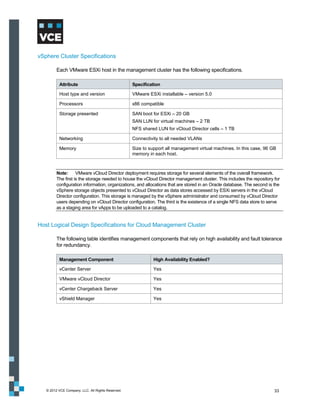
         addresses, however, are not globally unique and may conflict.

         To remedy this situation, the service provider can assign infrastructure-wide IP addresses within a
         service offering. Each X-Blade or VNX storage processor supports one IP address space. However,
         an X-Blade can support multiple logical IP interfaces and both storage processors and X-Blades
         support VLAN tagging. VLAN tagging allows multiple networks to access resources without the risk of
         traversing address spaces. In the event of an IP address conflict, the server log file reports any
         duplicate address warnings. IP addressing conflicts can be addressed in higher layers of the stack.
         This is most easily accomplished at the compute layer.


   © 2012 VCE Company, LLC. All Rights Reserved.                                                                    79
Figure 49 is a graphical representation of how VMware vSphere can be used to separate each
      tenant’s address space.


      Figure 49. Address space separation with VMware vSphere


© 2012 VCE Company, LLC. All Rights Reserved.                                                      80
Virtual Machine Data Store Separation

      VMware uses a cluster file system called a virtual machine file system (VMFS). An ESXi host
      associates a VMFS volume, which is made up of a larger logical unit. Each virtual machine directory is
      stored in the Virtual Machine Disk (VMDK) sub-directory in the VMFS volume. While a virtual machine
      is in operation, the VMFS volume locks those files to prevent other ESXi servers from updating them.
      One VMDK directory is associated with a single virtual machine; multiple virtual machines cannot
      access the same VMDK directory.

      We recommend implementing LUN masking (that is, storage groups) to assign storage to ESXi
      servers. LUN masking is an authorization process that makes a LUN available only to specific hosts
      on the EMC SAN as further protection against misbehaving servers corrupting disks belonging to
      other servers. This complements the use of zoning on the MDS, effectively extending zoning from the
      front-end port on the array to the device on which the physical disk resides.

      Virtual Data Mover on VNX

      VNX provides a multinaming domain solution for a data mover in the UNIX environment by
      implementing an NFS server per virtual data mover (VDM). A data mover hosting several VDMs can
      serve UNIX clients that are members of different LDAP or NIS domains, assuming that each VDM
      works for a unique naming domain. Several NFS servers are emulated on the data mover in order to
      serve the file system resources of the data mover for different naming domains. Each NFS server is
      assigned to one or more data mover network interfaces.

      The VDMs loaded on a data mover use the network interfaces configured on the data mover. You
      cannot duplicate an IP address for two VDM interfaces configured on the same data mover. Once a
      VDM interface is assigned, you can manage NFS exports on a VDM. CIFS and NFS protocols can
      share the same network interface; however, only one NFS endpoint and CIFS server is addressed
      through a particular logical network interface.

      The multinaming domain solution implements an NFS server per VDM-named NFS endpoint. The
      VDM acts as a container that includes the file systems exported by the NFS endpoint and/or the CIFS
      server. These VDM file systems are visible through a subset of data mover network interfaces
      attached to the VDM. The same network interface can be shared by both CIFS and NFS protocols on
      that VDM. The NFS endpoint and CIFS server are addressed through the network interfaces attached
      to that particular VDM. This allows users to perform either of the following:

          Move a VDM, along with its NFS and CIFS exports and configuration data (LDAP, net groups,
           and so forth), to another data mover
          Back up the VDM, along with its NFS and CIFS exports and configuration data

      This feature supports at least 50 NFS VDMs per physical data mover and up to 25 LDAP domains.


© 2012 VCE Company, LLC. All Rights Reserved.                                                           81
Figure 50 shows a physical data mover with VDM implementation.


         Figure 50. Physical data mover with VDM implementation

         Note:   VDM for NFS is available on VNX OE for File Version 7.0.50.2. You cannot use Unisphere to configure
         VDM for NFS.

         Refer to Configuring NFS on VNX for more information.


Separation of Data Access

         Separation of data access ensures that a tenant cannot see or access any other tenant’s data. The
         data access protocol in use determines how this is accomplished. Protocols for how tenant data traffic
         flows inside EMC VNX are:

             CIFS
             NFS
             iSCSI
             Fibre Channel over Ethernet/Fibre Channel (FCoE/FC)


   © 2012 VCE Company, LLC. All Rights Reserved.                                                                  82
Figure 51 displays the access protocols and the respective protocol stack that can be used to access
      data residing on a unified system.


      Figure 51. Protocol stack

      CIFS Stack

      The following table summarizes how tenant data traffic flows inside EMC VNX for the CIFS stack.
      Secure separation is maintained at each layer throughout the CIFS stack.

       CIFS stack component                     Description

       VLAN                                     The secure separation of data access starts at the bottom of the CIFS
                                                stack on the IP network with the use of Virtual Local Area Networks
                                                (VLAN) to separate individual tenants.

       IP Interface VLAN Tagged                 The VLAN-tagging model extends into the unified system by VLAN
                                                tagging the individual IP interfaces so they understand and honor the
                                                tags being used.

       IP Packet Reflection                     IP packet reflection guarantees that any traffic sent from the storage
                                                system in response to a client request will go out over the same physical
                                                connection and VLAN on which the request was received.

       Virtual Data Mover                       The virtual data mover is a logical configuration container that wraps
                                                around a CIFS file-sharing instance.

       CIFS Server                              The virtual data mover resides on the CIFS server.

© 2012 VCE Company, LLC. All Rights Reserved.                                                                            83
CIFS stack component                     Description

       CIFS Share                               CIFS shares are built upon the CIFS servers.

       ABE                                      At the top of the stack is a Windows feature called Access Based
                                                Enumeration (ABE). ABE shows a user only the files that he/she has
                                                permission to access, thus extending the separation all the way to end
                                                users if desired.


      NFS Stack

      The following table summarizes how tenant data traffic flows inside EMC VNX for the NFS stack.

       NFS stack component                      Description

       VLAN                                     The secure separation of data access starts at the bottom of the NFS
                                                stack on the IP network, using VLANs to separate individual tenants.

       IP Interface VLAN tagged                 The VLAN tagging model extends into the unified system by VLAN
                                                tagging the individual IP interfaces so they understand and honor the
                                                tags being used.

       IP Packet Reflection                     IP packet reflection guarantees that any traffic sent from the storage
                                                system in response to a client request will go out over the same physical
                                                connection and VLAN on which the request was received.

       NFS Export VLAN tagged                   NFS exports can be associated with specific VLANs.

       NFS Export Hiding                        NFS export hiding tightly controls which users access the NFS exports. It
                                                enhances standard NFS server behavior by preventing users from
                                                seeing NFS exports for which they do not have access-level permission.
                                                It will appear to each tenant that they have their own individual NFS
                                                server.


© 2012 VCE Company, LLC. All Rights Reserved.                                                                            84
Figure 52 shows an NFS export and how a specific subnet has access to the NFS share.


      Figure 52. NFS export configuration

      In this example, VLAN 112 and VLAN 111 subnet has access to the /nfs1 share. VNX also provides
      granular access to the NFS share. An NFS export can be presented to a specific tenant subnet or
      specific host or group of hosts in the network.

      iSCSI Stack

      The following table summarizes how tenant data traffic flows inside EMC VNX for the iSCSI stack.

       iSCSI stack component                    Description

       VLAN                                     The secure separation of data access starts at the bottom of the iSCSI
                                                stack on the IP network with the use of VLAN to separate individual
                                                tenants.

       IP Interface VLAN tagged                 The VLAN-tagging model extends into the unified system by VLAN
                                                tagging the individual IP interfaces so they understand and honor the
                                                tags being used.

       iSCSI Portal                             Access then flows through an iSCSI portal to a target device, where it is
       Target                                   ultimately addressed to a LUN.
       LUN


© 2012 VCE Company, LLC. All Rights Reserved.                                                                            85
iSCSI stack component                    Description

       LUN Masking                              LUN masking is a feature for block-based protocols that ensures that
                                                LUNs are viewed and accessed only by those SAN clients with the
                                                appropriate permissions.


      Support for VLAN tagging in iSCSI

      VLAN is supported for iSCSI data ports and management ports on VNX storage systems. In addition
      to better performance, ease of management, and cost benefits, VLANs provide security advantages
      since devices configured with VLAN tags can see and communicate with each other only if they
      belong to the same VLAN. Therefore, you can:

          Set up multiple virtual ports on the VNX and segregate hosts into different VLANs based on your
           security policy
          Restrict sensitive data to one VLAN

      VLANs make it more difficult to sniff traffic, as they require sniffing across multiple networks. This
      provides extra security.

      Figure 53 shows the iSCSI port properties for a port with VLANs enabled and two virtual ports
      configured.


      Figure 53. iSCSI Port Properties with VLAN tagging enabled


© 2012 VCE Company, LLC. All Rights Reserved.                                                                          86
Fibre Channel over Ethernet/Fibre Channel Stack

      The lower layers of the fibre channel stack look quite different because it is not an IP-based protocol.
      The following table summarizes how tenant data traffic flows inside EMC VNX for the FCoE/FC stack.

       FCoE/FC stack component                  Description

       FC Zone                                  FC zoning controls which FC/Fibre Channel over Ethernet (FCoE)
                                                interfaces can communicate with each other within the fabric.

       VSAN                                     Virtual Storage Area Networks can be used to further subdivide
                                                individual zones without the need for physical separation.

       Target                                   Access flows to a target device, where it is ultimately addressed to a
       LUN                                      LUN.

       LUN Masking                              LUN masking is a feature for block-based protocols that ensures that
                                                LUNs are viewed and accessed only by those SAN clients with the
                                                appropriate permissions.


      Figure 54 and Figure 55 show how a 20 GB FC boot LUN and 2 TB LUN map to each host in VNX. It
      ensures each LUN presented to the ESXi host is properly masked and granted access to the specific
      LUN and spread out in different RAID groups.


      Figure 54. Boot LUN and host mapping


      Figure 55. Data LUN and host mapping


© 2012 VCE Company, LLC. All Rights Reserved.                                                                            87
Design Considerations for Service Assurance
         Once you achieve secure separation of each tenant’s data and path to that data, the next priority is
         predictable and reliable access that meets the tenant’s SLA. Furthermore, in a service provider
         chargeback environment, it may be important that tenants do not receive more performance than they
         paid for simply because there is no contention for shared storage resources.

         Service assurance ensures that SLAs are met at appropriate levels through the dedication of runtime
         resources and quality of service control.

         Additionally, storage tiering with FAST lowers overall storage costs and simplifies management while
         allowing different applications to meet different service-level requirements on distinct pools of storage
         within the same storage infrastructure. FAST technology automates the dynamic allocation and
         relocation of data across tiers for a given FAST policy, based on changing application performance
         requirements. FAST helps maximize the benefits of preconfigured tiered storage by optimizing cost
         and performance requirements to put the right data on the right tier at the right time.


Dedication of Runtime Resources

         Each VNX data mover has dedicated CPUs, memory, front-end, and back-end networks. A data
         mover can be dedicated to a single tenant or shared among several tenants. To further ensure the
         dedication of runtime resources, data movers can be clustered into active/standby groupings. From a
         hardware perspective, dedicating pools, spindles, and network ports to a specific tenant or application
         can further ensure adherence to SLAs.


Quality of Service Control

         EMC has several software tools available that organize the dedication of runtime resources. At the
         storage layer, the most powerful of these is Unisphere Quality of Service Manager (UQM), which
         allows VNX resources to be managed based on service levels.

         UQM utilizes policies to set performance goals for high-priority applications, set limits on lower-priority
         applications, and schedules policies to run on predefined timetables. These policies direct the
         management of any or all of the following performance aspects:

             Response time
             Bandwidth
             Throughput

         UQM provides a simple user interface for service providers to control policies. This control is invisible
         to tenants and can ensure that the activity of one tenant does not impact that of another. For example,
         if a tenant requests a dedicated disk, storage groups, and spindles for its storage resources, apply
         these control policies to get optimum storage I/O performance.


   © 2012 VCE Company, LLC. All Rights Reserved.                                                                 88
Figure 56 shows how you can create policies with a specific set of I/O class to ensure that SLAs are
        maintained.


        Figure 56. EMC VNX – QoS configuration


EMC VNX FAST VP

        With standard storage tiering in a non-FAST VP enabled array, multiple storage tiers are typically
        presented to the vCloud environment, and each offering is abstracted out into separate provider virtual
        data centers (vDC). A provider may choose to provision an EFD [SSD/Flash] tier, an FC/SAS tier, and
        a SATA/NL-SAS tier, and then abstract these into Gold, Silver, and Bronze provider virtual data
        centers. The customer then chooses resources from these for use in their organizational virtual data
        center.

        This provisioning model is limited for a number of reasons, including the following:

            VMware vCloud Director does not allow for a non-disruptive way to move virtual machines from
             one provider virtual data center to another. This means the customer must provide for downtime
             if the vApp needs to be moved to a more appropriate tier.
            For workloads with a variable I/O personality, there is no mechanism to automatically migrate
             those workloads to a more appropriate disk tier.
            With the cost of enterprise flash drives (EFD) still significant, creating an entire tier of them can
             be prohibitively expensive, especially with few workloads having an I/O pattern that takes full
             advantage of this particular storage medium.

        One way in which the standard storage tiering model can be beneficial is when multiple arrays are
        used to provide different kinds of storage to support different I/O workloads.


  © 2012 VCE Company, LLC. All Rights Reserved.                                                                 89
FAST VP Storage Tiering

      There are ways to provide more flexibility and a more cost-effective platform when compared with a
      standard tiering model. Instead of using a single disk type per provider virtual data center,
      organizations can blend both the cost and performance characteristics of multiple disk types. The
      following table shows examples of this approach.

       Create a FAST VP pool                As this type of tier…    For…
       containing…

       20% EFD and 80%                      Performance tier         Customers who might need the performance of
       FC/SAS disks                                                  EFD at certain times, but do not want to pay for
                                                                     that performance all the time

       50% FC/SAS disks and                 Production tier          Most standard enterprise applications to take
       50% SATA disks                                                advantage of the standard FC/SAS performance,
                                                                     yet have the ability to de-stage cold data to SATA
                                                                     disk to lower the overall cost of storage per GB

       90% SATA disks and 10%               Archive tier             Storing mostly nearline data, with the FC/SAS
       FC/SAS disks                                                  disks used for those instances where the
                                                                     customer needs to go to the archive to recover
                                                                     data, or for customers who are dumping a
                                                                     significant amount of data into the tier.


      Tiering Policies

      FAST VP offers a number of policy settings to determine how data is placed, how often it is promoted,
      and how data movement is managed. In a vCloud Director environment, the following policy settings
      are recommended to best accommodate the types of I/O workloads produced.

       Policy                               Default Setting                     Recommended Setting

       Data Relocation Schedule             Set to migrate data seven days a    In a vCloud Director environment,
                                            week, between 11pm and 6am,         open up the Data Relocation window
                                            reflecting the standard business    to run 24 hours a day.
                                            day.                                Reduce the Data Relocation Rate to
                                            Set to use a Data Relocation Rate   Low. This allows for constant
                                            of Medium, which can relocate       promotion and demotion of data, yet
                                            300-400 GB of data per hour.        limits the impact on host I/O.

       FAST VP-enabled                      Set to use the Auto-Tier,           In a vCloud Director environment,
       LUNs/Pools                           spreading data evenly across all    where customers are generally paying
                                            tiers of disks.                     for the lower tier of storage but
                                                                                leveraging the ability to promote
                                                                                workloads to higher-performing disk
                                                                                when needed, the recommendation is
                                                                                to use the Lowest Available Tier
                                                                                policy. This places all data onto the
                                                                                lower tier of disk initially, keeping the
                                                                                higher tier of disk free for data that
                                                                                needs it.


© 2012 VCE Company, LLC. All Rights Reserved.                                                                           90
EMC FAST Cache

         In a vCloud Director environment, VCE recommends a minimum of 100 GB of FAST Cache, with the
         amount of FAST Cache increasing as the number of virtual machines increases.

         The combination of FAST VP and FAST Cache allows the vCloud environment to scale better,
         support more virtual machines and a wider variety of service offerings, and protect against I/O spikes
         and bursting workloads in a way that is unique in the industry. These two technologies in tandem are
         a significant differentiator for the Vblock system.


EMC Unisphere Management Suite

         EMC Unisphere provides a simple, integrated experience for managing EMC Unified Storage through
         both a storage and VMware lens. It is designed to provide simplicity, flexibility, and automation, which
         are all key requirements for using private clouds.

         Unisphere includes a unique self-service support ecosystem that is accessible with one-click, task‐
         based navigation and controls for intuitive, context-based management. It provides customizable
         dashboard views and reporting capabilities that present users with valuable storage management
         information.


VMware vCloud Director

         A provider virtual data center is a resource pool consisting of a cluster of VMware ESXi servers that
         access a shared storage resource. The provider virtual data center can contain one of the following:

             Part of a data store (shared by other provider virtual data centers)
             All of a data store
             Multiple data stores

         As storage is provisioned to organization virtual data centers, the shared storage pool for the provider
         virtual data center is seen as a single pool of storage with no distinction of storage characteristics,
         protocol, or other characteristics differentiating it from being a single large address space.

         If a provider virtual data center contains more than one data store, it is considered best practice that
         those data stores have equal performance capability, protocol, and quality of service. Otherwise, the
         slower storage in the collective pool will impact the performance of that provider virtual data storage
         pool. Some virtual data centers might end up with faster storage than others.

         To gain the benefits of different storage tiers or protocols, define separate provider virtual data
         centers, where each provider virtual data center has storage of different protocols or differing quality-
         of-service storage. For example, provision the following:

             A provider virtual data center built on a data store backed by 15K RPM FC disks with loads of
              cache in the disk for the highest disk performance tier
             A second provider virtual data center built on a data store backed by SATA drives and not much
              cache in the array for a lower tier


   © 2012 VCE Company, LLC. All Rights Reserved.                                                                91
When a provider virtual data center shares a data store with another provider virtual data center, the
         performance of one provider virtual data center may impact performance of the other provider virtual
         data center. Therefore, it is considered best practice to have a provider virtual data center that has a
         dedicated data store such that isolation of the storage reduces the chances of introducing different
         quality-of-service storage resources in a provider virtual data center.


Design Considerations for Security and Compliance
         This section provides information about:

             Authentication with LDAP or Active Directory
             EMC VNX and RSA enVision


Authentication with LDAP or Active Directory

         VNX can authenticate users against an LDAP directory, such as Active Directory. Authentication
         against an LDAP server simplifies management because you do not need a separate set of
         credentials to manage VNX storage systems. It is also more secure, as enterprise password policies
         can be enforced for the storage environment.

         Figure 57 shows LDAP integration in VNX.


         Figure 57. LDAP configuration in VNX


   © 2012 VCE Company, LLC. All Rights Reserved.                                                               92
Role Mapping

      Once communications are established with the LDAP service, give specific LDAP users or groups
      access to Unisphere by mapping them to Unisphere roles. The LDAP service merely performs the
      authentication. Once authenticated, a user’s authorization is determined by the assigned Unisphere
      role. The most flexible configuration is to create LDAP groups that correspond to Unisphere roles. This
      allows you to control access to Unisphere by managing the members of the LDAP groups.

      For example, Figure 58 shows two LDAP groups: Storage Admins and Storage Monitors. It shows
      how you can map specific LDAP groups into specific roles.


      Figure 58. Mapping LDAP groups

      Component Access Control

      Component access control settings define access to a product by external and internal systems or
      components.

      CHAP Component Authentication

      SCSI's primary authentication mechanism for iSCSI initiators is the Challenge Handshake
      Authentication Protocol (CHAP). CHAP is an authentication protocol used to authenticate iSCSI
      initiators at target login and at various random times during a connection. CHAP security consists of a
      username and password. You can configure and enable CHAP security for initiators and for targets.
      The CHAP protocol requires initiator authentication. Target authentication (mutual CHAP) is optional.


© 2012 VCE Company, LLC. All Rights Reserved.                                                             93
LUN Masking Component Authorization

      A storage group is an access control mechanism for LUNs. It segregates groups of LUNs from access
      by specific hosts. When you configure a storage group, you identify a set of LUNs that will be used by
      only one or more hosts. The storage system then enforces access to the LUNs from the host. The
      LUNs are presented to only the hosts in the storage group. The hosts can see only the LUNs in the
      group.

      IP Filtering

      IP filtering adds another layer of security by allowing administrators and security administrators to
      configure the storage system to restrict administrative access to specified IP addresses. These
      settings can be applied to the local storage system or to the entire domain of storage systems.

      Audit Logging

      Audit logging is intended to provide a record of all activities, so that the following can occur:

          Checks for suspicious activity can be performed periodically.
          The scope of suspicious activity can be determined.

      Audit logs are especially important for financial institutions that are monitored by regulators.

      Audit information for VNX storage systems is contained within the event log on each storage
      processor. The log also contains hardware and software debugging information and a time-stamped
      record for each event. Each record contains the following information:

          Event code
          Description of event
          Name of the storage system
          Name of the corresponding storage processor
          Hostname associated with the storage processor


© 2012 VCE Company, LLC. All Rights Reserved.                                                                 94
VNX and RSA enVision

        VNX storage systems are made even more secure by leveraging the continuous collecting,
        monitoring, and analyzing capabilities of RSA enVision. RSA enVision performs the functions listed in
        the following table.

         RSA function                             Description

         Collects logs                            Can collect event log data from over 130 event sources–from firewalls to
                                                  databases. RSA enVision can also collect data from custom, proprietary
                                                  sources using standard transports such as Syslog, OBDC, SNMP, SFTP,
                                                  OPSEC, or WMI.

         Securely stores logs                     Compresses and encrypts log data so it can be stored for later analysis,
                                                  while maintaining log confidentiality and integrity.

         Analyzes logs                            Analyzes data in real time to check for anomalous behavior requiring an
                                                  immediate alert and response. RSA enVision proprietary logs are also
                                                  optimized for later reporting and forensic analysis. Built-in reports and
                                                  alerts allow administrators and auditors quick and easy access to log data.


        Figure 59 provides a detailed look at storage behavior in RSA enVision.


        Figure 59. RSA enVision storage behavior


  © 2012 VCE Company, LLC. All Rights Reserved.                                                                              95
Network Encryption

         The Storage Management server provides 256-bit symmetric encryption of all data passed between it
         and the administrative client components that communicate with it, as listed under Port Usage (Web
         browser, Secure CLI), as well as all data passed between Storage Management servers. The
         encryption is provided through SSL/TLS and uses the RSA encryption algorithm, providing the same
         level of cryptographic strength as is employed in e-commerce. Encryption protects the transferred
         data from prying eyes—whether on the local LANs behind the corporate firewalls, or if the storage
         systems are being remotely managed over the Internet.


Design Considerations for Availability and Data Protection
         Availability goes hand in hand with service assurance. While service assurance directs resources at
         the tenant level, availability secures resources at the service provider level. Availability ensures that
         resources are available for all tenants utilizing a service provider’s infrastructure, by meeting the
         requirements of high availability and local and remote data protection.


High Availability

         In the storage layer, the high availability design is consistent with the high availability model
         implemented at other layers in the Vblock system, comprising physical redundancy and path
         redundancy. These are listed in the following types of redundancies:

             Link redundancy
             Hardware and node redundancy

         Link Redundancy

         Pending the availability of FC port channels on UCS FC ports and FC port trunking, multiple individual
         FC links from the 6120 fabric interconnects are connected to each SAN fabric, and VSAN
         membership of each link is explicitly configured in the UCS. In the event of an FC (NP) port link failure,
         affected hosts will re-logon in a round-robin manner using available ports. FC port channel support,
         when available, means that redundant links in the port channel will provide active/active failover
         support in the event of a link failure.

         Multipathing software from VMware or EMC PowerPath software further enhances high availability,
         optimizing use of the available link bandwidth and enhancing load balancing across multiple active
         host adapter ports and links with minimal disruption in service.

         Hardware and Node Redundancy

         The Vblock system TMT design leverages best practice methodologies for SAN high availability,
         prescribing full hardware redundancy at each device in the I/O path from host to SAN. In terms of
         hardware redundancy this begins at the server, with dual port adapters per host. Redundant paths
         from the hosts feed into dual, redundant MDS SAN switches (that is, with dual supervisors) and then
         into redundant SAN arrays with tiered, RAID protection. RAID 1 and 5 were deployed in this particular
         design as two more commonly used levels; however the selection of a RAID protection level depends
         on a balancing of cost versus the critical nature of the data to be stored.

   © 2012 VCE Company, LLC. All Rights Reserved.                                                                 96
The ESXi hosts are protected by the VMware vCenter high availability feature. Storage paths can be
      protected using EMC PowerPath/VE. Figure 60 shows the storage path protection.


      Figure 60. Storage path protection

      Virtual machines and application data can be protected using EMC Avamar, Data Domain, and
      Replication Manager. However these are not within the scope of this guide.

      Single Point of Failure

      High availability (HA) systems are the foundation upon which any enterprise-class multi-tenancy
      environment is built. High availability systems are designed to be fully redundant with no single point
      of failure (SPOF). Additional availability features can be leveraged to address single point of failure in
      the TMT design. The following are some high-level SPOF entity needs to consider:

          Dual-ported drives
          Redundant FC loops
          Battery-backed mirrored write cache dual storage processors
          Asymmetric Logical Unit Access (ALUA) dual paths to storage
          N+M X-Blade failover clustering
          Network link aggregation
          Fail-safe network


© 2012 VCE Company, LLC. All Rights Reserved.                                                                97
Local and Remote Data Protection

         It is important to ensure that data is protected for the entirety of its lifecycle. Local replication
         technologies, such as snapshots and clones, allow users to roll back to recent points in time in the
         event of corruption or accidental deletion. Local replication technologies include SnapSure and
         SnapView for VNX. Use Network Data Management Protocol (NDMP) backup to deeply efficient
         storage platforms, such as Data Domain, for restoration of data from a point further back in time.
         Remote replication is key to protecting user data from site failures. EMC RecoverPoint and MirrorView
         software enable remote replication between EMC’s Unified Storage systems. Use Replication
         Manager to ease the management of replication and ensure consistency between replicas.

         Below are some key points for each of these products; however, they are not within the scope of this
         guide.

         SnapSure

         Use SnapSure to create and manage checkpoints on thin and thick file systems. Checkpoints are
         point-in-time, logical images of a file system. Checkpoints can be created on file systems that use pool
         LUNs or traditional LUNs.

         SnapView

         For local replication, SnapView snapshots and clones are supported on thin and thick LUNs.
         SnapView clones support replication between thick, thin, and traditional LUNs. When cloning from a
         thin LUN to a traditional LUN or thick LUN, the physical space of the traditional/thick LUN must equal
         the host-visible capacity of the thin LUN. This results in a fully allocated thin LUN if the traditional
         LUN/thick LUN is reverse-synchronized. Cloning from traditional/thick to thin LUN results in a fully
         allocated thin LUN as the initial synchronization will force the initialization of all the subscribed
         capacity.

         For more information, refer to EMC SnapView for VNX.

         RecoverPoint

         Replication is also supported through RecoverPoint. Continuous data protection (CDP) and
         continuous remote replication (CRR) support replication for thin LUNs, thick LUNs, and traditional
         LUNs. When using RecoverPoint to replicate to a thin LUN, only data is copied; unused space is
         ignored so the target LUN is thin after the replication. This can provide significant space savings when
         replicating from a non-thin volume to a thin volume. When using RecoverPoint, we recommend that
         you not use journal and repository volumes on thin LUNs.

         For more information on using RecoverPoint, see EMC RecoverPoint: Protecting the Private
         Cloud. (Powerlink access required.)


   © 2012 VCE Company, LLC. All Rights Reserved.                                                               98
MirrorView

      When mirroring a thin LUN to another thin LUN, only consumed capacity is replicated between the
      storage systems. This is most beneficial for initial synchronizations. Steady state replication is similar,
      since only new writes are written from the primary storage system to the secondary system.

      When mirroring from a thin LUN to a traditional or thick LUN, the thin LUN’s host-visible capacity must
      be equal to the traditional LUN’s capacity or the thick LUN’s user capacity. Any failback scenario that
      requires a full synchronization from the secondary to the thin primary image causes the thin LUN to
      become fully allocated. When mirroring from a thick LUN or traditional LUN to a thin LUN, the
      secondary thin LUN is fully allocated.

      With MirrorView, if the secondary image LUN is added with the no initial syncronization option, the
      secondary image retains its thin attributes. However, any subsequent full synchronization from the
      traditional LUN or thick LUN to the thin LUN, as a result of a recovery operation, causes the thin LUN
      to become fully allocated.

      For more information on using pool LUNs with MirrorView, see MirrorView Knowledgebook
      (Powerlink access required).

      PowerPath Migration Enabler

      EMC PowerPath Migration Enabler (PPME) is a host-based migration tool that enables non-disruptive
      or minimally disruptive data migration between storage systems or between logical units within a
      single storage system. The Host Copy technology in PPME works with the host operating system to
      migrate data from the source logical unit to the target. With PPME 5.3, the Host Copy technology
      supports migrating virtually provisioned devices. When migrating to a thin target, the target’s thin-
      device capability is maintained.


© 2012 VCE Company, LLC. All Rights Reserved.                                                                 99
Design Considerations for Service Provider Management and Control
        EMC Unisphere includes a unique self-service support ecosystem that is accessible through one-click,
        task-based navigation and controls for intuitive, context-based management. It provides customizable
        dashboard views and reporting capabilities that present users with valuable storage management
        information.

        EMC Unisphere, a unified element management interface for NAS, SAN, replication, and more, offers
        a single point of control from which a service provider can manage all aspects of the storage layer.

        Service providers can use Unified Infrastructure Manager/Provisioning to manage the entire stack
        (compute, network, and storage).

        These two products mark a paradigm shift in the way infrastructure is managed.

        Figure 61 shows a service provider view of the Unisphere dashboard and shows a connected vCenter
        with all the ESXi hosts.


        Figure 61. EMC Unisphere dashboard


  © 2012 VCE Company, LLC. All Rights Reserved.                                                            100
Design Considerations for Networking
        Various methods, including zoning and VLANs can enforce network separation. Internet Protocol
        Security (IPsec) provides application-independent network encryption at the IP layer for additional
        security.

        This section describes the design of and rationale behind the TMT framework for Vblock system
        network technologies. The design includes many issues that must be addressed prior to deployment,
        as no two environments are alike. Design considerations are provided for each TMT element.


Design Considerations for Secure Separation
        This section discusses using the following technologies to achieve secure separation at the network
        layer:

            VLANs
            Virtual Routing and Forwarding
            Virtual Device Context
            Access Control List


VLANs

        VLANs provide a Layer 2 option to scale virtual machine connectivity, providing application tier
        separation and multitenant isolation. In general, Vblock systems have two types of VLANs:

            Routed – Include management VLANs, virtual machine VLANs, and data VLANs; will pass
             through Layer 2 trunks and be routed to the external network
            Internal – Carry VMkernel traffic, such as vMotion, service console, NFS, DRS/HA, and so forth

        This design guide uses three tenants: Tenant Orange, Tenant Vanilla and Tenant Grape. Each tenant
        has multiple virtual machines for different applications (such as Web server, email server, and
        database), which are associated with different VLANs. It is always recommended to separate data
        and management VLANs.


  © 2012 VCE Company, LLC. All Rights Reserved.                                                               101
The following table lists example VLAN categories used in the Vblock system TMT design framework.

          VLAN type                                            VLAN name                            VLAN number

          Management VLANs (routed)                            Core Infra management                100
                                                               C200_ESX_mgt                         101
                                                               C299_ESX_vmotion                     102
                                                               UCS_mgt and KVM                      103
                                                               Vblock_ESX_mgt                       104
                                                               Vblock_ESX_vmotion                   105

          Internal VLANs (local to Vblock system)              Vblock_ESX_build                     106
                                                               Vblock_N1k_pkg                       107
                                                               Vblock_N1k_control                   108
                                                               Vblock_NFS                           111

          Data VLANs (routed VLAN)                             Fcoe_USC_to_storageA                 109
                                                               Fcoe_UCS_to_storageB                 110
                                                               Vblock_VMNetwork                     112
                                                               Tenant 1_VMNetwork                   113
                                                               Tenant-2_VMNetwork                   118
                                                               Tenant-3_VMNetwork                   123


         Configure VLAN (both Layer 2 and Layer 3) in all network devices supported in the TMT infrastructure
         to ensure that management, tenant, and Vblock system internal VLANs are isolated from each other.

         Note:      Service providers may need additional VLANs for scalability, depending on size requirements.


Virtual Routing and Forwarding

         Use Virtual Routing and Forwarding (VRF) to virtualize each network device and all its physical
         interconnects. From a data plane perspective, the VLAN tags can provide logical isolation on each
         point-to-point Ethernet link that connects the virtualized Layer 3 network device.

         Cisco VRF Lite uses a Layer 2 separation method to provide path isolation for each tenant across a
         shared network link. Using VRF Lite in the core and aggregation layers enables segmentation of
         tenants hosted on the common physical infrastructure. VRF Lite completely isolates the Layer 2 and
         Layer 3 control and forwarding planes of each tenant, allowing flexibility in defining an optimum
         network topology for each tenant.


   © 2012 VCE Company, LLC. All Rights Reserved.                                                                   102
The following table summarizes the benefits that the Cisco VRF Lite technology provides a TMT
      environment.

       Benefit                                  Description

       Virtual replication of physical          Each virtual network represents an exact replica of the underlying
       infrastructure                           physical infrastructure. This effect results from VRF Lite’s per hop
                                                technique, which requires every network device and its interconnections
                                                to be virtualized.

       True routing and forwarding              Dedicated data and control planes are defined to handle traffic belonging
       separation                               to groups with various requirements or policies. These groups represent
                                                an additional level of segregation and security as no communication is
                                                allowed among devices belonging to different VRFs unless explicitly
                                                configured.


      Network separation at Layer 2 is accomplished using VLANs. Figure 62 shows how the VLANs
      defined on each access layer device for each tenant are mapped to the same tenant VRF at the
      distribution layer.


      Figure 62. VLAN to VRF mapping


© 2012 VCE Company, LLC. All Rights Reserved.                                                                          103
Use VLANs to achieve network separation at Layer 2. While VRFs are used to identify a tenant,
         VLAN-IDs provide isolation at Layer 2.

         Tenant VRFs are applied on the Cisco Nexus 7000 Series Switch at the aggregation and core layer,
         which are mapped with unique VLANs. All VLANs are carried over the 802.1Q trunking ports.


Virtual Device Context

         The Layer 2 VLANs and Layer 3 VRF features help ensure TMT secure separation at the network
         layer. You can also use the Virtual Device Context (VDC) feature on the Nexus 7000 Series Switch to
         virtualize the device itself, presenting the physical switch as multiple logical devices.

         A virtual device context can contain its own unique and independent set of VLANs and VRFs. Each
         virtual device context can be assigned to its physical ports, allowing for the hardware data plane to be
         virtualized as well.


Access Control List

         Access Control List (ACL), VLAN Access Control List (VACL), and port security can be applied in TMT
         Layer 2 and Layer 3 to allow only the desired traffic for an expected destination within the same tenant
         domain or among different tenants. This is shown in the following table.

          Device name                                        ACL supported

          Cisco Nexus 1000V Series Switch                    Yes

          Cisco Nexus 5000 Series Switch                     Yes

          Cisco Nexus 7000 Series Switch                     Yes


   © 2012 VCE Company, LLC. All Rights Reserved.                                                              104
Design Considerations for Service Assurance
        Service assurance is a core requirement for shared resources and their protection. Network, compute,
        and storage resources are guaranteed based on service level agreements. Quality of service enables
        differential treatment of specific traffic flows, helping to ensure that in the event of congestion or failure
        conditions, critical traffic is provided with a sufficient amount of available bandwidth to meet throughput
        requirements.

        Figure 63 shows the traffic flow types defined in the Vblock system TMT design.


        Figure 63. Traffic flow types


  © 2012 VCE Company, LLC. All Rights Reserved.                                                                   105
The traffic flow types break down into three traffic categories, as shown in the following table.

       Traffic Category               Description

       Infrastructure                 Comprises management and control traffic and vMotion communication.
                                      This is typically set to the highest priority to maintain administrative
                                      communications during periods of instability or high CPU utilization.

       Tenant                         Differentiated into Gold, Silver, and Bronze service levels; may include virtual
                                      machine-to-virtual machine, virtual machine-to-storage, and/or virtual machine-
                                      to-tenant traffic.
                                           Gold tenant traffic is highest priority, requiring low latency and high bandwidth
                                            guarantees
                                           Silver traffic requires medium latency and bandwidth guarantees
                                           Bronze traffic is delay-tolerant, requiring low bandwidth guarantees
       Storage                        The Vblock system TMT design incorporates both FC and IP-attached storage.
                                      Since these traffic types are treated differently throughout the network, storage
                                      requires two subcategories:
                                           FC traffic requires a no drop policy
                                           NFS data store traffic is sensitive to delay and loss


      QoS service assurance for Vblock systems has been introduced at each layer. Consider the following
      features for service assurance at the network layer:

          Quality of service tenant marking at the edge
          Traffic flow matching
          Quality of service bandwidth guarantee
          Quality of service rate limit

      Traffic originates from three sources:

          ESXi hosts and virtual machines
          External to data center
          Networked-attached devices

      Consider traffic classification, bandwidth guarantee with queuing, and rate limiting based on tenant
      traffic priority for networking service assurance.


© 2012 VCE Company, LLC. All Rights Reserved.                                                                                   106
Design Considerations for Security and Compliance
        TMT infrastructure networks require intelligent services, such as firewall and load balancing of servers
        and hosted applications. This design guide focuses on the Vblock system TMT framework, in which a
        firewall module and other load balancers are the external devices connected to the Vblock system. A
        multi-tenant environment consists of numerous service and infrastructure devices, depending on the
        business model of the organization. Often, servers, firewalls, network intrusion prevention systems
        (IPS), host IPSs, switches, routers, application firewalls, and server load balancers are used in various
        combinations within a multi-tenant environment.

        The Cisco Firewall Services Module (FWSM) provides Layer 2 and Layer 3 firewall inspection,
        protocol inspection, and network address translation (NAT). The Cisco Application Control Engine
        (ACE) module provides server load balancing and protocol (IPSec, SSL) off-loading. Both the FWSM
        and ACE module can be easily integrated into existing Cisco 6500 Series switches, which are widely
        deployed in data center environments.

        Note:      To use the Cisco ACE module, you must add a Cisco 6500 Series switch.

        To succesfully achive trusted multi-tenancy, a service provider needs to adopt each key component
        as discussed below. As shown in Figure 3, the TMT framework has the following key components:

         Component                      Description

         Core                           Provides a Layer 3 routing module for all traffic in and out of the service provider
                                        data center.

         Aggregation                    Serves as the Layer 2 and Layer 3 boundary for the data center infrastructure. In
                                        this design, the aggregation layer also serves as the connection point for the
                                        primary data center firewalls.

         Services                       Deploys services such as server load balancers, intrusion prevention systems,
                                        application-based firewalls, network analysis modules, and additional firewall
                                        services.

         Access                         The data center access layer serves as a connection point for the server farm.
                                        The virtual access layer refers to the virtual network that resides in the physical
                                        servers when configured for virtualization.


        With this framework, you can add components as demand and load increase.


  © 2012 VCE Company, LLC. All Rights Reserved.                                                                           107
The following table describes the high-level security functions for each layer of the data center.

            Data Center Layer           Security Component        Purpose/Function

            Aggregation                 Data center firewalls     Initial filter for data center ingress and egress traffic.
                                                                  Virtual context is used to split policies for server-to-
                                                                  server filtering.

                                        Infrastructure security   Infrastructure security features are enabled to protect
                                                                  device, traffic plane, and control plane.
                                                                  Virtual data center provides internal/external
                                                                  segmentation.

            Service                     Security services         Additional firewall services for server farm–specific
                                                                  protection.
                                                                  Server load balancing masks servers and applications.
                                                                  Application firewall mitigates XSS-, HTTP-, SQL-, and
                                                                  XML-based attacks.

                                        Data center services      IPS/IDS provide traffic analysis and forensics.
                                                                  Network analysis provides traffic monitoring and data
                                                                  analysis.
                                                                  XML Gateway protects and optimizes Web-based
                                                                  services.

            Access                                                ACLs, CISC, port security, quality of service, CoPP, VN
                                                                  tag

            Virtual access                                        Layer 2 security features are available within the
                                                                  physical server for each virtual machine. Features
                                                                  include ACLs, CISF, port security, Netflow ERSPAN,
                                                                  quality of service, CoPP, VN tag.


Data Center Firewalls

         The aggregation layer provides an excellent filtering point and the first layer of protection for the data
         center. It provides a building block for deploying firewall services for ingress and egress filtering. The
         Layer 2 and Layer 3 recommendations for the aggregation layer also provide symmetric traffic
         patterns to support stateful packet filtering.

         Because of the performance requirements, this design uses a pair of Cisco ASA firewalls connected
         directly to the aggregation switches. The Cisco ASA firewalls meet the high-performance data center
         firewall requirements by providing 10 GB/s of stateful packet inspection.

         The Cisco ASA firewalls are configured in transparent mode, which means the firewalls are configured
         in a Layer 2 mode and will bridge traffic between interfaces. The Cisco ASA firewalls are configured
         for multiple contexts using the virtual context feature, which allows the firewall to be divided into
         multiple logical firewalls, each supporting different interfaces and policies.

         Note:    The modular aspect of this design allows additional firewalls to be deployed at the aggregation layer as
         the server farm grows and performance requirements increase.


   © 2012 VCE Company, LLC. All Rights Reserved.                                                                               108
The firewalls are configured in an active-active design, which allows load sharing across the
      infrastructure based on the active Layer 2 and Layer 3 traffic paths. Each firewall is configured for two
      virtual contexts:

          Virtual context 1 is active on ASA1
          Virtual context 2 is active on ASA2

      This corresponds to the active Layer 2 spanning tree path and the Layer 3 Hot Standby Routing
      Protocol (HSRP) configuration.

      Figure 64 shows an example of each firewall connection.


      Figure 64. Cisco ASA virtual contexts and Cisco Nexus 7000 virtual device contexts

      Virtual Context Details

      The context details on the firewall provide different forwarding paths and policy enforcement,
      depending on the traffic type and destination. Incoming traffic that is destined for the data center
      services layer (ACE, WAF, IPS, and so on) is forwarded over VLAN 161 from VDC1 on the Cisco
      Nexus 7000 to virtual context 1 on the Cisco ASA. The inside interface of virtual context 1 is
      configured on VLAN 162. The Cisco ASA filters the incoming traffic and then, in this case, bridges the
      traffic to the inside interface on VLAN 162. VLAN 162 is carried to the services switch where traffic has
      additional services applied. The same applies to virtual context 2 on VLANs 151 and 152. This context
      is active on ASA2.


© 2012 VCE Company, LLC. All Rights Reserved.                                                               109
Deployment Recommendations

      Firewalls enforce access policies for the data center. A best practice is to create a multilayered
      security model to protect the data center from internal or external threats.

      The firewall policy will differ, based on the organizational security policy and the types of applications
      deployed.

      Regardless of the number of ports and protocols allowed either to and from the data center, or from
      server to server, there are some baseline recommendations that serve as a starting point for most
      deployments. The firewalls should be hardened in a similar fashion to the infrastructure devices. The
      following configuration notes apply:

          Use HTTPS for device access. Disable HTTP access.
          Configure authentication, authorization, and accounting.
          Use out-of-band management and limit the types of traffic allowed over the management
           interface(s).
          Use Secure Shell (SSH). Disable Telnet.
          Use Network Time Protocol (NTP) servers.

      Depending on traffic types and policies, the goal might not be to send all traffic flows to the services
      layer. Some incoming application connections, such as those from a DMZ or client batch jobs (such
      as backup), might not need load balancing or additional services. An alternative is to deploy another
      context on the firewall to support the VLANs that are not forwarded to the services switches.

      Caveats

      Using transparent mode on the Cisco ASA firewalls requires that an IP address be configured for each
      context. This is required to bridge traffic from one interface to another and to manage each Cisco ASA
      context. While in transparent mode, you cannot allocate the same VLAN across multiple interfaces for
      management purposes. A separate VLAN is used to manage each context. The VLANs created for
      each context can be bridged back to the primary management VLAN on an upstream switch if
      desired.

      Note:    This provides a workaround and does not require allocating new network-wide management VLANs and
      IP subnets to manage each context.


© 2012 VCE Company, LLC. All Rights Reserved.                                                                 110
Services Layer

         Data center security services can be deployed in a variety of combinations. The goal of these designs
         is to provide a modular approach to deploying security by allowing additional capacity to be added
         easily for each service. Additional Web application firewalls, intrusion prevention systems (IPS),
         firewalls, and monitoring services can all be scaled without requiring an overall redesign of the data
         center.

         Figure 65 illustrates how the services layer fits into the data center security environment.


         Figure 65. Data center security and the services layer


Cisco Application Control Engine

         This design features the Cisco Application Control Engine (ACE) service module for the Cisco
         Catalyst 6500. Cisco ACE is designed as an application- and server-scaling tool, but it has security
         benefits as well. Cisco ACE can mask a server’s real IP address and provide a single IP address for
         clients to connect over a single or multiple protocols such as HTTP, HTTPS, FTP, and so forth.

         This design uses Cisco ACE to scale the Web application firewall appliances, which are configured as
         a server farm. Cisco ACE distributes connections to the Web application firewall pool.

         As an added benefit, Cisco ACE can store server certificates locally. This allows Cisco ACE to proxy
         Secure Socket Layer (SSL) connections for client requests and forward the requests in clear text to
         the server.


   © 2012 VCE Company, LLC. All Rights Reserved.                                                            111
Cisco ACE provides a highly available and scalable data center solution from which the vCloud
      Director environment can benefit. Use Cisco ACE to apply a different context and associated policies,
      interfaces, and resources for one vCloud Director cell and a completely different context for another
      vCloud Director cell.

      In this design, Cisco ACE is terminating incoming HTTPS requests and decrypting the traffic prior to
      forwarding it to the Web application firewall farm. The Web application firewall and subsequent Cisco
      IPS devices can now view the traffic in clear text for inspection purposes.

      Note:     Some compliance standards and security policies dictate that traffic be encrypted from client to server. It
      is possible to modify the design so traffic is re-encrypted on Cisco ACE after inspection prior to being forwarded to
      the server.


      Web Application Firewall

      Cisco ACE Web Application Firewall (WAF) provides firewall services for Web-based applications. It
      secures and protects Web applications from common attacks, such as identity theft, data theft,
      application disruption, fraud, and targeted attacks. These attacks can include cross-site scripting
      (XSS) attacks, SQL and command injection, privilege escalation, cross-site request forgeries (CSRF),
      buffer overflows, cookie tampering, and denial-of-service (DoS) attacks.

      In the TMT design, the two Web application firewall appliances are considered as a cluster and are
      load balanced by Cisco ACE. Each Web application firewall cluster member can be seen in the Cisco
      ACE Web Application Firewall Management Dashboard.

      The Cisco ACE Web Application Firewall acts as a reverse proxy for the Web servers it is configured
      to protect. The Virtual Web Application creates a virtual URL that intercepts incoming client
      connections. You can configure a virtual Web application based on the protocol and port as well as
      the policy you want applied.

      The destination server IP address is Cisco ACE. Because the Web application firewall is being load
      balanced by Cisco ACE, it is configured as a one-armed connection to Cisco ACE to send and receive
      traffic.


© 2012 VCE Company, LLC. All Rights Reserved.                                                                          112
Cisco ACE and Web Application Firewall Design

         Cisco ACE Web Application Firewall is deployed in a one-armed design and is connected to Cisco
         ACE over a single interface.


         Figure 66. Cisco ACE module and Web Application Firewall integration


Cisco Intrusion Prevention System

         The Cisco Intrusion Prevention System (IPS) provides deep packet and anomaly inspection to protect
         against both common and complex embedded attacks.

         The IPS devices used in this design are Cisco IPS 4270s with 10 GbE modules. Because of the
         nature of IPS and the intense inspection capabilities, the amount of overall throughput varies
         depending on the active policy. Default IPS policies were used in the examples presented in this
         design guide.

         In this design, the IPS appliances are configured for VLAN pairing. Each IPS is connected to the
         services switch with a single 10 GbE interface. In this example, VLAN 163 and VLAN 164 are
         configured as the VLAN pair.


   © 2012 VCE Company, LLC. All Rights Reserved.                                                            113
The IPS deployment in the data center leverages EtherChannel load balancing from the service
      switch. This method is recommended for the data center because it allows the IPS services to scale to
      meet the data center requirements. This is shown in Figure 67.


      Figure 67. IPS ECLB in the services layer

      A port channel is configured on the services switch to forward traffic over each 10 GB link to the
      receiving IPS. Since Cisco IPS does not support Link Aggregate Control Protocol (LACP) or Port
      Aggregation Protocol (PAgP), the port channel is set to on to ensure no negotiation is necessary for
      the channel to become operational.

      It is very important to ensure all traffic for a specific flow goes to the same Cisco IPS. To best
      accomplish this, it is recommended to set the hash for the port channel to source and destination IP
      address. Each EtherChannel supports up to eight ports per channel.


© 2012 VCE Company, LLC. All Rights Reserved.                                                            114
This design can scale up to eight Cisco IPS 4270s per channel. Figure 68 illustrates Cisco IPS
      EtherChannel load balancing.


      Figure 68. Cisco IPS EtherChannel load balancing

      Caveats

      Spanning tree plays an important role in IPS redundancy in this design. Under normal operating
      conditions traffic, a VLAN always follows the same active Layer 2 path. If a failure occurs (a service
      switch failure or a service switch link failure), spanning tree converges, and the active Layer 2 traffic
      path changes to the redundant service switch and Cisco IPS appliances.


© 2012 VCE Company, LLC. All Rights Reserved.                                                                 115
Cisco ACE, Cisco ACE Web Application Firewall, Cisco IPS Traffic Flows

         The security services in this design reside between the VDC1 and VDC2 on the Cisco Nexus 7000
         Series Switch. All security services are running in a Layer 2 transparent configuration. As traffic flows
         from VDC1 to the outside Cisco ASA context, it is bridged across VLANs and forwarded through each
         security service until it reaches the inside VDC2, where it is routed directly to the correct server or
         application.

         Figure 69 shows the service flow for client-to-server traffic through the security services in the red
         traffic path. In this example, the client is making a Web request to a virtual IP address (VIP) defined on
         the Cisco ACE virtual context.


         Figure 69. Security service traffic flow (client to server)


   © 2012 VCE Company, LLC. All Rights Reserved.                                                               116
The following table describes the stages associated with Figure 69.

          Stage            What happens

          1                Client is directed through Cisco Nexus 7000-1 VDC1 to the active Cisco ASA virtual context
                           transparently bridging traffic between VDC1 and VDC2 on the Cisco Nexus 7000.

          2                The transparent Cisco ASA virtual context forwards traffic from VLAN 161 to VLAN 162
                           towards Cisco Nexus 7000-1 VDC2.

          3                VDC2 shows spanning tree root for VLAN 162 through connection to services switch SS1.
                           SS1 shows spanning tree root for VLAN 162 through the Cisco ACE transparent virtual
                           context.

          4                The Cisco ACE transparent virtual context applies an input service policy on VLAN 162.
                           This service policy, named AGGREGATE_SLB, has the virtual IP definition. The virtual IP
                           rules associated with this policy enforce SSL-termination services and load-balancing
                           services to a Web application firewall server farm.
                           HTTP-based probes determine the state of the Web application firewall server farm. The
                           request is forwarded to a specific Web application firewall appliance defined in the Cisco
                           ACE server farm. The client IP address is inserted as an HTTP header by Cisco ACE to
                           maintain the integrity of server-based logging within the farm. The source IP address of the
                           request forwarded to the Web application firewall is that of the originating client—in this
                           example, 10.7.54.34.

          5                In this example, the Web application firewall has a virtual Web application defined named
                           Crack Me. The Web application firewall appliance receives on port 81 the HTTP request that
                           was forwarded from Cisco ACE. The Web application firewall applies all relevant security
                           policies for this traffic and proxies the request back to a VIP (10.8.162.200) located on the
                           same virtual Cisco ACE context on VLAN interface 190.

          6                Traffic is forwarded from the Web application firewall on VLAN 163. A port channel is
                           configured to carry VLAN 163 and VLAN 164 on each member trunk interface. Cisco IPS
                           receives all traffic on VLAN 163, performs inline inspection, and forwards the traffic back
                           over the port channel on VLAN 164.


Access Layer

         In this design, the data center access layer provides Layer 2 connectivity for the server farm. In most
         cases the primary role of the access layer is to provide port density for scaling the server farm. Figure
         70 shows the data center access layer.


   © 2012 VCE Company, LLC. All Rights Reserved.                                                                         117
Figure 70. Data center access layer

      Recommendations

      Security at the access layer is primarily focused on securing Layer 2 flows. Best practices include:

          Using VLANs to segment server traffic
          Associating access control lists (ACL) to prevent any undesired communication

      Additional security mechanisms that can be deployed at the access layer include:

          Private VLANs (PVLAN)
          Catalyst Integrated Security features, which include Dynamic Address Resolution Protocol
           (ARP) inspection, Dynamic Host Configuration Protocol (DHCP) Snooping, and IP Source
           Guard

      Port security can also be used to lock down a critical server to a specific port.

      The access layer and virtual access layer serve the same logical purpose. The virtual access layer is
      a new location and a new footprint of the traditional physical data center access layer. These features
      are also applicable to the traditional physical access layer.


© 2012 VCE Company, LLC. All Rights Reserved.                                                                118
Virtual Access Layer Security

      Server virtualization is creating new challenges for security deployments. Visibility into virtual machine
      activity and isolation of server traffic becomes more difficult when virtual machine–sourced traffic can
      reach other virtual machines within the same server without being sent outside the physical server.

      When applications reside on virtual machines and multiple virtual machines reside within the same
      physical server, it may not be necessary for traffic to leave the physical server and pass through a
      physical access switch for one virtual machine to communicate with another. Enforcing network
      policies in this type of environment can be a significant challenge. The goal remains to provide in this
      new virtual access layer many of the same security services and features as are used in the traditional
      access layer.

      The virtual access layer resides in and across the physical servers running virtualization software.
      Virtual networking occurs within these servers to map virtual machine connectivity to that of the
      physical server. A virtual switch is configured within the server to provide virtual machine port
      connectivity. How each virtual machine connects, and to which physical server port it is mapped, are
      configured on this virtual switching component. While this new access layer resides within the server,
      it is really the same concept as the traditional physical access layer. It is just participating in a
      virtualized environment.

      Figure 71 illustrates the deployment of a virtual switching platform in the context of this environment.


      Figure 71. Cisco Nexus 1000V data center deployment


© 2012 VCE Company, LLC. All Rights Reserved.                                                                119
When a network policy is defined on the Cisco Nexus 1000V, it is updated in the virtual data center
      and displayed as a port group. The network and security teams can configure a predefined policy and
      make it available to the server administrators using the same methods they use to apply policies
      today. Cisco Nexus 1000V policies are defined through a feature called port profiles.

      Policy Enforcement

      Use port profiles to configure network and security features under a single profile that can be applied
      to multiple interfaces. Once you define a port profile, you can inherit that profile and any setting
      defined on one or more interfaces. You can define multiple profiles—all assigned to different
      interfaces.

      This feature provides multiple security benefits:

          Network security policies are still defined by network and security administrators and are applied
           to the virtual switch in the same way as on physical access switches.
          Once the features are defined in a port profile and assigned to an interface, the server
           administrator need only pick the available port group and assign it to the virtual machine. This
           alleviates the chances of misconfiguration and overlapping, or of non-compliant security policies
           being applied.

      Visibility

      Server virtualization brings new challenges for visibility into what is occurring at the virtual network
      level. Traffic flows can occur within the server between virtual machines without needing to traverse a
      physical access switch. Although vCloud Director and vShield Edge restrict vApp traffic inside the
      organization, if there is a specific situation where dedicated tenant environment virtual machines are
      available and a tenant-specific virtual machine is infected or compromised, it may be more difficult for
      administrators to spot the problem without the traffic forwarding through security appliances.

      Encapsulated Remote Switched Port Analyzer (ERSPAN) is a useful tool for gaining visibility into
      network traffic flows. This feature is supported on the Cisco Nexus 1000V. ERSPAN can be enabled
      on the Cisco Nexus 1000V and traffic flows can be exported from the server to external devices. See
      Figure 72.


© 2012 VCE Company, LLC. All Rights Reserved.                                                              120
Figure 72. Cisco Nexus 1000V and ERSPAN IDS and NAM at services switch

      The following table describes what happens in Figure 72.

       Stage            What happens

       1                ERSPAN forwards copies of the virtual machine traffic to the Cisco IPS appliance and the
                        Cisco Network Analysis Module (NAM). Both the Cisco IPS and Cisco NAM are located at
                        the service layer in the service switch.

       2                A new virtual sensor (VS1) has been created on the existing Cisco IPS appliances to
                        provide monitoring for only the ERSPAN session from the server. Up to four virtual sensors
                        can be configured on a single Cisco IPS appliance and they can be configured in either
                        intrusion prevention system or instruction detection system (IDS) mode. In this case the new
                        virtual sensor VS1 has been set to IDS or monitor mode. It receives a copy of the virtual
                        machine traffic over the ERSPAN session from the Cisco Nexus 1000V.

       3                Two ERSPAN sessions have been created on the Cisco Nexus 1000V:
                             Session 1 has a destination of the Cisco NAM
                             Session 2 has a destination of the Cisco IPS appliance
                        Each session terminates on the 6500 service switch.


© 2012 VCE Company, LLC. All Rights Reserved.                                                                      121
Using a different ERSPAN-id for each session provides isolation. A maximum of 66 source and
        destination ERSPAN sessions can be configured per switch.

        Caveats

        ERSPAN can affect overall system performance, depending on the number of ports sending data and
        the amount of traffic being generated. It is always a good idea to monitor system performance when
        you enable ERSPAN to verify the overall effects on the system.

        Note:    You must permit protocol type header 0x88BE for ERSPAN Generic Routing Encapsulation (GRE)
        connections.


Security Recommendations

        The following are some best practice security recommendations:

            Harden data center infrastructure devices and use authentication, authorization, and accounting
             for role-based access control and logging.
            Authenticate and authorize device access using TACACS+ to a Cisco Access Control Server
             (ACS).
            Enable local fallback if the Cisco ACS is unreachable.
            Define local usernames and secrets for user accounts in the ADMIN group. The local username
             and secret should match that defined in the TACACS server.
            Define the ACLs to limit the type of traffic to and from the device from the out-of-band
             management network.
            Enable network time protocol (NTP) on all devices. NTP synchronizes timestamps for all logging
             across the infrastructure, which makes it an invaluable tool for troubleshooting.

        For detailed infrastructure security recommendations and best practices, see the Cisco Network
        Security Baseline and the following URL:

        http://www.cisco.com/en/US/docs/solutions/Enterprise/Security/Baseline_Security/securebasebook
        .html


  © 2012 VCE Company, LLC. All Rights Reserved.                                                               122
Threats Mitigated

          The following table indicates the threats mitigated with the data security design described in this guide.

                                          Cisco
                                           ASA                  Cisco     Cisco         RSA       Infrastructure
                                         Firewall   Cisco IPS   ACE      ACE WAF      enVision      Protection

 Authorized access                          Yes       Yes                   Yes          Yes           Yes

 Malware, viruses, worms,                   Yes       Yes       Yes                      Yes           Yes
 DoS

 Application attacks (XSS,                  Yes       Yes                   Yes          Yes
 SQL injection, directory
 transversal, and so forth)

 Tunneled attacks                           Yes       Yes       Yes         Yes          Yes           Yes

 Visibility                                 Yes       Yes       Yes         Yes          Yes           Yes


Vblock™ Systems Security Features

          Within the Vblock system, the following security features can be applied to the TMT design
          framework:

               Port security
               ACLs

          Port Security

          Cisco Nexus 5000 Series switches provide port security features that reject intrusion attempts and
          report these intrusions to the administrator.

          Typically, any fibre channel device in a SAN can attach to any SAN switch port and access SAN
          services based on zone membership. Port security features prevent unauthorized access to a switch
          port in the Cisco Nexus 5000 Series switch.

          ACLs

          A router ACL (RACL) is an ACL that is applied to an interface with a Layer 3 address assigned to it. It
          can be applied to any port that has an IP address, including the following:

               Routed interfaces
               Loopback interfaces
               VLAN interfaces

          The security boundary is to permit or deny traffic moving between subnets or networks. The RACL is
          supported in hardware and has no effect on performance.


    © 2012 VCE Company, LLC. All Rights Reserved.                                                               123
A VLAN access control list (VACL) is an ACL that is applied to a VLAN. It can be applied only to a
         VLAN–no other type of interface. The security boundary is to permit or deny moving traffic between
         VLANs and permit or deny traffic within a VLAN. The VLAN ACL is supported in hardware.

         A port access control list (PACL) entry is an ACL applied to a Layer 2 switch port interface. It cannot
         be applied to any other type of interface. It works in only the ingress direction. The security boundary
         is to permit or deny moving traffic within a VLAN. The PACL is supported in hardware and has no
         effect on performance.


Design Considerations for Availability and Data Protection
         Availability is defined as the probability that a service or network is operational and functional as
         needed at any point in time. Cloud data centers offer IaaS to either internal enterprise customers or
         external customers of service providers. The services are controlled using SLAs, which can be stricter
         in service provider deployments than in enterprise deployments. A highly available data center
         infrastructure is the foundation of SLA guarantee and successful cloud deployment.


Physical Redundancy Design Consideration

         To build an end-to-end resilient design, hardware redundancy is the first layer of protection that
         provides rapid recovery from failures. Physical redundancy must be enabled at various layers of the
         infrastructure, as described in the following table.

          Physical Redundancy Method                   Details

          Node redundancy                              Redundant pair of devices

          Hardware redundancy within the node          Dual supervisors
                                                       Distributed port-channel across line cards
                                                       Redundant line cards per virtual device context

          Link redundancy                              Distributed port-channel across line cards
                                                       Virtual port channel


         Figure 73 shows the overall network availability for each layer.


   © 2012 VCE Company, LLC. All Rights Reserved.                                                               124
Figure 73. Network availability for each layer

      In addition to physical layer redundancy, the following logical redundancy features help provide a
      highly reliable and robust environment that will guarantee the customer’s service with minimum
      interruption during the network failure or maintenance:

          Virtual port channel
          Hot standby router protocol
          Nexus 1000V and Mac pinning
          Nexus 1000V VSM redundancy


© 2012 VCE Company, LLC. All Rights Reserved.                                                              125
Virtual Port Channel

      A virtual port channel (vPC) is a port-channeling concept extending link aggregation to two separate
      physical switches. It allows links that are physically connected to two Cisco Nexus devices to appear
      as a single port channel to any other device, including a switch or server. This feature is transparent to
      neighboring devices. A virtual port channel can provide Layer 2 multipathing–which creates
      redundancy through increased bandwidth–to enable multiple active parallel paths between nodes and
      to load balance traffic where alternative paths exist. The following devices support virtual port
      channels:

          Cisco Nexus 1000V Series Switch
          Cisco Nexus 5000 Series Switch
          Cisco Nexus 7000 Series Switch
          Cisco UCS 6120 fabric interconnect

      Hot Standby Router Protocol

      Hot Standby Router Protocol (HSRP) is Cisco's standard method of providing high network availability
      by providing first-hop redundancy for IP hosts on an IEEE 802 LAN configured with a default gateway
      IP address. HSRP routes IP traffic without relying on the availability of any single router. It enables a
      set of router interfaces to work together to present the appearance of a single virtual router or default
      gateway to the hosts on a LAN.

      When HSRP is configured on a network or segment, it provides a virtual Media Access Control (MAC)
      address and an IP address that is shared among a group of configured routers. HSRP allows two or
      more HSRP-configured routers to use the MAC address and IP network address of a virtual router.
      The virtual router does not exist; it represents the common target for routers that are configured to
      provide backup to each other. One of the routers is selected to be the active router and another to be
      the standby router, which assumes control of the group MAC and IP address should the designated
      active router fail.

      Figure 74 shows active and standby HSRP routers configured on Switch 1 and Switch 2.


© 2012 VCE Company, LLC. All Rights Reserved.                                                               126
Figure 74. Active and standby HSRP routers

      Virtual port channel is used across the TMT network between the different layers. HSRP is configured
      at the Nexus 7000 sub-aggregation layer, which provides the backup default gateway if the primary
      default gateway fails.

      Cisco Nexus 1000V and MAC Pinning

      The Cisco Nexus 1000V Series Switch uses the MAC pinning feature to provide more granular load-
      balancing methods and redundancy. Virtual machine NICs can be pinned to an uplink path using port
      profiles definitions. Using port profiles, an administrator defines the preferred uplink path to use. If
      these uplinks fail, another uplink is dynamically chosen. If an active physical link goes down, the Cisco
      Nexus 1000V Series Switch sends notification packets upstream of a surviving link to inform upstream
      switches of the new path required to reach these virtual machines. These notifications are sent to the
      Cisco UCS 6100 Series fabric interconnect, which updates its MAC address tables and sends
      gratuitous ARP messages on the uplink ports so the data center access layer network can learn the
      new path.

      Nexus 1000V VSM Redundancy

      Define one Virtual Supervisor Module (VSM) as the primary module and the other as the secondary
      module. The two VSMs run as an active-standby pair, similar to supervisors in a physical chassis, and
      provide high-availability switch management. The Cisco Nexus 1000V Series VSM is not in the data
      path, so even if both VSMs are powered down, the Virtual Ethernet Module (VEM) is not affected and
      continues to forward traffic. Each VSM in an active-standby pair is required to run on a separate
      VMware ESXi host. This setup helps ensure high availability if even one VMware ESXi server fails.


© 2012 VCE Company, LLC. All Rights Reserved.                                                              127
Design Considerations for Service Provider Management and Control
        The Cisco Data Center Network Manager infrastructure can actively monitor the SAN and LAN. With
        DCNM, many features of Cisco NX-OS–including Ethernet switching, physical ports and port
        channels, and ACLs–can be configured and monitored.

        Integration of Cisco Data Center Network Manager and Cisco Fabric Manager provides overall uptime
        and reliability of the cloud infrastructure and improves business continuity.

        Nexus 5000 Series switches provide many management features to help provision and manage the
        device, including:

            CLI-based console to provide detailed out-of-band management
            Virtual port channel configuration synchronization
            SSHv2
            Authentication, authorization, and accounting
            Authentication, authorization, and accounting with RBAC


  © 2012 VCE Company, LLC. All Rights Reserved.                                                      128
Design Considerations for Additional Security Technologies
        Security and compliance ensures the confidentiality, integrity, and availability of each tenant’s
        environment at every layer of the TMT stack using technologies like identity management and access
        control, encryption and key management, firewalls, malware protection, and intrusion prevention. This
        is a primary concern for both service provider and tenant. The ability to have an accurate, clear picture
        of the security and compliance posture of the Vblock system is vital to the success of the service
        provider in ensuring a trusted, multi-tenant environment; and for the tenants to adopt the converged
        resources in alignment with their business objectives.

        The TMT design ensures that all activities performed in the provisioning, configuration, and
        management of the multi-tenant environment, as well as day-to-day activities and events for individual
        tenants, are verified and continuously monitored. It is also important that all operational events are
        recorded and that these records are available as evidence during audits.

        The security and compliance element of TMT encircles the other elements. It is the verify component
        of the maxim–“Trust, but verify”–in that all configurations, technologies, and solutions must be
        auditable and their status verifiable in a timely manner. Governance, Risk, and Compliance (GRC),
        specifically IT GRC, is the foundation of this element.

        The IT GRC domain focuses on the management of IT-related controls. This is vital to the converged
        infrastructure provider, as surveys indicate that security ranks highest among the concerns for using
        cloud-based solutions. The ability to ensure oversight and report on security controls such as firewalls,
        hardening configurations, and identity access management; and non-technical controls such as
        consistent use of processes, background checks for employees, and regular review of policies is
        paramount to the success of the provider in ensuring the security and compliance objectives
        demanded by their customers. Key benefits of a robust IT GRC solution include:

            Creating and distributing policies and controls and mapping them to regulations and internal
             compliance requirements
            Assessing whether the controls are actually in place and working, and remediating those that
             are not
            Easing risk assessment and mitigation


  © 2012 VCE Company, LLC. All Rights Reserved.                                                              129
Design Considerations for Secure Separation
        This section discusses using RSA Archer eGRC and RSA enVision to achieve secure separation.


RSA Archer eGRC

        With respect to secure separation, the RSA Archer eGRC Platform is a multi-tenant software platform,
        supporting the configuration of separate instances in provider-hosted environments. These individual
        instances support data segmentation, as well as discrete user experiences and branding. By utilizing
        inherited record permissions and role-based access controls built into the platform, both service
        providers and tenants are provided secure and separate spaces within a single installation of RSA
        Archer eGRC.

        Based upon tenant requirements, it is also possible to provision a discrete RSA Archer eGRC
        instance per tenant. Unless a larger number of concurrent users will be accessing the instance or a
        high-availability solution is required, this deployment can run within a single virtual machine with the
        application and database components running on the same server.


RSA enVision

        Deploying separate instances of RSA enVision for the service provider and the tenants results in a
        discrete and secure separation of the collected and stored data. For the service provider, an RSA
        enVision instance centrally collects and stores event information from all the Vblock system
        components separately from each tenants’ data.


Design Considerations for Service Assurance
        This section discusses using RSA Archer eGRC and RSA enVision to achieve service assurance.


RSA Archer eGRC

        The RSA Archer eGRC Platform supports the TMT element of service assurance by providing a clear
        and consistent mechanism for providing metric and service level agreement data to both service
        providers and tenants through robust reporting and dashboard views. Through integration with RSA
        enVision and engagements with RSA Professional Services, these reports and dashboards can be
        automated using data points from the element managers and products using RSA enVision.

        Figure 75 shows an example RSA Archer eGRC dashboard.


  © 2012 VCE Company, LLC. All Rights Reserved.                                                                130
Figure 75. Sample RSA Archer eGRC dashboard


RSA enVision

        RSA enVision integrates with RSA Archer eGRC in the RSA Security Incident Management Solution
        to complete and streamline the entire lifecycle for security incident management. By capturing all
        event and alert data from the Vblock system components, service providers are able to establish
        baselines and then be automatically alerted to anomalies–from an operational and security
        perspective.

        The correlation capabilities allow for seemingly innocent information from separate logs to identify real
        events when read holistically. This allows for quick responses to those events in the environment, their
        resolution, and subsequent root cause analysis and remediation. From the tenant point of view, this
        provides for a more stable and reliable solution for business needs.


  © 2012 VCE Company, LLC. All Rights Reserved.                                                              131
Design Considerations for Security and Compliance
        This section discusses using RSA Archer eGRC and RSA enVision to achieve security and
        compliance.


RSA Archer eGRC

        The RSA Solution for Cloud Security and Compliance for RSA Archer eGRC enables user
        organizations and service providers to orchestrate and visualize the security of their virtualization
        infrastructure and physical infrastructure from a single console. The solution extends the Enterprise,
        Compliance, and Policy modules within the RSA Archer eGRC Platform with content from the Archer
        Library, dashboard views, and questionnaires to provide a solution based on cloud security and
        compliance.

        The RSA Solution for Cloud Security and Compliance provides the service provider the mechanism to
        perform continuous monitoring of the VMware infrastructure against the more than 130 control
        procedures in the library written specifically against the VMware vSphere 4.0 Security Hardening
        Guide. In addition to providing the service provider the necessary means to oversee and govern the
        security and compliance posture, the RSA Solution also allows for:

        1. Discovery of new devices
        2. Configuration measurement of new devices
        3. Establishment of baselines using questionnaires
        4. Remediation of compliance issues


        Figure 76. RSA Solution for Cloud Security and Compliance


  © 2012 VCE Company, LLC. All Rights Reserved.                                                            132
Using this solution gives the service provider a means to ensure and, very importantly, prove the
        compliance of the virtualized infrastructure to authoritative sources such as PCI-DSS, COBIT, NIST,
        HIPAA, and NERC.


RSA enVision

        RSA enVision includes preconfigured integration with all Vblock system infrastructure components,
        including the Cisco UCS and Nexus components, EMC storage, and VMware vSphere, vCenter,
        vShield, and vCloud Director. This ensures a consistent and centralized means of collecting and
        storing the events and alerts generated by the various Vblock system components.

        From the service provider viewpoint, RSA enVision provides the means to ensure compliance with
        regulatory requirements regarding secure logging and monitoring.


Design Considerations for Availability and Data Protection
        This section discusses using RSA Archer eGRC and RSA enVision to achieve availability and data
        protection.


RSA Archer eGRC

        The powerful and flexible nature of the RSA Archer eGRC Platform provides both service providers
        and tenants the mechanism to integrate business critical data points and information into their
        governance program. The consistent understanding of where business sensitive data is located, as
        well as its criticality rating, is fundamental in making provisioning and availability decisions. Through
        consultation with RSA Professional Services, it is possible to integrate workflow-managed
        questionnaires to ensure consistent capturing of this information. This captured information can then
        be used as data points for the creation of custom reporting dashboards and reports.


        Figure 77. Workflow questionnaire

        In addition to this information classification, RSA Archer integrates with RSA enVision as its collection
        entity from sources such as data loss prevention, anti-virus, and intruder detection/prevention systems
        to bring these data points into the centralized governance dashboards.


  © 2012 VCE Company, LLC. All Rights Reserved.                                                                133
RSA enVision

        RSA enVision helps the service provider ensure the continued availability of the environment and the
        protection of the data contained in the Vblock system. By centralizing and correlating alerts and
        events, RSA enVision provides the service provider the visibility into the environment needed to
        identify and act upon security events within the environment. Real-time notification provides the
        means to prevent possible compromises and impact to the services and the tenants.


Design Considerations for Tenant Management and Control
        This section discusses using RSA Archer eGRC and RSA enVision to achieve tenant management
        and control.


RSA Archer eGRC

        The multi-tenant reporting capabilities of the RSA Archer eGRC Platform give each tenant a
        comprehensive, real-time view of the eGRC program. Tenants can take advantage of prebuilt reports
        to monitor activities and trends and generate ad hoc reports to access the information needed to
        make decisions, address issues, and complete tasks. The cloud provider can build customizable
        dashboards tailored by tenant or audience, so that users get exactly the information they need based
        on their roles and responsibilities.


RSA enVision

        For tenants requiring centralized event management for their virtualized systems, dedicated instances
        of RSA enVision are provisioned for their exclusive use. As a virtual appliance under the tenant’s
        control, RSA enVision in this use case provides the mechanism for the virtualized operating systems,
        applications, and services to centralize their event and logs. The tenant can use the reports and
        dashboards within their RSA enVision instance, or integrate it with an instance of RSA Archer eGRC,
        to ensure transparency to the operational and security events within their hosted environment.


  © 2012 VCE Company, LLC. All Rights Reserved.                                                          134
Design Considerations for Service Provider Management and Control
        This section discusses using RSA Archer eGRC and RSA enVision to achieve service provider
        management and control.


RSA Archer eGRC

        Similar to providing the tenants with reporting capabilities, the RSA Archer eGRC Platform empowers
        the service provider with comprehensive, real-time visibility into their governance, risk, and compliance
        program. This transparency allows the provider to more effectively manage the risks to their
        environment, and in turn, manage the risks to their customers’ hosted resources. Through the
        continuous monitoring of controls and the remediation workflow capabilities, service providers can
        ensure that the shared and dedicated infrastructure meets both the requirements set forth by
        regulatory authorities and those agreed upon with their tenants.


        Figure 78. Sample report


RSA enVision

        Service providers in a multi-tenant environment need the complete visibility that RSA enVision
        provides into their converged infrastructure environment. By consolidating the alerts and events from
        all the Vblock system components, service providers can efficiently and effectively monitor, manage,
        and control the environment. The realtime knowledge of what is happening in the Vblock system
        empowers the service provider in the facilitation of each of the VCE elements of TMT.


  © 2012 VCE Company, LLC. All Rights Reserved.                                                              135
Conclusion
        The six foundational elements of secure separation, service assurance, security and compliance,
        availability and data protection, tenant management and control, and service provider management
        and control form the basis of the Vblock system TMT design framework.

        The following table summarizes the technologies used to ensure TMT at each layer of the Vblock
        system.

TMT Element               Compute                 Storage               Network                  Security
                                                                                                 Technologies

Secure Separation         Use of service          VSAN segmentation     VLAN segmentation        Discrete, separate
                          profiles for tenants    Zoning                VRF                      instances of RSA
                          Physical blade                                                         Archer eGRC and
                                                  Mapping and           Cisco Nexus 7000         RSA enVision for the
                          separation              masking               Virtual Device           service provider and
                          UCS organizational      RAID groups and       Context (VDC)            for each tenant as
                          groups                  pools                 Access Control Lists     needed
                          UCS RBAC, service       Virtual Data Mover    (ACL), Nexus 1000V
                          profiles, and server                          port profiles
                          pools                                         VMware vShield
                          UCS VLANs                                     Apps, Edge
                          UCS VSANs
                          VMware vCloud
                          Director

Service Assurance         UCS quality of          EMC Unisphere         Nexus                    Robust reports and
                          service                 Quality of Service    1000/5000/7000           dashboard views
                          Port channels           Manager               quality of service       with RSA Archer
                                                  EMC Fully             Quality of service       eGRC
                          Server pools
                                                  Automated Storage     bandwidth control        Audit logging and
                          VMware vCloud           Tiering (FAST)                                 alerting with RSA
                          Director                                      Quality of service
                                                  Pools                 rate limiting            enVision integrated
                          VMware High                                                            into the incident
                          Availability                                  Quality of service       management
                                                                        traffic classification   lifecycle
                          VMware Fault
                          Tolerance                                     Quality of service
                                                                        queuing
                          VMware Distributed
                          Resource Scheduler
                          (DRS)
                          VMware vSphere
                          Resource Pools

Security and              UCS RBAC                Authentication with   ASA firewalls            Lifecycle and
Compliance                LDAP                    LDAP or Active        Cisco Application        reporting of
                                                  Directory             Control Engine           automated and non-
                          vCenter                                                                automated control
                          Administrator group     VNX User Account      Cisco Intrusion
                                                  Roles                                          compliance with
                          RADIUS or                                     Prevention System        RSA Archer eGRC
                          TACACS+                 VNX and RSA           (IPS)
                                                  enVision                                       Regulatory logging
                                                                        Port security            and auditing
                                                  IP Filtering          ACLs                     requirements met
                                                                                                 with RSA enVision


  © 2012 VCE Company, LLC. All Rights Reserved.                                                                    136
TMT Element               Compute                 Storage                   Network                 Security
                                                                                                    Technologies

Availability and          Cisco UCS High          High Availability: link   Cisco Nexus OS          Data classification
Data Protection           Availability (dual      redundancy,               virtual port channels   questionnaires with
                          fabric interconnect)    hardware and node         (vPC)                   RSA Archer eGRC
                          Fabric interconnect     redundancy                Cisco Hot Standby       Real-time
                          clustering              Local and remote          Router Protocol         correlations and
                          Service profile         data protection           Cisco Nexus 1000V       alerting through
                          dynamic mobility        EMC SnapSure              and MAC pinning         integration of
                                                                                                    systems with RSA
                          VMware vSphere          EMC SnapView              Device/Link             enVision
                          High Availability       EMC RecoverPoint          Redundancy
                          VMware vMotion          EMC MirrorView            Nexus 1000V
                          vCenter Heartbeat                                 Active/Standby VSM
                                                  EMC PowerPath
                          vCloud Director cells   Migration Enabler
                          VMware vCenter
                          Site Recovery
                          Manager (SRM)

Tenant                    VMware vCloud           VMware vCloud             VMware vCloud           Tenant visibility into
Management and            Director                Director                  Director                their security and
Control                   RSA enVision                                                              compliance posture
                                                                                                    through discrete
                                                                                                    instances of RSA
                                                                                                    Archer eGRC
                                                                                                    Instances of RSA
                                                                                                    enVision to address
                                                                                                    specific tenant
                                                                                                    requirements and
                                                                                                    regulatory needs

Service Provider          VMware vCenter          EMC Unisphere             Cisco Data Center       Provider governance
Management and            Cisco UCS Manager       EMC Ionix UIM/P           Network Manager         and insight over
Control                                                                     (DCNM)                  entire security and
                          VMware vCloud                                                             compliance posture
                          Director                                          Cisco Fabric
                                                                            Manager (FM)            with RSA Archer
                          VMware vShield                                                            eGRC
                          Manager                                                                   Centralize logging
                          VMware vCenter                                                            and alerting to
                          Chargeback                                                                maximize
                                                                                                    efficiencies with
                          Cisco Nexus 1000V
                                                                                                    RSA enVision
                          EMC Ionix Unified
                          Infrastructure
                          Manager


  © 2012 VCE Company, LLC. All Rights Reserved.                                                                          137
Next Steps
       To learn more about this and other solutions, contact a VCE representative or visit www.vce.com.

       For additional Vblock system solutions, go to www.vce.com/solutions.

       For Vblock systems, go to www.vce.com/vblock/.


 © 2012 VCE Company, LLC. All Rights Reserved.                                                            138
Acronym Glossary
       The following table defines acronyms used throughout this guide.

        Acronym                     Definition

        ABE                         Access based enumeration

        ACE                         Application Control Engine

        ACL                         Access control list

        ACS                         Access Control Server

        AD                          Active Directory

        AMP                         Advanced Management Pod

        API                         Application programming interface

        CDP                         Continuous data protection

        CHAP                        Challenge Handshake Authentication Protocol

        CLI                         Command-line interface

        CNA                         Converged network adapter

        CoS                         Class of service

        CRR                         Continuous remote replication

        DR                          Disaster recovery

        DRS                         Distributed Resource Scheduler

        EFD                         Enterprise flash drive

        ERSPAN                      Encapsulated Remote Switched Port Analyzer

        FAST                        Fully Automated Storage Tiering

        FC                          Fibre channel

        FCoE                        Fibre Channel over Ethernet

        FWSM                        Firewall Services Module

        GbE                         Gigabit Ethernet

        HA                          High Availability

        HBA                         Host bus adapter

        HSRP                        Hot standby router protocol

        IaaS                        Infrastructure as a service

        IDS                         Intrusion detection system

        IPS                         Intrusion prevention system

        IPsec                       Internet protocol security


 © 2012 VCE Company, LLC. All Rights Reserved.                                    139
Acronym                     Definition

       LACP                        Link aggregate control protocol

       LUN                         Logical unit number

       MAC                         Media access control

       NAM                         Network Analysis Module

       NAT                         Network address translation

       NDMP                        Network Data Management Protocol

       NPV                         N port virtualization

       NTP                         Network Time Protocol

       PAgP                        Port Aggregation Protocol

       PACL                        Port access control list

       PCI-DSS                     Payment card industry data security standards

       PPME                        PowerPath Migration Enabler

       QoS                         Quality of service

       RACL                        Router access control list

       RBAC                        Role-based access control

       SAN                         Storage area network

       SLA                         Service level agreement

       SPOF                        Single point of failure

       SRM                         Site Recovery Manager

       SSH                         Secure shell

       SSL                         Secure socket layer

       TMT                         Trusted multi-tenancy

       UIM/P                       Unified Infrastructure Manager Provisioning

       UCS                         Unified Computing System

       UQM                         Unisphere Quality of Service Manager

       VACL                        VLAN access control list

       vCD                         vCloud Director

       vDC                         Virtual data center

       VDC                         Virtual device context

       vDS                         vSphere Distributed Switch

       VDM                         Virtual data mover

       VEM                         Virtual Ethernet Module


© 2012 VCE Company, LLC. All Rights Reserved.                                      140
Acronym                     Definition

       vHBA                        Virtual host bus adapter

       VIC                         Virtual interface card

       VIP                         Virtual IP

       VLAN                        Virtual local area network

       VM                          Virtual machine

       VMDK                        Virtual machine disk

       VMFS                        Virtual machine file system

       vNIC                        Virtual network interface card

       vPC                         Virtual port channel

       VRF                         Virtual routing and forwarding

       VSAN                        Virtual storage area network

       vSM                         vShield Manager

       VSM                         Virtual Supervisor Module

       WAF                         Web application firewall


© 2012 VCE Company, LLC. All Rights Reserved.                       141
ABOUT VCE
VCE, formed by Cisco and EMC with investments from VMware and Intel, accelerates the adoption of converged infrastructure and
cloud-based computing models that dramatically reduce the cost of IT while improving time to market for our customers. VCE,
through the Vblock system, delivers the industry's only fully integrated and fully virtualized cloud infrastructure system. VCE
solutions are available through an extensive partner network, and cover horizontal applications, vertical industry offerings, and
application development environments, allowing customers to focus on business innovation instead of integrating, validating and
managing IT infrastructure.
For more information, go to www.vce.com.


THE INFORMATION IN THIS PUBLICATION IS PROVIDED "AS IS." VCE MAKES NO REPRESENTATIONS OR WARRANTIES
OF ANY KIND WITH RESPECT TO THE INFORMATION IN THIS PUBLICATION, AND SPECIFICALLY DISCLAIMS IMPLIED
WARRANTIES OR MERCHANTABILITY OR FITNESS FOR A PARTICULAR PURPOSE.


  Copyright © 2012 VCE Company, LLC. All rights reserved. Vblock and the VCE logo are registered trademarks or trademarks of VCE Company, LLC and/or its
  affiliates in the United States or other countries. All other trademarks used herein are the property of their respective owners.


    © 2012 VCE Company, LLC. All Rights Reserved.

VBLOCK SOLUTION FOR TRUSTED MULTI-TENANCY: DESIGN GUIDE

  • 1.
    VCE Word Template Table of Contents www.vce.com VBLOCK™ SOLUTION FOR TRUSTED MULTI-TENANCY: DESIGN GUIDE June 2012 Solution Authors Saif Khan, Manager, Solution Architect Shreekant Das, Lead Principal Architect Kailin Chen, Solutions Architect Bilal Syed, Sr. Solutions Architect Jason Videll, Sr. Solutions Architect Ted Balman, Solutions Architect © 2012 VCE Company, LLC. All Rights Reserved. 1 © 2012 VCE Company, LLC. All Rights Reserved.
  • 2.
    Contents Introduction ...............................................................................................................................6 About This Guide .....................................................................................................................6 Audience .................................................................................................................................7 Scope ......................................................................................................................................7 Feedback .................................................................................................................................7 Trusted Multi-Tenancy Foundational Elements ...................................................................... 8 Secure Separation ...................................................................................................................9 Service Assurance ...................................................................................................................9 Security and Compliance ....................................................................................................... 10 Availability and Data Protection ............................................................................................. 10 Tenant Management and Control .......................................................................................... 10 Service Provider Management and Control ........................................................................... 11 Technology Overview ............................................................................................................. 12 Management and Orchestration............................................................................................. 13 Advanced Management Pod .............................................................................................. 13 EMC Ionix Unified Infrastructure Manager/Provisioning ...................................................... 14 Compute Technologies .......................................................................................................... 14 Cisco Unified Computing System ....................................................................................... 14 VMware vSphere ................................................................................................................ 14 VMware vCenter Server ..................................................................................................... 15 VMware vCloud Director ..................................................................................................... 15 VMware vCenter Chargeback ............................................................................................. 15 VMware vShield ................................................................................................................. 15 Storage Technologies ............................................................................................................ 16 EMC Fully Automated Storage Tiering................................................................................ 16 EMC FAST Cache .............................................................................................................. 16 EMC PowerPath/VE ........................................................................................................... 17 EMC Unified Storage .......................................................................................................... 17 EMC Unisphere Management Suite ................................................................................... 17 EMC Unisphere Quality of Service Manager ...................................................................... 17 Network Technologies ........................................................................................................... 18 Cisco Nexus 1000V Series ................................................................................................. 18 Cisco Nexus 5000 Series ................................................................................................... 18 Cisco Nexus 7000 Series ................................................................................................... 18 Cisco MDS ......................................................................................................................... 18 © 2012 VCE Company, LLC. All Rights Reserved. 2
  • 3.
    Cisco Data CenterNetwork Manager ................................................................................. 18 Security Technologies ........................................................................................................... 19 RSA Archer eGRC.............................................................................................................. 19 RSA enVision ..................................................................................................................... 19 Design Framework .................................................................................................................. 20 End-to-End Topology ............................................................................................................. 20 Virtual Machine and Cloud Resources Layer ...................................................................... 21 Virtual Access Layer/vSwitch .............................................................................................. 22 Storage and SAN Layer ...................................................................................................... 22 Compute Layer ................................................................................................................... 22 Network Layers .................................................................................................................. 23 Logical Topology ................................................................................................................... 23 Tenant Traffic Flow Representation .................................................................................... 26 VMware vSphere Logical Framework Overview ................................................................. 28 Logical Design ....................................................................................................................... 32 Cloud Management Cluster Logical Design ........................................................................ 32 vSphere Cluster Specifications ........................................................................................... 33 Host Logical Design Specifications for Cloud Management Cluster .................................... 33 Host Logical Configuration for Resource Groups ................................................................ 34 vSphere Cluster Host Design Specification for Resource Groups ....................................... 34 Security .............................................................................................................................. 34 Tenant Anatomy Overview..................................................................................................... 35 Design Considerations for Management and Orchestration ............................................... 36 Configuration ......................................................................................................................... 37 Enabling Services .................................................................................................................. 38 Creating a Service Offering ................................................................................................ 40 Provisioning a Service ........................................................................................................ 40 Design Considerations for Compute ..................................................................................... 41 Design Considerations for Secure Separation ....................................................................... 42 Cisco UCS .......................................................................................................................... 42 VMware vCloud Director ..................................................................................................... 51 Design Considerations for Service Assurance ....................................................................... 57 Cisco UCS .......................................................................................................................... 57 VMware vCloud Director ..................................................................................................... 59 Design Considerations for Security and Compliance ............................................................. 61 Cisco UCS .......................................................................................................................... 61 VMware vCloud Director ..................................................................................................... 64 VMware vCenter Server ..................................................................................................... 66 Design Considerations for Availability and Data Protection .................................................... 66 © 2012 VCE Company, LLC. All Rights Reserved. 3
  • 4.
    Cisco UCS ..........................................................................................................................67 Virtualization ....................................................................................................................... 68 Design Considerations for Tenant Management and Control ................................................. 71 VMware vCloud Director ..................................................................................................... 71 Design Considerations for Service Provider Management and Control .................................. 73 Virtualization ....................................................................................................................... 73 Design Considerations for Storage ....................................................................................... 77 Design Considerations for Secure Separation ....................................................................... 77 Segmentation by VSAN and Zoning ................................................................................... 77 Separation of Data at Rest ................................................................................................. 79 Address Space Separation ................................................................................................. 79 Separation of Data Access ................................................................................................. 82 Design Considerations for Service Assurance ....................................................................... 88 Dedication of Runtime Resources ...................................................................................... 88 Quality of Service Control ................................................................................................... 88 EMC VNX FAST VP ........................................................................................................... 89 EMC FAST Cache .............................................................................................................. 91 EMC Unisphere Management Suite ................................................................................... 91 VMware vCloud Director ..................................................................................................... 91 Design Considerations for Security and Compliance ............................................................. 92 Authentication with LDAP or Active Directory ..................................................................... 92 VNX and RSA enVision ...................................................................................................... 95 Design Considerations for Availability and Data Protection .................................................... 96 High Availability .................................................................................................................. 96 Local and Remote Data Protection ..................................................................................... 98 Design Considerations for Service Provider Management and Control ................................ 100 Design Considerations for Networking ............................................................................... 101 Design Considerations for Secure Separation ..................................................................... 101 VLANs .............................................................................................................................. 101 Virtual Routing and Forwarding ........................................................................................ 102 Virtual Device Context ...................................................................................................... 104 Access Control List ........................................................................................................... 104 Design Considerations for Service Assurance ..................................................................... 105 Design Considerations for Security and Compliance ........................................................... 107 Data Center Firewalls ....................................................................................................... 108 Services Layer .................................................................................................................. 111 Cisco Application Control Engine...................................................................................... 111 Cisco Intrusion Prevention System ................................................................................... 113 Cisco ACE, Cisco ACE Web Application Firewall, Cisco IPS Traffic Flows ....................... 116 © 2012 VCE Company, LLC. All Rights Reserved. 4
  • 5.
    Access Layer ....................................................................................................................117 Security Recommendations .............................................................................................. 122 Threats Mitigated .............................................................................................................. 123 Vblock™ Systems Security Features ................................................................................ 123 Design Considerations for Availability and Data Protection .................................................. 124 Physical Redundancy Design Consideration .................................................................... 124 Design Considerations for Service Provider Management and Control ................................ 128 Design Considerations for Additional Security Technologies .......................................... 129 Design Considerations for Secure Separation ..................................................................... 130 RSA Archer eGRC............................................................................................................ 130 RSA enVision ................................................................................................................... 130 Design Considerations for Service Assurance ..................................................................... 130 RSA Archer eGRC............................................................................................................ 130 RSA enVision ................................................................................................................... 131 Design Considerations for Security and Compliance ........................................................... 132 RSA Archer eGRC............................................................................................................ 132 RSA enVision ................................................................................................................... 133 Design Considerations for Availability and Data Protection .................................................. 133 RSA Archer eGRC............................................................................................................ 133 RSA enVision ................................................................................................................... 134 Design Considerations for Tenant Management and Control ............................................... 134 RSA Archer eGRC............................................................................................................ 134 RSA enVision ................................................................................................................... 134 Design Considerations for Service Provider Management and Control ................................ 135 RSA Archer eGRC............................................................................................................ 135 RSA enVision ................................................................................................................... 135 Conclusion ............................................................................................................................ 136 Next Steps ............................................................................................................................. 138 Acronym Glossary ................................................................................................................ 139 © 2012 VCE Company, LLC. All Rights Reserved. 5
  • 6.
    Introduction The Vblock™ Solution for Trusted Multi-Tenancy (TMT) Design Guide describes how Vblock™ Systems allow enterprises and service providers to rapidly build virtualized data centers that support the unique challenges of provisioning Infrastructure as a Service (IaaS) to multiple tenants. The TMT solution comprises six foundational elements that address the unique requirements of the IaaS cloud service model:  Secure separation  Service assurance  Security and compliance  Availability and data protection  Tenant management and control  Service provider management and control The TMT solution deploys compute, storage, network, security, and management Vblock system components that address each element while offering service providers and tenants numerous benefits. The following table summarizes these benefits. Provider Benefits Tenant Benefits Lower cost-to-serve Cost savings transferred to tenants Standardized offerings Faster incident resolution with standardized services Easier growth and scale using standard Secure isolation of resources and data infrastructures More predictable planning around capacity and Usage-based services model, such as backup and workloads storage About This Guide This design guide explains how service providers can use specific products in the compute, network, storage, security, and management component layers of Vblock systems to support the six foundational elements of TMT. By meeting these objectives, Vblock systems offer service providers and enterprises an ideal business model and IT infrastructure to securely provision IaaS to multiple tenants. This guide demonstrates processes for:  Designing and managing Vblock systems to deliver infrastructure multi-tenancy and service multi-tenancy  Managing and operating Vblock systems securely and reliably © 2012 VCE Company, LLC. All Rights Reserved. 6
  • 7.
    The specific goalof this guide is to describe the design of and rationale behind the TMT solution. The guide looks at each layer of the Vblock system and shows how to achieve trusted multi-tenancy at each layer. The design includes many issues that must be addressed prior to deployment, as no two environments are alike. Audience The target audience for this guide is highly technical, including technical consultants, professional services personnel, IT managers, infrastructure architects, partner engineers, sales engineers, and service providers deploying a TMT environment with leading technologies from VCE. Scope TMT can be used to offer dedicated IaaS (compute, storage, network, management, and virtualization resources) or leverage single instances of services and applications for multiple consumers. This guide only addresses design considerations for offering dedicated IaaS to multiple tenants. While this design guide describes how Vblock systems can be designed, operated, and managed to support TMT, it does not provide specific configuration information, which must be specifically considered for each unique deployment. In this guide, the terms “Tenant” and “Consumer” refer to the consumers of the services provided by a service provider. Feedback To suggest documentation changes and provide feedback on this guide, send email to docfeedback@vce.com. Include the title of this guide, the name of the topic to which your comment applies, and your feedback. © 2012 VCE Company, LLC. All Rights Reserved. 7
  • 8.
    Trusted Multi-Tenancy FoundationalElements The TMT solution comprises six foundational elements that address the unique requirements of the IaaS cloud service model:  Secure separation  Service assurance  Security and compliance  Availability and data protection  Tenant management and control  Service provider management and control Figure 1. Six elements of the Vblock Solution for Trusted Multi-Tenancy © 2012 VCE Company, LLC. All Rights Reserved. 8
  • 9.
    Secure Separation Secure separation refers to the effective segmentation and isolation of tenants and their assets within the multi-tenant environment. Adequate secure separation ensures that the resources of existing tenants remain untouched and the integrity of the applications, workloads, and data remains uncompromised when the service provider provisions new tenants. Each tenant might have access to different amounts of network, compute, and storage resources in the converged stack. The tenant sees only those resources allocated to them. From the standpoint of the service provider, secure separation requires the systematic deployment of various security control mechanisms throughout the infrastructure to ensure the confidentiality, integrity, and availability of tenant data, services, and applications. The logical segmentation and isolation of tenant assets and information is essential for providing confidentiality in a multi-tenant environment. In fact, ensuring the privacy and security of each tenant becomes a key design requirement in the decision to adopt cloud services. Service Assurance Service assurance plays a vital role in providing tenants with consistent, enforceable, and reliable service levels. Unlike physical resources, virtual resources are highly scalable and easy to allocate and reallocate on demand. In a multi-tenant virtualized environment, the service provider prioritizes virtual resources to accommodate the growth and changing business needs of tenants. Service level agreements (SLA) define the level of service agreed to by the tenant and service provider. The service assurance element of TMT provides technologies and methods to ensure that tenants receive the agreed-upon level of service. Various methods are available to deliver consistent SLAs across the network, compute, and storage components of the Vblock system, including:  Quality of service in the Cisco Unified Computing System (UCS) and Cisco Nexus platforms  EMC Symmetrix Quality of Service tools  EMC Unisphere Quality of Service Manager (UQM)  VMware Distributed Resource Scheduler (DRS) Without the correct mix of service assurance features and capabilities, it can be difficult to maintain uptime, throughput, quality of service, and availability SLAs. © 2012 VCE Company, LLC. All Rights Reserved. 9
  • 10.
    Security and Compliance Security and compliance refers to the confidentiality, integrity, and availability of each tenant’s environment at every layer of the TMT stack. TMT ensures security and compliance using technologies like identity management and access control, encryption and key management, firewalls, malware protection, and intrusion prevention. This is a primary concern for both service provider and tenant. The TMT solution ensures that all activities performed in the provisioning, configuration, and management of the multi-tenant environment, as well as day-to-day activities and events for individual tenants, are verified and continuously monitored. It is also important that all operational events are recorded and that these records are available as evidence during audits. As regulatory requirements expand, the private cloud environment will become increasingly subject to security and compliance standards, such as Payment Card Industry Data Security Standards (PCI- DSS), HIPAA, Sarbanes-Oxley (SOX), and Gramm-Leach-Bliley Act (GLBA). With the proper tools, achieving and demonstrating compliance is not only possible, but it can often become easier than in a non-virtualized environment. Availability and Data Protection Resources and data must be available for use by the tenant. High availability means that resources such as network bandwidth, memory, CPU, or data storage are always online and available to users when needed. Redundant systems, configurations, and architecture can minimize or eliminate points of failure that adversely affect availability to the tenant. Data protection is a key ingredient in a resilient architecture. Cloud computing imposes a resource trade-off from high performance. Increasingly robust security and data classification requirements are an essential tool for balancing that equation. Enterprises need to know what data is important and where it is located as prerequisites to making performance cost-benefit decisions, as well as ensuring focus on the most critical areas for data loss prevention procedures. Tenant Management and Control In every cloud services model there are elements of control that the service provider delegates to the tenant. The tenant’s administrative, management, monitoring, and reporting capabilities need to be restricted to the delegated resources. Reasons for delegating control include convenience, new revenue opportunities, security, compliance, or tenant requirement. In all cases, the goal of the TMT model is to allow for and simplify the management, visibility, and reporting of this delegation. Tenants should have control over relevant portions of their service. Specifically, tenants should be able to:  Provision allocated resources  Manage the state of all virtualized objects  View change management status for the infrastructure component  Add and remove administrative contacts © 2012 VCE Company, LLC. All Rights Reserved. 10
  • 11.
     Request moreservices as needed In addition, tenants taking advantage of data protection or data backup services should be able to manage this capability on their own, including setting schedules and backup types, initiating jobs, and running reports. This tenant-in-control model allows tenants to dynamically change the environment to suit their workloads as resource requirements change. Service Provider Management and Control Another goal of TMT is to simplify management of resources at every level of the infrastructure and to provide the functionality to provision, monitor, troubleshoot, and charge back the resources used by tenants. Management of multi-tenant environments comes with challenges, from reporting and alerting to capacity management and tenant control delegation. The Vblock system helps address these challenges by providing scalable, integrated management solutions inherent to the infrastructure, and a rich, fully developed application programming interface (API) stack for adding additional service provider value. Providers of infrastructure services in a multi-tenant environment require comprehensive control and complete visibility of the shared infrastructure to provide the availability, data protection, security, and service levels expected by tenants. The ability to control, manage, and monitor resources at all levels of the infrastructure requires a dynamic, efficient, and flexible design that allows the service provider to access, provision, and then release computing resources from a shared pool – quickly, easily, and with minimal effort. © 2012 VCE Company, LLC. All Rights Reserved. 11
  • 12.
    Technology Overview With Vblock systems, VCE delivers the industry's first completely integrated IT offering that combines best-of-breed virtualization, networking, compute, storage, security, and management technologies with end-to-end vendor accountability. Vblock systems are characterized by:  Repeatable units of construction based on matched performance, operational characteristics, and discrete requirements of power, space, and cooling  Repeatable design patterns that facilitate rapid deployment, integration, and scalability  An architecture that can be scaled for the highest efficiencies in virtualization  An extensible management and orchestration model based on industry-standard tools, APIs, and methods  A design that contains, manages, and mitigates failure scenarios in hardware and software environments Vblock systems provide pre-engineered, production ready (fully tested) virtualized infrastructure components, including industry-leading technologies from Cisco, EMC, and VMware. Vblock systems are designed and built to satisfy a broad range of specific customer implementation requirements. To design TMT, you need to understand each layer (compute, network, and storage) of the Vblock system architecture. Figure 2 provides an example of Vblock system architecture. Figure 2. Example of Vblock system architecture © 2012 VCE Company, LLC. All Rights Reserved. 12
  • 13.
    Note: Cisco Nexus 7000 is not part of the Vblock system architecture. For more information on the Vblock system architecture, refer to the Vblock systems Architecture Overview documentation located at http://www.vce.com/vblock/. This section describes the technologies at each layer of the Vblock system addressed in this guide to achieve TMT. Management and Orchestration Management and orchestration technologies include Advanced Management Pod (AMP) and EMC Ionix Unified Infrastructure Manager/Provisioning (UIM/P). Advanced Management Pod Vblock systems include an AMP, which provides a single management point for the Vblock system. It enables the following benefits:  Allows monitoring and managing of Vblock system health, performance, and capacity  Provides fault isolation for management  Eliminates resource overhead on the Vblock system  Provides a clear demarcation point for remote operations Two versions of the AMP are available: a mini-AMP and a high-availability version (HA AMP); however, an HA AMP is recommended. For more information on AMP, refer to the Vblock systems Architecture Overview documentation located at http://www.vce.com/vblock/. AMP components include:  VMware vCenter, vCenter Database, and vCenter Update Manager for Vblock system  Active Directory, DNS, DHCP (if required)  EMC Ionix UIM/P 3.0  Cisco Nexus 1000V VSM  Unisphere Service Manager, EMC VNX Initialization Utility, PowerPath/VE and Fabric Manager © 2012 VCE Company, LLC. All Rights Reserved. 13
  • 14.
    EMC Ionix UnifiedInfrastructure Manager/Provisioning EMC Ionix UIM/P enables automated provisioning capabilities for the Vblock system in a TMT environment by combining provisioning with configuration, change, and compliance management. With UIM/P, you can speed service delivery and reduce errors with policy-based, automated converged infrastructure provisioning. Key features include the ability to:  Easily define and create infrastructure service profiles to match business requirements  Separate planning from execution to optimize senior IT technical staff  Respond to dynamic business needs with infrastructure service life cycle management  Maintain Vblock system compliance through policy-based management  Integrate with VMware vCenter and VMware vCloud Director for extended management capabilities Compute Technologies Within the computing infrastructure of the Vblock system, multi-tenancy concerns at multiple levels must be addressed, including the UCS server infrastructure and the VMware vSphere Hypervisor. Cisco Unified Computing System The Cisco UCS is a next-generation data center platform that unites network, compute, storage, and virtualization into a cohesive system designed to reduce total cost of ownership and increase business agility. The system integrates a low-latency, lossless, 10 Gb Ethernet (GbE) unified network fabric with enterprise class x86 architecture servers. The system is an integrated, scalable, multi-chassis platform in which all resources participate in a unified management domain. Whether it has only one server or many servers with thousands of virtual machines (VM), the Cisco UCS is managed as a single system, thereby decoupling scale from complexity. Cisco UCS Manager provides unified, centralized, embedded management of all software and hardware components of the Cisco UCS across multiple chassis and thousands of virtual machines. The entire UCS is managed as a single logical entity through an intuitive graphical user interface (GUI), a command-line interface (CLI), or an XML API. UCS Manager delivers greater agility and scale for server operations while reducing complexity and risk. It provides flexible role- and policy- based management using service profiles and templates, and it facilitates processes based on IT Infrastructure Library (ITIL) concepts. VMware vSphere VMware vSphere is a complete, scalable, and powerful virtualization platform, delivering the infrastructure and application services that organizations need to transform their information technology and deliver IT as a service. VMware vSphere is a host operating system that runs directly on the Cisco UCS infrastructure and fully virtualizes the underlying hardware, allowing multiple virtual machine guest operating systems to share the UCS physical resources. © 2012 VCE Company, LLC. All Rights Reserved. 14
  • 15.
    VMware vCenter Server VMware vCenter Server is a simple and efficient way to manage VMware vSphere. It provides unified management of all the hosts and virtual machines in your data center from a single console with aggregate performance monitoring of clusters, hosts and virtual machines. VMware vCenter Server gives administrators deep insight into the status and configuration of clusters, hosts, virtual machines, storage, the guest operating system, and other critical components of a virtual infrastructure. It plays a key role in helping achieve secure separation, availability, tenant management and control, and service provider management and control. VMware vCloud Director VMware vCloud Director gives customers the ability to build secure private clouds that dramatically increase data center efficiency and business agility. With VMware vSphere, VMware vCloud Director delivers cloud computing for existing data centers by pooling virtual infrastructure resources and delivering them to users as catalog-based services. VMware vCenter Chargeback VMware vCenter Chargeback is an end-to-end metering and cost reporting solution for virtual environments that enables accurate cost measurement, analysis, and reporting of virtual machines using VMware vSphere. Virtual machine resource consumption data is collected from VMware vCenter Server. Integration with VMware vCloud Director also enables automated chargeback for private cloud environments. VMware vShield The VMware vShield family of security solutions provides virtualization-aware protection for virtual data centers and cloud environments. VMware vShield products strengthen application and data security, enable TMT, improve visibility and control, and accelerate IT compliance efforts across the organization. VMware vShield products include vShield App and vShield Edge. vShield App provides firewall capability between virtual machines by placing a firewall filter on every virtual network adapter. It allows for easy application of firewall policies. vShield Edge virtualizes data center perimeters and offers firewall, VPN, Web load balancer, NAT, and DCHP services. © 2012 VCE Company, LLC. All Rights Reserved. 15
  • 16.
    Storage Technologies The features of multi-tenancy offerings can be combined with standard security methods such as storage area network (SAN) zoning and Ethernet virtual local area networks (VLAN) to segregate, control, and manage storage resources among the infrastructure tenants. EMC Fully Automated Storage Tiering EMC Fully Automated Storage Tiering (FAST) automates the movement and placement of data across storage resources as needed. FAST enables continuous optimization of your applications by eliminating trade-offs between capacity and performance, while simultaneously lowering cost and delivering higher service levels. EMC VNX FAST VP EMC VNX FAST VP is a policy-based auto-tiering solution that efficiently utilizes storage tiers by moving slices of colder data to high-capacity disks. It increases performance by keeping hotter slices of data on performance drives. In a VMware vCloud environment, FAST VP enables providers to offer a blended storage offering, reducing the cost of a traditional single-type offering while allowing for a wider range of customer use cases. This helps accommodate a larger cross-section of virtual machines with different performance characteristics. EMC FAST Cache FAST Cache is an industry-leading feature supported by Vblock systems. It extends the VNX array’s read-write cache and ensures that unpredictable I/O spikes are serviced at enterprise flash drive (EFD) speeds, which is of particular benefit in a VMware vCloud Director environment. Multiple virtual machines on multiple virtual machine file system (VMFS) data stores spread across multiple hosts can generate a very random I/O pattern, placing stress on both the storage processors as well as the DRAM cache. FAST Cache, a standard feature on all Vblock systems, mitigates the effects of this kind of I/O by extending the DRAM cache for reads and writes, increasing the overall cache performance of the array, improving l/O during usage spikes, and dramatically reducing the overall number of dirty pages and cache misses. Because FAST Cache is aware of EFD disk tiers available in the array, FAST VP and FAST Cache work together to improve array performance. Data that has been promoted to an EFD tier is never cached inside FAST Cache, ensuring that both options are leveraged in the most efficient way. © 2012 VCE Company, LLC. All Rights Reserved. 16
  • 17.
    EMC PowerPath/VE EMC PowerPath/VE delivers PowerPath multipathing features to optimize storage access in VMware vSphere virtual environments by removing the administrative overhead associated with load balancing and failover. Use PowerPath/VE to standardize path management across heterogeneous physical and virtual environments. PowerPath/VE enables you to automate optimal server, storage, and path utilization in a dynamic virtual environment. PowerPath/VE works with VMware ESXi as a multipathing plug-in that provides enhanced path management capabilities to ESXi hosts. It installs as a kernel module on the vSphere host and plugs in to the vSphere I/O stack framework to bring the advanced multipathing capabilities of PowerPath– dynamic load balancing and automatic failover–to the VMware vSphere platform. EMC Unified Storage The EMC Unified Storage system is a highly available architecture capable of five nines availability. The Unified Storage arrays achieve five nines availability by eliminating single points of failure throughout the physical storage stack, using technologies such as dual-ported drives, hot spares, redundant back-end loops, redundant front-end and back-end ports, dual storage processors, redundant fans and power supplies, and cache battery backup. EMC Unisphere Management Suite EMC Unisphere provides a simple, integrated experience for managing EMC Unified Storage through both a storage and VMware lens. Key features include a Web-based management interface to discover, monitor, and configure EMC Unified Storage; self-service support ecosystem to gain quick access to realtime online support tools; automatic event notification to proactively manage critical status changes; and customizable dashboard views and reporting. EMC Unisphere Quality of Service Manager EMC Unisphere Quality of Service (QoS) Manager enables dynamic allocation of storage resources to meet service level requirements for critical applications. QoS Manager monitors storage system performance on an appliance-by-application basis, providing a logical view of application performance on the storage system. In addition to displaying real-time data, performance data can be archived for offline trending and data analysis. © 2012 VCE Company, LLC. All Rights Reserved. 17
  • 18.
    Network Technologies Multi-tenancy concerns must be addressed at multiple levels within the network infrastructure of the Vblock system. Various methods, including zoning and VLANs, can enforce network separation. Internet Protocol Security (IPsec) also provides application-independent network encryption at the IP layer for additional security. Cisco Nexus 1000V Series The Cisco Nexus 1000V is a software switch embedded in the software kernel of VMware vSphere. The Nexus 1000V provides virtual machine-level network visibility, isolation, and security for VMware server virtualization. With the Nexus 1000V Series, virtual machines can leverage the same network configuration, security policy, diagnostic tools, and operational models as their physical server counterparts attached to dedicated physical network ports. Virtualization administrators can access predefined network policies that follow mobile virtual machines to ensure proper connectivity, saving valuable resources for virtual machine administration. Cisco Nexus 5000 Series Cisco Nexus 5000 Series switches are data center class, high performance, standards-based Ethernet and Fibre Channel over Ethernet (FCoE) switches that enable the consolidation of LAN, SAN, and cluster network environments onto a single unified fabric. Cisco Nexus 7000 Series Cisco Nexus 7000 Series switches are modular switching systems designed for use in the data center. Nexus 7000 switches deliver the scalability, continuous systems operation, and transport flexibility required for 10 GB/s Ethernet networks today. In addition, the system architecture is capable of supporting future 40 GB/s Ethernet, 100 GB/s Ethernet, and unified I/O modules. Cisco MDS The Cisco MDS 9000 Series helps build highly available, scalable storage networks with advanced security and unified management. The Cisco MDS 9000 family facilitates secure separation at the network layer with virtual storage area networks (VSAN) and zoning. VSANs help achieve higher security and greater stability in fibre channel (FC) fabrics by providing isolation among devices that are physically connected to the same fabric. The zoning service within a fibre channel fabric provides security between devices sharing the same fabric. Cisco Data Center Network Manager Cisco Data Center Network Manager provides an effective tool to manage the Cisco data center infrastructure and actively monitor the SAN and LAN. © 2012 VCE Company, LLC. All Rights Reserved. 18
  • 19.
    Security Technologies RSA Archer eGRC and RSA enVision security technologies can be used to achieve security and compliance. RSA Archer eGRC The RSA Archer eGRC Platform for enterprise governance, risk, and compliance has the industry’s most comprehensive library of policies, control standards, procedures, and assessments mapped to current global regulations and industry guidelines. The flexibility of the RSA Archer framework, coupled with this library, provides the service providers and tenants in a trusted multi-tenant environment the mechanism to successfully implement a governance, risk, and compliance program over the Vblock system. This addresses both the components and technologies comprising the Vblock system and the virtualized services and resources it hosts. Organizations can deploy the RSA Archer eGRC Platform in a variety of configurations, based on the expected user load, utilization, and availability requirements. As business needs evolve, the environment can adapt and scale to meet the new demands. Regardless of the size and solution architecture, the RSA Archer eGRC Platform consists of three logical layers: a .NET Web-enabled interface, the application layer, and a Microsoft SQL database backend. RSA enVision The RSA enVision platform is a security information and event management (SIEM) solution that offers a scalable, distributed architecture to collect, store, manage, and correlate event logs generated from all the components comprising the Vblock system–from the physical devices and software products to the management and orchestration and security solutions. By seamlessly integrating with RSA Archer eGRC, RSA enVision provides both service providers and tenants a powerful solution to collect and correlate raw data into actionable information. Not only does RSA enVision satisfy regulatory compliance requirements, it helps ensure stability and integrity through robust incident management capabilities. © 2012 VCE Company, LLC. All Rights Reserved. 19
  • 20.
    Design Framework This section provides the following information:  End-to-end topology  Logical topology  Logical design details  Overview of tenant anatomy End-to-End Topology Secure separation creates trusted zones that shield each tenant’s applications, virtual machines, compute, network, and storage from compromise and resource effects caused by adjacent tenants and external threats. The solution framework presented in this guide considers additional technologies that comprehensively provide appropriate in-depth defense. A combination of protective, detective, and reactive controls and solid operational processes are required to deliver protection against internal and external threats. Key layers include:  Virtual machine and cloud resources (VMware vSphere and VMware vCloud Director)  Virtual access/vSwitch (Cisco Nexus 1000V)  Storage and SAN (Cisco MDS and EMC storage)  Compute (Cisco UCS)  Access and aggregation (Nexus 5000 and Nexus 7000) Figure 3 illustrates the design framework. © 2012 VCE Company, LLC. All Rights Reserved. 20
  • 21.
    Figure 3. TMTdesign framework Virtual Machine and Cloud Resources Layer VMware vSphere and VMware vCloud Director are used in the cloud layer to accelerate the delivery and consumption of IT services while maintaining the security and control of the data center. VMware vCloud Director enables the consolidation of virtual infrastructure across multiple clusters, the encapsulation of application services as portable vApps, and the deployment of those services on- demand with isolation and control. © 2012 VCE Company, LLC. All Rights Reserved. 21
  • 22.
    Virtual Access Layer/vSwitch Cisco Nexus 1000V vSphere Distributed Switch (vDS) acts as the virtual network access layer for the virtual machines. Edge LAN policies such as quality of service marking and vNIC ACLs are implemented at this layer in Nexus 1000V port-profiles. The following table describes the virtual access layer: Component Description One data center One primary Nexus 1000V Virtual Supervisor Module (VSM) One secondary Nexus 1000V VSM ESXi servers Each running an instance of the Nexus 1000V Virtual Ethernet Module (VEM) Tenant Multiple virtual machines, which have different applications such as Web server, database, and so forth, for each tenant Storage and SAN Layer The TMT design framework is based on the use of storage arrays supporting fibre channel connectivity. The storage arrays connect through MDS SAN switches to the UCS 6120 switches in the access layer. Several layers of security (including zoning, access controls at the guest operating system and ESXi level, and logical unit number (LUN) masking within the VNX) tightly control access to data on the storage system. Compute Layer The following table provides an example of the components of a multi-tenant environment virtual compute farm: Note: A Vblock system may have more resources than what is described here. Component Description Three UCS 5108 chassis  11 UCS B200 servers (dual quad-core Intel Xeon X5570 CPU at 2.93 GHZ and 96 GB RAM)  Four UCS B440 servers (four Intel Xeon 7500 series processors and 32 dual in-line memory module slots with 256 GB memory)  Ten GbE Cisco VIC converged network adapters (CNA) organized into a VMware ESXi cluster 15 servers (4 clusters)  Each server has two CNAs and are dual-attached to the UCS 6100 fabric interconnect  The CNAs provide: - LAN and SAN connectivity to the servers, which run VMware ESXi 5.0 hypervisor - LAN and SAN services to the hypervisor © 2012 VCE Company, LLC. All Rights Reserved. 22
  • 23.
    Network Layers Access Layer Nexus 5000 is used at the access layer and connects to the Cisco UCS 6120s. In the Layer 2 access layer, redundant pairs of Cisco UCS 6120 switches aggregate VLANs from the Nexus 1000V vDS. FCoE SAN traffic from virtual machines is handed off as FC traffic to a pair of MDS SAN switches, and then to a pair of storage array controllers. FC expansion modules in the UCS 6120 switch provide SAN interconnects to dual SAN fabrics. The UCS 6120 switches are in N Port virtualization (NPV) mode to interoperate with the SAN fabric. Aggregation Layer Nexus 7000 is used at the aggregation layer. The virtual device context (VDC) feature in the Nexus 7000 separates it into sub-aggregation and aggregation virtual device contexts for Layer 3 routing. The aggregation virtual device context connects to the core network to route the internal data center traffic to the Internet and from the Internet back to the internal data center. Logical Topology Figure 4 shows the logical topology for the TMT design framework. © 2012 VCE Company, LLC. All Rights Reserved. 23
  • 24.
    Figure 4. TMTlogical topology © 2012 VCE Company, LLC. All Rights Reserved. 24
  • 25.
    The logical topologyrepresents the virtual components and virtual connections that exist within the physical topology. The following table describes the topology. Component Details Nexus 7000 Virtualized aggregation layer switch. Provides redundant paths to the Nexus 5000 access layer. Virtual port channel provides a logically loopless topology with convergence times based on EtherChannel. Creates three virtual device contexts (VDC): WAN edge virtual device context, sub-aggregation virtual device context, and aggregation virtual device context. Sub-aggregation virtual device context connects to Nexus 5000 and aggregation virtual device context by virtual port channel. Nexus 5000 Unified access layer switch. Provides 10 GbE IP connectivity between the Vblock system and the outside world. In a unified storage configuration, the switches also connect the fabric interconnects in the compute layer to the data movers in the storage layer. The switches also provide connectivity to the AMP. Two UCS 6120 fabric Provides a robust compute layer platform. Virtual port channel interconnects provides a topology with redundant chassis, cards, and links with Nexus 5000 and Nexus 7000. Each connects to one MDS 9148 to form its own fabric. Four 4 GB/s FC links connect the UCS 6120 to MDS 9148. The MDS 9148 switches connect to the storage controllers. In this example, the storage array has two controllers. Each MDS 9148 has two connections to each FC storage controller. These dual connections provide redundancy if an FC controller fails and the MDS 9148 is not isolated. Connect to the Nexus 5000 access switch through EtherChannel with dual-10 GbE. Three UCS chassis Each chassis is populated with blade servers and Fabric Extenders for redundancy or aggregation of bandwidth. UCS blade servers Connect to the SAN fabric through the Cisco UCS 6120XP fabric interconnect, which uses an 8-port 8 GB fibre channel expansion module to access the SAN. Connect to LAN through the Cisco UCS 6120XP fabric interconnects. These ports require SFP+ adapters. The server ports of fabric interconnects can operate at 10 GB/s and Fibre Channel ports of fabric interconnects can operate at 2/4/8 GB/s. EMC VNX storage Connects to the fabric interconnect with 8 GB fibre channel for block. Connects to the Nexus 5000 access switch through EtherChannel with dual-10 GbE for file. © 2012 VCE Company, LLC. All Rights Reserved. 25
  • 26.
    Tenant Traffic FlowRepresentation Figure 5 depicts the traffic flow through each layer of the solution, from the virtual machine level to the storage layer. Figure 5. Tenant traffic flow © 2012 VCE Company, LLC. All Rights Reserved. 26
  • 27.
    Traffic flow inthe data center is classified into the following categories:  Front-end—User to data center, Web, GUI  Back-end—Within data center, multi-tier application, storage, backup  Management—Virtual machine access, application administration, monitoring, and so forth Note: Front-end traffic, also called client-to-server traffic, traverses the Nexus 7000 aggregation layer and a select number of network-based services. At the application layer, each tenant may have multiple vApps with applications and have different virtual machines for different workloads. The Cisco Nexus 1000V vDS acts as the virtual access layer for the virtual machines. Edge LAN policies, such as quality of service marking and vNIC ACLs, can be implemented at the Nexus 1000V. Each ESXi server becomes a virtual Ethernet blade of Nexus 1000V, called Virtual Ethernet Module (VEM). Each vNIC connects to Nexus 1000V through a port group; each port group specifies one or more VLANs used by a VMNIC. The port group can also specify other network attributes, such as rate limit and port security. The VM uplink port profile forwards VLANs belonging to virtual machines. The system uplink port profile forwards VLANs belonging to management traffic. The virtual machine traffic for different tenants traverses the network through different uplink port profiles, where port security, rate limiting, and quality of service apply to guarantee secure separation and assurance. vSphere VMNICs are associated to the Cisco Nexus 1000V to be used as the uplinks. The network interface virtualization capabilities of the Cisco adapter enable the use of VMware multi-NIC design on a server that has two 10 GB physical interfaces with complete quality of service, bandwidth sharing, and VLAN portability among the virtual adapters. vShield Edge controls all network traffic to and from the virtual data center and helps provide an abstraction of the separation in the cloud environment. Virtual machine traffic goes through the UCS FEX (I/O module) to the fabric interconnect 6120. If the traffic is aligned to use the storage resources and it is intended to use FC storage, it passes over an FC port on the fabric interconnect and Cisco MDS, to the storage array, and through a storage processor, to reach the specific storage pool or storage groups. For example, if a tenant is using a dedicated storage resource with specific disks inside a storage array, traffic is routed to the assigned LUN with a dedicated storage group, RAID group, and disks. If there is NFS traffic, it passes over a network port on the fabric interconnect and Cisco Nexus 5000, through a virtual port channel to the storage array, and over a data mover, to reach the NFS data store. The NFS export LUN is tagged with a VLAN to ensure the security and isolation with a dedicated storage group, RAID group, and disks. Figure 5 shows an example of a few dedicated tenant storage resources. However, if the storage is designed for a shared traffic pool, traffic is routed to a specific storage pool to pull resources. ESXi hosts for different tenants pass the server-client and management traffic over a server port and reach the access layer of the Nexus 5000 through virtual port channel. Server blades on UCS chassis are allocated for the different tenants. The resource on UCS can be dedicated or shared. For example, if using dedicated servers for each tenant, VLANs are assigned for different tenants and are carried over the dot1Q trunk to the aggregation layer of the Nexus 7000, where each tenant is mapped to the Virtual Routing and Forwarding (VRF). Traffic is routed to the external network over the core. © 2012 VCE Company, LLC. All Rights Reserved. 27
  • 28.
    VMware vSphere LogicalFramework Overview Figure 6 shows the virtual vSphere layer on top of the physical server infrastructure. Figure 6. vSphere logical framework The diagram shows blade server technology with three chassis initially dedicated to the vCloud environment. The physical design represents the networking and storage connectivity from the blade chassis to the fabric and SAN, as well as the physical networking infrastructure. (Connectivity between the blade servers and the chassis switching is different and is not shown here.) Two chassis are initially populated with eight blades each for the cloud resource clusters, with an even distribution between the two chassis of blades belonging to each resource cluster. In this scenario, vSphere resources are organized and separated into management and resource clusters with three resource groups (Gold, Silver, and Bronze). Figure 7 illustrates the management cluster and resource groups. © 2012 VCE Company, LLC. All Rights Reserved. 28
  • 29.
    Figure 7. Managementcluster and resource groups Cloud Management Clusters A cloud management cluster is a management cluster containing all core components and services needed to run the cloud. It is a resource group or “compute cluster” that represents dedicated resources for cloud consumption. It is best to use a separate cluster outside the Vblock system resources. Each resource group is a cluster of VMware ESXi hosts managed by a VMware vCenter Server, and is under the control of VMware vCloud Director. VMware vCloud Director can manage the resources of multiple resource groups or multiple compute clusters. Cloud Management Components The following components run as minimum-requirement virtual machines on the management cluster hosts: Components Number of virtual machines vCenter Server 1 vCenter Database 1 vCenter Update Manager 1 vCenter Update Manager Database 1 vCloud Director Cells 2 (for multi-cell) vCloud Director Database 1 © 2012 VCE Company, LLC. All Rights Reserved. 29
  • 30.
    Components Number of virtual machines vCenter Chargeback Server 1 vCenter Chargeback Database 1 vShield Manager 1 Note: A vCloud Director cluster contains one or more vCloud Director servers; these servers are referred to as cells and form the basis of the VMware cloud. A cloud can be formed from multiple cells. The number of vCloud Director cells depends on the size of the vCloud environment and the level of redundancy. Figure 8 highlights the cloud management cluster. Figure 8. Cloud management cluster Resources allocated for cloud use have little overhead reserved. For example, cloud resource groups would not host vCenter management virtual machines. Best practices encourage separating the cloud management cluster from the cloud resource groups(s) in order to:  Facilitate quicker troubleshooting and problem resolution. Management components are strictly contained in a specified cluster and manageable management cluster.  Keep cloud management components separate from the resources they are managing.  Consistently and transparently manage and carve up resource groups.  Provide an additional step for high availability and redundancy for the TMT infrastructure. © 2012 VCE Company, LLC. All Rights Reserved. 30
  • 31.
    Resource Groups A resource group is a set of resources dedicated to user workloads and managed by VMware vCenter Server. vCloud Director manages the resources of all attached resource groups within vCenter Servers. All cloud-provisioning tasks are initiated through VMware vCloud Director and passed down to the appropriate vCenter Server instance. Figure 9 highlights cloud resource groups. Figure 9. Cloud resource groups Provisioning resources in standardized groupings promotes a consistent approach for scaling vCloud environments. For consistent workload experience, place each resource group on a separate resource cluster. The resource group design represents three VMware vSphere High Availability (HA) Distributed Resource Scheduler (DRS) clusters and infrastructure used to run the vApps that are provisioned and managed by VMware vCloud Director. © 2012 VCE Company, LLC. All Rights Reserved. 31
  • 32.
    Logical Design This section provides information about the logical design, including:  Cloud management cluster logical design  vSphere cluster specifications  Host logical design specifications  Host logical configurations for resource groups  vSphere cluster host design specifications for resource groups  Security Cloud Management Cluster Logical Design The compute design encompasses the VMware ESXi hosts contained in the management cluster. Specifications are listed below. Attribute Specification Number of ESXi hosts 3 vSphere datacenter 1 VMware DRS configuration Fully automated VMware High Availability (HA) Enable Host Yes Monitoring VMware HA Admission Control Policy Cluster tolerances 1 host failure (percentage based) VMware HA percentage 67% VMware HA Admission Control Response Prevent virtual machines from being powered on if they violate availability constraints VMware HA Default VM Restart Priority N/A VMware HA Host Isolation Response Leave virtual machine powered on VMware HA Enable VM Monitoring Yes VMware HA VM Monitoring Sensitivity Medium Note: In this section, the scope is limited to only the Vblock system supporting the management component workloads. © 2012 VCE Company, LLC. All Rights Reserved. 32
  • 33.
    vSphere Cluster Specifications Each VMware ESXi host in the management cluster has the following specifications. Attribute Specification Host type and version VMware ESXi installable – version 5.0 Processors x86 compatible Storage presented SAN boot for ESXi – 20 GB SAN LUN for virtual machines – 2 TB NFS shared LUN for vCloud Director cells – 1 TB Networking Connectivity to all needed VLANs Memory Size to support all management virtual machines. In this case, 96 GB memory in each host. Note: VMware vCloud Director deployment requires storage for several elements of the overall framework. The first is the storage needed to house the vCloud Director management cluster. This includes the repository for configuration information, organizations, and allocations that are stored in an Oracle database. The second is the vSphere storage objects presented to vCloud Director as data stores accessed by ESXi servers in the vCloud Director configuration. This storage is managed by the vSphere administrator and consumed by vCloud Director users depending on vCloud Director configuration. The third is the existence of a single NFS data store to serve as a staging area for vApps to be uploaded to a catalog. Host Logical Design Specifications for Cloud Management Cluster The following table identifies management components that rely on high availability and fault tolerance for redundancy. Management Component High Availability Enabled? vCenter Server Yes VMware vCloud Director Yes vCenter Chargeback Server Yes vShield Manager Yes © 2012 VCE Company, LLC. All Rights Reserved. 33
  • 34.
    Host Logical Configurationfor Resource Groups The following table identifies the specifications for each VMware ESXi host in the resource cluster. Attribute Specification Host type and version VMware ESXi Installable – version 5.0 Processors x86 compatible Storage presented SAN boot for ESXi – 20 GB SAN LUN for virtual machines – 2 TB Networking Connectivity to all needed VLANs Memory Size to support virtual machine workloads vSphere Cluster Host Design Specification for Resource Groups All vSphere resource clusters are configured similarly with the following specifications. Attribute Specification VMware DRS configuration Fully automated VMware DRS Migration Threshold 3 stars VMware HA Enable Host Monitoring Yes VMware HA Admission Control Policy Cluster tolerances 1 host failure (percentage based) VMware HA percentage 83% VMware HA Admission Control Response Prevent virtual machines from being powered on if they violate availability constraints VMware HA Default VM Restart Priority N/A VMware HA Host Isolation Response Leave virtual machine powered on Security The RSA Archer eGRC Platform can be run on a single server, with the application and database components running on the same server. This configuration is suitable for organizations:  With fewer than 50 concurrent users  That do not require a high-performance or high availability solution For the TMT framework, RSA enVision can be deployed as a virtual appliance in the AMP. Each Vblock system component can be configured to utilize it as its centralized event manager through its identified collection method. RSA enVision can then be integrated with RSA Archer eGRC per the RSA Security Incident Management Solution configuration guidelines. © 2012 VCE Company, LLC. All Rights Reserved. 34
  • 35.
    Tenant Anatomy Overview This design guide uses three tenants as examples: Orange (tenant 1), Vanilla (tenant 2), and Grape (tenant 3). All tenants share the same TMT infrastructure and resources. Each tenant has its own virtual compute, network, and storage resources. Resources are allocated for each tenant based on their business model, requirements, and priorities. Traffic between tenants is restricted, separated, and protected for the TMT environment. Figure 10. TMT tenant anatomy In this design guide (and associated configurations), three levels of services are provided in the cloud: Bronze, Silver, and Gold. These tiers define service levels for compute, storage, and network performance. The following table provides sample network and data differentiations by service tier. Bronze Silver Gold Services No additional services Firewall services Firewall and load- balancing services Bandwidth 20% 30% 40% Segmentation One VLAN per client, Multiple VLANs per client, Multiple VLANs per client, single Virtual Routing single VRF single VRF and Forwarding (VRF) Data Protection None Snap – virtual copy (local Clone – mirror copy (local site) site) Disaster Recovery None Remote application (with Remote replication (any- specific recovery point point-in-time recovery) objective (RPO) / recovery time objective (RTO)) Using this tiered model, you can do the following:  Offer service tiers with well-defined and distinct SLAs  Support customer segmentation based on desired service levels and functionality  Allow for differentiated application support based on service tiers © 2012 VCE Company, LLC. All Rights Reserved. 35
  • 36.
    Design Considerations forManagement and Orchestration Service providers can leverage Unified Infrastructure Manager/Provisioning to provision the Vblock system in a TMT environment. The AMP cluster of hosts holds UIM/P, which is accessed through a Web browser. Use UIM/P as a domain manager to provision Vblock systems as a single entity. UIM/P interacts with the individual element managers for compute, storage, SAN, and virtualization to automate the most common and repetitive operational tasks required to provision services. It also interacts with vCloud Director to automate cloud operations, such as the creation of a virtual data center. For provisioning, this guide focuses on the functional capabilities provided by UIM/P in a TMT environment. As shown in Figure 11, the UIM/P dashboard gives service provider administrators a quick summary of available infrastructure resources. This eliminates the need to perform manual discovery and documentation, thereby reducing the time it takes to begin deploying resources. Once administrators have resource availability information, they can begin to provision existing service offerings or create new ones. Figure 11. UIM/P dashboard © 2012 VCE Company, LLC. All Rights Reserved. 36
  • 37.
    Figure 12. UIM/PService Offerings Configuration While UIM/P automates the operational tasks involved in building services on Vblock systems, administrators need to perform initial task sets on each domain manager before beginning service provisioning. This section describes both key initial tasks to perform on the individual domain managers and operational tasks managed through UIM/P. The following table shows what is configured as part of initial device configuration and what is configured through UIM/P. © 2012 VCE Company, LLC. All Rights Reserved. 37
  • 38.
    Device manager Initial configuration Operational configuration completed with UIM/P UCS Manager  Management configuration (IP and  LAN credentials  MAC pool  Chassis discovery  SAN  Enable ports  World Wide Name (WWN)  KVMIP pool pool  Create VLANs  WWPN pool  Assign VLANs  Boot policies  VSANs  Service templates  Select pools  Select boot policy  Server  UUID pool  Create service profile  Associate profile to server  Install vSphere ESXi Unisphere MDS/Nexus  Management configuration (IP and  Create storage group credentials)  Associate host and LUN  RAID group, storage pool, or both  Zone  Create LUNs  Aliases  Zone sets vCenter  Create Windows virtual machine  Create data center  Create database  Create clusters  Install vCenter software  High availability policy  DRS policy  Distributed power management (DPM) policy  Add hosts to cluster  Create data stores  Create networks Enabling Services After completing the initial configurations, use the following high-level workflow to enable services. Stage Workflow action Description 1 Vblock system discovery Gather data for Vblock system devices, interconnectivity, and external networks, and populate data in UIM database. 2 Service planning Collect service resource requirements, including:  The number of servers and server attributes  Amount of boot and data storage and storage attributes  Networks to be used for connectivity between the service resources and external networks  vCenter Server and VMware ESXi cluster information © 2012 VCE Company, LLC. All Rights Reserved. 38
  • 39.
    Stage Workflow action Description 3 Service provisioning Reserve resources based on the server and storage requirements defined for the service during service planning. Install VMware ESXi on the servers. Configure connectivity between the cluster and external networks. 4 Service activation Turn on the system, start up Cisco UCS service profiles, activate network paths, and make resources available for use. The workflow separates provisioning and activation, to allow activation of the service as needed. 5 vCenter synchronization Synchronize the VMware ESXi clusters with the vCenter Server. Once you provision and activate a service, the synchronizing process includes adding the VMware ESXi cluster to the vCenter server data store and registering the cluster hosts provisioned with vCenter Server. 6 vCloud synchronization Discover vCloud and build a connection to the vCenter servers. The clusters created in vCenter Server are pushed to the appropriate vCloud. UIM/P integrates with vCloud Director in the same way it integrates with vCenter Server. Figure 13 describes the provisioning, activation, and synchronization process, including key sub-steps during the provisioning process. Figure 13. Provisioning, activation, and synchronization process flow © 2012 VCE Company, LLC. All Rights Reserved. 39
  • 40.
    Creating a ServiceOffering To create a service offering: 1. Select the operating system. 2. Define server characteristics. 3. Define storage characteristics for startup. 4. Define storage characteristics for application data. 5. Create network profile. Provisioning a Service To provision a service: 1. Select the service offering. 2. Select Vblock system. 3. Select servers. 4. Configure IP and provide DNS hostname for operating system installation. 5. Select storage. 6. Select and configure network profile and vNICs. 7. Configure vCenter cluster settings. 8. Configure vCloud Director settings. © 2012 VCE Company, LLC. All Rights Reserved. 40
  • 41.
    Design Considerations forCompute Within the computing infrastructure of Vblock systems, multi-tenancy concerns can be managed at multiple levels, from the central processing unit (CPU), through the Cisco Unified Computing System (UCS) server infrastructure, and within the VMware solution elements. This section describes the design of and rationale behind the TMT framework. The design includes many issues that must be addressed prior to deployment, as no two environments are alike. Design considerations are provided for the components listed in the following table. Component Version Description Cisco UCS 2.0 Core component of the Vblock system that provides compute resources in the cloud. It helps achieve secure separation, service assurance, security, availability, and service provider management in the TMT framework. VMware vSphere 5.0 Foundation of underlying cloud infrastructure and components. Includes:  VMware ESXi hosts  VMware vCenter Server  Resource pools  VMware High Availability (HA) and Distributed Resource Scheduler (DRS)  VMware vMotion VMware vCloud Director 1.5 Builds on VMware vSphere to provide a complete multi-tenant infrastructure. It delivers on-demand cloud infrastructure so users can consume virtual resources with maximum agility. It consolidates data centers and deploys workloads on shared infrastructure with built-in security and role-based access control. Includes:  VMware vCloud Director Server (two instances, each installed on a Red Hat Linux virtual machine and referred to as a “cell”)  VMware vCloud Director Database (one instance per clustered set of VMware vCloud Director cells) VMware vShield 5.0 Provides network security services, including NAT and firewall. Includes:  vShield Edge (deployed automatically on hosts as virtual appliances by VMware vCloud Director to separate tenants)  vShield App (deployed on ESXi host layer to zone and secure virtual machine traffic)  vShield Manager (one instance per vCenter Server in the cloud resource groups to manage vShield Edge and vShield App) VMware vCenter 1.6.2 Provides resource metering and chargeback models. Includes: Chargeback  VMware vCenter Chargeback Server  VMware Chargeback Data Collector  VMware vCloud Data Collector  VMware vShield Manager Data Collector © 2012 VCE Company, LLC. All Rights Reserved. 41
  • 42.
    Design Considerations forSecure Separation This section discusses using the following technologies to achieve secure separation at the compute layer:  Cisco UCS  VMware vCloud Director Cisco UCS The UCS blade servers contain a pair of Cisco Virtual Interface Card (VIC) Ethernet uplinks. Cisco VIC presents virtual interfaces (UCS vNIC) to the VMware ESXi host, which allow for further traffic segmentation and categorization across all traffic types based on vNIC network policies. Using port aggregation between the fabric interconnect vNIC pairs enhances the availability and capacity of each traffic category. All inbound traffic is stripped of its VLAN header and switched to the appropriate destination’s virtual Ethernet interface. In addition, the Cisco VIC allows for the creation of multiple virtual host bus adapters (vHBA), permitting FC-enabled startup across the same physical infrastructure. Each VMware virtual interface type, VMkernel, and individual virtual machine interface connects directly to the Cisco Nexus 1000V software distributed virtual switch. At this layer, packets are tagged with the appropriate VLAN header and all outbound traffic is aggregated to the two Cisco fabric interconnects. This section contains information about the high-level UCS features that help achieve secure separation in the TMT framework:  UCS service profiles  UCS organizations  VLAN considerations  VSAN considerations UCS Service Profiles Use UCS service profiles to ensure secure separation at the compute layer. Hardware can be presented in a stateless manner that is completely transparent to the operating system and the applications that run on it. A service profile creates a hardware overlay that contains specific information sensitive to the operating system:  MAC addresses  WWN values  UUID  BIOS  Firmware versions © 2012 VCE Company, LLC. All Rights Reserved. 42
  • 43.
    In a multi-tenantenvironment, the service provider can define a service profile giving access to any server in a predefined server resource with specific processor, memory, or other administrator-defined characteristics. The service provider can then provision one or more servers through service profiles, which can be used for an organization or a tenant. Service profiles are particularly useful when deployed with UCS Role-Based Access Control (RBAC), which provides granular administrative access control to UCS system resources based on administrative roles in a service provider environment. Servers instantiated by service profiles start up from a LUN that is tied to the specified WWPN, allowing an installed operating system instance to be locked with the service profile. The independence from server hardware allows installed systems to be re-deployed between blades. Through the use of pools and templates, UCS hardware can be quickly deployed and scaled. The TMT framework uses three distinct server roles to segregate and classify UCS blade servers. This helps identify and associate specific service profiles depending on their purpose and policy. The following table describes these roles. Role Description Management These servers can be associated with a service profile that is meant only for cloud management or any type of service provider infrastructure workload. Dedicated These servers can be associated with different service profiles, server pools, and roles with VLAN policy; for example, for a specific tenant VLAN allowed access to those servers that are meant only for specific tenants. The TMT framework considers a few tenants who strongly want to have a dedicated UCS cluster to further segregate workloads in the virtualization layer as needed. It also considers tenants who want dedicated workload throughput from the underlying compute infrastructure, which maps to the VMware DRS cluster. Mixed These servers can be associated with a different service profile meant for shared resource clusters for the VMware DRS cluster. Depending on tenant requirements, UCS can be designed to use a dedicated compute resource or a shared resource. The TMT framework uses mixed servers for shared resource clusters as an example. These servers can be spread across the UCS fabric to minimize the impact of a single point of failure or a single chassis failure. © 2012 VCE Company, LLC. All Rights Reserved. 43
  • 44.
    Figure 14 showsan example of how the three servers are designed in the TMT framework. Figure 14. TMT framework server design © 2012 VCE Company, LLC. All Rights Reserved. 44
  • 45.
    Figure 15 showsan example of three tenants (Orange, Vanilla, and Grape) using three service profiles on three different physical blades to ensure secure separation at the blade level. Figure 15. Secure separation at the blade level © 2012 VCE Company, LLC. All Rights Reserved. 45
  • 46.
    UCS Organizations The Cisco UCS organizations feature helps with multi-tenancy by logically segmenting physical system resources. Organizations are logically isolated in the UCS fabric. UCS hardware and policies can be assigned to different organizations so that the appropriate tenant or organizational unit can access the assigned compute resources. A rich set of policies in UCS can be applied per organization to ensure that the right sets of attributes and I/O policies are assigned to the correct organization. Each organization can have its own pool of resources, including the following:  Resource pools (server, MAC, UUID, WWPN, and so forth)  Policies  Service profiles  Service profile templates UCS organizations are hierarchical. Root is the top-level organization. System-wide policies and pools in root are available to all organizations in the system. Any policies and pools created in other organizations are available only to organizations below it in the same hierarchy. The functional isolation provided by UCS is helpful for a multi-tenant environment. Use the UCS features of RBAC and locales (a UCS feature to isolate tenant compute resources) on top of organizations to assign or restrict user privileges and roles by organization. Figure 16 shows the hierarchical organization of UCS clusters starting from Root. It shows three types of cluster configurations (Management, Dedicated, and Mixed). Below that are the three tenants (Orange, Vanilla, and Grape) with their service levels (Gold, Silver, and Bronze). Figure 16. UCS cluster hierarchical organization © 2012 VCE Company, LLC. All Rights Reserved. 46
  • 47.
    UCS allows thecreation of resource pools to ensure secure separation between tenants. Use the following:  LAN resources  IP pool  MAC pool  VLAN pool  Management resources  KVM addresses pool  VLAN pool  SAN resources  WWN addresses pool  VSANs  Identity resources  UUID pool  Compute resources  Server pools Figure 17 illustrates how creating separate resource pools for the three tenants helps with secure separation at the compute layer. Figure 17. Resource pools © 2012 VCE Company, LLC. All Rights Reserved. 47
  • 48.
    Figure 18 isan example of a UCS Service Profile workflow diagram for three tenants. Figure 18. UCS Service Profile workflow VLAN Considerations In Cisco UCS, a named VLAN creates a connection to a specific management LAN and tenant- specific VLANs. The VLAN isolates traffic, including broadcast traffic, to that external LAN. The name assigned to a VLAN ID adds a layer of abstraction that you can use to globally update all servers associated with service profiles using the named VLAN. You do not need to reconfigure servers individually to maintain communication with the external LAN. For example, if a service provider wanted to isolate a group of compute clusters for a specific tenant, the specific tenant VLAN needs to be allowed in the service profile of that tenant. This provides another layer of abstraction in secure separation. To illustrate, if Tenant Orange has dedicated UCS blades, it is recommended to allow only Tenant Orange–specific VLANs to ensure that only Tenant Orange has access to those blades. Figure 19 shows a dedicated service profile for Tenant Orange that uses a vNIC template as Orange. Tenant © 2012 VCE Company, LLC. All Rights Reserved. 48
  • 49.
    Orange VLANs areallowed to use that specific vNIC template. However, a global vNIC template can still be used for all blades, providing the ability to allow or disallow specific VLANs from updating service profile templates. Figure 19. Dedicated service profile for Tenant Orange VSAN Considerations in UCS A named VSAN creates a connection to a specific external SAN. The VSAN isolates traffic, including broadcast traffic, to that external SAN. The traffic on one named VSAN knows that the traffic on another named VSAN exists, but it cannot read or access that traffic. The name assigned to a VSAN ID adds a layer of abstraction that allows you to globally update all servers associated with service profiles that use the named VSAN. You do not need to individually reconfigure servers to maintain communication with the external SAN. You can create more than one named VSAN with the same VSAN ID. In a cluster configuration, a named VSAN is configured to be accessible to only the FC uplinks on both fabric interconnects. © 2012 VCE Company, LLC. All Rights Reserved. 49
  • 50.
    Figure 20 showsthat VSAN 10 and VSAN 11 are configured in UCS SAN Cloud and uplinked to an FC port. Figure 20. VSAN configuration in UCS Figure 21 shows how an FC port is assigned to a VSAN ID in UCS. In this case, uplink FC Port 1 is assigned to VSAN10. Figure 21. Assigning a VSAN to FC ports © 2012 VCE Company, LLC. All Rights Reserved. 50
  • 51.
    VMware vCloud Director VMware vCloud Director introduces logical constructs to facilitate multi-tenancy and provide interoperability between vCloud instances built to the vCloud API standard. VMware vCloud Director helps administer tenants—such as a business unit, organization, or division—by policy. In the TMT framework, each organization has isolated virtual resources, independent LDAP-based authentication, specific policy controls, and unique catalogs. To ensure secure separation in a TMT environment where multiple organizations share Vblock system resources, the TMT framework includes VMware vCloud Director along with VMware vShield perimeter protection, port-level firewall, and NAT and DHCP services. Figure 22 shows a logical separation of organizations in VMware vCloud Director. Figure 22. Organization separation © 2012 VCE Company, LLC. All Rights Reserved. 51
  • 52.
    A service providermay want to view all the listed tenants or organizations in vCloud Director to easily manage them. Figure 23 shows the service provider’s tenant view in VMware vCloud Director. Figure 23. Tenant view in vCloud Director Organizations are the unit of multi-tenancy within vCloud Director. They represent a single logical security boundary. Each organization contains a collection of users, computing resources, catalogs, and vApp workloads. Organization users can be local users or imported from an LDAP server. LDAP integration can be specific to an organization, or it can leverage an organizational unit within the system LDAP configuration, as defined by the vCloud system administrator. The name of the organization, specified during creation time, maps to a unique URL that allows access to the GUI for that organization. For example, Figure 24 shows that Tenant Orange maps to a specific default organization URL. Each tenant accesses the resource using its own URL and authentication. Figure 24. Organization unique identifier URL © 2012 VCE Company, LLC. All Rights Reserved. 52
  • 53.
    The vCloud Directornetwork provides an extra layer of separation. vCloud Director has three different types of networking, each with a specific purpose:  External network  Organization network  vApp network External Network The external network is the connection to the outside world. An external network always needs a port group, meaning that a port group needs to be available within VMware vSphere and the distributed switch. Tenants commonly require direct connections from inside the vCloud environment into the service provider networking backbone. This is analogous to extending a wire from the network switch containing the network or VLAN to be used, all the way through the vCloud layers into the vApp. Each organization in the TMT environment has an internal organization network and a direct connect external organization network. Organization Network An organization network provides network connectivity to vApp workloads within an organization. Users in an organization have no visibility into external networks and connect to outside networks through external organization networks. This is analogous to users in an organization connecting to a corporate network that is uplinked to a service provider for Internet access. The following table lists connectivity options for organization networks. Network Type Connectivity External organization Direct connection External organization NAT/routed Internal organization Isolated A directly connected external organization network places the vApp virtual machines in the port group of the external network. IP address assignments for vApps follow the external network IP addressing. Internal and routed external organization networks are instantiated through network pools by vCloud system administrators. Organization administrators do not have the ability to provision organization networks but can configure network services such as firewall, NAT, DHCP, VPN, and static routing. Note: Organization network is meant only for the intra-organization network and is specific to an organization. © 2012 VCE Company, LLC. All Rights Reserved. 53
  • 54.
    Figure 25 showsan example of an internal and external network configuration. Figure 25. Internal and external organization networks Service providers provision organization networks using network pools. Figure 26 shows the service provider’s administrator view of the organization networks. Figure 26. Administrator view of organization networks © 2012 VCE Company, LLC. All Rights Reserved. 54
  • 55.
    vApp Network A vApp network is similar to an organization network. It is meant for a vApp internal network. It acts as a boundary for isolating specific virtual machines within a vApp. A vApp network is an isolated segment created for a particular application stack within an organization’s network to enable multi-tier applications to communicate with each other and, at the same time, isolate the intra-vApp traffic from other applications within the organization. The resources to create the isolation are managed by the organization administrator and allocated from a pool provided by the vCloud administrator. Figure 27 shows a vApp configuration for Tenant Grape. Figure 27. Micro-segmentation of virtual workloads Network Pools All three network classes can be backed using the virtual network features of the Nexus 1000V. It is important to understand the relationship between the virtual networking features of the Nexus 1000V and the classes of networks defined and implemented in a vCloud Director environment. Typically, a network class (specifically, an organization and vApp) is described as being backed by an allocation of isolated networks. For an organization administrator to create an isolated vApp network, the administrator must have a free isolation resource to consume and use in order to provide that isolated network for the vApp. © 2012 VCE Company, LLC. All Rights Reserved. 55
  • 56.
    To deploy anorganization or vApp network, you need a network pool in vCloud Director. Network pools contain network definitions used to instantiate private/routed organization and vApp networks. Networks created from network pools are isolated at Layer 2. You can create three types of network pools in vCloud Director, as shown in the following table. Network Pool Type Description vSphere port group backed Network pools are backed by pre-provisioned port groups in Cisco Nexus 1000V or VMware distributed switch. VLAN backed A range of pre-provisioned VLAN IDs back network pools. This assumes all VLANs specified are trunked. vCloud Director network Network pools are backed by vCloud isolated networks, which are an isolation backed overlay network uniquely identified by a fence ID implemented through encapsulation techniques that span hosts and provide traffic isolation from other networks. It requires a distributed switch. vCloud Director creates port groups automatically on distributed switches as needed. Figure 28 shows how network pool types are presented in VMware vCloud Director. Figure 28. Network pools © 2012 VCE Company, LLC. All Rights Reserved. 56
  • 57.
    Each pool hasspecific requirements, limitations, and recommendations. The TMT framework uses a port group backed network pool with a Cisco Nexus 1000V Distributed switch. Each port group is isolated to its own VLAN ID. Each tenant (network, in this case) is associated with its own network pool, each backed by a set of port groups. VMware vCloud Director automatically deploys vShield Edge devices to facilitate routed network connections. vShield Edge uses MAC encapsulation for NAT routing, which helps prevent Layer 2 network information from being seen by other organizations in the environment. vShield Edge also provides a firewall service that can be configured to block inbound traffic to virtual machines connected to a public access organization network. Design Considerations for Service Assurance This section discusses using the following technologies to achieve service assurance at the compute layer:  Cisco UCS  VMware vCloud Director Cisco UCS The following UCS features support service assurance:  Quality of service  Port channels  Server pools  Redundant UCS fabrics Compute, storage, and network resources need to be categorized in order to provide a differential service model for a multi-tenant environment. The following table shows an example of Gold, Silver, and Bronze service levels for compute resources. Level Compute Resource Gold UCS B440 blades Silver UCS B200 and B440 blades Bronze UCS B200 blades System classes in the UCS specify the bandwidth allocated for traffic types across the entire system. Each system class reserves a specific segment of the bandwidth for a specific type of traffic. Using quality of service policies, the UCS assigns a system class to the outgoing traffic and then matches a quality of service policy to the class of service (CoS) value marked by the Nexus 1000V Series switch for each virtual machine. UCS quality of service configuration can help achieve service assurance for multiple tenants. A best practice to ensure guaranteed quality of service throughout a multi-tenant environment is to configure quality of service for different service levels on the UCS. © 2012 VCE Company, LLC. All Rights Reserved. 57
  • 58.
    Figure 29 showsdifferent quality of service weight values configured for different class of service values that correspond to Gold, Silver, and Bronze service levels. This helps ensure traffic priority for tenants associated with those service levels. Figure 29. Quality of service configuration Quality of service policies assign a system class to the outgoing traffic for a vNIC or vHBA. Therefore, to configure the vNIC or vHBA, include a quality of service policy in a vNIC or vHBA policy and then include that policy in a service profile. Figure 30 shows how to create quality of service policies. Figure 30. Creating quality of service policy © 2012 VCE Company, LLC. All Rights Reserved. 58
  • 59.
    VMware vCloud Director VMware vCloud Director provides several allocation models to achieve service levels in the TMT framework. An organization virtual data center allocates resources from a provider virtual data center and makes them available for use by a given organization. Multiple organization virtual data centers can take from the same provider virtual data center. One organization can have multiple organization virtual data centers. Resources are taken from a provider virtual data center and allocated to an organization virtual data center using one of three resource allocation models, as shown in the following table. Model Description Pay as you go Resources are reserved and committed for vApps only as vApps are created. There is no upfront reservation of resources. Allocation A baseline amount (guarantee) of resources from the provider virtual data center is reserved for the organization virtual data center’s exclusive use. An additional percentage of resources are available to oversubscribe CPU and memory, but this taps into compute resources that are shared by other organization virtual data centers drawing from the provider virtual data center. Reservation All resources assigned to the organization virtual data center are reserved exclusively for the organization virtual data center’s use. With all the above models, the organization can be set to deploy an unlimited or limited number of virtual machines. In selecting the appropriate allocation model, consider the service definition and organization’s use case workloads. Although all tenants use the shared infrastructure, the resources for each tenant are guaranteed based on the allocation model in place. The service provider can set the parameters for CPU, memory, storage, and network for each tenant’s organization virtual data center, as shown in Figure 31, Figure 32, and Figure 33. © 2012 VCE Company, LLC. All Rights Reserved. 59
  • 60.
    Figure 31. Organizationvirtual data center allocation configuration Figure 32. Organization virtual data center storage allocation © 2012 VCE Company, LLC. All Rights Reserved. 60
  • 61.
    Figure 33. Organizationvirtual data center network pool allocation Design Considerations for Security and Compliance This section discusses using the following technologies to achieve security and compliance at the compute layer:  Cisco UCS  VMware vCloud Director  VMware vCenter Server Cisco UCS The UCS Role-Based Access Control (RBAC) feature helps ensure security by providing granular administrative access control to the UCS system resources based on administrative roles, tenant organization, and locale. The RBAC function of the Cisco UCS allows you to control service provider user access to the actions and resources in the UCS. RBAC is a security mechanism that can greatly lower the cost and complexity of Vblock system security administration. RBAC simplifies security administration by using roles, hierarchies, and constraints to organize privileges. Cisco UCS Manager offers flexible RBAC to define the roles and privileges for different administrators within the Cisco UCS environment. The UCS RBAC allows access to be controlled based on the roles assigned to individuals. The following table lists the elements of the UCS RBAC model. © 2012 VCE Company, LLC. All Rights Reserved. 61
  • 62.
    Element Description Role A job function within the context of locale, along with the authority and responsibility given to the user assigned to the role User A person using the UCS; users are assigned to one or more roles Action Any task a user can perform in the UCS that is subject to access control; an action is performed on a resource Privilege Permission granted or denied to a role to perform an action Locale A logical object created to manage organizations and determine which users have privileges to use the resources in organizations The UCS RBAC feature can help service providers segregate roles to manage multiple tenants. One example is using UCS RBAC with LDAP integration to ensure all roles are defined and have specific accesses as per their roles. A service provider can leverage this feature in a multi-tenant environment to ensure a high level of centralized security control. LDAP groups can be created for different administration roles, such as network, storage, server profiles, security, and operations. This helps providers keep security and compliance in place by having designated roles to configure different parts of the Vblock system. Figure 34 shows an LDAP group mapped to a specific role in a UCS. An Active Directory group called ucsnetwork is mapped to a predefined network role in UCS. This means that anyone belonging to the ucsnetwork group in Active Directory can perform a network task in UCS; other features are shown as read-only. Figure 34. LDAP group mapping in UCS © 2012 VCE Company, LLC. All Rights Reserved. 62
  • 63.
    Figure 35 illustrateshow UCS groups provide hierarchy. It shows how group ucsnetwork is laid out in an Active Directory domain. Figure 35. Active Directory groups for UCS LDAP Additional UCS security control features include the following:  Administrative access to the Cisco UCS is authenticated by using either: - A remote protocol such as LDAP, RADIUS, or TACACS+ - A combination of local database and remote protocols  HTTPS provides authenticated and encrypted access to the Cisco UCS Manager GUI. HTTPS uses components of the Public Key Infrastructure (PKI), such as digital certificates, to establish secure communications between the client’s browser and Cisco UCS Manager. © 2012 VCE Company, LLC. All Rights Reserved. 63
  • 64.
    VMware vCloud Director Role-based and centralized user authentication through multi-party Active Directory/LDAP integration is the best way to manage the cloud. In vCloud Director, each organization represents a collection of end users, groups, and computing resources. Users authenticate at the organization level, using credentials validated through LDAP. Set this up based on the cloud organization’s requirements. For example, Service Provider–VCE can have its own Active Directory infrastructure for user and groups to authenticate to the vCloud environment. Tenant Orange can have its own Active Directory to manage authentication to the vCloud environment. Having each organization with their own Active Directory improves security by providing ease of integration with organization identity and access management processes and controls, and it ensures that only authorized users have access to the tenant cloud infrastructure. Figure 36 and Figure 37 show both the service provider and organization LDAP integration and the difference in LDAP server settings. Figure 36. Service provider LDAP integration © 2012 VCE Company, LLC. All Rights Reserved. 64
  • 65.
    Figure 37. OrganizationLDAP integration Each tenant has its own user and group management and provides role-based security access, as shown in Figure 38. The users are shown only the vApps that they can access. vApps that users do not have access to are not visible, even if they reside within the same organization. Figure 38. User role management © 2012 VCE Company, LLC. All Rights Reserved. 65
  • 66.
    VMware vCenter Server vCenter Server is installed using a local administrator account. When vCenter Server is joined to a domain, this results in any domain administrator gaining administrative privileges to vCenter. To remove this potential security risk, it is recommended to always create a vCenter Administrator group in an Active Directory and assign it to the vCenter Server Administrator role, making it possible to remove the local administrators group from this role. Note: Refer to the vSphere Security Hardening Guide for more information. In Figure 39, in the TMT framework there is a VMware Admins group created in an Active Directory. This group has access to the TMT vCenter data center. A user member of this group can perform the administration of vCenter. Figure 39. vCenter administration Design Considerations for Availability and Data Protection Availability and Disaster Recovery (DR) focuses on the recovery of systems and infrastructure after an incident interrupts normal operations. A disaster can be defined as partial or complete unavailability of resources and services, including applications, the virtualization layer, the cloud layer, or the workloads running in the resource groups. Good practices at the infrastructure level will lead to easier disaster recovery of the cloud management cluster. This includes technologies such as HA, DRS, and vMotion for reactive and proactive protection of your infrastructure. This section discusses using the following technologies to achieve availability and data protection at the compute layer:  Cisco UCS  Virtualization © 2012 VCE Company, LLC. All Rights Reserved. 66
  • 67.
    Cisco UCS Fabric interconnect clustering allows each fabric interconnect to continuously monitor the other’s status. If one fabric interconnect becomes unavailable, the other takes over automatically. Figure 40 shows how Cisco UCS is deployed as a high availability cluster for management layer redundancy. It is configured as two Cisco UCS 6100 Series fabric interconnects directly connected with Ethernet cables between the L1 (L1-to-L1) and L2 (L2-to-L2) ports. Figure 40. Fabric interconnect clustering Service profile dynamic mobility provides another layer of protection. When a physical blade server fails, it automatically transfers the service profile to an available server in the pool. Virtual Port Channel in UCS With virtual port channel uplinks, there is minimal impact of both physical link failures and upstream switch failures. With more physical member links in one larger logical uplink, there is the potential for even better overall uplink load balancing and better high availability. © 2012 VCE Company, LLC. All Rights Reserved. 67
  • 68.
    Figure 41 showshow port channel 101 and 102 are configured with four uplink members. Figure 41. Virtual port channel in UCS Virtualization Enable overall cloud availability design for tenants using the following features:  VMware vSphere HA  VMware vCenter Heartbeat  VMware vMotion  VMware vCloud Director cells VMware vSphere HA VMware HA clusters enable a collection of VMware ESXi hosts to work together to provide, as a group, higher levels of availability for virtual machines than each ESXi host could provide individually. When planning the creation and use of a new VMware HA cluster, the options you select affect how that cluster responds to failures of hosts or virtual machines. VMware HA provides high availability for virtual machines by pooling the machines and the hosts on which they reside into a cluster. Hosts in the cluster are monitored and in the event of a failure, the virtual machines on the failed host are restarted on alternate hosts. © 2012 VCE Company, LLC. All Rights Reserved. 68
  • 69.
    In the TMTframework, all VMware HA clusters are deployed with identical server hardware. Using identical hardware provides a number of key advantages, including the following:  Simplified configuration and management of the servers using host profiles  Increased ability to handle server failures and reduced resource fragmentation VMware vMotion VMware vMotion enables the live migration of running virtual machines from one physical server to another with zero downtime, continuous service availability, and complete transaction integrity. Use VMware vMotion to:  Perform hardware maintenance without scheduled downtime  Proactively migrate virtual machines away from failing or underperforming servers  Automatically optimize and allocate entire pools of resources for optimal hardware utilization and alignment with business priorities vCenter Heartbeat Use vCenter Heartbeat to protect vCenter Server in order to provide an additional layer of resiliency. The vCenter Heartbeat server works by replicating all vCenter configuration and data to a secondary passive server using a dedicated network channel. The secondary server is up all the time, with the live configuration of the active server, but an IP packet filter masks it from the active network. Figure 42 shows a scenario when the complete hardware goes down, the operating system crashes, or the active vCenter link is down. Figure 42. vCenter Heartbeat scenario © 2012 VCE Company, LLC. All Rights Reserved. 69
  • 70.
    vCloud Director Cells vCloud Director cells are stateless front-end processors for the vCloud. Each cell has a variety of purposes and self-manages various functions among cells while connecting to a central database. The cell manages connectivity to the cloud and provides both API and GUI end-points/clients. Figure 43 shows the TMT framework using multiple cells (a load-balanced group) to address availability and scale. This is typically achieved by load balancing or content switching this front-end layer. Load balancers present a consistent address for services regardless of the underlying node responding. They can spread session load across cells, monitor cell health, and add or remove cells from the active service pool. Figure 43. vCloud Director multi-cell Single Point of Failure To ensure successful implementation of availability, which is a crucial part of the TMT design, carefully consider each component listed in the following table. Component Availability Options ESXi hosts Configure all VMware ESXi hosts in highly available clusters with a minimum of n+1 redundancy. This provides protection not only for the virtual machines, but also for the virtual machines hosting the platform portal/management applications and all of the vShield Edge appliances. ESXi host network connectivity Configure the ESXi host with a minimum of two physical paths to each required network (port group) to ensure that a single link failure does not impact platform or virtual machine connectivity. This should include management and vMotion networks. The Load Based Teaming mechanism is used to avoid oversubscribed network links. ESXi host storage connectivity Configure ESXi hosts with a minimum of two physical paths to each LUN or NFS share to ensure that a single storage path failure does not impact service. © 2012 VCE Company, LLC. All Rights Reserved. 70
  • 71.
    Component Availability Options VMware vCenter Server Run vCenter Server as a virtual machine and make use of vCenter Server Heartbeat. VMware vCenter database vCenter Heartbeat provides vCenter database resiliency. vShield Manager vShield Manager receives the additional protection of VMware FT, resulting in seamless failover between hosts in the event of a host failure vCenter Chargeback Deploy vCenter Chargeback virtual machines as a two-node, load- balanced cluster. Deploy multiple Chargeback data collectors remotely to avoid a single point of failure. vCloud Director Deploy the vCloud Director virtual machines as a load-balanced, highly available clustered pair in an N+1 redundancy setup, with the option to scale out when the environment requires this. VMware Site Recovery Manager In addition to other components, you can use VMware Site Recovery Manager (SRM) for disaster recovery and availability. Site Recovery Manager accelerates recovery by automating the recovery process, and it simplifies the management of disaster recovery plans by making disaster recovery an integrated element of the management of your VMware virtual infrastructure. VMware Site Recovery Manager is fully supported on the Vblock system; however, it is not supported with VMware vCloud Director and is not within the scope of this design guide. Design Considerations for Tenant Management and Control This section discusses using VMware vCloud Director to achieve tenant management and control at the compute layer. VMware vCloud Director vCloud Director provides an intuitive Web portal (vCloud Self Service Portal) that organization users use to manage their compute, storage, and network resources. In general, a dedicated group of users in a tenant manages the organization resources, such as creating or assigning networks and catalogs and allocating memory, CPU, or storage resources to an organization. In Figure 44, the tenants can create the vApps or deploy them from templates. Tenants can create the vApp network as needed from the network pool; use the browser plug-in to upload media and access the console of the virtual machines in the vApp; and start and stop the virtual machines as needed. For example, when Tenant Orange wants to access its virtual environment, it needs to point to the URL https://vcd1.pluto.vcelab.net/cloud/org/orange. © 2012 VCE Company, LLC. All Rights Reserved. 71
  • 72.
    Figure 44. vAppadministration Tenant In-Control Configuration The tenants can manage users and groups, policies, and the catalogs for their environment, as shown in Figure 45. Figure 45. Environment administration © 2012 VCE Company, LLC. All Rights Reserved. 72
  • 73.
    Design Considerations forService Provider Management and Control This section discusses using virtualization technologies to achieve service provider management and control at the compute layer. Virtualization A service provider will have access to the entire VMware vSphere and VMware vCloud environment to flexibly manage and monitor the environment. A service provider can access and manage the following:  vCenter with a virtual infrastructure (VI) client  Cisco UCS  vCloud with a Web browser pointing to the vCloud Director cell address  vShield Manager with a Web browser pointing to the IP or hostname  vCenter Chargeback with a Web browser pointing to the IP or hostname  Cisco Nexus 1000V with SSH to VSM For example, in vCloud Director, the service provider is in complete control of the physical infrastructure. The service provider can:  Enable or disable ESXi hosts and data stores for cloud usage  Create and remove the external networks that are needed for communicating with the Internet, backup networks, IP-based storage networks, VPNs, and MPLS networks, as well as the organization networks and network pools  Create and remove the organization, administration users, provider virtual data center, and organization virtual data centers  Determine which organization can share the catalog with others Figure 46 shows how a service provider views the complete physical infrastructure in vCloud Director. © 2012 VCE Company, LLC. All Rights Reserved. 73
  • 74.
    Figure 46. Serviceprovider view VMware vCenter Chargeback VMware vCenter Chargeback is an end-to-end metering and cost reporting solution for virtual environments using VMware vSphere. It has the following core components:  Data Collectors: - Chargeback Data Collector—responsible for vCenter Server data collection - vCloud Director (vCD) and vShield Manager (vSM) data collectors — responsible for utilization/allocation collection on the new abstraction layer created by vCloud Director  Load Balancer (embedded in vCenter Chargeback) — receives and routes all user requests to the application; needs to be installed only once for the Chargeback cluster  Chargeback Server and chargeback database Figure 47 shows a Vblock system chargeback deployment architecture model. © 2012 VCE Company, LLC. All Rights Reserved. 74
  • 75.
    Figure 47. Vblocksystem chargeback deployment architecture © 2012 VCE Company, LLC. All Rights Reserved. 75
  • 76.
    Key Vblock SystemMetrics When determining a metering methodology for TMT, consider the following:  What metrics (units, components, or attributes) will be monitored?  How will the metrics be obtained?  What sampling frequency will be used for each metric?  How will the metrics be aggregated and correlated to formulate meaningful business value? Within a Vblock system virtualized computing environment, the infrastructure chargeback details can be modeled as fully loaded measurements per virtual machine. The virtual machine essentially becomes the point resource allocated back to users/customers. Below are the some of the key metrics to collect when measuring virtual machine resource utilization: Resource Chargeback Metrics Unit of Measurement CPU CPU usage GHz Virtual CPU (vCPU) Count Memory Memory usage GB Memory size GB Network Network received/transmitted usage GB Disk Storage usage GB Disk read/write usage GB For more information, see Vblock Systems – Guidelines for Metering and Chargeback Using VMware vCenter Chargeback. © 2012 VCE Company, LLC. All Rights Reserved. 76
  • 77.
    Design Considerations forStorage Multi-tenancy features can be combined with standard security methods, such as storage area network (SAN) zoning and Ethernet VLANs, to segregate, control, and manage storage resources among the infrastructure’s tenants. Multi-tenancy offerings include data-at-rest encryption; secure transmission of data; and bandwidth, cache, CPU, and disk drive isolation. This section describes the design of and rationale behind storage technologies in the TMT framework. The design includes many issues that must be addressed prior to deployment. Design Considerations for Secure Separation The fundamental principle that makes multi-tenancy secure is that no tenant can access another’s data. Secure separation is essential to reaching this goal. At the storage layer, secure separation can be divided into the following basic requirements:  Segmentation of path by VSAN and zoning  Separation of data at rest  Address space separation  Separation of data access Segmentation by VSAN and Zoning To extend secure separation to the storage layer, consider the isolation mechanisms available in a SAN environment. Cisco MDS storage area networks (SAN) offer true segmentation mechanisms, similar to VLANs in Ethernet. These mechanisms, called VSANs, work with fibre channel zones; however, VSANs do not tie into the virtual host bus adapter (HBA) of a virtual machine. VSANs and zones associate to a host rather than a virtual machine. All virtual machines running on a particular host belong to the same VSAN or zone. Since it is not possible to extend SAN isolation to the virtual machine, VSANs or FC zones are used to isolate hosts from each other in the SAN fabric. To keep management overhead low, we do not recommend deploying a large number of VSANs. Instead, the TMT design leverages fibre channel soft zone configuration to isolate the storage layer on a per-host basis. It combines this method with zoning through WWN/device alias for administrative flexibility. Fibre Channel Zones SAN zoning can restrict visibility and connectivity between devices connected to a common fibre channel SAN. It is a built-in security mechanism available in an FC switch that prevents traffic leaking between zones. © 2012 VCE Company, LLC. All Rights Reserved. 77
  • 78.
    Design Scenarios ofVSAN and Zoning VSANs and zoning are two powerful tools within the Cisco MDS 9000 family of products that aid the cloud administrator in building robust, secure, and manageable storage networking environments while optimizing the use and cost of storage switching hardware. In general, VSANs are used to divide a redundant physical SAN infrastructure into separate virtual SAN islands, each with its own set of fibre channel fabric services. Having each VSAN support an independent set of fibre channel services enables a VSAN-enabled infrastructure to house numerous applications without risk of fabric resource or event conflicts between the virtual environments. Once the physical fabric is divided, use zoning to implement a security layout that is tuned to the needs of each application within each VSAN. Figure 48 illustrates the VSAN physical topology. Figure 48. VSAN physical topology © 2012 VCE Company, LLC. All Rights Reserved. 78
  • 79.
    VSANs are firstcreated as isolated fabrics within a common physical topology. Once VSANs are created, apply individual unique zone sets as necessary within each VSAN. The following table summarizes the primary differences between VSANs and zones. Characteristic VSANs Zoning Maximum per switch/fabric 1024 per switch 1000+ zones per fabric (VSAN) Membership criteria Physical port Physical port, WWN Isolation enforcement method Hardware Hardware Fibre channel service model New set of services per VSAN Same set of services for entire fabric Traffic isolation method Hardware-based tagging Implicit using hardware ACLs Traffic accounting Yes per VSAN No Separate manageability Yes per VSAN (future) No Traffic engineering Yes per VSAN No Note: Note that UIM supports only one VSAN for each fabric. Separation of Data at Rest Today, most deployments treat physical storage as a shared infrastructure. However, in multi-tenancy, it is sometimes necessary to ensure that a specific dataset does not share spindles with any other dataset. This separation could be required between tenants or even within a single tenant’s dataset. Business reasons for this include competitive companies using the same shared service, and governance/regulatory requirements. EMC VNX provides flexible RAID and volume configurations that allow spindles to be dedicated to LUNs or storage pools. VNX allows the creation of tenant-specific storage pools that can be used to dedicate specified spindles to particular tenants. Address Space Separation In some situations, each tenant is completely unaware of the other tenants. However, without proper mitigation there is the potential for address space overlap. Fibre channel World Wide Names (WWN) and iSCSI device names are globally unique, with no possibility of contention in either area. IP addresses, however, are not globally unique and may conflict. To remedy this situation, the service provider can assign infrastructure-wide IP addresses within a service offering. Each X-Blade or VNX storage processor supports one IP address space. However, an X-Blade can support multiple logical IP interfaces and both storage processors and X-Blades support VLAN tagging. VLAN tagging allows multiple networks to access resources without the risk of traversing address spaces. In the event of an IP address conflict, the server log file reports any duplicate address warnings. IP addressing conflicts can be addressed in higher layers of the stack. This is most easily accomplished at the compute layer. © 2012 VCE Company, LLC. All Rights Reserved. 79
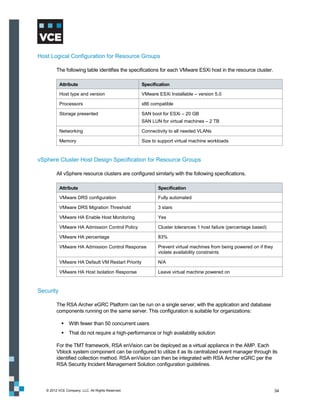
  • 80.
    Figure 49 isa graphical representation of how VMware vSphere can be used to separate each tenant’s address space. Figure 49. Address space separation with VMware vSphere © 2012 VCE Company, LLC. All Rights Reserved. 80
  • 81.
    Virtual Machine DataStore Separation VMware uses a cluster file system called a virtual machine file system (VMFS). An ESXi host associates a VMFS volume, which is made up of a larger logical unit. Each virtual machine directory is stored in the Virtual Machine Disk (VMDK) sub-directory in the VMFS volume. While a virtual machine is in operation, the VMFS volume locks those files to prevent other ESXi servers from updating them. One VMDK directory is associated with a single virtual machine; multiple virtual machines cannot access the same VMDK directory. We recommend implementing LUN masking (that is, storage groups) to assign storage to ESXi servers. LUN masking is an authorization process that makes a LUN available only to specific hosts on the EMC SAN as further protection against misbehaving servers corrupting disks belonging to other servers. This complements the use of zoning on the MDS, effectively extending zoning from the front-end port on the array to the device on which the physical disk resides. Virtual Data Mover on VNX VNX provides a multinaming domain solution for a data mover in the UNIX environment by implementing an NFS server per virtual data mover (VDM). A data mover hosting several VDMs can serve UNIX clients that are members of different LDAP or NIS domains, assuming that each VDM works for a unique naming domain. Several NFS servers are emulated on the data mover in order to serve the file system resources of the data mover for different naming domains. Each NFS server is assigned to one or more data mover network interfaces. The VDMs loaded on a data mover use the network interfaces configured on the data mover. You cannot duplicate an IP address for two VDM interfaces configured on the same data mover. Once a VDM interface is assigned, you can manage NFS exports on a VDM. CIFS and NFS protocols can share the same network interface; however, only one NFS endpoint and CIFS server is addressed through a particular logical network interface. The multinaming domain solution implements an NFS server per VDM-named NFS endpoint. The VDM acts as a container that includes the file systems exported by the NFS endpoint and/or the CIFS server. These VDM file systems are visible through a subset of data mover network interfaces attached to the VDM. The same network interface can be shared by both CIFS and NFS protocols on that VDM. The NFS endpoint and CIFS server are addressed through the network interfaces attached to that particular VDM. This allows users to perform either of the following:  Move a VDM, along with its NFS and CIFS exports and configuration data (LDAP, net groups, and so forth), to another data mover  Back up the VDM, along with its NFS and CIFS exports and configuration data This feature supports at least 50 NFS VDMs per physical data mover and up to 25 LDAP domains. © 2012 VCE Company, LLC. All Rights Reserved. 81
  • 82.
    Figure 50 showsa physical data mover with VDM implementation. Figure 50. Physical data mover with VDM implementation Note: VDM for NFS is available on VNX OE for File Version 7.0.50.2. You cannot use Unisphere to configure VDM for NFS. Refer to Configuring NFS on VNX for more information. Separation of Data Access Separation of data access ensures that a tenant cannot see or access any other tenant’s data. The data access protocol in use determines how this is accomplished. Protocols for how tenant data traffic flows inside EMC VNX are:  CIFS  NFS  iSCSI  Fibre Channel over Ethernet/Fibre Channel (FCoE/FC) © 2012 VCE Company, LLC. All Rights Reserved. 82
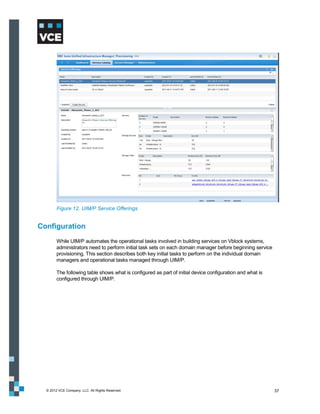
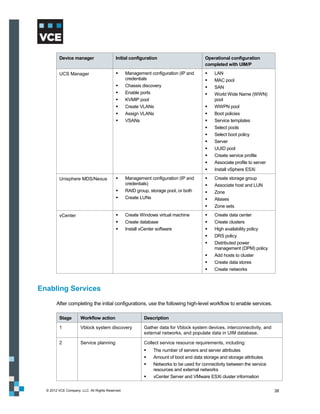
  • 83.
    Figure 51 displaysthe access protocols and the respective protocol stack that can be used to access data residing on a unified system. Figure 51. Protocol stack CIFS Stack The following table summarizes how tenant data traffic flows inside EMC VNX for the CIFS stack. Secure separation is maintained at each layer throughout the CIFS stack. CIFS stack component Description VLAN The secure separation of data access starts at the bottom of the CIFS stack on the IP network with the use of Virtual Local Area Networks (VLAN) to separate individual tenants. IP Interface VLAN Tagged The VLAN-tagging model extends into the unified system by VLAN tagging the individual IP interfaces so they understand and honor the tags being used. IP Packet Reflection IP packet reflection guarantees that any traffic sent from the storage system in response to a client request will go out over the same physical connection and VLAN on which the request was received. Virtual Data Mover The virtual data mover is a logical configuration container that wraps around a CIFS file-sharing instance. CIFS Server The virtual data mover resides on the CIFS server. © 2012 VCE Company, LLC. All Rights Reserved. 83
  • 84.
    CIFS stack component Description CIFS Share CIFS shares are built upon the CIFS servers. ABE At the top of the stack is a Windows feature called Access Based Enumeration (ABE). ABE shows a user only the files that he/she has permission to access, thus extending the separation all the way to end users if desired. NFS Stack The following table summarizes how tenant data traffic flows inside EMC VNX for the NFS stack. NFS stack component Description VLAN The secure separation of data access starts at the bottom of the NFS stack on the IP network, using VLANs to separate individual tenants. IP Interface VLAN tagged The VLAN tagging model extends into the unified system by VLAN tagging the individual IP interfaces so they understand and honor the tags being used. IP Packet Reflection IP packet reflection guarantees that any traffic sent from the storage system in response to a client request will go out over the same physical connection and VLAN on which the request was received. NFS Export VLAN tagged NFS exports can be associated with specific VLANs. NFS Export Hiding NFS export hiding tightly controls which users access the NFS exports. It enhances standard NFS server behavior by preventing users from seeing NFS exports for which they do not have access-level permission. It will appear to each tenant that they have their own individual NFS server. © 2012 VCE Company, LLC. All Rights Reserved. 84
  • 85.
    Figure 52 showsan NFS export and how a specific subnet has access to the NFS share. Figure 52. NFS export configuration In this example, VLAN 112 and VLAN 111 subnet has access to the /nfs1 share. VNX also provides granular access to the NFS share. An NFS export can be presented to a specific tenant subnet or specific host or group of hosts in the network. iSCSI Stack The following table summarizes how tenant data traffic flows inside EMC VNX for the iSCSI stack. iSCSI stack component Description VLAN The secure separation of data access starts at the bottom of the iSCSI stack on the IP network with the use of VLAN to separate individual tenants. IP Interface VLAN tagged The VLAN-tagging model extends into the unified system by VLAN tagging the individual IP interfaces so they understand and honor the tags being used. iSCSI Portal Access then flows through an iSCSI portal to a target device, where it is Target ultimately addressed to a LUN. LUN © 2012 VCE Company, LLC. All Rights Reserved. 85
  • 86.
    iSCSI stack component Description LUN Masking LUN masking is a feature for block-based protocols that ensures that LUNs are viewed and accessed only by those SAN clients with the appropriate permissions. Support for VLAN tagging in iSCSI VLAN is supported for iSCSI data ports and management ports on VNX storage systems. In addition to better performance, ease of management, and cost benefits, VLANs provide security advantages since devices configured with VLAN tags can see and communicate with each other only if they belong to the same VLAN. Therefore, you can:  Set up multiple virtual ports on the VNX and segregate hosts into different VLANs based on your security policy  Restrict sensitive data to one VLAN VLANs make it more difficult to sniff traffic, as they require sniffing across multiple networks. This provides extra security. Figure 53 shows the iSCSI port properties for a port with VLANs enabled and two virtual ports configured. Figure 53. iSCSI Port Properties with VLAN tagging enabled © 2012 VCE Company, LLC. All Rights Reserved. 86
  • 87.
    Fibre Channel overEthernet/Fibre Channel Stack The lower layers of the fibre channel stack look quite different because it is not an IP-based protocol. The following table summarizes how tenant data traffic flows inside EMC VNX for the FCoE/FC stack. FCoE/FC stack component Description FC Zone FC zoning controls which FC/Fibre Channel over Ethernet (FCoE) interfaces can communicate with each other within the fabric. VSAN Virtual Storage Area Networks can be used to further subdivide individual zones without the need for physical separation. Target Access flows to a target device, where it is ultimately addressed to a LUN LUN. LUN Masking LUN masking is a feature for block-based protocols that ensures that LUNs are viewed and accessed only by those SAN clients with the appropriate permissions. Figure 54 and Figure 55 show how a 20 GB FC boot LUN and 2 TB LUN map to each host in VNX. It ensures each LUN presented to the ESXi host is properly masked and granted access to the specific LUN and spread out in different RAID groups. Figure 54. Boot LUN and host mapping Figure 55. Data LUN and host mapping © 2012 VCE Company, LLC. All Rights Reserved. 87
  • 88.
    Design Considerations forService Assurance Once you achieve secure separation of each tenant’s data and path to that data, the next priority is predictable and reliable access that meets the tenant’s SLA. Furthermore, in a service provider chargeback environment, it may be important that tenants do not receive more performance than they paid for simply because there is no contention for shared storage resources. Service assurance ensures that SLAs are met at appropriate levels through the dedication of runtime resources and quality of service control. Additionally, storage tiering with FAST lowers overall storage costs and simplifies management while allowing different applications to meet different service-level requirements on distinct pools of storage within the same storage infrastructure. FAST technology automates the dynamic allocation and relocation of data across tiers for a given FAST policy, based on changing application performance requirements. FAST helps maximize the benefits of preconfigured tiered storage by optimizing cost and performance requirements to put the right data on the right tier at the right time. Dedication of Runtime Resources Each VNX data mover has dedicated CPUs, memory, front-end, and back-end networks. A data mover can be dedicated to a single tenant or shared among several tenants. To further ensure the dedication of runtime resources, data movers can be clustered into active/standby groupings. From a hardware perspective, dedicating pools, spindles, and network ports to a specific tenant or application can further ensure adherence to SLAs. Quality of Service Control EMC has several software tools available that organize the dedication of runtime resources. At the storage layer, the most powerful of these is Unisphere Quality of Service Manager (UQM), which allows VNX resources to be managed based on service levels. UQM utilizes policies to set performance goals for high-priority applications, set limits on lower-priority applications, and schedules policies to run on predefined timetables. These policies direct the management of any or all of the following performance aspects:  Response time  Bandwidth  Throughput UQM provides a simple user interface for service providers to control policies. This control is invisible to tenants and can ensure that the activity of one tenant does not impact that of another. For example, if a tenant requests a dedicated disk, storage groups, and spindles for its storage resources, apply these control policies to get optimum storage I/O performance. © 2012 VCE Company, LLC. All Rights Reserved. 88
  • 89.
    Figure 56 showshow you can create policies with a specific set of I/O class to ensure that SLAs are maintained. Figure 56. EMC VNX – QoS configuration EMC VNX FAST VP With standard storage tiering in a non-FAST VP enabled array, multiple storage tiers are typically presented to the vCloud environment, and each offering is abstracted out into separate provider virtual data centers (vDC). A provider may choose to provision an EFD [SSD/Flash] tier, an FC/SAS tier, and a SATA/NL-SAS tier, and then abstract these into Gold, Silver, and Bronze provider virtual data centers. The customer then chooses resources from these for use in their organizational virtual data center. This provisioning model is limited for a number of reasons, including the following:  VMware vCloud Director does not allow for a non-disruptive way to move virtual machines from one provider virtual data center to another. This means the customer must provide for downtime if the vApp needs to be moved to a more appropriate tier.  For workloads with a variable I/O personality, there is no mechanism to automatically migrate those workloads to a more appropriate disk tier.  With the cost of enterprise flash drives (EFD) still significant, creating an entire tier of them can be prohibitively expensive, especially with few workloads having an I/O pattern that takes full advantage of this particular storage medium. One way in which the standard storage tiering model can be beneficial is when multiple arrays are used to provide different kinds of storage to support different I/O workloads. © 2012 VCE Company, LLC. All Rights Reserved. 89
  • 90.
    FAST VP StorageTiering There are ways to provide more flexibility and a more cost-effective platform when compared with a standard tiering model. Instead of using a single disk type per provider virtual data center, organizations can blend both the cost and performance characteristics of multiple disk types. The following table shows examples of this approach. Create a FAST VP pool As this type of tier… For… containing… 20% EFD and 80% Performance tier Customers who might need the performance of FC/SAS disks EFD at certain times, but do not want to pay for that performance all the time 50% FC/SAS disks and Production tier Most standard enterprise applications to take 50% SATA disks advantage of the standard FC/SAS performance, yet have the ability to de-stage cold data to SATA disk to lower the overall cost of storage per GB 90% SATA disks and 10% Archive tier Storing mostly nearline data, with the FC/SAS FC/SAS disks disks used for those instances where the customer needs to go to the archive to recover data, or for customers who are dumping a significant amount of data into the tier. Tiering Policies FAST VP offers a number of policy settings to determine how data is placed, how often it is promoted, and how data movement is managed. In a vCloud Director environment, the following policy settings are recommended to best accommodate the types of I/O workloads produced. Policy Default Setting Recommended Setting Data Relocation Schedule Set to migrate data seven days a In a vCloud Director environment, week, between 11pm and 6am, open up the Data Relocation window reflecting the standard business to run 24 hours a day. day. Reduce the Data Relocation Rate to Set to use a Data Relocation Rate Low. This allows for constant of Medium, which can relocate promotion and demotion of data, yet 300-400 GB of data per hour. limits the impact on host I/O. FAST VP-enabled Set to use the Auto-Tier, In a vCloud Director environment, LUNs/Pools spreading data evenly across all where customers are generally paying tiers of disks. for the lower tier of storage but leveraging the ability to promote workloads to higher-performing disk when needed, the recommendation is to use the Lowest Available Tier policy. This places all data onto the lower tier of disk initially, keeping the higher tier of disk free for data that needs it. © 2012 VCE Company, LLC. All Rights Reserved. 90
  • 91.
    EMC FAST Cache In a vCloud Director environment, VCE recommends a minimum of 100 GB of FAST Cache, with the amount of FAST Cache increasing as the number of virtual machines increases. The combination of FAST VP and FAST Cache allows the vCloud environment to scale better, support more virtual machines and a wider variety of service offerings, and protect against I/O spikes and bursting workloads in a way that is unique in the industry. These two technologies in tandem are a significant differentiator for the Vblock system. EMC Unisphere Management Suite EMC Unisphere provides a simple, integrated experience for managing EMC Unified Storage through both a storage and VMware lens. It is designed to provide simplicity, flexibility, and automation, which are all key requirements for using private clouds. Unisphere includes a unique self-service support ecosystem that is accessible with one-click, task‐ based navigation and controls for intuitive, context-based management. It provides customizable dashboard views and reporting capabilities that present users with valuable storage management information. VMware vCloud Director A provider virtual data center is a resource pool consisting of a cluster of VMware ESXi servers that access a shared storage resource. The provider virtual data center can contain one of the following:  Part of a data store (shared by other provider virtual data centers)  All of a data store  Multiple data stores As storage is provisioned to organization virtual data centers, the shared storage pool for the provider virtual data center is seen as a single pool of storage with no distinction of storage characteristics, protocol, or other characteristics differentiating it from being a single large address space. If a provider virtual data center contains more than one data store, it is considered best practice that those data stores have equal performance capability, protocol, and quality of service. Otherwise, the slower storage in the collective pool will impact the performance of that provider virtual data storage pool. Some virtual data centers might end up with faster storage than others. To gain the benefits of different storage tiers or protocols, define separate provider virtual data centers, where each provider virtual data center has storage of different protocols or differing quality- of-service storage. For example, provision the following:  A provider virtual data center built on a data store backed by 15K RPM FC disks with loads of cache in the disk for the highest disk performance tier  A second provider virtual data center built on a data store backed by SATA drives and not much cache in the array for a lower tier © 2012 VCE Company, LLC. All Rights Reserved. 91
  • 92.
    When a providervirtual data center shares a data store with another provider virtual data center, the performance of one provider virtual data center may impact performance of the other provider virtual data center. Therefore, it is considered best practice to have a provider virtual data center that has a dedicated data store such that isolation of the storage reduces the chances of introducing different quality-of-service storage resources in a provider virtual data center. Design Considerations for Security and Compliance This section provides information about:  Authentication with LDAP or Active Directory  EMC VNX and RSA enVision Authentication with LDAP or Active Directory VNX can authenticate users against an LDAP directory, such as Active Directory. Authentication against an LDAP server simplifies management because you do not need a separate set of credentials to manage VNX storage systems. It is also more secure, as enterprise password policies can be enforced for the storage environment. Figure 57 shows LDAP integration in VNX. Figure 57. LDAP configuration in VNX © 2012 VCE Company, LLC. All Rights Reserved. 92
  • 93.
    Role Mapping Once communications are established with the LDAP service, give specific LDAP users or groups access to Unisphere by mapping them to Unisphere roles. The LDAP service merely performs the authentication. Once authenticated, a user’s authorization is determined by the assigned Unisphere role. The most flexible configuration is to create LDAP groups that correspond to Unisphere roles. This allows you to control access to Unisphere by managing the members of the LDAP groups. For example, Figure 58 shows two LDAP groups: Storage Admins and Storage Monitors. It shows how you can map specific LDAP groups into specific roles. Figure 58. Mapping LDAP groups Component Access Control Component access control settings define access to a product by external and internal systems or components. CHAP Component Authentication SCSI's primary authentication mechanism for iSCSI initiators is the Challenge Handshake Authentication Protocol (CHAP). CHAP is an authentication protocol used to authenticate iSCSI initiators at target login and at various random times during a connection. CHAP security consists of a username and password. You can configure and enable CHAP security for initiators and for targets. The CHAP protocol requires initiator authentication. Target authentication (mutual CHAP) is optional. © 2012 VCE Company, LLC. All Rights Reserved. 93
  • 94.
    LUN Masking ComponentAuthorization A storage group is an access control mechanism for LUNs. It segregates groups of LUNs from access by specific hosts. When you configure a storage group, you identify a set of LUNs that will be used by only one or more hosts. The storage system then enforces access to the LUNs from the host. The LUNs are presented to only the hosts in the storage group. The hosts can see only the LUNs in the group. IP Filtering IP filtering adds another layer of security by allowing administrators and security administrators to configure the storage system to restrict administrative access to specified IP addresses. These settings can be applied to the local storage system or to the entire domain of storage systems. Audit Logging Audit logging is intended to provide a record of all activities, so that the following can occur:  Checks for suspicious activity can be performed periodically.  The scope of suspicious activity can be determined. Audit logs are especially important for financial institutions that are monitored by regulators. Audit information for VNX storage systems is contained within the event log on each storage processor. The log also contains hardware and software debugging information and a time-stamped record for each event. Each record contains the following information:  Event code  Description of event  Name of the storage system  Name of the corresponding storage processor  Hostname associated with the storage processor © 2012 VCE Company, LLC. All Rights Reserved. 94
  • 95.
    VNX and RSAenVision VNX storage systems are made even more secure by leveraging the continuous collecting, monitoring, and analyzing capabilities of RSA enVision. RSA enVision performs the functions listed in the following table. RSA function Description Collects logs Can collect event log data from over 130 event sources–from firewalls to databases. RSA enVision can also collect data from custom, proprietary sources using standard transports such as Syslog, OBDC, SNMP, SFTP, OPSEC, or WMI. Securely stores logs Compresses and encrypts log data so it can be stored for later analysis, while maintaining log confidentiality and integrity. Analyzes logs Analyzes data in real time to check for anomalous behavior requiring an immediate alert and response. RSA enVision proprietary logs are also optimized for later reporting and forensic analysis. Built-in reports and alerts allow administrators and auditors quick and easy access to log data. Figure 59 provides a detailed look at storage behavior in RSA enVision. Figure 59. RSA enVision storage behavior © 2012 VCE Company, LLC. All Rights Reserved. 95
  • 96.
    Network Encryption The Storage Management server provides 256-bit symmetric encryption of all data passed between it and the administrative client components that communicate with it, as listed under Port Usage (Web browser, Secure CLI), as well as all data passed between Storage Management servers. The encryption is provided through SSL/TLS and uses the RSA encryption algorithm, providing the same level of cryptographic strength as is employed in e-commerce. Encryption protects the transferred data from prying eyes—whether on the local LANs behind the corporate firewalls, or if the storage systems are being remotely managed over the Internet. Design Considerations for Availability and Data Protection Availability goes hand in hand with service assurance. While service assurance directs resources at the tenant level, availability secures resources at the service provider level. Availability ensures that resources are available for all tenants utilizing a service provider’s infrastructure, by meeting the requirements of high availability and local and remote data protection. High Availability In the storage layer, the high availability design is consistent with the high availability model implemented at other layers in the Vblock system, comprising physical redundancy and path redundancy. These are listed in the following types of redundancies:  Link redundancy  Hardware and node redundancy Link Redundancy Pending the availability of FC port channels on UCS FC ports and FC port trunking, multiple individual FC links from the 6120 fabric interconnects are connected to each SAN fabric, and VSAN membership of each link is explicitly configured in the UCS. In the event of an FC (NP) port link failure, affected hosts will re-logon in a round-robin manner using available ports. FC port channel support, when available, means that redundant links in the port channel will provide active/active failover support in the event of a link failure. Multipathing software from VMware or EMC PowerPath software further enhances high availability, optimizing use of the available link bandwidth and enhancing load balancing across multiple active host adapter ports and links with minimal disruption in service. Hardware and Node Redundancy The Vblock system TMT design leverages best practice methodologies for SAN high availability, prescribing full hardware redundancy at each device in the I/O path from host to SAN. In terms of hardware redundancy this begins at the server, with dual port adapters per host. Redundant paths from the hosts feed into dual, redundant MDS SAN switches (that is, with dual supervisors) and then into redundant SAN arrays with tiered, RAID protection. RAID 1 and 5 were deployed in this particular design as two more commonly used levels; however the selection of a RAID protection level depends on a balancing of cost versus the critical nature of the data to be stored. © 2012 VCE Company, LLC. All Rights Reserved. 96
  • 97.
    The ESXi hostsare protected by the VMware vCenter high availability feature. Storage paths can be protected using EMC PowerPath/VE. Figure 60 shows the storage path protection. Figure 60. Storage path protection Virtual machines and application data can be protected using EMC Avamar, Data Domain, and Replication Manager. However these are not within the scope of this guide. Single Point of Failure High availability (HA) systems are the foundation upon which any enterprise-class multi-tenancy environment is built. High availability systems are designed to be fully redundant with no single point of failure (SPOF). Additional availability features can be leveraged to address single point of failure in the TMT design. The following are some high-level SPOF entity needs to consider:  Dual-ported drives  Redundant FC loops  Battery-backed mirrored write cache dual storage processors  Asymmetric Logical Unit Access (ALUA) dual paths to storage  N+M X-Blade failover clustering  Network link aggregation  Fail-safe network © 2012 VCE Company, LLC. All Rights Reserved. 97
  • 98.
    Local and RemoteData Protection It is important to ensure that data is protected for the entirety of its lifecycle. Local replication technologies, such as snapshots and clones, allow users to roll back to recent points in time in the event of corruption or accidental deletion. Local replication technologies include SnapSure and SnapView for VNX. Use Network Data Management Protocol (NDMP) backup to deeply efficient storage platforms, such as Data Domain, for restoration of data from a point further back in time. Remote replication is key to protecting user data from site failures. EMC RecoverPoint and MirrorView software enable remote replication between EMC’s Unified Storage systems. Use Replication Manager to ease the management of replication and ensure consistency between replicas. Below are some key points for each of these products; however, they are not within the scope of this guide. SnapSure Use SnapSure to create and manage checkpoints on thin and thick file systems. Checkpoints are point-in-time, logical images of a file system. Checkpoints can be created on file systems that use pool LUNs or traditional LUNs. SnapView For local replication, SnapView snapshots and clones are supported on thin and thick LUNs. SnapView clones support replication between thick, thin, and traditional LUNs. When cloning from a thin LUN to a traditional LUN or thick LUN, the physical space of the traditional/thick LUN must equal the host-visible capacity of the thin LUN. This results in a fully allocated thin LUN if the traditional LUN/thick LUN is reverse-synchronized. Cloning from traditional/thick to thin LUN results in a fully allocated thin LUN as the initial synchronization will force the initialization of all the subscribed capacity. For more information, refer to EMC SnapView for VNX. RecoverPoint Replication is also supported through RecoverPoint. Continuous data protection (CDP) and continuous remote replication (CRR) support replication for thin LUNs, thick LUNs, and traditional LUNs. When using RecoverPoint to replicate to a thin LUN, only data is copied; unused space is ignored so the target LUN is thin after the replication. This can provide significant space savings when replicating from a non-thin volume to a thin volume. When using RecoverPoint, we recommend that you not use journal and repository volumes on thin LUNs. For more information on using RecoverPoint, see EMC RecoverPoint: Protecting the Private Cloud. (Powerlink access required.) © 2012 VCE Company, LLC. All Rights Reserved. 98
  • 99.
    MirrorView When mirroring a thin LUN to another thin LUN, only consumed capacity is replicated between the storage systems. This is most beneficial for initial synchronizations. Steady state replication is similar, since only new writes are written from the primary storage system to the secondary system. When mirroring from a thin LUN to a traditional or thick LUN, the thin LUN’s host-visible capacity must be equal to the traditional LUN’s capacity or the thick LUN’s user capacity. Any failback scenario that requires a full synchronization from the secondary to the thin primary image causes the thin LUN to become fully allocated. When mirroring from a thick LUN or traditional LUN to a thin LUN, the secondary thin LUN is fully allocated. With MirrorView, if the secondary image LUN is added with the no initial syncronization option, the secondary image retains its thin attributes. However, any subsequent full synchronization from the traditional LUN or thick LUN to the thin LUN, as a result of a recovery operation, causes the thin LUN to become fully allocated. For more information on using pool LUNs with MirrorView, see MirrorView Knowledgebook (Powerlink access required). PowerPath Migration Enabler EMC PowerPath Migration Enabler (PPME) is a host-based migration tool that enables non-disruptive or minimally disruptive data migration between storage systems or between logical units within a single storage system. The Host Copy technology in PPME works with the host operating system to migrate data from the source logical unit to the target. With PPME 5.3, the Host Copy technology supports migrating virtually provisioned devices. When migrating to a thin target, the target’s thin- device capability is maintained. © 2012 VCE Company, LLC. All Rights Reserved. 99
  • 100.
    Design Considerations forService Provider Management and Control EMC Unisphere includes a unique self-service support ecosystem that is accessible through one-click, task-based navigation and controls for intuitive, context-based management. It provides customizable dashboard views and reporting capabilities that present users with valuable storage management information. EMC Unisphere, a unified element management interface for NAS, SAN, replication, and more, offers a single point of control from which a service provider can manage all aspects of the storage layer. Service providers can use Unified Infrastructure Manager/Provisioning to manage the entire stack (compute, network, and storage). These two products mark a paradigm shift in the way infrastructure is managed. Figure 61 shows a service provider view of the Unisphere dashboard and shows a connected vCenter with all the ESXi hosts. Figure 61. EMC Unisphere dashboard © 2012 VCE Company, LLC. All Rights Reserved. 100
  • 101.
    Design Considerations forNetworking Various methods, including zoning and VLANs can enforce network separation. Internet Protocol Security (IPsec) provides application-independent network encryption at the IP layer for additional security. This section describes the design of and rationale behind the TMT framework for Vblock system network technologies. The design includes many issues that must be addressed prior to deployment, as no two environments are alike. Design considerations are provided for each TMT element. Design Considerations for Secure Separation This section discusses using the following technologies to achieve secure separation at the network layer:  VLANs  Virtual Routing and Forwarding  Virtual Device Context  Access Control List VLANs VLANs provide a Layer 2 option to scale virtual machine connectivity, providing application tier separation and multitenant isolation. In general, Vblock systems have two types of VLANs:  Routed – Include management VLANs, virtual machine VLANs, and data VLANs; will pass through Layer 2 trunks and be routed to the external network  Internal – Carry VMkernel traffic, such as vMotion, service console, NFS, DRS/HA, and so forth This design guide uses three tenants: Tenant Orange, Tenant Vanilla and Tenant Grape. Each tenant has multiple virtual machines for different applications (such as Web server, email server, and database), which are associated with different VLANs. It is always recommended to separate data and management VLANs. © 2012 VCE Company, LLC. All Rights Reserved. 101
  • 102.
    The following tablelists example VLAN categories used in the Vblock system TMT design framework. VLAN type VLAN name VLAN number Management VLANs (routed) Core Infra management 100 C200_ESX_mgt 101 C299_ESX_vmotion 102 UCS_mgt and KVM 103 Vblock_ESX_mgt 104 Vblock_ESX_vmotion 105 Internal VLANs (local to Vblock system) Vblock_ESX_build 106 Vblock_N1k_pkg 107 Vblock_N1k_control 108 Vblock_NFS 111 Data VLANs (routed VLAN) Fcoe_USC_to_storageA 109 Fcoe_UCS_to_storageB 110 Vblock_VMNetwork 112 Tenant 1_VMNetwork 113 Tenant-2_VMNetwork 118 Tenant-3_VMNetwork 123 Configure VLAN (both Layer 2 and Layer 3) in all network devices supported in the TMT infrastructure to ensure that management, tenant, and Vblock system internal VLANs are isolated from each other. Note: Service providers may need additional VLANs for scalability, depending on size requirements. Virtual Routing and Forwarding Use Virtual Routing and Forwarding (VRF) to virtualize each network device and all its physical interconnects. From a data plane perspective, the VLAN tags can provide logical isolation on each point-to-point Ethernet link that connects the virtualized Layer 3 network device. Cisco VRF Lite uses a Layer 2 separation method to provide path isolation for each tenant across a shared network link. Using VRF Lite in the core and aggregation layers enables segmentation of tenants hosted on the common physical infrastructure. VRF Lite completely isolates the Layer 2 and Layer 3 control and forwarding planes of each tenant, allowing flexibility in defining an optimum network topology for each tenant. © 2012 VCE Company, LLC. All Rights Reserved. 102
  • 103.
    The following tablesummarizes the benefits that the Cisco VRF Lite technology provides a TMT environment. Benefit Description Virtual replication of physical Each virtual network represents an exact replica of the underlying infrastructure physical infrastructure. This effect results from VRF Lite’s per hop technique, which requires every network device and its interconnections to be virtualized. True routing and forwarding Dedicated data and control planes are defined to handle traffic belonging separation to groups with various requirements or policies. These groups represent an additional level of segregation and security as no communication is allowed among devices belonging to different VRFs unless explicitly configured. Network separation at Layer 2 is accomplished using VLANs. Figure 62 shows how the VLANs defined on each access layer device for each tenant are mapped to the same tenant VRF at the distribution layer. Figure 62. VLAN to VRF mapping © 2012 VCE Company, LLC. All Rights Reserved. 103
  • 104.
    Use VLANs toachieve network separation at Layer 2. While VRFs are used to identify a tenant, VLAN-IDs provide isolation at Layer 2. Tenant VRFs are applied on the Cisco Nexus 7000 Series Switch at the aggregation and core layer, which are mapped with unique VLANs. All VLANs are carried over the 802.1Q trunking ports. Virtual Device Context The Layer 2 VLANs and Layer 3 VRF features help ensure TMT secure separation at the network layer. You can also use the Virtual Device Context (VDC) feature on the Nexus 7000 Series Switch to virtualize the device itself, presenting the physical switch as multiple logical devices. A virtual device context can contain its own unique and independent set of VLANs and VRFs. Each virtual device context can be assigned to its physical ports, allowing for the hardware data plane to be virtualized as well. Access Control List Access Control List (ACL), VLAN Access Control List (VACL), and port security can be applied in TMT Layer 2 and Layer 3 to allow only the desired traffic for an expected destination within the same tenant domain or among different tenants. This is shown in the following table. Device name ACL supported Cisco Nexus 1000V Series Switch Yes Cisco Nexus 5000 Series Switch Yes Cisco Nexus 7000 Series Switch Yes © 2012 VCE Company, LLC. All Rights Reserved. 104
  • 105.
    Design Considerations forService Assurance Service assurance is a core requirement for shared resources and their protection. Network, compute, and storage resources are guaranteed based on service level agreements. Quality of service enables differential treatment of specific traffic flows, helping to ensure that in the event of congestion or failure conditions, critical traffic is provided with a sufficient amount of available bandwidth to meet throughput requirements. Figure 63 shows the traffic flow types defined in the Vblock system TMT design. Figure 63. Traffic flow types © 2012 VCE Company, LLC. All Rights Reserved. 105
  • 106.
    The traffic flowtypes break down into three traffic categories, as shown in the following table. Traffic Category Description Infrastructure Comprises management and control traffic and vMotion communication. This is typically set to the highest priority to maintain administrative communications during periods of instability or high CPU utilization. Tenant Differentiated into Gold, Silver, and Bronze service levels; may include virtual machine-to-virtual machine, virtual machine-to-storage, and/or virtual machine- to-tenant traffic.  Gold tenant traffic is highest priority, requiring low latency and high bandwidth guarantees  Silver traffic requires medium latency and bandwidth guarantees  Bronze traffic is delay-tolerant, requiring low bandwidth guarantees Storage The Vblock system TMT design incorporates both FC and IP-attached storage. Since these traffic types are treated differently throughout the network, storage requires two subcategories:  FC traffic requires a no drop policy  NFS data store traffic is sensitive to delay and loss QoS service assurance for Vblock systems has been introduced at each layer. Consider the following features for service assurance at the network layer:  Quality of service tenant marking at the edge  Traffic flow matching  Quality of service bandwidth guarantee  Quality of service rate limit Traffic originates from three sources:  ESXi hosts and virtual machines  External to data center  Networked-attached devices Consider traffic classification, bandwidth guarantee with queuing, and rate limiting based on tenant traffic priority for networking service assurance. © 2012 VCE Company, LLC. All Rights Reserved. 106
  • 107.
    Design Considerations forSecurity and Compliance TMT infrastructure networks require intelligent services, such as firewall and load balancing of servers and hosted applications. This design guide focuses on the Vblock system TMT framework, in which a firewall module and other load balancers are the external devices connected to the Vblock system. A multi-tenant environment consists of numerous service and infrastructure devices, depending on the business model of the organization. Often, servers, firewalls, network intrusion prevention systems (IPS), host IPSs, switches, routers, application firewalls, and server load balancers are used in various combinations within a multi-tenant environment. The Cisco Firewall Services Module (FWSM) provides Layer 2 and Layer 3 firewall inspection, protocol inspection, and network address translation (NAT). The Cisco Application Control Engine (ACE) module provides server load balancing and protocol (IPSec, SSL) off-loading. Both the FWSM and ACE module can be easily integrated into existing Cisco 6500 Series switches, which are widely deployed in data center environments. Note: To use the Cisco ACE module, you must add a Cisco 6500 Series switch. To succesfully achive trusted multi-tenancy, a service provider needs to adopt each key component as discussed below. As shown in Figure 3, the TMT framework has the following key components: Component Description Core Provides a Layer 3 routing module for all traffic in and out of the service provider data center. Aggregation Serves as the Layer 2 and Layer 3 boundary for the data center infrastructure. In this design, the aggregation layer also serves as the connection point for the primary data center firewalls. Services Deploys services such as server load balancers, intrusion prevention systems, application-based firewalls, network analysis modules, and additional firewall services. Access The data center access layer serves as a connection point for the server farm. The virtual access layer refers to the virtual network that resides in the physical servers when configured for virtualization. With this framework, you can add components as demand and load increase. © 2012 VCE Company, LLC. All Rights Reserved. 107
  • 108.
    The following tabledescribes the high-level security functions for each layer of the data center. Data Center Layer Security Component Purpose/Function Aggregation Data center firewalls Initial filter for data center ingress and egress traffic. Virtual context is used to split policies for server-to- server filtering. Infrastructure security Infrastructure security features are enabled to protect device, traffic plane, and control plane. Virtual data center provides internal/external segmentation. Service Security services Additional firewall services for server farm–specific protection. Server load balancing masks servers and applications. Application firewall mitigates XSS-, HTTP-, SQL-, and XML-based attacks. Data center services IPS/IDS provide traffic analysis and forensics. Network analysis provides traffic monitoring and data analysis. XML Gateway protects and optimizes Web-based services. Access ACLs, CISC, port security, quality of service, CoPP, VN tag Virtual access Layer 2 security features are available within the physical server for each virtual machine. Features include ACLs, CISF, port security, Netflow ERSPAN, quality of service, CoPP, VN tag. Data Center Firewalls The aggregation layer provides an excellent filtering point and the first layer of protection for the data center. It provides a building block for deploying firewall services for ingress and egress filtering. The Layer 2 and Layer 3 recommendations for the aggregation layer also provide symmetric traffic patterns to support stateful packet filtering. Because of the performance requirements, this design uses a pair of Cisco ASA firewalls connected directly to the aggregation switches. The Cisco ASA firewalls meet the high-performance data center firewall requirements by providing 10 GB/s of stateful packet inspection. The Cisco ASA firewalls are configured in transparent mode, which means the firewalls are configured in a Layer 2 mode and will bridge traffic between interfaces. The Cisco ASA firewalls are configured for multiple contexts using the virtual context feature, which allows the firewall to be divided into multiple logical firewalls, each supporting different interfaces and policies. Note: The modular aspect of this design allows additional firewalls to be deployed at the aggregation layer as the server farm grows and performance requirements increase. © 2012 VCE Company, LLC. All Rights Reserved. 108
  • 109.
    The firewalls areconfigured in an active-active design, which allows load sharing across the infrastructure based on the active Layer 2 and Layer 3 traffic paths. Each firewall is configured for two virtual contexts:  Virtual context 1 is active on ASA1  Virtual context 2 is active on ASA2 This corresponds to the active Layer 2 spanning tree path and the Layer 3 Hot Standby Routing Protocol (HSRP) configuration. Figure 64 shows an example of each firewall connection. Figure 64. Cisco ASA virtual contexts and Cisco Nexus 7000 virtual device contexts Virtual Context Details The context details on the firewall provide different forwarding paths and policy enforcement, depending on the traffic type and destination. Incoming traffic that is destined for the data center services layer (ACE, WAF, IPS, and so on) is forwarded over VLAN 161 from VDC1 on the Cisco Nexus 7000 to virtual context 1 on the Cisco ASA. The inside interface of virtual context 1 is configured on VLAN 162. The Cisco ASA filters the incoming traffic and then, in this case, bridges the traffic to the inside interface on VLAN 162. VLAN 162 is carried to the services switch where traffic has additional services applied. The same applies to virtual context 2 on VLANs 151 and 152. This context is active on ASA2. © 2012 VCE Company, LLC. All Rights Reserved. 109
  • 110.
    Deployment Recommendations Firewalls enforce access policies for the data center. A best practice is to create a multilayered security model to protect the data center from internal or external threats. The firewall policy will differ, based on the organizational security policy and the types of applications deployed. Regardless of the number of ports and protocols allowed either to and from the data center, or from server to server, there are some baseline recommendations that serve as a starting point for most deployments. The firewalls should be hardened in a similar fashion to the infrastructure devices. The following configuration notes apply:  Use HTTPS for device access. Disable HTTP access.  Configure authentication, authorization, and accounting.  Use out-of-band management and limit the types of traffic allowed over the management interface(s).  Use Secure Shell (SSH). Disable Telnet.  Use Network Time Protocol (NTP) servers. Depending on traffic types and policies, the goal might not be to send all traffic flows to the services layer. Some incoming application connections, such as those from a DMZ or client batch jobs (such as backup), might not need load balancing or additional services. An alternative is to deploy another context on the firewall to support the VLANs that are not forwarded to the services switches. Caveats Using transparent mode on the Cisco ASA firewalls requires that an IP address be configured for each context. This is required to bridge traffic from one interface to another and to manage each Cisco ASA context. While in transparent mode, you cannot allocate the same VLAN across multiple interfaces for management purposes. A separate VLAN is used to manage each context. The VLANs created for each context can be bridged back to the primary management VLAN on an upstream switch if desired. Note: This provides a workaround and does not require allocating new network-wide management VLANs and IP subnets to manage each context. © 2012 VCE Company, LLC. All Rights Reserved. 110
  • 111.
    Services Layer Data center security services can be deployed in a variety of combinations. The goal of these designs is to provide a modular approach to deploying security by allowing additional capacity to be added easily for each service. Additional Web application firewalls, intrusion prevention systems (IPS), firewalls, and monitoring services can all be scaled without requiring an overall redesign of the data center. Figure 65 illustrates how the services layer fits into the data center security environment. Figure 65. Data center security and the services layer Cisco Application Control Engine This design features the Cisco Application Control Engine (ACE) service module for the Cisco Catalyst 6500. Cisco ACE is designed as an application- and server-scaling tool, but it has security benefits as well. Cisco ACE can mask a server’s real IP address and provide a single IP address for clients to connect over a single or multiple protocols such as HTTP, HTTPS, FTP, and so forth. This design uses Cisco ACE to scale the Web application firewall appliances, which are configured as a server farm. Cisco ACE distributes connections to the Web application firewall pool. As an added benefit, Cisco ACE can store server certificates locally. This allows Cisco ACE to proxy Secure Socket Layer (SSL) connections for client requests and forward the requests in clear text to the server. © 2012 VCE Company, LLC. All Rights Reserved. 111
  • 112.
    Cisco ACE providesa highly available and scalable data center solution from which the vCloud Director environment can benefit. Use Cisco ACE to apply a different context and associated policies, interfaces, and resources for one vCloud Director cell and a completely different context for another vCloud Director cell. In this design, Cisco ACE is terminating incoming HTTPS requests and decrypting the traffic prior to forwarding it to the Web application firewall farm. The Web application firewall and subsequent Cisco IPS devices can now view the traffic in clear text for inspection purposes. Note: Some compliance standards and security policies dictate that traffic be encrypted from client to server. It is possible to modify the design so traffic is re-encrypted on Cisco ACE after inspection prior to being forwarded to the server. Web Application Firewall Cisco ACE Web Application Firewall (WAF) provides firewall services for Web-based applications. It secures and protects Web applications from common attacks, such as identity theft, data theft, application disruption, fraud, and targeted attacks. These attacks can include cross-site scripting (XSS) attacks, SQL and command injection, privilege escalation, cross-site request forgeries (CSRF), buffer overflows, cookie tampering, and denial-of-service (DoS) attacks. In the TMT design, the two Web application firewall appliances are considered as a cluster and are load balanced by Cisco ACE. Each Web application firewall cluster member can be seen in the Cisco ACE Web Application Firewall Management Dashboard. The Cisco ACE Web Application Firewall acts as a reverse proxy for the Web servers it is configured to protect. The Virtual Web Application creates a virtual URL that intercepts incoming client connections. You can configure a virtual Web application based on the protocol and port as well as the policy you want applied. The destination server IP address is Cisco ACE. Because the Web application firewall is being load balanced by Cisco ACE, it is configured as a one-armed connection to Cisco ACE to send and receive traffic. © 2012 VCE Company, LLC. All Rights Reserved. 112
  • 113.
    Cisco ACE andWeb Application Firewall Design Cisco ACE Web Application Firewall is deployed in a one-armed design and is connected to Cisco ACE over a single interface. Figure 66. Cisco ACE module and Web Application Firewall integration Cisco Intrusion Prevention System The Cisco Intrusion Prevention System (IPS) provides deep packet and anomaly inspection to protect against both common and complex embedded attacks. The IPS devices used in this design are Cisco IPS 4270s with 10 GbE modules. Because of the nature of IPS and the intense inspection capabilities, the amount of overall throughput varies depending on the active policy. Default IPS policies were used in the examples presented in this design guide. In this design, the IPS appliances are configured for VLAN pairing. Each IPS is connected to the services switch with a single 10 GbE interface. In this example, VLAN 163 and VLAN 164 are configured as the VLAN pair. © 2012 VCE Company, LLC. All Rights Reserved. 113
  • 114.
    The IPS deploymentin the data center leverages EtherChannel load balancing from the service switch. This method is recommended for the data center because it allows the IPS services to scale to meet the data center requirements. This is shown in Figure 67. Figure 67. IPS ECLB in the services layer A port channel is configured on the services switch to forward traffic over each 10 GB link to the receiving IPS. Since Cisco IPS does not support Link Aggregate Control Protocol (LACP) or Port Aggregation Protocol (PAgP), the port channel is set to on to ensure no negotiation is necessary for the channel to become operational. It is very important to ensure all traffic for a specific flow goes to the same Cisco IPS. To best accomplish this, it is recommended to set the hash for the port channel to source and destination IP address. Each EtherChannel supports up to eight ports per channel. © 2012 VCE Company, LLC. All Rights Reserved. 114
  • 115.
    This design canscale up to eight Cisco IPS 4270s per channel. Figure 68 illustrates Cisco IPS EtherChannel load balancing. Figure 68. Cisco IPS EtherChannel load balancing Caveats Spanning tree plays an important role in IPS redundancy in this design. Under normal operating conditions traffic, a VLAN always follows the same active Layer 2 path. If a failure occurs (a service switch failure or a service switch link failure), spanning tree converges, and the active Layer 2 traffic path changes to the redundant service switch and Cisco IPS appliances. © 2012 VCE Company, LLC. All Rights Reserved. 115
  • 116.
    Cisco ACE, CiscoACE Web Application Firewall, Cisco IPS Traffic Flows The security services in this design reside between the VDC1 and VDC2 on the Cisco Nexus 7000 Series Switch. All security services are running in a Layer 2 transparent configuration. As traffic flows from VDC1 to the outside Cisco ASA context, it is bridged across VLANs and forwarded through each security service until it reaches the inside VDC2, where it is routed directly to the correct server or application. Figure 69 shows the service flow for client-to-server traffic through the security services in the red traffic path. In this example, the client is making a Web request to a virtual IP address (VIP) defined on the Cisco ACE virtual context. Figure 69. Security service traffic flow (client to server) © 2012 VCE Company, LLC. All Rights Reserved. 116
  • 117.
    The following tabledescribes the stages associated with Figure 69. Stage What happens 1 Client is directed through Cisco Nexus 7000-1 VDC1 to the active Cisco ASA virtual context transparently bridging traffic between VDC1 and VDC2 on the Cisco Nexus 7000. 2 The transparent Cisco ASA virtual context forwards traffic from VLAN 161 to VLAN 162 towards Cisco Nexus 7000-1 VDC2. 3 VDC2 shows spanning tree root for VLAN 162 through connection to services switch SS1. SS1 shows spanning tree root for VLAN 162 through the Cisco ACE transparent virtual context. 4 The Cisco ACE transparent virtual context applies an input service policy on VLAN 162. This service policy, named AGGREGATE_SLB, has the virtual IP definition. The virtual IP rules associated with this policy enforce SSL-termination services and load-balancing services to a Web application firewall server farm. HTTP-based probes determine the state of the Web application firewall server farm. The request is forwarded to a specific Web application firewall appliance defined in the Cisco ACE server farm. The client IP address is inserted as an HTTP header by Cisco ACE to maintain the integrity of server-based logging within the farm. The source IP address of the request forwarded to the Web application firewall is that of the originating client—in this example, 10.7.54.34. 5 In this example, the Web application firewall has a virtual Web application defined named Crack Me. The Web application firewall appliance receives on port 81 the HTTP request that was forwarded from Cisco ACE. The Web application firewall applies all relevant security policies for this traffic and proxies the request back to a VIP (10.8.162.200) located on the same virtual Cisco ACE context on VLAN interface 190. 6 Traffic is forwarded from the Web application firewall on VLAN 163. A port channel is configured to carry VLAN 163 and VLAN 164 on each member trunk interface. Cisco IPS receives all traffic on VLAN 163, performs inline inspection, and forwards the traffic back over the port channel on VLAN 164. Access Layer In this design, the data center access layer provides Layer 2 connectivity for the server farm. In most cases the primary role of the access layer is to provide port density for scaling the server farm. Figure 70 shows the data center access layer. © 2012 VCE Company, LLC. All Rights Reserved. 117
  • 118.
    Figure 70. Datacenter access layer Recommendations Security at the access layer is primarily focused on securing Layer 2 flows. Best practices include:  Using VLANs to segment server traffic  Associating access control lists (ACL) to prevent any undesired communication Additional security mechanisms that can be deployed at the access layer include:  Private VLANs (PVLAN)  Catalyst Integrated Security features, which include Dynamic Address Resolution Protocol (ARP) inspection, Dynamic Host Configuration Protocol (DHCP) Snooping, and IP Source Guard Port security can also be used to lock down a critical server to a specific port. The access layer and virtual access layer serve the same logical purpose. The virtual access layer is a new location and a new footprint of the traditional physical data center access layer. These features are also applicable to the traditional physical access layer. © 2012 VCE Company, LLC. All Rights Reserved. 118
  • 119.
    Virtual Access LayerSecurity Server virtualization is creating new challenges for security deployments. Visibility into virtual machine activity and isolation of server traffic becomes more difficult when virtual machine–sourced traffic can reach other virtual machines within the same server without being sent outside the physical server. When applications reside on virtual machines and multiple virtual machines reside within the same physical server, it may not be necessary for traffic to leave the physical server and pass through a physical access switch for one virtual machine to communicate with another. Enforcing network policies in this type of environment can be a significant challenge. The goal remains to provide in this new virtual access layer many of the same security services and features as are used in the traditional access layer. The virtual access layer resides in and across the physical servers running virtualization software. Virtual networking occurs within these servers to map virtual machine connectivity to that of the physical server. A virtual switch is configured within the server to provide virtual machine port connectivity. How each virtual machine connects, and to which physical server port it is mapped, are configured on this virtual switching component. While this new access layer resides within the server, it is really the same concept as the traditional physical access layer. It is just participating in a virtualized environment. Figure 71 illustrates the deployment of a virtual switching platform in the context of this environment. Figure 71. Cisco Nexus 1000V data center deployment © 2012 VCE Company, LLC. All Rights Reserved. 119
  • 120.
    When a networkpolicy is defined on the Cisco Nexus 1000V, it is updated in the virtual data center and displayed as a port group. The network and security teams can configure a predefined policy and make it available to the server administrators using the same methods they use to apply policies today. Cisco Nexus 1000V policies are defined through a feature called port profiles. Policy Enforcement Use port profiles to configure network and security features under a single profile that can be applied to multiple interfaces. Once you define a port profile, you can inherit that profile and any setting defined on one or more interfaces. You can define multiple profiles—all assigned to different interfaces. This feature provides multiple security benefits:  Network security policies are still defined by network and security administrators and are applied to the virtual switch in the same way as on physical access switches.  Once the features are defined in a port profile and assigned to an interface, the server administrator need only pick the available port group and assign it to the virtual machine. This alleviates the chances of misconfiguration and overlapping, or of non-compliant security policies being applied. Visibility Server virtualization brings new challenges for visibility into what is occurring at the virtual network level. Traffic flows can occur within the server between virtual machines without needing to traverse a physical access switch. Although vCloud Director and vShield Edge restrict vApp traffic inside the organization, if there is a specific situation where dedicated tenant environment virtual machines are available and a tenant-specific virtual machine is infected or compromised, it may be more difficult for administrators to spot the problem without the traffic forwarding through security appliances. Encapsulated Remote Switched Port Analyzer (ERSPAN) is a useful tool for gaining visibility into network traffic flows. This feature is supported on the Cisco Nexus 1000V. ERSPAN can be enabled on the Cisco Nexus 1000V and traffic flows can be exported from the server to external devices. See Figure 72. © 2012 VCE Company, LLC. All Rights Reserved. 120
  • 121.
    Figure 72. CiscoNexus 1000V and ERSPAN IDS and NAM at services switch The following table describes what happens in Figure 72. Stage What happens 1 ERSPAN forwards copies of the virtual machine traffic to the Cisco IPS appliance and the Cisco Network Analysis Module (NAM). Both the Cisco IPS and Cisco NAM are located at the service layer in the service switch. 2 A new virtual sensor (VS1) has been created on the existing Cisco IPS appliances to provide monitoring for only the ERSPAN session from the server. Up to four virtual sensors can be configured on a single Cisco IPS appliance and they can be configured in either intrusion prevention system or instruction detection system (IDS) mode. In this case the new virtual sensor VS1 has been set to IDS or monitor mode. It receives a copy of the virtual machine traffic over the ERSPAN session from the Cisco Nexus 1000V. 3 Two ERSPAN sessions have been created on the Cisco Nexus 1000V:  Session 1 has a destination of the Cisco NAM  Session 2 has a destination of the Cisco IPS appliance Each session terminates on the 6500 service switch. © 2012 VCE Company, LLC. All Rights Reserved. 121
  • 122.
    Using a differentERSPAN-id for each session provides isolation. A maximum of 66 source and destination ERSPAN sessions can be configured per switch. Caveats ERSPAN can affect overall system performance, depending on the number of ports sending data and the amount of traffic being generated. It is always a good idea to monitor system performance when you enable ERSPAN to verify the overall effects on the system. Note: You must permit protocol type header 0x88BE for ERSPAN Generic Routing Encapsulation (GRE) connections. Security Recommendations The following are some best practice security recommendations:  Harden data center infrastructure devices and use authentication, authorization, and accounting for role-based access control and logging.  Authenticate and authorize device access using TACACS+ to a Cisco Access Control Server (ACS).  Enable local fallback if the Cisco ACS is unreachable.  Define local usernames and secrets for user accounts in the ADMIN group. The local username and secret should match that defined in the TACACS server.  Define the ACLs to limit the type of traffic to and from the device from the out-of-band management network.  Enable network time protocol (NTP) on all devices. NTP synchronizes timestamps for all logging across the infrastructure, which makes it an invaluable tool for troubleshooting. For detailed infrastructure security recommendations and best practices, see the Cisco Network Security Baseline and the following URL: http://www.cisco.com/en/US/docs/solutions/Enterprise/Security/Baseline_Security/securebasebook .html © 2012 VCE Company, LLC. All Rights Reserved. 122
  • 123.
    Threats Mitigated The following table indicates the threats mitigated with the data security design described in this guide. Cisco ASA Cisco Cisco RSA Infrastructure Firewall Cisco IPS ACE ACE WAF enVision Protection Authorized access Yes Yes Yes Yes Yes Malware, viruses, worms, Yes Yes Yes Yes Yes DoS Application attacks (XSS, Yes Yes Yes Yes SQL injection, directory transversal, and so forth) Tunneled attacks Yes Yes Yes Yes Yes Yes Visibility Yes Yes Yes Yes Yes Yes Vblock™ Systems Security Features Within the Vblock system, the following security features can be applied to the TMT design framework:  Port security  ACLs Port Security Cisco Nexus 5000 Series switches provide port security features that reject intrusion attempts and report these intrusions to the administrator. Typically, any fibre channel device in a SAN can attach to any SAN switch port and access SAN services based on zone membership. Port security features prevent unauthorized access to a switch port in the Cisco Nexus 5000 Series switch. ACLs A router ACL (RACL) is an ACL that is applied to an interface with a Layer 3 address assigned to it. It can be applied to any port that has an IP address, including the following:  Routed interfaces  Loopback interfaces  VLAN interfaces The security boundary is to permit or deny traffic moving between subnets or networks. The RACL is supported in hardware and has no effect on performance. © 2012 VCE Company, LLC. All Rights Reserved. 123
  • 124.
    A VLAN accesscontrol list (VACL) is an ACL that is applied to a VLAN. It can be applied only to a VLAN–no other type of interface. The security boundary is to permit or deny moving traffic between VLANs and permit or deny traffic within a VLAN. The VLAN ACL is supported in hardware. A port access control list (PACL) entry is an ACL applied to a Layer 2 switch port interface. It cannot be applied to any other type of interface. It works in only the ingress direction. The security boundary is to permit or deny moving traffic within a VLAN. The PACL is supported in hardware and has no effect on performance. Design Considerations for Availability and Data Protection Availability is defined as the probability that a service or network is operational and functional as needed at any point in time. Cloud data centers offer IaaS to either internal enterprise customers or external customers of service providers. The services are controlled using SLAs, which can be stricter in service provider deployments than in enterprise deployments. A highly available data center infrastructure is the foundation of SLA guarantee and successful cloud deployment. Physical Redundancy Design Consideration To build an end-to-end resilient design, hardware redundancy is the first layer of protection that provides rapid recovery from failures. Physical redundancy must be enabled at various layers of the infrastructure, as described in the following table. Physical Redundancy Method Details Node redundancy Redundant pair of devices Hardware redundancy within the node Dual supervisors Distributed port-channel across line cards Redundant line cards per virtual device context Link redundancy Distributed port-channel across line cards Virtual port channel Figure 73 shows the overall network availability for each layer. © 2012 VCE Company, LLC. All Rights Reserved. 124
  • 125.
    Figure 73. Networkavailability for each layer In addition to physical layer redundancy, the following logical redundancy features help provide a highly reliable and robust environment that will guarantee the customer’s service with minimum interruption during the network failure or maintenance:  Virtual port channel  Hot standby router protocol  Nexus 1000V and Mac pinning  Nexus 1000V VSM redundancy © 2012 VCE Company, LLC. All Rights Reserved. 125
  • 126.
    Virtual Port Channel A virtual port channel (vPC) is a port-channeling concept extending link aggregation to two separate physical switches. It allows links that are physically connected to two Cisco Nexus devices to appear as a single port channel to any other device, including a switch or server. This feature is transparent to neighboring devices. A virtual port channel can provide Layer 2 multipathing–which creates redundancy through increased bandwidth–to enable multiple active parallel paths between nodes and to load balance traffic where alternative paths exist. The following devices support virtual port channels:  Cisco Nexus 1000V Series Switch  Cisco Nexus 5000 Series Switch  Cisco Nexus 7000 Series Switch  Cisco UCS 6120 fabric interconnect Hot Standby Router Protocol Hot Standby Router Protocol (HSRP) is Cisco's standard method of providing high network availability by providing first-hop redundancy for IP hosts on an IEEE 802 LAN configured with a default gateway IP address. HSRP routes IP traffic without relying on the availability of any single router. It enables a set of router interfaces to work together to present the appearance of a single virtual router or default gateway to the hosts on a LAN. When HSRP is configured on a network or segment, it provides a virtual Media Access Control (MAC) address and an IP address that is shared among a group of configured routers. HSRP allows two or more HSRP-configured routers to use the MAC address and IP network address of a virtual router. The virtual router does not exist; it represents the common target for routers that are configured to provide backup to each other. One of the routers is selected to be the active router and another to be the standby router, which assumes control of the group MAC and IP address should the designated active router fail. Figure 74 shows active and standby HSRP routers configured on Switch 1 and Switch 2. © 2012 VCE Company, LLC. All Rights Reserved. 126
  • 127.
    Figure 74. Activeand standby HSRP routers Virtual port channel is used across the TMT network between the different layers. HSRP is configured at the Nexus 7000 sub-aggregation layer, which provides the backup default gateway if the primary default gateway fails. Cisco Nexus 1000V and MAC Pinning The Cisco Nexus 1000V Series Switch uses the MAC pinning feature to provide more granular load- balancing methods and redundancy. Virtual machine NICs can be pinned to an uplink path using port profiles definitions. Using port profiles, an administrator defines the preferred uplink path to use. If these uplinks fail, another uplink is dynamically chosen. If an active physical link goes down, the Cisco Nexus 1000V Series Switch sends notification packets upstream of a surviving link to inform upstream switches of the new path required to reach these virtual machines. These notifications are sent to the Cisco UCS 6100 Series fabric interconnect, which updates its MAC address tables and sends gratuitous ARP messages on the uplink ports so the data center access layer network can learn the new path. Nexus 1000V VSM Redundancy Define one Virtual Supervisor Module (VSM) as the primary module and the other as the secondary module. The two VSMs run as an active-standby pair, similar to supervisors in a physical chassis, and provide high-availability switch management. The Cisco Nexus 1000V Series VSM is not in the data path, so even if both VSMs are powered down, the Virtual Ethernet Module (VEM) is not affected and continues to forward traffic. Each VSM in an active-standby pair is required to run on a separate VMware ESXi host. This setup helps ensure high availability if even one VMware ESXi server fails. © 2012 VCE Company, LLC. All Rights Reserved. 127
  • 128.
    Design Considerations forService Provider Management and Control The Cisco Data Center Network Manager infrastructure can actively monitor the SAN and LAN. With DCNM, many features of Cisco NX-OS–including Ethernet switching, physical ports and port channels, and ACLs–can be configured and monitored. Integration of Cisco Data Center Network Manager and Cisco Fabric Manager provides overall uptime and reliability of the cloud infrastructure and improves business continuity. Nexus 5000 Series switches provide many management features to help provision and manage the device, including:  CLI-based console to provide detailed out-of-band management  Virtual port channel configuration synchronization  SSHv2  Authentication, authorization, and accounting  Authentication, authorization, and accounting with RBAC © 2012 VCE Company, LLC. All Rights Reserved. 128
  • 129.
    Design Considerations forAdditional Security Technologies Security and compliance ensures the confidentiality, integrity, and availability of each tenant’s environment at every layer of the TMT stack using technologies like identity management and access control, encryption and key management, firewalls, malware protection, and intrusion prevention. This is a primary concern for both service provider and tenant. The ability to have an accurate, clear picture of the security and compliance posture of the Vblock system is vital to the success of the service provider in ensuring a trusted, multi-tenant environment; and for the tenants to adopt the converged resources in alignment with their business objectives. The TMT design ensures that all activities performed in the provisioning, configuration, and management of the multi-tenant environment, as well as day-to-day activities and events for individual tenants, are verified and continuously monitored. It is also important that all operational events are recorded and that these records are available as evidence during audits. The security and compliance element of TMT encircles the other elements. It is the verify component of the maxim–“Trust, but verify”–in that all configurations, technologies, and solutions must be auditable and their status verifiable in a timely manner. Governance, Risk, and Compliance (GRC), specifically IT GRC, is the foundation of this element. The IT GRC domain focuses on the management of IT-related controls. This is vital to the converged infrastructure provider, as surveys indicate that security ranks highest among the concerns for using cloud-based solutions. The ability to ensure oversight and report on security controls such as firewalls, hardening configurations, and identity access management; and non-technical controls such as consistent use of processes, background checks for employees, and regular review of policies is paramount to the success of the provider in ensuring the security and compliance objectives demanded by their customers. Key benefits of a robust IT GRC solution include:  Creating and distributing policies and controls and mapping them to regulations and internal compliance requirements  Assessing whether the controls are actually in place and working, and remediating those that are not  Easing risk assessment and mitigation © 2012 VCE Company, LLC. All Rights Reserved. 129
  • 130.
    Design Considerations forSecure Separation This section discusses using RSA Archer eGRC and RSA enVision to achieve secure separation. RSA Archer eGRC With respect to secure separation, the RSA Archer eGRC Platform is a multi-tenant software platform, supporting the configuration of separate instances in provider-hosted environments. These individual instances support data segmentation, as well as discrete user experiences and branding. By utilizing inherited record permissions and role-based access controls built into the platform, both service providers and tenants are provided secure and separate spaces within a single installation of RSA Archer eGRC. Based upon tenant requirements, it is also possible to provision a discrete RSA Archer eGRC instance per tenant. Unless a larger number of concurrent users will be accessing the instance or a high-availability solution is required, this deployment can run within a single virtual machine with the application and database components running on the same server. RSA enVision Deploying separate instances of RSA enVision for the service provider and the tenants results in a discrete and secure separation of the collected and stored data. For the service provider, an RSA enVision instance centrally collects and stores event information from all the Vblock system components separately from each tenants’ data. Design Considerations for Service Assurance This section discusses using RSA Archer eGRC and RSA enVision to achieve service assurance. RSA Archer eGRC The RSA Archer eGRC Platform supports the TMT element of service assurance by providing a clear and consistent mechanism for providing metric and service level agreement data to both service providers and tenants through robust reporting and dashboard views. Through integration with RSA enVision and engagements with RSA Professional Services, these reports and dashboards can be automated using data points from the element managers and products using RSA enVision. Figure 75 shows an example RSA Archer eGRC dashboard. © 2012 VCE Company, LLC. All Rights Reserved. 130
  • 131.
    Figure 75. SampleRSA Archer eGRC dashboard RSA enVision RSA enVision integrates with RSA Archer eGRC in the RSA Security Incident Management Solution to complete and streamline the entire lifecycle for security incident management. By capturing all event and alert data from the Vblock system components, service providers are able to establish baselines and then be automatically alerted to anomalies–from an operational and security perspective. The correlation capabilities allow for seemingly innocent information from separate logs to identify real events when read holistically. This allows for quick responses to those events in the environment, their resolution, and subsequent root cause analysis and remediation. From the tenant point of view, this provides for a more stable and reliable solution for business needs. © 2012 VCE Company, LLC. All Rights Reserved. 131
  • 132.
    Design Considerations forSecurity and Compliance This section discusses using RSA Archer eGRC and RSA enVision to achieve security and compliance. RSA Archer eGRC The RSA Solution for Cloud Security and Compliance for RSA Archer eGRC enables user organizations and service providers to orchestrate and visualize the security of their virtualization infrastructure and physical infrastructure from a single console. The solution extends the Enterprise, Compliance, and Policy modules within the RSA Archer eGRC Platform with content from the Archer Library, dashboard views, and questionnaires to provide a solution based on cloud security and compliance. The RSA Solution for Cloud Security and Compliance provides the service provider the mechanism to perform continuous monitoring of the VMware infrastructure against the more than 130 control procedures in the library written specifically against the VMware vSphere 4.0 Security Hardening Guide. In addition to providing the service provider the necessary means to oversee and govern the security and compliance posture, the RSA Solution also allows for: 1. Discovery of new devices 2. Configuration measurement of new devices 3. Establishment of baselines using questionnaires 4. Remediation of compliance issues Figure 76. RSA Solution for Cloud Security and Compliance © 2012 VCE Company, LLC. All Rights Reserved. 132
  • 133.
    Using this solutiongives the service provider a means to ensure and, very importantly, prove the compliance of the virtualized infrastructure to authoritative sources such as PCI-DSS, COBIT, NIST, HIPAA, and NERC. RSA enVision RSA enVision includes preconfigured integration with all Vblock system infrastructure components, including the Cisco UCS and Nexus components, EMC storage, and VMware vSphere, vCenter, vShield, and vCloud Director. This ensures a consistent and centralized means of collecting and storing the events and alerts generated by the various Vblock system components. From the service provider viewpoint, RSA enVision provides the means to ensure compliance with regulatory requirements regarding secure logging and monitoring. Design Considerations for Availability and Data Protection This section discusses using RSA Archer eGRC and RSA enVision to achieve availability and data protection. RSA Archer eGRC The powerful and flexible nature of the RSA Archer eGRC Platform provides both service providers and tenants the mechanism to integrate business critical data points and information into their governance program. The consistent understanding of where business sensitive data is located, as well as its criticality rating, is fundamental in making provisioning and availability decisions. Through consultation with RSA Professional Services, it is possible to integrate workflow-managed questionnaires to ensure consistent capturing of this information. This captured information can then be used as data points for the creation of custom reporting dashboards and reports. Figure 77. Workflow questionnaire In addition to this information classification, RSA Archer integrates with RSA enVision as its collection entity from sources such as data loss prevention, anti-virus, and intruder detection/prevention systems to bring these data points into the centralized governance dashboards. © 2012 VCE Company, LLC. All Rights Reserved. 133
  • 134.
    RSA enVision RSA enVision helps the service provider ensure the continued availability of the environment and the protection of the data contained in the Vblock system. By centralizing and correlating alerts and events, RSA enVision provides the service provider the visibility into the environment needed to identify and act upon security events within the environment. Real-time notification provides the means to prevent possible compromises and impact to the services and the tenants. Design Considerations for Tenant Management and Control This section discusses using RSA Archer eGRC and RSA enVision to achieve tenant management and control. RSA Archer eGRC The multi-tenant reporting capabilities of the RSA Archer eGRC Platform give each tenant a comprehensive, real-time view of the eGRC program. Tenants can take advantage of prebuilt reports to monitor activities and trends and generate ad hoc reports to access the information needed to make decisions, address issues, and complete tasks. The cloud provider can build customizable dashboards tailored by tenant or audience, so that users get exactly the information they need based on their roles and responsibilities. RSA enVision For tenants requiring centralized event management for their virtualized systems, dedicated instances of RSA enVision are provisioned for their exclusive use. As a virtual appliance under the tenant’s control, RSA enVision in this use case provides the mechanism for the virtualized operating systems, applications, and services to centralize their event and logs. The tenant can use the reports and dashboards within their RSA enVision instance, or integrate it with an instance of RSA Archer eGRC, to ensure transparency to the operational and security events within their hosted environment. © 2012 VCE Company, LLC. All Rights Reserved. 134
  • 135.
    Design Considerations forService Provider Management and Control This section discusses using RSA Archer eGRC and RSA enVision to achieve service provider management and control. RSA Archer eGRC Similar to providing the tenants with reporting capabilities, the RSA Archer eGRC Platform empowers the service provider with comprehensive, real-time visibility into their governance, risk, and compliance program. This transparency allows the provider to more effectively manage the risks to their environment, and in turn, manage the risks to their customers’ hosted resources. Through the continuous monitoring of controls and the remediation workflow capabilities, service providers can ensure that the shared and dedicated infrastructure meets both the requirements set forth by regulatory authorities and those agreed upon with their tenants. Figure 78. Sample report RSA enVision Service providers in a multi-tenant environment need the complete visibility that RSA enVision provides into their converged infrastructure environment. By consolidating the alerts and events from all the Vblock system components, service providers can efficiently and effectively monitor, manage, and control the environment. The realtime knowledge of what is happening in the Vblock system empowers the service provider in the facilitation of each of the VCE elements of TMT. © 2012 VCE Company, LLC. All Rights Reserved. 135
  • 136.
    Conclusion The six foundational elements of secure separation, service assurance, security and compliance, availability and data protection, tenant management and control, and service provider management and control form the basis of the Vblock system TMT design framework. The following table summarizes the technologies used to ensure TMT at each layer of the Vblock system. TMT Element Compute Storage Network Security Technologies Secure Separation Use of service VSAN segmentation VLAN segmentation Discrete, separate profiles for tenants Zoning VRF instances of RSA Physical blade Archer eGRC and Mapping and Cisco Nexus 7000 RSA enVision for the separation masking Virtual Device service provider and UCS organizational RAID groups and Context (VDC) for each tenant as groups pools Access Control Lists needed UCS RBAC, service Virtual Data Mover (ACL), Nexus 1000V profiles, and server port profiles pools VMware vShield UCS VLANs Apps, Edge UCS VSANs VMware vCloud Director Service Assurance UCS quality of EMC Unisphere Nexus Robust reports and service Quality of Service 1000/5000/7000 dashboard views Port channels Manager quality of service with RSA Archer EMC Fully Quality of service eGRC Server pools Automated Storage bandwidth control Audit logging and VMware vCloud Tiering (FAST) alerting with RSA Director Quality of service Pools rate limiting enVision integrated VMware High into the incident Availability Quality of service management traffic classification lifecycle VMware Fault Tolerance Quality of service queuing VMware Distributed Resource Scheduler (DRS) VMware vSphere Resource Pools Security and UCS RBAC Authentication with ASA firewalls Lifecycle and Compliance LDAP LDAP or Active Cisco Application reporting of Directory Control Engine automated and non- vCenter automated control Administrator group VNX User Account Cisco Intrusion Roles compliance with RADIUS or Prevention System RSA Archer eGRC TACACS+ VNX and RSA (IPS) enVision Regulatory logging Port security and auditing IP Filtering ACLs requirements met with RSA enVision © 2012 VCE Company, LLC. All Rights Reserved. 136
  • 137.
    TMT Element Compute Storage Network Security Technologies Availability and Cisco UCS High High Availability: link Cisco Nexus OS Data classification Data Protection Availability (dual redundancy, virtual port channels questionnaires with fabric interconnect) hardware and node (vPC) RSA Archer eGRC Fabric interconnect redundancy Cisco Hot Standby Real-time clustering Local and remote Router Protocol correlations and Service profile data protection Cisco Nexus 1000V alerting through dynamic mobility EMC SnapSure and MAC pinning integration of systems with RSA VMware vSphere EMC SnapView Device/Link enVision High Availability EMC RecoverPoint Redundancy VMware vMotion EMC MirrorView Nexus 1000V vCenter Heartbeat Active/Standby VSM EMC PowerPath vCloud Director cells Migration Enabler VMware vCenter Site Recovery Manager (SRM) Tenant VMware vCloud VMware vCloud VMware vCloud Tenant visibility into Management and Director Director Director their security and Control RSA enVision compliance posture through discrete instances of RSA Archer eGRC Instances of RSA enVision to address specific tenant requirements and regulatory needs Service Provider VMware vCenter EMC Unisphere Cisco Data Center Provider governance Management and Cisco UCS Manager EMC Ionix UIM/P Network Manager and insight over Control (DCNM) entire security and VMware vCloud compliance posture Director Cisco Fabric Manager (FM) with RSA Archer VMware vShield eGRC Manager Centralize logging VMware vCenter and alerting to Chargeback maximize efficiencies with Cisco Nexus 1000V RSA enVision EMC Ionix Unified Infrastructure Manager © 2012 VCE Company, LLC. All Rights Reserved. 137
  • 138.
    Next Steps To learn more about this and other solutions, contact a VCE representative or visit www.vce.com. For additional Vblock system solutions, go to www.vce.com/solutions. For Vblock systems, go to www.vce.com/vblock/. © 2012 VCE Company, LLC. All Rights Reserved. 138
  • 139.
    Acronym Glossary The following table defines acronyms used throughout this guide. Acronym Definition ABE Access based enumeration ACE Application Control Engine ACL Access control list ACS Access Control Server AD Active Directory AMP Advanced Management Pod API Application programming interface CDP Continuous data protection CHAP Challenge Handshake Authentication Protocol CLI Command-line interface CNA Converged network adapter CoS Class of service CRR Continuous remote replication DR Disaster recovery DRS Distributed Resource Scheduler EFD Enterprise flash drive ERSPAN Encapsulated Remote Switched Port Analyzer FAST Fully Automated Storage Tiering FC Fibre channel FCoE Fibre Channel over Ethernet FWSM Firewall Services Module GbE Gigabit Ethernet HA High Availability HBA Host bus adapter HSRP Hot standby router protocol IaaS Infrastructure as a service IDS Intrusion detection system IPS Intrusion prevention system IPsec Internet protocol security © 2012 VCE Company, LLC. All Rights Reserved. 139
  • 140.
    Acronym Definition LACP Link aggregate control protocol LUN Logical unit number MAC Media access control NAM Network Analysis Module NAT Network address translation NDMP Network Data Management Protocol NPV N port virtualization NTP Network Time Protocol PAgP Port Aggregation Protocol PACL Port access control list PCI-DSS Payment card industry data security standards PPME PowerPath Migration Enabler QoS Quality of service RACL Router access control list RBAC Role-based access control SAN Storage area network SLA Service level agreement SPOF Single point of failure SRM Site Recovery Manager SSH Secure shell SSL Secure socket layer TMT Trusted multi-tenancy UIM/P Unified Infrastructure Manager Provisioning UCS Unified Computing System UQM Unisphere Quality of Service Manager VACL VLAN access control list vCD vCloud Director vDC Virtual data center VDC Virtual device context vDS vSphere Distributed Switch VDM Virtual data mover VEM Virtual Ethernet Module © 2012 VCE Company, LLC. All Rights Reserved. 140
  • 141.
    Acronym Definition vHBA Virtual host bus adapter VIC Virtual interface card VIP Virtual IP VLAN Virtual local area network VM Virtual machine VMDK Virtual machine disk VMFS Virtual machine file system vNIC Virtual network interface card vPC Virtual port channel VRF Virtual routing and forwarding VSAN Virtual storage area network vSM vShield Manager VSM Virtual Supervisor Module WAF Web application firewall © 2012 VCE Company, LLC. All Rights Reserved. 141
  • 142.
    ABOUT VCE VCE, formedby Cisco and EMC with investments from VMware and Intel, accelerates the adoption of converged infrastructure and cloud-based computing models that dramatically reduce the cost of IT while improving time to market for our customers. VCE, through the Vblock system, delivers the industry's only fully integrated and fully virtualized cloud infrastructure system. VCE solutions are available through an extensive partner network, and cover horizontal applications, vertical industry offerings, and application development environments, allowing customers to focus on business innovation instead of integrating, validating and managing IT infrastructure. For more information, go to www.vce.com. THE INFORMATION IN THIS PUBLICATION IS PROVIDED "AS IS." VCE MAKES NO REPRESENTATIONS OR WARRANTIES OF ANY KIND WITH RESPECT TO THE INFORMATION IN THIS PUBLICATION, AND SPECIFICALLY DISCLAIMS IMPLIED WARRANTIES OR MERCHANTABILITY OR FITNESS FOR A PARTICULAR PURPOSE. Copyright © 2012 VCE Company, LLC. All rights reserved. Vblock and the VCE logo are registered trademarks or trademarks of VCE Company, LLC and/or its affiliates in the United States or other countries. All other trademarks used herein are the property of their respective owners. © 2012 VCE Company, LLC. All Rights Reserved.