Financial Services


                                 Vault
                             Management
                                System
                                  for
                             Central Banks

Jean-Marc Lepain
Central Bank Specialist
Vault Management System
• An Oracle Consulting Product
• A product build around Oracle Inventory
• Stand Alone Application/Integration to
  Oracle E-Business Suite
• The VMS can be customized to meet all
  Central Banks requirements
Scope of the System
• Physical inventory of coins, notes, ingots, etc.
• Non physical inventories
• Direct posting to the GL
• Reconciliation between stocks and accounting
  values
• Purchasing and invoicing
• Order processing
• Interface with the banking system/Cash
  Management
Vault Management vs. Inventory
• Physical inventory is permanent
• Items remain in circulation
• Reconciliation of physical stock with GL
  values
• Necessity to keep track of serial numbers
• Limited adjustment
• High security features
       70 to 80% standard functionalities
       20 to 30% customization
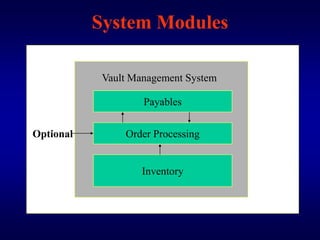
System Modules

            Vault Management System

                    Payables


Optional        Order Processing


                    Inventory
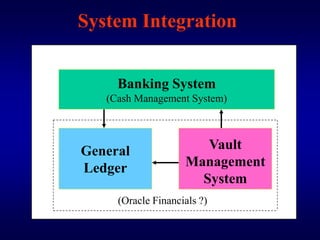
System Integration


     Banking System
   (Cash Management System)


General                Vault
Ledger              Management
                      System
     (Oracle Financials ?)
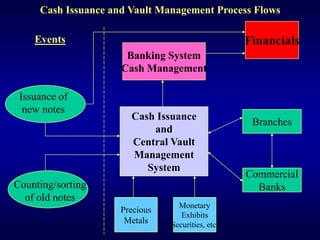
Cash Issuance and Vault Management Process Flows

    Events                                         Financials
                      Banking System
                     Cash Management

 Issuance of
  new notes
                       Cash Issuance
                                                    Branches
                           and
                       Central Vault
                       Management
                          System
                                                   Commercial
Counting/sorting                                     Banks
  of old notes
                                  Monetary
                     Precious
                                   Exhibits
                      Metals    Securities, etc.
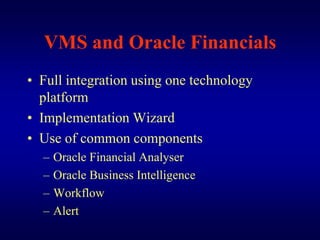
VMS and Oracle Financials
• Full integration using one technology
  platform
• Implementation Wizard
• Use of common components
  –   Oracle Financial Analyser
  –   Oracle Business Intelligence
  –   Workflow
  –   Alert
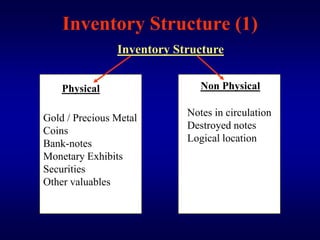
Inventory Structure (1)
                Inventory Structure


    Physical                   Non Physical

                            Notes in circulation
Gold / Precious Metal
                            Destroyed notes
Coins
Bank-notes                  Logical location
Monetary Exhibits
Securities
Other valuables
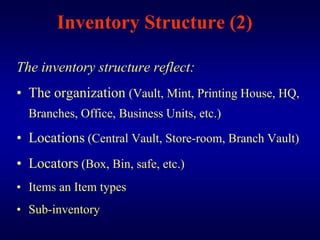
Inventory Structure (2)

The inventory structure reflect:
• The organization (Vault, Mint, Printing House, HQ,
  Branches, Office, Business Units, etc.)

• Locations (Central Vault, Store-room, Branch Vault)
• Locators (Box, Bin, safe, etc.)
• Items an Item types
• Sub-inventory
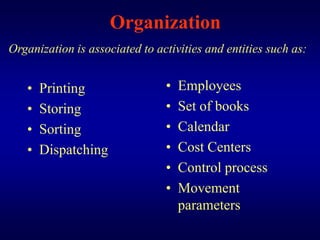
Organization
Organization is associated to activities and entities such as:


   •   Printing                 •   Employees
   •   Storing                  •   Set of books
   •   Sorting                  •   Calendar
   •   Dispatching              •   Cost Centers
                                •   Control process
                                •   Movement
                                    parameters
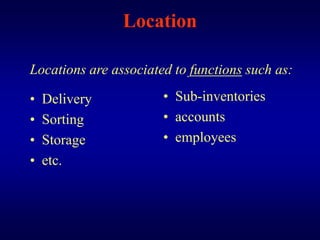
Location

Locations are associated to functions such as:

•   Delivery           • Sub-inventories
•   Sorting            • accounts
•   Storage            • employees
•   etc.
Sub-Inventory

•   by item and item types
•   by location, physical or logical
•   by locators
•   by time period
•   Cash In-transit Sub-Inventory (for shipping)
Bank-Notes Sub-Inventories
•   Denomination / Serial numbers
•   Non Audited / Waiting audit / Audited
•   Sorted clean / Sorted dirty
•   Counted audited clean / Counted audited dirty
•   Mint notes
•   Time expired
•   Mutilated notes
•   Forged notes and counterfeit
Non Monetary Deposits

• In the name of the Central Bank
• In the name of the State or any Institution
  (Ex: IMF)
• In the name of customers
                      (see scope of the system)
Transaction Set-Up
Transactions are managed by the Transaction
  Manager in which are defined:
• Transaction types
• Transaction profile options (material transactions,
  reservation, move transaction [work in process, importation of portable
  bar code reader, etc.], resource cost transaction, etc.)

• Transaction reasons
• Control options
• Default locator and sub-inventory
Transaction Types
• A Transaction Type is the combination of
  Transaction Source Types (Tags; Receipts;
  Orders) and a Transaction Action.
Transaction Actions:
  •Receipt into store      •Sub-inventory transfer
  •Issue from store        •Cost update
  •Adjustment
Transaction types:
Items received from Mint / Printing House, etc
Items received from Branches, Commercial Banks, etc.
Items sent to Branches, Commercial Banks, etc.
Tags and Tag Numbers
• Tags are associated with any group of items
  entering the vault such as bulk of notes,
  boxes of coins, etc.
• Tags numbers can be use to track any
  combination of items such as:
  – Serial numbers / lots
  – Location / locators
  – Item /Locator, etc.
• Tag reports, report control features
Inter-Organization Shipping
         Network (1)

The Inter-organization Shipping Network
 Windows is used to define accounting
 information and the relationship that exists
 between shipping and organization such are
 transporters, CB branches and commercial
 banks.
Inter-Organization Shipping
            Network (1)

•   Inter-company Relation Profiles
•   Movement zones
•   Movement statistic parameters
•   Inter-Organization Transfer Account
•   Shipping Sub-Inventory for Cash in Transit
•   Shipping cost management
Interface with the General Ledger
• Intermediary set of books or account can be
  defined in the GL
• The VMS can use common flexfield with the GL
• Transactions can be posted directly in the GL
  using Journal Import and Post Journal Process
• Reconciliation of physical value with accounting
  value
• Settlement Accounts of commercial banks are
  debited and credited directly
• Invoice from the Mint and the Printing House are
  automatically processed and debited
Reporting Tools
The Central Bank can choose from a variety
  of reporting tools such as:
• Application Standard Reports
• Oracle Financial Analyzer
• Oracle Business Intelligence
• Oracle Sale Analyzer
Reporting
•   Transaction Register
•   Transaction Historical Summary
•   Shipping Register
•   Receipt / Inspection Delivery Reports
•   Serial Number Transaction Register
•   Bank Note Reservation Report
•   Counterfeit Note Report
•   Adjustment Journal
•   Statistical Reports for coins/note demand
•   General Ledger Transfer History
Security Features
• Audit trails
• Access control and Access Profiles
• Limits for locations, locators, organizations,
  transport, employee, etc.
• Approval procedures for adjustment
• Alert
Auditing

The system can be audited by:
     • Organizations / Business Units
     • Set of books
     • Locations
     • Employees
     • Time intervals / Range of dates
     • Range of serial numbers
     • Range of Items types and sub-inventories

Vault management system_for_central_banks

  • 1.
    Financial Services Vault Management System for Central Banks Jean-Marc Lepain Central Bank Specialist
  • 2.
    Vault Management System •An Oracle Consulting Product • A product build around Oracle Inventory • Stand Alone Application/Integration to Oracle E-Business Suite • The VMS can be customized to meet all Central Banks requirements
  • 3.
    Scope of theSystem • Physical inventory of coins, notes, ingots, etc. • Non physical inventories • Direct posting to the GL • Reconciliation between stocks and accounting values • Purchasing and invoicing • Order processing • Interface with the banking system/Cash Management
  • 4.
    Vault Management vs.Inventory • Physical inventory is permanent • Items remain in circulation • Reconciliation of physical stock with GL values • Necessity to keep track of serial numbers • Limited adjustment • High security features 70 to 80% standard functionalities 20 to 30% customization
  • 5.
    System Modules Vault Management System Payables Optional Order Processing Inventory
  • 6.
    System Integration Banking System (Cash Management System) General Vault Ledger Management System (Oracle Financials ?)
  • 7.
    Cash Issuance andVault Management Process Flows Events Financials Banking System Cash Management Issuance of new notes Cash Issuance Branches and Central Vault Management System Commercial Counting/sorting Banks of old notes Monetary Precious Exhibits Metals Securities, etc.
  • 8.
    VMS and OracleFinancials • Full integration using one technology platform • Implementation Wizard • Use of common components – Oracle Financial Analyser – Oracle Business Intelligence – Workflow – Alert
  • 9.
    Inventory Structure (1) Inventory Structure Physical Non Physical Notes in circulation Gold / Precious Metal Destroyed notes Coins Bank-notes Logical location Monetary Exhibits Securities Other valuables
  • 10.
    Inventory Structure (2) Theinventory structure reflect: • The organization (Vault, Mint, Printing House, HQ, Branches, Office, Business Units, etc.) • Locations (Central Vault, Store-room, Branch Vault) • Locators (Box, Bin, safe, etc.) • Items an Item types • Sub-inventory
  • 11.
    Organization Organization is associatedto activities and entities such as: • Printing • Employees • Storing • Set of books • Sorting • Calendar • Dispatching • Cost Centers • Control process • Movement parameters
  • 12.
    Location Locations are associatedto functions such as: • Delivery • Sub-inventories • Sorting • accounts • Storage • employees • etc.
  • 13.
    Sub-Inventory • by item and item types • by location, physical or logical • by locators • by time period • Cash In-transit Sub-Inventory (for shipping)
  • 14.
    Bank-Notes Sub-Inventories • Denomination / Serial numbers • Non Audited / Waiting audit / Audited • Sorted clean / Sorted dirty • Counted audited clean / Counted audited dirty • Mint notes • Time expired • Mutilated notes • Forged notes and counterfeit
  • 15.
    Non Monetary Deposits •In the name of the Central Bank • In the name of the State or any Institution (Ex: IMF) • In the name of customers (see scope of the system)
  • 16.
    Transaction Set-Up Transactions aremanaged by the Transaction Manager in which are defined: • Transaction types • Transaction profile options (material transactions, reservation, move transaction [work in process, importation of portable bar code reader, etc.], resource cost transaction, etc.) • Transaction reasons • Control options • Default locator and sub-inventory
  • 17.
    Transaction Types • ATransaction Type is the combination of Transaction Source Types (Tags; Receipts; Orders) and a Transaction Action. Transaction Actions: •Receipt into store •Sub-inventory transfer •Issue from store •Cost update •Adjustment Transaction types: Items received from Mint / Printing House, etc Items received from Branches, Commercial Banks, etc. Items sent to Branches, Commercial Banks, etc.
  • 18.
    Tags and TagNumbers • Tags are associated with any group of items entering the vault such as bulk of notes, boxes of coins, etc. • Tags numbers can be use to track any combination of items such as: – Serial numbers / lots – Location / locators – Item /Locator, etc. • Tag reports, report control features
  • 19.
    Inter-Organization Shipping Network (1) The Inter-organization Shipping Network Windows is used to define accounting information and the relationship that exists between shipping and organization such are transporters, CB branches and commercial banks.
  • 20.
    Inter-Organization Shipping Network (1) • Inter-company Relation Profiles • Movement zones • Movement statistic parameters • Inter-Organization Transfer Account • Shipping Sub-Inventory for Cash in Transit • Shipping cost management
  • 21.
    Interface with theGeneral Ledger • Intermediary set of books or account can be defined in the GL • The VMS can use common flexfield with the GL • Transactions can be posted directly in the GL using Journal Import and Post Journal Process • Reconciliation of physical value with accounting value • Settlement Accounts of commercial banks are debited and credited directly • Invoice from the Mint and the Printing House are automatically processed and debited
  • 22.
    Reporting Tools The CentralBank can choose from a variety of reporting tools such as: • Application Standard Reports • Oracle Financial Analyzer • Oracle Business Intelligence • Oracle Sale Analyzer
  • 23.
    Reporting • Transaction Register • Transaction Historical Summary • Shipping Register • Receipt / Inspection Delivery Reports • Serial Number Transaction Register • Bank Note Reservation Report • Counterfeit Note Report • Adjustment Journal • Statistical Reports for coins/note demand • General Ledger Transfer History
  • 24.
    Security Features • Audittrails • Access control and Access Profiles • Limits for locations, locators, organizations, transport, employee, etc. • Approval procedures for adjustment • Alert
  • 25.
    Auditing The system canbe audited by: • Organizations / Business Units • Set of books • Locations • Employees • Time intervals / Range of dates • Range of serial numbers • Range of Items types and sub-inventories