Rawlinson Rivera, VMware
vSphere Virtual Volumes Technical Overview
STO4278
Student Guide & Internal & Confidential Update Daily
https://goo.gl/VVmVZ0
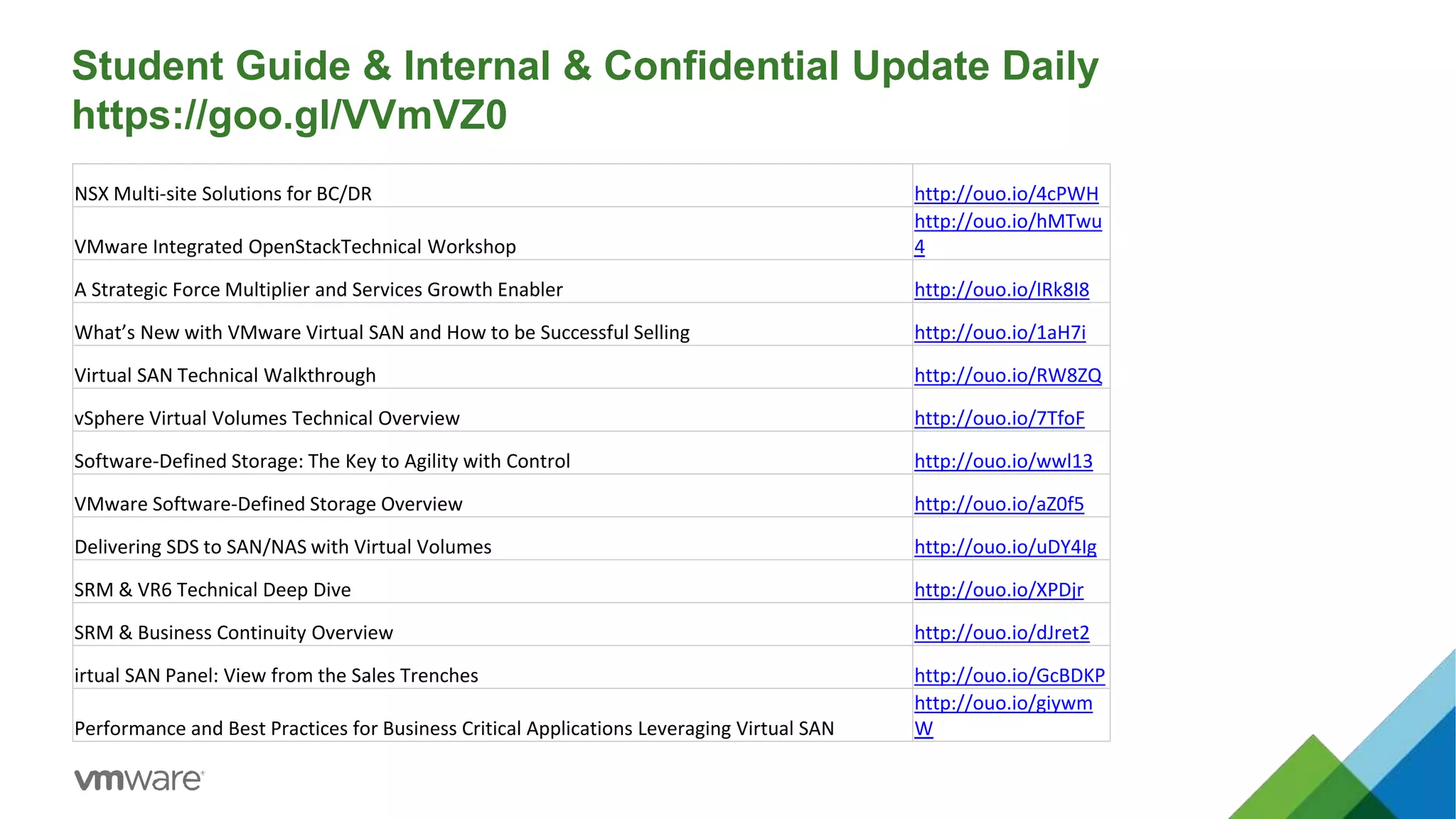
NSX Multi-site Solutions for BC/DR http://ouo.io/4cPWH
VMware Integrated OpenStackTechnical Workshop
http://ouo.io/hMTwu
4
A Strategic Force Multiplier and Services Growth Enabler http://ouo.io/IRk8I8
What’s New with VMware Virtual SAN and How to be Successful Selling http://ouo.io/1aH7i
Virtual SAN Technical Walkthrough http://ouo.io/RW8ZQ
vSphere Virtual Volumes Technical Overview http://ouo.io/7TfoF
Software-Defined Storage: The Key to Agility with Control http://ouo.io/wwl13
VMware Software-Defined Storage Overview http://ouo.io/aZ0f5
Delivering SDS to SAN/NAS with Virtual Volumes http://ouo.io/uDY4Ig
SRM & VR6 Technical Deep Dive http://ouo.io/XPDjr
SRM & Business Continuity Overview http://ouo.io/dJret2
irtual SAN Panel: View from the Sales Trenches http://ouo.io/GcBDKP
Performance and Best Practices for Business Critical Applications Leveraging Virtual SAN
http://ouo.io/giywm
W
The Software-Defined Data Center
Transform storage
by aligning it with
app demands
4
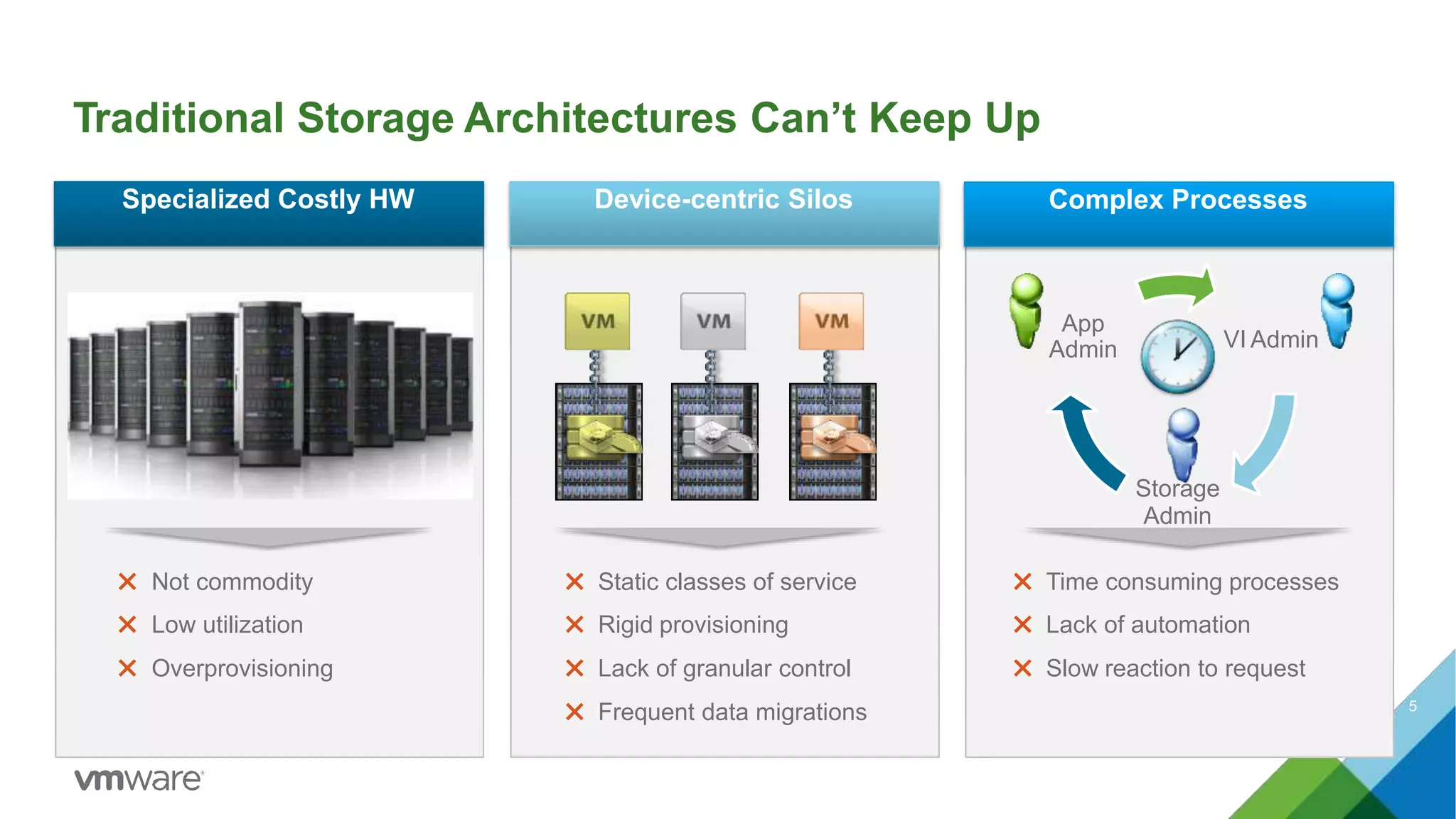
Traditional Storage Architectures Can’t Keep Up
Storage
Admin
Device-centric Silos Complex Processes
VI Admin
App
Admin
Specialized Costly HW
✖ Not commodity ✖ Static classes of service ✖ Time consuming processes
✖ Low utilization ✖ Rigid provisioning ✖ Lack of automation
✖ Overprovisioning ✖ Lack of granular control ✖ Slow reaction to request
✖ Frequent data migrations 5
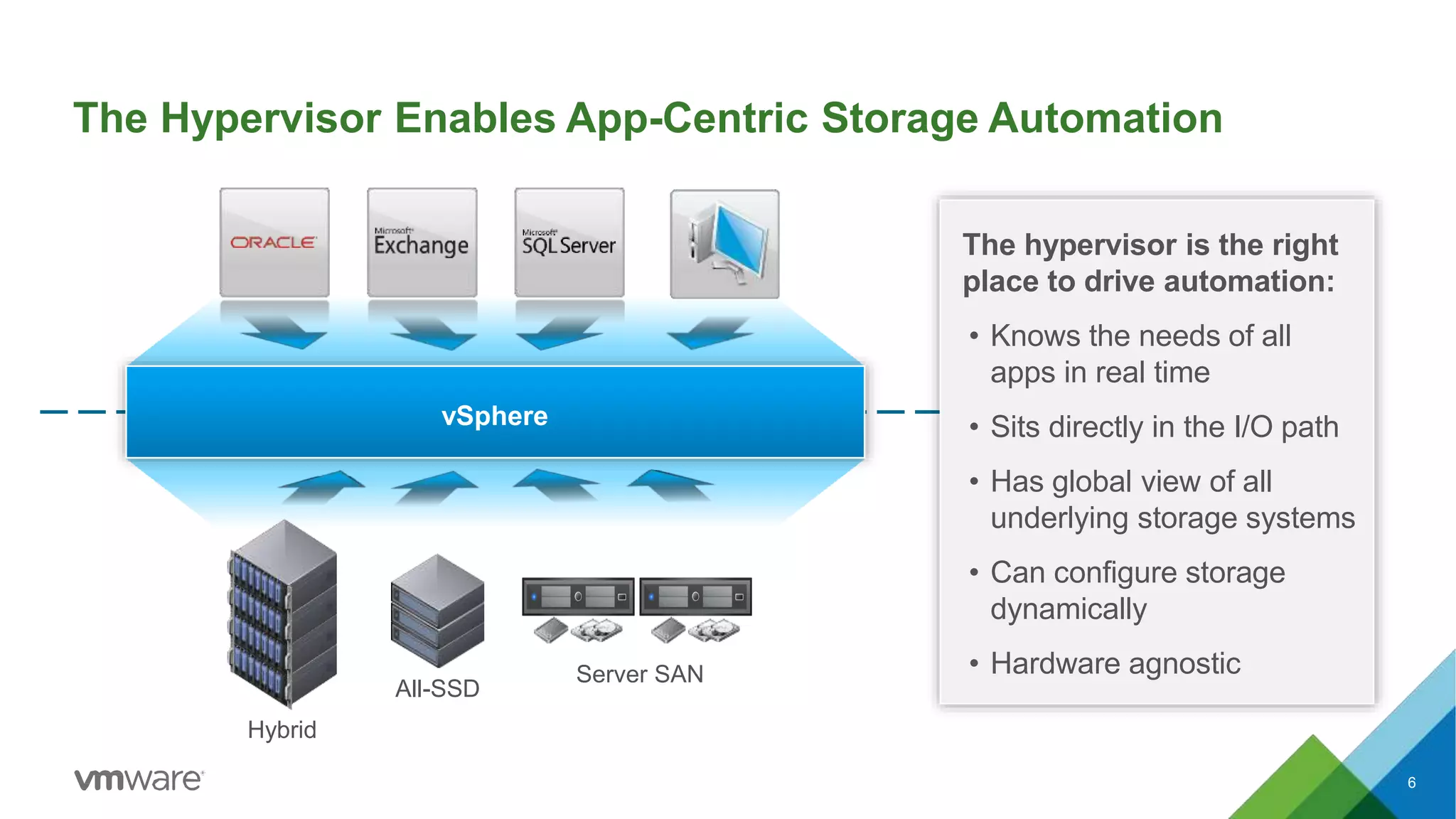
The Hypervisor Enables App-Centric Storage Automation
vSphere
The hypervisor is the right
place to drive automation:
• Knows the needs of all
apps in real time
• Sits directly in the I/O path
• Has global view of all
underlying storage systems
• Can configure storage
dynamically
• Hardware agnostic
6
All-SSD
Hybrid
Server SAN
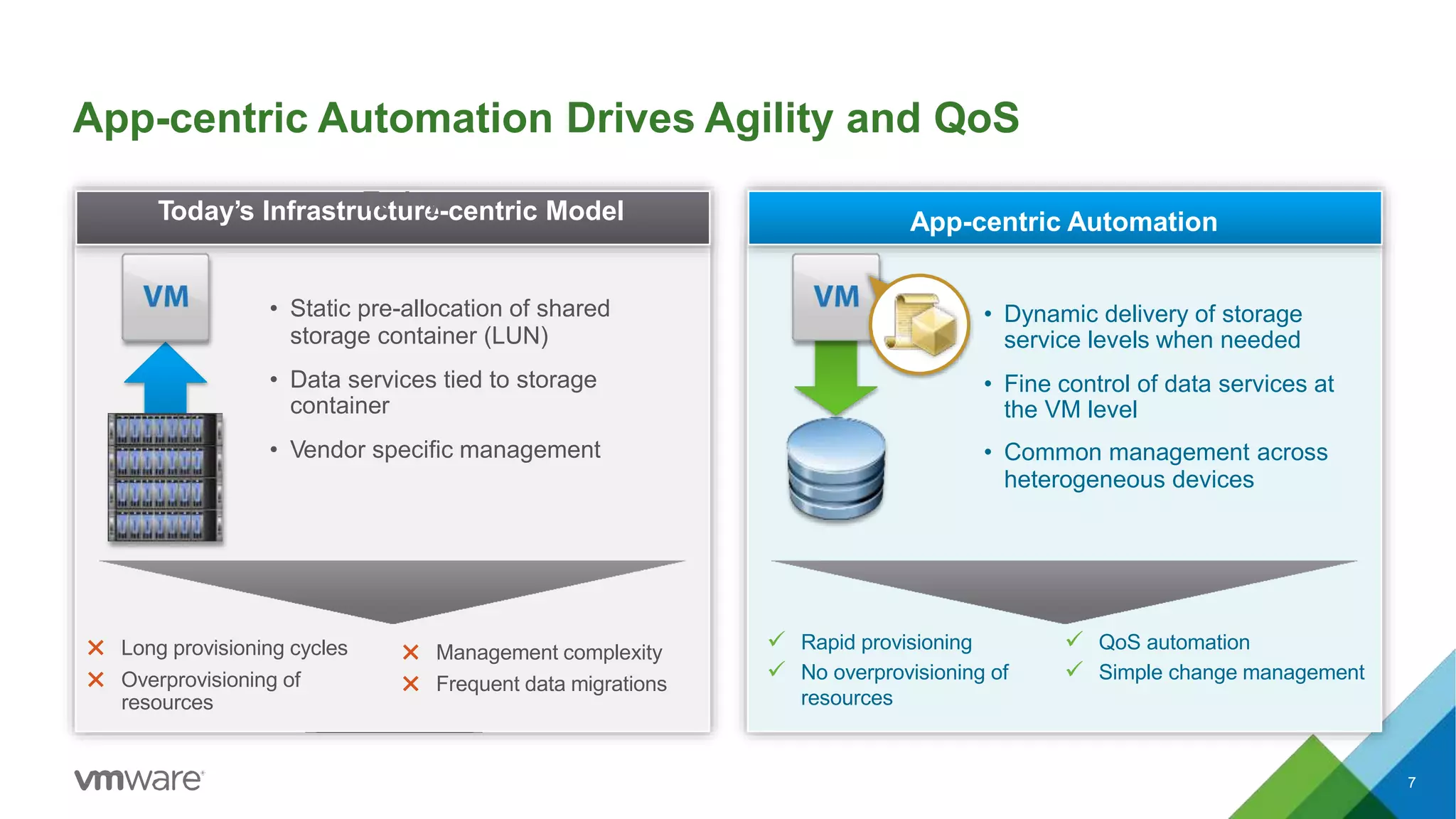
App-centric Automation Drives Agility and QoS
7
App-centric Automation
• Dynamic delivery of storage
service levels when needed
• Fine control of data services at
the VM level
• Common management across
heterogeneous devices
 Rapid provisioning
 No overprovisioning of
resources
 QoS automation
 Simple change management
Today’s InfrastruTcotduarey-centric Model
• Static pre-allocation of shared
storage container (LUN)
• Data services tied to storage
container
• Vendor specific management
✖ Long provisioning cycles
✖ Overprovisioning of
resources
✖ Management complexity
✖ Frequent data migrations
Control Plane
Storage Policy-Based Mgmt.
Data Plane
Storage Policy Based Mgmt.
Virtual Volumes
VVOL-enabled SAN / NAS
APIs
Control Plane
Data Plane
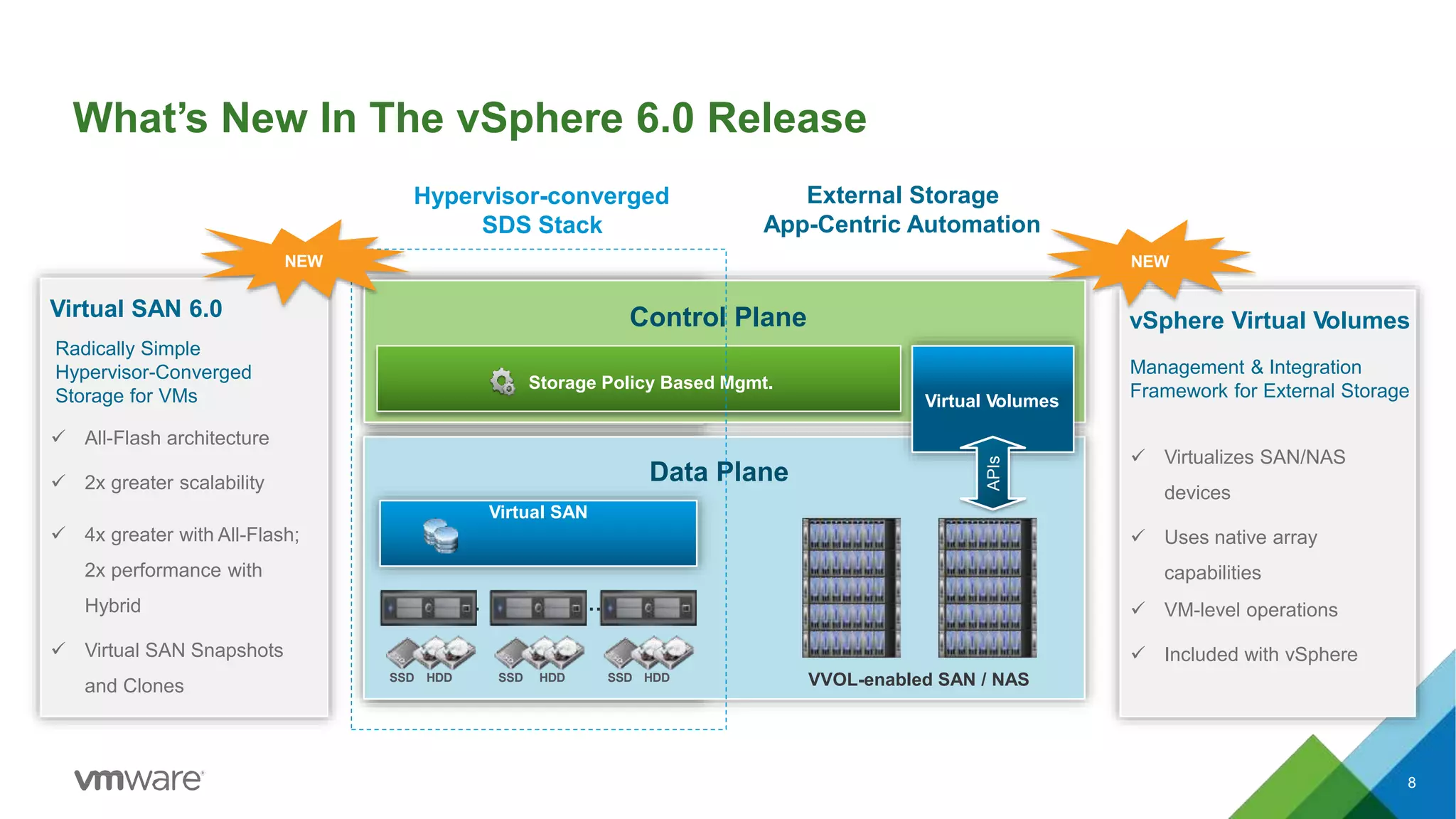
What’s New In The vSphere 6.0 Release
8
… …
Virtual SAN 6.0
Radically Simple
Hypervisor-Converged
Storage for VMs
 All-Flash architecture
 2x greater scalability
 4x greater with All-Flash;
2x performance with
Hybrid
 Virtual SAN Snapshots
and Clones
NEW
vSphere Virtual Volumes
 Virtualizes SAN/NAS
devices
 Uses native array
capabilities
 VM-level operations
 Included with vSphere
Management & Integration
Framework for External Storage
NEW
SSD HDD SSD HDD SSD HDD
Virtual SAN
Hypervisor-converged
SDS Stack
External Storage
App-Centric Automation
vSphere Virtual Volumes
A More Efficient Operational Model For External Storage
9
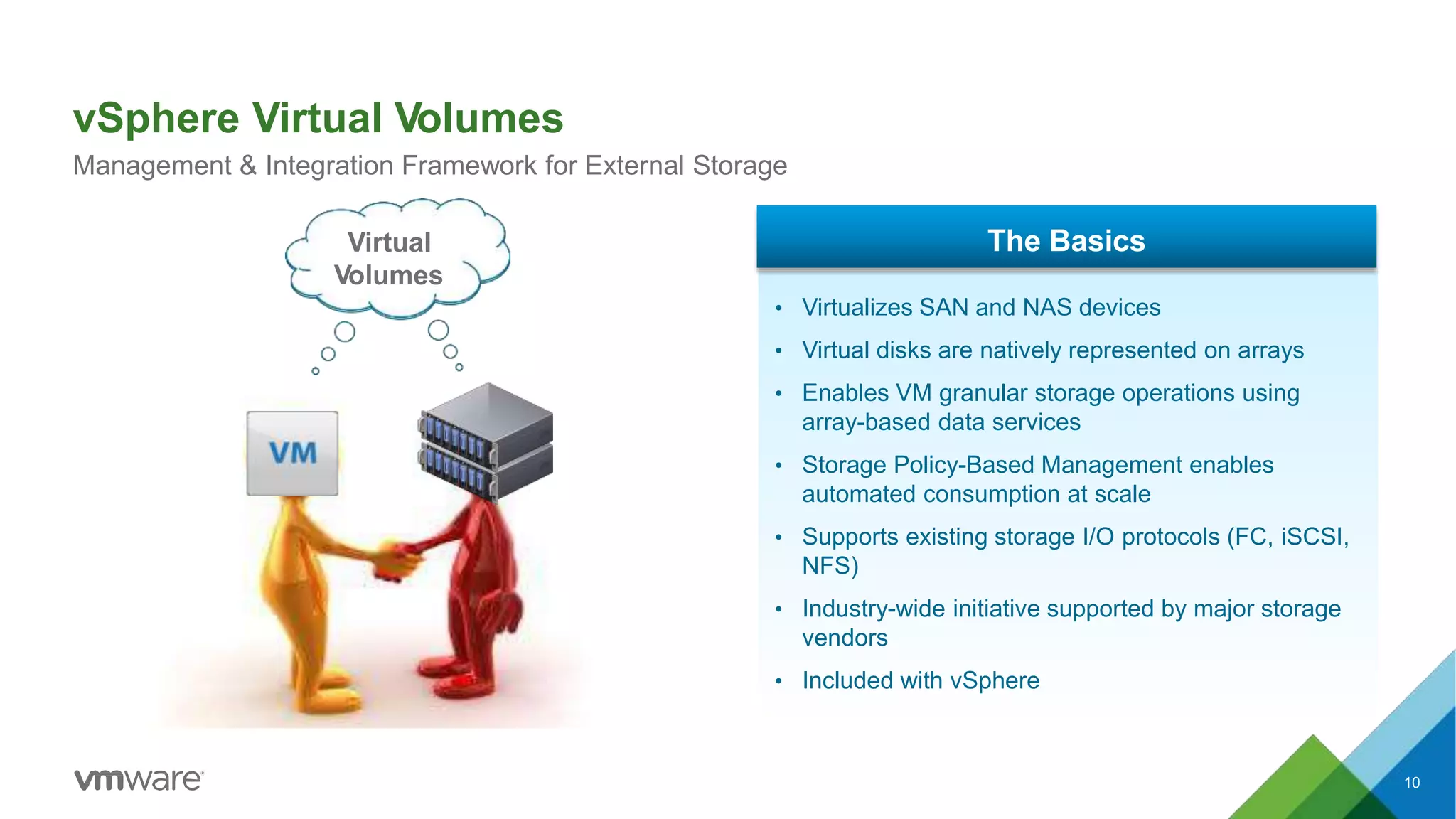
vSphere Virtual Volumes
Management & Integration Framework for External Storage
10
Virtual
Volumes
The Basics
• Virtualizes SAN and NAS devices
• Virtual disks are natively represented on arrays
• Enables VM granular storage operations using
array-based data services
• Storage Policy-Based Management enables
automated consumption at scale
• Supports existing storage I/O protocols (FC, iSCSI,
NFS)
• Industry-wide initiative supported by major storage
vendors
• Included with vSphere
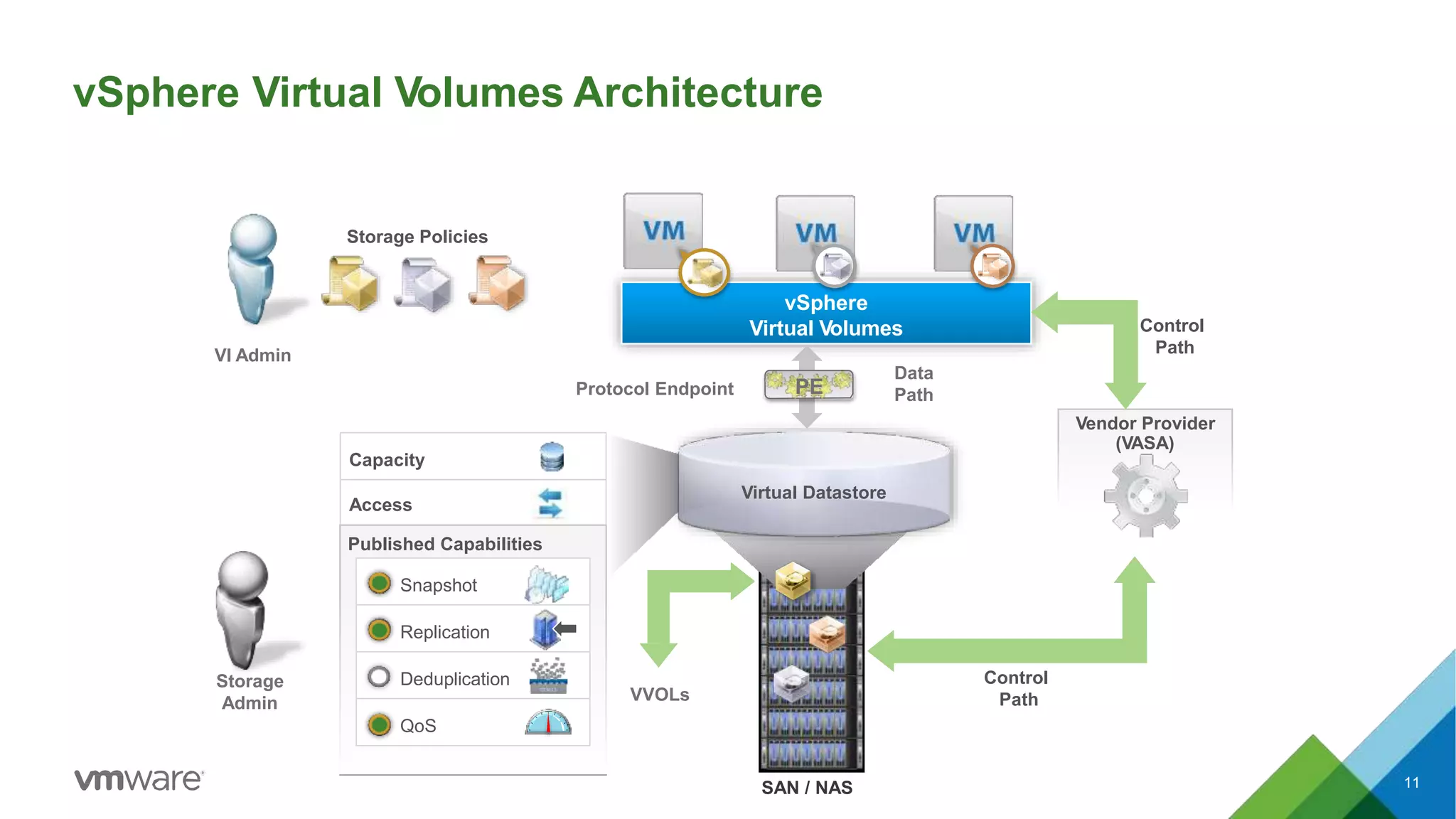
vSphere Virtual Volumes Architecture
vSphere
Virtual Volumes
11SAN / NAS
Vendor Provider
(VASA)
Control
Path
Control
Path
Storage Policies
Access
Capacity
Published Capabilities
Snapshot
Replication
Deduplication
QoS
Virtual Datastore
Storage
Admin
VI Admin
VVOLs
Data
PathProtocol Endpoint PE
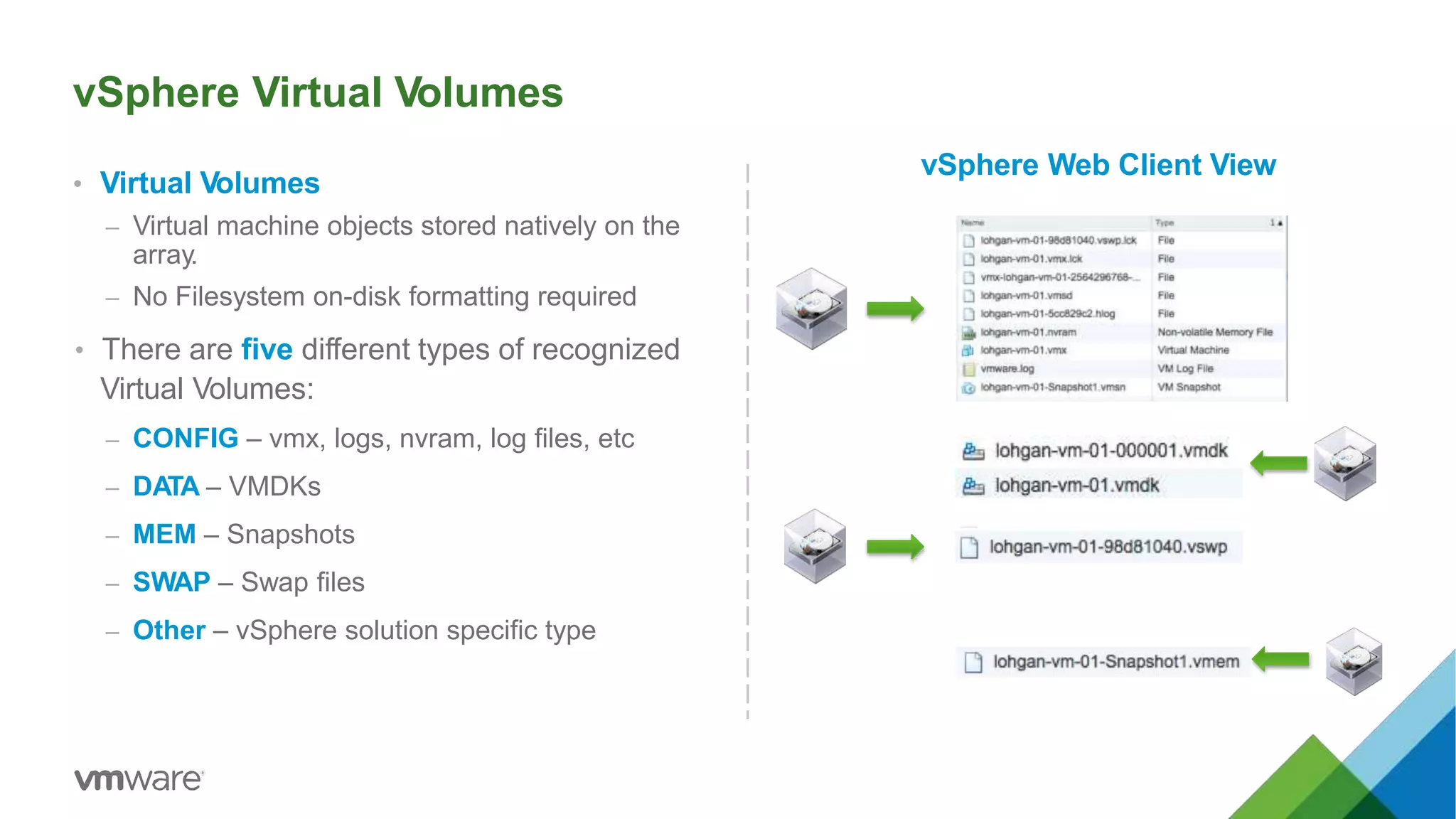
vSphere Virtual Volumes
• Virtual Volumes
– Virtual machine objects stored natively on the
array.
– No Filesystem on-disk formatting required
• There are five different types of recognized
Virtual Volumes:
– CONFIG – vmx, logs, nvram, log files, etc
– DATA – VMDKs
– MEM – Snapshots
– SWAP – Swap files
– Other – vSphere solution specific type
vSphere Web Client View
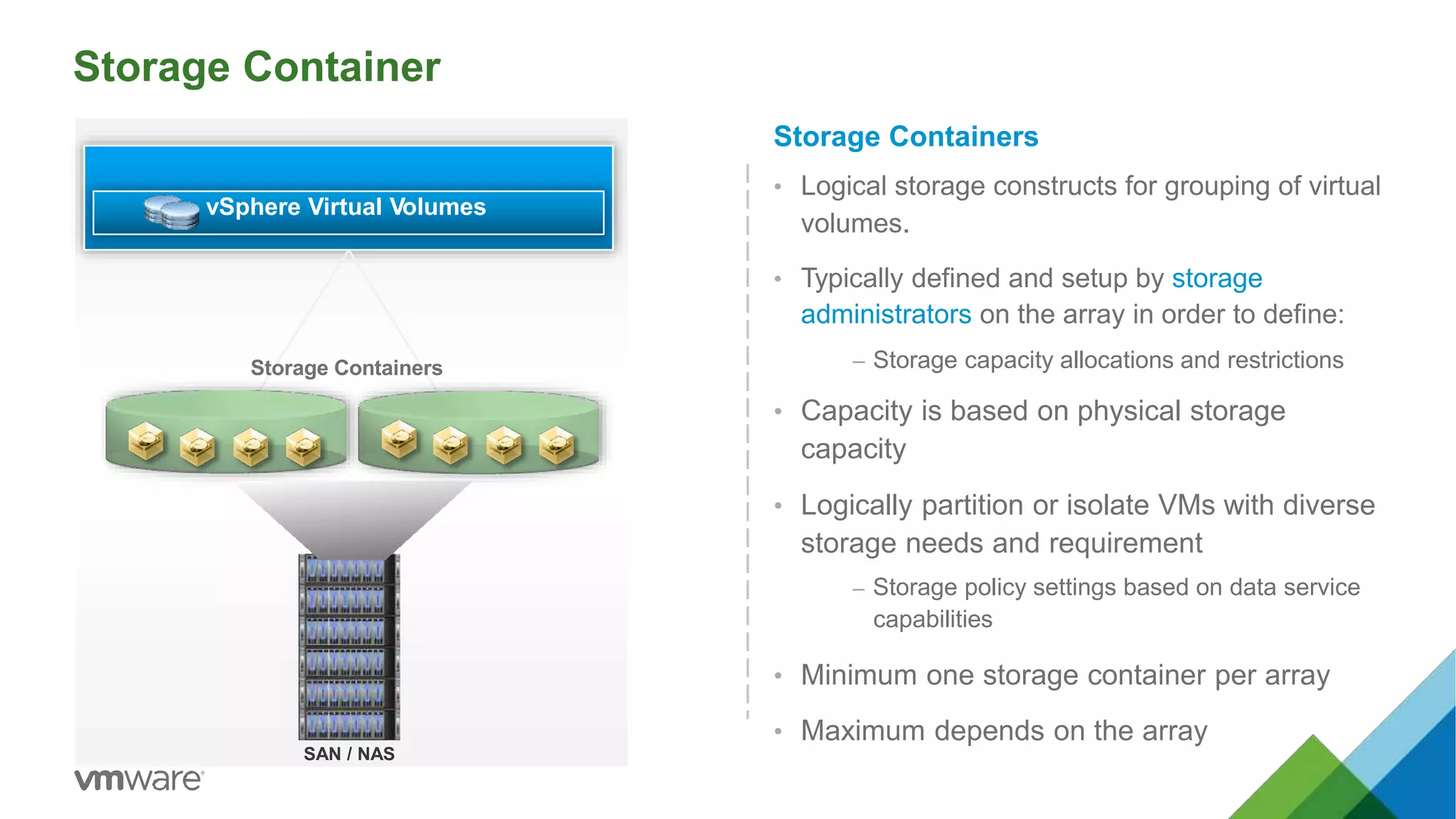
Storage Container
Storage Containers
• Logical storage constructs for grouping of virtual
volumes.
• Typically defined and setup by storage
administrators on the array in order to define:
– Storage capacity allocations and restrictions
• Capacity is based on physical storage
capacity
• Logically partition or isolate VMs with diverse
storage needs and requirement
– Storage policy settings based on data service
capabilities
• Minimum one storage container per array
• Maximum depends on the array
vSphere Virtual Volumes
SAN / NAS
Storage Containers
Storage Container
Storage Container
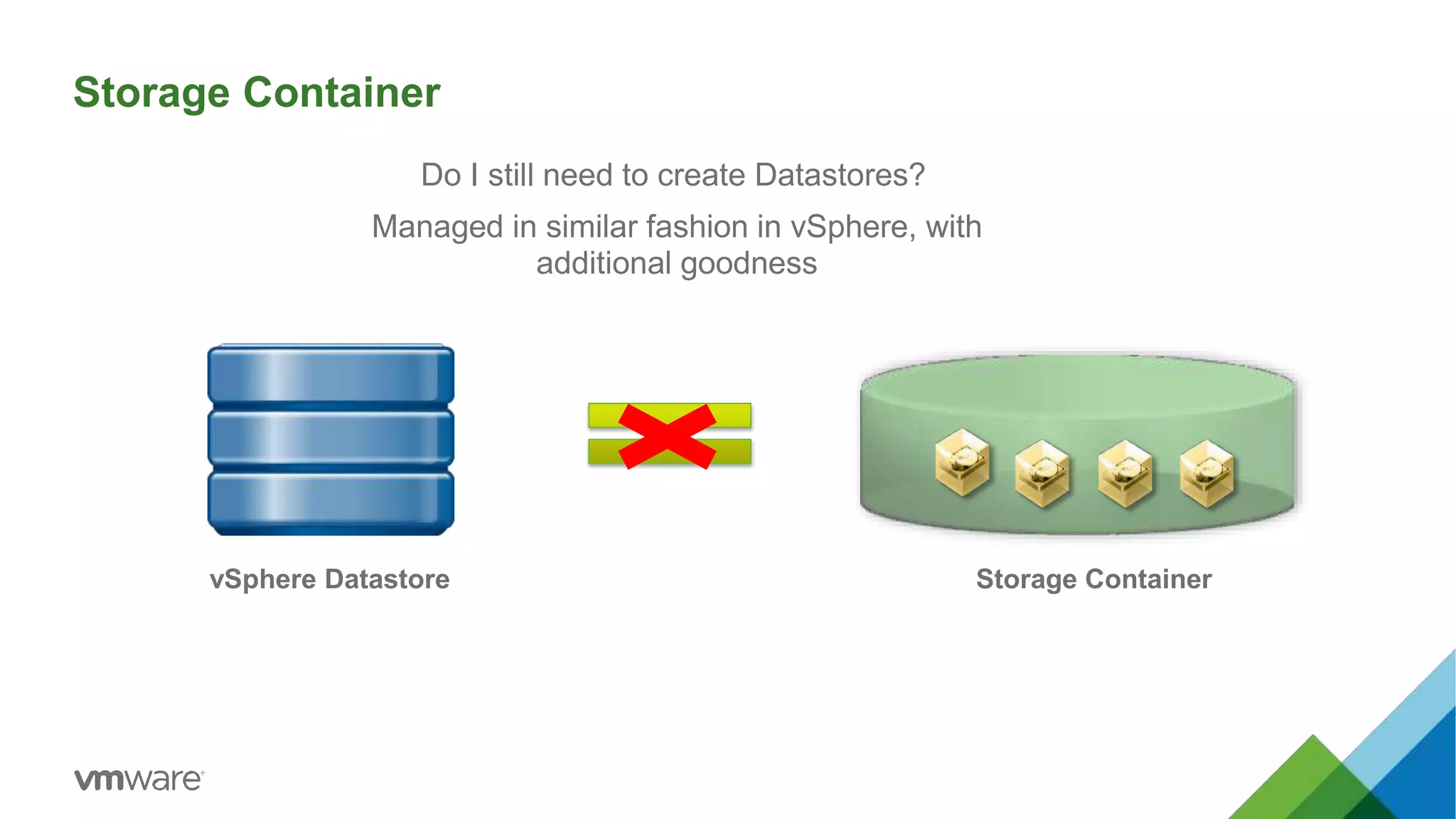
Do I still need to create Datastores?
Managed in similar fashion in vSphere, with
additional goodness
vSphere Datastore
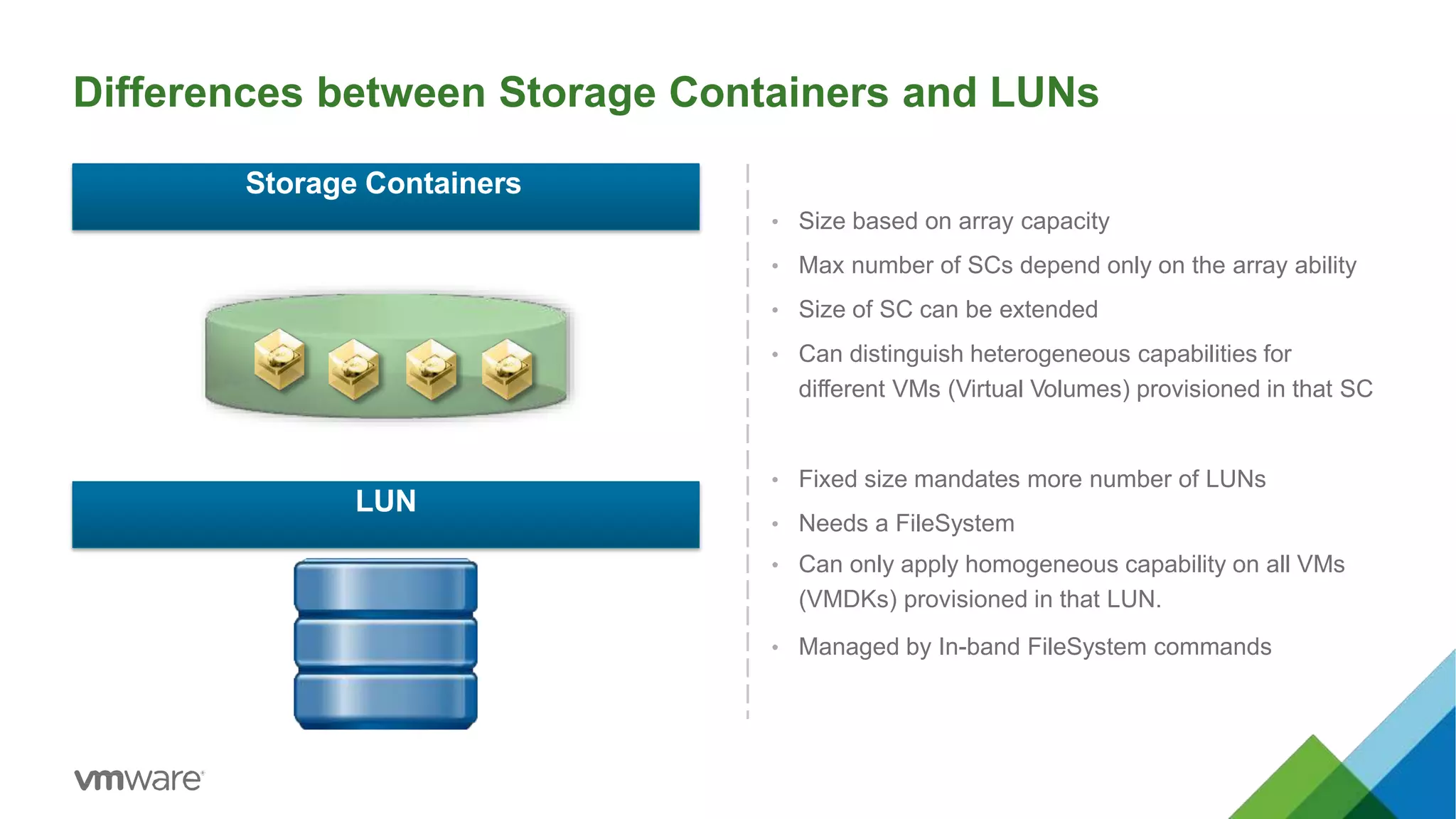
Differences between Storage Containers and LUNs
• Size based on array capacity
• Max number of SCs depend only on the array ability
• Size of SC can be extended
• Can distinguish heterogeneous capabilities for
different VMs (Virtual Volumes) provisioned in that SC
• Fixed size mandates more number of LUNs
• Needs a FileSystem
• Can only apply homogeneous capability on all VMs
(VMDKs) provisioned in that LUN.
• Managed by In-band FileSystem commands
Storage Containers
LUN
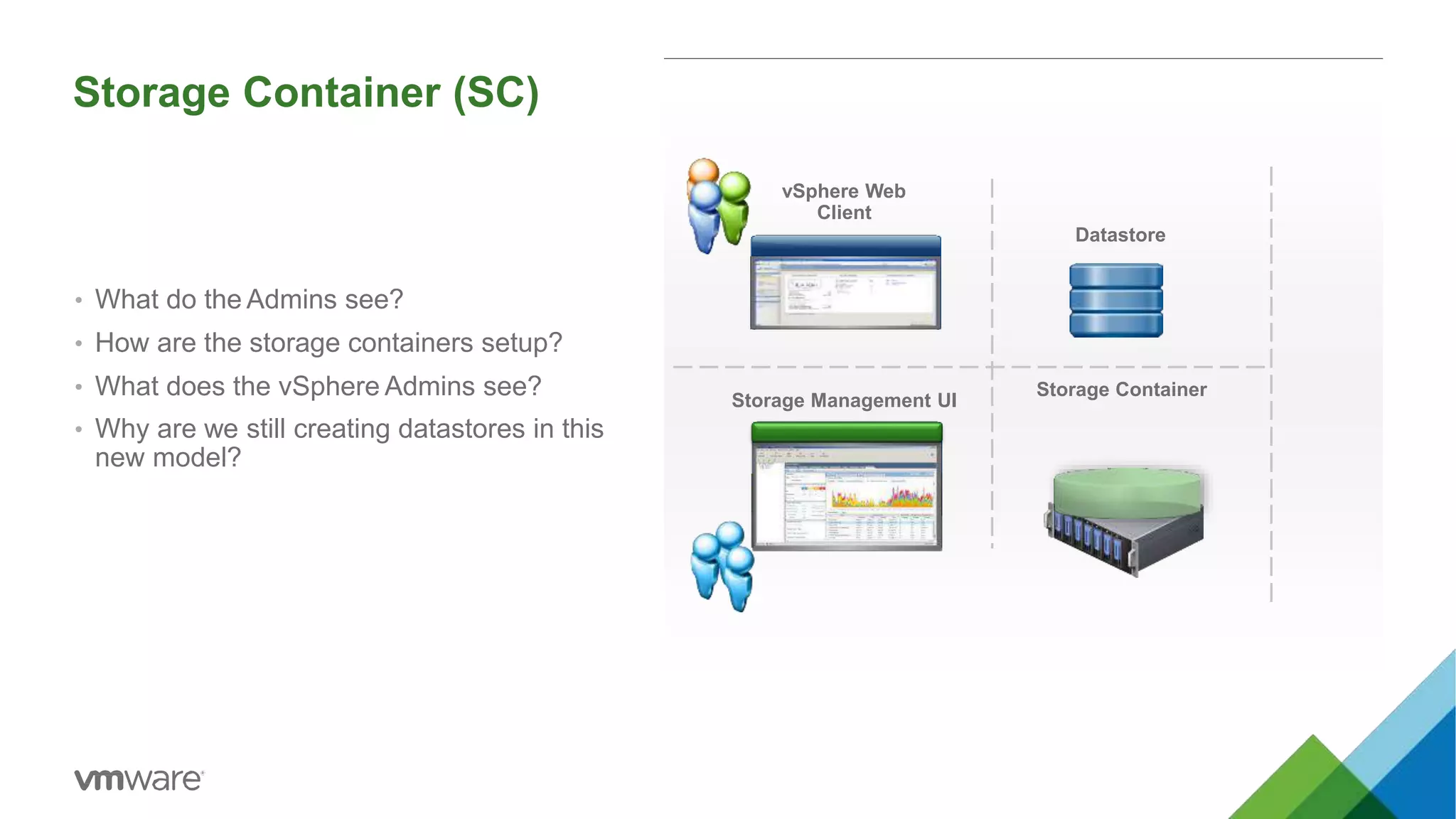
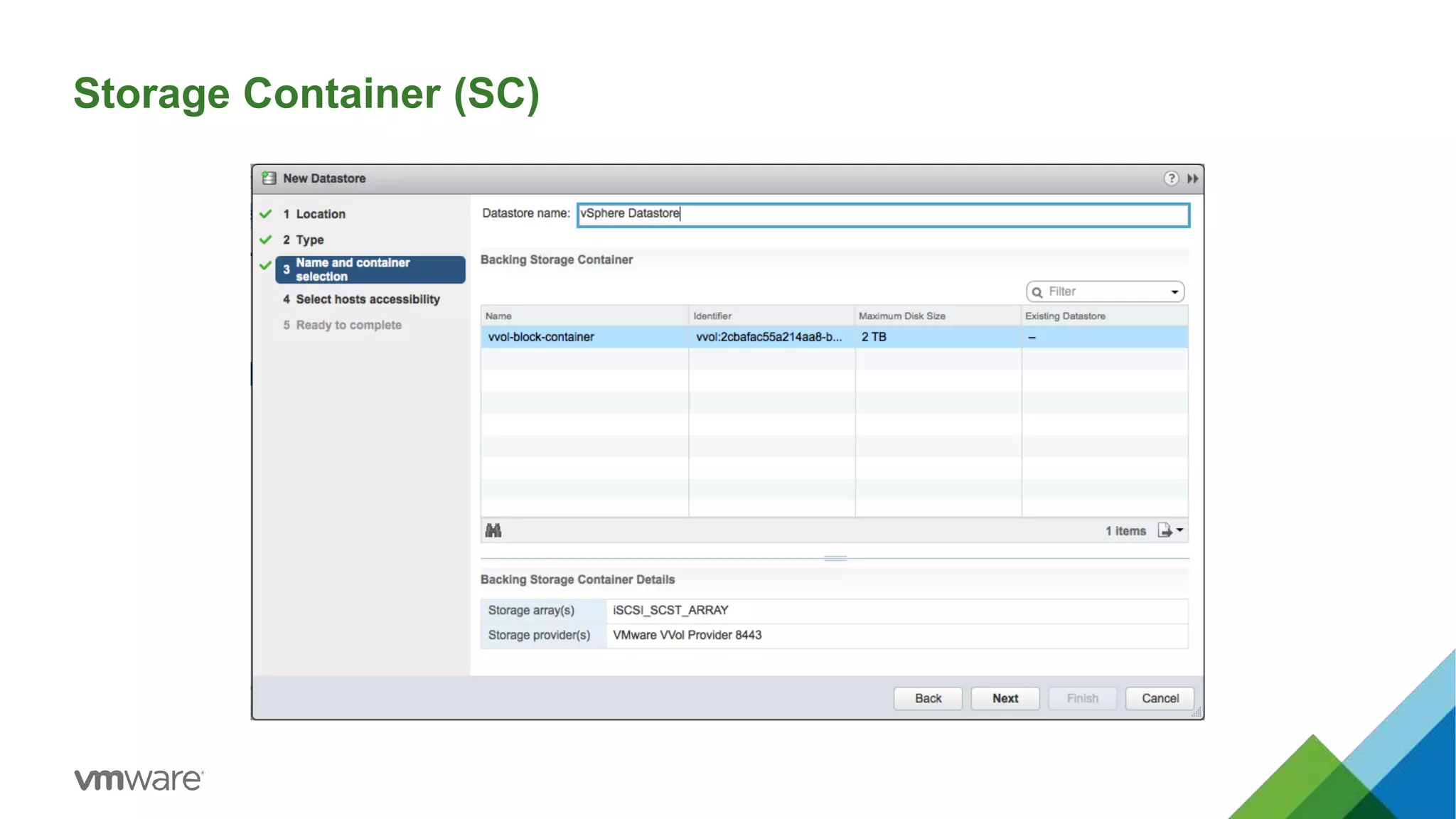
Storage Container (SC)
vSphere Web
Client
Storage Management UI
Datastore
Storage Container
• What do the Admins see?
• How are the storage containers setup?
• What does the vSphere Admins see?
• Why are we still creating datastores in this
new model?
Storage Container (SC)
Virtual Volumes
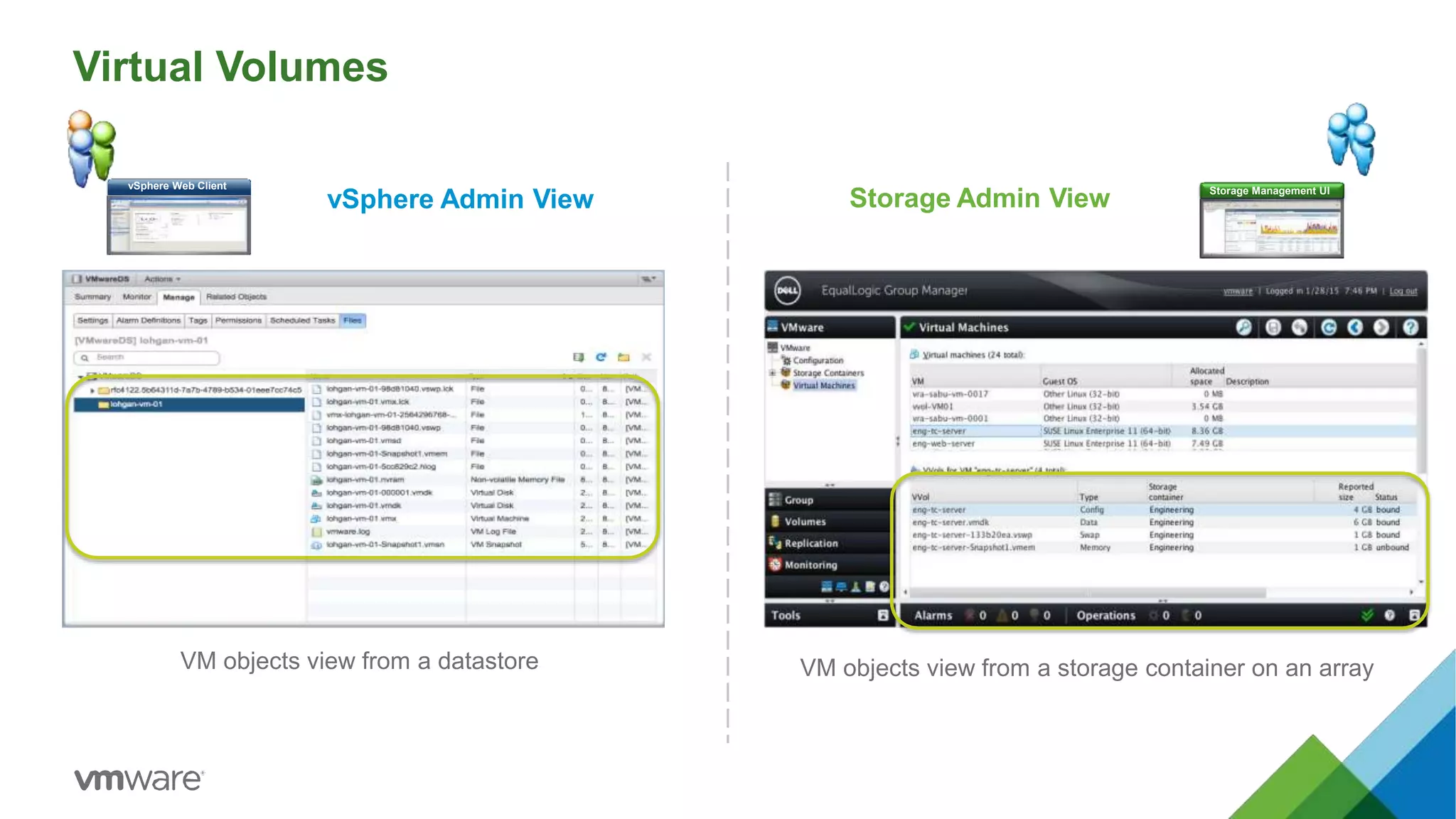
VM objects view from a storage container on an arrayVM objects view from a datastore
vSphere Web Client Storage Management UI
vSphere Admin View Storage Admin View
Data Plane
vSphere Virtual Volumes
19
Protocol Endpoints
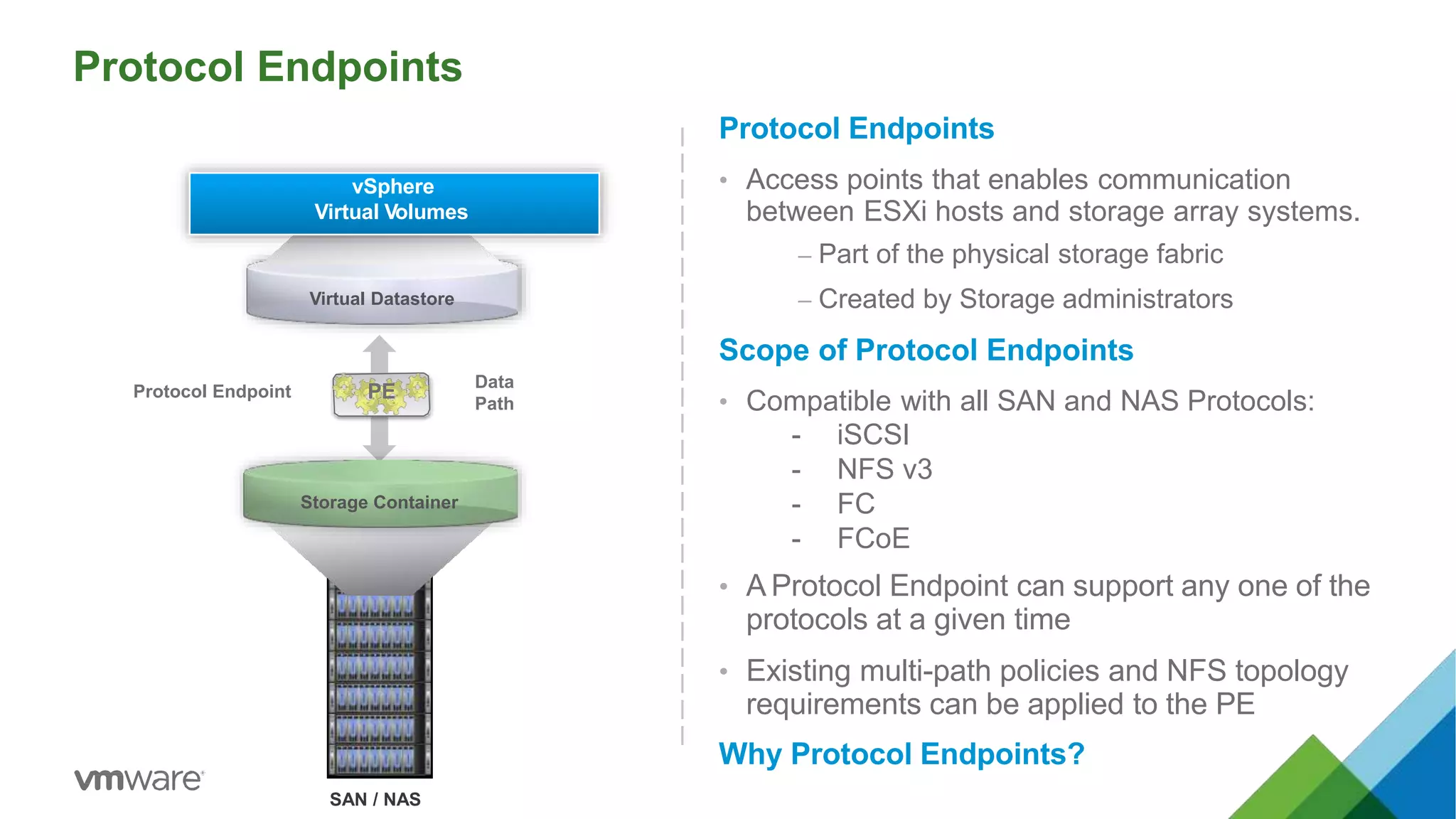
Protocol Endpoints
• Access points that enables communication
between ESXi hosts and storage array systems.
– Part of the physical storage fabric
– Created by Storage administrators
Scope of Protocol Endpoints
• Compatible with all SAN and NAS Protocols:
- iSCSI
- NFS v3
- FC
- FCoE
• A Protocol Endpoint can support any one of the
protocols at a given time
• Existing multi-path policies and NFS topology
requirements can be applied to the PE
Why Protocol Endpoints?
SAN / NAS
Virtual Datastore
Data
Path
Protocol Endpoint PE
vSphere
Virtual Volumes
Storage Container
Protocol Endpoints
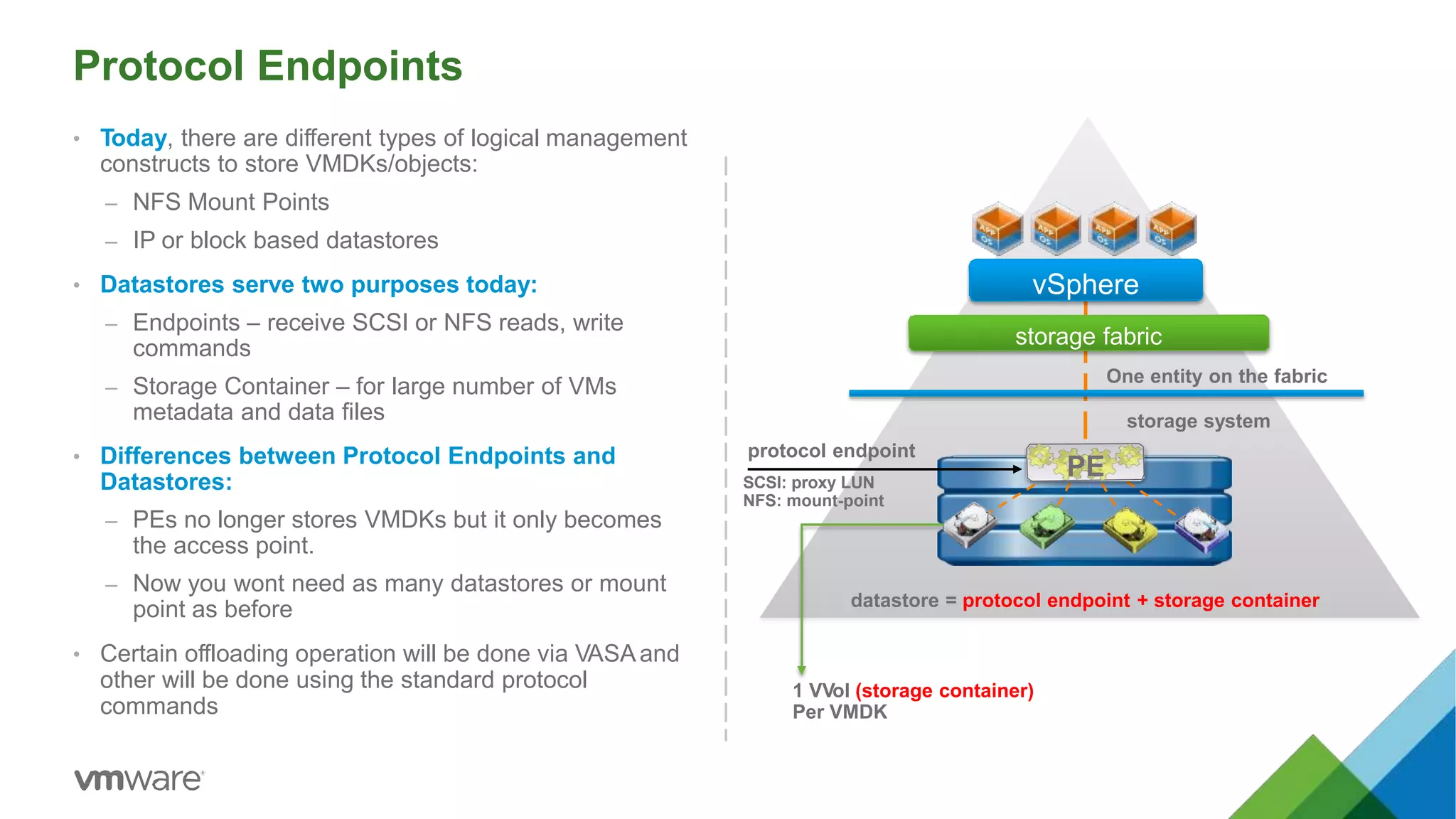
• Today, there are different types of logical management
constructs to store VMDKs/objects:
– NFS Mount Points
– IP or block based datastores
• Datastores serve two purposes today:
– Endpoints – receive SCSI or NFS reads, write
commands
– Storage Container – for large number of VMs
metadata and data files
• Differences between Protocol Endpoints and
Datastores:
– PEs no longer stores VMDKs but it only becomes
the access point.
– Now you wont need as many datastores or mount
point as before
• Certain offloading operation will be done via VASAand
other will be done using the standard protocol
commands
vSphere
storage fabric
PE
protocol endpoint
SCSI: proxy LUN
NFS: mount-point
datastore = protocol endpoint + storage container
storage system
1 VVol (storage container)
Per VMDK
One entity on the fabric
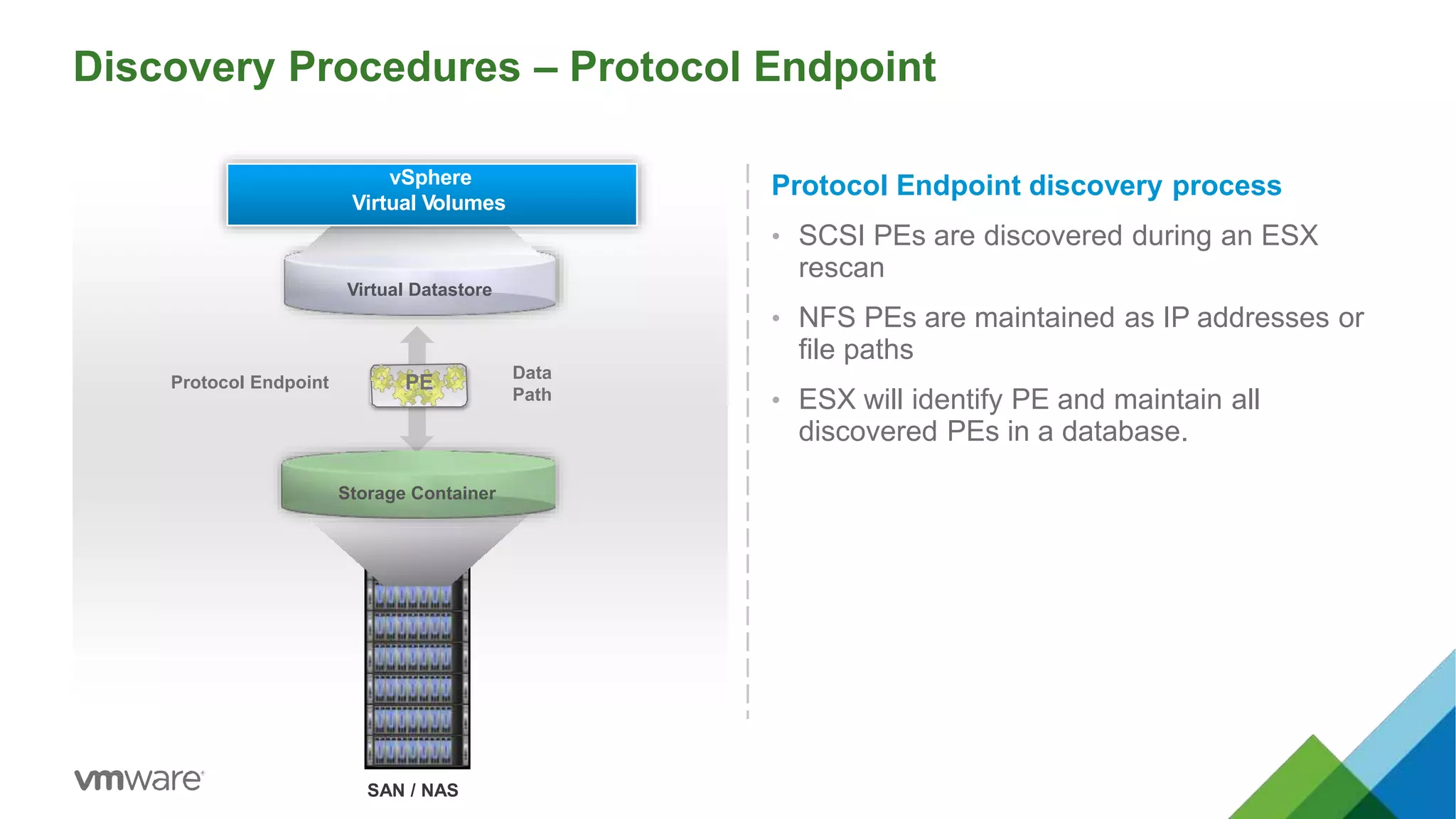
Discovery Procedures – Protocol Endpoint
Protocol Endpoint discovery process
• SCSI PEs are discovered during an ESX
rescan
• NFS PEs are maintained as IP addresses or
file paths
• ESX will identify PE and maintain all
discovered PEs in a database.
SAN / NAS
Virtual Datastore
Data
Path
Protocol Endpoint PE
vSphere
Virtual Volumes
Storage Container
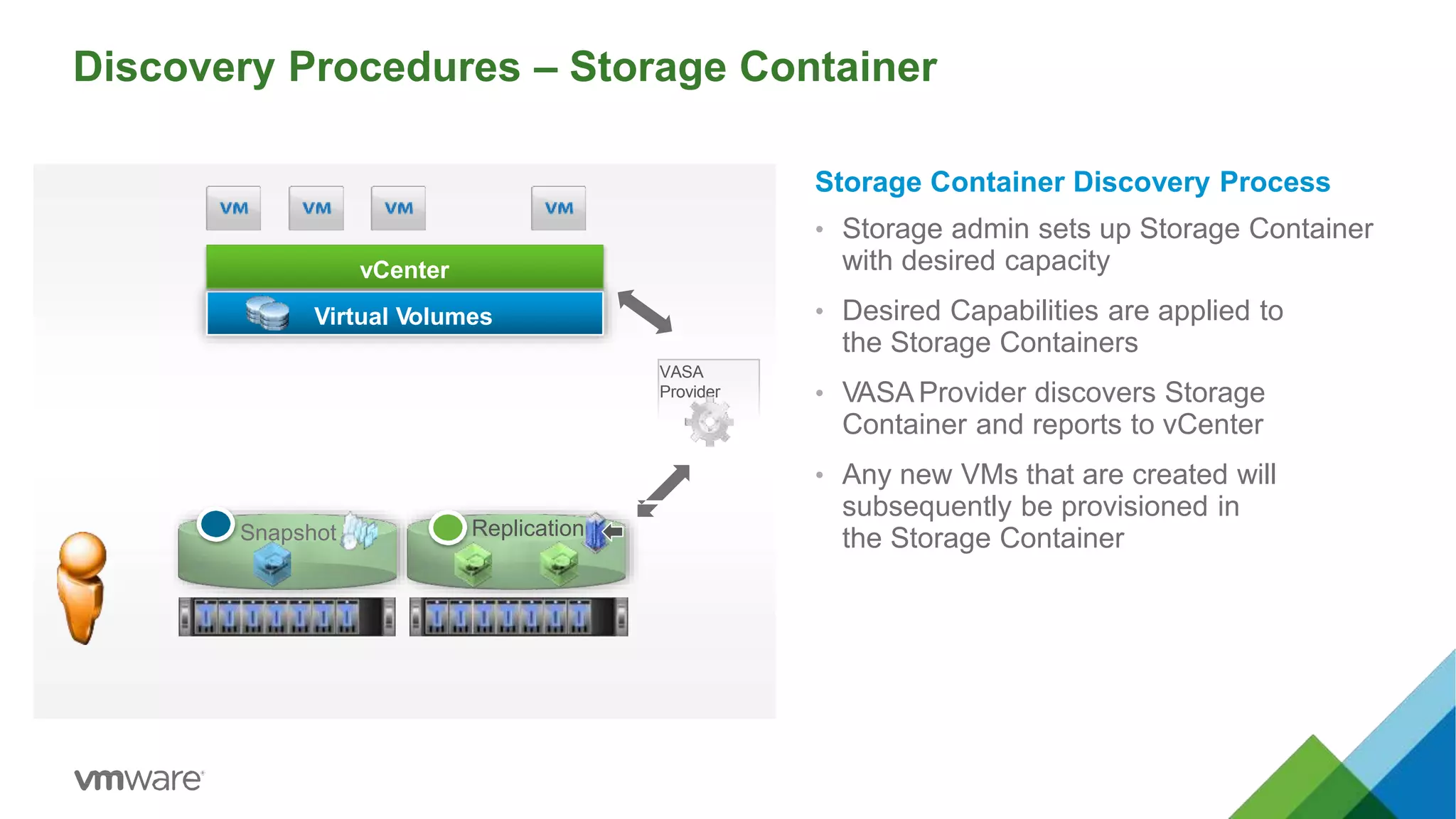
Discovery Procedures – Storage Container
Virtual Volumes
Snapshot Replication
vCenter
VASA
Provider
Storage Container Discovery Process
• Storage admin sets up Storage Container
with desired capacity
• Desired Capabilities are applied to
the Storage Containers
• VASA Provider discovers Storage
Container and reports to vCenter
• Any new VMs that are created will
subsequently be provisioned in
the Storage Container
Management Plane
vSphere Virtual Volumes
24
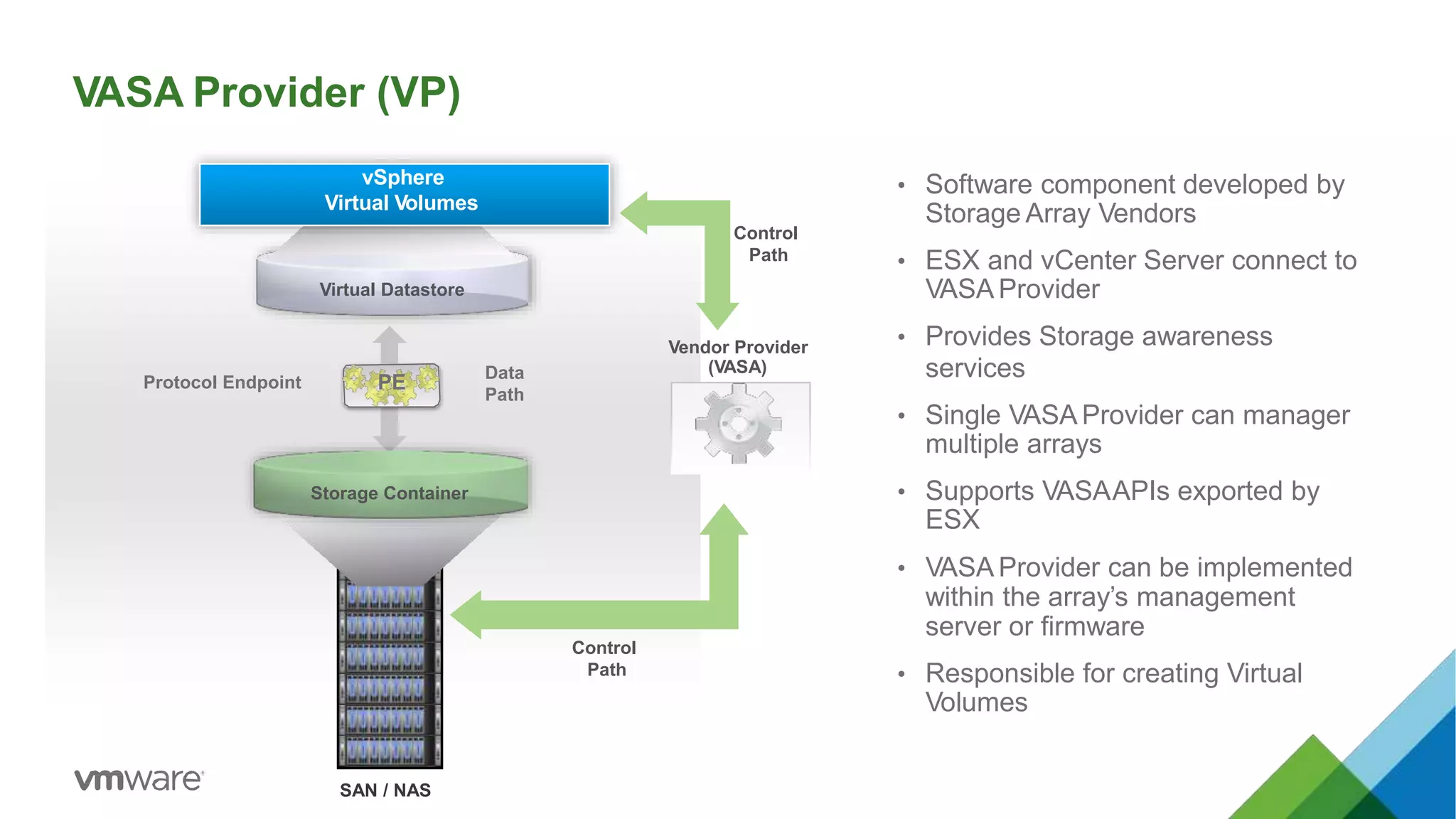
VASA Provider (VP)
• Software component developed by
Storage Array Vendors
• ESX and vCenter Server connect to
VASA Provider
• Provides Storage awareness
services
• Single VASA Provider can manager
multiple arrays
• Supports VASAAPIs exported by
ESX
• VASA Provider can be implemented
within the array’s management
server or firmware
• Responsible for creating Virtual
Volumes
SAN / NAS
Virtual Datastore
Data
Path
Protocol Endpoint PE
vSphere
Virtual Volumes
Storage Container
Vendor Provider
(VASA)
Control
Path
Control
Path
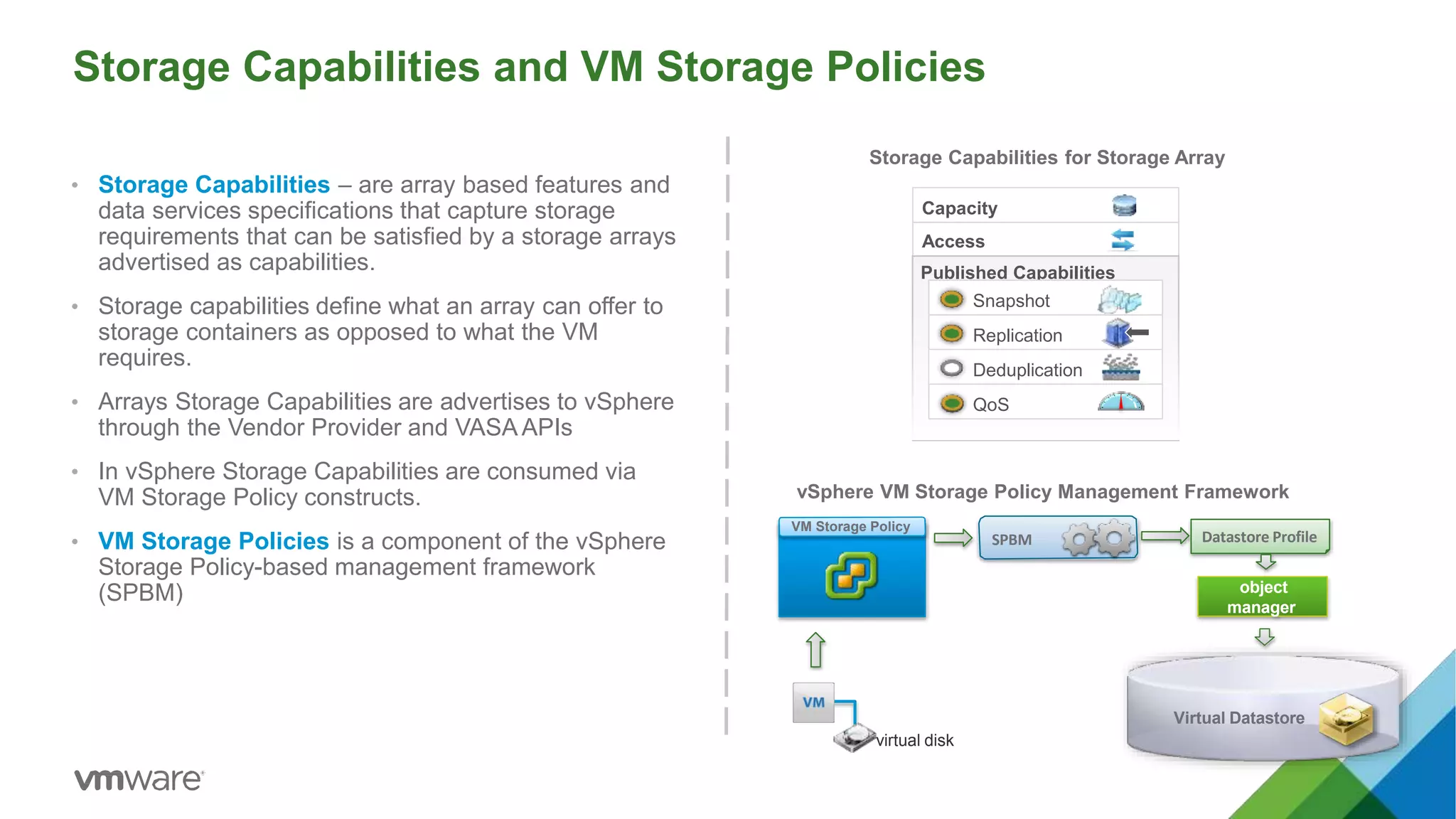
Storage Capabilities and VM Storage Policies
• Storage Capabilities – are array based features and
data services specifications that capture storage
requirements that can be satisfied by a storage arrays
advertised as capabilities.
• Storage capabilities define what an array can offer to
storage containers as opposed to what the VM
requires.
• Arrays Storage Capabilities are advertises to vSphere
through the Vendor Provider and VASA APIs
• In vSphere Storage Capabilities are consumed via
VM Storage Policy constructs.
• VM Storage Policies is a component of the vSphere
Storage Policy-based management framework
(SPBM)
SPBM
object
manager
virtual disk
Datastore Profile
VM Storage Policy
vSphere VM Storage Policy Management Framework
Storage Capabilities for Storage Array
Access
Capacity
Published Capabilities
Snapshot
Replication
Deduplication
QoS
Virtual Datastore
Storage Policy Based Management (SPBM) – Array Capabilities
Virtual Volumes APIs
Sample Default Profile for (6090a058-cd89-ffe3-87763007db37] - capabilities
Disk Types
Disk Encryption
Dedupe
Replication
Snapshot
Storage admin
Storage Policy-Based Mgmt.
Publish Capabilities
• Array based features and
data services
• Defines what an Array can
offer
• Advertised to ESX through
VASAAPIs
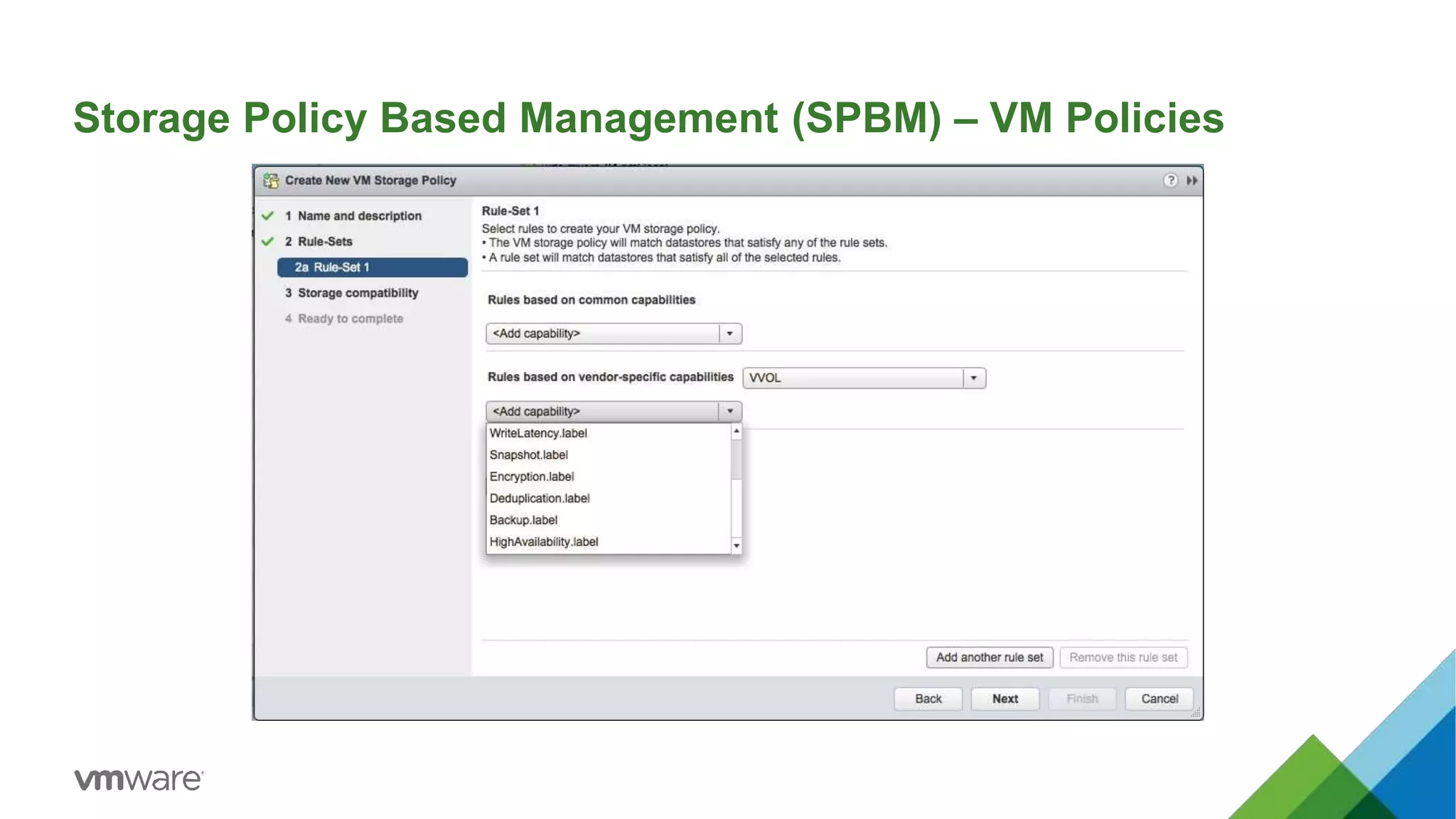
Storage Policy Based Management (SPBM) – VM Policies
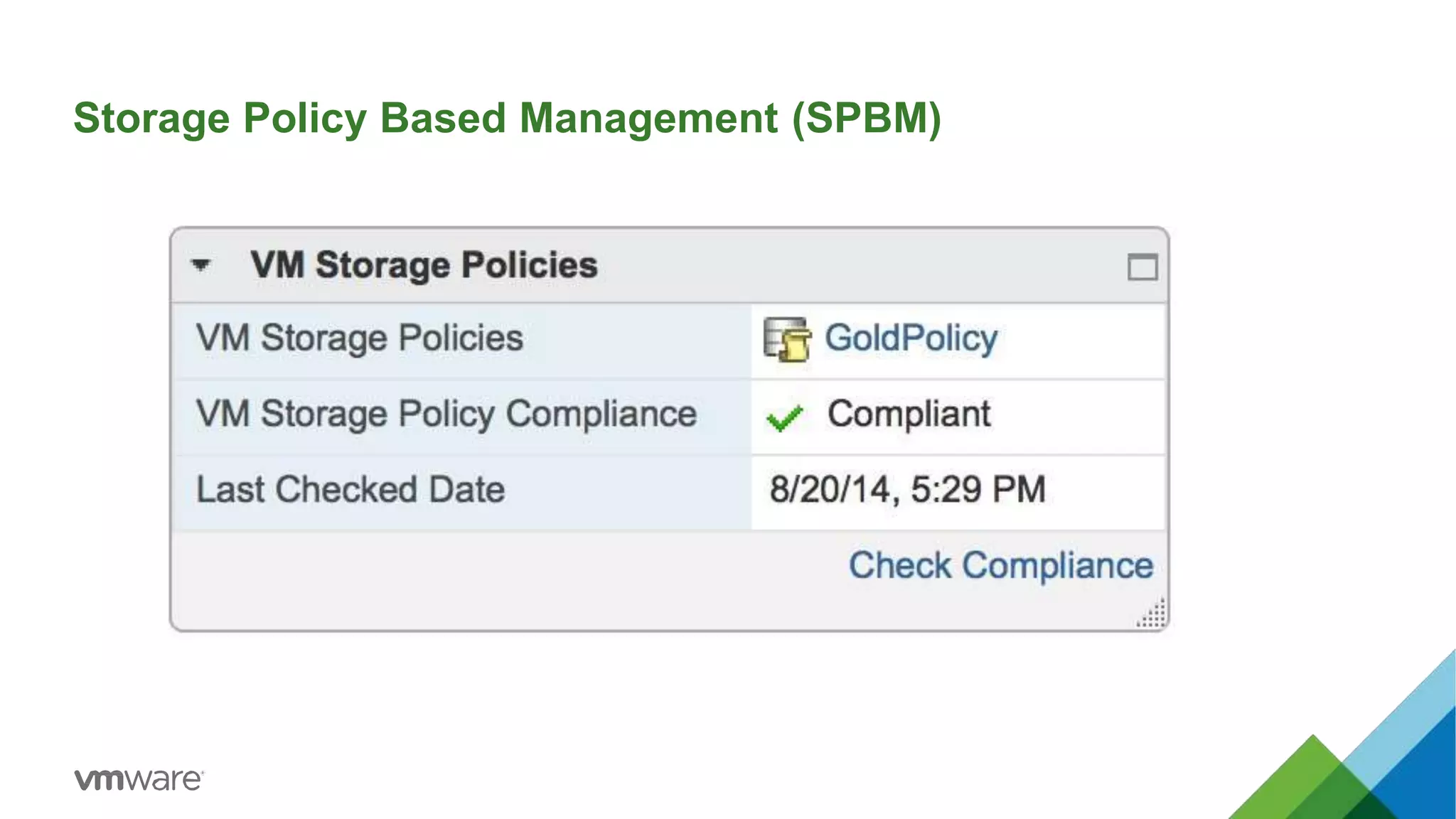
Storage Policy Based Management (SPBM)
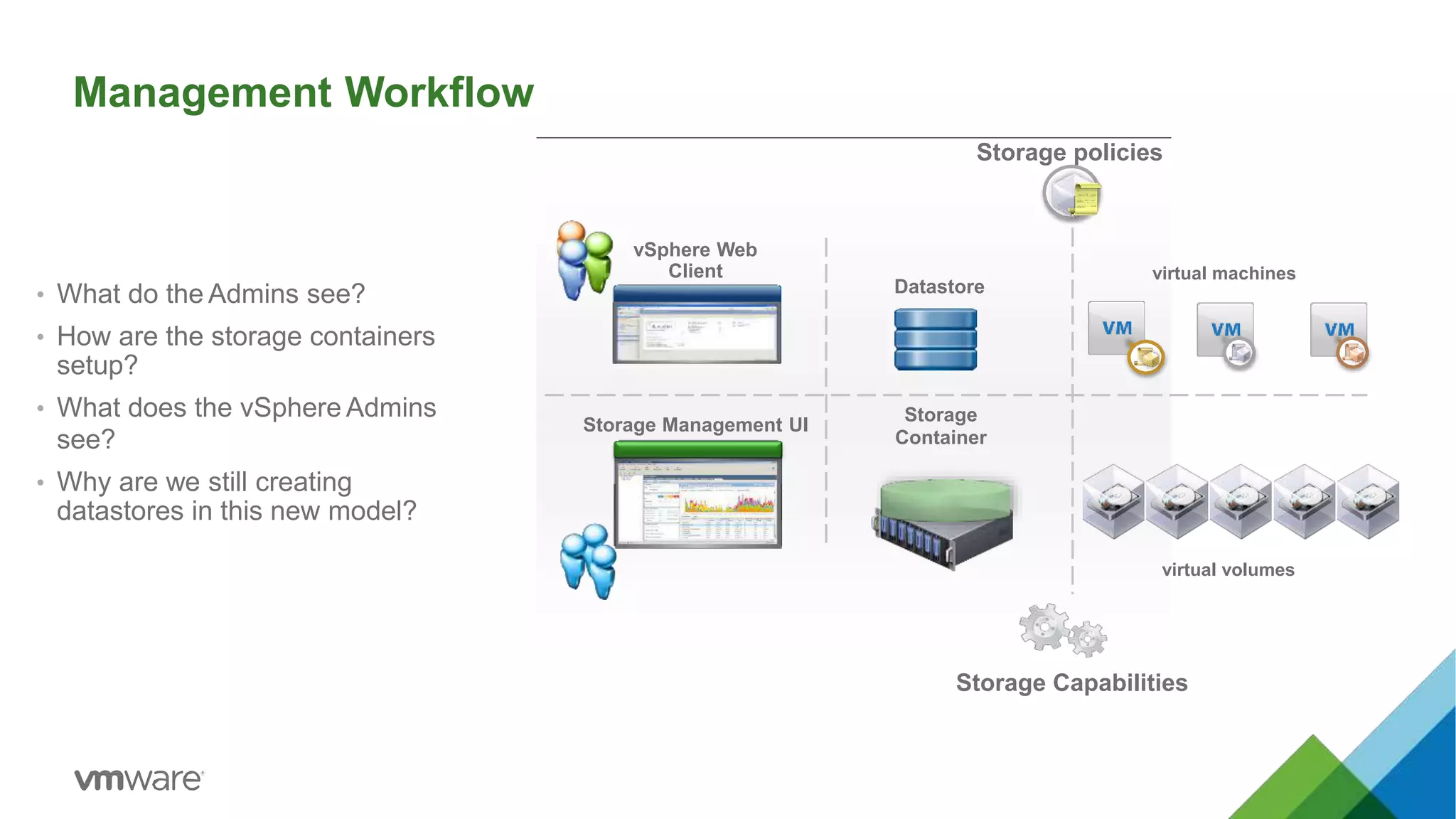
Management Workflow
• What do the Admins see?
• How are the storage containers
setup?
• What does the vSphere Admins
see?
• Why are we still creating
datastores in this new model?
Storage policies
vSphere Web
Client
Storage Management UI
Datastore
Storage
Container
Storage Capabilities
virtual volumes
virtual machines
Provision and Lifecycle
Workflows
Binds
31
vvol vvol vvol
DATA CONF SWAP
vvol vvol vvol
SWAP CONF DATA
Provisioning Workflow
storage arrays
PE
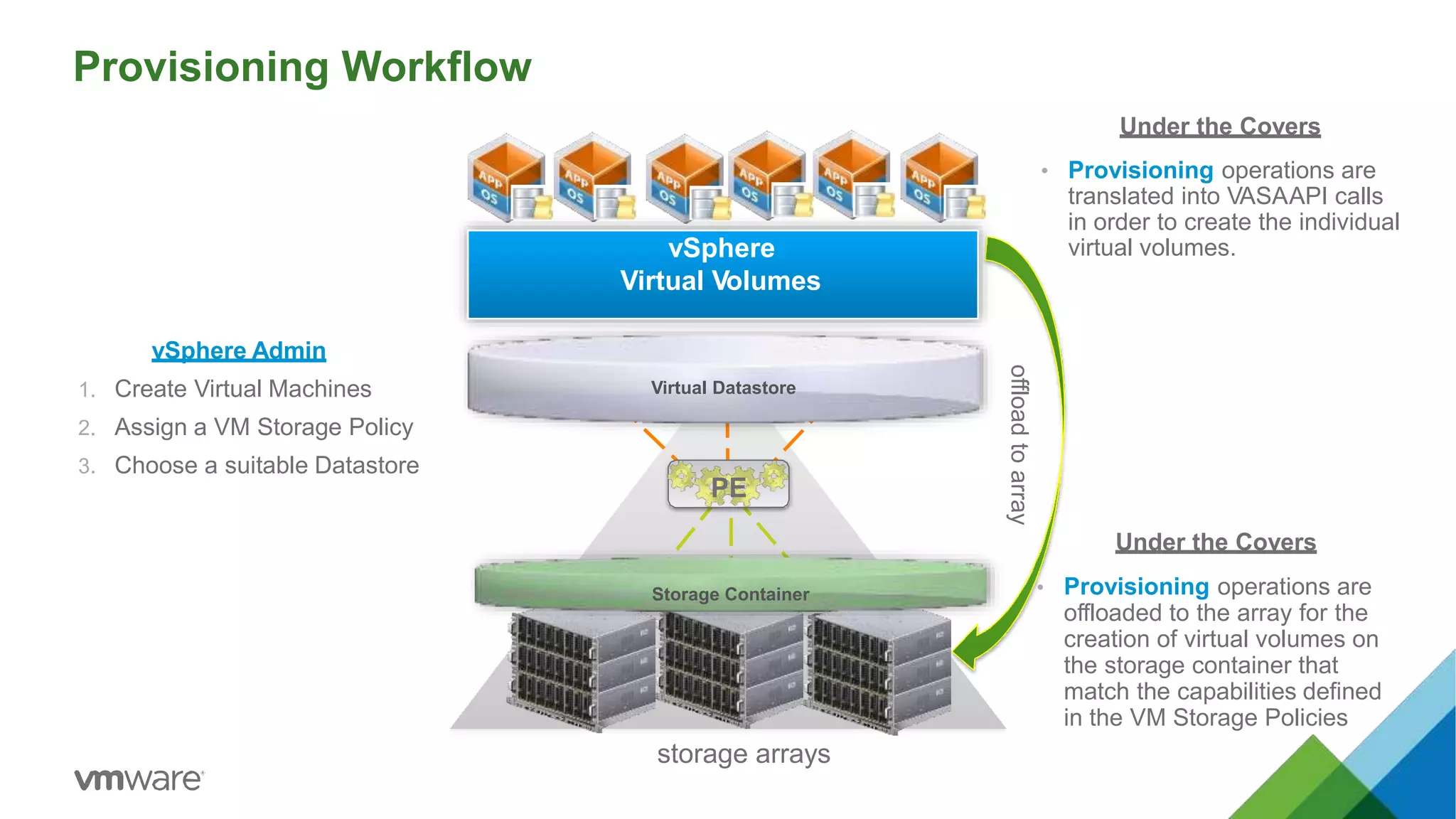
vSphere Admin
1. Create Virtual Machines
2. Assign a VM Storage Policy
3. Choose a suitable Datastore
Under the Covers
• Provisioning operations are
translated into VASAAPI calls
in order to create the individual
virtual volumes.
Under the Covers
• Provisioning operations are
offloaded to the array for the
creation of virtual volumes on
the storage container that
match the capabilities defined
in the VM Storage Policies
offloadtoarray
Virtual Datastore
Storage Container
vSphere
Virtual Volumes
Binding Operations
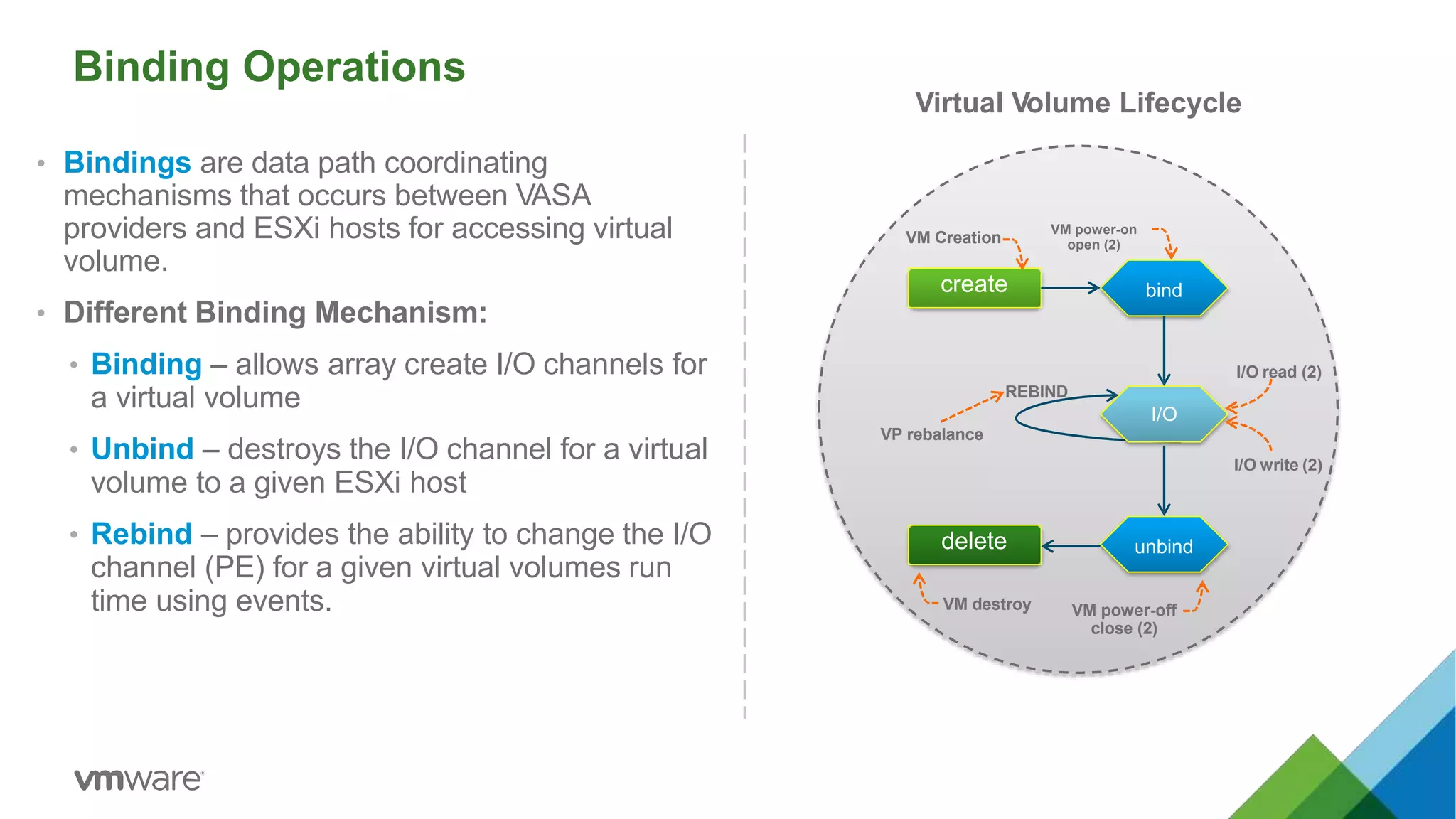
• Bindings are data path coordinating
mechanisms that occurs between VASA
providers and ESXi hosts for accessing virtual
volume.
• Different Binding Mechanism:
• Binding – allows array create I/O channels for
a virtual volume
• Unbind – destroys the I/O channel for a virtual
volume to a given ESXi host
• Rebind – provides the ability to change the I/O
channel (PE) for a given virtual volumes run
time using events.
create bind
unbinddelete
VM Creation
VM power-on
open (2)
I/O read (2)
REBIND
I/O
VP rebalance
I/O write (2)
VM power-off
close (2)
VM destroy
Virtual Volume Lifecycle
Binding Mechanism Workflow
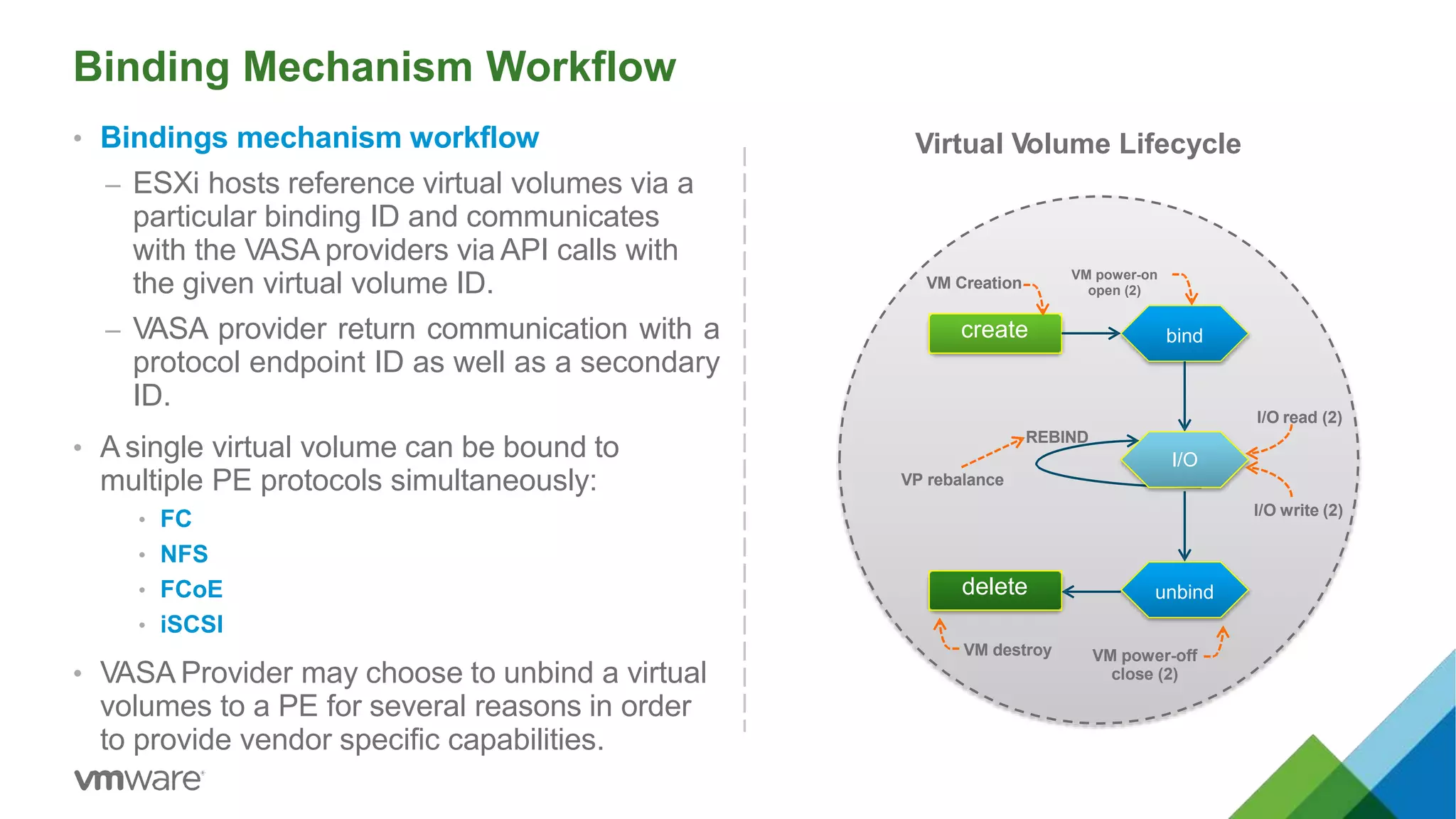
• Bindings mechanism workflow
– ESXi hosts reference virtual volumes via a
particular binding ID and communicates
with the VASA providers via API calls with
the given virtual volume ID.
– VASA provider return communication with a
protocol endpoint ID as well as a secondary
ID.
• A single virtual volume can be bound to
multiple PE protocols simultaneously:
• FC
• NFS
• FCoE
• iSCSI
• VASA Provider may choose to unbind a virtual
volumes to a PE for several reasons in order
to provide vendor specific capabilities.
create bind
unbinddelete
VM Creation
VM power-on
open (2)
I/O read (2)
REBIND
I/O
VP rebalance
I/O write (2)
VM power-off
close (2)
VM destroy
Virtual Volume Lifecycle
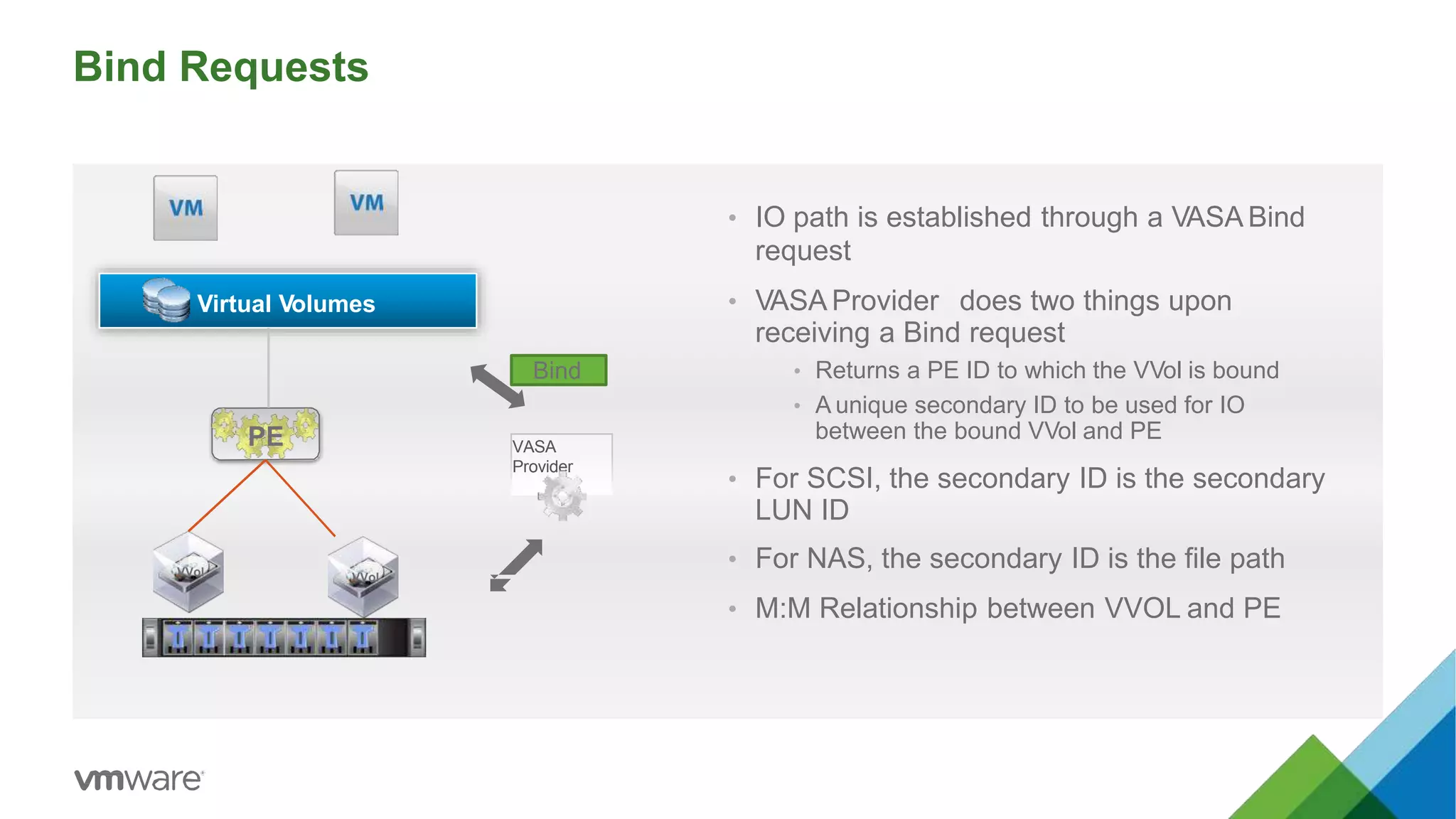
Bind Requests
• IO path is established through a VASA Bind
request
• VASA Provider does two things upon
receiving a Bind request
• Returns a PE ID to which the VVol is bound
• A unique secondary ID to be used for IO
between the bound VVol and PE
• For SCSI, the secondary ID is the secondary
LUN ID
• For NAS, the secondary ID is the file path
• M:M Relationship between VVOL and PE
Virtual Volumes
VASA
Provider
VVol
PE
VVol
Bind
Operation Scenarios
Offload, Migrations, Snapshots
37
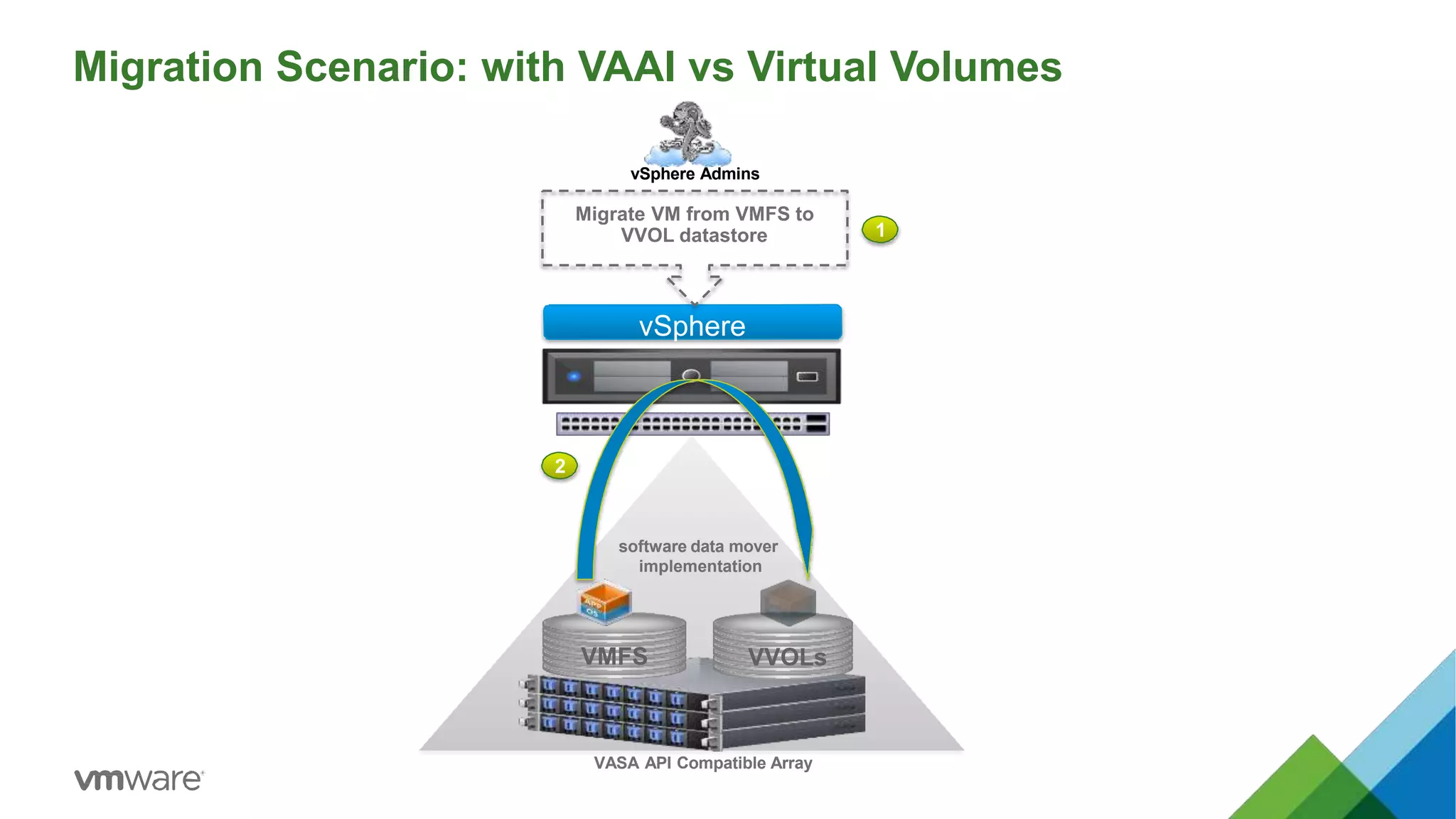
Migration Scenario: with VAAI vs Virtual Volumes
VASA API Compatible Array
2
vSphere
VMFS VVOLs
1
vSphere Admins
Migrate VM from VMFS to
VVOL datastore
software data mover
implementation
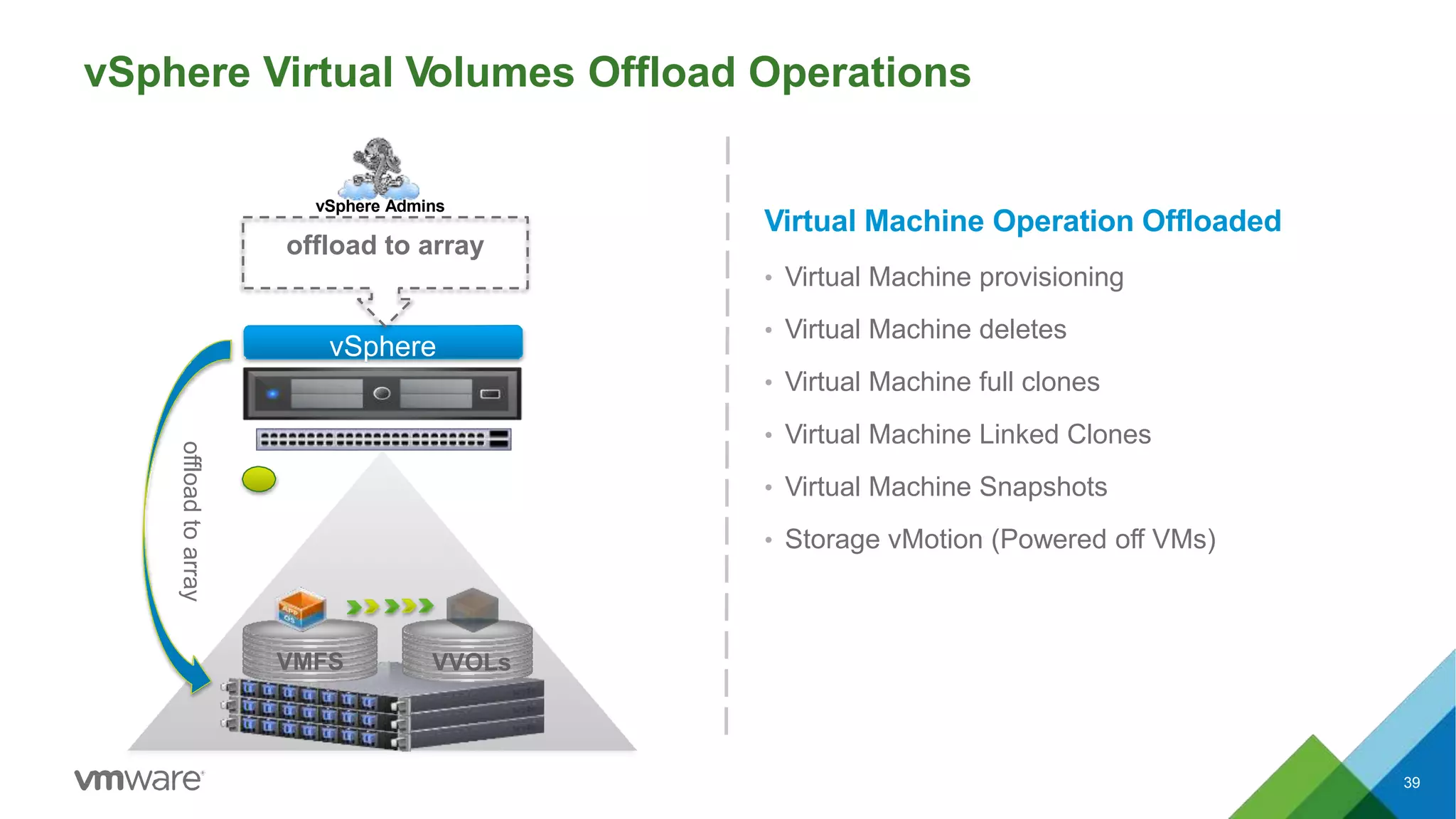
39
vSphere Virtual Volumes Offload Operations
vSphere
VMFS VVOLs
vSphere Admins
offload to array
offloadtoarray
Virtual Machine Operation Offloaded
• Virtual Machine provisioning
• Virtual Machine deletes
• Virtual Machine full clones
• Virtual Machine Linked Clones
• Virtual Machine Snapshots
• Storage vMotion (Powered off VMs)
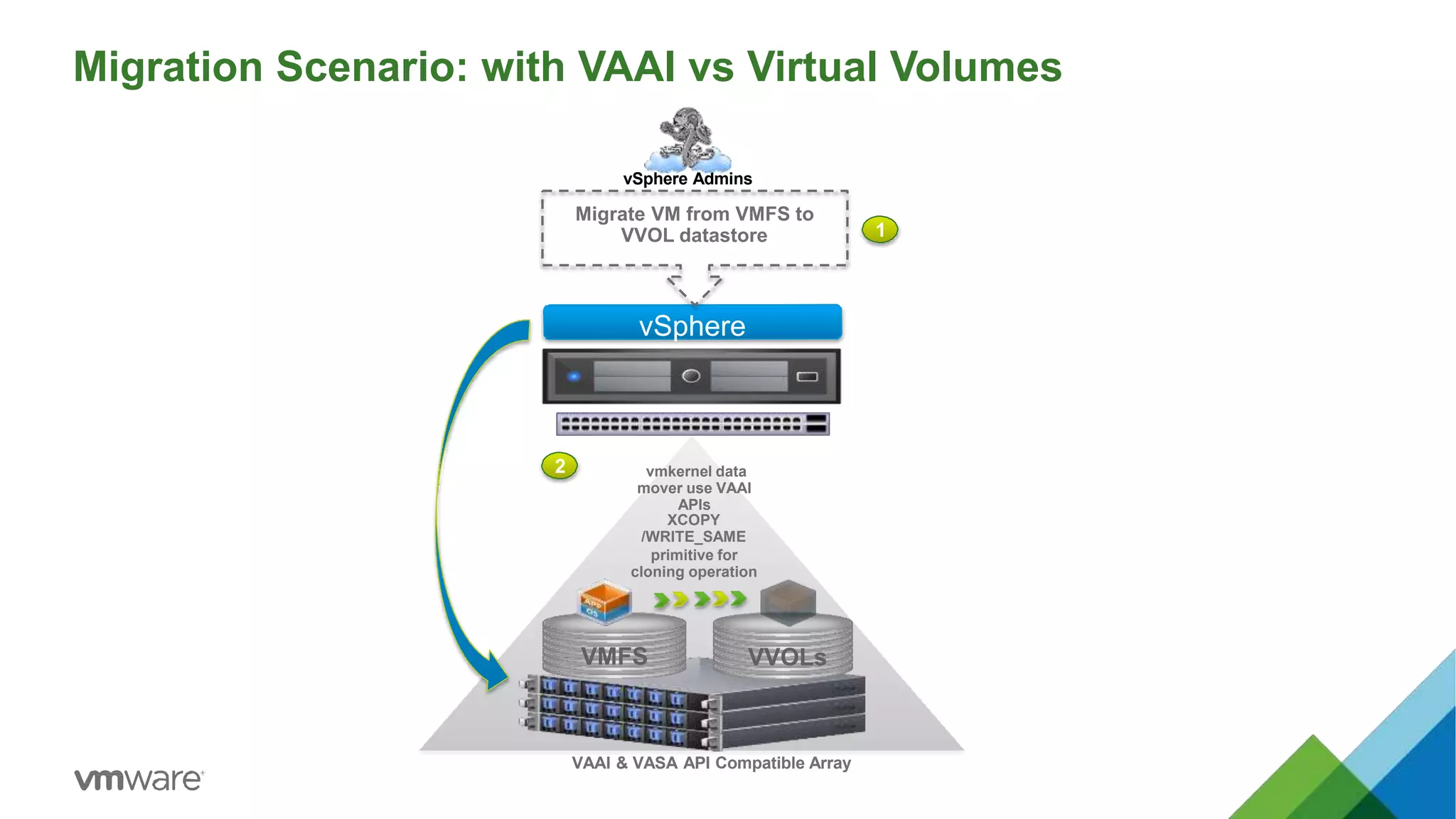
Migration Scenario: with VAAI vs Virtual Volumes
VAAI & VASA API Compatible Array
2
vSphere
VMFS VVOLs
1
vSphere Admins
Migrate VM from VMFS to
VVOL datastore
vmkernel data
mover use VAAI
APIs
XCOPY
/WRITE_SAME
primitive for
cloning operation
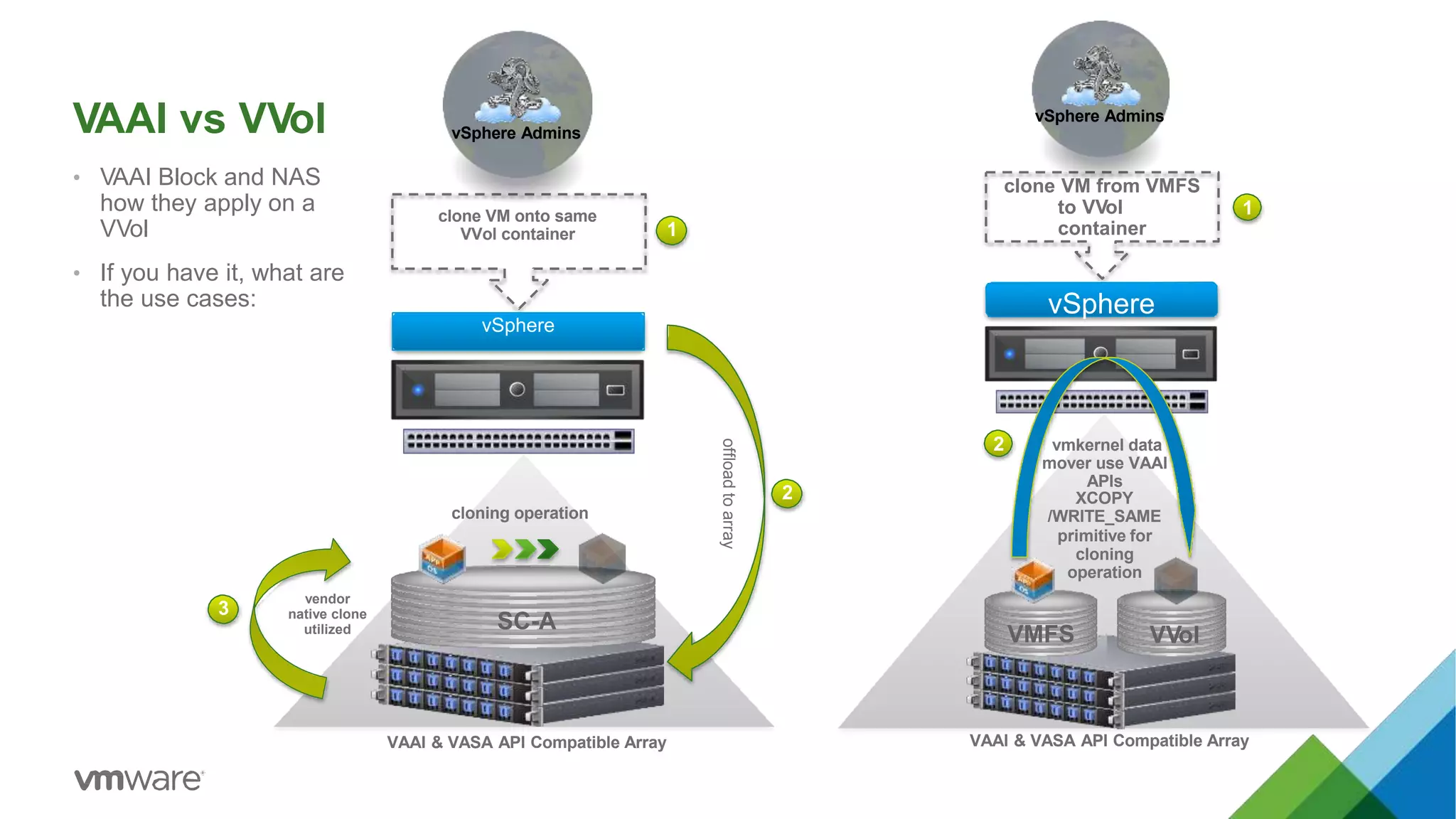
VAAI vs VVol
• VAAI Block and NAS
how they apply on a
VVol
• If you have it, what are
the use cases:
SC-A
cloning operation
VAAI & VASA API Compatible Array
offloadtoarray
clone VM onto same
VVol container
vSphere Admins
vendor
native clone
utilized
1
vSphere
2
3
VAAI & VASA API Compatible Array
clone VM from VMFS
to VVol
container
vSphere Admins
vmkernel data
mover use VAAI
APIs
XCOPY
/WRITE_SAME
primitive for
cloning
operation
2
vSphere
VMFS VVol
1
clone VM from VVol container to
different VVol container
vSphere Admins
vSphere
1
2
offloadtoarray
3
vendor native clone utilized with VASA primitives
Fully VAAI & VASA APIs Compatible Array
SC-A SC-B
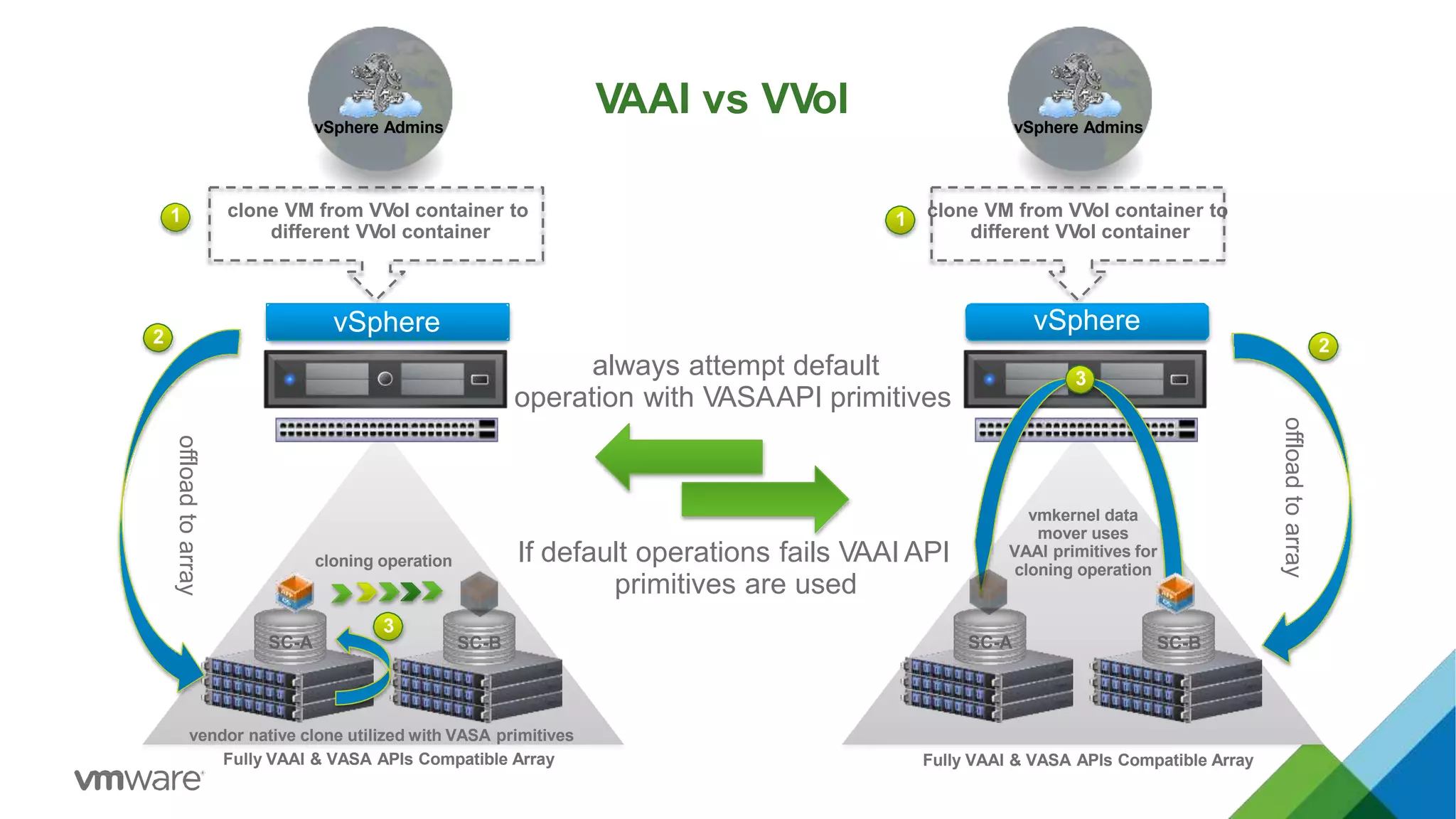
always attempt default
operation with VASAAPI primitives
1 default
fail back 2
If default operations fails VAAI API
primitives are used
clone VM from VVol container to
different VVol container
vSphere Admins
vmkernel data
mover uses
VAAI primitives for
cloning operation
vSphere
1
2
offloadtoarray
3
Fully VAAI & VASA APIs Compatible Array
SC-A SC-B
cloning operation
VAAI vs VVol
Snapshots
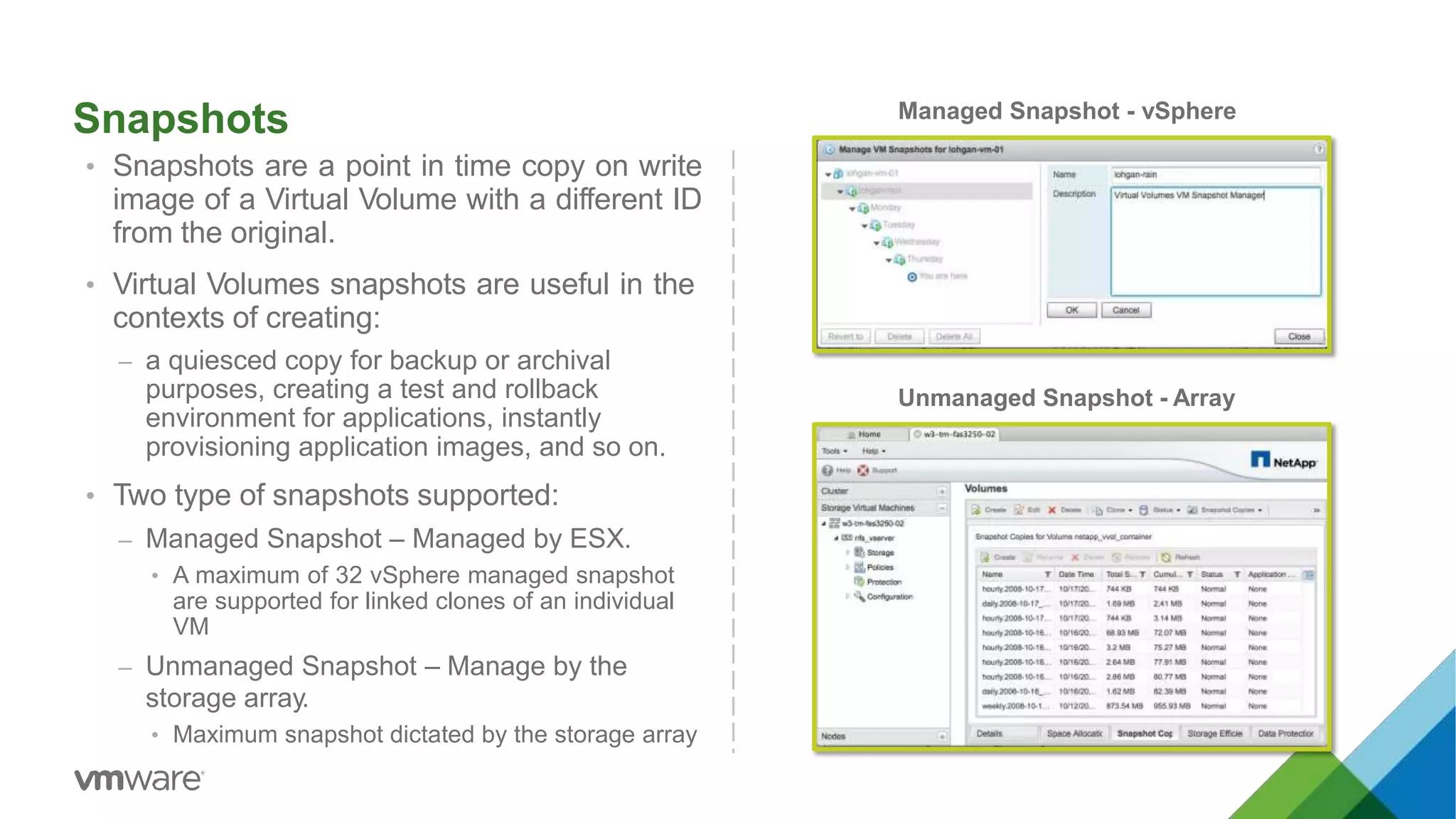
• Snapshots are a point in time copy on write
image of a Virtual Volume with a different ID
from the original.
• Virtual Volumes snapshots are useful in the
contexts of creating:
– a quiesced copy for backup or archival
purposes, creating a test and rollback
environment for applications, instantly
provisioning application images, and so on.
• Two type of snapshots supported:
– Managed Snapshot – Managed by ESX.
• A maximum of 32 vSphere managed snapshot
are supported for linked clones of an individual
VM
– Unmanaged Snapshot – Manage by the
storage array.
• Maximum snapshot dictated by the storage array
Managed Snapshot - vSphere
Unmanaged Snapshot - Array
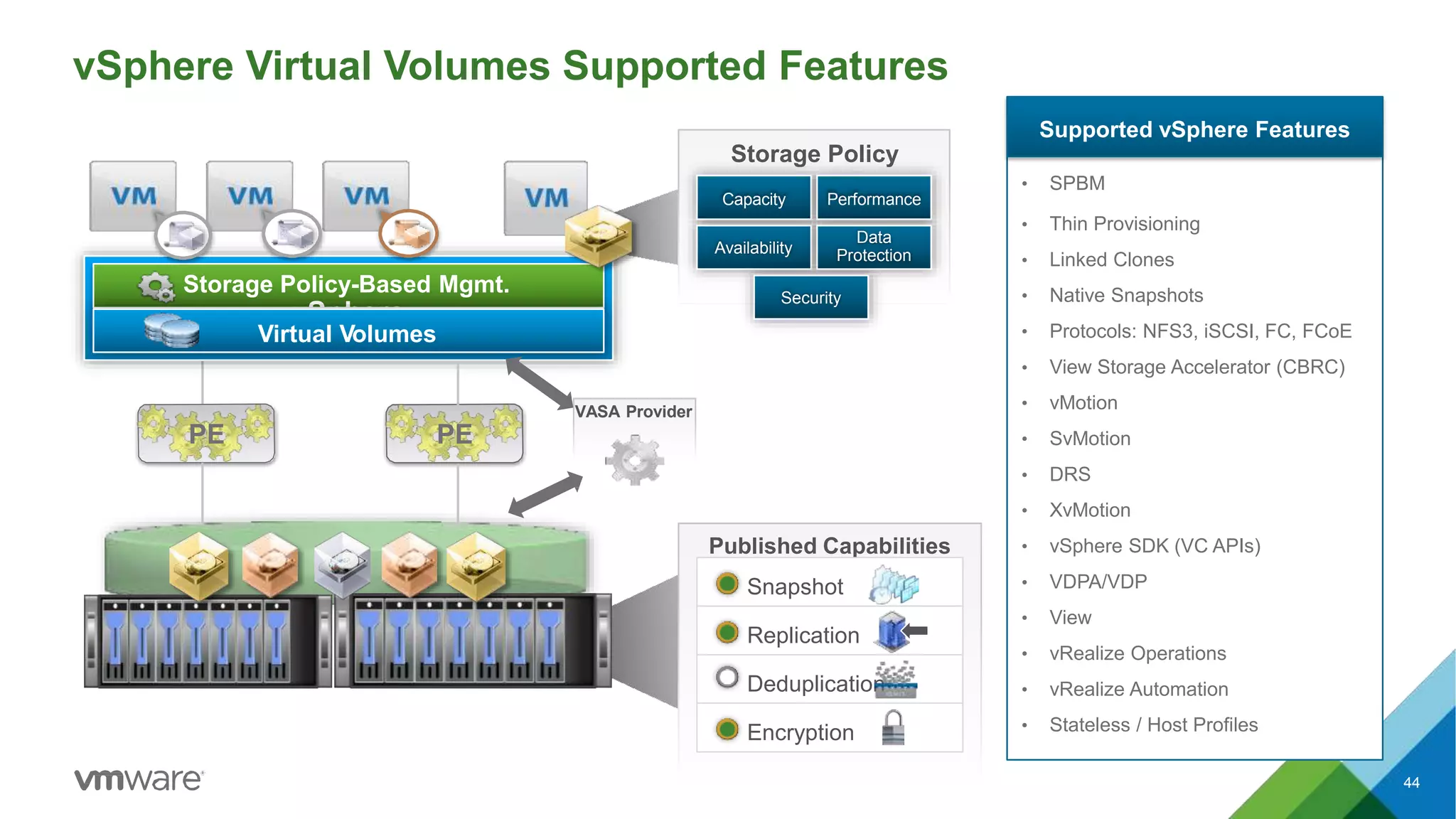
vSphere Virtual Volumes Supported Features
Supported vSphere Features
• SPBM
• Thin Provisioning
• Linked Clones
• Native Snapshots
• Protocols: NFS3, iSCSI, FC, FCoE
• View Storage Accelerator (CBRC)
• vMotion
• SvMotion
• DRS
• XvMotion
• vSphere SDK (VC APIs)
• VDPA/VDP
• View
• vRealize Operations
• vRealize Automation
• Stateless / Host Profiles
Published Capabilities
Snapshot
Replication
Deduplication
Encryption
Storage Policy-Based Mgmt.
vSphere
Virtual Volumes
Storage Policy
Capacity Performance
Availability
Data
Protection
Security
PE
VASA Provider
PE
44
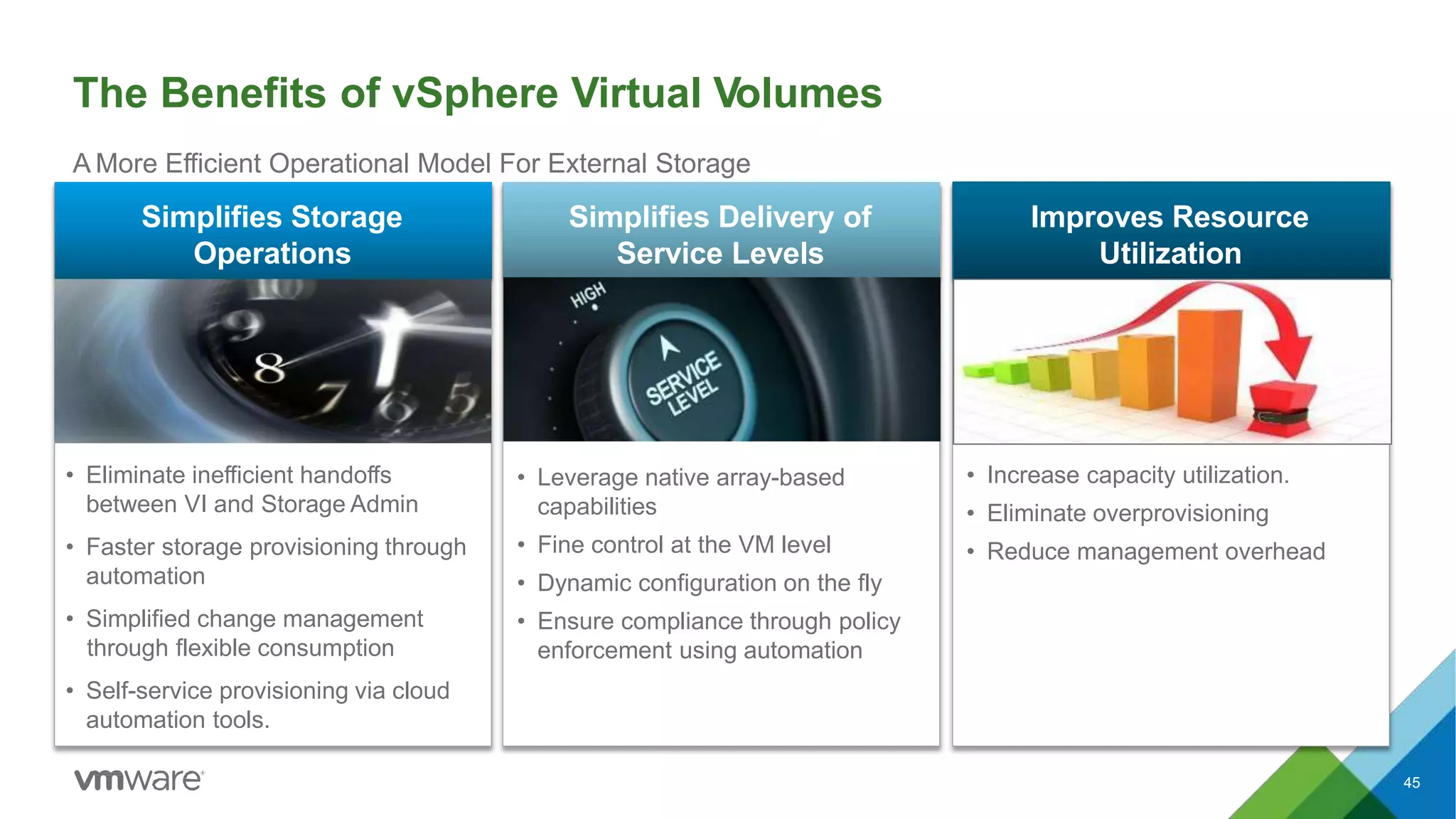
The Benefits of vSphere Virtual Volumes
45
A More Efficient Operational Model For External Storage
Improves Resource
Utilization
• Increase capacity utilization.
• Eliminate overprovisioning
• Reduce management overhead
• Eliminate inefficient handoffs
between VI and Storage Admin
• Faster storage provisioning through
automation
• Simplified change management
through flexible consumption
• Self-service provisioning via cloud
automation tools.
Simplifies Storage
Operations
• Leverage native array-based
capabilities
• Fine control at the VM level
• Dynamic configuration on the fly
• Ensure compliance through policy
enforcement using automation
Simplifies Delivery of
Service Levels
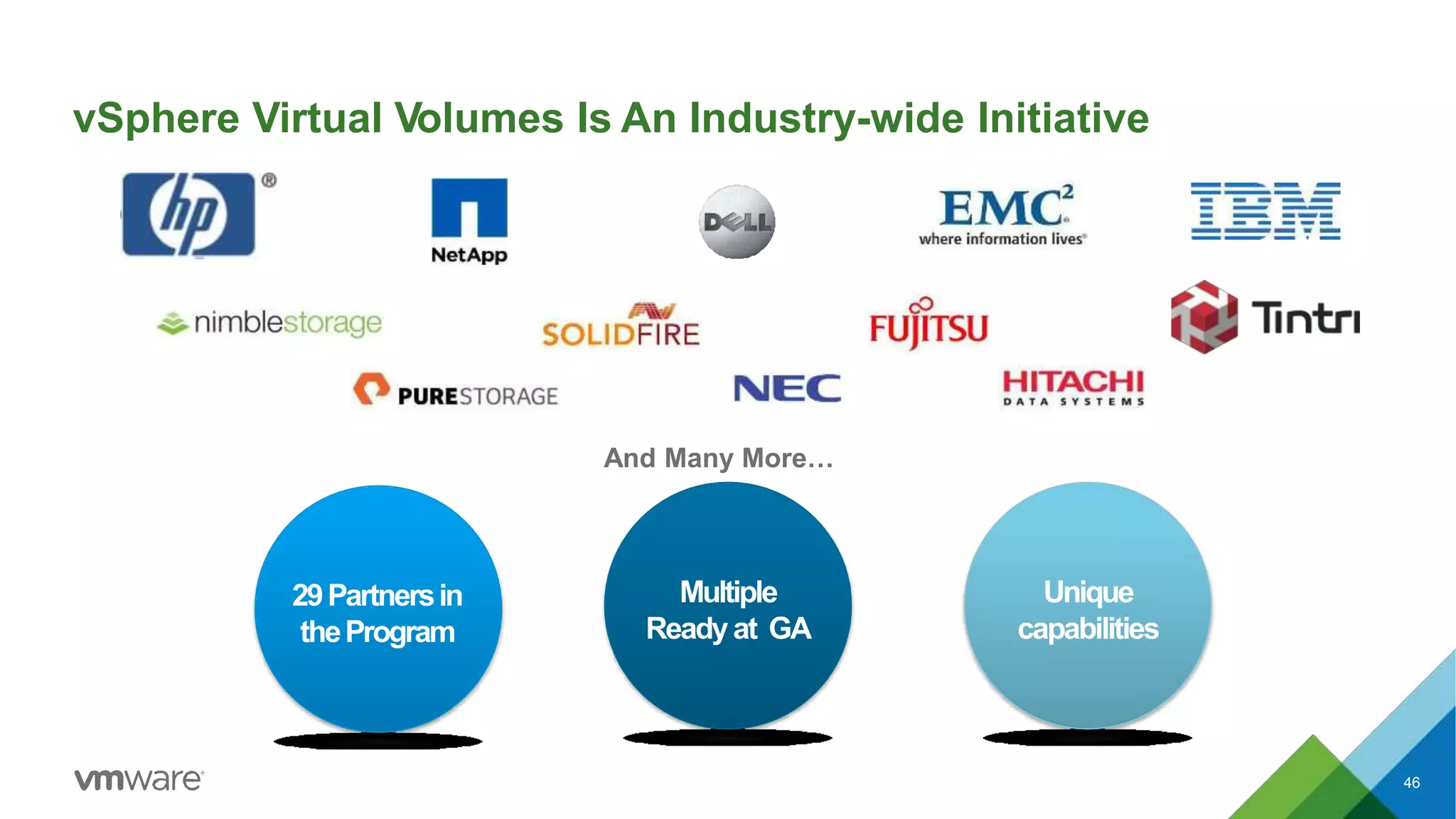
vSphere Virtual Volumes Is An Industry-wide Initiative
Multiple
Readyat GA
Unique
capabilities
46
And Many More…
29Partnersin
theProgram
48
Please submit your feedback
via our mobile app.
49
Rawlinson Rivera
@PunchingClouds
THANK YOU
50

V sphere virtual volumes technical overview

  • 1.
    Rawlinson Rivera, VMware vSphereVirtual Volumes Technical Overview STO4278
  • 2.
    Student Guide &Internal & Confidential Update Daily https://goo.gl/VVmVZ0 NSX Multi-site Solutions for BC/DR http://ouo.io/4cPWH VMware Integrated OpenStackTechnical Workshop http://ouo.io/hMTwu 4 A Strategic Force Multiplier and Services Growth Enabler http://ouo.io/IRk8I8 What’s New with VMware Virtual SAN and How to be Successful Selling http://ouo.io/1aH7i Virtual SAN Technical Walkthrough http://ouo.io/RW8ZQ vSphere Virtual Volumes Technical Overview http://ouo.io/7TfoF Software-Defined Storage: The Key to Agility with Control http://ouo.io/wwl13 VMware Software-Defined Storage Overview http://ouo.io/aZ0f5 Delivering SDS to SAN/NAS with Virtual Volumes http://ouo.io/uDY4Ig SRM & VR6 Technical Deep Dive http://ouo.io/XPDjr SRM & Business Continuity Overview http://ouo.io/dJret2 irtual SAN Panel: View from the Sales Trenches http://ouo.io/GcBDKP Performance and Best Practices for Business Critical Applications Leveraging Virtual SAN http://ouo.io/giywm W
  • 3.
    The Software-Defined DataCenter Transform storage by aligning it with app demands 4
  • 4.
    Traditional Storage ArchitecturesCan’t Keep Up Storage Admin Device-centric Silos Complex Processes VI Admin App Admin Specialized Costly HW ✖ Not commodity ✖ Static classes of service ✖ Time consuming processes ✖ Low utilization ✖ Rigid provisioning ✖ Lack of automation ✖ Overprovisioning ✖ Lack of granular control ✖ Slow reaction to request ✖ Frequent data migrations 5
  • 5.
    The Hypervisor EnablesApp-Centric Storage Automation vSphere The hypervisor is the right place to drive automation: • Knows the needs of all apps in real time • Sits directly in the I/O path • Has global view of all underlying storage systems • Can configure storage dynamically • Hardware agnostic 6 All-SSD Hybrid Server SAN
  • 6.
    App-centric Automation DrivesAgility and QoS 7 App-centric Automation • Dynamic delivery of storage service levels when needed • Fine control of data services at the VM level • Common management across heterogeneous devices  Rapid provisioning  No overprovisioning of resources  QoS automation  Simple change management Today’s InfrastruTcotduarey-centric Model • Static pre-allocation of shared storage container (LUN) • Data services tied to storage container • Vendor specific management ✖ Long provisioning cycles ✖ Overprovisioning of resources ✖ Management complexity ✖ Frequent data migrations
  • 7.
    Control Plane Storage Policy-BasedMgmt. Data Plane Storage Policy Based Mgmt. Virtual Volumes VVOL-enabled SAN / NAS APIs Control Plane Data Plane What’s New In The vSphere 6.0 Release 8 … … Virtual SAN 6.0 Radically Simple Hypervisor-Converged Storage for VMs  All-Flash architecture  2x greater scalability  4x greater with All-Flash; 2x performance with Hybrid  Virtual SAN Snapshots and Clones NEW vSphere Virtual Volumes  Virtualizes SAN/NAS devices  Uses native array capabilities  VM-level operations  Included with vSphere Management & Integration Framework for External Storage NEW SSD HDD SSD HDD SSD HDD Virtual SAN Hypervisor-converged SDS Stack External Storage App-Centric Automation
  • 8.
    vSphere Virtual Volumes AMore Efficient Operational Model For External Storage 9
  • 9.
    vSphere Virtual Volumes Management& Integration Framework for External Storage 10 Virtual Volumes The Basics • Virtualizes SAN and NAS devices • Virtual disks are natively represented on arrays • Enables VM granular storage operations using array-based data services • Storage Policy-Based Management enables automated consumption at scale • Supports existing storage I/O protocols (FC, iSCSI, NFS) • Industry-wide initiative supported by major storage vendors • Included with vSphere
  • 10.
    vSphere Virtual VolumesArchitecture vSphere Virtual Volumes 11SAN / NAS Vendor Provider (VASA) Control Path Control Path Storage Policies Access Capacity Published Capabilities Snapshot Replication Deduplication QoS Virtual Datastore Storage Admin VI Admin VVOLs Data PathProtocol Endpoint PE
  • 11.
    vSphere Virtual Volumes •Virtual Volumes – Virtual machine objects stored natively on the array. – No Filesystem on-disk formatting required • There are five different types of recognized Virtual Volumes: – CONFIG – vmx, logs, nvram, log files, etc – DATA – VMDKs – MEM – Snapshots – SWAP – Swap files – Other – vSphere solution specific type vSphere Web Client View
  • 12.
    Storage Container Storage Containers •Logical storage constructs for grouping of virtual volumes. • Typically defined and setup by storage administrators on the array in order to define: – Storage capacity allocations and restrictions • Capacity is based on physical storage capacity • Logically partition or isolate VMs with diverse storage needs and requirement – Storage policy settings based on data service capabilities • Minimum one storage container per array • Maximum depends on the array vSphere Virtual Volumes SAN / NAS Storage Containers
  • 13.
    Storage Container Storage Container DoI still need to create Datastores? Managed in similar fashion in vSphere, with additional goodness vSphere Datastore
  • 14.
    Differences between StorageContainers and LUNs • Size based on array capacity • Max number of SCs depend only on the array ability • Size of SC can be extended • Can distinguish heterogeneous capabilities for different VMs (Virtual Volumes) provisioned in that SC • Fixed size mandates more number of LUNs • Needs a FileSystem • Can only apply homogeneous capability on all VMs (VMDKs) provisioned in that LUN. • Managed by In-band FileSystem commands Storage Containers LUN
  • 15.
    Storage Container (SC) vSphereWeb Client Storage Management UI Datastore Storage Container • What do the Admins see? • How are the storage containers setup? • What does the vSphere Admins see? • Why are we still creating datastores in this new model?
  • 16.
  • 17.
    Virtual Volumes VM objectsview from a storage container on an arrayVM objects view from a datastore vSphere Web Client Storage Management UI vSphere Admin View Storage Admin View
  • 18.
  • 19.
    Protocol Endpoints Protocol Endpoints •Access points that enables communication between ESXi hosts and storage array systems. – Part of the physical storage fabric – Created by Storage administrators Scope of Protocol Endpoints • Compatible with all SAN and NAS Protocols: - iSCSI - NFS v3 - FC - FCoE • A Protocol Endpoint can support any one of the protocols at a given time • Existing multi-path policies and NFS topology requirements can be applied to the PE Why Protocol Endpoints? SAN / NAS Virtual Datastore Data Path Protocol Endpoint PE vSphere Virtual Volumes Storage Container
  • 20.
    Protocol Endpoints • Today,there are different types of logical management constructs to store VMDKs/objects: – NFS Mount Points – IP or block based datastores • Datastores serve two purposes today: – Endpoints – receive SCSI or NFS reads, write commands – Storage Container – for large number of VMs metadata and data files • Differences between Protocol Endpoints and Datastores: – PEs no longer stores VMDKs but it only becomes the access point. – Now you wont need as many datastores or mount point as before • Certain offloading operation will be done via VASAand other will be done using the standard protocol commands vSphere storage fabric PE protocol endpoint SCSI: proxy LUN NFS: mount-point datastore = protocol endpoint + storage container storage system 1 VVol (storage container) Per VMDK One entity on the fabric
  • 21.
    Discovery Procedures –Protocol Endpoint Protocol Endpoint discovery process • SCSI PEs are discovered during an ESX rescan • NFS PEs are maintained as IP addresses or file paths • ESX will identify PE and maintain all discovered PEs in a database. SAN / NAS Virtual Datastore Data Path Protocol Endpoint PE vSphere Virtual Volumes Storage Container
  • 22.
    Discovery Procedures –Storage Container Virtual Volumes Snapshot Replication vCenter VASA Provider Storage Container Discovery Process • Storage admin sets up Storage Container with desired capacity • Desired Capabilities are applied to the Storage Containers • VASA Provider discovers Storage Container and reports to vCenter • Any new VMs that are created will subsequently be provisioned in the Storage Container
  • 23.
  • 24.
    VASA Provider (VP) •Software component developed by Storage Array Vendors • ESX and vCenter Server connect to VASA Provider • Provides Storage awareness services • Single VASA Provider can manager multiple arrays • Supports VASAAPIs exported by ESX • VASA Provider can be implemented within the array’s management server or firmware • Responsible for creating Virtual Volumes SAN / NAS Virtual Datastore Data Path Protocol Endpoint PE vSphere Virtual Volumes Storage Container Vendor Provider (VASA) Control Path Control Path
  • 25.
    Storage Capabilities andVM Storage Policies • Storage Capabilities – are array based features and data services specifications that capture storage requirements that can be satisfied by a storage arrays advertised as capabilities. • Storage capabilities define what an array can offer to storage containers as opposed to what the VM requires. • Arrays Storage Capabilities are advertises to vSphere through the Vendor Provider and VASA APIs • In vSphere Storage Capabilities are consumed via VM Storage Policy constructs. • VM Storage Policies is a component of the vSphere Storage Policy-based management framework (SPBM) SPBM object manager virtual disk Datastore Profile VM Storage Policy vSphere VM Storage Policy Management Framework Storage Capabilities for Storage Array Access Capacity Published Capabilities Snapshot Replication Deduplication QoS Virtual Datastore
  • 26.
    Storage Policy BasedManagement (SPBM) – Array Capabilities Virtual Volumes APIs Sample Default Profile for (6090a058-cd89-ffe3-87763007db37] - capabilities Disk Types Disk Encryption Dedupe Replication Snapshot Storage admin Storage Policy-Based Mgmt. Publish Capabilities • Array based features and data services • Defines what an Array can offer • Advertised to ESX through VASAAPIs
  • 27.
    Storage Policy BasedManagement (SPBM) – VM Policies
  • 28.
    Storage Policy BasedManagement (SPBM)
  • 29.
    Management Workflow • Whatdo the Admins see? • How are the storage containers setup? • What does the vSphere Admins see? • Why are we still creating datastores in this new model? Storage policies vSphere Web Client Storage Management UI Datastore Storage Container Storage Capabilities virtual volumes virtual machines
  • 30.
  • 31.
    vvol vvol vvol DATACONF SWAP vvol vvol vvol SWAP CONF DATA Provisioning Workflow storage arrays PE vSphere Admin 1. Create Virtual Machines 2. Assign a VM Storage Policy 3. Choose a suitable Datastore Under the Covers • Provisioning operations are translated into VASAAPI calls in order to create the individual virtual volumes. Under the Covers • Provisioning operations are offloaded to the array for the creation of virtual volumes on the storage container that match the capabilities defined in the VM Storage Policies offloadtoarray Virtual Datastore Storage Container vSphere Virtual Volumes
  • 32.
    Binding Operations • Bindingsare data path coordinating mechanisms that occurs between VASA providers and ESXi hosts for accessing virtual volume. • Different Binding Mechanism: • Binding – allows array create I/O channels for a virtual volume • Unbind – destroys the I/O channel for a virtual volume to a given ESXi host • Rebind – provides the ability to change the I/O channel (PE) for a given virtual volumes run time using events. create bind unbinddelete VM Creation VM power-on open (2) I/O read (2) REBIND I/O VP rebalance I/O write (2) VM power-off close (2) VM destroy Virtual Volume Lifecycle
  • 33.
    Binding Mechanism Workflow •Bindings mechanism workflow – ESXi hosts reference virtual volumes via a particular binding ID and communicates with the VASA providers via API calls with the given virtual volume ID. – VASA provider return communication with a protocol endpoint ID as well as a secondary ID. • A single virtual volume can be bound to multiple PE protocols simultaneously: • FC • NFS • FCoE • iSCSI • VASA Provider may choose to unbind a virtual volumes to a PE for several reasons in order to provide vendor specific capabilities. create bind unbinddelete VM Creation VM power-on open (2) I/O read (2) REBIND I/O VP rebalance I/O write (2) VM power-off close (2) VM destroy Virtual Volume Lifecycle
  • 34.
    Bind Requests • IOpath is established through a VASA Bind request • VASA Provider does two things upon receiving a Bind request • Returns a PE ID to which the VVol is bound • A unique secondary ID to be used for IO between the bound VVol and PE • For SCSI, the secondary ID is the secondary LUN ID • For NAS, the secondary ID is the file path • M:M Relationship between VVOL and PE Virtual Volumes VASA Provider VVol PE VVol Bind
  • 35.
  • 36.
    Migration Scenario: withVAAI vs Virtual Volumes VASA API Compatible Array 2 vSphere VMFS VVOLs 1 vSphere Admins Migrate VM from VMFS to VVOL datastore software data mover implementation
  • 37.
    39 vSphere Virtual VolumesOffload Operations vSphere VMFS VVOLs vSphere Admins offload to array offloadtoarray Virtual Machine Operation Offloaded • Virtual Machine provisioning • Virtual Machine deletes • Virtual Machine full clones • Virtual Machine Linked Clones • Virtual Machine Snapshots • Storage vMotion (Powered off VMs)
  • 38.
    Migration Scenario: withVAAI vs Virtual Volumes VAAI & VASA API Compatible Array 2 vSphere VMFS VVOLs 1 vSphere Admins Migrate VM from VMFS to VVOL datastore vmkernel data mover use VAAI APIs XCOPY /WRITE_SAME primitive for cloning operation
  • 39.
    VAAI vs VVol •VAAI Block and NAS how they apply on a VVol • If you have it, what are the use cases: SC-A cloning operation VAAI & VASA API Compatible Array offloadtoarray clone VM onto same VVol container vSphere Admins vendor native clone utilized 1 vSphere 2 3 VAAI & VASA API Compatible Array clone VM from VMFS to VVol container vSphere Admins vmkernel data mover use VAAI APIs XCOPY /WRITE_SAME primitive for cloning operation 2 vSphere VMFS VVol 1
  • 40.
    clone VM fromVVol container to different VVol container vSphere Admins vSphere 1 2 offloadtoarray 3 vendor native clone utilized with VASA primitives Fully VAAI & VASA APIs Compatible Array SC-A SC-B always attempt default operation with VASAAPI primitives 1 default fail back 2 If default operations fails VAAI API primitives are used clone VM from VVol container to different VVol container vSphere Admins vmkernel data mover uses VAAI primitives for cloning operation vSphere 1 2 offloadtoarray 3 Fully VAAI & VASA APIs Compatible Array SC-A SC-B cloning operation VAAI vs VVol
  • 41.
    Snapshots • Snapshots area point in time copy on write image of a Virtual Volume with a different ID from the original. • Virtual Volumes snapshots are useful in the contexts of creating: – a quiesced copy for backup or archival purposes, creating a test and rollback environment for applications, instantly provisioning application images, and so on. • Two type of snapshots supported: – Managed Snapshot – Managed by ESX. • A maximum of 32 vSphere managed snapshot are supported for linked clones of an individual VM – Unmanaged Snapshot – Manage by the storage array. • Maximum snapshot dictated by the storage array Managed Snapshot - vSphere Unmanaged Snapshot - Array
  • 42.
    vSphere Virtual VolumesSupported Features Supported vSphere Features • SPBM • Thin Provisioning • Linked Clones • Native Snapshots • Protocols: NFS3, iSCSI, FC, FCoE • View Storage Accelerator (CBRC) • vMotion • SvMotion • DRS • XvMotion • vSphere SDK (VC APIs) • VDPA/VDP • View • vRealize Operations • vRealize Automation • Stateless / Host Profiles Published Capabilities Snapshot Replication Deduplication Encryption Storage Policy-Based Mgmt. vSphere Virtual Volumes Storage Policy Capacity Performance Availability Data Protection Security PE VASA Provider PE 44
  • 43.
    The Benefits ofvSphere Virtual Volumes 45 A More Efficient Operational Model For External Storage Improves Resource Utilization • Increase capacity utilization. • Eliminate overprovisioning • Reduce management overhead • Eliminate inefficient handoffs between VI and Storage Admin • Faster storage provisioning through automation • Simplified change management through flexible consumption • Self-service provisioning via cloud automation tools. Simplifies Storage Operations • Leverage native array-based capabilities • Fine control at the VM level • Dynamic configuration on the fly • Ensure compliance through policy enforcement using automation Simplifies Delivery of Service Levels
  • 44.
    vSphere Virtual VolumesIs An Industry-wide Initiative Multiple Readyat GA Unique capabilities 46 And Many More… 29Partnersin theProgram
  • 45.
    48 Please submit yourfeedback via our mobile app.
  • 46.
  • 47.