KeepingA Bunch of
DatabaseSchemas
Synchronized
What we’ve learned about Doctrine Migrations
Docker
Dev
Test
Live
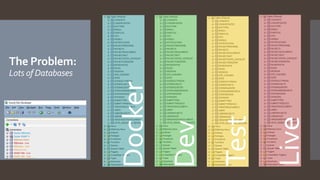
The Problem:
Lots of Databases
Docker
Dev
Test
Live
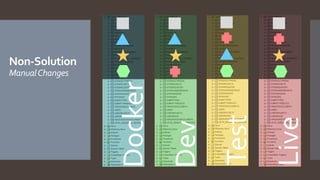
Non-Solution
ManualChanges
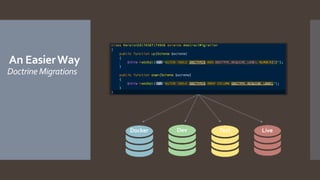
An EasierWay
Doctrine Migrations
Docker Dev Test Live
Where we
are using it
SMART IRB Exchange
eSMART
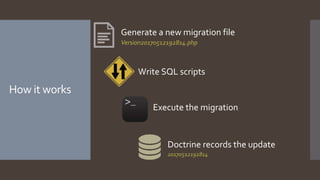
How it works
Generate a new migration file
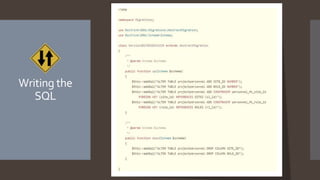
Write SQL scripts
Version20170512192814.php
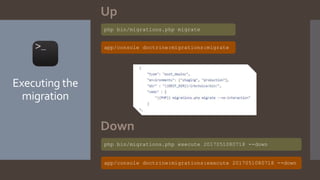
Execute the migration
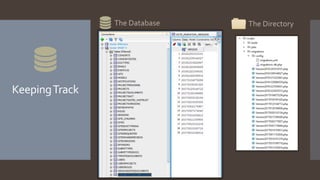
Doctrine records the update
20170512192814
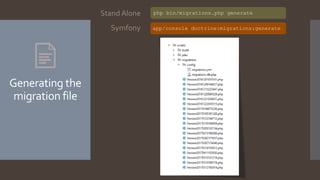
Generating the
migration file
php bin/migrations.php generate
app/console doctrine:migrations:generateSymfony
Stand Alone
Writing the
SQL
Executing the
migration
php bin/migrations.php migrate
php bin/migrations.php execute 2017051080718 --down
Up
Down
app/console doctrine:migrations:migrate
app/console doctrine:migrations:execute 2017051080718 --down
KeepingTrack
The Database The Directory
That’s the
basics Generate Execute TrackCode
Questions?
Lessons
Learned
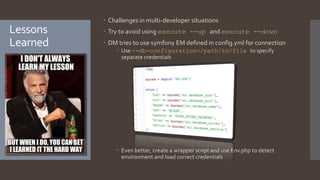
 Challenges in multi-developer situations
 Try to avoid using execute --up and execute --down
 DM tries to use symfony EM defined in config.yml for connection
 Use --db-configuration=/path/to/file to specify
separate credentials
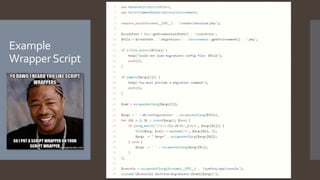
 Even better, create a wrapper script and use Env.php to detect
environment and load correct credentials
Example
WrapperScript
Complex
Migrations
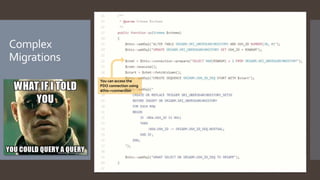
You can access the
PDO connection using
$this->connection
Is Doctrine
Migrations
worth it?
References
Doctrine Migrations Documentation
• http://www.doctrine-project.org/projects/migrations.html
Article on using stand-alone Doctrine Migrations
• https://akrabat.com/using-doctrine-migrations-outside-of-doctrine-
orm-or-symfony/
Notes for inclusion in SMART IRB Exchange
• https://github.com/vanderbilt/irbshare/wiki/Using-Doctrine-
Migrations

Using Doctrine Migrations to Synchronize Databases

Editor's Notes

  • #2 Present tool for synchronizing dbase Bryce – General overview / simple use case Patrick – Lessons learned in more complex scenario Goal – Drink the DM KoolAid
  • #3 My situation – 8 databases to keep in sync. IRBChoice and SIE are same core app running with different features in different environments.
  • #4 Tried making changes in SQL Developer while coding, then remembering 1) what changes I made and 2) to make those changes to other dbases Result: Inevitably something would crash because I forgot a change. Never sure if dbases in sync
  • #5 Now, I write SQL in a script file to modify dbase. I manually run script on Docker to upgrade dbase. When I push code to servers, deploy script runs migration code. I don’t have to remember my dbase changes, or worry that code is out of sync with dbase.
  • #6 With a name like “Doctrine Migrations” you may think you have to use Doctrine ORM. I’m using it on Zend Framework with Oracle DB. Patrick is using with Symfony & Doctrine also on Oracle. Can add to any project via Composer dependency
  • #7 Once DM is installed, these are steps for making changes to your dbase No more on-the-fly db changes in GUI. Keeping 8 dbases in sync requires discipline, and first step is scripting ALL changes.
  • #8 DM is configured with a directory where all migrations are stored. First step in migration is creating a new file. File is specially named with timestamp. Have to use this naming scheme. If desired, you can organize scripts in subfolders and DM will still find them all.
  • #9 ALL dbase modifications in script / SQL. No more GUI tweaks. “Generate” gave us this framework. All we do is fill out the ‘up’ and ‘down’ methods. Example: Add two columns to table. Each command is separate entry, but you can use PL/SQL code. Write “down” function to back out. This is important. If the “Up” crashes, it doesn’t crash gracefully. I test these – running ‘up’ and then ‘down’ and then ‘up’ in Docker until it works without failures.
  • #10 Can execute manually or make it part of deployment script. - Migrate before or after code changes? After. If code change fails, don’t have to run migration To roll back, select version to execute “down”.
  • #11 When a migration completes successfully, DM records the version ID in single-field table. On next migration, the versions listed in directory are compared with those in the table. If any missing, they are executed in order. Story: Running ‘migrate’ on loaded db that did not have initial setup migration marked. Tried to build from beginning.
  • #12 That’s the basics. Any questions on the fundamentals before Patrick talks about some of the challenges?
  • #13 If lots of ppl are running execute --down/--up in random orders, it can cause headaches The db connection used by symfony shouldn’t have access to alter schemas, so DM needs a separate connection
  • #14 This wrapper script detects the environment and loads the correct configuration file, so the user doesn’t have to worry about it (and can’t make a mistake!!!)
  • #15 Updating a table to use a sequence for the primary key column. Since the table has existing data, we need to query it and get the current number of rows so we know where to start the sequence.