WebRTC

Bring real-time to the web
HCMC University of Technology

NEW TRENDS of
WEB TECHNOLOGY ON MOBILE

VIDEO COMMUNICATION
with

09/2012
I. What is WebRTC ?

II. Key Features
1. Media Stream
2. Peer Connection
3. Data Channels
III. Applications
IV. Demos
WebRTC
TỔNG QUAN

Bring real-time to the web
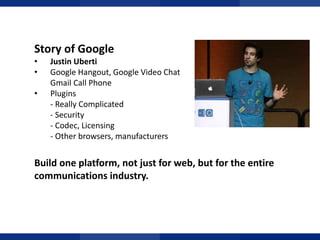
Story of Google
•
•
•

Justin Uberti
Google Hangout, Google Video Chat
Gmail Call Phone
Plugins
- Really Complicated
- Security
- Codec, Licensing
- Other browsers, manufacturers

TỔNG QUAN

Build one platform, not just for web, but for the entire
communications industry.
What is WebRTC ?
• Real Time Communications meets the web
• A state-of-the-art audio/video communication stack in your web
browser
• A cross-industry effort to create a new communications platform

TỔNG QUAN

“WebRTC and HTML5 could enable the same transformation for real
time that the original browser did for information.”
Phil Edholm
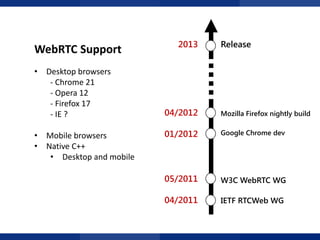
WebRTC Support
• Desktop browsers
- Chrome 21
- Opera 12
- Firefox 17
- IE ?

2013

04/2012

Mozilla Firefox nightly build

01/2012

Google Chrome dev

05/2011

W3C WebRTC WG

04/2011

IETF RTCWeb WG

TỔNG QUAN

• Mobile browsers
• Native C++
• Desktop and mobile

Release
ỨNG DỤNG
Key Features
TRONG ĐÀO TẠO TỪ XA
I. What is WebRTC ?

II. Key Features
1. Media Stream
2. Peer Connection
3. Data Channels
III. Applications
IV. Demos
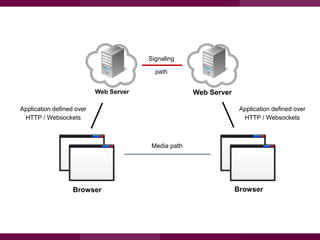
Signaling
path
Web Server
Application defined over
HTTP / Websockets

Web Server

TỔNG QUAN

Application defined over
HTTP / Websockets

Media path

Browser

Browser
Key Features
1. Media Stream
Access audio and video
Media Stream
•
•
•
•

Represent a MediaSource
getUserMedia API to access camera/microphone
Use with <video> as an URL
Send to remote peer

Combine with other HTML5 for funny effects
• <canvas>
• CSS
• WebGL
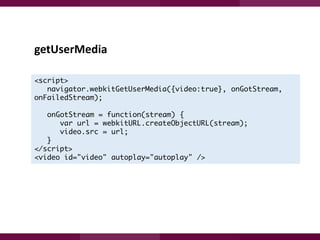
getUserMedia
<script>
navigator.webkitGetUserMedia({video:true}, onGotStream,
onFailedStream);
onGotStream = function(stream) {
var url = webkitURL.createObjectURL(stream);
video.src = url;
}
</script>
<video id="video" autoplay="autoplay" />
Key Features
2. Peer Connection
Audio and video session
PeerConnection
API for establishing audio/video calls
Built-in
• Peer-to-peer
• Codec control
• Encryption
• Bandwidth management
Setup a session
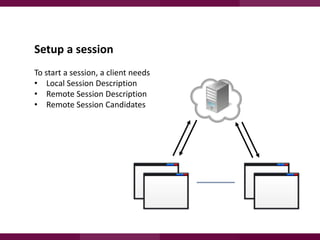
To start a session, a client needs
• Local Session Description
• Remote Session Description
• Remote Session Candidates
Setup a session
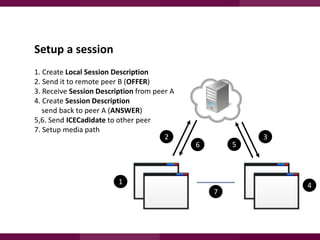
1. Create Local Session Description
2. Send it to remote peer B (OFFER)
3. Receive Session Description from peer A
4. Create Session Description
send back to peer A (ANSWER)
5,6. Send ICECadidate to other peer
7. Setup media path
2

5

6

1
7

3

4
PeerConnection API
Caller side

Callee side

Create a new PeerConnection
PeerConnection(config, iceCallback)
addStream(stream)

<receive call from caller>

Create local SessionDescription
createOffer(hints)
setLocalDescription(type, desc)
startIce()
<wait for response from callee>
Receive remote SessionDescription
setRemoteDescription(type, desc)

Create PeerConnection
PeerConnection(config, iceCallback)
setRemoteDescription(type, desc)

Create local SessionDescription
createAnswer(offer, hints)
setLocalDescription(type, desc)
startIce()
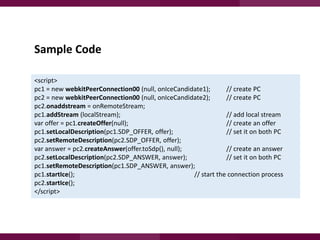
Sample Code
<script>
pc1 = new webkitPeerConnection00 (null, onIceCandidate1);
// create PC
pc2 = new webkitPeerConnection00 (null, onIceCandidate2);
// create PC
pc2.onaddstream = onRemoteStream;
pc1.addStream (localStream);
// add local stream
var offer = pc1.createOffer(null);
// create an offer
pc1.setLocalDescription(pc1.SDP_OFFER, offer);
// set it on both PC
pc2.setRemoteDescription(pc2.SDP_OFFER, offer);
var answer = pc2.createAnswer(offer.toSdp(), null);
// create an answer
pc2.setLocalDescription(pc2.SDP_ANSWER, answer);
// set it on both PC
pc1.setRemoteDescription(pc1.SDP_ANSWER, answer);
pc1.startIce();
// start the connection process
pc2.startIce();
</script>
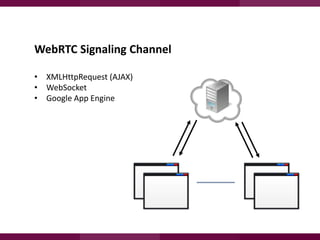
WebRTC Signaling Channel
• XMLHttpRequest (AJAX)
• WebSocket
• Google App Engine
Key Features
3. Data Channels

Peer-to-peer data exchange in browsers
Data Channel
Peer-to-peer exchange of arbitrary application data
•
•
•

Low latency
High message rate/thoughput
Reliable and unreliable semantics

Use cases
•
•
•
•
•

Multiplayer game
Remote desktop
Real-time interactive (chat, drawing…)
File transfer
Decentralized networks
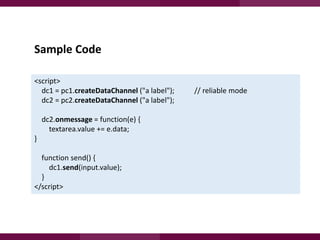
Sample Code
<script>
dc1 = pc1.createDataChannel ("a label");
dc2 = pc2.createDataChannel ("a label");
dc2.onmessage = function(e) {
textarea.value += e.data;

}
function send() {
dc1.send(input.value);
}
</script>

// reliable mode
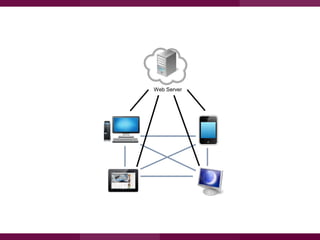
Web Server
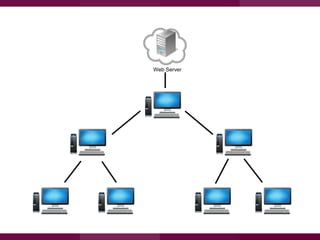
Web Server
CƠ SỞ LÝ THUYẾT
Applications
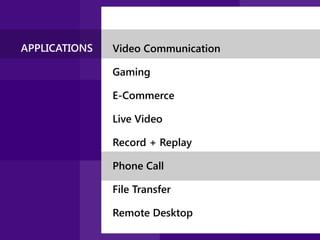
APPLICATIONS

Video Communication
Gaming
E-Commerce
Live Video
Record + Replay
Phone Call

File Transfer
Remote Desktop
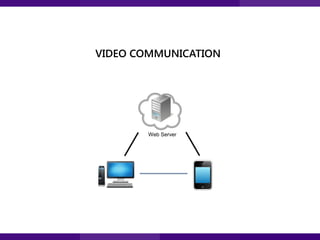
VIDEO COMMUNICATION

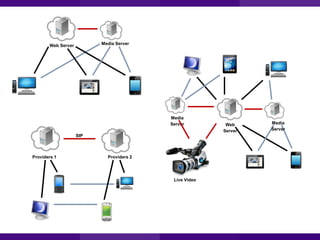
Web Server
Media Server

Web Server

Media
Server
SIP

Providers 1

Providers 2

Live Video

Web
Server

Media
Server
Start ups
Zingaya (Call' button for websites) enables voice calls through any
computer from a webpage. No download or phone is required.
Voxeo Labs (Open source enabler for WebRTC services) Phono is a jQuery
plug-in that turns any Web browser into a multichannel communications
platform
Utribo (SaaS Service) 'Connect' by Utribo is a Software as a Service that
enables subscribers to receive calls made in a web browser to their
computer, phone, ….
Tenhands (Enterprise HD Video Collaboration) Desktop HD video
collaboration service, it's free and built for business needs.
Bistri (Social Video) Video chat with fun video effects, take screenshots of
calls, share them with friends or social networks. Bistri runs in the
browser, no need to install additional software or plugins.
WebRTC

Bring real-time to the web
HCMC University of Technology

WebRTC

Bring real-time to the web

Nguyễn Mậu Quang Vũ

Phạm Nguyên Trình

nguyenmauquangvu@gmail.com

hlv.nguyentrinh@gmail.com

WebRTC - Brings Real-Time to the Web

  • 1.
  • 2.
    HCMC University ofTechnology NEW TRENDS of WEB TECHNOLOGY ON MOBILE VIDEO COMMUNICATION with 09/2012
  • 3.
    I. What isWebRTC ? II. Key Features 1. Media Stream 2. Peer Connection 3. Data Channels III. Applications IV. Demos
  • 4.
  • 5.
    Story of Google • • • JustinUberti Google Hangout, Google Video Chat Gmail Call Phone Plugins - Really Complicated - Security - Codec, Licensing - Other browsers, manufacturers TỔNG QUAN Build one platform, not just for web, but for the entire communications industry.
  • 6.
    What is WebRTC? • Real Time Communications meets the web • A state-of-the-art audio/video communication stack in your web browser • A cross-industry effort to create a new communications platform TỔNG QUAN “WebRTC and HTML5 could enable the same transformation for real time that the original browser did for information.” Phil Edholm
  • 7.
    WebRTC Support • Desktopbrowsers - Chrome 21 - Opera 12 - Firefox 17 - IE ? 2013 04/2012 Mozilla Firefox nightly build 01/2012 Google Chrome dev 05/2011 W3C WebRTC WG 04/2011 IETF RTCWeb WG TỔNG QUAN • Mobile browsers • Native C++ • Desktop and mobile Release
  • 8.
  • 9.
    I. What isWebRTC ? II. Key Features 1. Media Stream 2. Peer Connection 3. Data Channels III. Applications IV. Demos
  • 10.
    Signaling path Web Server Application definedover HTTP / Websockets Web Server TỔNG QUAN Application defined over HTTP / Websockets Media path Browser Browser
  • 11.
    Key Features 1. MediaStream Access audio and video
  • 12.
    Media Stream • • • • Represent aMediaSource getUserMedia API to access camera/microphone Use with <video> as an URL Send to remote peer Combine with other HTML5 for funny effects • <canvas> • CSS • WebGL
  • 13.
    getUserMedia <script> navigator.webkitGetUserMedia({video:true}, onGotStream, onFailedStream); onGotStream =function(stream) { var url = webkitURL.createObjectURL(stream); video.src = url; } </script> <video id="video" autoplay="autoplay" />
  • 14.
    Key Features 2. PeerConnection Audio and video session
  • 15.
    PeerConnection API for establishingaudio/video calls Built-in • Peer-to-peer • Codec control • Encryption • Bandwidth management
  • 16.
    Setup a session Tostart a session, a client needs • Local Session Description • Remote Session Description • Remote Session Candidates
  • 17.
    Setup a session 1.Create Local Session Description 2. Send it to remote peer B (OFFER) 3. Receive Session Description from peer A 4. Create Session Description send back to peer A (ANSWER) 5,6. Send ICECadidate to other peer 7. Setup media path 2 5 6 1 7 3 4
  • 18.
    PeerConnection API Caller side Calleeside Create a new PeerConnection PeerConnection(config, iceCallback) addStream(stream) <receive call from caller> Create local SessionDescription createOffer(hints) setLocalDescription(type, desc) startIce() <wait for response from callee> Receive remote SessionDescription setRemoteDescription(type, desc) Create PeerConnection PeerConnection(config, iceCallback) setRemoteDescription(type, desc) Create local SessionDescription createAnswer(offer, hints) setLocalDescription(type, desc) startIce()
  • 19.
    Sample Code <script> pc1 =new webkitPeerConnection00 (null, onIceCandidate1); // create PC pc2 = new webkitPeerConnection00 (null, onIceCandidate2); // create PC pc2.onaddstream = onRemoteStream; pc1.addStream (localStream); // add local stream var offer = pc1.createOffer(null); // create an offer pc1.setLocalDescription(pc1.SDP_OFFER, offer); // set it on both PC pc2.setRemoteDescription(pc2.SDP_OFFER, offer); var answer = pc2.createAnswer(offer.toSdp(), null); // create an answer pc2.setLocalDescription(pc2.SDP_ANSWER, answer); // set it on both PC pc1.setRemoteDescription(pc1.SDP_ANSWER, answer); pc1.startIce(); // start the connection process pc2.startIce(); </script>
  • 20.
    WebRTC Signaling Channel •XMLHttpRequest (AJAX) • WebSocket • Google App Engine
  • 21.
    Key Features 3. DataChannels Peer-to-peer data exchange in browsers
  • 22.
    Data Channel Peer-to-peer exchangeof arbitrary application data • • • Low latency High message rate/thoughput Reliable and unreliable semantics Use cases • • • • • Multiplayer game Remote desktop Real-time interactive (chat, drawing…) File transfer Decentralized networks
  • 23.
    Sample Code <script> dc1 =pc1.createDataChannel ("a label"); dc2 = pc2.createDataChannel ("a label"); dc2.onmessage = function(e) { textarea.value += e.data; } function send() { dc1.send(input.value); } </script> // reliable mode
  • 24.
  • 25.
  • 26.
    CƠ SỞ LÝTHUYẾT Applications
  • 27.
    APPLICATIONS Video Communication Gaming E-Commerce Live Video Record+ Replay Phone Call File Transfer Remote Desktop
  • 28.
  • 29.
    Media Server Web Server Media Server SIP Providers1 Providers 2 Live Video Web Server Media Server
  • 30.
    Start ups Zingaya (Call'button for websites) enables voice calls through any computer from a webpage. No download or phone is required. Voxeo Labs (Open source enabler for WebRTC services) Phono is a jQuery plug-in that turns any Web browser into a multichannel communications platform Utribo (SaaS Service) 'Connect' by Utribo is a Software as a Service that enables subscribers to receive calls made in a web browser to their computer, phone, …. Tenhands (Enterprise HD Video Collaboration) Desktop HD video collaboration service, it's free and built for business needs. Bistri (Social Video) Video chat with fun video effects, take screenshots of calls, share them with friends or social networks. Bistri runs in the browser, no need to install additional software or plugins.
  • 31.
  • 32.
    HCMC University ofTechnology WebRTC Bring real-time to the web Nguyễn Mậu Quang Vũ Phạm Nguyên Trình nguyenmauquangvu@gmail.com hlv.nguyentrinh@gmail.com