Behavior & Specification
Driven Development in PHP
Presented by Joshua Warren
OR:
I heard you like to code, so let’s
write code that writes code while
you code.
About Me
PHP Developer
Working with PHP since 1999
Founder & CEO
Founded Creatuity in 2008
PHP Development Firm
Focused on the Magento platform
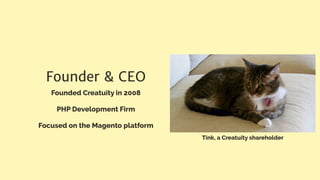
Tink, a Creatuity shareholder
JoshuaWarren.com
@JoshuaSWarren
IMPORTANT!
• joind.in/14065
• Download slides
• Post comments
• Leave a rating!
What You Need To Know
ASSUMPTIONS
Today we assume you’re a PHP developer.
That you are familiar with test driven development.
And that you’ve at least tried PHPUnit, Selenium or
another testing tool.
BDD - no, the B does not stand for beer, despite what a Brit might tell you
Behavior Driven Development
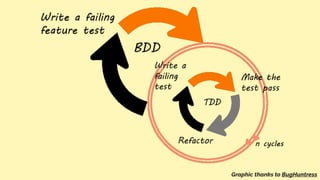
Think of BDD as stepping back a level from TDD.
Graphic thanks to BugHuntress
TDD generally deals with functional units.
BDD steps back a level to consider complete features.
In BDD, you write feature files in the form of user stories
that you test against.
BDD uses a ubiquitous language - basically, a language
that business stakeholders, project managers, developers
and our automated tools can all understand.
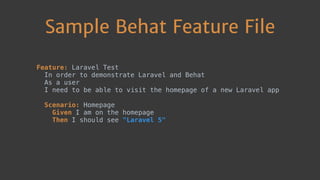
Sample Behat Feature File
Feature: Laravel Test

In order to demonstrate Laravel and Behat

As a user

I need to be able to visit the homepage of a new Laravel app


Scenario: Homepage

Given I am on the homepage

Then I should see "Laravel 5"

Behat
We implement BDD in PHP with a tool called Behat
Behat is a free, open source tool designed for BDD
and PHP
behat.org
SpecBDD - aka, Testing Tongue Twisters
Specification Behavior Driven
Development
Before you write a line of code, you write a
specification for how that code should work
Focuses you on architectural decisions up-front
PHPSpec
Open Source tool for specification driven
development in PHP
www.phpspec.net
Why Use Behat and PHPSpec?
These tools allow you to focus exclusively on logic
Helps build functional testing coverage
Guides planning and ensuring that all
stakeholders are in agreement
Let’s Build Something!
… what we’re building …
Setting up Our Project
Setup a Laravel 5 project
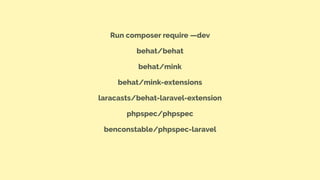
Run composer require —dev
behat/behat
behat/mink
behat/mink-extensions
laracasts/behat-laravel-extension
phpspec/phpspec
benconstable/phpspec-laravel
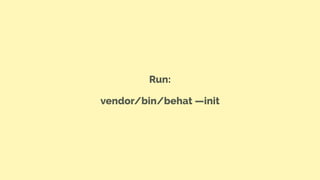
Run:
vendor/bin/behat —init
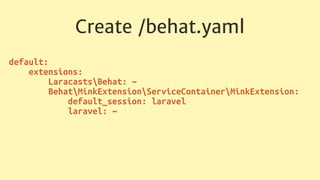
Create /behat.yaml
default:

extensions:

LaracastsBehat: ~

BehatMinkExtensionServiceContainerMinkExtension:

default_session: laravel

laravel: ~

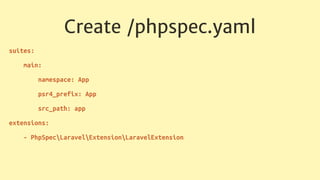
Create /phpspec.yaml
suites:
main:
namespace: App
psr4_prefix: App
src_path: app
extensions:
- PhpSpecLaravelExtensionLaravelExtension
Features
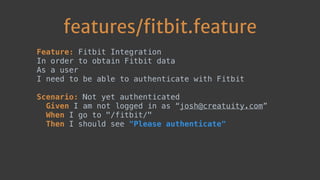
features/fitbit.feature
Feature: Fitbit Integration

In order to obtain Fitbit data

As a user

I need to be able to authenticate with Fitbit

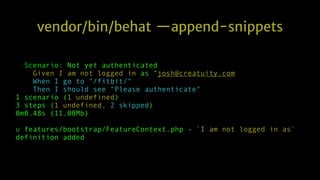
Scenario: Not yet authenticated

Given I am not logged in as “josh@creatuity.com”
When I go to "/fitbit/"

Then I should see "Please authenticate"


vendor/bin/behat —append-snippets
Scenario: Not yet authenticated:6
Given I am not logged in as “josh@creatuity.com
When I go to "/fitbit/"
Then I should see "Please authenticate"
1 scenario (1 undefined)
3 steps (1 undefined, 2 skipped)
0m0.48s (11.00Mb)
u features/bootstrap/FeatureContext.php - `I am not logged in as`
definition added
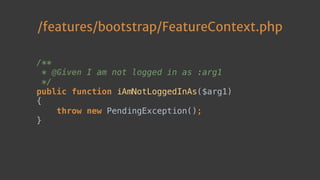
Behat’s written code for us!
/features/bootstrap/FeatureContext.php
/**

* @Given I am not logged in as :arg1

*/

public function iAmNotLoggedInAs($arg1)

{

throw new PendingException();

}

Behat writes just enough to get us show us where
to add our logic.
Behat expects us to add logic to this function to
detect the user is not logged in.
Before we do that, let’s finish out our feature file.
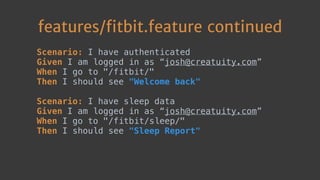
features/fitbit.feature continued
Scenario: I have authenticated

Given I am logged in as “josh@creatuity.com”
When I go to "/fitbit/"

Then I should see "Welcome back"

Scenario: I have sleep data

Given I am logged in as “josh@creatuity.com”

When I go to "/fitbit/sleep/"

Then I should see "Sleep Report"

Run vendor/bin/behat —append-snippets one
more time
Now, let’s fill in the logic Behat needs us to add.
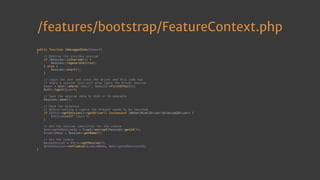
/features/bootstrap/FeatureContext.php
/**

* @Given I am not logged in as :email

*/

public function iAmNotLoggedInAs($email)

{

// We completely log out

// Destroy the previous session

if (Session::isStarted()) {

Session::regenerate(true);

} else {

Session::start();

}

}

/features/bootstrap/FeatureContext.php
public function iAmLoggedInAs($email)

{

// Destroy the previous session

if (Session::isStarted()) {

Session::regenerate(true);

} else {

Session::start();

}


// Login the user and since the driver and this code now

// share a session this will also login the driver session

$user = User::where('email', $email)->firstOrFail();

Auth::login($user);


// Save the session data to disk or to memcache

Session::save();


// Hack for Selenium

// Before setting a cookie the browser needs to be launched

if ($this->getSession()->getDriver() instanceof BehatMinkDriverSelenium2Driver) {

$this->visit('login');

}


// Get the session identifier for the cookie

$encryptedSessionId = Crypt::encrypt(Session::getId());

$cookieName = Session::getName();


// Set the cookie

$minkSession = $this->getSession();

$minkSession->setCookie($cookieName, $encryptedSessionId);

}
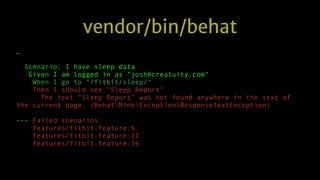
We run vendor/bin/behat once more
vendor/bin/behat
…
Scenario: I have sleep data
Given I am logged in as "josh@creatuity.com"
When I go to "/fitbit/sleep/"
Then I should see "Sleep Report"
The text "Sleep Report" was not found anywhere in the text of
the current page. (BehatMinkExceptionResponseTextException)
--- Failed scenarios:
features/fitbit.feature:6
features/fitbit.feature:11
features/fitbit.feature:16
A perfect failure!
These failures show us that Behat is testing our
app properly, and now we just need to write the
application logic.
Specifications
Now we write specifications for how our Fitbit class
should work.
These specifications should provide the logic to
deliver the results that Behat is testing for.
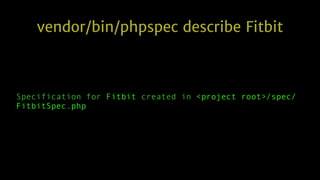
vendor/bin/phpspec describe Fitbit
Specification for Fitbit created in <project root>/spec/
FitbitSpec.php
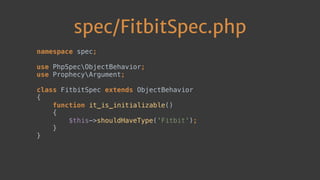
PHPSpec generates a basic spec file for us
spec/FitbitSpec.php
namespace spec;


use PhpSpecObjectBehavior;

use ProphecyArgument;


class FitbitSpec extends ObjectBehavior

{

function it_is_initializable()

{

$this->shouldHaveType('Fitbit');

}

}

This default spec tells PHPSpec to expect a class
named Fitbit.
Now we add a bit more to the file so PHPSpec will
understand what this class should do.
spec/FitbitSpec.php continued
function it_connects_to_fitbit($email)

{

$this->connect($email)->shouldReturn('Success');

}


function it_returns_sleep_data($email)

{

$this->sleepData($email)->shouldReturn([8, 8, 8, 8, 8]);

}

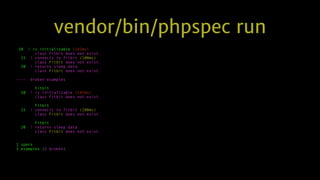
Now we run PHPSpec once more…
vendor/bin/phpspec run
10 ! is initializable (142ms)
class Fitbit does not exist.
15 ! connects to fitbit (100ms)
class Fitbit does not exist.
20 ! returns sleep data
class Fitbit does not exist.
---- broken examples
Fitbit
10 ! is initializable (142ms)
class Fitbit does not exist.
Fitbit
15 ! connects to fitbit (100ms)
class Fitbit does not exist.
Fitbit
20 ! returns sleep data
class Fitbit does not exist.
1 specs
3 examples (3 broken)
Lots of failures…
But wait a second - PHPSpec prompts us!
Do you want me to create `Fitbit` for you?
[Y/n]
PHPSpec will create the class and the methods for us!
This is very powerful with frameworks like Laravel
and Magento, which have PHPSpec plugins that
help PHPSpec know where class files should be
located.
Fitbit.php - class Fitbit {
function connect($email)

{

// TODO: write logic here

}


function sleepData($email)

{

// TODO: write logic here

}

And now, the easy part…
Implementation
Implement logic in the new Fitbit class in the
locations directed by PHPSpec
Tie that logic into views in our application.
Once we’re done with the implementation, we
move on to…
Testing
Once we’re done, running phpspec run should
return green
Once phpspec returns green, run behat, which
should return green as well
We now know that our new feature is working
correctly without needing to open a web browser
PHPSpec gives us confidence that the application
logic was implemented correctly.
Behat gives us confidence that the feature is being
displayed properly to users.
Success!
The purpose of this talk is to get you hooked on
Behat & PHPSpec and show you how easy it is to
get started.
Behat and PHPSpec are both powerful tools
PHPSpec can be used at a very granular level to
ensure your application logic works correctly
Next week, setup Behat and PHPSpec on one of
your projects and take it for a quick test by
implementing one short feature.
Keep In Touch!
• joind.in/14065
• @JoshuaSWarren
• JoshuaWarren.com

Behavior & Specification Driven Development in PHP - #OpenWest