Role / User Management in
IT360 Enterprise Edition and
Professional Edition

           K.Lakshmi Shankar
What you learn from this presentation?
 After going through this presentation, you will know:
 2.What is Role Management
 3.Default Roles supported in IT360
 4.What is User Management
 5.Default Users supported in IT360
 6.The relationship between User Management and Role Management – the Role vs
 User matrix
 7.The Role vs IT360 Module matrix
 8.How to create a New User from the default available Roles
 9.How to create a New Role itself and associate the same to a User
 Note 1: This presentation is designed to help you understand User and Role Management as defined in IT360
 and hence does not cover the detailed steps on creating a custom User or a custom Role. However, relevant
 links to our online documents are provided for the same. On a similar note AD User import , etc., are not
 covered here.
 Note 2: The screenshots in this presentation are for representation only. The content / fields would be slightly
 different depending on the edition you use – Professional Edition or Enterprise Edition Central Server or
 Enterprise Edition Probe.


                                              ZOHO Corporation Confidential
Definitions
 • Role Management is an authorization
   mechanism that defines which Users access
   which modules of IT360
 • User Management is an authentication
   mechanism that controls the access to IT360
   application to individuals of the IT Department
   / Organization


                    ZOHO Corporation Confidential
Introduction to Role Management
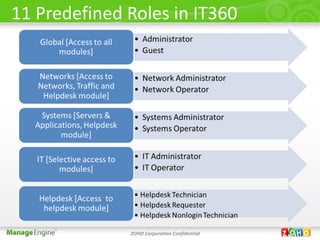
• There are 11 Roles defined in IT360
• Some Roles provide full administrative
  capabilities; some provide Read-Only capabilities
  while some provide intermediate access
• You can define your own New Role also
• Users acquire access rights through their Roles
• A User has to be associated to a defined Role
• You can associate a Role to many Users [one to
  many]


                    ZOHO Corporation Confidential
11 Predefined Roles in IT360


              ZOHO Corporation Confidential
Introduction to User Management

•Users are an integral part of IT360
•Users acquire access rights through their Roles
•A User has to be associated to a defined Role
•Some of them need a full Administrator access while a few need
only a Read Only access
•Some of them will require an intermediate access - an
administrator access to a certain limited modules of IT360 and a
Read Only access to the rest of the modules
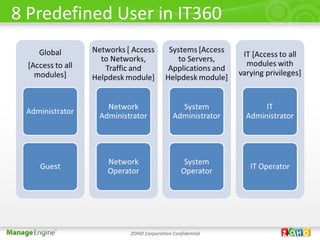
•There are 8 User supported in IT360 by default
•You can define your own New User
•You can associate many Users to a Role [many to one]


                         ZOHO Corporation Confidential
8 Predefined User in IT360


              ZOHO Corporation Confidential
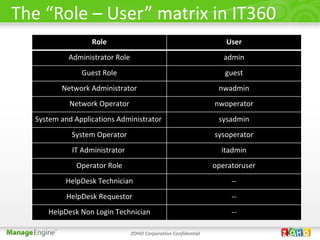
The “Role – User” matrix in IT360
                  Role                                             User
           Administrator Role                                      admin
               Guest Role                                          guest
         Network Administrator                                   nwadmin
            Network Operator                                    nwoperator
  System and Applications Administrator                          sysadmin
            System Operator                                     sysoperator
            IT Administrator                                      itadmin
              Operator Role                                     operatoruser
          HelpDesk Technician                                        --
           HelpDesk Requestor                                        --
     HelpDesk Non Login Technician                                   --

                                ZOHO Corporation Confidential
“Role - Module Access” matrix
      Role: Administrator Role                               User: admin
        IT360 module        Read Write Access              Read Only Access
          Networks                     Yes                       NA
          Servers &                    Yes                       NA
         Applications
            Traffic                    Yes                       NA
         ServiceDesk                   Yes                       NA
        Role: Guest Role                                       User: guest
        IT360 module        Read Write Access              Read Only Access
          Networks                     No                        Yes
          Servers &                    No                        Yes
         Applications
            Traffic                    No                        Yes
         ServiceDesk         Yes [“Requester”                    NA
                                  access]

                           ZOHO Corporation Confidential
“Role - Module Access” matrix– contd.
        Role: Network Administrator                                User: nwadmin
           IT360 module            Read Write Access             Read Only Access
             Networks                        Yes                       NA
        Servers & Applications               No                        No
               Traffic                       Yes                       NA
            ServiceDesk             Yes [“Technician”                  NA
                                         access]
        Role: Network Operator                                   User: nwoperator
           IT360 module            Read Write Access             Read Only Access
             Networks                        No                        Yes
        Servers & Applications               No                        No
               Traffic                       No                   Yes [assigned
                                                                  Groups only]
            ServiceDesk             Yes [“Technician”                  NA
                                         access]


                                 ZOHO Corporation Confidential
“Role - Module Access” matrix– contd.
        Role: System Administrator                           User: sysadmin
          IT360 module      Read Write Access              Read Only Access
            Networks                   No                        No
            Servers &                  Yes                       NA
           Applications
              Traffic                  No                        No
           ServiceDesk       Yes [“Technician”                   NA
                                  access]
        Role: System Operator                              User: sysoperator
          IT360 module      Read Write Access              Read Only Access
            Networks                   No                        Yes
            Servers &                  No                   Yes [assigned
           Applications                                       Groups]
              Traffic                  No                        No
           ServiceDesk       Yes [“Technician”                   NA
                                  access]

                           ZOHO Corporation Confidential
“Role - Module Access” matrix– contd.
        Role: IT Administrator                                         User: itadmin
           IT360 module           Read Write Access                Read Only Access
              Networks                       Yes                           NA
        Servers & Applications               Yes                           NA
               Traffic                       Yes                           NA
            ServiceDesk            Yes [“Technician +                     NA
                                      Reporter +
                                  POApprover + Change
                                    Manager” access]
         Role: Operator User                                     User: operator user
            IT360 module            Read Write Access              Read Only Access
              Networks                       No                           Yes
        Servers & Applications               No                   Yes [assigned Groups]
               Traffic                       No                   Yes [assigned Groups]
             ServiceDesk             Yes [“Requester”                      NA
                                          access]


                                 ZOHO Corporation Confidential
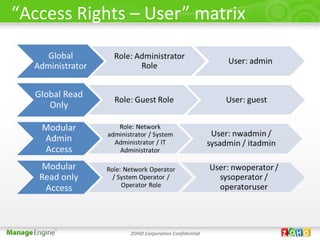
“Access Rights – User” matrix


              ZOHO Corporation Confidential
A question


             ZOHO Corporation Confidential
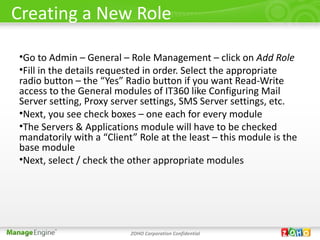
Creating a New Role

•Go to Admin – General – Role Management – click on Add Role
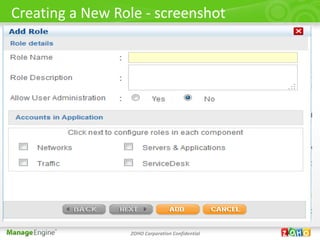
•Fill in the details requested in order. Select the appropriate
radio button – the “Yes” Radio button if you want Read-Write
access to the General modules of IT360 like Configuring Mail
Server setting, Proxy server settings, SMS Server settings, etc.
•Next, you see check boxes – one each for every module
•The Servers & Applications module will have to be checked
mandatorily with a “Client” Role at the least – this module is the
base module
•Next, select / check the other appropriate modules


                          ZOHO Corporation Confidential
Creating a New Role - screenshot


                 ZOHO Corporation Confidential
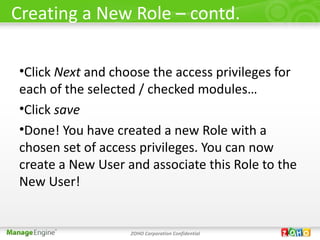
Creating a New Role – contd.

•Click Next and choose the access privileges for
each of the selected / checked modules…
•Click save
•Done! You have created a new Role with a
chosen set of access privileges. You can now
create a New User and associate this Role to the
New User!


                   ZOHO Corporation Confidential
One more question


             ZOHO Corporation Confidential
Creating a New User

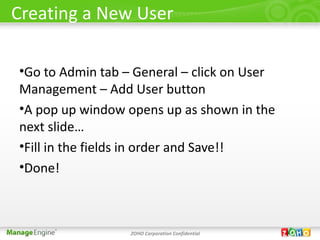
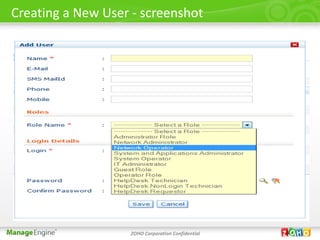
•Go to Admin tab – General – click on User
Management – Add User button
•A pop up window opens up as shown in the
next slide…
•Fill in the fields in order and Save!!
•Done!


                  ZOHO Corporation Confidential
Creating a New User - screenshot


                   ZOHO Corporation Confidential
Recollecting…

Remember!

•User Management is dependent on the
underlying Role Management

•You can define your own Users and Roles and
associate them!!

                  ZOHO Corporation Confidential
Have you understood?
I hope you would have understood User
Management, Role Management and the
relationship between them as defined in IT360
Enterprise Edition and Professional Edition

Also, you now know the default User types and
Roles as supported in IT360

Creating custom User types and Roles


                  ZOHO Corporation Confidential
References
For more details, you may refer to our online help
documentation

http://www.manageengine.com/it360/help/meitms/getting-st

http
://www.manageengine.com/it360/help/meitms/manage-user

http://
www.manageengine.com/it360/help/meitms/manage-users-r


                       ZOHO Corporation Confidential
Contact Us
Write to us for any help:

It360-eval@manageengine.com

                   Thank You


                    ZOHO Corporation Confidential

User Management and Role Management in IT360

  • 1.
    Role / UserManagement in IT360 Enterprise Edition and Professional Edition K.Lakshmi Shankar
  • 2.
    What you learnfrom this presentation? After going through this presentation, you will know: 2.What is Role Management 3.Default Roles supported in IT360 4.What is User Management 5.Default Users supported in IT360 6.The relationship between User Management and Role Management – the Role vs User matrix 7.The Role vs IT360 Module matrix 8.How to create a New User from the default available Roles 9.How to create a New Role itself and associate the same to a User Note 1: This presentation is designed to help you understand User and Role Management as defined in IT360 and hence does not cover the detailed steps on creating a custom User or a custom Role. However, relevant links to our online documents are provided for the same. On a similar note AD User import , etc., are not covered here. Note 2: The screenshots in this presentation are for representation only. The content / fields would be slightly different depending on the edition you use – Professional Edition or Enterprise Edition Central Server or Enterprise Edition Probe. ZOHO Corporation Confidential
  • 3.
    Definitions • RoleManagement is an authorization mechanism that defines which Users access which modules of IT360 • User Management is an authentication mechanism that controls the access to IT360 application to individuals of the IT Department / Organization ZOHO Corporation Confidential
  • 4.
    Introduction to RoleManagement • There are 11 Roles defined in IT360 • Some Roles provide full administrative capabilities; some provide Read-Only capabilities while some provide intermediate access • You can define your own New Role also • Users acquire access rights through their Roles • A User has to be associated to a defined Role • You can associate a Role to many Users [one to many] ZOHO Corporation Confidential
  • 5.
    11 Predefined Rolesin IT360 ZOHO Corporation Confidential
  • 6.
    Introduction to UserManagement •Users are an integral part of IT360 •Users acquire access rights through their Roles •A User has to be associated to a defined Role •Some of them need a full Administrator access while a few need only a Read Only access •Some of them will require an intermediate access - an administrator access to a certain limited modules of IT360 and a Read Only access to the rest of the modules •There are 8 User supported in IT360 by default •You can define your own New User •You can associate many Users to a Role [many to one] ZOHO Corporation Confidential
  • 7.
    8 Predefined Userin IT360 ZOHO Corporation Confidential
  • 8.
    The “Role –User” matrix in IT360 Role User Administrator Role admin Guest Role guest Network Administrator nwadmin Network Operator nwoperator System and Applications Administrator sysadmin System Operator sysoperator IT Administrator itadmin Operator Role operatoruser HelpDesk Technician -- HelpDesk Requestor -- HelpDesk Non Login Technician -- ZOHO Corporation Confidential
  • 9.
    “Role - ModuleAccess” matrix Role: Administrator Role User: admin IT360 module Read Write Access Read Only Access Networks Yes NA Servers & Yes NA Applications Traffic Yes NA ServiceDesk Yes NA Role: Guest Role User: guest IT360 module Read Write Access Read Only Access Networks No Yes Servers & No Yes Applications Traffic No Yes ServiceDesk Yes [“Requester” NA access] ZOHO Corporation Confidential
  • 10.
    “Role - ModuleAccess” matrix– contd. Role: Network Administrator User: nwadmin IT360 module Read Write Access Read Only Access Networks Yes NA Servers & Applications No No Traffic Yes NA ServiceDesk Yes [“Technician” NA access] Role: Network Operator User: nwoperator IT360 module Read Write Access Read Only Access Networks No Yes Servers & Applications No No Traffic No Yes [assigned Groups only] ServiceDesk Yes [“Technician” NA access] ZOHO Corporation Confidential
  • 11.
    “Role - ModuleAccess” matrix– contd. Role: System Administrator User: sysadmin IT360 module Read Write Access Read Only Access Networks No No Servers & Yes NA Applications Traffic No No ServiceDesk Yes [“Technician” NA access] Role: System Operator User: sysoperator IT360 module Read Write Access Read Only Access Networks No Yes Servers & No Yes [assigned Applications Groups] Traffic No No ServiceDesk Yes [“Technician” NA access] ZOHO Corporation Confidential
  • 12.
    “Role - ModuleAccess” matrix– contd. Role: IT Administrator User: itadmin IT360 module Read Write Access Read Only Access Networks Yes NA Servers & Applications Yes NA Traffic Yes NA ServiceDesk Yes [“Technician + NA Reporter + POApprover + Change Manager” access] Role: Operator User User: operator user IT360 module Read Write Access Read Only Access Networks No Yes Servers & Applications No Yes [assigned Groups] Traffic No Yes [assigned Groups] ServiceDesk Yes [“Requester” NA access] ZOHO Corporation Confidential
  • 13.
    “Access Rights –User” matrix ZOHO Corporation Confidential
  • 14.
    A question ZOHO Corporation Confidential
  • 15.
    Creating a NewRole •Go to Admin – General – Role Management – click on Add Role •Fill in the details requested in order. Select the appropriate radio button – the “Yes” Radio button if you want Read-Write access to the General modules of IT360 like Configuring Mail Server setting, Proxy server settings, SMS Server settings, etc. •Next, you see check boxes – one each for every module •The Servers & Applications module will have to be checked mandatorily with a “Client” Role at the least – this module is the base module •Next, select / check the other appropriate modules ZOHO Corporation Confidential
  • 16.
    Creating a NewRole - screenshot ZOHO Corporation Confidential
  • 17.
    Creating a NewRole – contd. •Click Next and choose the access privileges for each of the selected / checked modules… •Click save •Done! You have created a new Role with a chosen set of access privileges. You can now create a New User and associate this Role to the New User! ZOHO Corporation Confidential
  • 18.
    One more question ZOHO Corporation Confidential
  • 19.
    Creating a NewUser •Go to Admin tab – General – click on User Management – Add User button •A pop up window opens up as shown in the next slide… •Fill in the fields in order and Save!! •Done! ZOHO Corporation Confidential
  • 20.
    Creating a NewUser - screenshot ZOHO Corporation Confidential
  • 21.
    Recollecting… Remember! •User Management isdependent on the underlying Role Management •You can define your own Users and Roles and associate them!! ZOHO Corporation Confidential
  • 22.
    Have you understood? Ihope you would have understood User Management, Role Management and the relationship between them as defined in IT360 Enterprise Edition and Professional Edition Also, you now know the default User types and Roles as supported in IT360 Creating custom User types and Roles ZOHO Corporation Confidential
  • 23.
    References For more details,you may refer to our online help documentation http://www.manageengine.com/it360/help/meitms/getting-st http ://www.manageengine.com/it360/help/meitms/manage-user http:// www.manageengine.com/it360/help/meitms/manage-users-r ZOHO Corporation Confidential
  • 24.
    Contact Us Write tous for any help: It360-eval@manageengine.com Thank You ZOHO Corporation Confidential