USER INTERFACES FOR MOBILE
APPLICATIONS
K Senthil Kumar
Assistant Professor,
Sri Eshwar College of Engineering,
Coimbatore – 641 202
USER INTERFACES FOR MOBILE APPLICATIONS
 Which Interface you like to use?
Interface 1 Interface 2
USER INTERFACES FOR MOBILE APPLICATIONS
 User Interface plays important role in deciding the
success of the app.
 The main goal of any app designer should be
making app a daily habit.
 40% of app budget is allocated to user interface
design.
 The common mistakes of designing user interface
are placing buttons smaller in size, placing big or
small images in different places and selecting
wrong color patterns for views.
 Clarity of interface is much required for any app.
 User interface should follow standard native app
interface standards.
IMPORTANT CONSIDERATION FOR USER INTERFACE
 Expert vs novice users
 App should be efficient for expert user and it should
provide information to novice users
IMPORTANT CONSIDERATION FOR USER INTERFACE
 Ideal button size
 The button size of app should be easily used by user, if
size is less then 1 cm then it is not used by user.
IMPORTANT CONSIDERATION FOR USER INTERFACE
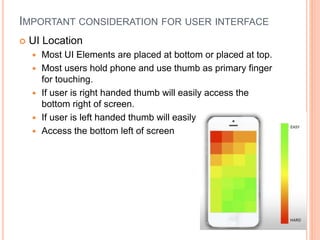
 UI Location
 Most UI Elements are placed at bottom or placed at top.
 Most users hold phone and use thumb as primary finger
for touching.
 If user is right handed thumb will easily access the
bottom right of screen.
 If user is left handed thumb will easily
 Access the bottom left of screen
IMPORTANT CONSIDERATION FOR USER INTERFACE
 Accounting for motion
 Flow direction plays important role in designing mobile app.
 For example, for a right-handed person, circular flows with a
pivot point at the bottom right of the screen are much easier
than linear flows
IMPORTANT CONSIDERATION FOR USER INTERFACE
 How much is too much
 The button should be limited, if we place more no of
button then it will be tough even for expert user

User interfaces for mobile applications

  • 1.
    USER INTERFACES FORMOBILE APPLICATIONS K Senthil Kumar Assistant Professor, Sri Eshwar College of Engineering, Coimbatore – 641 202
  • 2.
    USER INTERFACES FORMOBILE APPLICATIONS  Which Interface you like to use? Interface 1 Interface 2
  • 3.
    USER INTERFACES FORMOBILE APPLICATIONS  User Interface plays important role in deciding the success of the app.  The main goal of any app designer should be making app a daily habit.  40% of app budget is allocated to user interface design.  The common mistakes of designing user interface are placing buttons smaller in size, placing big or small images in different places and selecting wrong color patterns for views.  Clarity of interface is much required for any app.  User interface should follow standard native app interface standards.
  • 4.
    IMPORTANT CONSIDERATION FORUSER INTERFACE  Expert vs novice users  App should be efficient for expert user and it should provide information to novice users
  • 5.
    IMPORTANT CONSIDERATION FORUSER INTERFACE  Ideal button size  The button size of app should be easily used by user, if size is less then 1 cm then it is not used by user.
  • 6.
    IMPORTANT CONSIDERATION FORUSER INTERFACE  UI Location  Most UI Elements are placed at bottom or placed at top.  Most users hold phone and use thumb as primary finger for touching.  If user is right handed thumb will easily access the bottom right of screen.  If user is left handed thumb will easily  Access the bottom left of screen
  • 7.
    IMPORTANT CONSIDERATION FORUSER INTERFACE  Accounting for motion  Flow direction plays important role in designing mobile app.  For example, for a right-handed person, circular flows with a pivot point at the bottom right of the screen are much easier than linear flows
  • 8.
    IMPORTANT CONSIDERATION FORUSER INTERFACE  How much is too much  The button should be limited, if we place more no of button then it will be tough even for expert user