URBAN WATER
MANAGEMENT
SUBMITTED TO
PROF. DR. E VENKATARATNAM
STORMWATER RUNOFF
MODELLING USING
MIKE SWMM (MIKE URBAN)
SUBMITTED BY
K.SUTEJA
N.NAGADATT SHARMA
P.VEERANJANEYULU
LOCATION & MAP
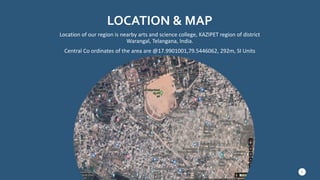
Location of our region is nearby arts and science college, KAZIPET region of district
Warangal, Telangana, India.
Central Co ordinates of the area are @17.9901001,79.5446062, 292m, SI Units
3
MIKE SWMM (MIKE URBAN)
MIKE URBAN is the urban water modelling software of choice when
important parameters for model selection are stability, workflow,
openness, flexibility, GIS integration and physical soundness.
MIKE URBAN covers all water networks in the city, including water
distribution systems, storm water drainage systems, and sewer
collection in separate and combined systems.
MIKE URBAN IS USED FOR
 Master planning of collection systems
 Wet weather management planning to reduce overflows
 Hydraulic rehabilitation planning
 Capacity management and operational maintenance
 Rainfall dependent inflow and infiltration
 Modelling of sediment transport and water quality parameters
 Emergency response planning for urban flooding
4
BENEFITS OF MIKE
MIKE URBAN is the modelling software package for
all urban water modelling activities. You can
maximize your productivity and fully leverage your
investment in GIS and water modelling software
tools.
All GIS licenses and components required are
embedded in the MIKE URBAN license.
MIKE URBAN is available in many languages and we
provide local support in more than 30 countries.
Regardless of which engine you choose or which
model you build, all your data is stored in one
database.
5
IMPORT OF DATA: IMPORTING ARCVIEW SHAPEFILES
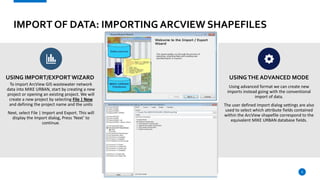
USING IMPORT/EXPORT WIZARD
To import ArcView GIS wastewater network
data into MIKE URBAN, start by creating a new
project or opening an existing project. We will
create a new project by selecting File | New
and defining the project name and the units
Next, select File | Import and Export. This will
display the Import dialog, Press ‘Next’ to
continue.
USINGTHE ADVANCED MODE
Using advanced format we can create new
imports instead going with the conventional
import of data.
The user defined import dialog settings are also
used to select which attribute fields contained
within the ArcView shapefile correspond to the
equivalent MIKE URBAN database fields.
6
IMPORT OF DATA: IMPORTING ARCVIEW SHAPEFILES
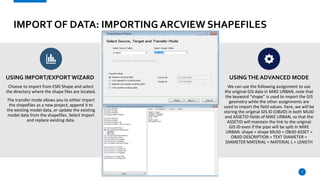
USING IMPORT/EXPORT WIZARD
Choose to import from ESRI Shape and select
the directory where the shape files are located.
The transfer mode allows you to either import
the shapefiles as a new project, append it to
the existing model data, or update the existing
model data from the shapefiles. Select Import
and replace existing data.
USINGTHE ADVANCED MODE
We can use the following assignment to use
the original GIS data in MIKE URBAN, note that
the keyword “shape” is used to import the GIS
geometry while the other assignments are
used to import the field values. here, we will be
storing the original GIS ID (OBJID) in both MUID
and ASSETID fields of MIKE URBAN, so that the
ASSETID will maintain the link to the original
GIS ID even if the pipe will be split in MIKE
URBAN. shape = shape MUID = OBJID ASSET =
OBJID DESCRIPTION = TEXT DIAMETER =
DIAMETER MATERIAL = MATERIAL L = LENGTH
7
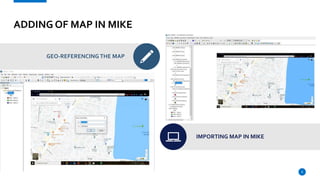
ADDING OF MAP IN MIKE
GEO-REFERENCING THE MAP
IMPORTING MAP IN MIKE
8
ADDING OF NODES AND LINKS
START EDITING & CREATE NEW FEATURE
SELECT FEATURE
ADDING NODES AND LINKS
9
To add links you have double click on the nodes.
For a single click it creates a new node.
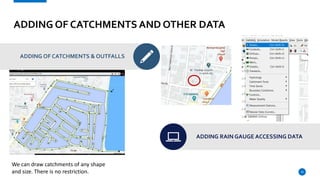
ADDING OF CATCHMENTS AND OTHER DATA
ADDING OF CATCHMENTS & OUTFALLS
ADDING RAIN GAUGE ACCESSING DATA
10
We can draw catchments of any shape
and size. There is no restriction.
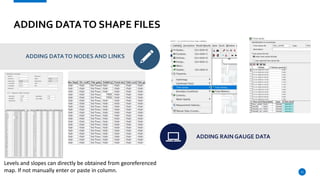
ADDING DATATO SHAPE FILES
ADDING DATATO NODES AND LINKS
ADDING RAIN GAUGE DATA
11
Levels and slopes can directly be obtained from georeferenced
map. If not manually enter or paste in column.
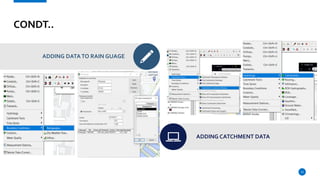
CONDT..
ADDING DATATO RAIN GUAGE
ADDING CATCHMENT DATA
12
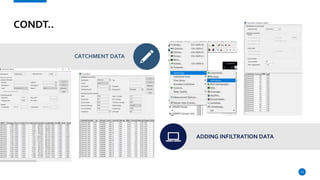
CONDT..
CATCHMENT DATA
ADDING INFILTRATION DATA
13
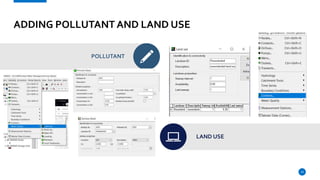
ADDING POLLUTANT AND LAND USE
POLLUTANT
LAND USE
14
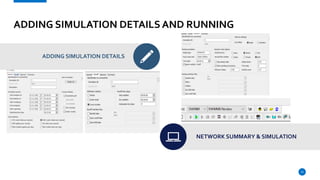
ADDING SIMULATION DETAILS AND RUNNING
ADDING SIMULATION DETAILS
NETWORK SUMMARY & SIMULATION
15
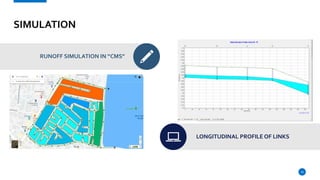
SIMULATION
RUNOFF SIMULATION IN “CMS”
LONGITUDINAL PROFILE OF LINKS
16
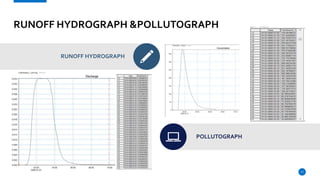
RUNOFF HYDROGRAPH &POLLUTOGRAPH
RUNOFF HYDROGRAPH
POLLUTOGRAPH
17
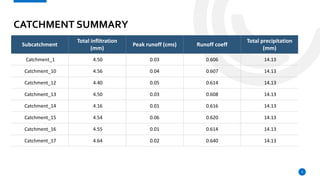
CATCHMENT SUMMARY
Subcatchment
Total inflitration
(mm)
Peak runoff (cms) Runoff coeff
Total precipitation
(mm)
Catchment_1 4.50 0.03 0.606 14.13
Catchment_10 4.56 0.04 0.607 14.13
Catchment_12 4.40 0.05 0.614 14.13
Catchment_13 4.50 0.03 0.608 14.13
Catchment_14 4.16 0.01 0.616 14.13
Catchment_15 4.54 0.06 0.620 14.13
Catchment_16 4.55 0.01 0.614 14.13
Catchment_17 4.64 0.02 0.640 14.13
9
TEAM
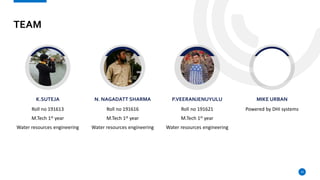
K.SUTEJA
Roll no 191613
M.Tech 1st year
Water resources engineering
N. NAGADATT SHARMA
Roll no 191616
M.Tech 1st year
Water resources engineering
P.VEERANJENUYULU
Roll no 191621
M.Tech 1st year
Water resources engineering
MIKE URBAN
Powered by DHI systems
19
THANKYOU!
K.SUTEJA 191613
N.NAGADATT SHARMA 191616
P.VEERANJANEYULU 191621
A PRESENTATION BY
Instructions and Feedback
21

Urban Stormwater modeling using MIKE URBAN

  • 1.
  • 2.
    STORMWATER RUNOFF MODELLING USING MIKESWMM (MIKE URBAN) SUBMITTED BY K.SUTEJA N.NAGADATT SHARMA P.VEERANJANEYULU
  • 3.
    LOCATION & MAP Locationof our region is nearby arts and science college, KAZIPET region of district Warangal, Telangana, India. Central Co ordinates of the area are @17.9901001,79.5446062, 292m, SI Units 3
  • 4.
    MIKE SWMM (MIKEURBAN) MIKE URBAN is the urban water modelling software of choice when important parameters for model selection are stability, workflow, openness, flexibility, GIS integration and physical soundness. MIKE URBAN covers all water networks in the city, including water distribution systems, storm water drainage systems, and sewer collection in separate and combined systems. MIKE URBAN IS USED FOR  Master planning of collection systems  Wet weather management planning to reduce overflows  Hydraulic rehabilitation planning  Capacity management and operational maintenance  Rainfall dependent inflow and infiltration  Modelling of sediment transport and water quality parameters  Emergency response planning for urban flooding 4
  • 5.
    BENEFITS OF MIKE MIKEURBAN is the modelling software package for all urban water modelling activities. You can maximize your productivity and fully leverage your investment in GIS and water modelling software tools. All GIS licenses and components required are embedded in the MIKE URBAN license. MIKE URBAN is available in many languages and we provide local support in more than 30 countries. Regardless of which engine you choose or which model you build, all your data is stored in one database. 5
  • 6.
    IMPORT OF DATA:IMPORTING ARCVIEW SHAPEFILES USING IMPORT/EXPORT WIZARD To import ArcView GIS wastewater network data into MIKE URBAN, start by creating a new project or opening an existing project. We will create a new project by selecting File | New and defining the project name and the units Next, select File | Import and Export. This will display the Import dialog, Press ‘Next’ to continue. USINGTHE ADVANCED MODE Using advanced format we can create new imports instead going with the conventional import of data. The user defined import dialog settings are also used to select which attribute fields contained within the ArcView shapefile correspond to the equivalent MIKE URBAN database fields. 6
  • 7.
    IMPORT OF DATA:IMPORTING ARCVIEW SHAPEFILES USING IMPORT/EXPORT WIZARD Choose to import from ESRI Shape and select the directory where the shape files are located. The transfer mode allows you to either import the shapefiles as a new project, append it to the existing model data, or update the existing model data from the shapefiles. Select Import and replace existing data. USINGTHE ADVANCED MODE We can use the following assignment to use the original GIS data in MIKE URBAN, note that the keyword “shape” is used to import the GIS geometry while the other assignments are used to import the field values. here, we will be storing the original GIS ID (OBJID) in both MUID and ASSETID fields of MIKE URBAN, so that the ASSETID will maintain the link to the original GIS ID even if the pipe will be split in MIKE URBAN. shape = shape MUID = OBJID ASSET = OBJID DESCRIPTION = TEXT DIAMETER = DIAMETER MATERIAL = MATERIAL L = LENGTH 7
  • 8.
    ADDING OF MAPIN MIKE GEO-REFERENCING THE MAP IMPORTING MAP IN MIKE 8
  • 9.
    ADDING OF NODESAND LINKS START EDITING & CREATE NEW FEATURE SELECT FEATURE ADDING NODES AND LINKS 9 To add links you have double click on the nodes. For a single click it creates a new node.
  • 10.
    ADDING OF CATCHMENTSAND OTHER DATA ADDING OF CATCHMENTS & OUTFALLS ADDING RAIN GAUGE ACCESSING DATA 10 We can draw catchments of any shape and size. There is no restriction.
  • 11.
    ADDING DATATO SHAPEFILES ADDING DATATO NODES AND LINKS ADDING RAIN GAUGE DATA 11 Levels and slopes can directly be obtained from georeferenced map. If not manually enter or paste in column.
  • 12.
    CONDT.. ADDING DATATO RAINGUAGE ADDING CATCHMENT DATA 12
  • 13.
  • 14.
    ADDING POLLUTANT ANDLAND USE POLLUTANT LAND USE 14
  • 15.
    ADDING SIMULATION DETAILSAND RUNNING ADDING SIMULATION DETAILS NETWORK SUMMARY & SIMULATION 15
  • 16.
    SIMULATION RUNOFF SIMULATION IN“CMS” LONGITUDINAL PROFILE OF LINKS 16
  • 17.
    RUNOFF HYDROGRAPH &POLLUTOGRAPH RUNOFFHYDROGRAPH POLLUTOGRAPH 17
  • 18.
    CATCHMENT SUMMARY Subcatchment Total inflitration (mm) Peakrunoff (cms) Runoff coeff Total precipitation (mm) Catchment_1 4.50 0.03 0.606 14.13 Catchment_10 4.56 0.04 0.607 14.13 Catchment_12 4.40 0.05 0.614 14.13 Catchment_13 4.50 0.03 0.608 14.13 Catchment_14 4.16 0.01 0.616 14.13 Catchment_15 4.54 0.06 0.620 14.13 Catchment_16 4.55 0.01 0.614 14.13 Catchment_17 4.64 0.02 0.640 14.13 9
  • 19.
    TEAM K.SUTEJA Roll no 191613 M.Tech1st year Water resources engineering N. NAGADATT SHARMA Roll no 191616 M.Tech 1st year Water resources engineering P.VEERANJENUYULU Roll no 191621 M.Tech 1st year Water resources engineering MIKE URBAN Powered by DHI systems 19
  • 20.
    THANKYOU! K.SUTEJA 191613 N.NAGADATT SHARMA191616 P.VEERANJANEYULU 191621 A PRESENTATION BY
  • 21.