CS – 8591
COMPUTER NETWORKS
Unit - I
INTRODUCTION AND
PHYSICAL LAYER
Ms. Angayarkanni S A
Assistant Professor, IT, RMKEC
Outline of Day 2
 Internet Vs internet
 History of Internet
 Protocol Layering
 TCP/IP Protocol suite
 OSI Model
1.2
Internet Vs internet
Internet
 set of all networks which
are interconnected and
interoperate using the
IETF standard protocols.
internet
 Any network of devices
which can communicate
with each other.
Internet is a superset of internets. The
Internet is the network of networks.
1.4
The Internet
• The Internet has revolutionized many aspects of our
daily lives.
• It has affected the way we do business as well as the
way we spend our leisure time.
• The Internet is a communication system that has
brought a wealth of information to our fingertips
and organized it for our use.
Q-A
 Network of devices which can
communicate with each other
 internet
 Father of internet
 Vint Cerf
 Father of WWW
 Tim Berners Lee
1.5
Protocol Layering
 Protocol 
 defines the rules that both the sender and receiver
and all intermediate devices need to follow to be
able to communicate effectively.
 Communication
 Simple  need only one simple protocol.
 complex,  need to divide the task between
different layers, in which case we need a protocol
at each layer, or protocol layering
1.6
Protocol Layering
 Let us develop two simple scenarios to better
understand the need for protocol layering.
 In the first scenario, communication is so simple
that it can occur in only one layer.
 In the second, the communication between Maria
and Ann takes place in three layers
1.7
Protocol Layering
 First Scenario
 Maria and Ann are neighbors with a lot of
common ideas.
 Communication (one layer)
 face to face, in the same language,
1.8
Protocol Layering
 First Scenario - Protocols
1. Greet each other when they meet
2. Confine the vocabulary to the level of friendship
3. Refrain from speaking if one is speaking
4. Opportunity to talk both on an issue (dialog / monolog)
5. Exchange nice words when departing
1.9
Protocol Layering
 Second Scenario
 Maria and Ann are physically far away.
 Communication (three layer)
 Letters/Mail
 Should be in a secure way
 Listen/Talk
Second Scenario
Postal carrier facility
Protocol Layering
1.11
Principles of Protocol Layering
1. if we want bidirectional communication  need to
make each layer so that it is able to perform two
opposite tasks, one in each direction.
2. we need to follow in protocol layering is that the two
objects under each layer at both sites should be
identical.
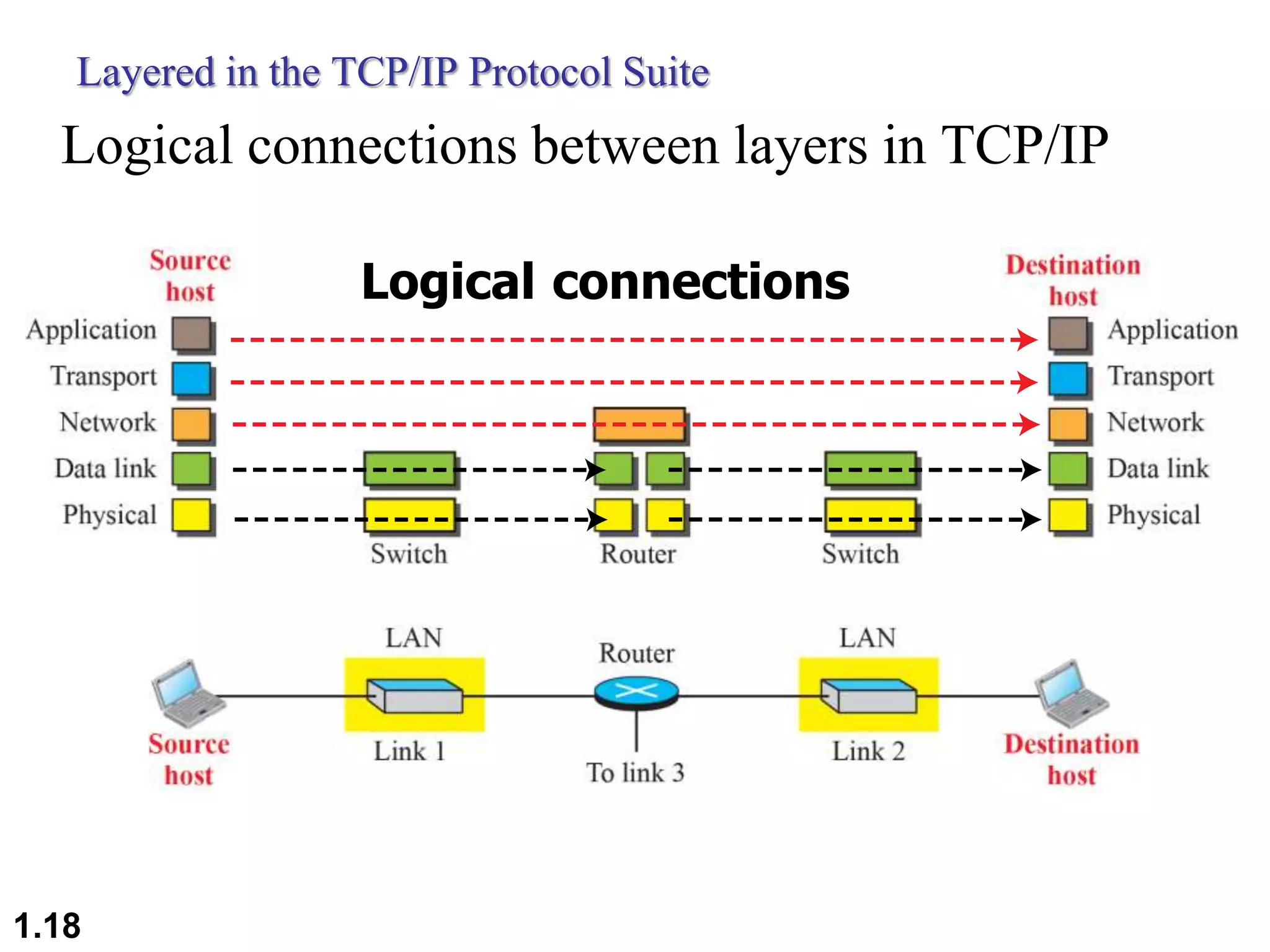
Logical Connections
 Layer-to-layer communication.
1.13
Protocol suite
 Suite set of
interconnected rooms under
one room number
 a set of rooms designated for
one person's or family's use or
for a particular purpose
 Protocol suite Collection
of protocols that are
designed to work together.
 Set of protocols organized in
different layers
1.14
TCP/IP Protocol Suite
 TCP/IP : Transmission Control Protocol/Internet
Protocol
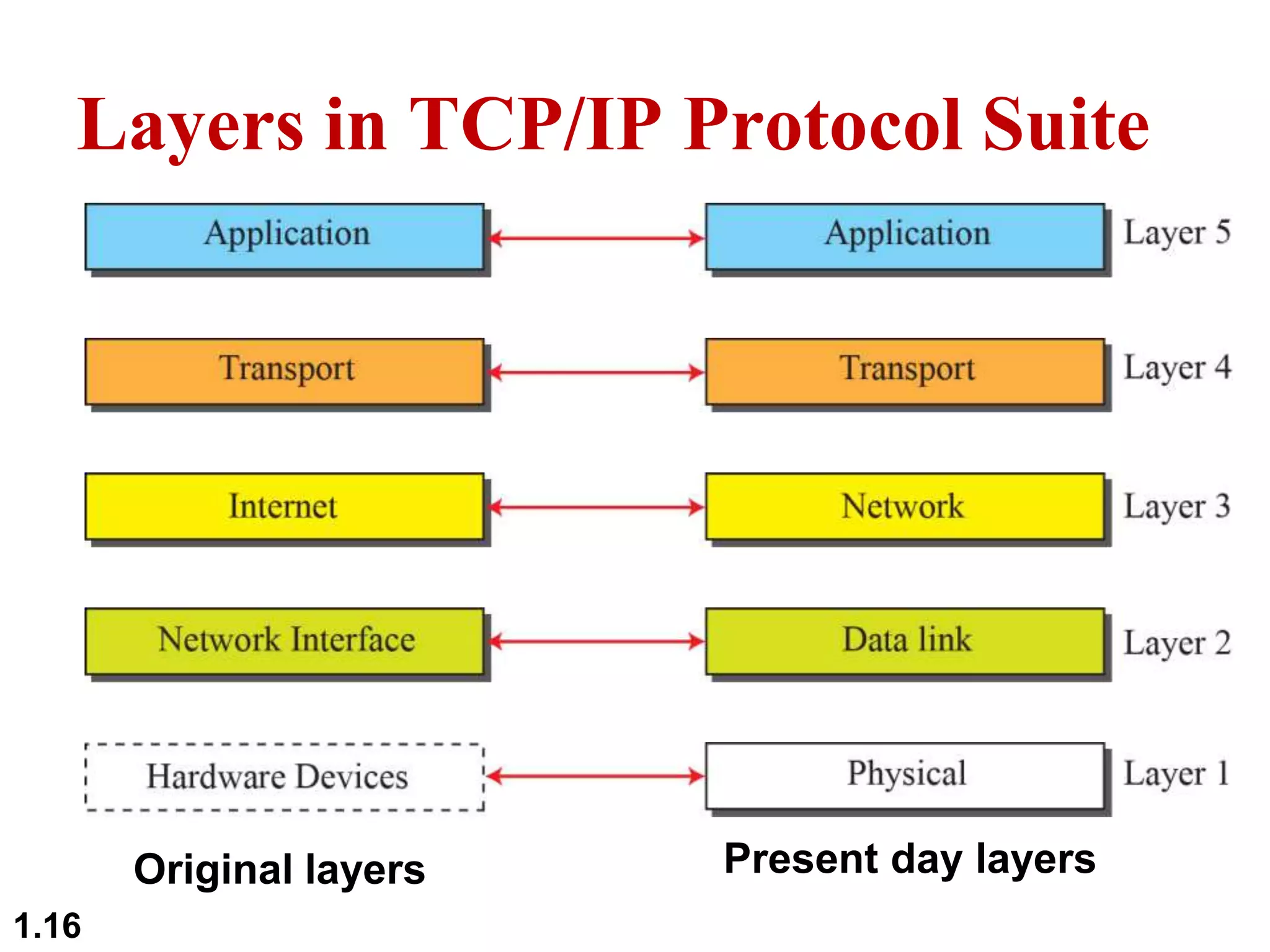
 TCP/IP is a protocol suite (a set of protocols
organized in different layers) used in the Internet
today.
 It is a hierarchical protocol made up of interactive
modules, each of which provides a specific
functionality.
 The original TCP/IP protocol suite was defined as
four software layers built upon the hardware. Today,
however, TCP/IP is thought of as a five-layer model.
 Department of Defense Four-Layer Model
1.15
Layers in TCP/IP Protocol Suite
Original layers Present day layers
1.16
Layered Architecture
Communication through an internet
1.17
Layered in the TCP/IP Protocol Suite
Logical connections between layers in TCP/IP
Logical connections
1.18
Layered in the TCP/IP Protocol Suite
Identical objects in the in TCP/IP protocol suite
Identical objects (messages)
Identical objects (segment or user datagram)
Identical objects (datagram)
Identical objects (frame)
Identical objects (bits)
Identical objects (datagram)
Identical objects (frame)
Identical objects (bits)
1.19
Encapsulation and Decapsulation
1.20
McGraw-Hill ©TheMcGraw-HillCompanies,Inc., 2000
TCP/IP Protocol Suite
Layers
Physical Layer
 1. Physical Characteristics of Interface and medium :
Type of Transmission medium
 2. Representation of Bits : Encoding Techniques ;
Conversion of Bits to Electrical/Optical signals
 3. Data rate: bits/sec
 4. Synchronization: Clock Synchronization at Sender &
receiver
 5. Physical Topology: Star, Bus, Mesh, Ring etc
 6. Line Configuration : Point to Point, Multipoint
Configurations
 7. Transmission Mode : Simplex , Half-Duplex, Full-
Duplex
Physical layer is responsible for movements of bits from one hop(node)
to the next
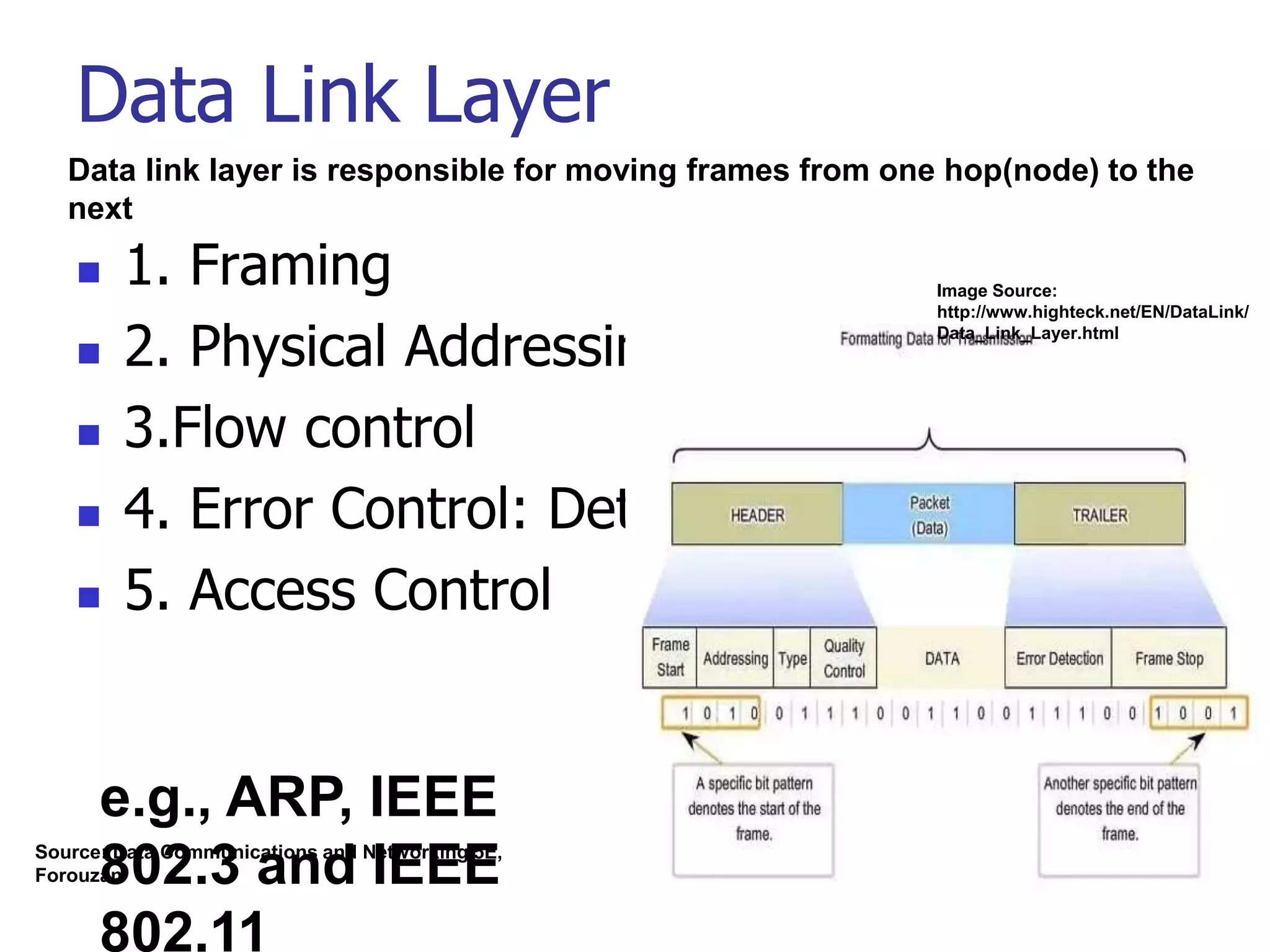
Data Link Layer
 1. Framing
 2. Physical Addressing
 3.Flow control
 4. Error Control: Detection & Correction
 5. Access Control
Data link layer is responsible for moving frames from one hop(node) to the
next
e.g., ARP, IEEE
802.3 and IEEE
802.11
Source: Data Communications and Networking 5E,
Forouzan
Image Source:
http://www.highteck.net/EN/DataLink/
Data_Link_Layer.html
Network Layer
 1. Logical Addressing: IPv4, IPv6
 2. Routing: Routing algorithms & table
(traffic routing & control)
Network layer is responsible for delivery of individual packets
from source host to destination host
e.g., IP,
ICMP, IGMP,
DHCP
Image Source:
Weblink
https://fossbytes.com/
network-layer-osi-
model/
Transport Layer
 1. Service point addressing: Port Address
 2. Segmentation : Divided into transmittable
segments with sequence numbers
 3. Connection Control
 4. Flow Control
 5. Session Multiplexing
 6. Error Detection & Correction (resends)
 7. Message reordering (reassembly)
Transport layer is responsible for the delivery of the message
from one process to another
e.g., TCP,
UDP
Application Layer
 1. Network virtual terminal (e.g. usgs)
 2.File transfer, access and management
 3.Mail services
 4.Directory services
Application layer is responsible for
providing services to the user.
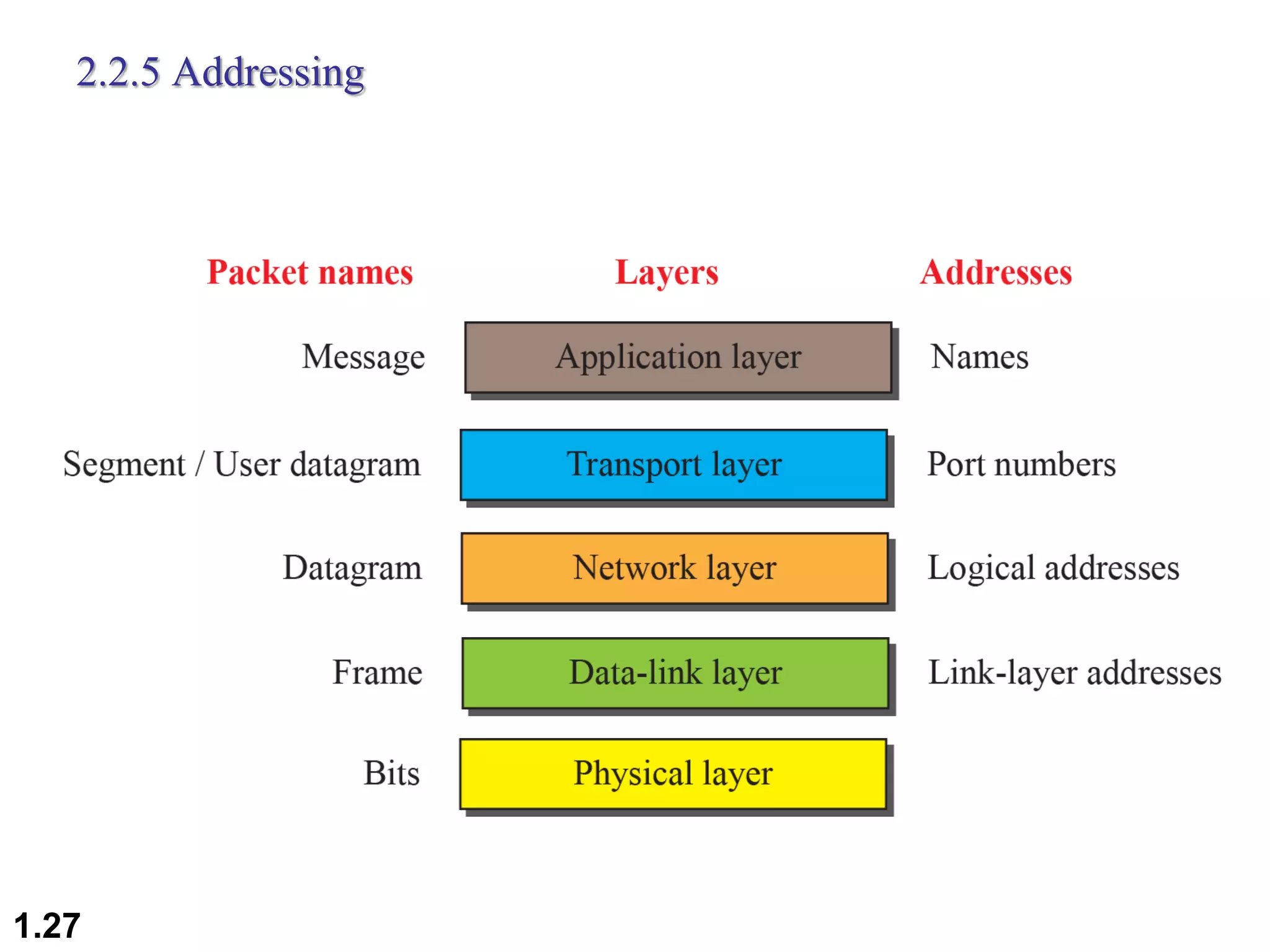
2.2.5 Addressing
1.27
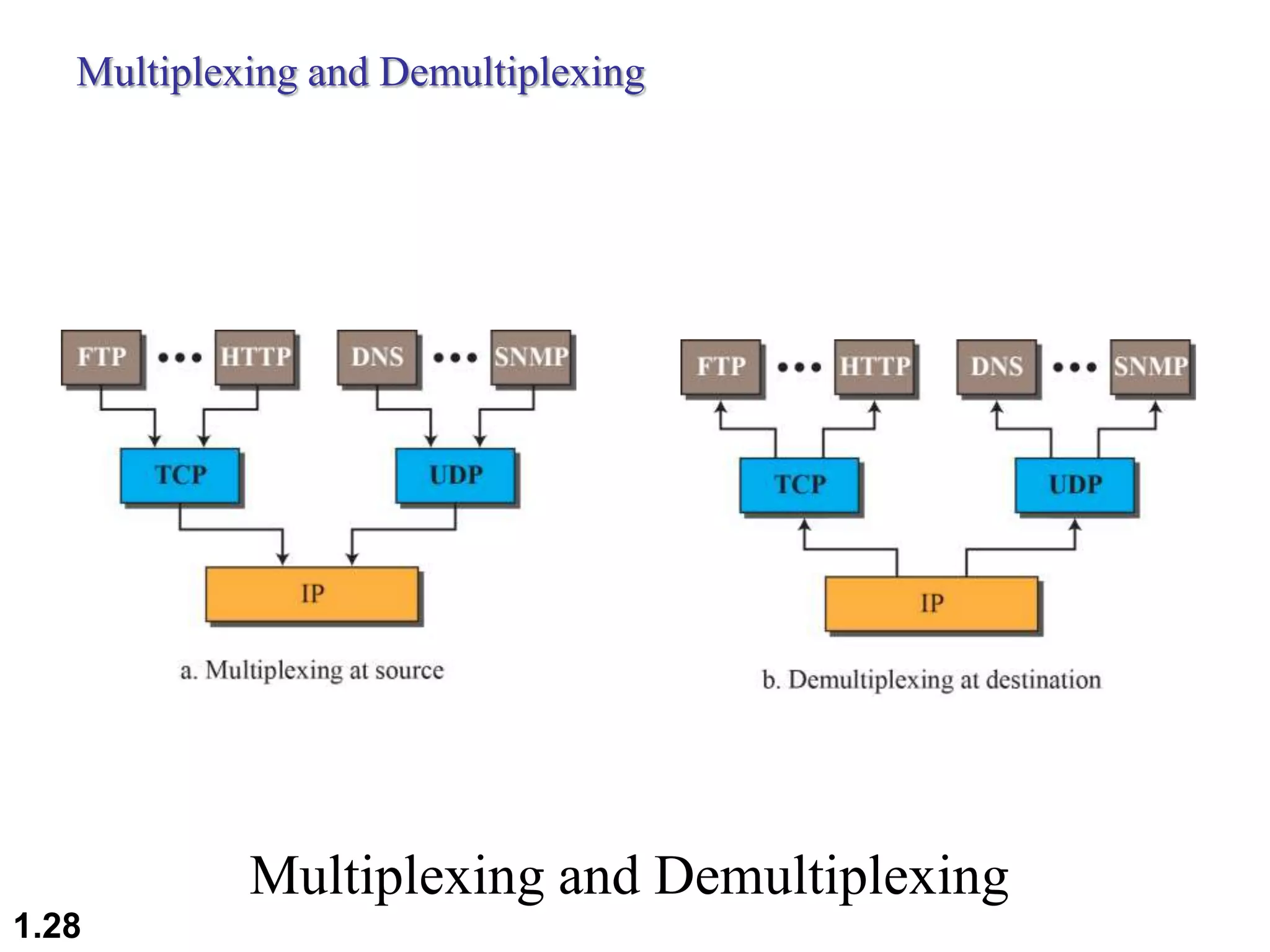
Multiplexing and Demultiplexing
1.28
2.29
THE OSI MODEL
o Established in 1947, the International
Standards Organization (ISO) is a
multinational body dedicated to worldwide
agreement on international standards.
o An ISO standard that covers all aspects of
network communications is the Open Systems
Interconnection (OSI) model.
o It was first introduced in the late 1970s.
ISO is the organization.
OSI is the model.
The OSI Model
1.30
TCP/IP and OSI Model
TCP/IP and OSI model
1.31
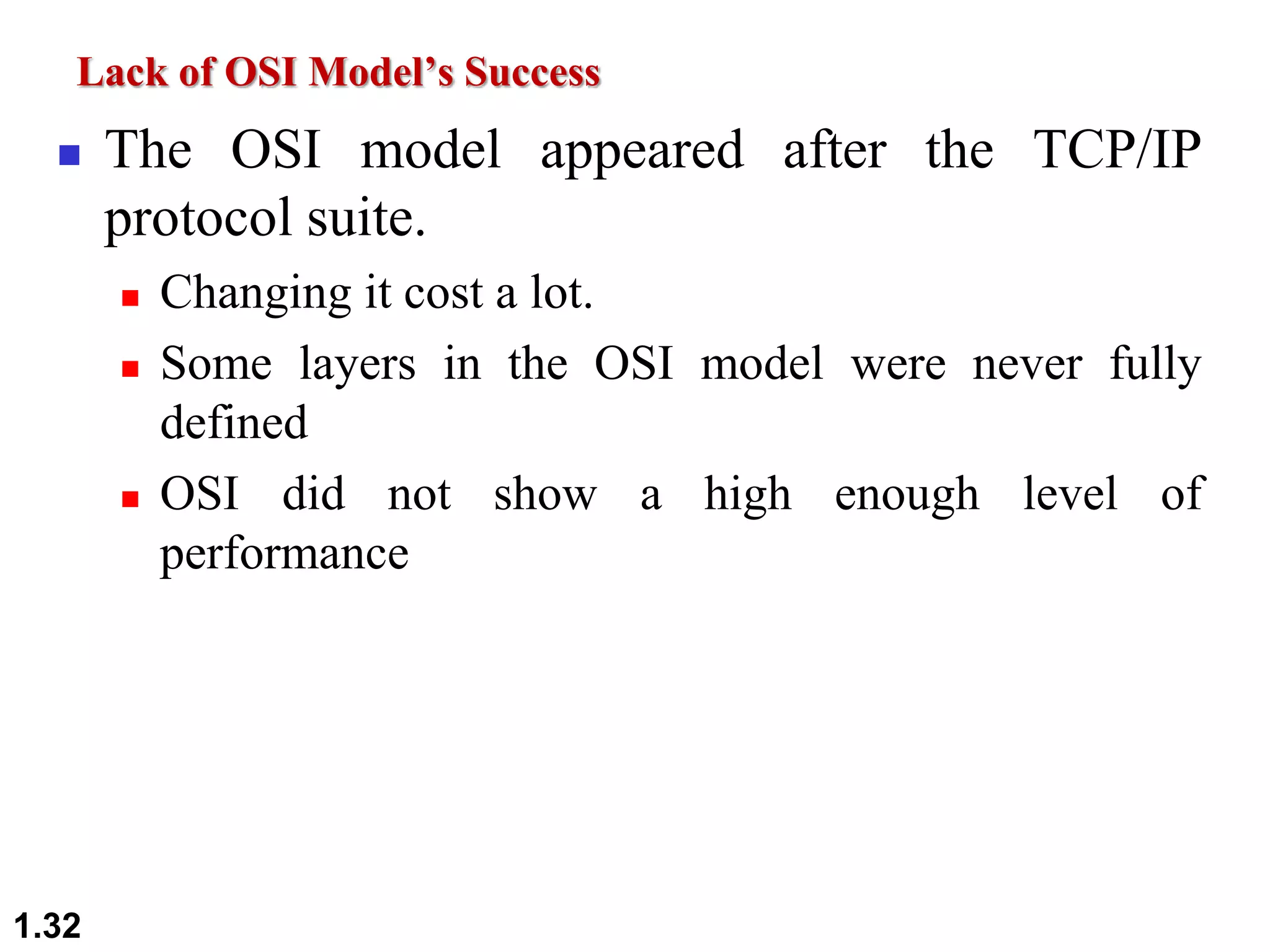
Lack of OSI Model’s Success
 The OSI model appeared after the TCP/IP
protocol suite.
 Changing it cost a lot.
 Some layers in the OSI model were never fully
defined
 OSI did not show a high enough level of
performance
1.32
 A device operating at network layer is
called ____
a) Router
b) Equalizer
c) Bridge
d) Repeater
1.33
Q-A
 A device operating at network layer is
called ____
a) Router
b) Equalizer
c) Bridge
d) Repeater
1.34
Q-A
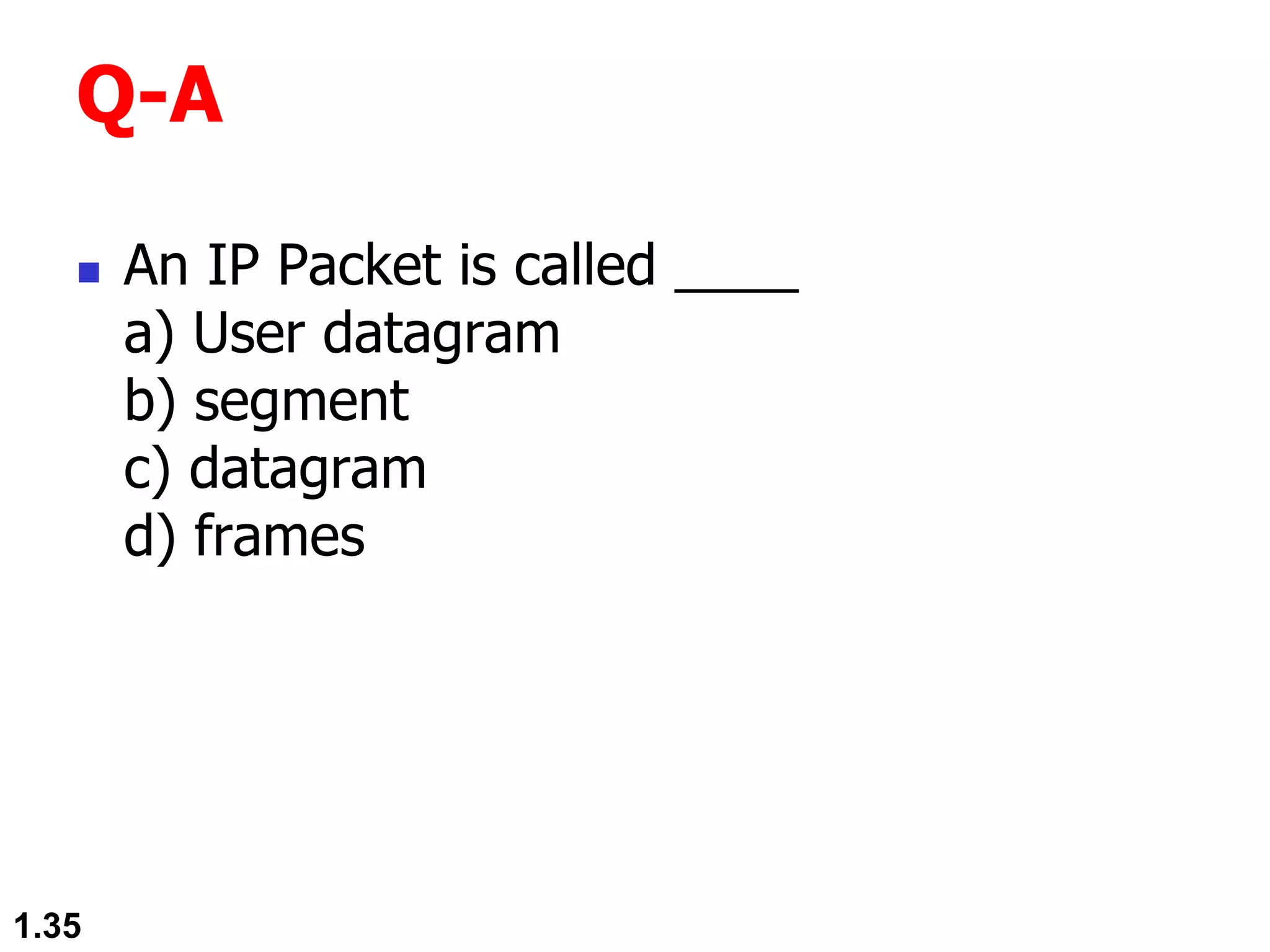
 An IP Packet is called ____
a) User datagram
b) segment
c) datagram
d) frames
1.35
Q-A
 An IP Packet is called ____
a) User datagram
b) segment
c) datagram
d) frames
1.36
Q-A
 An TCP Packet is called ____
a) User datagram
b) segment
c) datagram
d) bits
1.37
Q-A
 An TCP Packet is called ____
a) User datagram
b) segment
c) datagram
d) bits
1.38
Q-A
 The physical layer is concerned with
___________
a) bit-by-bit delivery
p) process to process delivery
c) application to application delivery
d) port to port delivery
1.39
Q-A
 The physical layer is concerned with
___________
a) bit-by-bit delivery
p) process to process delivery
c) application to application delivery
d) port to port delivery
1.40
Q-A
THANK YOU
1.41

Unit_I - 2

  • 1.
    CS – 8591 COMPUTERNETWORKS Unit - I INTRODUCTION AND PHYSICAL LAYER Ms. Angayarkanni S A Assistant Professor, IT, RMKEC
  • 2.
    Outline of Day2  Internet Vs internet  History of Internet  Protocol Layering  TCP/IP Protocol suite  OSI Model 1.2
  • 3.
    Internet Vs internet Internet set of all networks which are interconnected and interoperate using the IETF standard protocols. internet  Any network of devices which can communicate with each other. Internet is a superset of internets. The Internet is the network of networks.
  • 4.
    1.4 The Internet • TheInternet has revolutionized many aspects of our daily lives. • It has affected the way we do business as well as the way we spend our leisure time. • The Internet is a communication system that has brought a wealth of information to our fingertips and organized it for our use.
  • 5.
    Q-A  Network ofdevices which can communicate with each other  internet  Father of internet  Vint Cerf  Father of WWW  Tim Berners Lee 1.5
  • 6.
    Protocol Layering  Protocol  defines the rules that both the sender and receiver and all intermediate devices need to follow to be able to communicate effectively.  Communication  Simple  need only one simple protocol.  complex,  need to divide the task between different layers, in which case we need a protocol at each layer, or protocol layering 1.6
  • 7.
    Protocol Layering  Letus develop two simple scenarios to better understand the need for protocol layering.  In the first scenario, communication is so simple that it can occur in only one layer.  In the second, the communication between Maria and Ann takes place in three layers 1.7
  • 8.
    Protocol Layering  FirstScenario  Maria and Ann are neighbors with a lot of common ideas.  Communication (one layer)  face to face, in the same language, 1.8
  • 9.
    Protocol Layering  FirstScenario - Protocols 1. Greet each other when they meet 2. Confine the vocabulary to the level of friendship 3. Refrain from speaking if one is speaking 4. Opportunity to talk both on an issue (dialog / monolog) 5. Exchange nice words when departing 1.9
  • 10.
    Protocol Layering  SecondScenario  Maria and Ann are physically far away.  Communication (three layer)  Letters/Mail  Should be in a secure way  Listen/Talk
  • 11.
    Second Scenario Postal carrierfacility Protocol Layering 1.11
  • 12.
    Principles of ProtocolLayering 1. if we want bidirectional communication  need to make each layer so that it is able to perform two opposite tasks, one in each direction. 2. we need to follow in protocol layering is that the two objects under each layer at both sites should be identical.
  • 13.
  • 14.
    Protocol suite  Suiteset of interconnected rooms under one room number  a set of rooms designated for one person's or family's use or for a particular purpose  Protocol suite Collection of protocols that are designed to work together.  Set of protocols organized in different layers 1.14
  • 15.
    TCP/IP Protocol Suite TCP/IP : Transmission Control Protocol/Internet Protocol  TCP/IP is a protocol suite (a set of protocols organized in different layers) used in the Internet today.  It is a hierarchical protocol made up of interactive modules, each of which provides a specific functionality.  The original TCP/IP protocol suite was defined as four software layers built upon the hardware. Today, however, TCP/IP is thought of as a five-layer model.  Department of Defense Four-Layer Model 1.15
  • 16.
    Layers in TCP/IPProtocol Suite Original layers Present day layers 1.16
  • 17.
  • 18.
    Layered in theTCP/IP Protocol Suite Logical connections between layers in TCP/IP Logical connections 1.18
  • 19.
    Layered in theTCP/IP Protocol Suite Identical objects in the in TCP/IP protocol suite Identical objects (messages) Identical objects (segment or user datagram) Identical objects (datagram) Identical objects (frame) Identical objects (bits) Identical objects (datagram) Identical objects (frame) Identical objects (bits) 1.19
  • 20.
  • 21.
  • 22.
    Physical Layer  1.Physical Characteristics of Interface and medium : Type of Transmission medium  2. Representation of Bits : Encoding Techniques ; Conversion of Bits to Electrical/Optical signals  3. Data rate: bits/sec  4. Synchronization: Clock Synchronization at Sender & receiver  5. Physical Topology: Star, Bus, Mesh, Ring etc  6. Line Configuration : Point to Point, Multipoint Configurations  7. Transmission Mode : Simplex , Half-Duplex, Full- Duplex Physical layer is responsible for movements of bits from one hop(node) to the next
  • 23.
    Data Link Layer 1. Framing  2. Physical Addressing  3.Flow control  4. Error Control: Detection & Correction  5. Access Control Data link layer is responsible for moving frames from one hop(node) to the next e.g., ARP, IEEE 802.3 and IEEE 802.11 Source: Data Communications and Networking 5E, Forouzan Image Source: http://www.highteck.net/EN/DataLink/ Data_Link_Layer.html
  • 24.
    Network Layer  1.Logical Addressing: IPv4, IPv6  2. Routing: Routing algorithms & table (traffic routing & control) Network layer is responsible for delivery of individual packets from source host to destination host e.g., IP, ICMP, IGMP, DHCP Image Source: Weblink https://fossbytes.com/ network-layer-osi- model/
  • 25.
    Transport Layer  1.Service point addressing: Port Address  2. Segmentation : Divided into transmittable segments with sequence numbers  3. Connection Control  4. Flow Control  5. Session Multiplexing  6. Error Detection & Correction (resends)  7. Message reordering (reassembly) Transport layer is responsible for the delivery of the message from one process to another e.g., TCP, UDP
  • 26.
    Application Layer  1.Network virtual terminal (e.g. usgs)  2.File transfer, access and management  3.Mail services  4.Directory services Application layer is responsible for providing services to the user.
  • 27.
  • 28.
  • 29.
    2.29 THE OSI MODEL oEstablished in 1947, the International Standards Organization (ISO) is a multinational body dedicated to worldwide agreement on international standards. o An ISO standard that covers all aspects of network communications is the Open Systems Interconnection (OSI) model. o It was first introduced in the late 1970s. ISO is the organization. OSI is the model.
  • 30.
  • 31.
    TCP/IP and OSIModel TCP/IP and OSI model 1.31
  • 32.
    Lack of OSIModel’s Success  The OSI model appeared after the TCP/IP protocol suite.  Changing it cost a lot.  Some layers in the OSI model were never fully defined  OSI did not show a high enough level of performance 1.32
  • 33.
     A deviceoperating at network layer is called ____ a) Router b) Equalizer c) Bridge d) Repeater 1.33 Q-A
  • 34.
     A deviceoperating at network layer is called ____ a) Router b) Equalizer c) Bridge d) Repeater 1.34 Q-A
  • 35.
     An IPPacket is called ____ a) User datagram b) segment c) datagram d) frames 1.35 Q-A
  • 36.
     An IPPacket is called ____ a) User datagram b) segment c) datagram d) frames 1.36 Q-A
  • 37.
     An TCPPacket is called ____ a) User datagram b) segment c) datagram d) bits 1.37 Q-A
  • 38.
     An TCPPacket is called ____ a) User datagram b) segment c) datagram d) bits 1.38 Q-A
  • 39.
     The physicallayer is concerned with ___________ a) bit-by-bit delivery p) process to process delivery c) application to application delivery d) port to port delivery 1.39 Q-A
  • 40.
     The physicallayer is concerned with ___________ a) bit-by-bit delivery p) process to process delivery c) application to application delivery d) port to port delivery 1.40 Q-A
  • 41.