Unit 6: The Web Application Extension for UML

 Web pages should be modeled as first-class elements in the
    internal design model and represented alongside the classes and
    components that make up the rest of the Web presentation layer.
 However, the default building blocks of UML are not sufficient to
    express the necessary subtleties of Web pages as objects:
         Web pages may have scripts to be executed on the server, which
          interact with server-side resources before being sent to the browser
          as a completed Web page.
         Web pages may have scripts that execute on the browser as well.
         When processed by the server, the Web page does one thing; when
          processed by the browser, it does a completely different thing.
 The Web Application Extension (WAE) to UML enables us to
    represent Web pages and other architecturally significant elements
    in the internal design model of the Web presentation layer

dsbw 2011/2012 q1                                                                1
UML Mechanisms To Extend UML
 In general, any extension to UML is expressed in terms of
    stereotypes, tagged values, and/or constraints.
 Combined, these mechanisms extend the notation of UML,
    enabling creating new types of building blocks to be used in the
    model.
 Stereotype: is an extension to the vocabulary of the language that
    allows to attach a new semantic meaning to a UML model element
    (a class, an association, etc).
 Tagged value: is the definition of a new property that can be
    associated with a model element.
      UML Classes, for instance, have names, visibility, persistence,
       and other properties associated with them.
 Constraint: specifies the conditions under which the model can be
    considered well formed.
dsbw 2011/2012 q1                                                        2
WAE Stereotypes

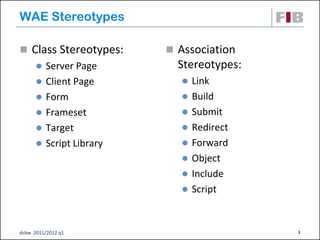
 Class Stereotypes:      Association
       Server Page        Stereotypes:
       Client Page         Link
       Form                Build
       Frameset            Submit
       Target              Redirect
       Script Library      Forward
                            Object
                            Include
                            Script


dsbw 2011/2012 q1                         3
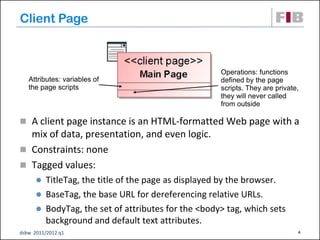
Client Page


                                                    Operations: functions
   Attributes: variables of                         defined by the page
   the page scripts                                 scripts. They are private,
                                                    they will never called
                                                    from outside

 A client page instance is an HTML-formatted Web page with a
  mix of data, presentation, and even logic.
 Constraints: none
 Tagged values:
       TitleTag, the title of the page as displayed by the browser.
       BaseTag, the base URL for dereferencing relative URLs.
       BodyTag, the set of attributes for the <body> tag, which sets
        background and default text attributes.
dsbw 2011/2012 q1                                                            4
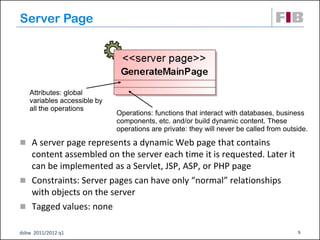
Server Page


   Attributes: global
   variables accessible by
   all the operations
                             Operations: functions that interact with databases, business
                             components, etc. and/or build dynamic content. These
                             operations are private: they will never be called from outside.

 A server page represents a dynamic Web page that contains
  content assembled on the server each time it is requested. Later it
  can be implemented as a Servlet, JSP, ASP, or PHP page
 Constraints: Server pages can have only “normal” relationships
  with objects on the server
 Tagged values: none

dsbw 2011/2012 q1                                                                       5
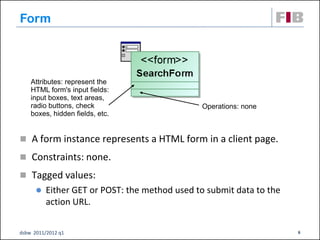
Form


    Attributes: represent the
    HTML form's input fields:
    input boxes, text areas,
    radio buttons, check                       Operations: none
    boxes, hidden fields, etc.


 A form instance represents a HTML form in a client page.
 Constraints: none.

 Tagged values:
         Either GET or POST: the method used to submit data to the
          action URL.


dsbw 2011/2012 q1                                                     6
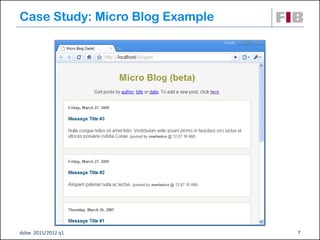
Case Study: Micro Blog Example


dsbw 2011/2012 q1                7
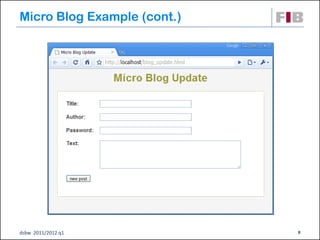
Micro Blog Example (cont.)


dsbw 2011/2012 q1            8
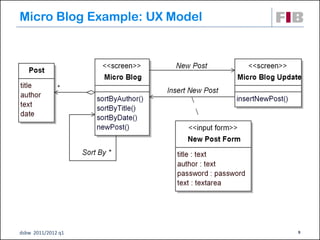
Micro Blog Example: UX Model


dsbw 2011/2012 q1              9
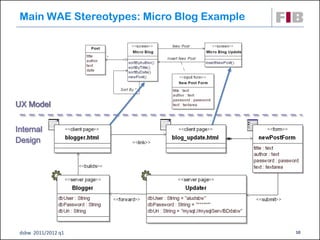
Main WAE Stereotypes: Micro Blog Example


UX Model


Internal
Design


 dsbw 2011/2012 q1                          10
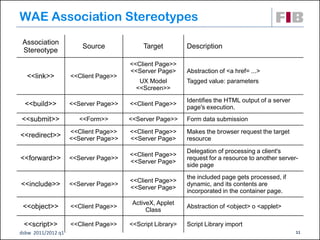
WAE Association Stereotypes
 Association
                        Source            Target          Description
 Stereotype
                                      <<Client Page>>
                                      <<Server Page>      Abstraction of <a href= ...>
  <<link>>          <<Client Page>>
                                         UX Model         Tagged value: parameters
                                        <<Screen>>
                                                          Identifies the HTML output of a server
  <<build>>         <<Server Page>>   <<Client Page>>
                                                          page's execution.
<<submit>>             <<Form>>       <<Server Page>>     Form data submission

                    <<Client Page>>   <<Client Page>>     Makes the browser request the target
<<redirect>>        <<Server Page>>   <<Server Page>      resource

                                                          Delegation of processing a client's
                                      <<Client Page>>
<<forward>>         <<Server Page>>
                                      <<Server Page>
                                                          request for a resource to another server-
                                                          side page
                                                          the included page gets processed, if
                                      <<Client Page>>
<<include>>         <<Server Page>>
                                      <<Server Page>
                                                          dynamic, and its contents are
                                                          incorporated in the container page.
                                       ActiveX, Applet
 <<object>>         <<Client Page>>
                                            Class
                                                          Abstraction of <object> o <applet>

 <<script>>         <<Client Page>>   <<Script Library>   Script Library import
dsbw 2011/2012 q1                                                                                  11
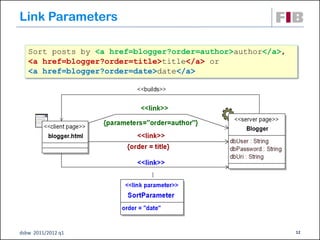
Link Parameters

   Sort posts by <a href=blogger?order=author>author</a>,
   <a href=blogger?order=title>title</a> or
   <a href=blogger?order=date>date</a>


dsbw 2011/2012 q1                                           12
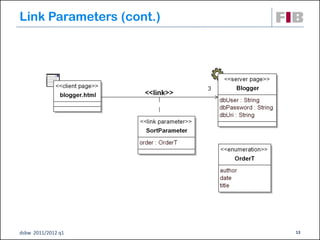
Link Parameters (cont.)


dsbw 2011/2012 q1         13
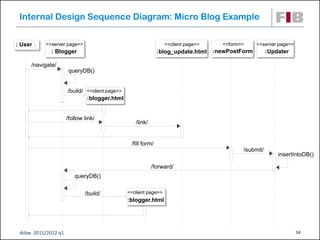
Internal Design Sequence Diagram: Micro Blog Example

: User     <<server page>>                                       <<client page>>      <<form>>    <<server page>>
             : Blogger                                        :blog_update.html    :newPostForm         :Updater

     /navigate/
                      queryDB()


                     /build/ <<client page>>
                             :blogger.html


                     /follow link/
                                                  /link/


                                                /fill form/
                                                                                             /submit/
                                                                                                            insertIntoDB()

                                                           /forward/
                        queryDB()


                             /build/           <<client page>>
                                               :blogger.html


 dsbw 2011/2012 q1                                                                                                  14
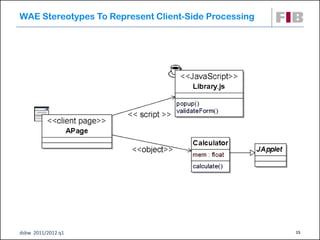
WAE Stereotypes To Represent Client-Side Processing


dsbw 2011/2012 q1                                     15
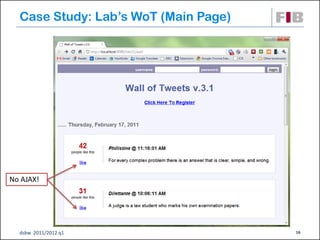
Case Study: Lab’s WoT (Main Page)


No AJAX!


  dsbw 2011/2012 q1                   16
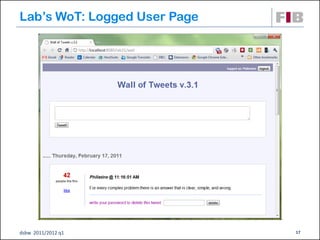
Lab’s WoT: Logged User Page


dsbw 2011/2012 q1             17
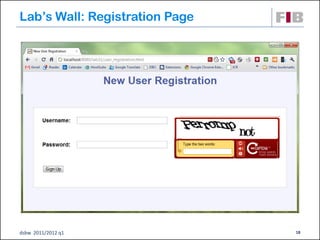
Lab’s Wall: Registration Page


dsbw 2011/2012 q1               18
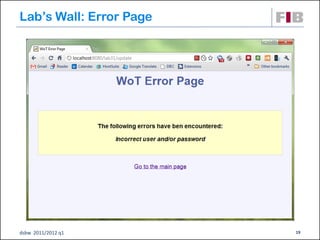
Lab’s Wall: Error Page


dsbw 2011/2012 q1        19
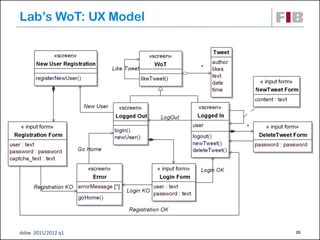
Lab’s WoT: UX Model


dsbw 2011/2012 q1     20
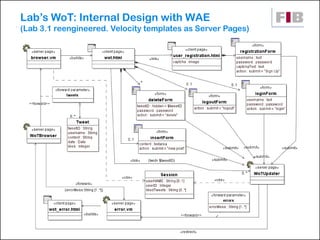
Lab’s WoT: Internal Design with WAE
(Lab 3.1 reengineered. Velocity templates as Server Pages)


dsbw 2011/2012 q1                                            21
References
 J. Conallen. Building Web Applications with UML. Second
    Edition. Addison-Wesley, 2003.


dsbw 2011/2012 q1                                           22

Unit 06: The Web Application Extension for UML

  • 1.
    Unit 6: TheWeb Application Extension for UML  Web pages should be modeled as first-class elements in the internal design model and represented alongside the classes and components that make up the rest of the Web presentation layer.  However, the default building blocks of UML are not sufficient to express the necessary subtleties of Web pages as objects:  Web pages may have scripts to be executed on the server, which interact with server-side resources before being sent to the browser as a completed Web page.  Web pages may have scripts that execute on the browser as well.  When processed by the server, the Web page does one thing; when processed by the browser, it does a completely different thing.  The Web Application Extension (WAE) to UML enables us to represent Web pages and other architecturally significant elements in the internal design model of the Web presentation layer dsbw 2011/2012 q1 1
  • 2.
    UML Mechanisms ToExtend UML  In general, any extension to UML is expressed in terms of stereotypes, tagged values, and/or constraints.  Combined, these mechanisms extend the notation of UML, enabling creating new types of building blocks to be used in the model.  Stereotype: is an extension to the vocabulary of the language that allows to attach a new semantic meaning to a UML model element (a class, an association, etc).  Tagged value: is the definition of a new property that can be associated with a model element.  UML Classes, for instance, have names, visibility, persistence, and other properties associated with them.  Constraint: specifies the conditions under which the model can be considered well formed. dsbw 2011/2012 q1 2
  • 3.
    WAE Stereotypes  ClassStereotypes:  Association  Server Page Stereotypes:  Client Page  Link  Form  Build  Frameset  Submit  Target  Redirect  Script Library  Forward  Object  Include  Script dsbw 2011/2012 q1 3
  • 4.
    Client Page Operations: functions Attributes: variables of defined by the page the page scripts scripts. They are private, they will never called from outside  A client page instance is an HTML-formatted Web page with a mix of data, presentation, and even logic.  Constraints: none  Tagged values:  TitleTag, the title of the page as displayed by the browser.  BaseTag, the base URL for dereferencing relative URLs.  BodyTag, the set of attributes for the <body> tag, which sets background and default text attributes. dsbw 2011/2012 q1 4
  • 5.
    Server Page Attributes: global variables accessible by all the operations Operations: functions that interact with databases, business components, etc. and/or build dynamic content. These operations are private: they will never be called from outside.  A server page represents a dynamic Web page that contains content assembled on the server each time it is requested. Later it can be implemented as a Servlet, JSP, ASP, or PHP page  Constraints: Server pages can have only “normal” relationships with objects on the server  Tagged values: none dsbw 2011/2012 q1 5
  • 6.
    Form Attributes: represent the HTML form's input fields: input boxes, text areas, radio buttons, check Operations: none boxes, hidden fields, etc.  A form instance represents a HTML form in a client page.  Constraints: none.  Tagged values:  Either GET or POST: the method used to submit data to the action URL. dsbw 2011/2012 q1 6
  • 7.
    Case Study: MicroBlog Example dsbw 2011/2012 q1 7
  • 8.
    Micro Blog Example(cont.) dsbw 2011/2012 q1 8
  • 9.
    Micro Blog Example:UX Model dsbw 2011/2012 q1 9
  • 10.
    Main WAE Stereotypes:Micro Blog Example UX Model Internal Design dsbw 2011/2012 q1 10
  • 11.
    WAE Association Stereotypes Association Source Target Description Stereotype <<Client Page>> <<Server Page> Abstraction of <a href= ...> <<link>> <<Client Page>> UX Model Tagged value: parameters <<Screen>> Identifies the HTML output of a server <<build>> <<Server Page>> <<Client Page>> page's execution. <<submit>> <<Form>> <<Server Page>> Form data submission <<Client Page>> <<Client Page>> Makes the browser request the target <<redirect>> <<Server Page>> <<Server Page> resource Delegation of processing a client's <<Client Page>> <<forward>> <<Server Page>> <<Server Page> request for a resource to another server- side page the included page gets processed, if <<Client Page>> <<include>> <<Server Page>> <<Server Page> dynamic, and its contents are incorporated in the container page. ActiveX, Applet <<object>> <<Client Page>> Class Abstraction of <object> o <applet> <<script>> <<Client Page>> <<Script Library> Script Library import dsbw 2011/2012 q1 11
  • 12.
    Link Parameters Sort posts by <a href=blogger?order=author>author</a>, <a href=blogger?order=title>title</a> or <a href=blogger?order=date>date</a> dsbw 2011/2012 q1 12
  • 13.
  • 14.
    Internal Design SequenceDiagram: Micro Blog Example : User <<server page>> <<client page>> <<form>> <<server page>> : Blogger :blog_update.html :newPostForm :Updater /navigate/ queryDB() /build/ <<client page>> :blogger.html /follow link/ /link/ /fill form/ /submit/ insertIntoDB() /forward/ queryDB() /build/ <<client page>> :blogger.html dsbw 2011/2012 q1 14
  • 15.
    WAE Stereotypes ToRepresent Client-Side Processing dsbw 2011/2012 q1 15
  • 16.
    Case Study: Lab’sWoT (Main Page) No AJAX! dsbw 2011/2012 q1 16
  • 17.
    Lab’s WoT: LoggedUser Page dsbw 2011/2012 q1 17
  • 18.
    Lab’s Wall: RegistrationPage dsbw 2011/2012 q1 18
  • 19.
    Lab’s Wall: ErrorPage dsbw 2011/2012 q1 19
  • 20.
    Lab’s WoT: UXModel dsbw 2011/2012 q1 20
  • 21.
    Lab’s WoT: InternalDesign with WAE (Lab 3.1 reengineered. Velocity templates as Server Pages) dsbw 2011/2012 q1 21
  • 22.
    References  J. Conallen.Building Web Applications with UML. Second Edition. Addison-Wesley, 2003. dsbw 2011/2012 q1 22