SEARCH ENGINE MARKETING
Sanjivani Rural Education Society’s
Sanjivani College of Engineering, Kopargaon-423603
(An Autonomous Institute Affiliated to Savitribai Phule Pune University, Pune)
NAAC ‘A’ Grade Accredited, ISO 9001:2015 Certified
Department of Information Technology
(NBA Accredited)
Mr. N. L. Shelake
Assistant Professor
SEARCH ENGINE MARKETING
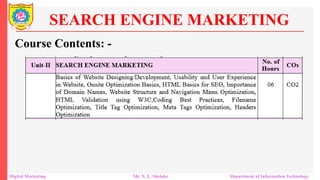
Course Contents: -
Digital Marketing Mr. N. L. Shelake Department of Information Technology
Basics of Web Designing
Web design shares many principles with print design.
Understand space, layout, fonts, and colors.
Effective communication through design.
Design elements are the building blocks of any webpage.
Understanding these elements enhances your design skills.
Search Engine Marketing
Digital Marketing Mr. N. L. Shelake Department of Information Technology
Basics Terminology of Web Developement
Search Engine Marketing
Digital Marketing Mr. N. L. Shelake Department of Information Technology
Lines and Line Work
Lines include borders and rules (horizontal and vertical).
Help delineate spaces and improve readability.
 Shape
Shapes are enclosed contours in design.
Use different shapes creatively, not limited to squares or
rectangles.
Search Engine Marketing
Digital Marketing Mr. N. L. Shelake Department of Information Technology
Basics Elements of Website Design
Texture
Texture adds a sense of surface to your design.
Achieved visually on web pages using natural or artificial
textures..
 Color
Color enhances a design but isn't mandatory.
Start with a design without color, then add it sparingly.
Search Engine Marketing
Digital Marketing Mr. N. L. Shelake Department of Information Technology
Basics Elements of Website Design
Direction
Texture adds a sense of surface to your design.
Achieved visually on web pages using natural or artificial
textures.
 Layout Design
Layout is crucial in positioning elements on the page.
Screen resolution consideration is important.
Search Engine Marketing
Digital Marketing Mr. N. L. Shelake Department of Information Technology
Basics Elements of Website Design
Aligning Images
Avoid randomly placing images on the page.
Align images to integrate them into the layout effectively..
 Fonts and Typography
Fonts define the appearance of text on the page.
Consider both micro-level (individual font choice) and macro-
level (overall text arrangement)..
Search Engine Marketing
Digital Marketing Mr. N. L. Shelake Department of Information Technology
Basics Elements of Website Design
Font Measurements
Fixed Height Measures: inches, centimeters, points, etc.
Relative Measures: ems, pixels, percentages, etc.
 Color Usage in Web Design
Color is a powerful tool for visual communication.
Use it wisely to convey meaning and enhance design..
Search Engine Marketing
Digital Marketing Mr. N. L. Shelake Department of Information Technology
Basics Elements of Website Design
Web Navigation
Navigation ensures users can easily move between pages.
Plan your site’s information architecture carefully..
 Accessibility and Usability
Accessibility and usability make your site more inclusive.
Don’t sacrifice design quality for accessibility; integrate both.
Search Engine Marketing
Digital Marketing Mr. N. L. Shelake Department of Information Technology
Basics Elements of Website Design
 A product can be used by specified users to achieve specified
goals with effectiveness, efficiency and satisfaction in a specified
context of use.
Usability means that the people who use the product can do so
quickly and easily to accomplish their own tasks
Usability and User Experience in Website
Digital Marketing Mr. N. L. Shelake Department of Information Technology
This definition rests on four points
Usability means focusing on users
People use products to be productive (HCI)
Users are busy people trying to accomplish tasks
Users decide when a product is easy to use
Usability and User Experience in Website
Digital Marketing Mr. N. L. Shelake Department of Information Technology
User Experience (UX) focuses on understanding users, including
their needs, values, abilities, and limitations.
It also incorporates the business goals and objectives of the
project.
Promote improving the quality of the user’s interaction with and
perceptions of your product and any related services
involves a person's emotions about using a particular product,
system or service
User experience (UX)
Digital Marketing Mr. N. L. Shelake Department of Information Technology
User-Centric: Ensures products and services meet user needs
effectively.
Business Impact: Aligns with business objectives to drive
success.
Quality Interaction: Enhances the overall experience and
perception of the product.
Emotional Experience: How users feel while interacting with a
product.
Importance of UX
Digital Marketing Mr. N. L. Shelake Department of Information Technology
Experiential Aspect: The meaningful and valuable experiences
provided by the product.
Practical Aspects
Utility: Does the product meet user needs?
Ease of Use: Is the product intuitive and user-friendly?
Efficiency: How quickly and effectively can users achieve
their goals?
Importance of UX
Digital Marketing Mr. N. L. Shelake Department of Information Technology
UX is subjective; different users have different perceptions and
experiences (Individual Perception)
Each user's background, expectations, and context influence their
UX (Personal Experience)
UX is not static; it changes with new technologies, updates, and
user feedback. (Evolving Experience)
Regularly adapting and enhancing the UX to meet evolving user
needs and industry standards (Continuous Improvement)
User experience (UX)
Digital Marketing Mr. N. L. Shelake Department of Information Technology
User experience (UX)
Digital Marketing Mr. N. L. Shelake Department of Information Technology
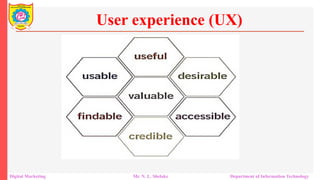
Useful - Content should be original and fulfill a need
Usable - Site must be easy to use
Desirable - Image, identity, brand, and design elements are used to
suggest emotion and appreciation
Findable - Content needs to be navigable and locatable onsite and
offsite
Accessible - Content needs to be accessible to people with disabilities
Credible - Users must trust and believe what you tell them
User experience (UX)
Digital Marketing Mr. N. L. Shelake Department of Information Technology
Onsite optimization is anything that you do within your website to
optimize it for the search engines. There are key factors such as:
 Domain name
 Meta description
 Web contents
 Internal links
 Tags and Meta tags
 Anchor texts
 Rick media files
 Bounce rate
 Loading speed
Onsite Optimization Basics
Digital Marketing Mr. N. L. Shelake Department of Information Technology
A domain name is the unique address of a website on the internet,
used to identify and access it.
For onsite optimization, choosing a domain name that reflects the
site's content or primary keywords can help improve relevance
and search engine ranking.
Google’s EMD update, having an exact match domain name no
longer matters a lot to SEO
The domain name adds credibility and relevancy to your blog. It
can help users to decide if the blog is the right one to get the
information they are searching for or not.
Domain Name
Digital Marketing Mr. N. L. Shelake Department of Information Technology
A meta description is a short summary (typically 150-160
characters) of a web page’s content, included in the HTML of the
page.
It appears under the page title in search engine results. A well-
written meta description can improve click-through rates by
providing a compelling preview of the content.
This is also used by the search engine crawlers when ranking
websites for certain keywords.
Therefore, make sure that your target keyword term is present in
the Meta description
Meta Description
Digital Marketing Mr. N. L. Shelake Department of Information Technology
Quality and uniqueness of post must be given due focus where
every post is different.
Interesting and Effective title that effectively grabs attention
Meta description which shows an overview about blog.
The Meta description can heavily influence the search users‟
decision on whether to checkout your site or not.
Meta Description
Digital Marketing Mr. N. L. Shelake Department of Information Technology
Web content refers to the textual, visual, and multimedia
information available on a web page.
 It includes articles, blog posts, images, videos, and other
elements.
 High-quality, relevant, and keyword-optimized content is
essential for good onsite optimization as it helps search engines
understand the page’s relevance to user queries.
Web Content
Digital Marketing Mr. N. L. Shelake Department of Information Technology
Internal links are hyperlinks that point to other pages or posts
within the same website.
They help users navigate the site and distribute page authority
throughout the site.
 For SEO, internal linking enhances the site’s structure and helps
search engines crawl and index the pages more efficiently.
Internal Links
Digital Marketing Mr. N. L. Shelake Department of Information Technology
Tags are keywords or phrases assigned to content to describe its
topic and facilitate categorization and search ability.
Meta tags are HTML elements that provide metadata about the
web page, such as meta descriptions, meta keywords, and meta
robots.
 Meta tags help search engines understand the content and control
indexing behavior.
Tags and Meta Tags
Digital Marketing Mr. N. L. Shelake Department of Information Technology
Anchor text is the clickable text in a hyperlink.
It’s important for SEO because it provides context to both users
and search engines about the linked page’s content.
Using descriptive and keyword-rich anchor text can improve a
page's relevance for specific search terms.
Anchor Text
Digital Marketing Mr. N. L. Shelake Department of Information Technology
Rich media files include complex file types such as videos, audio
files, animations, and interactive content.
Optimizing rich media involves ensuring these files are properly
tagged, compressed for faster loading, and relevant to the
surrounding content to enhance user engagement and SEO.
These files should be properly inserted with alt-tags that are
relevant to the main target keyword phrase
Rich Media Files
Digital Marketing Mr. N. L. Shelake Department of Information Technology
Bounce rate refers to the percentage of visitors who leave a
website after viewing only one page, without interacting further.
A high bounce rate can indicate that the landing page is not
engaging or relevant, which can negatively impact SEO rankings.
Improving content and user experience can help reduce bounce
rates.
Bounce rate
Digital Marketing Mr. N. L. Shelake Department of Information Technology
Loading speed is the time it takes for a web page to fully appear
and become interactive.
Faster loading speeds enhance user experience and are favored by
search engines.
Optimizing loading speed involves reducing file sizes, leveraging
browser caching, and using efficient coding practices.
Loading Speed
Digital Marketing Mr. N. L. Shelake Department of Information Technology
Search Engine Optimization (SEO) is process of making site
search engine user friendly.
It starts with different title tags and Meta descriptions on every
page.
The SEO serves as bridge over gap where it brings people with
computer skills and information they require
HTML coding that tell engines how to properly “read” your
content
Improve search engine visibility by adding SEO tags in HTML
HTML Basics for SEO
Digital Marketing Mr. N. L. Shelake Department of Information Technology
When a search engine’s crawler comes across your content, it
takes a look at the HTML tags of the site
This kind of information helps engines like Google determine
what your content is about and how to categorize the material.
How visitors view your content in those search engines.
How social media uses content tags to show your articles
It’s HTML tags for SEO that will affect how your website
performs on the Internet.
HTML Basics for SEO
Digital Marketing Mr. N. L. Shelake Department of Information Technology
<Title> Tag
The title should not be longer than 70-100 characters including
spaces.
The title should not begin with domain name and considered as
spam.
The domain name shouldn't be repeated in title and considered as
spam.
It does not use same filename as title tag or filename or domain
name.
HTML <HEAD> Content
Digital Marketing Mr. N. L. Shelake Department of Information Technology
<Meta Description> Tag
 Shouldn't be longer than 200 characters.
HTML <HEAD> Content
Digital Marketing Mr. N. L. Shelake Department of Information Technology
<Meta Keywords> Tag
 Shouldn't be longer than 268 characters.
 Shouldn't use words that are not present in body of page.
 Redundant characters will not hurt the results; however words
after the first
 Start all keywords with capital letters.
 Separate keywords with ", "character combination.
 You may use phrases as well.
HTML <HEAD> Content
Digital Marketing Mr. N. L. Shelake Department of Information Technology
Content
 The text on page should contain keywords right at start of page.
 Keywords should not overuse as keyword takes 12-24% of body
text.
 Do not use content on front page
HTML <HEAD> Content
Digital Marketing Mr. N. L. Shelake Department of Information Technology
Code Page
 If website uses different language than default search engine that
liked by target audience or website uses special characters which
is different to language making sure to implement proper HTML
code page tag.
 Unicode versions of special characters are more or less
impossible to look up in search engines.
HTML <HEAD> Content
Digital Marketing Mr. N. L. Shelake Department of Information Technology
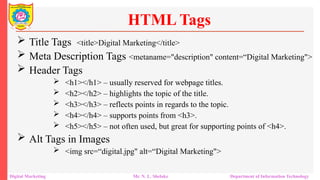
 Title Tags <title>Digital Marketing</title>
 Meta Description Tags <metaname="description" content=“Digital Marketing">
 Header Tags
 <h1></h1> – usually reserved for webpage titles.
 <h2></h2> – highlights the topic of the title.
 <h3></h3> – reflects points in regards to the topic.
 <h4></h4> – supports points from <h3>.
 <h5></h5> – not often used, but great for supporting points of <h4>.
 Alt Tags in Images
 <img src=“digital.jpg" alt=“Digital Marketing">
HTML Tags
Digital Marketing Mr. N. L. Shelake Department of Information Technology
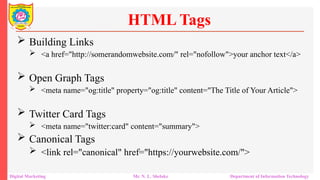
 Building Links
 <a href="http://somerandomwebsite.com/" rel="nofollow">your anchor text</a>
 Open Graph Tags
 <meta name="og:title" property="og:title" content="The Title of Your Article">
 Twitter Card Tags
 <meta name="twitter:card" content="summary">
 Canonical Tags
 <link rel="canonical" href="https://yourwebsite.com/">
HTML Tags
Digital Marketing Mr. N. L. Shelake Department of Information Technology
 Domain name is a unique identity on internet.
 Domain name builds credibility: Having your own domain
name will lead to professionalism. When new visitor reaches
your website, he/she happens to look at domain name and make a
first impression opinion about website. The domain name gives
an impression about status of company.
Importance of Domain Names
Digital Marketing Mr. N. L. Shelake Department of Information Technology
 Domain name gives uniqueness: Having own domain name is
same as having your own place which shows that you address is
your own and not shared which can be like www.name-of-your-
own-website.com
Importance of Domain Names
Digital Marketing Mr. N. L. Shelake Department of Information Technology
 Domain name gives branding: If you have brand name or
company name in your domain name it will help to reinforce a
brand value which further will increase awareness of particular
brand. Visitors will not simply know about your brand name but
also remembers it for future use. The brand name will be
remembered by them that can be transferred to other people
whenever visitor talks about it.
Importance of Domain Names
Digital Marketing Mr. N. L. Shelake Department of Information Technology
 Domain name gives personalized and multiple e-mail
addresses: In case of your registered domain name, you can
create own personal e-mail address which looks as
yourname@name-of-your-own-website.com and helps in making
you an important person to deal with. It creates flexibility by
having multiple e-mails of particular departments and
organization as per need.
Importance of Domain Names
Digital Marketing Mr. N. L. Shelake Department of Information Technology
 Domain name gives portability on internet: In case of website
running under particular domain name, then there is portability
of carrying website to any webhost as required. In case if you are
sharing someone else’s domain name then you can’t take domain
name along with your website. In such case you have to create a
new domain name and further you will lose your visitors.
Importance of Domain Names
Digital Marketing Mr. N. L. Shelake Department of Information Technology
 Domain name gives importance to websites by search
engines: The search engines recognize importance of domain
name and give preference to websites having own unique domain
names instead of subdomains or part of another domain name,
like when you get your website launched with free webhost.
Importance of Domain Names
Digital Marketing Mr. N. L. Shelake Department of Information Technology
 Optimizing website structure and navigation menus is crucial for
enhancing user experience, improving search engine visibility,
and increasing overall website performance.
 Optimizing website's structure and navigation is vital for SEO,
because it helps search engines understand the content on
website and how it is organize.
 Improve the user experience by making it easier for visitors to
find what they are looking for on website.
Website Structure and Navigation Menu Optimization
Digital Marketing Mr. N. L. Shelake Department of Information Technology
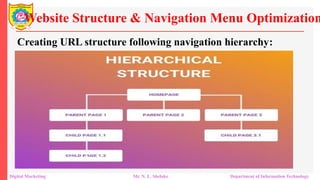
Plan out hierarchy before developing website:
 Design a clear and logical website hierarchy that organizes
content into categories, subcategories, and pages.
 makes it easier for search engines to understand the
relationships between pages and helps them determine the most
important pages on website
 This should reflect the logical flow of information users expect.
 Identify primary pages (e.g., Home, About, Services) and
secondary pages (e.g., individual service pages, blog posts).
Website Structure & Navigation Menu Optimization
Digital Marketing Mr. N. L. Shelake Department of Information Technology
Plan out hierarchy before developing website:
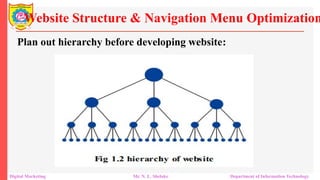
 Organize web content into categories and subcategories, with the
most important pages at the top level and secondary pages
nested underneath.
 This makes it easier for search engines to understand the
relationships between pages and helps them determine the most
important pages on website
 Use hierarchical headings (H1, H2, H3, etc.) to indicate the
structure and importance of content.
Website Structure & Navigation Menu Optimization
Digital Marketing Mr. N. L. Shelake Department of Information Technology
Plan out hierarchy before developing website:
Website Structure & Navigation Menu Optimization
Digital Marketing Mr. N. L. Shelake Department of Information Technology
Creating URL structure following navigation hierarchy:
 Develop a URL structure that is descriptive, keyword-rich and
reflects the content hierarchy. For example, a product page URL
might look like
www.example.com/category/subcategory/product-name
 Ensure the URL structure is consistent across the site, making it
easier for users to understand where they are and for search
engines to crawl your site.
 Instead of "www.example.com/page1" use
"www.example.com/best-seo-tips”
Website Structure & Navigation Menu Optimization
Digital Marketing Mr. N. L. Shelake Department of Information Technology
Creating URL structure following navigation hierarchy:
Website Structure & Navigation Menu Optimization
Digital Marketing Mr. N. L. Shelake Department of Information Technology
Creating URL structure following navigation hierarchy:
 Generate an XML sitemap and submit it to search engines (e.g.,
Google Search Console) to ensure all pages are discovered and
indexed efficiently.
 Include priority and frequency tags to indicate the importance
and update frequency of pages.
 A sitemap is a list of all the pages on your website, organized in
a hierarchy.
 Use descriptive, keyword-rich URLs for your pages
Website Structure & Navigation Menu Optimization
Digital Marketing Mr. N. L. Shelake Department of Information Technology
Creating URL structure following navigation hierarchy:
 Create descriptive and SEO-friendly URLs that reflect the
content hierarchy and include relevant keywords.
 Avoid using dynamic parameters or cryptic URLs that can
confuse users and search engines.
Website Structure & Navigation Menu Optimization
Digital Marketing Mr. N. L. Shelake Department of Information Technology
Creating site navigation in HTML or CSS:
 It is better to make coding simple in HTML and CSS for
navigation.
 So coding in JavaScript, Flash, and Ajax limits crawler’s will
cover website by navigation and hierarchy.
Website Structure & Navigation Menu Optimization
Digital Marketing Mr. N. L. Shelake Department of Information Technology
Use of shallow depth navigation structure:
 Navigation structure follows a website hierarchy
 Make sure that important pages are not buried inside deep
inside a website
 Breadcrumb navigation is a hierarchy of links that shows the
user's current location within the website
 Breadcrumbs also provide additional contextual information to
search engines.
 Breadcrumb navigation to enhance user navigation and provide
clear paths for users to backtrack through the website hierarchy.
Website Structure & Navigation Menu Optimization
Digital Marketing Mr. N. L. Shelake Department of Information Technology
Creating header which lists main navigation pages:
 It is seen that the top header should list main pages.
 Adding any other menu elements apart from your main
categories can become distracting and unnecessary
 Use descriptive, keyword-rich titles and headers on pages to
help search engines understand the content of your page. For
example, instead of using "Chapter 1" as a title, use "10 Tips for
Optimizing Your Website's Structure and Navigation for SEO."
Website Structure & Navigation Menu Optimization
Digital Marketing Mr. N. L. Shelake Department of Information Technology
Developing comprehensive internal linking structure:
 It allows users to navigate.
 It helps in establishing information hierarchy.
 It helps spreading link around websites.
 Use internal linking to link related pages on website together.
 This helps search engines understand the relationships between
web pages and can improve the ranking of web pages in search
results
Website Structure & Navigation Menu Optimization
Digital Marketing Mr. N. L. Shelake Department of Information Technology
Developing comprehensive internal linking structure:
 Implement strategic internal linking to connect related pages
and establish a network of interconnected content.
 Use descriptive anchor text containing relevant keywords to
improve crawlability and user navigation
Website Structure & Navigation Menu Optimization
Digital Marketing Mr. N. L. Shelake Department of Information Technology
Use responsive design:
 Make sure your website is mobile-friendly and uses responsive
design.
 This means that your website should look and function properly
on all devices, including smartphones and tablets.
 With more and more people using mobile devices to browse the
web, it's important to have a mobile-friendly website to ensure
that your content is accessible to a wider audience.
Website Structure & Navigation Menu Optimization
Digital Marketing Mr. N. L. Shelake Department of Information Technology
 The navigation structure of web site helps beginner/user to find
information in fast and easy way without guessing.
 Group related information together in categories and sub-
categories.
 It provides way for users to access categories from home page
and main web site menu.
Navigation Menu Optimization
Digital Marketing Mr . N. L. Shelake Department of Information Technology
 It plans navigation structure before building website as in
advance where each page reside
 Assist the user in finding what they want by proving related
content. For example if you have an online shop show “Related
products” when a user is viewing a product
 Continuously refining and optimizing website navigation based
on user feedback and analytics insights is key to maintaining a
successful online presence
Navigation Menu Optimization
Digital Marketing Mr . N. L. Shelake Department of Information Technology
 Use descriptive and user-friendly labels for navigation menu
items that accurately represent the content of each page.
 Avoid generic terms or jargon that may confuse users.
 Primary Navigation: Place the most important links (e.g.,
Home, Products, Services, Contact) in the primary navigation.
Keep it simple and easy to scan.
 Secondary Navigation: Use secondary menus for less critical
links (e.g., About Us, Blog, Resources).
Navigation Menu Optimization
Digital Marketing Mr. N. L. Shelake Department of Information Technology
 Dropdown Menus: Use dropdowns for categories that have
subcategories, but avoid overloading the menu with too many
options.
 Sticky Navigation: Consider using sticky navigation bars that
stay at the top of the page as the user scrolls, ensuring easy
access to the menu at all times.
 Mobile Optimization: Ensure the navigation menu is mobile-
friendly, with a collapsible menu (hamburger icon) that is easy to
use on smaller screens.
Navigation Menu Optimization
Digital Marketing Mr. N. L. Shelake Department of Information Technology
Logical Order:
 Arrange navigation menu items in a logical order based on
hierarchy and importance.
 Place high-priority pages or sections at the beginning of the
menu for easy access.
Navigation Menu Optimization
Digital Marketing Mr. N. L. Shelake Department of Information Technology
Consistent Navigation Across Pages:
 Maintain consistent navigation elements (e.g., header or footer
menus) across all pages of the website to provide a seamless
browsing experience.
 Include important links (e.g., contact, about, services) in
prominent positions for easy access.
Navigation Menu Optimization
Digital Marketing Mr. N. L. Shelake Department of Information Technology
Mobile Responsiveness:
 Optimize navigation menus for mobile devices by using
responsive design techniques that adapt to smaller screens.
 Use hamburger menus or expandable navigation to conserve
space and maintain usability on mobile devices
Navigation Menu Optimization
Digital Marketing Mr. N. L. Shelake Department of Information Technology
 Prioritize user experience by designing intuitive and user-
friendly website navigation.
 Use analytics data to monitor user behavior and identify areas for
navigation improvement.
 Conduct A/B testing to optimize navigation menu design and
layout for better engagement and conversion rates.
 Regularly audit and update website structure to accommodate
new content and user preferences.
Best Practices for Website Structure and Navigation Optimization
Digital Marketing Mr. N. L. Shelake Department of Information Technology
 An essential tool for web development
 This tool helps ensure that our HTML code is correct and
follows web standards.
 This not only makes our web pages look and behave as
expected but also ensures they are accessible and compatible
with different browsers
 This validator checks the markup validity of Web documents in
HTML, XHTML, SMIL, MathML, etc.
HTML Validation using W3C
Digital Marketing Mr. N. L. Shelake Department of Information Technology
 World Wide Web Consortium (W3C) allows internet users to
check HTML and XHTML documents for well-formatted
markup.
 HTML validation checks if HTML code conforms to the
standards and specifications set by W3C.
 Markup validation is an important step towards ensuring the
technical quality of web pages
 If you fail to validate the pages, your website will most likely
suffer from errors or poor traffic owing to poor formatting and
readability
HTML Validation using W3C
Digital Marketing Mr. N. L. Shelake Department of Information Technology
 According to HTML standards, each HTML document requires a
document type declaration.
 The "DOCTYPE" begins the HTML document and tells a
validator which version of HTML to use in checking the
document's syntax.
 The following DOCTYPEs are commonly used:
 <!DOCTYPE HTML PUBLIC "-//W3C//DTD HTML 4.01//EN"
"http://www.w3.org/TR/html4/strict.dtd">
HTML Validation using W3C
Digital Marketing Mr. N. L. Shelake Department of Information Technology
 Compatibility Across different Browsers
 Improvement in accessibility for users with disabilities.
 Enhances Search Engine Optimization (SEO)
 Ensures Proper Rendering
 Facilitates Debugging and Maintenance
 Helps developers adhere to web standards and best practices,
promoting high-quality web development.
 Promotes Professionalism
Why Code Validation?
Digital Marketing Mr. N. L. Shelake Department of Information Technology
 Service: W3C Markup Validation Service
 Website: W3C Validator
 Functionality: Validates HTML and XHTML documents.
Provides detailed feedback on errors and warnings.
W3C Validator Overview
Digital Marketing Mr. N. L. Shelake Department of Information Technology
 Validate by URL
 Validate by File Upload
 Validate by Direct Input
Validation Methods
Digital Marketing Mr. N. L. Shelake Department of Information Technology
 Access the W3C Validator:
Go to the W3C Validator.
 Choose Validation Method:
URL, File Upload, or Direct Input.
 Submit the Document:
Click "Check" to start validation.
 Review Results:
View errors, warnings, and suggestions.
Make necessary corrections to the HTML code.
Validation Process
Digital Marketing Mr. N. L. Shelake Department of Information Technology
Best Coding Practices
Digital Marketing Mr. N. L. Shelake Department of Information Technology
 It is better to make sure that the code is easy to read and
understand.
 It should be followed that any formatting standards used by
organization should always include comments in code
 Use empty lines and spaces to make code more readable
 Simple, refactoring, documentation..
Best Coding Practices
Digital Marketing Mr. N. L. Shelake Department of Information Technology
 Files can be anything such as HTML, PHP, Images or
documents, It is found that Google gives importance to
filenames, hence uploading or embedding into website will allow
names of files that are optimized.
Filename Optimization
Digital Marketing Mr. N. L. Shelake Department of Information Technology
 Filename should be relevant to content of webpage.
 It should be short and descriptive.
 Targeted keyword should be preferred as filename.
 In perfect optimization, use of same targeted keyword in
filename of webpage.
 Try to use 2 keywords in filename if possible.
 Do not stuff filename with 3-4 keywords.
 Separate words in filename with hyphen rather than with
underscores.
 Do not use generic words as filenames.
Filename Best Practices
Digital Marketing Mr. N. L. Shelake Department of Information Technology
 Title tags are technically called as title elements which defines
title of a document.
 This tag is used on search engine results pages to display preview
scraps for given page that can be important for SEO and social
sharing.
 The title element of web page shows accurate and concise
description of page's content
Title Tag Optimization
Digital Marketing Mr. N. L. Shelake Department of Information Technology
 It is for user experience and search engine optimization which
creates value in specific areas such as:
 Relevancy, Browsing, Search Engine Results Pages
 It is seen that title tag serves as main text which shows an online
document having long considered as most important on page
SEO elements that appears in three key places as:
 Browsers
 Search Engine Results Pages
 External Websites
Title Tag Optimization
Digital Marketing Mr. N. L. Shelake Department of Information Technology
 Recommendations for optimizing title tags for search engine and
usability goals such as
 Be Mindful of Length
 Place Important Keywords Close to Front of Title Tag
 Leverage Branding
 Consider Readability and Emotional Impact
Title Tag Optimization
Digital Marketing Mr. N. L. Shelake Department of Information Technology
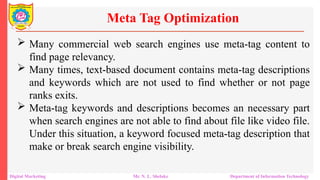
 Many commercial web search engines use meta-tag content to
find page relevancy.
 Many times, text-based document contains meta-tag descriptions
and keywords which are not used to find whether or not page
ranks exits.
 Meta-tag keywords and descriptions becomes an necessary part
when search engines are not able to find about file like video file.
Under this situation, a keyword focused meta-tag description that
make or break search engine visibility.
Meta Tag Optimization
Digital Marketing Mr. N. L. Shelake Department of Information Technology
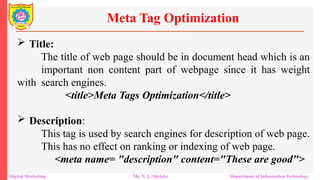
 Title:
The title of web page should be in document head which is an
important non content part of webpage since it has weight
with search engines.
<title>Meta Tags Optimization</title>
 Description:
This tag is used by search engines for description of web page.
This has no effect on ranking or indexing of web page.
<meta name= "description" content="These are good">
Meta Tag Optimization
Digital Marketing Mr. N. L. Shelake Department of Information Technology
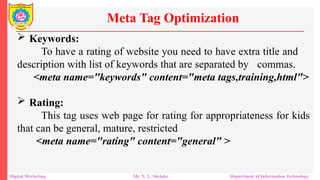
 Keywords:
To have a rating of website you need to have extra title and
description with list of keywords that are separated by commas.
<meta name="keywords" content="meta tags,training,html">
 Rating:
This tag uses web page for rating for appropriateness for kids
that can be general, mature, restricted
<meta name="rating" content="general" >
Meta Tag Optimization
Digital Marketing Mr. N. L. Shelake Department of Information Technology
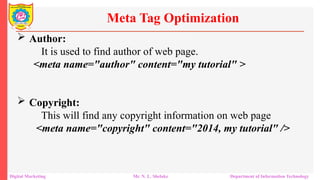
 Author:
It is used to find author of web page.
<meta name="author" content="my tutorial" >
 Copyright:
This will find any copyright information on web page
<meta name="copyright" content="2014, my tutorial" />
Meta Tag Optimization
Digital Marketing Mr. N. L. Shelake Department of Information Technology
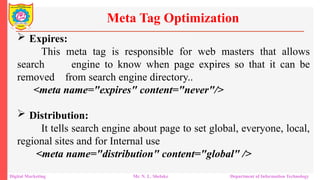
 Expires:
This meta tag is responsible for web masters that allows
search engine to know when page expires so that it can be
removed from search engine directory..
<meta name="expires" content="never"/>
 Distribution:
It tells search engine about page to set global, everyone, local,
regional sites and for Internal use
<meta name="distribution" content="global" />
Meta Tag Optimization
Digital Marketing Mr. N. L. Shelake Department of Information Technology
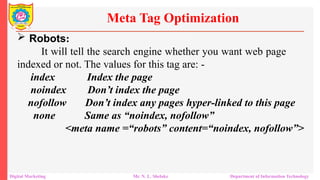
 Robots:
It will tell the search engine whether you want web page
indexed or not. The values for this tag are: -
index Index the page
noindex Don’t index the page
nofollow Don’t index any pages hyper-linked to this page
none Same as “noindex, nofollow”
<meta name =“robots” content=“noindex, nofollow”>
Meta Tag Optimization
Digital Marketing Mr. N. L. Shelake Department of Information Technology
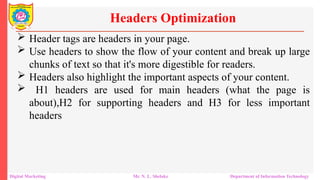
 Header tags are headers in your page.
 Use headers to show the flow of your content and break up large
chunks of text so that it's more digestible for readers.
 Headers also highlight the important aspects of your content.
 H1 headers are used for main headers (what the page is
about),H2 for supporting headers and H3 for less important
headers
Headers Optimization
Digital Marketing Mr. N. L. Shelake Department of Information Technology
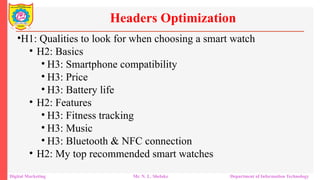
•H1: Qualities to look for when choosing a smart watch
• H2: Basics
• H3: Smartphone compatibility
• H3: Price
• H3: Battery life
• H2: Features
• H3: Fitness tracking
• H3: Music
• H3: Bluetooth & NFC connection
• H2: My top recommended smart watches
Headers Optimization
Digital Marketing Mr. N. L. Shelake Department of Information Technology
 The header tag is required for site visitors as heading tag informs
both internet search engine and site visitors exactly what content
is about.
 It is found that heading tags are symbolized from <h1> to <h6>,
where <h1> is among most important tag by internet search
engine and <h6> being low and that is not so important.
 Header tag containing specific key phrases which are linked with
company extra along with additional text which describes
internet contents.
Headers Optimization
Digital Marketing Mr. N. L. Shelake Department of Information Technology
 Add highly relevant key phrases in <h1> tag, because it is
weighted most than other heading tags.
 Evaluate the relevancy of the key phrases and put most
significant keyword in <h1> tag, less vital that you <h2>, further
less vital that you <h3> and ultimately lowest key phrases to
<h6>
Headers Optimization
Digital Marketing Mr. N. L. Shelake Department of Information Technology
Search Engine Marketing
Digital Marketing Mr. N. L. Shelake Department of Information Technology
Thank You

Unit II Search Engine Marketing Added.pptx

  • 1.
    SEARCH ENGINE MARKETING SanjivaniRural Education Society’s Sanjivani College of Engineering, Kopargaon-423603 (An Autonomous Institute Affiliated to Savitribai Phule Pune University, Pune) NAAC ‘A’ Grade Accredited, ISO 9001:2015 Certified Department of Information Technology (NBA Accredited) Mr. N. L. Shelake Assistant Professor
  • 2.
    SEARCH ENGINE MARKETING CourseContents: - Digital Marketing Mr. N. L. Shelake Department of Information Technology
  • 3.
    Basics of WebDesigning Web design shares many principles with print design. Understand space, layout, fonts, and colors. Effective communication through design. Design elements are the building blocks of any webpage. Understanding these elements enhances your design skills. Search Engine Marketing Digital Marketing Mr. N. L. Shelake Department of Information Technology
  • 4.
    Basics Terminology ofWeb Developement Search Engine Marketing Digital Marketing Mr. N. L. Shelake Department of Information Technology
  • 5.
    Lines and LineWork Lines include borders and rules (horizontal and vertical). Help delineate spaces and improve readability.  Shape Shapes are enclosed contours in design. Use different shapes creatively, not limited to squares or rectangles. Search Engine Marketing Digital Marketing Mr. N. L. Shelake Department of Information Technology Basics Elements of Website Design
  • 6.
    Texture Texture adds asense of surface to your design. Achieved visually on web pages using natural or artificial textures..  Color Color enhances a design but isn't mandatory. Start with a design without color, then add it sparingly. Search Engine Marketing Digital Marketing Mr. N. L. Shelake Department of Information Technology Basics Elements of Website Design
  • 7.
    Direction Texture adds asense of surface to your design. Achieved visually on web pages using natural or artificial textures.  Layout Design Layout is crucial in positioning elements on the page. Screen resolution consideration is important. Search Engine Marketing Digital Marketing Mr. N. L. Shelake Department of Information Technology Basics Elements of Website Design
  • 8.
    Aligning Images Avoid randomlyplacing images on the page. Align images to integrate them into the layout effectively..  Fonts and Typography Fonts define the appearance of text on the page. Consider both micro-level (individual font choice) and macro- level (overall text arrangement).. Search Engine Marketing Digital Marketing Mr. N. L. Shelake Department of Information Technology Basics Elements of Website Design
  • 9.
    Font Measurements Fixed HeightMeasures: inches, centimeters, points, etc. Relative Measures: ems, pixels, percentages, etc.  Color Usage in Web Design Color is a powerful tool for visual communication. Use it wisely to convey meaning and enhance design.. Search Engine Marketing Digital Marketing Mr. N. L. Shelake Department of Information Technology Basics Elements of Website Design
  • 10.
    Web Navigation Navigation ensuresusers can easily move between pages. Plan your site’s information architecture carefully..  Accessibility and Usability Accessibility and usability make your site more inclusive. Don’t sacrifice design quality for accessibility; integrate both. Search Engine Marketing Digital Marketing Mr. N. L. Shelake Department of Information Technology Basics Elements of Website Design
  • 11.
     A productcan be used by specified users to achieve specified goals with effectiveness, efficiency and satisfaction in a specified context of use. Usability means that the people who use the product can do so quickly and easily to accomplish their own tasks Usability and User Experience in Website Digital Marketing Mr. N. L. Shelake Department of Information Technology
  • 12.
    This definition restson four points Usability means focusing on users People use products to be productive (HCI) Users are busy people trying to accomplish tasks Users decide when a product is easy to use Usability and User Experience in Website Digital Marketing Mr. N. L. Shelake Department of Information Technology
  • 13.
    User Experience (UX)focuses on understanding users, including their needs, values, abilities, and limitations. It also incorporates the business goals and objectives of the project. Promote improving the quality of the user’s interaction with and perceptions of your product and any related services involves a person's emotions about using a particular product, system or service User experience (UX) Digital Marketing Mr. N. L. Shelake Department of Information Technology
  • 14.
    User-Centric: Ensures productsand services meet user needs effectively. Business Impact: Aligns with business objectives to drive success. Quality Interaction: Enhances the overall experience and perception of the product. Emotional Experience: How users feel while interacting with a product. Importance of UX Digital Marketing Mr. N. L. Shelake Department of Information Technology
  • 15.
    Experiential Aspect: Themeaningful and valuable experiences provided by the product. Practical Aspects Utility: Does the product meet user needs? Ease of Use: Is the product intuitive and user-friendly? Efficiency: How quickly and effectively can users achieve their goals? Importance of UX Digital Marketing Mr. N. L. Shelake Department of Information Technology
  • 16.
    UX is subjective;different users have different perceptions and experiences (Individual Perception) Each user's background, expectations, and context influence their UX (Personal Experience) UX is not static; it changes with new technologies, updates, and user feedback. (Evolving Experience) Regularly adapting and enhancing the UX to meet evolving user needs and industry standards (Continuous Improvement) User experience (UX) Digital Marketing Mr. N. L. Shelake Department of Information Technology
  • 17.
    User experience (UX) DigitalMarketing Mr. N. L. Shelake Department of Information Technology
  • 18.
    Useful - Contentshould be original and fulfill a need Usable - Site must be easy to use Desirable - Image, identity, brand, and design elements are used to suggest emotion and appreciation Findable - Content needs to be navigable and locatable onsite and offsite Accessible - Content needs to be accessible to people with disabilities Credible - Users must trust and believe what you tell them User experience (UX) Digital Marketing Mr. N. L. Shelake Department of Information Technology
  • 19.
    Onsite optimization isanything that you do within your website to optimize it for the search engines. There are key factors such as:  Domain name  Meta description  Web contents  Internal links  Tags and Meta tags  Anchor texts  Rick media files  Bounce rate  Loading speed Onsite Optimization Basics Digital Marketing Mr. N. L. Shelake Department of Information Technology
  • 20.
    A domain nameis the unique address of a website on the internet, used to identify and access it. For onsite optimization, choosing a domain name that reflects the site's content or primary keywords can help improve relevance and search engine ranking. Google’s EMD update, having an exact match domain name no longer matters a lot to SEO The domain name adds credibility and relevancy to your blog. It can help users to decide if the blog is the right one to get the information they are searching for or not. Domain Name Digital Marketing Mr. N. L. Shelake Department of Information Technology
  • 21.
    A meta descriptionis a short summary (typically 150-160 characters) of a web page’s content, included in the HTML of the page. It appears under the page title in search engine results. A well- written meta description can improve click-through rates by providing a compelling preview of the content. This is also used by the search engine crawlers when ranking websites for certain keywords. Therefore, make sure that your target keyword term is present in the Meta description Meta Description Digital Marketing Mr. N. L. Shelake Department of Information Technology
  • 22.
    Quality and uniquenessof post must be given due focus where every post is different. Interesting and Effective title that effectively grabs attention Meta description which shows an overview about blog. The Meta description can heavily influence the search users‟ decision on whether to checkout your site or not. Meta Description Digital Marketing Mr. N. L. Shelake Department of Information Technology
  • 23.
    Web content refersto the textual, visual, and multimedia information available on a web page.  It includes articles, blog posts, images, videos, and other elements.  High-quality, relevant, and keyword-optimized content is essential for good onsite optimization as it helps search engines understand the page’s relevance to user queries. Web Content Digital Marketing Mr. N. L. Shelake Department of Information Technology
  • 24.
    Internal links arehyperlinks that point to other pages or posts within the same website. They help users navigate the site and distribute page authority throughout the site.  For SEO, internal linking enhances the site’s structure and helps search engines crawl and index the pages more efficiently. Internal Links Digital Marketing Mr. N. L. Shelake Department of Information Technology
  • 25.
    Tags are keywordsor phrases assigned to content to describe its topic and facilitate categorization and search ability. Meta tags are HTML elements that provide metadata about the web page, such as meta descriptions, meta keywords, and meta robots.  Meta tags help search engines understand the content and control indexing behavior. Tags and Meta Tags Digital Marketing Mr. N. L. Shelake Department of Information Technology
  • 26.
    Anchor text isthe clickable text in a hyperlink. It’s important for SEO because it provides context to both users and search engines about the linked page’s content. Using descriptive and keyword-rich anchor text can improve a page's relevance for specific search terms. Anchor Text Digital Marketing Mr. N. L. Shelake Department of Information Technology
  • 27.
    Rich media filesinclude complex file types such as videos, audio files, animations, and interactive content. Optimizing rich media involves ensuring these files are properly tagged, compressed for faster loading, and relevant to the surrounding content to enhance user engagement and SEO. These files should be properly inserted with alt-tags that are relevant to the main target keyword phrase Rich Media Files Digital Marketing Mr. N. L. Shelake Department of Information Technology
  • 28.
    Bounce rate refersto the percentage of visitors who leave a website after viewing only one page, without interacting further. A high bounce rate can indicate that the landing page is not engaging or relevant, which can negatively impact SEO rankings. Improving content and user experience can help reduce bounce rates. Bounce rate Digital Marketing Mr. N. L. Shelake Department of Information Technology
  • 29.
    Loading speed isthe time it takes for a web page to fully appear and become interactive. Faster loading speeds enhance user experience and are favored by search engines. Optimizing loading speed involves reducing file sizes, leveraging browser caching, and using efficient coding practices. Loading Speed Digital Marketing Mr. N. L. Shelake Department of Information Technology
  • 30.
    Search Engine Optimization(SEO) is process of making site search engine user friendly. It starts with different title tags and Meta descriptions on every page. The SEO serves as bridge over gap where it brings people with computer skills and information they require HTML coding that tell engines how to properly “read” your content Improve search engine visibility by adding SEO tags in HTML HTML Basics for SEO Digital Marketing Mr. N. L. Shelake Department of Information Technology
  • 31.
    When a searchengine’s crawler comes across your content, it takes a look at the HTML tags of the site This kind of information helps engines like Google determine what your content is about and how to categorize the material. How visitors view your content in those search engines. How social media uses content tags to show your articles It’s HTML tags for SEO that will affect how your website performs on the Internet. HTML Basics for SEO Digital Marketing Mr. N. L. Shelake Department of Information Technology
  • 32.
    <Title> Tag The titleshould not be longer than 70-100 characters including spaces. The title should not begin with domain name and considered as spam. The domain name shouldn't be repeated in title and considered as spam. It does not use same filename as title tag or filename or domain name. HTML <HEAD> Content Digital Marketing Mr. N. L. Shelake Department of Information Technology
  • 33.
    <Meta Description> Tag Shouldn't be longer than 200 characters. HTML <HEAD> Content Digital Marketing Mr. N. L. Shelake Department of Information Technology
  • 34.
    <Meta Keywords> Tag Shouldn't be longer than 268 characters.  Shouldn't use words that are not present in body of page.  Redundant characters will not hurt the results; however words after the first  Start all keywords with capital letters.  Separate keywords with ", "character combination.  You may use phrases as well. HTML <HEAD> Content Digital Marketing Mr. N. L. Shelake Department of Information Technology
  • 35.
    Content  The texton page should contain keywords right at start of page.  Keywords should not overuse as keyword takes 12-24% of body text.  Do not use content on front page HTML <HEAD> Content Digital Marketing Mr. N. L. Shelake Department of Information Technology
  • 36.
    Code Page  Ifwebsite uses different language than default search engine that liked by target audience or website uses special characters which is different to language making sure to implement proper HTML code page tag.  Unicode versions of special characters are more or less impossible to look up in search engines. HTML <HEAD> Content Digital Marketing Mr. N. L. Shelake Department of Information Technology
  • 37.
     Title Tags<title>Digital Marketing</title>  Meta Description Tags <metaname="description" content=“Digital Marketing">  Header Tags  <h1></h1> – usually reserved for webpage titles.  <h2></h2> – highlights the topic of the title.  <h3></h3> – reflects points in regards to the topic.  <h4></h4> – supports points from <h3>.  <h5></h5> – not often used, but great for supporting points of <h4>.  Alt Tags in Images  <img src=“digital.jpg" alt=“Digital Marketing"> HTML Tags Digital Marketing Mr. N. L. Shelake Department of Information Technology
  • 38.
     Building Links <a href="http://somerandomwebsite.com/" rel="nofollow">your anchor text</a>  Open Graph Tags  <meta name="og:title" property="og:title" content="The Title of Your Article">  Twitter Card Tags  <meta name="twitter:card" content="summary">  Canonical Tags  <link rel="canonical" href="https://yourwebsite.com/"> HTML Tags Digital Marketing Mr. N. L. Shelake Department of Information Technology
  • 39.
     Domain nameis a unique identity on internet.  Domain name builds credibility: Having your own domain name will lead to professionalism. When new visitor reaches your website, he/she happens to look at domain name and make a first impression opinion about website. The domain name gives an impression about status of company. Importance of Domain Names Digital Marketing Mr. N. L. Shelake Department of Information Technology
  • 40.
     Domain namegives uniqueness: Having own domain name is same as having your own place which shows that you address is your own and not shared which can be like www.name-of-your- own-website.com Importance of Domain Names Digital Marketing Mr. N. L. Shelake Department of Information Technology
  • 41.
     Domain namegives branding: If you have brand name or company name in your domain name it will help to reinforce a brand value which further will increase awareness of particular brand. Visitors will not simply know about your brand name but also remembers it for future use. The brand name will be remembered by them that can be transferred to other people whenever visitor talks about it. Importance of Domain Names Digital Marketing Mr. N. L. Shelake Department of Information Technology
  • 42.
     Domain namegives personalized and multiple e-mail addresses: In case of your registered domain name, you can create own personal e-mail address which looks as yourname@name-of-your-own-website.com and helps in making you an important person to deal with. It creates flexibility by having multiple e-mails of particular departments and organization as per need. Importance of Domain Names Digital Marketing Mr. N. L. Shelake Department of Information Technology
  • 43.
     Domain namegives portability on internet: In case of website running under particular domain name, then there is portability of carrying website to any webhost as required. In case if you are sharing someone else’s domain name then you can’t take domain name along with your website. In such case you have to create a new domain name and further you will lose your visitors. Importance of Domain Names Digital Marketing Mr. N. L. Shelake Department of Information Technology
  • 44.
     Domain namegives importance to websites by search engines: The search engines recognize importance of domain name and give preference to websites having own unique domain names instead of subdomains or part of another domain name, like when you get your website launched with free webhost. Importance of Domain Names Digital Marketing Mr. N. L. Shelake Department of Information Technology
  • 45.
     Optimizing websitestructure and navigation menus is crucial for enhancing user experience, improving search engine visibility, and increasing overall website performance.  Optimizing website's structure and navigation is vital for SEO, because it helps search engines understand the content on website and how it is organize.  Improve the user experience by making it easier for visitors to find what they are looking for on website. Website Structure and Navigation Menu Optimization Digital Marketing Mr. N. L. Shelake Department of Information Technology
  • 46.
    Plan out hierarchybefore developing website:  Design a clear and logical website hierarchy that organizes content into categories, subcategories, and pages.  makes it easier for search engines to understand the relationships between pages and helps them determine the most important pages on website  This should reflect the logical flow of information users expect.  Identify primary pages (e.g., Home, About, Services) and secondary pages (e.g., individual service pages, blog posts). Website Structure & Navigation Menu Optimization Digital Marketing Mr. N. L. Shelake Department of Information Technology
  • 47.
    Plan out hierarchybefore developing website:  Organize web content into categories and subcategories, with the most important pages at the top level and secondary pages nested underneath.  This makes it easier for search engines to understand the relationships between pages and helps them determine the most important pages on website  Use hierarchical headings (H1, H2, H3, etc.) to indicate the structure and importance of content. Website Structure & Navigation Menu Optimization Digital Marketing Mr. N. L. Shelake Department of Information Technology
  • 48.
    Plan out hierarchybefore developing website: Website Structure & Navigation Menu Optimization Digital Marketing Mr. N. L. Shelake Department of Information Technology
  • 49.
    Creating URL structurefollowing navigation hierarchy:  Develop a URL structure that is descriptive, keyword-rich and reflects the content hierarchy. For example, a product page URL might look like www.example.com/category/subcategory/product-name  Ensure the URL structure is consistent across the site, making it easier for users to understand where they are and for search engines to crawl your site.  Instead of "www.example.com/page1" use "www.example.com/best-seo-tips” Website Structure & Navigation Menu Optimization Digital Marketing Mr. N. L. Shelake Department of Information Technology
  • 50.
    Creating URL structurefollowing navigation hierarchy: Website Structure & Navigation Menu Optimization Digital Marketing Mr. N. L. Shelake Department of Information Technology
  • 51.
    Creating URL structurefollowing navigation hierarchy:  Generate an XML sitemap and submit it to search engines (e.g., Google Search Console) to ensure all pages are discovered and indexed efficiently.  Include priority and frequency tags to indicate the importance and update frequency of pages.  A sitemap is a list of all the pages on your website, organized in a hierarchy.  Use descriptive, keyword-rich URLs for your pages Website Structure & Navigation Menu Optimization Digital Marketing Mr. N. L. Shelake Department of Information Technology
  • 52.
    Creating URL structurefollowing navigation hierarchy:  Create descriptive and SEO-friendly URLs that reflect the content hierarchy and include relevant keywords.  Avoid using dynamic parameters or cryptic URLs that can confuse users and search engines. Website Structure & Navigation Menu Optimization Digital Marketing Mr. N. L. Shelake Department of Information Technology
  • 53.
    Creating site navigationin HTML or CSS:  It is better to make coding simple in HTML and CSS for navigation.  So coding in JavaScript, Flash, and Ajax limits crawler’s will cover website by navigation and hierarchy. Website Structure & Navigation Menu Optimization Digital Marketing Mr. N. L. Shelake Department of Information Technology
  • 54.
    Use of shallowdepth navigation structure:  Navigation structure follows a website hierarchy  Make sure that important pages are not buried inside deep inside a website  Breadcrumb navigation is a hierarchy of links that shows the user's current location within the website  Breadcrumbs also provide additional contextual information to search engines.  Breadcrumb navigation to enhance user navigation and provide clear paths for users to backtrack through the website hierarchy. Website Structure & Navigation Menu Optimization Digital Marketing Mr. N. L. Shelake Department of Information Technology
  • 55.
    Creating header whichlists main navigation pages:  It is seen that the top header should list main pages.  Adding any other menu elements apart from your main categories can become distracting and unnecessary  Use descriptive, keyword-rich titles and headers on pages to help search engines understand the content of your page. For example, instead of using "Chapter 1" as a title, use "10 Tips for Optimizing Your Website's Structure and Navigation for SEO." Website Structure & Navigation Menu Optimization Digital Marketing Mr. N. L. Shelake Department of Information Technology
  • 56.
    Developing comprehensive internallinking structure:  It allows users to navigate.  It helps in establishing information hierarchy.  It helps spreading link around websites.  Use internal linking to link related pages on website together.  This helps search engines understand the relationships between web pages and can improve the ranking of web pages in search results Website Structure & Navigation Menu Optimization Digital Marketing Mr. N. L. Shelake Department of Information Technology
  • 57.
    Developing comprehensive internallinking structure:  Implement strategic internal linking to connect related pages and establish a network of interconnected content.  Use descriptive anchor text containing relevant keywords to improve crawlability and user navigation Website Structure & Navigation Menu Optimization Digital Marketing Mr. N. L. Shelake Department of Information Technology
  • 58.
    Use responsive design: Make sure your website is mobile-friendly and uses responsive design.  This means that your website should look and function properly on all devices, including smartphones and tablets.  With more and more people using mobile devices to browse the web, it's important to have a mobile-friendly website to ensure that your content is accessible to a wider audience. Website Structure & Navigation Menu Optimization Digital Marketing Mr. N. L. Shelake Department of Information Technology
  • 59.
     The navigationstructure of web site helps beginner/user to find information in fast and easy way without guessing.  Group related information together in categories and sub- categories.  It provides way for users to access categories from home page and main web site menu. Navigation Menu Optimization Digital Marketing Mr . N. L. Shelake Department of Information Technology
  • 60.
     It plansnavigation structure before building website as in advance where each page reside  Assist the user in finding what they want by proving related content. For example if you have an online shop show “Related products” when a user is viewing a product  Continuously refining and optimizing website navigation based on user feedback and analytics insights is key to maintaining a successful online presence Navigation Menu Optimization Digital Marketing Mr . N. L. Shelake Department of Information Technology
  • 61.
     Use descriptiveand user-friendly labels for navigation menu items that accurately represent the content of each page.  Avoid generic terms or jargon that may confuse users.  Primary Navigation: Place the most important links (e.g., Home, Products, Services, Contact) in the primary navigation. Keep it simple and easy to scan.  Secondary Navigation: Use secondary menus for less critical links (e.g., About Us, Blog, Resources). Navigation Menu Optimization Digital Marketing Mr. N. L. Shelake Department of Information Technology
  • 62.
     Dropdown Menus:Use dropdowns for categories that have subcategories, but avoid overloading the menu with too many options.  Sticky Navigation: Consider using sticky navigation bars that stay at the top of the page as the user scrolls, ensuring easy access to the menu at all times.  Mobile Optimization: Ensure the navigation menu is mobile- friendly, with a collapsible menu (hamburger icon) that is easy to use on smaller screens. Navigation Menu Optimization Digital Marketing Mr. N. L. Shelake Department of Information Technology
  • 63.
    Logical Order:  Arrangenavigation menu items in a logical order based on hierarchy and importance.  Place high-priority pages or sections at the beginning of the menu for easy access. Navigation Menu Optimization Digital Marketing Mr. N. L. Shelake Department of Information Technology
  • 64.
    Consistent Navigation AcrossPages:  Maintain consistent navigation elements (e.g., header or footer menus) across all pages of the website to provide a seamless browsing experience.  Include important links (e.g., contact, about, services) in prominent positions for easy access. Navigation Menu Optimization Digital Marketing Mr. N. L. Shelake Department of Information Technology
  • 65.
    Mobile Responsiveness:  Optimizenavigation menus for mobile devices by using responsive design techniques that adapt to smaller screens.  Use hamburger menus or expandable navigation to conserve space and maintain usability on mobile devices Navigation Menu Optimization Digital Marketing Mr. N. L. Shelake Department of Information Technology
  • 66.
     Prioritize userexperience by designing intuitive and user- friendly website navigation.  Use analytics data to monitor user behavior and identify areas for navigation improvement.  Conduct A/B testing to optimize navigation menu design and layout for better engagement and conversion rates.  Regularly audit and update website structure to accommodate new content and user preferences. Best Practices for Website Structure and Navigation Optimization Digital Marketing Mr. N. L. Shelake Department of Information Technology
  • 67.
     An essentialtool for web development  This tool helps ensure that our HTML code is correct and follows web standards.  This not only makes our web pages look and behave as expected but also ensures they are accessible and compatible with different browsers  This validator checks the markup validity of Web documents in HTML, XHTML, SMIL, MathML, etc. HTML Validation using W3C Digital Marketing Mr. N. L. Shelake Department of Information Technology
  • 68.
     World WideWeb Consortium (W3C) allows internet users to check HTML and XHTML documents for well-formatted markup.  HTML validation checks if HTML code conforms to the standards and specifications set by W3C.  Markup validation is an important step towards ensuring the technical quality of web pages  If you fail to validate the pages, your website will most likely suffer from errors or poor traffic owing to poor formatting and readability HTML Validation using W3C Digital Marketing Mr. N. L. Shelake Department of Information Technology
  • 69.
     According toHTML standards, each HTML document requires a document type declaration.  The "DOCTYPE" begins the HTML document and tells a validator which version of HTML to use in checking the document's syntax.  The following DOCTYPEs are commonly used:  <!DOCTYPE HTML PUBLIC "-//W3C//DTD HTML 4.01//EN" "http://www.w3.org/TR/html4/strict.dtd"> HTML Validation using W3C Digital Marketing Mr. N. L. Shelake Department of Information Technology
  • 70.
     Compatibility Acrossdifferent Browsers  Improvement in accessibility for users with disabilities.  Enhances Search Engine Optimization (SEO)  Ensures Proper Rendering  Facilitates Debugging and Maintenance  Helps developers adhere to web standards and best practices, promoting high-quality web development.  Promotes Professionalism Why Code Validation? Digital Marketing Mr. N. L. Shelake Department of Information Technology
  • 71.
     Service: W3CMarkup Validation Service  Website: W3C Validator  Functionality: Validates HTML and XHTML documents. Provides detailed feedback on errors and warnings. W3C Validator Overview Digital Marketing Mr. N. L. Shelake Department of Information Technology
  • 72.
     Validate byURL  Validate by File Upload  Validate by Direct Input Validation Methods Digital Marketing Mr. N. L. Shelake Department of Information Technology
  • 73.
     Access theW3C Validator: Go to the W3C Validator.  Choose Validation Method: URL, File Upload, or Direct Input.  Submit the Document: Click "Check" to start validation.  Review Results: View errors, warnings, and suggestions. Make necessary corrections to the HTML code. Validation Process Digital Marketing Mr. N. L. Shelake Department of Information Technology
  • 74.
    Best Coding Practices DigitalMarketing Mr. N. L. Shelake Department of Information Technology
  • 75.
     It isbetter to make sure that the code is easy to read and understand.  It should be followed that any formatting standards used by organization should always include comments in code  Use empty lines and spaces to make code more readable  Simple, refactoring, documentation.. Best Coding Practices Digital Marketing Mr. N. L. Shelake Department of Information Technology
  • 76.
     Files canbe anything such as HTML, PHP, Images or documents, It is found that Google gives importance to filenames, hence uploading or embedding into website will allow names of files that are optimized. Filename Optimization Digital Marketing Mr. N. L. Shelake Department of Information Technology
  • 77.
     Filename shouldbe relevant to content of webpage.  It should be short and descriptive.  Targeted keyword should be preferred as filename.  In perfect optimization, use of same targeted keyword in filename of webpage.  Try to use 2 keywords in filename if possible.  Do not stuff filename with 3-4 keywords.  Separate words in filename with hyphen rather than with underscores.  Do not use generic words as filenames. Filename Best Practices Digital Marketing Mr. N. L. Shelake Department of Information Technology
  • 78.
     Title tagsare technically called as title elements which defines title of a document.  This tag is used on search engine results pages to display preview scraps for given page that can be important for SEO and social sharing.  The title element of web page shows accurate and concise description of page's content Title Tag Optimization Digital Marketing Mr. N. L. Shelake Department of Information Technology
  • 79.
     It isfor user experience and search engine optimization which creates value in specific areas such as:  Relevancy, Browsing, Search Engine Results Pages  It is seen that title tag serves as main text which shows an online document having long considered as most important on page SEO elements that appears in three key places as:  Browsers  Search Engine Results Pages  External Websites Title Tag Optimization Digital Marketing Mr. N. L. Shelake Department of Information Technology
  • 80.
     Recommendations foroptimizing title tags for search engine and usability goals such as  Be Mindful of Length  Place Important Keywords Close to Front of Title Tag  Leverage Branding  Consider Readability and Emotional Impact Title Tag Optimization Digital Marketing Mr. N. L. Shelake Department of Information Technology
  • 81.
     Many commercialweb search engines use meta-tag content to find page relevancy.  Many times, text-based document contains meta-tag descriptions and keywords which are not used to find whether or not page ranks exits.  Meta-tag keywords and descriptions becomes an necessary part when search engines are not able to find about file like video file. Under this situation, a keyword focused meta-tag description that make or break search engine visibility. Meta Tag Optimization Digital Marketing Mr. N. L. Shelake Department of Information Technology
  • 82.
     Title: The titleof web page should be in document head which is an important non content part of webpage since it has weight with search engines. <title>Meta Tags Optimization</title>  Description: This tag is used by search engines for description of web page. This has no effect on ranking or indexing of web page. <meta name= "description" content="These are good"> Meta Tag Optimization Digital Marketing Mr. N. L. Shelake Department of Information Technology
  • 83.
     Keywords: To havea rating of website you need to have extra title and description with list of keywords that are separated by commas. <meta name="keywords" content="meta tags,training,html">  Rating: This tag uses web page for rating for appropriateness for kids that can be general, mature, restricted <meta name="rating" content="general" > Meta Tag Optimization Digital Marketing Mr. N. L. Shelake Department of Information Technology
  • 84.
     Author: It isused to find author of web page. <meta name="author" content="my tutorial" >  Copyright: This will find any copyright information on web page <meta name="copyright" content="2014, my tutorial" /> Meta Tag Optimization Digital Marketing Mr. N. L. Shelake Department of Information Technology
  • 85.
     Expires: This metatag is responsible for web masters that allows search engine to know when page expires so that it can be removed from search engine directory.. <meta name="expires" content="never"/>  Distribution: It tells search engine about page to set global, everyone, local, regional sites and for Internal use <meta name="distribution" content="global" /> Meta Tag Optimization Digital Marketing Mr. N. L. Shelake Department of Information Technology
  • 86.
     Robots: It willtell the search engine whether you want web page indexed or not. The values for this tag are: - index Index the page noindex Don’t index the page nofollow Don’t index any pages hyper-linked to this page none Same as “noindex, nofollow” <meta name =“robots” content=“noindex, nofollow”> Meta Tag Optimization Digital Marketing Mr. N. L. Shelake Department of Information Technology
  • 87.
     Header tagsare headers in your page.  Use headers to show the flow of your content and break up large chunks of text so that it's more digestible for readers.  Headers also highlight the important aspects of your content.  H1 headers are used for main headers (what the page is about),H2 for supporting headers and H3 for less important headers Headers Optimization Digital Marketing Mr. N. L. Shelake Department of Information Technology
  • 88.
    •H1: Qualities tolook for when choosing a smart watch • H2: Basics • H3: Smartphone compatibility • H3: Price • H3: Battery life • H2: Features • H3: Fitness tracking • H3: Music • H3: Bluetooth & NFC connection • H2: My top recommended smart watches Headers Optimization Digital Marketing Mr. N. L. Shelake Department of Information Technology
  • 89.
     The headertag is required for site visitors as heading tag informs both internet search engine and site visitors exactly what content is about.  It is found that heading tags are symbolized from <h1> to <h6>, where <h1> is among most important tag by internet search engine and <h6> being low and that is not so important.  Header tag containing specific key phrases which are linked with company extra along with additional text which describes internet contents. Headers Optimization Digital Marketing Mr. N. L. Shelake Department of Information Technology
  • 90.
     Add highlyrelevant key phrases in <h1> tag, because it is weighted most than other heading tags.  Evaluate the relevancy of the key phrases and put most significant keyword in <h1> tag, less vital that you <h2>, further less vital that you <h3> and ultimately lowest key phrases to <h6> Headers Optimization Digital Marketing Mr. N. L. Shelake Department of Information Technology
  • 91.
    Search Engine Marketing DigitalMarketing Mr. N. L. Shelake Department of Information Technology Thank You