View layer : Designing interface
objects
Introduction
• UI(user interface)
– Main goal of UI is to display and obtain needed
information in an accessible , efficient manner
– UI design is a creative process
Designing view layer classes
• UI layer consists of
– objects with which user interacts
– Objects needed to manage or control UI
• Responsibility of view layer objects
– Input :responding to user interaction
• Translating user’s action into an appropriate response
– Output :displaying or printing business objects
Process of designing view layer classes
• It has 4 major activities
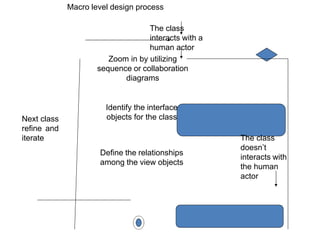
– Macro level UI design process: (identifying view layer object)
• Takes place during analysis phase
• Identifying classes that interact with human actors by analysing use
cases
• sequence and collaboration diagram helps to identify UI classes
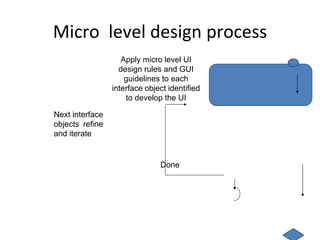
– Micro level UI design activities
• Designing the view layer objects by applying design axioms and
corollaries
– Decide how to use and extend the components so they best support
application specific functions and provide the most usable interface
• Prototyping the view layer interface
– Useful in the early design process
– Testing usability and user satisfaction
– Refining and iterating the design
Macro level design process
The class
interacts with a
human actor
Zoom in by utilizing
sequence or collaboration
diagrams
Next class
refine and
iterate
Identify the interface
objects for the class
Define the relationships
among the view objects
The class
doesn’t
interacts with
the human
actor
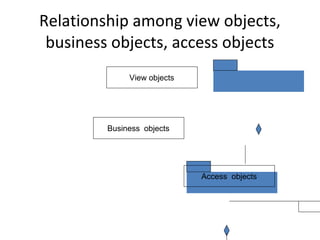
Access objects
Business objects
View objects
Relationship among view objects,
business objects, access objects
Micro level design process
Apply micro level UI
design rules and GUI
guidelines to each
interface object identified
to develop the UI
Next interface
objects refine
and iterate
Done
Design rules
• Making the interface simple ( application of corollary 2)
– Ex:
• Car engine is complex
• But driver interface remains simple
– User must be able to work with our screen without asking much
questions
– Factors affecting UI
• Dead lines
• Comparative evaluations
• Addition features
• Shortcuts
– Things to be considered while designing UI
• Additional features affect performance, complexity
• Fixing problem, after the release of product is difficult

Analysis Design View layer Interface.pdf

  • 1.
    View layer :Designing interface objects
  • 2.
    Introduction • UI(user interface) –Main goal of UI is to display and obtain needed information in an accessible , efficient manner – UI design is a creative process
  • 3.
    Designing view layerclasses • UI layer consists of – objects with which user interacts – Objects needed to manage or control UI • Responsibility of view layer objects – Input :responding to user interaction • Translating user’s action into an appropriate response – Output :displaying or printing business objects
  • 4.
    Process of designingview layer classes • It has 4 major activities – Macro level UI design process: (identifying view layer object) • Takes place during analysis phase • Identifying classes that interact with human actors by analysing use cases • sequence and collaboration diagram helps to identify UI classes – Micro level UI design activities • Designing the view layer objects by applying design axioms and corollaries – Decide how to use and extend the components so they best support application specific functions and provide the most usable interface • Prototyping the view layer interface – Useful in the early design process – Testing usability and user satisfaction – Refining and iterating the design
  • 5.
    Macro level designprocess The class interacts with a human actor Zoom in by utilizing sequence or collaboration diagrams Next class refine and iterate Identify the interface objects for the class Define the relationships among the view objects The class doesn’t interacts with the human actor
  • 6.
    Access objects Business objects Viewobjects Relationship among view objects, business objects, access objects
  • 7.
    Micro level designprocess Apply micro level UI design rules and GUI guidelines to each interface object identified to develop the UI Next interface objects refine and iterate Done
  • 8.
    Design rules • Makingthe interface simple ( application of corollary 2) – Ex: • Car engine is complex • But driver interface remains simple – User must be able to work with our screen without asking much questions – Factors affecting UI • Dead lines • Comparative evaluations • Addition features • Shortcuts – Things to be considered while designing UI • Additional features affect performance, complexity • Fixing problem, after the release of product is difficult