ABINAYA.R / AP / CSE / SRIT
OPERATING SYSTEM
UNIT- I
 Operating Systems Overview
 Introduction - Computer System Overview - Basic
Elements - Instruction Execution – Interrupts - Memory
Hierarchy - Cache Memory - Direct Memory Access -
Multiprocessor and Multicore Organization. Operating
system overview : objectives and functions - Evolution of
Operating System.- Computer System Structure –
Operating System Structures : System Components –
Operating System Services - System Calls - System
Programs – System Structure - OS Generation and System
Boot.
ABINAYA.R / AP / CSE / SRIT
INTRODUCTION
ABINAYA.R / AP / CSE / SRIT
What is an Operating System?
 A program that acts as an intermediary between a user
of a computer and the computer hardware
 Operating system goals:
 Execute user programs and make solving user problems
easier
 Make the computer system convenient to use
 Use the computer hardware in an efficient manner
ABINAYA.R / AP / CSE / SRIT
Need of OS
 Do you speak binary?
 Can you comprehend machine code?
 If I gave you a sheet full of 1s and 0s, could you tell me
what it means/does?
 If you were to go to a country you’ve never been to that
speaks a language you’ve never heard, or maybe you’ve
heard of it but don’t actually speak it, what would you
need while there to help you communicate with the
locals?
ABINAYA.R / AP / CSE / SRIT
OS-Soul of a Computer!!!
 Your operating system functions as that translator in
your PC.
 It converts those 1s and 0s, yes/no, and on/off values into
a readable language that you will understand.
 It does all of this in a streamlined graphical user interface,
or GUI, that you can move around with a mouse, click
things, move them, and see them happening before your
eyes.
ABINAYA.R / AP / CSE / SRIT
Operating System
 An Operating System (OS) is a collection of software that
manages computer hardware and provides services for
programs.
 Specifically, it hides hardware complexity, manages
computational resources, and provides isolation and
protection.
 Most importantly, it directly has privilege access to the
underlying hardware.
 There are three key elements of an operating system are:
(1)Abstractions (process, thread, file, socket, memory),
(2)Mechanisms(create, schedule, open, write, allocate), and
(3) Policies (LRU, EDF).
ABINAYA.R / AP / CSE / SRIT
Overview of computer system
 A computer system is a set of integrated devices which
takes input, process it and give output. Also it store
data and information.computer system allows users to
input, manipulate and store data. Computer systems
include a CPU, monitor, keyboard, mouse and other
optional components.
ABINAYA.R / AP / CSE / SRIT
Components of a computer
system
 All general-purpose computers require the following
hardware components :
 Memory : It is used to store data and programs.It may
be temporary or permanent
e.g RAM,ROM
 Mass storage device : Allows a computer to store large
amount of data permanently.
e.g Hard Disk.
ABINAYA.R / AP / CSE / SRIT
 input device : Any device that sends data to a computer is
called input device.
e.g keyboard and mouse
 Output device : Any device that outputs information
or data from a computer to another device is called output
device.
e.g display screen, printer
 central processing unit (CPU) : This is also called as
heart of the computer, CPU is responsible for executes
instructions. It receives data input, executes instructions,
and processes information and then generate appropriate
result.Sometimes referred to simply as the central processor,
but more commonly called processor.

ABINAYA.R / AP / CSE / SRIT
 Input Devices
Keyboard, Mouse, Digitizing Tablet, Track Ball, Joystick,
TouchScreen, Light Pen, Speech Recognition System,
Digital camera, Scanner, Magnetic Ink
CharacterRecognition (MICR), Optical Character
Recognition (OCR), Optical Mark Recognition (OMR),
Barcode Reader
 Output Devices
Monitor, Visual Display Terminal, Printer, Plotter,
Computer Output on Microfilm(COM), Video Output
System, Audio Response System
 Input-Output Devices
Hard disk drive, Floppy disk drive, USB drive, CD drive,
DVD drive.
ABINAYA.R / AP / CSE / SRIT
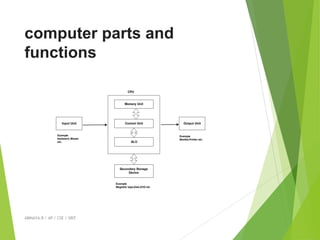
computer parts and
functions
ABINAYA.R / AP / CSE / SRIT
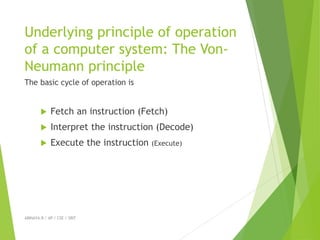
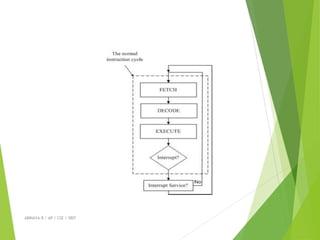
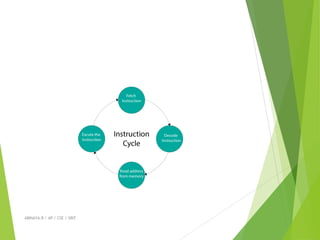
Underlying principle of operation
of a computer system: The Von-
Neumann principle
The basic cycle of operation is
 Fetch an instruction (Fetch)
 Interpret the instruction (Decode)
 Execute the instruction (Execute)
ABINAYA.R / AP / CSE / SRIT
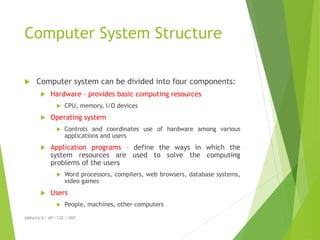
Computer System Structure
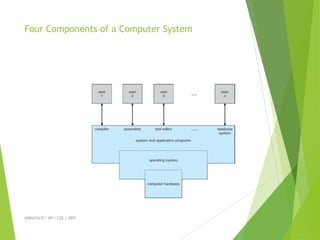
 Computer system can be divided into four components:
 Hardware – provides basic computing resources
 CPU, memory, I/O devices
 Operating system
 Controls and coordinates use of hardware among various
applications and users
 Application programs – define the ways in which the
system resources are used to solve the computing
problems of the users
 Word processors, compilers, web browsers, database systems,
video games
 Users
 People, machines, other computers
ABINAYA.R / AP / CSE / SRIT
Four Components of a Computer System
ABINAYA.R / AP / CSE / SRIT
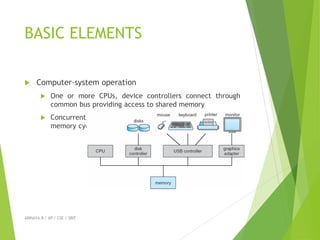
BASIC ELEMENTS
 Computer-system operation
 One or more CPUs, device controllers connect through
common bus providing access to shared memory
 Concurrent execution of CPUs and devices competing for
memory cycles
ABINAYA.R / AP / CSE / SRIT
INSTRUCTION EXECUTION
 Instruction is a command which is given by the user to
computer.
 Execution is the process by which a computer performs
instruction.
 Instruction execution means a program to be executed
by a processor consists of a set of instructions stored in
memory.
ABINAYA.R / AP / CSE / SRIT

OPERATING SYSTEM-lecturenotesUNIT 1-1-19.pdf

  • 1.
    ABINAYA.R / AP/ CSE / SRIT OPERATING SYSTEM
  • 2.
    UNIT- I  OperatingSystems Overview  Introduction - Computer System Overview - Basic Elements - Instruction Execution – Interrupts - Memory Hierarchy - Cache Memory - Direct Memory Access - Multiprocessor and Multicore Organization. Operating system overview : objectives and functions - Evolution of Operating System.- Computer System Structure – Operating System Structures : System Components – Operating System Services - System Calls - System Programs – System Structure - OS Generation and System Boot. ABINAYA.R / AP / CSE / SRIT
  • 3.
  • 4.
    What is anOperating System?  A program that acts as an intermediary between a user of a computer and the computer hardware  Operating system goals:  Execute user programs and make solving user problems easier  Make the computer system convenient to use  Use the computer hardware in an efficient manner ABINAYA.R / AP / CSE / SRIT
  • 5.
    Need of OS Do you speak binary?  Can you comprehend machine code?  If I gave you a sheet full of 1s and 0s, could you tell me what it means/does?  If you were to go to a country you’ve never been to that speaks a language you’ve never heard, or maybe you’ve heard of it but don’t actually speak it, what would you need while there to help you communicate with the locals? ABINAYA.R / AP / CSE / SRIT
  • 6.
    OS-Soul of aComputer!!!  Your operating system functions as that translator in your PC.  It converts those 1s and 0s, yes/no, and on/off values into a readable language that you will understand.  It does all of this in a streamlined graphical user interface, or GUI, that you can move around with a mouse, click things, move them, and see them happening before your eyes. ABINAYA.R / AP / CSE / SRIT
  • 7.
    Operating System  AnOperating System (OS) is a collection of software that manages computer hardware and provides services for programs.  Specifically, it hides hardware complexity, manages computational resources, and provides isolation and protection.  Most importantly, it directly has privilege access to the underlying hardware.  There are three key elements of an operating system are: (1)Abstractions (process, thread, file, socket, memory), (2)Mechanisms(create, schedule, open, write, allocate), and (3) Policies (LRU, EDF). ABINAYA.R / AP / CSE / SRIT
  • 8.
    Overview of computersystem  A computer system is a set of integrated devices which takes input, process it and give output. Also it store data and information.computer system allows users to input, manipulate and store data. Computer systems include a CPU, monitor, keyboard, mouse and other optional components. ABINAYA.R / AP / CSE / SRIT
  • 9.
    Components of acomputer system  All general-purpose computers require the following hardware components :  Memory : It is used to store data and programs.It may be temporary or permanent e.g RAM,ROM  Mass storage device : Allows a computer to store large amount of data permanently. e.g Hard Disk. ABINAYA.R / AP / CSE / SRIT
  • 10.
     input device: Any device that sends data to a computer is called input device. e.g keyboard and mouse  Output device : Any device that outputs information or data from a computer to another device is called output device. e.g display screen, printer  central processing unit (CPU) : This is also called as heart of the computer, CPU is responsible for executes instructions. It receives data input, executes instructions, and processes information and then generate appropriate result.Sometimes referred to simply as the central processor, but more commonly called processor.  ABINAYA.R / AP / CSE / SRIT
  • 11.
     Input Devices Keyboard,Mouse, Digitizing Tablet, Track Ball, Joystick, TouchScreen, Light Pen, Speech Recognition System, Digital camera, Scanner, Magnetic Ink CharacterRecognition (MICR), Optical Character Recognition (OCR), Optical Mark Recognition (OMR), Barcode Reader  Output Devices Monitor, Visual Display Terminal, Printer, Plotter, Computer Output on Microfilm(COM), Video Output System, Audio Response System  Input-Output Devices Hard disk drive, Floppy disk drive, USB drive, CD drive, DVD drive. ABINAYA.R / AP / CSE / SRIT
  • 12.
  • 13.
    Underlying principle ofoperation of a computer system: The Von- Neumann principle The basic cycle of operation is  Fetch an instruction (Fetch)  Interpret the instruction (Decode)  Execute the instruction (Execute) ABINAYA.R / AP / CSE / SRIT
  • 14.
    ABINAYA.R / AP/ CSE / SRIT
  • 15.
    Computer System Structure Computer system can be divided into four components:  Hardware – provides basic computing resources  CPU, memory, I/O devices  Operating system  Controls and coordinates use of hardware among various applications and users  Application programs – define the ways in which the system resources are used to solve the computing problems of the users  Word processors, compilers, web browsers, database systems, video games  Users  People, machines, other computers ABINAYA.R / AP / CSE / SRIT
  • 16.
    Four Components ofa Computer System ABINAYA.R / AP / CSE / SRIT
  • 17.
    BASIC ELEMENTS  Computer-systemoperation  One or more CPUs, device controllers connect through common bus providing access to shared memory  Concurrent execution of CPUs and devices competing for memory cycles ABINAYA.R / AP / CSE / SRIT
  • 18.
    INSTRUCTION EXECUTION  Instructionis a command which is given by the user to computer.  Execution is the process by which a computer performs instruction.  Instruction execution means a program to be executed by a processor consists of a set of instructions stored in memory. ABINAYA.R / AP / CSE / SRIT
  • 19.
    ABINAYA.R / AP/ CSE / SRIT