Unit 1:
Fundamentals of
Computer
1
What is a Computer?
Definition:
• A computer is an electronic device that accepts data as input,
processes it, and outputs the results.
• A functional computer system includes both hardware and
software.
Main Functionality:
• Input: Accepts data from the user.
• Process: Executes instructions using the CPU.
• Output: Displays results to the user.
08/11/2024 2
Central Processing Unit (CPU)
The Brain of the Computer: Executes instructions of a computer
program.
Components of CPU:
• Arithmetic and Logic Unit (ALU): Performs arithmetic and
logical operations.
• Control Unit: Manages the operations of the computer.
• Storage Unit: Stores program statements and data.
• Input/Output Unit: Manages data exchange with the user.
08/11/2024 3
Characteristics of Computer
Systems
Speed:
• Executes millions of instructions per second.
• Faster than human calculations.
• Measured in GigaHertz (GHz) and MegaHertz (MHz).
Diligence:
• Can work continuously without fatigue.
• Performs millions of calculations consistently and accurately.
Reliability:
• Produces consistent results.
• Output depends on input accuracy.
Automation:
• Capable of automatic operations through programmed instructions.
• Reduces the need for manual intervention.
08/11/2024 4
Characteristics of Computer
Systems
Versatility:
• Can perform multiple tasks simultaneously.
• Example: Listening to music while creating a document.
Memory:
• Stores millions of records with precision.
• Memory is measured in Bytes, Kilobytes (KB), Megabytes (MB), etc.
• Primary Memory: Built-in storage for immediate data access.
Accuracy:
• Low error rates during operations.
• Errors typically result from incorrect input by humans.
08/11/2024 5
Basic Terms Related to
Computers
Vacuum Tube: Vacuum tubes have the functionality
of controlling the flow of electronics in a vacuum.
Generally, it is used in switches, amplifiers, radios,
televisions, etc.
Transistor: A transistor helps in controlling the flow of
electricity in devices, it works as an amplifier or a
switch.
Integrated Circuit (IC): Integrated circuits are silicon
chips that contain their circuit elements like transistors,
resistors, etc.
Microprocessors: Microprocessors are the components
that contain the CPU and its circuits and are present in
the Integrated Circuit.
Magnetic Drum: Magnetic Drum is like a cylinder that
stores data and cylinder.
Magnetic Core: Magnetic cores are used to store
information. These are arrays of small rings.
Machine Language: Machine Language is the
language that a computer accepts (in the form of binary
digits). It is also called low-level programming
language.
Memory: Memory is used to store data, information,
and program in a computer.
Artificial Intelligence: Artificial Intelligence deals
with creating intelligent machines and behaviors.
08/11/2024 6
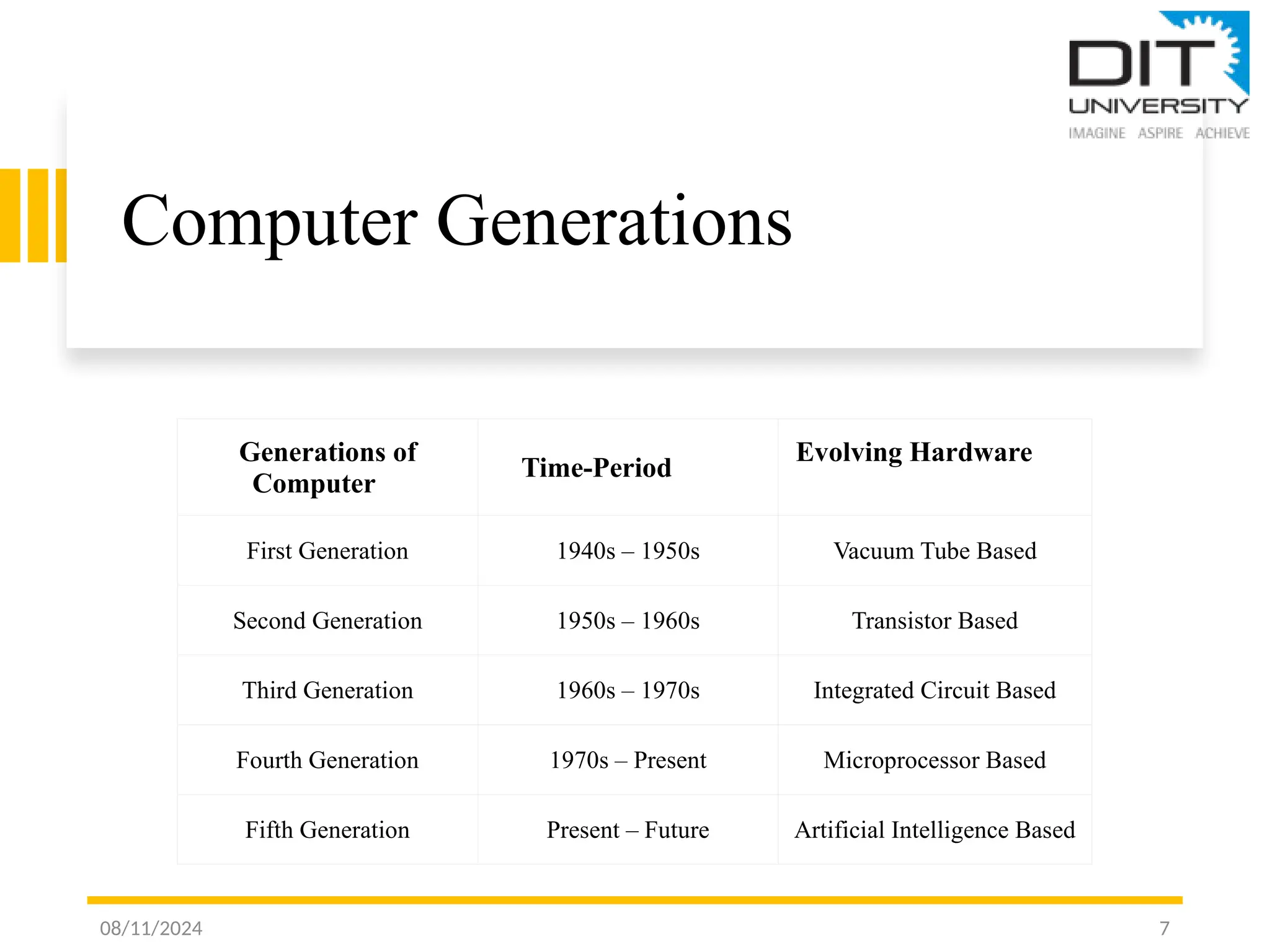
Computer Generations
08/11/2024 7
Generations of
Computer
Time-Period
Evolving Hardware
First Generation 1940s – 1950s Vacuum Tube Based
Second Generation 1950s – 1960s Transistor Based
Third Generation 1960s – 1970s Integrated Circuit Based
Fourth Generation 1970s – Present Microprocessor Based
Fifth Generation Present – Future Artificial Intelligence Based
Computer Generations
First Generation of Computers(1940 – 1956): The period from 1940-1956 was the
period of first-generation computers. They are basically based on vacuum tubes, and
vacuum tubes are used as the basic components for memory and circuitry for CPU (Central
Processing Unit). For e.g., UNIVAC-1 And ENIVAC
Second Generation of Computers (1957 – 1963): The second generation of computers
consists of two types of devices transistors and magnetic core. For e.g., IBM 1401, IBM
1920, etc.
Third Generation of Computers(1964 – 1971): Jack Kilby invented the Integrated
Circuit. This Integrated Circuit replaced the use of transistors in the third generation of
computers. Integrated Circuits itself consists of many transistors, capacitors, and resistors
and due to this third-generation computers are smaller in size, efficient, and more reliable.
For e.g., CDC 1700, IBM-360 Series, etc.
08/11/2024 8
Computer Generations
Fourth Generation of Computers(1972 onward): VLSI (Very Large Scale
Integrated) Circuit or they are also known as microprocessors are used in
Fourth generation computers. Microprocessor chip is made up of thousands
of Integrated Circuits build on a single silicon chip. The use of Personal
Computer(PCs) increased in this generation and First Personal Computer
(PC) was developed by IBM. For e.g., Apple, CRAY-1, etc.
Fifth Generation of Computers(Present and Future): It is based on
Artificial intelligence (AI) software. Artificial intelligence describes the
medium and way of making computers like humans, the way human think,
the way humans act, etc. and this is an emerging branch and has all the
scopes for research work too. For e.g., PARAM 10000, IBM notebooks, etc.
08/11/2024 9
Introduction to Von Neumann
Architecture
• Proposed by John Von Neumann in 1945.
• Fundamental design for most modern computers.
Types of Computers:
• Fixed Program Computers:
• Specific functions, non-reprogrammable (e.g., calculators).
Stored Program Computers:
• Programs and data stored in the same memory.
• Easier to reprogram and versatile.
Key Concept:
• Programs and data share the same memory space.
• Simplifies computer reprogramming.
08/11/2024 10
08/11/2024 11
Introduction to Von Neumann Architecture
Central Processing Unit (CPU):
• Executes computer program instructions.
Components:
• Control Unit (CU): Directs data flow and processor control signals.
• Arithmetic and Logic Unit (ALU): Performs calculations and logical operations.
• Registers: High-speed storage areas for data processing.
• Main Memory Unit:
• Stores data and instructions.
• Shared memory space for programs and data.
• Input/Output Devices: Interface for user interaction and data exchange.
Introduction
to Von-
Neumann
Architecture
08/11/2024 12
Introduction to Von Neumann
Architecture
Registers:
• Accumulator: Temporary storage for ALU results.
• Program Counter (PC): Tracks next instruction address.
• Memory Address Register (MAR): Holds memory locations for data fetching.
• Memory Data Register (MDR): Stores data to be transferred to/from memory.
• Current Instruction Register (CIR): Holds the most recent instruction.
• Instruction Buffer Register (IBR): Stores instructions not immediately executed.
Buses:
• Data Bus: Transfers data among memory, I/O devices, and processor.
• Address Bus: Carries addresses for data transfer.
• Control Bus: Manages control signals for system coordination.
08/11/2024 13
Introduction
to Von
Neumann
Architecture
08/11/2024 14

Fundamental of Computers unit 1-ppt.pptx

  • 1.
  • 2.
    What is aComputer? Definition: • A computer is an electronic device that accepts data as input, processes it, and outputs the results. • A functional computer system includes both hardware and software. Main Functionality: • Input: Accepts data from the user. • Process: Executes instructions using the CPU. • Output: Displays results to the user. 08/11/2024 2
  • 3.
    Central Processing Unit(CPU) The Brain of the Computer: Executes instructions of a computer program. Components of CPU: • Arithmetic and Logic Unit (ALU): Performs arithmetic and logical operations. • Control Unit: Manages the operations of the computer. • Storage Unit: Stores program statements and data. • Input/Output Unit: Manages data exchange with the user. 08/11/2024 3
  • 4.
    Characteristics of Computer Systems Speed: •Executes millions of instructions per second. • Faster than human calculations. • Measured in GigaHertz (GHz) and MegaHertz (MHz). Diligence: • Can work continuously without fatigue. • Performs millions of calculations consistently and accurately. Reliability: • Produces consistent results. • Output depends on input accuracy. Automation: • Capable of automatic operations through programmed instructions. • Reduces the need for manual intervention. 08/11/2024 4
  • 5.
    Characteristics of Computer Systems Versatility: •Can perform multiple tasks simultaneously. • Example: Listening to music while creating a document. Memory: • Stores millions of records with precision. • Memory is measured in Bytes, Kilobytes (KB), Megabytes (MB), etc. • Primary Memory: Built-in storage for immediate data access. Accuracy: • Low error rates during operations. • Errors typically result from incorrect input by humans. 08/11/2024 5
  • 6.
    Basic Terms Relatedto Computers Vacuum Tube: Vacuum tubes have the functionality of controlling the flow of electronics in a vacuum. Generally, it is used in switches, amplifiers, radios, televisions, etc. Transistor: A transistor helps in controlling the flow of electricity in devices, it works as an amplifier or a switch. Integrated Circuit (IC): Integrated circuits are silicon chips that contain their circuit elements like transistors, resistors, etc. Microprocessors: Microprocessors are the components that contain the CPU and its circuits and are present in the Integrated Circuit. Magnetic Drum: Magnetic Drum is like a cylinder that stores data and cylinder. Magnetic Core: Magnetic cores are used to store information. These are arrays of small rings. Machine Language: Machine Language is the language that a computer accepts (in the form of binary digits). It is also called low-level programming language. Memory: Memory is used to store data, information, and program in a computer. Artificial Intelligence: Artificial Intelligence deals with creating intelligent machines and behaviors. 08/11/2024 6
  • 7.
    Computer Generations 08/11/2024 7 Generationsof Computer Time-Period Evolving Hardware First Generation 1940s – 1950s Vacuum Tube Based Second Generation 1950s – 1960s Transistor Based Third Generation 1960s – 1970s Integrated Circuit Based Fourth Generation 1970s – Present Microprocessor Based Fifth Generation Present – Future Artificial Intelligence Based
  • 8.
    Computer Generations First Generationof Computers(1940 – 1956): The period from 1940-1956 was the period of first-generation computers. They are basically based on vacuum tubes, and vacuum tubes are used as the basic components for memory and circuitry for CPU (Central Processing Unit). For e.g., UNIVAC-1 And ENIVAC Second Generation of Computers (1957 – 1963): The second generation of computers consists of two types of devices transistors and magnetic core. For e.g., IBM 1401, IBM 1920, etc. Third Generation of Computers(1964 – 1971): Jack Kilby invented the Integrated Circuit. This Integrated Circuit replaced the use of transistors in the third generation of computers. Integrated Circuits itself consists of many transistors, capacitors, and resistors and due to this third-generation computers are smaller in size, efficient, and more reliable. For e.g., CDC 1700, IBM-360 Series, etc. 08/11/2024 8
  • 9.
    Computer Generations Fourth Generationof Computers(1972 onward): VLSI (Very Large Scale Integrated) Circuit or they are also known as microprocessors are used in Fourth generation computers. Microprocessor chip is made up of thousands of Integrated Circuits build on a single silicon chip. The use of Personal Computer(PCs) increased in this generation and First Personal Computer (PC) was developed by IBM. For e.g., Apple, CRAY-1, etc. Fifth Generation of Computers(Present and Future): It is based on Artificial intelligence (AI) software. Artificial intelligence describes the medium and way of making computers like humans, the way human think, the way humans act, etc. and this is an emerging branch and has all the scopes for research work too. For e.g., PARAM 10000, IBM notebooks, etc. 08/11/2024 9
  • 10.
    Introduction to VonNeumann Architecture • Proposed by John Von Neumann in 1945. • Fundamental design for most modern computers. Types of Computers: • Fixed Program Computers: • Specific functions, non-reprogrammable (e.g., calculators). Stored Program Computers: • Programs and data stored in the same memory. • Easier to reprogram and versatile. Key Concept: • Programs and data share the same memory space. • Simplifies computer reprogramming. 08/11/2024 10
  • 11.
    08/11/2024 11 Introduction toVon Neumann Architecture Central Processing Unit (CPU): • Executes computer program instructions. Components: • Control Unit (CU): Directs data flow and processor control signals. • Arithmetic and Logic Unit (ALU): Performs calculations and logical operations. • Registers: High-speed storage areas for data processing. • Main Memory Unit: • Stores data and instructions. • Shared memory space for programs and data. • Input/Output Devices: Interface for user interaction and data exchange.
  • 12.
  • 13.
    Introduction to VonNeumann Architecture Registers: • Accumulator: Temporary storage for ALU results. • Program Counter (PC): Tracks next instruction address. • Memory Address Register (MAR): Holds memory locations for data fetching. • Memory Data Register (MDR): Stores data to be transferred to/from memory. • Current Instruction Register (CIR): Holds the most recent instruction. • Instruction Buffer Register (IBR): Stores instructions not immediately executed. Buses: • Data Bus: Transfers data among memory, I/O devices, and processor. • Address Bus: Carries addresses for data transfer. • Control Bus: Manages control signals for system coordination. 08/11/2024 13
  • 14.