M. SC. (Computer Science)
Course Code : 23CsCmpP121
Course Name : DOT NET
PresentedBy : Priyanka Jadhav
Modern College of Arts,Science and
Commerce ,Pune-5
Notes
Chapter 2
Introduction to C#
Chapter 2
Introduction to C#
2.1 Language features
2.1.1Variables and Expressions,
typeconversion
2.1.2Flow Control
2.1.3Functions, Delegates
Points to be covered in today’s Lecture
1. .
Chapter 2
Introduction to C#
2.1.1 Variables and Expressions,typeconversion
Variables and constant are basic building block of
programming language .
A variable is a name given to memory location whose
value may change during the program execution.
C# syntax for declaring variables:-
<datatype> <varname>;
For example :int num;
On the other hand ,a constant is a value which never
changes during the program execution.
C# syntax for declaring constant:
<const><datatype> <constName>;
For example: const int num;
1. .
Chapter 2
Introduction to C#
2.1.1 Variables and Expressions,typeconversion
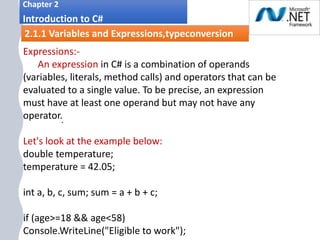
Expressions:-
An expression in C# is a combination of operands
(variables, literals, method calls) and operators that can be
evaluated to a single value. To be precise, an expression
must have at least one operand but may not have any
operator.
Let's look at the example below:
double temperature;
temperature = 42.05;
int a, b, c, sum; sum = a + b + c;
if (age>=18 && age<58)
Console.WriteLine("Eligible to work");
1. .
Chapter 2
Introduction to C#
2.1.1 Variables and Expressions,typeconversion
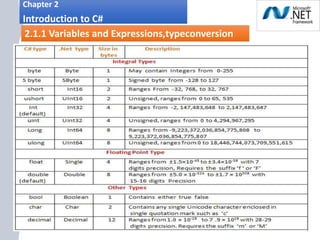
Datatypes in C#:-
1. .
Chapter 2
Introduction to C#
2.1.1 Variables and Expressions,typeconversion
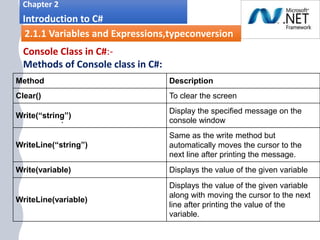
Console Class in C#:-
Methods of Console class in C#:
Method Description
Clear() To clear the screen
Write(“string”)
Display the specified message on the
console window
WriteLine(“string”)
Same as the write method but
automatically moves the cursor to the
next line after printing the message.
Write(variable) Displays the value of the given variable
WriteLine(variable)
Displays the value of the given variable
along with moving the cursor to the next
line after printing the value of the
variable.
1. .
Chapter 2
Introduction to C#
2.1.1 Variables and Expressions,typeconversion
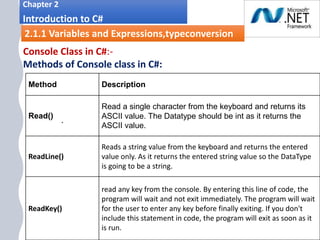
Console Class in C#:-
Methods of Console class in C#:
Method Description
Read()
Read a single character from the keyboard and returns its
ASCII value. The Datatype should be int as it returns the
ASCII value.
ReadLine()
Reads a string value from the keyboard and returns the entered
value only. As it returns the entered string value so the DataType
is going to be a string.
ReadKey()
read any key from the console. By entering this line of code, the
program will wait and not exit immediately. The program will wait
for the user to enter any key before finally exiting. If you don't
include this statement in code, the program will exit as soon as it
is run.
1. .
Chapter 2
Introduction to C#
2.1.1 Variables and Expressions,typeconversion
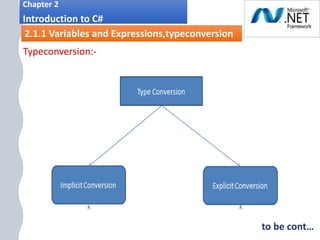
Typeconversion:-
to be cont…
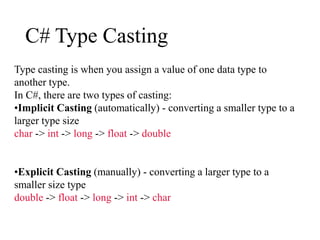
C# Type Casting
Type casting is when you assign a value of one data type to
another type.
In C#, there are two types of casting:
•Implicit Casting (automatically) - converting a smaller type to a
larger type size
char -> int -> long -> float -> double
•Explicit Casting (manually) - converting a larger type to a
smaller size type
double -> float -> long -> int -> char
1. .
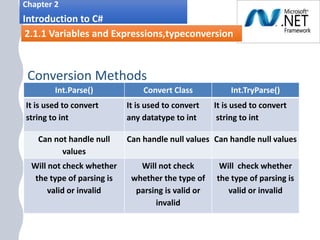
Conversion Methods
Int.Parse() Convert Class Int.TryParse()
It is used to convert
string to int
It is used to convert
any datatype to int
It is used to convert
string to int
Can not handle null
values
Can handle null values Can handle null values
Will not check whether
the type of parsing is
valid or invalid
Will not check
whether the type of
parsing is valid or
invalid
Will check whether
the type of parsing is
valid or invalid
2.1.1 Variables and Expressions,typeconversion
Chapter 2
Introduction to C#
2.1.1 Variables and Expressions,typeconversion
i.
Chapter 2
Introduction to C#
2.1.2 Flow Control
Flow Control allows us to execute code based on some
conditions. It also allows to execute the code specified number
of times.
Following are the Flow control statements:-
i. Selection statements are used to select one of number of
possible statements for execution based on the value of
some expression. In this group are if and switch
statements.
ii. Iteration statements are used to repeatedly execute an
embedded statements. In this group are the
while,do,for,and foreach statements .
iii. Jump statements are used to transfer control. In this
group are the break,continue,goto,throw,return,and yield
statements.
i.
Chapter 2
Introduction to C#
2.1.3 Functions, Delegates
Functions:-
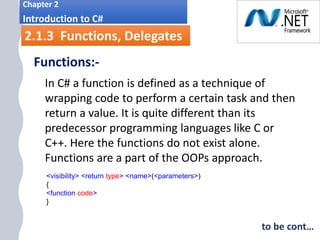
In C# a function is defined as a technique of
wrapping code to perform a certain task and then
return a value. It is quite different than its
predecessor programming languages like C or
C++. Here the functions do not exist alone.
Functions are a part of the OOPs approach.
<visibility> <return type> <name>(<parameters>)
{
<function code>
}
to be cont…
i.
Chapter 2
Introduction to C#
2.1.3 Functions, Delegates
Functions:-
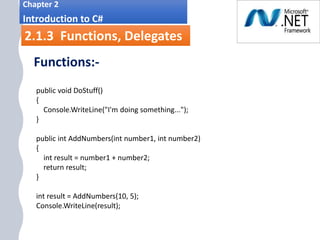
public void DoStuff()
{
Console.WriteLine("I'm doing something...");
}
public int AddNumbers(int number1, int number2)
{
int result = number1 + number2;
return result;
}
int result = AddNumbers(10, 5);
Console.WriteLine(result);
i.
Chapter 2
Introduction to C#
2.1.3 Functions, Delegates
Functions:-
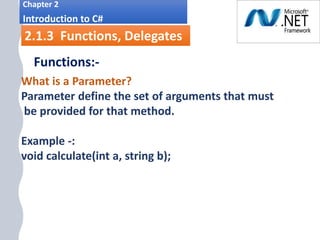
What is a Parameter?
Parameter define the set of arguments that must
be provided for that method.
Example -:
void calculate(int a, string b);
i.
Chapter 2
Introduction to C#
2.1.3 Functions, Delegates
Functions:-
Parameter Modifiers
Usually methods take parameters. There are many ways
to pass the parameters and for this C# provides some
parameter modifiers. Look at them below.
1. none (or default) parameter
2. ref (reference) parameter
3. out (output) parameter
4. params (parameters) parameter
i.
Chapter 2
Introduction to C#
2.1.3 Functions, Delegates
Functions:-
Parameter Modifiers
1. none (or default) parameter: -
 If a parameter is not attached with
any modifier, then the parameter's
value is passed to the method.
 This is also known as call-by-value
and it is the default for any parameter.
X = 20;
Console.WriteLine(x);
i.
Chapter 2
Introduction to C#
2.1.3 Functions, Delegates
Functions:-
Parameter Modifiers
•2. ref (reference) parameter:
C# provides the ref parameter modifier, to
pass argument by reference.
To pass by reference the ref modifier should
be used when declaring and calling the
method.
to be cont…
i.
Chapter 2
Introduction to C#
2.1.3 Functions, Delegates
Functions:-
Parameter Modifiers
to be cont…
• 2. ref (reference) parameter: -
If a parameter is attached with a ref
modifier, then changes will be made in a
method that affect the calling method.
This is also known as call-by-reference.
X = 20;
Console.WriteLine(&x);
i.
Chapter 2
Introduction to C#
2.1.3 Functions, Delegates
Functions:-
Parameter Modifiers
to be cont…
•3.out (output) parameter:
 C# provides the out parameter modifier
which is similar to ref arguments.
 To pass by reference the out modifier
should be used when declaring and
calling the method.
to be cont…
i.
Chapter 2
Introduction to C#
2.1.3 Functions, Delegates
Functions:-
Parameter Modifiers
•3.out (output) parameter: -
If a parameter is attached with an out
modifier, then we can return a value to a
calling method without using a return
statement.
i.
Chapter 2
Introduction to C#
2.1.3 Functions, Delegates
Functions:-
Parameter Modifiers
•4. params (parameters) parameter: -
 If a parameter is attached with a params
modifier, then we can send multiple
arguments as a single parameter.
 Any method can have only one params
modifier and it should be the last parameter
for the method.
i.
Chapter 2
Introduction to C#
2.1.3 Functions, Delegates
Functions:-
Parameter Modifiers
differences between output (out) and reference (ref)
parameters:
 Ref parameters Needs to be initialized before
passing it to the function.
 Out parameters Need not be initialized while
calling the function. But need to be initialized in
the called function.
Questions
1. What is variable and expression?
2. What are the Console Classes in C#?
3. Type Conversion Methods?
4. C# type Casting?
5. What is flow control and flow control statements?
6. What is functions how we call the functions?
7. What are the Access control?
8. Define Parameter and Parameter modifiers
Chapter 2
Introduction to C#

Unit 1:DOT NET Framework CLR(Common Language Runtime )

  • 1.
    M. SC. (ComputerScience) Course Code : 23CsCmpP121 Course Name : DOT NET PresentedBy : Priyanka Jadhav Modern College of Arts,Science and Commerce ,Pune-5
  • 2.
  • 3.
    Chapter 2 Introduction toC# 2.1 Language features 2.1.1Variables and Expressions, typeconversion 2.1.2Flow Control 2.1.3Functions, Delegates Points to be covered in today’s Lecture
  • 4.
    1. . Chapter 2 Introductionto C# 2.1.1 Variables and Expressions,typeconversion Variables and constant are basic building block of programming language . A variable is a name given to memory location whose value may change during the program execution. C# syntax for declaring variables:- <datatype> <varname>; For example :int num; On the other hand ,a constant is a value which never changes during the program execution. C# syntax for declaring constant: <const><datatype> <constName>; For example: const int num;
  • 5.
    1. . Chapter 2 Introductionto C# 2.1.1 Variables and Expressions,typeconversion Expressions:- An expression in C# is a combination of operands (variables, literals, method calls) and operators that can be evaluated to a single value. To be precise, an expression must have at least one operand but may not have any operator. Let's look at the example below: double temperature; temperature = 42.05; int a, b, c, sum; sum = a + b + c; if (age>=18 && age<58) Console.WriteLine("Eligible to work");
  • 6.
    1. . Chapter 2 Introductionto C# 2.1.1 Variables and Expressions,typeconversion Datatypes in C#:-
  • 7.
    1. . Chapter 2 Introductionto C# 2.1.1 Variables and Expressions,typeconversion Console Class in C#:- Methods of Console class in C#: Method Description Clear() To clear the screen Write(“string”) Display the specified message on the console window WriteLine(“string”) Same as the write method but automatically moves the cursor to the next line after printing the message. Write(variable) Displays the value of the given variable WriteLine(variable) Displays the value of the given variable along with moving the cursor to the next line after printing the value of the variable.
  • 8.
    1. . Chapter 2 Introductionto C# 2.1.1 Variables and Expressions,typeconversion Console Class in C#:- Methods of Console class in C#: Method Description Read() Read a single character from the keyboard and returns its ASCII value. The Datatype should be int as it returns the ASCII value. ReadLine() Reads a string value from the keyboard and returns the entered value only. As it returns the entered string value so the DataType is going to be a string. ReadKey() read any key from the console. By entering this line of code, the program will wait and not exit immediately. The program will wait for the user to enter any key before finally exiting. If you don't include this statement in code, the program will exit as soon as it is run.
  • 9.
    1. . Chapter 2 Introductionto C# 2.1.1 Variables and Expressions,typeconversion Typeconversion:- to be cont…
  • 10.
    C# Type Casting Typecasting is when you assign a value of one data type to another type. In C#, there are two types of casting: •Implicit Casting (automatically) - converting a smaller type to a larger type size char -> int -> long -> float -> double •Explicit Casting (manually) - converting a larger type to a smaller size type double -> float -> long -> int -> char
  • 11.
    1. . Conversion Methods Int.Parse()Convert Class Int.TryParse() It is used to convert string to int It is used to convert any datatype to int It is used to convert string to int Can not handle null values Can handle null values Can handle null values Will not check whether the type of parsing is valid or invalid Will not check whether the type of parsing is valid or invalid Will check whether the type of parsing is valid or invalid 2.1.1 Variables and Expressions,typeconversion Chapter 2 Introduction to C# 2.1.1 Variables and Expressions,typeconversion
  • 12.
    i. Chapter 2 Introduction toC# 2.1.2 Flow Control Flow Control allows us to execute code based on some conditions. It also allows to execute the code specified number of times. Following are the Flow control statements:- i. Selection statements are used to select one of number of possible statements for execution based on the value of some expression. In this group are if and switch statements. ii. Iteration statements are used to repeatedly execute an embedded statements. In this group are the while,do,for,and foreach statements . iii. Jump statements are used to transfer control. In this group are the break,continue,goto,throw,return,and yield statements.
  • 13.
    i. Chapter 2 Introduction toC# 2.1.3 Functions, Delegates Functions:- In C# a function is defined as a technique of wrapping code to perform a certain task and then return a value. It is quite different than its predecessor programming languages like C or C++. Here the functions do not exist alone. Functions are a part of the OOPs approach. <visibility> <return type> <name>(<parameters>) { <function code> } to be cont…
  • 14.
    i. Chapter 2 Introduction toC# 2.1.3 Functions, Delegates Functions:- public void DoStuff() { Console.WriteLine("I'm doing something..."); } public int AddNumbers(int number1, int number2) { int result = number1 + number2; return result; } int result = AddNumbers(10, 5); Console.WriteLine(result);
  • 15.
    i. Chapter 2 Introduction toC# 2.1.3 Functions, Delegates Functions:- What is a Parameter? Parameter define the set of arguments that must be provided for that method. Example -: void calculate(int a, string b);
  • 16.
    i. Chapter 2 Introduction toC# 2.1.3 Functions, Delegates Functions:- Parameter Modifiers Usually methods take parameters. There are many ways to pass the parameters and for this C# provides some parameter modifiers. Look at them below. 1. none (or default) parameter 2. ref (reference) parameter 3. out (output) parameter 4. params (parameters) parameter
  • 17.
    i. Chapter 2 Introduction toC# 2.1.3 Functions, Delegates Functions:- Parameter Modifiers 1. none (or default) parameter: -  If a parameter is not attached with any modifier, then the parameter's value is passed to the method.  This is also known as call-by-value and it is the default for any parameter. X = 20; Console.WriteLine(x);
  • 18.
    i. Chapter 2 Introduction toC# 2.1.3 Functions, Delegates Functions:- Parameter Modifiers •2. ref (reference) parameter: C# provides the ref parameter modifier, to pass argument by reference. To pass by reference the ref modifier should be used when declaring and calling the method. to be cont…
  • 19.
    i. Chapter 2 Introduction toC# 2.1.3 Functions, Delegates Functions:- Parameter Modifiers to be cont… • 2. ref (reference) parameter: - If a parameter is attached with a ref modifier, then changes will be made in a method that affect the calling method. This is also known as call-by-reference. X = 20; Console.WriteLine(&x);
  • 20.
    i. Chapter 2 Introduction toC# 2.1.3 Functions, Delegates Functions:- Parameter Modifiers to be cont… •3.out (output) parameter:  C# provides the out parameter modifier which is similar to ref arguments.  To pass by reference the out modifier should be used when declaring and calling the method. to be cont…
  • 21.
    i. Chapter 2 Introduction toC# 2.1.3 Functions, Delegates Functions:- Parameter Modifiers •3.out (output) parameter: - If a parameter is attached with an out modifier, then we can return a value to a calling method without using a return statement.
  • 22.
    i. Chapter 2 Introduction toC# 2.1.3 Functions, Delegates Functions:- Parameter Modifiers •4. params (parameters) parameter: -  If a parameter is attached with a params modifier, then we can send multiple arguments as a single parameter.  Any method can have only one params modifier and it should be the last parameter for the method.
  • 23.
    i. Chapter 2 Introduction toC# 2.1.3 Functions, Delegates Functions:- Parameter Modifiers differences between output (out) and reference (ref) parameters:  Ref parameters Needs to be initialized before passing it to the function.  Out parameters Need not be initialized while calling the function. But need to be initialized in the called function.
  • 24.
    Questions 1. What isvariable and expression? 2. What are the Console Classes in C#? 3. Type Conversion Methods? 4. C# type Casting? 5. What is flow control and flow control statements? 6. What is functions how we call the functions? 7. What are the Access control? 8. Define Parameter and Parameter modifiers Chapter 2 Introduction to C#