Composition, immutability and everything nice….
Let’s write Redux from Scratch!
REDUX
Why do this?
There’s lots of existing material out there
already!
Redux documentation (free)
Redux Egghead Course (free)
And tons of books, print & online resources
So, again, why do this?
It gives us a different way to learn.
Writing a simplified version will give us a
deeper understanding of how Redux works.
It’s principles, patterns and techniques.
And, give us clearer insights into how best
to utilize it in our application and
possible integrations.
What is Redux anyway?
“Redux is a predictable
state container for
JavaScript apps.”
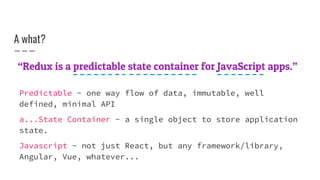
A what?
“Redux is a predictable state container for JavaScript apps.”
Predictable - one way flow of data, immutable, well
defined, minimal API
a...State Container - a single object to store application
state.
Javascript - not just React, but any framework/library,
Angular, Vue, whatever...
Ok, so I guess we should
understand how it works.
The idea behind Redux is
to store application state
in a single place.
The state is a simple
object. Ex.
State
STATE
{
count: 0
todos: [
{ title: “do it”, done: false }
]
}
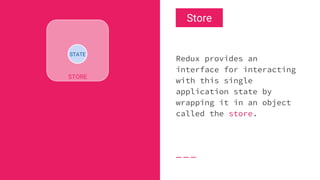
Redux provides an
interface for interacting
with this single
application state by
wrapping it in an object
called the store.
STATE
Store
STORE
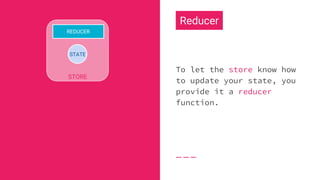
To let the store know how
to update your state, you
provide it a reducer
function.
STATE
Reducer
STORE
REDUCER
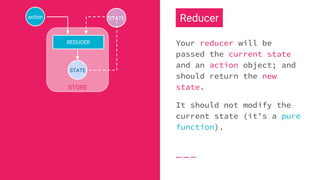
Your reducer will be
passed the current state
and an action object; and
should return the new
state.
It should not modify the
current state (it’s a pure
function).
STATE
Reducer
STORE
REDUCER
action STATE
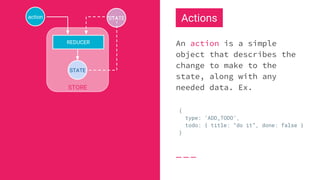
An action is a simple
object that describes the
change to make to the
state, along with any
needed data. Ex.
STATE
Actions
STORE
REDUCER
action
{
type: ‘ADD_TODO’,
todo: { title: “do it”, done: false }
}
STATE
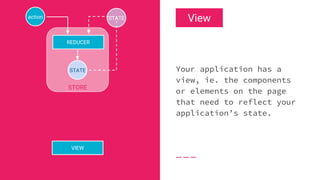
Your application has a
view, ie. the components
or elements on the page
that need to reflect your
application’s state.
STATE
View
STORE
REDUCER
action
VIEW
STATE
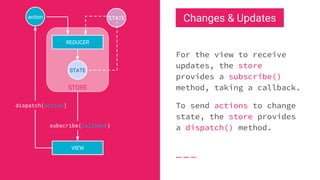
For the view to receive
updates, the store
provides a subscribe()
method, taking a callback.
To send actions to change
state, the store provides
a dispatch() method.
STATE
Changes & Updates
STORE
REDUCER
action
VIEW
subscribe(callback)
dispatch(action)
STATE
That’s the basics...
Which is what we’ll be implementing today.
Obviously, there are more advanced topics to cover on
Redux, such as middleware and store enhancers, selectors,
action creators, along with side effects.
But let’s not bite off more than we can chew...
Sweet! Let’s code...
createStore()
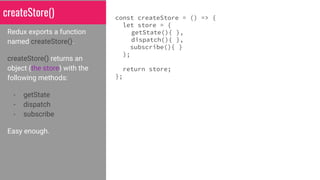
Redux exports a function
named createStore().
createStore() returns an
object (the store) with the
following methods:
- getState
- dispatch
- subscribe
Easy enough.
const createStore = () => {
let store = {
getState(){ },
dispatch(){ },
subscribe(){ }
};
return store;
};
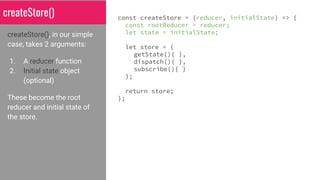
createStore(), in our simple
case, takes 2 arguments:
1. A reducer function
2. Initial state object
(optional)
These become the root
reducer and initial state of
the store.
const createStore = (reducer, initialState) => {
const rootReducer = reducer;
let state = initialState;
let store = {
getState(){ },
dispatch(){ },
subscribe(){ }
};
return store;
};
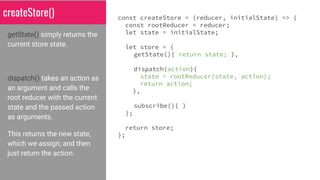
createStore()
getState() simply returns the
current store state.
dispatch() takes an action as
an argument and calls the
root reducer with the current
state and the passed action
as arguments.
This returns the new state,
which we assign; and then
just return the action.
const createStore = (reducer, initialState) => {
const rootReducer = reducer;
let state = initialState;
let store = {
getState(){ return state; },
dispatch(action){
state = rootReducer(state, action);
return action;
},
subscribe(){ }
};
return store;
};
createStore()
subscribe() takes a callback
function as an argument and
saves it for later.
In dispatch(), after we get the
new state from the root
reducer, we’ll execute the
callback functions for each
of our subscribers.
const createStore = (reducer, initialState) => {
const rootReducer = reducer;
let state = initialState;
const listeners = [];
let store = {
getState(){ return state; },
dispatch(action){
state = rootReducer(state, action);
listeners.forEach(listener => listener());
return action;
},
subscribe(callback){
listeners.push(callback);
}
};
return store;
};
createStore()
Finally, before returning the
newly created store,
createStore() will initialize
the store’s state by
dispatching an initialization
action.
This action simply calls the
root reducer with a special
action that populates the
store with any defaults.
const createStore = (reducer, initialState) => {
const rootReducer = reducer;
let state = initialState;
const listeners = [];
let store = {
getState(){ return state; },
dispatch(action){
state = rootReducer(state, action);
listeners.forEach(listener => listener());
return action;
},
subscribe(callback){
listeners.push(callback);
}
};
store.dispatch({ type: ‘@@redux/INIT’ });
return store;
};
createStore()
CONGRATULATIONS!
You’ve just written
Redux!
(the basic version)
But does it work just like Redux?
The following Codepen has our implementation of Redux along
with React 15.4 working together in a simple app.
http://codepen.io/datchley/pen/aJeJea?editors=0010
A note about Reducers...
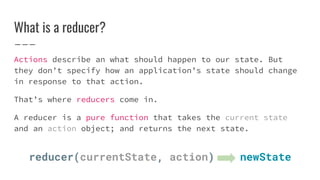
What is a reducer?
Actions describe an what should happen to our state. But
they don’t specify how an application’s state should change
in response to that action.
That’s where reducers come in.
A reducer is a pure function that takes the current state
and an action object; and returns the next state.
reducer(currentState, action) newState
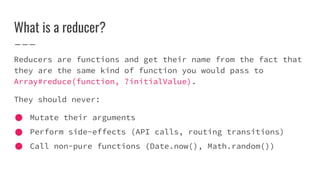
What is a reducer?
Reducers are functions and get their name from the fact that
they are the same kind of function you would pass to
Array#reduce(function, ?initialValue).
They should never:
Mutate their arguments
Perform side-effects (API calls, routing transitions)
Call non-pure functions (Date.now(), Math.random())
Reducer Example
const count = (state = {}, action) => {
switch (action.type) {
case ‘INCREMENT’: return {
...state,
[action.what]: (state[action.what]||0) + 1
};
case ‘DECREMENT’: return {
...state,
[action.what]: (state[action.what]||0) - 1
};
default: return state;
}
}
{
errors: 0,
warnings: 0
}
{
type: ‘INCREMENT,
what: ‘warnings’
}
{
errors: 0,
warnings: 1
}
input: state input: action
output: new state
view in codepen
Managing State w/ Reducers
todos count[] 0
[0] [1] [2]
Suppose our application needed to keep
track of two different pieces of state:
1. a count
2. a list of todo items
These are independent of each other, so
we want to manage them with separate
reducers.
Managing State
const count = (state = 0, action) => {
switch (action.type) {
case ‘INCREMENT’: return state + 1;
case ‘DECREMENT’: return state - 1;
default: return state;
}
}
todos count[] 0
[0] [1] [2]
state slices
and the reducer that manages them
Different reducers can manage different
parts of the state. Here’s the reducer
for managing our count.
Managing State
const count = (state = 0, action) => {
switch (action.type) {
case ‘INCREMENT’: return state + 1;
case ‘DECREMENT’: return state - 1;
default: return state;
}
}
todos count[] 0
[0] [1] [2]
state slices
and the reducer that manages them
And here’s the reducer for our todo list.
const todos = (state = [], action) => {
switch (action.type) {
case ‘ADD_TODO’:
return [ ...state, action.payload ];
default: return state;
}
};
How do we combine these into a single reducer
to create the store?
// createStore takes a single reducer
const store = createStore(/* ??? */);
root
todos count[] 0
[0] [1] [2]
?
combineReducers()
root
todos count[] 0
[0] [1] [2]
Redux provides combineReducers() which
will combine multiple reducers into a
single reducer.
{ }
const root = combineReducers({
todos,
count
});
const store = createStore(root);
combineReducers() returns a new reducer,
which we can then use to create our
store.
Now, I...
The speaker,...
Presenter of this material,...
Will show an example.
const count = (state = 0, action) => {
switch (action.type) {
case ‘INCREMENT’: return state + 1;
case ‘DECREMENT’: return state - 1;
default: return state;
}
}
const todos = (state = [], action) => {
switch (action.type) {
case ‘ADD_TODO’: return [ ...state, action.payload ];
default: return state;
}
};
The reducers
Two simple reducers. Each is a pure function, ie their output is
solely determined by their input and they produce no side-effects.
Each will manage a different “slice” of our application state.
const count = (state = 0, action) => { /* ... */ };
const todos = (state = [], action) => { /* ... */ };
const root = combineReducers({ count, todos });
const store = createStore(root);
count: 0
todos: [ ]
root
STATE
Ok, let’s make some changes...
Now that we have our initial store, we can start making changes by
dispatching actions to the store.
store.getState()
// => {
// => count: 0,
// => todos: []
// => }
OLD STATE NEW STATE
count: 0
todos
[0]: { title: “get milk”, ... }
[1]: { title: “re-write Redux”, ... }
root
store.dispatch({
type: ‘ADD_TODO’,
payload: { title: “get milk”, completed: false }
});
store.dispatch({
type: ‘ADD_TODO’,
payload: { title: “re-write Redux”, completed: true }
});
count: 0
todos: [ ]
root
equal
not equal
count: 0
todos
root
not equal
equal
1
2
21NEW STATE
count: 0
todos
[0]: { title: “get milk”, completed: false }
[1]: { title: “re-write Redux”, completed: true }
root
STATE
What changed?
After the root reducer returns, only the todos slice of the state is
a mutated copy. The rest shallowly compare as equal, as the count
reducer returns the current state.
This allows any view to know which components require updating in a
more efficient manner, as it can simply do comparisons using ===.
count: 0
todos
[0]: { title: “get milk”, completed: false }
[1]: { title: “re-write Redux”, completed: true }
root
store.dispatch({
type: ‘INCREMENT’
});
store.dispatch({
type: ‘INCREMENT’
});
OLD STATE
equal
not equal count: 2
todos
root
NEW STATE
[0]: { ... }
[1]: { ... }
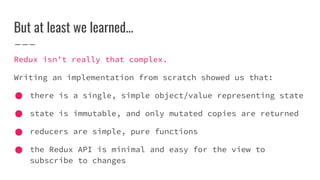
But at least we learned...
Redux isn’t really that complex.
Writing an implementation from scratch showed us that:
there is a single, simple object/value representing state
state is immutable, and only mutated copies are returned
reducers are simple, pure functions
the Redux API is minimal and easy for the view to
subscribe to changes
The city of Reduxville is saved, thanks in
(no) part to this presentation...
Questions?
More Redux from Scratch! (because I got bored)
To see a more full implementation of Redux, including:
- store enhancers + middleware
- applyMiddleware() - logger and thunk
- combineReducers()
- and the compose() function
view in codepen

Understanding redux

  • 1.
    Composition, immutability andeverything nice….
  • 2.
    Let’s write Reduxfrom Scratch! REDUX
  • 4.
    Why do this? There’slots of existing material out there already! Redux documentation (free) Redux Egghead Course (free) And tons of books, print & online resources
  • 5.
    So, again, whydo this? It gives us a different way to learn. Writing a simplified version will give us a deeper understanding of how Redux works. It’s principles, patterns and techniques. And, give us clearer insights into how best to utilize it in our application and possible integrations.
  • 6.
  • 7.
    “Redux is apredictable state container for JavaScript apps.”
  • 8.
    A what? “Redux isa predictable state container for JavaScript apps.” Predictable - one way flow of data, immutable, well defined, minimal API a...State Container - a single object to store application state. Javascript - not just React, but any framework/library, Angular, Vue, whatever...
  • 9.
    Ok, so Iguess we should understand how it works.
  • 10.
    The idea behindRedux is to store application state in a single place. The state is a simple object. Ex. State STATE { count: 0 todos: [ { title: “do it”, done: false } ] }
  • 11.
    Redux provides an interfacefor interacting with this single application state by wrapping it in an object called the store. STATE Store STORE
  • 12.
    To let thestore know how to update your state, you provide it a reducer function. STATE Reducer STORE REDUCER
  • 13.
    Your reducer willbe passed the current state and an action object; and should return the new state. It should not modify the current state (it’s a pure function). STATE Reducer STORE REDUCER action STATE
  • 14.
    An action isa simple object that describes the change to make to the state, along with any needed data. Ex. STATE Actions STORE REDUCER action { type: ‘ADD_TODO’, todo: { title: “do it”, done: false } } STATE
  • 15.
    Your application hasa view, ie. the components or elements on the page that need to reflect your application’s state. STATE View STORE REDUCER action VIEW STATE
  • 16.
    For the viewto receive updates, the store provides a subscribe() method, taking a callback. To send actions to change state, the store provides a dispatch() method. STATE Changes & Updates STORE REDUCER action VIEW subscribe(callback) dispatch(action) STATE
  • 17.
    That’s the basics... Whichis what we’ll be implementing today. Obviously, there are more advanced topics to cover on Redux, such as middleware and store enhancers, selectors, action creators, along with side effects. But let’s not bite off more than we can chew...
  • 18.
  • 19.
    createStore() Redux exports afunction named createStore(). createStore() returns an object (the store) with the following methods: - getState - dispatch - subscribe Easy enough. const createStore = () => { let store = { getState(){ }, dispatch(){ }, subscribe(){ } }; return store; };
  • 20.
    createStore(), in oursimple case, takes 2 arguments: 1. A reducer function 2. Initial state object (optional) These become the root reducer and initial state of the store. const createStore = (reducer, initialState) => { const rootReducer = reducer; let state = initialState; let store = { getState(){ }, dispatch(){ }, subscribe(){ } }; return store; }; createStore()
  • 21.
    getState() simply returnsthe current store state. dispatch() takes an action as an argument and calls the root reducer with the current state and the passed action as arguments. This returns the new state, which we assign; and then just return the action. const createStore = (reducer, initialState) => { const rootReducer = reducer; let state = initialState; let store = { getState(){ return state; }, dispatch(action){ state = rootReducer(state, action); return action; }, subscribe(){ } }; return store; }; createStore()
  • 22.
    subscribe() takes acallback function as an argument and saves it for later. In dispatch(), after we get the new state from the root reducer, we’ll execute the callback functions for each of our subscribers. const createStore = (reducer, initialState) => { const rootReducer = reducer; let state = initialState; const listeners = []; let store = { getState(){ return state; }, dispatch(action){ state = rootReducer(state, action); listeners.forEach(listener => listener()); return action; }, subscribe(callback){ listeners.push(callback); } }; return store; }; createStore()
  • 23.
    Finally, before returningthe newly created store, createStore() will initialize the store’s state by dispatching an initialization action. This action simply calls the root reducer with a special action that populates the store with any defaults. const createStore = (reducer, initialState) => { const rootReducer = reducer; let state = initialState; const listeners = []; let store = { getState(){ return state; }, dispatch(action){ state = rootReducer(state, action); listeners.forEach(listener => listener()); return action; }, subscribe(callback){ listeners.push(callback); } }; store.dispatch({ type: ‘@@redux/INIT’ }); return store; }; createStore()
  • 24.
  • 25.
    But does itwork just like Redux? The following Codepen has our implementation of Redux along with React 15.4 working together in a simple app. http://codepen.io/datchley/pen/aJeJea?editors=0010
  • 26.
    A note aboutReducers...
  • 27.
    What is areducer? Actions describe an what should happen to our state. But they don’t specify how an application’s state should change in response to that action. That’s where reducers come in. A reducer is a pure function that takes the current state and an action object; and returns the next state. reducer(currentState, action) newState
  • 28.
    What is areducer? Reducers are functions and get their name from the fact that they are the same kind of function you would pass to Array#reduce(function, ?initialValue). They should never: Mutate their arguments Perform side-effects (API calls, routing transitions) Call non-pure functions (Date.now(), Math.random())
  • 29.
    Reducer Example const count= (state = {}, action) => { switch (action.type) { case ‘INCREMENT’: return { ...state, [action.what]: (state[action.what]||0) + 1 }; case ‘DECREMENT’: return { ...state, [action.what]: (state[action.what]||0) - 1 }; default: return state; } } { errors: 0, warnings: 0 } { type: ‘INCREMENT, what: ‘warnings’ } { errors: 0, warnings: 1 } input: state input: action output: new state view in codepen
  • 30.
    Managing State w/Reducers todos count[] 0 [0] [1] [2] Suppose our application needed to keep track of two different pieces of state: 1. a count 2. a list of todo items These are independent of each other, so we want to manage them with separate reducers.
  • 31.
    Managing State const count= (state = 0, action) => { switch (action.type) { case ‘INCREMENT’: return state + 1; case ‘DECREMENT’: return state - 1; default: return state; } } todos count[] 0 [0] [1] [2] state slices and the reducer that manages them Different reducers can manage different parts of the state. Here’s the reducer for managing our count.
  • 32.
    Managing State const count= (state = 0, action) => { switch (action.type) { case ‘INCREMENT’: return state + 1; case ‘DECREMENT’: return state - 1; default: return state; } } todos count[] 0 [0] [1] [2] state slices and the reducer that manages them And here’s the reducer for our todo list. const todos = (state = [], action) => { switch (action.type) { case ‘ADD_TODO’: return [ ...state, action.payload ]; default: return state; } };
  • 33.
    How do wecombine these into a single reducer to create the store? // createStore takes a single reducer const store = createStore(/* ??? */); root todos count[] 0 [0] [1] [2] ?
  • 34.
    combineReducers() root todos count[] 0 [0][1] [2] Redux provides combineReducers() which will combine multiple reducers into a single reducer. { } const root = combineReducers({ todos, count }); const store = createStore(root); combineReducers() returns a new reducer, which we can then use to create our store.
  • 35.
    Now, I... The speaker,... Presenterof this material,... Will show an example.
  • 36.
    const count =(state = 0, action) => { switch (action.type) { case ‘INCREMENT’: return state + 1; case ‘DECREMENT’: return state - 1; default: return state; } } const todos = (state = [], action) => { switch (action.type) { case ‘ADD_TODO’: return [ ...state, action.payload ]; default: return state; } }; The reducers Two simple reducers. Each is a pure function, ie their output is solely determined by their input and they produce no side-effects. Each will manage a different “slice” of our application state.
  • 37.
    const count =(state = 0, action) => { /* ... */ }; const todos = (state = [], action) => { /* ... */ }; const root = combineReducers({ count, todos }); const store = createStore(root); count: 0 todos: [ ] root STATE Ok, let’s make some changes... Now that we have our initial store, we can start making changes by dispatching actions to the store. store.getState() // => { // => count: 0, // => todos: [] // => }
  • 38.
    OLD STATE NEWSTATE count: 0 todos [0]: { title: “get milk”, ... } [1]: { title: “re-write Redux”, ... } root store.dispatch({ type: ‘ADD_TODO’, payload: { title: “get milk”, completed: false } }); store.dispatch({ type: ‘ADD_TODO’, payload: { title: “re-write Redux”, completed: true } }); count: 0 todos: [ ] root equal not equal count: 0 todos root not equal equal 1 2 21NEW STATE
  • 39.
    count: 0 todos [0]: {title: “get milk”, completed: false } [1]: { title: “re-write Redux”, completed: true } root STATE What changed? After the root reducer returns, only the todos slice of the state is a mutated copy. The rest shallowly compare as equal, as the count reducer returns the current state. This allows any view to know which components require updating in a more efficient manner, as it can simply do comparisons using ===.
  • 40.
    count: 0 todos [0]: {title: “get milk”, completed: false } [1]: { title: “re-write Redux”, completed: true } root store.dispatch({ type: ‘INCREMENT’ }); store.dispatch({ type: ‘INCREMENT’ }); OLD STATE equal not equal count: 2 todos root NEW STATE [0]: { ... } [1]: { ... }
  • 41.
    But at leastwe learned... Redux isn’t really that complex. Writing an implementation from scratch showed us that: there is a single, simple object/value representing state state is immutable, and only mutated copies are returned reducers are simple, pure functions the Redux API is minimal and easy for the view to subscribe to changes
  • 42.
    The city ofReduxville is saved, thanks in (no) part to this presentation...
  • 43.
  • 44.
    More Redux fromScratch! (because I got bored) To see a more full implementation of Redux, including: - store enhancers + middleware - applyMiddleware() - logger and thunk - combineReducers() - and the compose() function view in codepen