Paging Like A Pro
Android Architecture Components: Paging
Gabor Varadi
@zhuinden
Recap: What’s in the AAC?
• Lifecycle (LifecycleObserver, @OnLifecycleEvent)
• ViewModel (ViewModelProviders, ViewModelStore)
• LiveData (liveData.observe(lifecycleOwner,
observer))
• Room (ORM - @Entity, @ForeignKey, etc.)
What’s the end game?
Simplified data loading:
- if database exposes an observable query
which is re-queried when a write „invalidates”
the table, then we don’t need to manage „data
loading callbacks”
- threading is simplified: data loading is
automatic and occurs on a background thread
(initial evaluation + triggered by future writes)
How do the pieces fit together?
• Room exposes query result as LiveData (which
retains previous value and can be observed) and updates it
• ViewModel caches the LiveData across
configuration changes
• LiveData pauses operations after onStop until
onStart via Lifecycle events, and automatically
unsubscribes on onDestroy, emits new values
Where’s the catch?
• LiveData<List<T>>
@Dao
interface CatDao {
@Query("SELECT * FROM ${Cat.TABLE_NAME}
ORDER BY ${Cat.COLUMN_RANK}")
fun listenForCats(): LiveData<List<Cat>>
}
• What if I have MANY (10000+) cats?
• What if I update it often?
• How many items should I read to memory?
Should I read all items when a write happens?
Possible solutions:
• 1.) implement pagination manually:
„load more” button
• 2.) lazy-load everything!!1!
• 3.) ???
1.) Paginating manually
• „Load more” callbacks: appending to already
loaded list
• Doesn’t listen for database writes
automatically at all
• Must load and keep all previous items in
memory
2.) Lazy loading
• does this approach
• Every query result is a lazy-loaded „cursor”
• Cursors are invalidated and re-calculated on
writes, making „listening for changes” possible
• Everything is a proxy, no data is kept in
memory – everything is loaded from DB
private Realm realm;
private RealmResults<City> cities;
private RealmChangeListener<RealmResults<City>>
realmChangeListener = cities -> {
adapter.setData(cities);
};
realm = Realm.getDefaultInstance();
cities = realm.where(City.class).findAllAsync();
cities.addChangeListener(realmChangeListener);
// ...
cities.removeAllChangeListeners();
realm.close();
2.) Lazy loading
• Downside:
– Evaluation of the „lazy” data set must still
evaluate the entirety of the cursor
(in SQLite’s case, only a window is filled up, but
subsequent loads would happen on UI thread)
– Query result is evaluated on background thread,
but in Realm’s case, the accessors are on main
thread, and it is not a completely free operation
3.) ???
3.) Black magic
3.) Async loading pages of a data
source
• a.) AsyncListUtil: added in support v24.1.0
• b.) Paging Library: currently 1.0.0-RC1
3.b) PagedList + DataSource
• Idea:
– only load small pages to memory that we actually need
– reading the pages (and elements) should occur on
background thread
• Paging Library gives us:
– PagedList: exposes data
– DataSource: fills paged list
– DataSource.Factory: creates a data source
– PagedListAdapter: consumes paged list
– LivePagedListBuilder: creates new datasource
after invalidation
DataSource types
• Positional: pages can be indexed [0...n-1],
then [n, n+1, ...]
• ItemKeyed: item in page at index[n-1] has a
value that allows us to load the page that
contains [n, n+1, ...]
• PageKeyed: page contains a „cursor” value
that allows us to request „the next page”
Positional data sources
• Used for accessing data that supports
limit+offset (skip+take)
• Most common usage is to fill the paged list
from a database
• (Room has its own: LimitOffsetDataSource)
Can we still listen for changes?
• DataSource can be invalidated
• With a DataSource.Factory, the
DataSource can be re-created when it is
invalidated
• (Invalidation happens when a write has
changed the data set in such a way that a re-
evaluation is required)
How do I listen for changes?
private val liveResults: LiveData<PagedList<Cat>>
fun getCats() = liveResults
class TaskViewModel: ViewModel() {
init {
...
liveResults = LivePagedListBuilder<>(
catDao.listenForCats(),
PagedList.Config.Builder()
.setPageSize(20)
.setPrefetchDistance(20)
.setEnablePlaceholders(true)
.build())
.setInitialLoadKey(0)
.build()
}
Listening for changes
@Dao
interface CatDao {
@Query("SELECT * FROM ${Cat.TABLE_NAME}
ORDER BY ${Cat.COLUMN_RANK}")
fun listenForCats(): DataSource.Factory<Int, Cat>
}
class CatFragment: Fragment() {
override fun onViewCreated(view: View, icicle: Bundle?) {
...
val viewModel = ViewModelProviders.of(this)
.get<CatViewModel>();
...
recyclerView.setAdapter(catAdapter);
viewModel.getCats().observe(this) { pagedList ->
catAdapter.submitList(pagedList)
}
}
}
class CatAdapter: PagedListAdapter<Cat,
CatAdapter.ViewHolder>(Cat.DIFF_CALLBACK) {
override fun onBindViewHolder(holder: ViewHolder, pos: Int) {
val cat = getItem(pos);
if(cat != null) { // null makes datasource fetch page
holder.bind(cat);
}
}
...
}
What about network requests?
• Typically, we must fetch new items from the
server when we’re scrolling down to the
bottom (we’ve reached the end of our data
set)
• Solution: PagedList.BoundaryCallback
PagedList.BoundaryCallback
• onItemAtEndLoaded(T itemAtEnd)
• onItemAtFrontLoaded(T itemAtFront)
• onZeroItemsLoaded()
• This is where we can start network requests to fetch the
next batch of cats when we’ve reached the end of what’s
stored in the database
• The callback can be called multiple times, so we should
ensure that we don’t execute the same network request
multiple times
• We can set this on the LivePagedListBuilder
Custom Datasources
• Each data source type has a
LoadInitialCallback and a
LoadCallback
(or LoadRangeCallback for positional)
• We can extend PositionalDataSource,
ItemKeyedDataSource or
PageKeyedDataSource, and implement
the right methods
ItemKeyed / PagedKeyed Datasources
• It is possible to fetch pages from network, and
keep them in memory (without storing them
in the database)
• The keyed data sources make this use-case
easier
Load callbacks
• PagedKeyedDataSource:
– Initial load callback:
public abstract void onResult(
@NonNull List<Value> data,
@Nullable Key previousPageKey,
@Nullable Key nextPageKey);
– Load callback:
public abstract void onResult(
@NonNull List<Value> data,
@Nullable Key adjacentPageKey);
// adjacent is „next” or „previous”
depending on „loadAfter” or „loadBefore”
Load callbacks
• ItemKeyedDataSource:
– Initial load callback:
public abstract void onResult(
@NonNull List<Value> data,
int position, int totalCount);
– Load callback:
public abstract void onResult(
@NonNull List<Value> data);
– Also: it also has Key getKey(T item) that lets us
obtain the item key as a load parameter
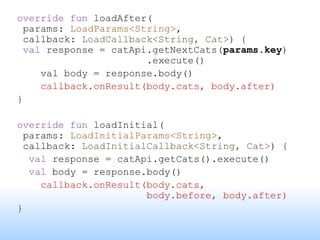
override fun loadAfter(
params: LoadParams<String>,
callback: LoadCallback<String, Cat>) {
val response = catApi.getNextCats(params.key)
.execute()
val body = response.body()
callback.onResult(body.cats, body.after)
}
override fun loadInitial(
params: LoadInitialParams<String>,
callback: LoadInitialCallback<String, Cat>) {
val response = catApi.getCats().execute()
val body = response.body()
callback.onResult(body.cats,
body.before, body.after)
}
Pull to refresh?
• If we expose our keyed data source via a
DataSource.Factory that is wrapped in a
LivePagedListBuilder, then we can
invalidate the data source, and re-retrieve the
initial page
class CatDataSourceFactory(
private val catApi: CatApi
) : DataSource.Factory<String, Cat>() {
override fun create(): DataSource<String, Cat> =
CatDataSource(catApi)
}
Network load status?
• We might want to show a loading indicator while
the datasource is retrieving data (especially if
downloading from network)
• Solution:
– we need to expose the „latest loading status” of „the
latest data source” that was created by the factory
– The data source can expose status via LiveData
– The factory can expose data source via LiveData
class CatDataSourceFactory(
private val catApi: CatApi
) : DataSource.Factory<String, Cat>() {
val lastDataSource =
MutableLiveData<CatDataSource>()
override fun create(): DataSource<String, Cat> =
CatDataSource(catApi).also { source ->
lastDataSource.postValue(source)
}
}
Transformations.switchMap(srcFactory.lastDataSource){
source ->
source.networkState
}
class CatDataSource(
private val catApi: CatApi
) : PageKeyedDataSource<String, Cat>() {
val networkState: MutableLiveData<NetworkState>()
override fun loadAfter(
params: LoadParams<String>,
callback: LoadCallback<String, Cat>) {
networkState.postValue(NetworkState.LOADING)
val response = catApi.getNextCats(params.key)
.execute()
val body = response.body()
networkState.postValue(NetworkState.SUCCESS)
callback.onResult(body.cats, body.after)
}
}
Retry request?
• As we made data source factory expose latest data
source, it is possible to expose a callback that fetches the
next page
Retry:
dataSourceFactory.latestLiveData.value?
.retry()
Refresh:
dataSourceFactory.latestLiveData.value?
.refresh() // invalidate
Error handling?
• Similarly to exposing load state, we can
expose “current error value” as a LiveData
from the DataSource
• Transformations.switchMap() from the
DataSource within the DataSource.Factory’s
LiveData, again
We have everything! 
The end game
• Room exposes DataSource.Factory<Key, T>, the
entity provides DiffUtil.ItemCallback
• ViewModel holds DataSource.Factory, builds
LiveData<PagedList<T>> using
LivePagedListProvider (with provided
PagedList.BoundaryCallback for fetching
new data), exposes DataSource’s LiveDatas via
switchMap()
• Fragment observes LiveData exposed from
ViewModel, feeds PagedList to
PagedListAdapter
Additional resources
https://github.com/googlesamples/android-
architecture-components/
https://developer.android.com/topic/libraries/ar
chitecture/guide
Thank you for your attention!
Q/A?

Paging Like A Pro

  • 1.
    Paging Like APro Android Architecture Components: Paging Gabor Varadi @zhuinden
  • 2.
    Recap: What’s inthe AAC? • Lifecycle (LifecycleObserver, @OnLifecycleEvent) • ViewModel (ViewModelProviders, ViewModelStore) • LiveData (liveData.observe(lifecycleOwner, observer)) • Room (ORM - @Entity, @ForeignKey, etc.)
  • 3.
    What’s the endgame? Simplified data loading: - if database exposes an observable query which is re-queried when a write „invalidates” the table, then we don’t need to manage „data loading callbacks” - threading is simplified: data loading is automatic and occurs on a background thread (initial evaluation + triggered by future writes)
  • 4.
    How do thepieces fit together? • Room exposes query result as LiveData (which retains previous value and can be observed) and updates it • ViewModel caches the LiveData across configuration changes • LiveData pauses operations after onStop until onStart via Lifecycle events, and automatically unsubscribes on onDestroy, emits new values
  • 5.
    Where’s the catch? •LiveData<List<T>> @Dao interface CatDao { @Query("SELECT * FROM ${Cat.TABLE_NAME} ORDER BY ${Cat.COLUMN_RANK}") fun listenForCats(): LiveData<List<Cat>> } • What if I have MANY (10000+) cats? • What if I update it often? • How many items should I read to memory? Should I read all items when a write happens?
  • 6.
    Possible solutions: • 1.)implement pagination manually: „load more” button • 2.) lazy-load everything!!1! • 3.) ???
  • 7.
    1.) Paginating manually •„Load more” callbacks: appending to already loaded list • Doesn’t listen for database writes automatically at all • Must load and keep all previous items in memory
  • 8.
    2.) Lazy loading •does this approach • Every query result is a lazy-loaded „cursor” • Cursors are invalidated and re-calculated on writes, making „listening for changes” possible • Everything is a proxy, no data is kept in memory – everything is loaded from DB
  • 9.
    private Realm realm; privateRealmResults<City> cities; private RealmChangeListener<RealmResults<City>> realmChangeListener = cities -> { adapter.setData(cities); }; realm = Realm.getDefaultInstance(); cities = realm.where(City.class).findAllAsync(); cities.addChangeListener(realmChangeListener); // ... cities.removeAllChangeListeners(); realm.close();
  • 10.
    2.) Lazy loading •Downside: – Evaluation of the „lazy” data set must still evaluate the entirety of the cursor (in SQLite’s case, only a window is filled up, but subsequent loads would happen on UI thread) – Query result is evaluated on background thread, but in Realm’s case, the accessors are on main thread, and it is not a completely free operation
  • 11.
  • 12.
  • 13.
    3.) Async loadingpages of a data source • a.) AsyncListUtil: added in support v24.1.0 • b.) Paging Library: currently 1.0.0-RC1
  • 14.
    3.b) PagedList +DataSource • Idea: – only load small pages to memory that we actually need – reading the pages (and elements) should occur on background thread • Paging Library gives us: – PagedList: exposes data – DataSource: fills paged list – DataSource.Factory: creates a data source – PagedListAdapter: consumes paged list – LivePagedListBuilder: creates new datasource after invalidation
  • 15.
    DataSource types • Positional:pages can be indexed [0...n-1], then [n, n+1, ...] • ItemKeyed: item in page at index[n-1] has a value that allows us to load the page that contains [n, n+1, ...] • PageKeyed: page contains a „cursor” value that allows us to request „the next page”
  • 16.
    Positional data sources •Used for accessing data that supports limit+offset (skip+take) • Most common usage is to fill the paged list from a database • (Room has its own: LimitOffsetDataSource)
  • 17.
    Can we stilllisten for changes? • DataSource can be invalidated • With a DataSource.Factory, the DataSource can be re-created when it is invalidated • (Invalidation happens when a write has changed the data set in such a way that a re- evaluation is required)
  • 18.
    How do Ilisten for changes? private val liveResults: LiveData<PagedList<Cat>> fun getCats() = liveResults class TaskViewModel: ViewModel() { init { ... liveResults = LivePagedListBuilder<>( catDao.listenForCats(), PagedList.Config.Builder() .setPageSize(20) .setPrefetchDistance(20) .setEnablePlaceholders(true) .build()) .setInitialLoadKey(0) .build() }
  • 19.
    Listening for changes @Dao interfaceCatDao { @Query("SELECT * FROM ${Cat.TABLE_NAME} ORDER BY ${Cat.COLUMN_RANK}") fun listenForCats(): DataSource.Factory<Int, Cat> }
  • 20.
    class CatFragment: Fragment(){ override fun onViewCreated(view: View, icicle: Bundle?) { ... val viewModel = ViewModelProviders.of(this) .get<CatViewModel>(); ... recyclerView.setAdapter(catAdapter); viewModel.getCats().observe(this) { pagedList -> catAdapter.submitList(pagedList) } } } class CatAdapter: PagedListAdapter<Cat, CatAdapter.ViewHolder>(Cat.DIFF_CALLBACK) { override fun onBindViewHolder(holder: ViewHolder, pos: Int) { val cat = getItem(pos); if(cat != null) { // null makes datasource fetch page holder.bind(cat); } } ... }
  • 21.
    What about networkrequests? • Typically, we must fetch new items from the server when we’re scrolling down to the bottom (we’ve reached the end of our data set) • Solution: PagedList.BoundaryCallback
  • 22.
    PagedList.BoundaryCallback • onItemAtEndLoaded(T itemAtEnd) •onItemAtFrontLoaded(T itemAtFront) • onZeroItemsLoaded() • This is where we can start network requests to fetch the next batch of cats when we’ve reached the end of what’s stored in the database • The callback can be called multiple times, so we should ensure that we don’t execute the same network request multiple times • We can set this on the LivePagedListBuilder
  • 23.
    Custom Datasources • Eachdata source type has a LoadInitialCallback and a LoadCallback (or LoadRangeCallback for positional) • We can extend PositionalDataSource, ItemKeyedDataSource or PageKeyedDataSource, and implement the right methods
  • 24.
    ItemKeyed / PagedKeyedDatasources • It is possible to fetch pages from network, and keep them in memory (without storing them in the database) • The keyed data sources make this use-case easier
  • 25.
    Load callbacks • PagedKeyedDataSource: –Initial load callback: public abstract void onResult( @NonNull List<Value> data, @Nullable Key previousPageKey, @Nullable Key nextPageKey); – Load callback: public abstract void onResult( @NonNull List<Value> data, @Nullable Key adjacentPageKey); // adjacent is „next” or „previous” depending on „loadAfter” or „loadBefore”
  • 26.
    Load callbacks • ItemKeyedDataSource: –Initial load callback: public abstract void onResult( @NonNull List<Value> data, int position, int totalCount); – Load callback: public abstract void onResult( @NonNull List<Value> data); – Also: it also has Key getKey(T item) that lets us obtain the item key as a load parameter
  • 27.
    override fun loadAfter( params:LoadParams<String>, callback: LoadCallback<String, Cat>) { val response = catApi.getNextCats(params.key) .execute() val body = response.body() callback.onResult(body.cats, body.after) } override fun loadInitial( params: LoadInitialParams<String>, callback: LoadInitialCallback<String, Cat>) { val response = catApi.getCats().execute() val body = response.body() callback.onResult(body.cats, body.before, body.after) }
  • 28.
    Pull to refresh? •If we expose our keyed data source via a DataSource.Factory that is wrapped in a LivePagedListBuilder, then we can invalidate the data source, and re-retrieve the initial page class CatDataSourceFactory( private val catApi: CatApi ) : DataSource.Factory<String, Cat>() { override fun create(): DataSource<String, Cat> = CatDataSource(catApi) }
  • 29.
    Network load status? •We might want to show a loading indicator while the datasource is retrieving data (especially if downloading from network) • Solution: – we need to expose the „latest loading status” of „the latest data source” that was created by the factory – The data source can expose status via LiveData – The factory can expose data source via LiveData
  • 30.
    class CatDataSourceFactory( private valcatApi: CatApi ) : DataSource.Factory<String, Cat>() { val lastDataSource = MutableLiveData<CatDataSource>() override fun create(): DataSource<String, Cat> = CatDataSource(catApi).also { source -> lastDataSource.postValue(source) } } Transformations.switchMap(srcFactory.lastDataSource){ source -> source.networkState }
  • 31.
    class CatDataSource( private valcatApi: CatApi ) : PageKeyedDataSource<String, Cat>() { val networkState: MutableLiveData<NetworkState>() override fun loadAfter( params: LoadParams<String>, callback: LoadCallback<String, Cat>) { networkState.postValue(NetworkState.LOADING) val response = catApi.getNextCats(params.key) .execute() val body = response.body() networkState.postValue(NetworkState.SUCCESS) callback.onResult(body.cats, body.after) } }
  • 32.
    Retry request? • Aswe made data source factory expose latest data source, it is possible to expose a callback that fetches the next page Retry: dataSourceFactory.latestLiveData.value? .retry() Refresh: dataSourceFactory.latestLiveData.value? .refresh() // invalidate
  • 33.
    Error handling? • Similarlyto exposing load state, we can expose “current error value” as a LiveData from the DataSource • Transformations.switchMap() from the DataSource within the DataSource.Factory’s LiveData, again
  • 34.
  • 35.
    The end game •Room exposes DataSource.Factory<Key, T>, the entity provides DiffUtil.ItemCallback • ViewModel holds DataSource.Factory, builds LiveData<PagedList<T>> using LivePagedListProvider (with provided PagedList.BoundaryCallback for fetching new data), exposes DataSource’s LiveDatas via switchMap() • Fragment observes LiveData exposed from ViewModel, feeds PagedList to PagedListAdapter
  • 36.
  • 37.
    Thank you foryour attention! Q/A?

Editor's Notes

  • #3 FragmentActivity and support Fragments implement LifecycleOwner, which allows them to expose a lifecycle that can be observed: LifecycleObserver and @OnLifecycleEvent(Lifecycle.Event.ON_RESUME) ViewModel relies on the ViewModelStore (Map<String, ViewModel>) which is kept alive using non-configuration instance ~ note ViewModelStoreOwner interface LiveData allows observing events (while retaining the last value, and emitting last value on re-subscription) – allowing automatic unsubscription and the ability to receive updates on future changes. Room is an ORM that lets you observe the database directly as LiveData... And more!
  • #5 For LiveData behavior, see LifecycleBoundObserver
  • #15 PagedListAdapter uses an AsyncPagedListDiffer to calculate the difference between the loaded pages.
  • #17 I wanted to show off a positional data source that wraps RealmResults, but it just didn’t fit into the slides. As in, it would not have been informative, imo. You can check it out here, though: https://github.com/Zhuinden/room-live-paged-list-provider-experiment/blob/e76f3d2c5e1be402ff0fe2dc46e62f9e2a102080/app-realm/src/main/java/com/zhuinden/realmlivepagedlistproviderexperiment/util/RealmTiledDataSource.java
  • #19 LivePagedListBuilder creates a ComputableLiveData which executes the re-query when the underlying data source is invalidated.
  • #21 PagedListAdapter handles showing items from the paged list using the AsyncPagedListDiffer. public static DiffCallback<User> DIFF_CALLBACK = new DiffCallback<User>() { @Override public boolean areItemsTheSame(@NonNull User oldItem, @NonNull User newItem) { return oldItem.userId == newItem.userId; } @Override public boolean areContentsTheSame(@NonNull User oldItem, @NonNull User newItem) { return oldItem.equals(newItem); } };
  • #23 In the official sample, this is what PagingRequestHelper is for: ensuring that a network request is called only once at a time.
  • #29 We might want to specify our own FetchExecutor for the LivePagedListBuilder.