Understanding
Connected Data through
Visualization
ConnectedData London | October 4th, 2019
Sebastian Mueller
– CTO yWorks –
/yworks/in/yguy/@yworks , @ySebp contact@yworks.com
Agenda
• Visualization – what types of tools are there?
• How can we do better?
• Use-case specific automatic layout
• Transforming graphs on the fly
• Detailed node visualization
• Customized user interactions
• Integration with third party systems
• Q&A
Who is this talk for?
• People working with connected data
• Data-scientists and engineers
• Project managers
• Software developers
Tools for Visualizing Connected Data
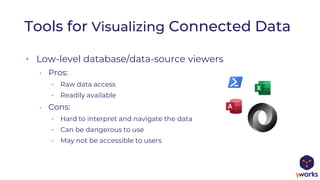
• Low-level database/data-source viewers
• Pros:
• Raw data access
• Readily available
• Cons:
• Hard to interpret and navigate the data
• Can be dangerous to use
• May not be accessible to users
Tools for Visualizing Connected Data
• Generic visualization applications
• Pros:
• Easy to get started
• Little low-level knowledge required
• Some analytics included
• Cons:
• Does not work with all schemas
• Costly for many users
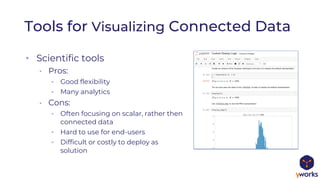
• Scientific tools
• Pros:
• Good flexibility
• Many analytics
• Cons:
• Often focusing on scalar, rather then
connected data
• Hard to use for end-users
• Difficult or costly to deploy as
solution
Tools for Visualizing Connected Data
• Visualization Software Libraries
• Pros:
• Best possible end-user experience
• Most flexible
• data acquisition
• transformation
• display
• interaction
• integration
• Cons:
• Initial software development work required
Tools for Visualizing Connected Data
software libraries for the visualization of
graphs, diagrams, and networks
• Most complete set of automatic layout algorithms
• Available for all major software platforms
• Graph analytics and algorithms included
• Viewing, editing, and creating diagrams
• Generic visualization engine for all diagramming needs
• Extreme customizability and extensibility
Importing the data
• Any source and
format is
possible:
• JSON, XML, text,
binary,
database-
connectors, etc.
await graphMLIOHandler.readFromURL(graph,
'./marvel-graph-raw.graphml')
const graph = new GraphBuilder({
nodesSource: jsonData.nodes,
edgesSource: jsonData.edges,
nodeIdBinding: 'id',
sourceNodeBinding: 'from',
targetNodeBinding: 'to',
}).buildGraph()
const node1 = graph.createNode({tag: data1})
const node2 = graph.createNode({tag: data2})
graph.createEdge(node1, node2)
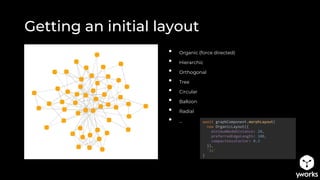
Getting an initial layout
await graphComponent.morphLayout(
new OrganicLayout({
minimumNodeDistance: 20,
preferredEdgeLength: 100,
compactnessFactor: 0.3
}),
'2s'
)
• Organic (force directed)
• Hierarchic
• Orthogonal
• Tree
• Circular
• Balloon
• Radial
• …
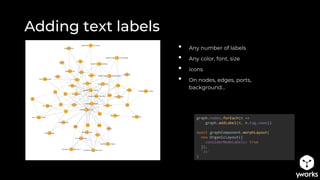
Adding text labels
graph.nodes.forEach(n =>
graph.addLabel(n, n.tag.name))
await graphComponent.morphLayout(
new OrganicLayout({
considerNodeLabels: true
}),
'2s'
)
• Any number of labels
• Any color, font, size
• icons
• On nodes, edges, ports,
background…
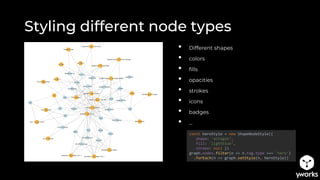
Styling different node types
const heroStyle = new ShapeNodeStyle({
shape: 'octagon‘,
fill: 'lightblue‘,
stroke: null })
graph.nodes.filter(n => n.tag.type === 'hero‘)
.forEach(n => graph.setStyle(n, heroStyle))
• Different shapes
• colors
• fills
• opacities
• strokes
• icons
• badges
• …
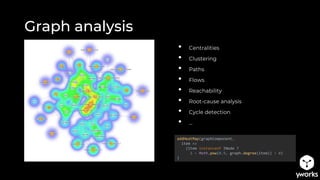
Graph analysis
addHeatMap(graphComponent,
item =>
(item instanceof INode ?
1 - Math.pow(0.9, graph.degree(item)) : 0)
)
• Centralities
• Clustering
• Paths
• Flows
• Reachability
• Root-cause analysis
• Cycle detection
• …
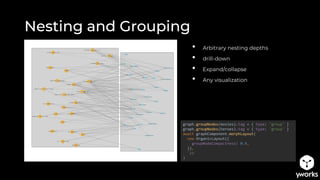
Nesting and Grouping
• Arbitrary nesting depths
• drill-down
• Expand/collapse
• Any visualization
graph.groupNodes(movies).tag = { type: 'group' }
graph.groupNodes(heroes).tag = { type: 'group' }
await graphComponent.morphLayout(
new OrganicLayout({
groupNodeCompactness: 0.9,
}),
'2s'
)
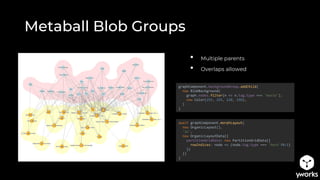
Metaball Blob Groups
• Multiple parents
• Overlaps allowed
await graphComponent.morphLayout(
new OrganicLayout(),
'2s',
new OrganicLayoutData({
partitionGridData: new PartitionGridData({
rowIndices: node => (node.tag.type === 'hero'?0:1)
})
})
)
graphComponent.backgroundGroup.addChild(
new BlobBackground(
graph.nodes.filter(n => n.tag.type === 'movie'),
new Color(255, 255, 128, 196),
)
)
await graphComponent.morphLayout(
new HierarchicLayout(),
'2s',
new HierarchicLayoutData({
givenLayersLayererIds: n => (n.tag.type === 'hero' ?0:1)
})
)
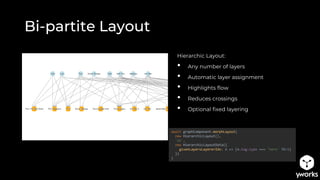
Bi-partite Layout
Hierarchic Layout:
• Any number of layers
• Automatic layer assignment
• Highlights flow
• Reduces crossings
• Optional fixed layering
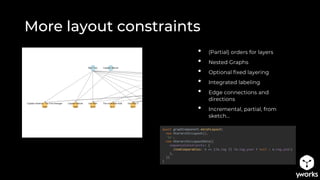
More layout constraints
• (Partial) orders for layers
• Nested Graphs
• Optional fixed layering
• Integrated labeling
• Edge connections and
directions
• Incremental, partial, from
sketch…
await graphComponent.morphLayout(
new HierarchicLayout(),
'2s',
new HierarchicLayoutData({
sequenceConstraints: {
itemComparables: n => (!n.tag || !n.tag.year ? null : n.tag.year)
},
})
)
Transforming the graph
1. Augment movie data
2. Sort movie nodes according to data
3. For each hero participating in two
movies, create edge between pairs of
sorted movies
4. Render as flow-graph from left to
right
movies.forEach(n => {
n.tag.year = movie2year[n.tag.name]
})
heroes.forEach(heroNode => {
graph
.outEdgesAt(heroNode)
.map(e => e.targetNode)
.orderBy(node => node.tag.year)
.reduce((a, b) => {
graph.createEdge({
source: a,
target: b,
tag: { hero: heroNode.tag },
labels: [heroNode.tag.name]
})
return b
})
})
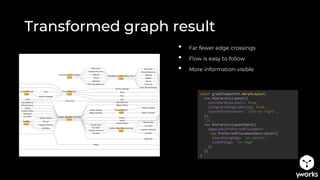
Transformed graph result
await graphComponent.morphLayout(
new HierarchicLayout({
considerNodeLabels: true,
integratedEdgeLabeling: true,
layoutOrientation: 'left-to-right',
}),
'2s',
new HierarchicLayoutData({
edgeLabelPreferredPlacement:
new PreferredPlacementDescriptor({
placeAlongEdge: 'at-center',
sideOfEdge: 'on-edge'
})
})
)
• Far fewer edge crossings
• Flow is easy to follow
• More information visible
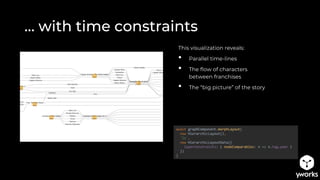
… with time constraints
This visualization reveals:
• Parallel time-lines
• The flow of characters
between franchises
• The “big picture” of the story
await graphComponent.morphLayout(
new HierarchicLayout(),
'2s',
new HierarchicLayoutData({
layerConstraints: { nodeComparables: n => n.tag.year }
})
)
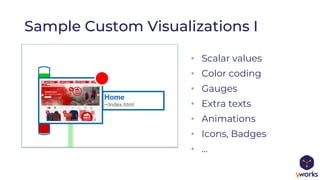
• Scalar values
• Color coding
• Gauges
• Extra texts
• Animations
• Icons, Badges
• …
Sample Custom Visualizations I
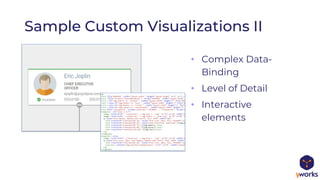
• Complex Data-
Binding
• Level of Detail
• Interactive
elements
Sample Custom Visualizations II
• Custom labels,
ports, edges,
nodes, groups
• Animated layouts
Sample Custom Visualizations III
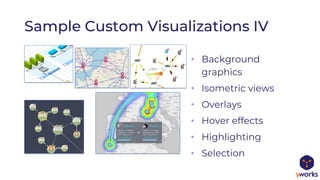
• Background
graphics
• Isometric views
• Overlays
• Hover effects
• Highlighting
• Selection
Sample Custom Visualizations IV
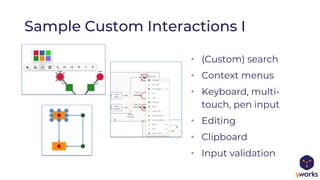
• (Custom) search
• Context menus
• Keyboard, multi-
touch, pen input
• Editing
• Clipboard
• Input validation
Sample Custom Interactions I
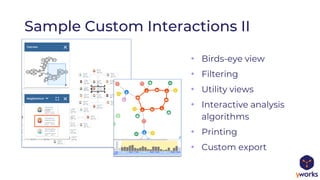
• Birds-eye view
• Filtering
• Utility views
• Interactive analysis
algorithms
• Printing
• Custom export
Sample Custom Interactions II
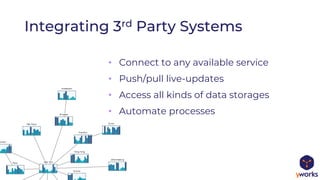
Integrating 3rd Party Systems
• Connect to any available service
• Push/pull live-updates
• Access all kinds of data storages
• Automate processes
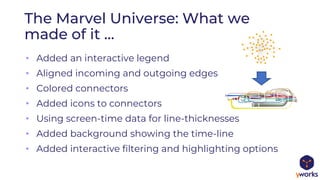
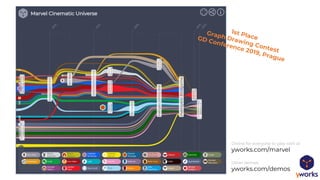
• Added an interactive legend
• Aligned incoming and outgoing edges
• Colored connectors
• Added icons to connectors
• Using screen-time data for line-thicknesses
• Added background showing the time-line
• Added interactive filtering and highlighting options
The Marvel Universe: What we
made of it …
Online for everyone to play with at
yworks.com/marvel
Other demos:
yworks.com/demos
Any Questions?
/yworks/in/yguy/@yworks , @ySebp contact@yworks.com
www.yworks.com
yfiles.com
yWorks GmbH, Vor dem Kreuzberg 28, 72070 Tuebingen, Germany
Thank you and
happy diagramming
with !

Understanding Connected Data through Visualization

  • 1.
  • 2.
    Sebastian Mueller – CTOyWorks – /yworks/in/yguy/@yworks , @ySebp contact@yworks.com
  • 3.
    Agenda • Visualization –what types of tools are there? • How can we do better? • Use-case specific automatic layout • Transforming graphs on the fly • Detailed node visualization • Customized user interactions • Integration with third party systems • Q&A
  • 4.
    Who is thistalk for? • People working with connected data • Data-scientists and engineers • Project managers • Software developers
  • 5.
    Tools for VisualizingConnected Data • Low-level database/data-source viewers • Pros: • Raw data access • Readily available • Cons: • Hard to interpret and navigate the data • Can be dangerous to use • May not be accessible to users
  • 6.
    Tools for VisualizingConnected Data • Generic visualization applications • Pros: • Easy to get started • Little low-level knowledge required • Some analytics included • Cons: • Does not work with all schemas • Costly for many users
  • 7.
    • Scientific tools •Pros: • Good flexibility • Many analytics • Cons: • Often focusing on scalar, rather then connected data • Hard to use for end-users • Difficult or costly to deploy as solution Tools for Visualizing Connected Data
  • 8.
    • Visualization SoftwareLibraries • Pros: • Best possible end-user experience • Most flexible • data acquisition • transformation • display • interaction • integration • Cons: • Initial software development work required Tools for Visualizing Connected Data
  • 9.
    software libraries forthe visualization of graphs, diagrams, and networks • Most complete set of automatic layout algorithms • Available for all major software platforms • Graph analytics and algorithms included • Viewing, editing, and creating diagrams • Generic visualization engine for all diagramming needs • Extreme customizability and extensibility
  • 10.
    Importing the data •Any source and format is possible: • JSON, XML, text, binary, database- connectors, etc. await graphMLIOHandler.readFromURL(graph, './marvel-graph-raw.graphml') const graph = new GraphBuilder({ nodesSource: jsonData.nodes, edgesSource: jsonData.edges, nodeIdBinding: 'id', sourceNodeBinding: 'from', targetNodeBinding: 'to', }).buildGraph() const node1 = graph.createNode({tag: data1}) const node2 = graph.createNode({tag: data2}) graph.createEdge(node1, node2)
  • 11.
    Getting an initiallayout await graphComponent.morphLayout( new OrganicLayout({ minimumNodeDistance: 20, preferredEdgeLength: 100, compactnessFactor: 0.3 }), '2s' ) • Organic (force directed) • Hierarchic • Orthogonal • Tree • Circular • Balloon • Radial • …
  • 12.
    Adding text labels graph.nodes.forEach(n=> graph.addLabel(n, n.tag.name)) await graphComponent.morphLayout( new OrganicLayout({ considerNodeLabels: true }), '2s' ) • Any number of labels • Any color, font, size • icons • On nodes, edges, ports, background…
  • 13.
    Styling different nodetypes const heroStyle = new ShapeNodeStyle({ shape: 'octagon‘, fill: 'lightblue‘, stroke: null }) graph.nodes.filter(n => n.tag.type === 'hero‘) .forEach(n => graph.setStyle(n, heroStyle)) • Different shapes • colors • fills • opacities • strokes • icons • badges • …
  • 14.
    Graph analysis addHeatMap(graphComponent, item => (iteminstanceof INode ? 1 - Math.pow(0.9, graph.degree(item)) : 0) ) • Centralities • Clustering • Paths • Flows • Reachability • Root-cause analysis • Cycle detection • …
  • 15.
    Nesting and Grouping •Arbitrary nesting depths • drill-down • Expand/collapse • Any visualization graph.groupNodes(movies).tag = { type: 'group' } graph.groupNodes(heroes).tag = { type: 'group' } await graphComponent.morphLayout( new OrganicLayout({ groupNodeCompactness: 0.9, }), '2s' )
  • 16.
    Metaball Blob Groups •Multiple parents • Overlaps allowed await graphComponent.morphLayout( new OrganicLayout(), '2s', new OrganicLayoutData({ partitionGridData: new PartitionGridData({ rowIndices: node => (node.tag.type === 'hero'?0:1) }) }) ) graphComponent.backgroundGroup.addChild( new BlobBackground( graph.nodes.filter(n => n.tag.type === 'movie'), new Color(255, 255, 128, 196), ) )
  • 17.
    await graphComponent.morphLayout( new HierarchicLayout(), '2s', newHierarchicLayoutData({ givenLayersLayererIds: n => (n.tag.type === 'hero' ?0:1) }) ) Bi-partite Layout Hierarchic Layout: • Any number of layers • Automatic layer assignment • Highlights flow • Reduces crossings • Optional fixed layering
  • 18.
    More layout constraints •(Partial) orders for layers • Nested Graphs • Optional fixed layering • Integrated labeling • Edge connections and directions • Incremental, partial, from sketch… await graphComponent.morphLayout( new HierarchicLayout(), '2s', new HierarchicLayoutData({ sequenceConstraints: { itemComparables: n => (!n.tag || !n.tag.year ? null : n.tag.year) }, }) )
  • 19.
    Transforming the graph 1.Augment movie data 2. Sort movie nodes according to data 3. For each hero participating in two movies, create edge between pairs of sorted movies 4. Render as flow-graph from left to right movies.forEach(n => { n.tag.year = movie2year[n.tag.name] }) heroes.forEach(heroNode => { graph .outEdgesAt(heroNode) .map(e => e.targetNode) .orderBy(node => node.tag.year) .reduce((a, b) => { graph.createEdge({ source: a, target: b, tag: { hero: heroNode.tag }, labels: [heroNode.tag.name] }) return b }) })
  • 20.
    Transformed graph result awaitgraphComponent.morphLayout( new HierarchicLayout({ considerNodeLabels: true, integratedEdgeLabeling: true, layoutOrientation: 'left-to-right', }), '2s', new HierarchicLayoutData({ edgeLabelPreferredPlacement: new PreferredPlacementDescriptor({ placeAlongEdge: 'at-center', sideOfEdge: 'on-edge' }) }) ) • Far fewer edge crossings • Flow is easy to follow • More information visible
  • 21.
    … with timeconstraints This visualization reveals: • Parallel time-lines • The flow of characters between franchises • The “big picture” of the story await graphComponent.morphLayout( new HierarchicLayout(), '2s', new HierarchicLayoutData({ layerConstraints: { nodeComparables: n => n.tag.year } }) )
  • 22.
    • Scalar values •Color coding • Gauges • Extra texts • Animations • Icons, Badges • … Sample Custom Visualizations I
  • 23.
    • Complex Data- Binding •Level of Detail • Interactive elements Sample Custom Visualizations II
  • 24.
    • Custom labels, ports,edges, nodes, groups • Animated layouts Sample Custom Visualizations III
  • 25.
    • Background graphics • Isometricviews • Overlays • Hover effects • Highlighting • Selection Sample Custom Visualizations IV
  • 26.
    • (Custom) search •Context menus • Keyboard, multi- touch, pen input • Editing • Clipboard • Input validation Sample Custom Interactions I
  • 27.
    • Birds-eye view •Filtering • Utility views • Interactive analysis algorithms • Printing • Custom export Sample Custom Interactions II
  • 28.
    Integrating 3rd PartySystems • Connect to any available service • Push/pull live-updates • Access all kinds of data storages • Automate processes
  • 29.
    • Added aninteractive legend • Aligned incoming and outgoing edges • Colored connectors • Added icons to connectors • Using screen-time data for line-thicknesses • Added background showing the time-line • Added interactive filtering and highlighting options The Marvel Universe: What we made of it …
  • 30.
    Online for everyoneto play with at yworks.com/marvel Other demos: yworks.com/demos
  • 31.
    Any Questions? /yworks/in/yguy/@yworks ,@ySebp contact@yworks.com www.yworks.com
  • 32.
    yfiles.com yWorks GmbH, Vordem Kreuzberg 28, 72070 Tuebingen, Germany Thank you and happy diagramming with !