
Introduction to
Graph Databases
v 1.0
What is a graph?
2
• Nodes
• Relationships
• Properties
• Labels
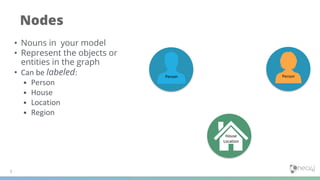
Nodes
3
• Nouns in your model
• Represent the objects or
entities in the graph
• Can be labeled:
• Person
• House
• Location
• Region
Person Person
House
Location
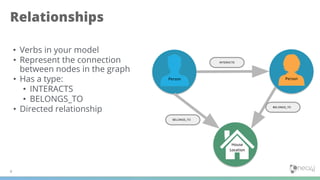
Relationships
4
• Verbs in your model
• Represent the connection
between nodes in the graph
• Has a type:
• INTERACTS
• BELONGS_TO
• Directed relationship
Person Person
House
Location
INTERACTS
BELONGS_TO
BELONGS_TO
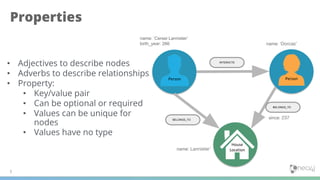
Properties
5
• Adjectives to describe nodes
• Adverbs to describe relationships
• Property:
• Key/value pair
• Can be optional or required
• Values can be unique for
nodes
• Values have no type
Person Person
House
Location
INTERACTS
BELONGS_TO
BELONGS_TO
name: ‘Cersei Lannister’
birth_year: 266 name: ‘Dorcas’
name: Lannister’
since: 237
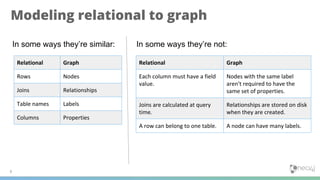
Modeling relational to graph
6
In some ways they’re similar:
Relational Graph
Rows Nodes
Joins Relationships
Table names Labels
Columns Properties
In some ways they’re not:
Relational Graph
Each column must have a field
value.
Nodes with the same label
aren't required to have the
same set of properties.
Joins are calculated at query
time.
Relationships are stored on disk
when they are created.
A row can belong to one table. A node can have many labels.
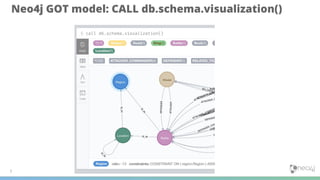
Neo4j GOT model: CALL db.schema.visualization()
7
Introduction to Cypher
v 1.0
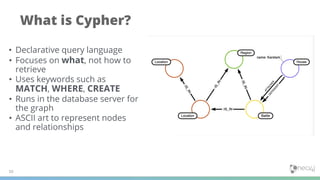
What is Cypher?
10
• Declarative query language
• Focuses on what, not how to
retrieve
• Uses keywords such as
MATCH, WHERE, CREATE
• Runs in the database server for
the graph
• ASCII art to represent nodes
and relationships
Cypher is ASCII Art
11
A
B C
LIKESLIKES
LIKES
(A)-[:LIKES]->(B),(A)-[:LIKES]->(C),(B)-[:LIKES]->(C)
(A)-[:LIKES]->(B)-[:LIKES]->(C)<-[:LIKES]-(A)
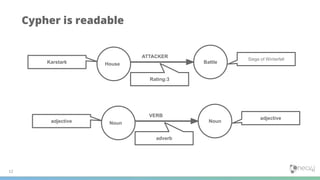
Cypher is readable
12
Karstark House Battle
Siege of Winterfell
Rating:3
ATTACKER
adjective Noun Noun
adjective
adverb
VERB
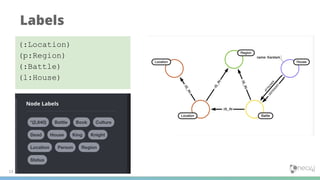
Labels
13
(:Location)
(p:Region)
(:Battle)
(l:House)
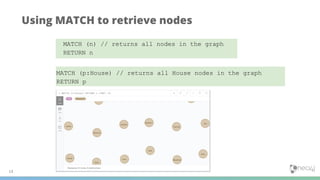
Using MATCH to retrieve nodes
14
MATCH (n) // returns all nodes in the graph
RETURN n
MATCH (p:House) // returns all House nodes in the graph
RETURN p
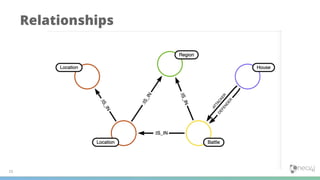
Relationships
15
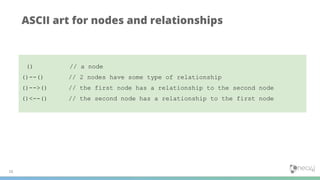
ASCII art for nodes and relationships
16
() // a node
()--() // 2 nodes have some type of relationship
()-->() // the first node has a relationship to the second node
()<--() // the second node has a relationship to the first node
Querying using relationships
17
MATCH (h:House) -[:ATTACKER]->(b:Battle)
RETURN h.name, b.name
MATCH (h:House) --(b:Battle) // any relationship
RETURN h.name, b.name
Using a relationship in a query
18
match (h:House)-[a:ATTACKER]->(b:Battle)
return h,a,b limit 30
Find the Houses attacking in a battle returning the nodes and
relationships found:
Querying by multiple relationships
19
match (h:House)-[a:ATTACKER|:DEFENDER]->(b:Battle)
return h,a,b limit 30
Find the Houses attacking or defending in a battle returning the
nodes and relationships found:
APOC
v 1.0
21
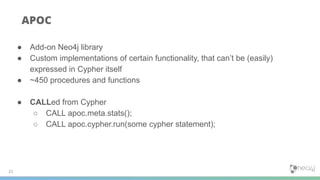
APOC
● Add-on Neo4j library
● Custom implementations of certain functionality, that can’t be (easily)
expressed in Cypher itself
● ~450 procedures and functions
● CALLed from Cypher
○ CALL apoc.meta.stats();
○ CALL apoc.cypher.run(some cypher statement);
GDS Cypher
v 1.0
23
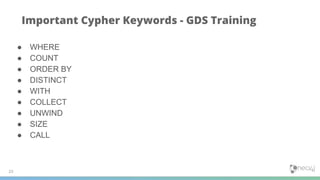
Important Cypher Keywords - GDS Training
● WHERE
● COUNT
● ORDER BY
● DISTINCT
● WITH
● COLLECT
● UNWIND
● SIZE
● CALL
Filtering queries using WHERE
24
MATCH (h:House {name:'Darry'})-[r:DEFENDER]->(b:Battle)
RETURN h,b
Previously you retrieved nodes as follows:
A more flexible syntax for the same query is:
MATCH (h:House)-[r:DEFENDER]->(b:Battle)
WHERE h.name = ‘Darry’ or b.name=’Sack of
Winterfell’
RETURN h,b
MATCH (h:House)-[r:DEFENDER]->(b:Battle)
WHERE h.name = ‘Darry’
RETURN h,b
Testing more than equality:
Specifying ranges in WHERE clauses
25
MATCH (p:Person)-[:BELONGS_TO]->(h:House)
WHERE p.death_year >= 300 AND p.death_year <= 1200
RETURN p.name, h.name
Is the same as:
This query to find all people who belonged to a house and died between 300 and
1200.
MATCH (p:Person)-[:BELONGS_TO]->(h:House)
WHERE 300 <= p.death_year <= 1200
RETURN p.name, h.name
Aggregation in Cypher
26
// implicitly groups by h.name
MATCH (a:Person)-[:BELONGS_TO]->(h:House)
RETURN h.name, count(*)as Household
• Different from SQL - no need to specify a grouping key.
• As soon as you use an aggregation function, all non-aggregated result columns automatically
become grouping keys.
• Implicit grouping based upon fields in the RETURN clause.
Counting results
27
Find all of the attacking and defending commanders who were in a battle,
return the count of the number paths found between attacker and defender
and collect the battle names as a list:
MATCH
(attacker:Person)-[:ATTACKER_COMMANDER]->(b:Battle)<-[d:DEFENDER_COMMANDER]-
(defender:Person)
RETURN attacker.name, defender.name, count(b) AS commonBattles,
collect(b.name) AS battlenames
order by commonBattles desc limit 5
Ordering results
28
You can return results in order based upon the property value:
MATCH
(attacker:Person)-[:ATTACKER_COMMANDER]->(b:Battle)<-[d:DEFENDER_COMMANDER]-
(defender:Person)
RETURN attacker.name, defender.name, count(b) AS commonBattles,
collect(b.name) AS battlenames
ORDER BY commonBattles desc limit 5
Eliminating duplication
29
We can eliminate the duplication in this query by specifying the
DISTINCT keyword as follows:
MATCH (p:Person)-[:INTERACTS|:INTERACTS_1|:INTERACTS_2]->(p1:Person)
WHERE p.name = 'Ramsay Snow'
RETURN distinct p1.name
Using WITH and DISTINCT to eliminate
duplication
30
We can also eliminate the duplication in this query by specifying
WITH DISTINCT as follows:
MATCH (p:Person)-[:INTERACTS|:INTERACTS_1|:INTERACTS_2]->(p1:Person)
WHERE p.name = 'Ramsay Snow'
WITH distinct p1
RETURN p1.name
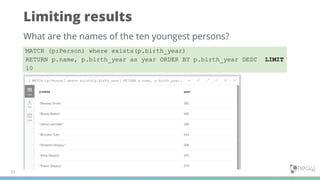
Limiting results
31
What are the names of the ten youngest persons?
MATCH (p:Person) where exists(p.birth_year)
RETURN p.name, p.birth_year as year ORDER BY p.birth_year DESC LIMIT
10
Controlling number of results using WITH
32
Retrieve the persons who were the ATTACKER_COMMANDER in two battles,
returning the list of battles:
MATCH (p:Person)-[:ATTACKER_COMMANDER]->(b:Battle)
WITH p, count(*) AS numBattles, collect(b.name) as battles
WHERE numBattles = 2
RETURN p.name, numBattles, battles
Additional processing using WITH
33
Use the WITH clause to perform intermediate processing or data flow
operations.
MATCH (p:Person)-[:ATTACKER_COMMANDER]->(b:Battle)
WITH p, count(*) AS numBattles, collect(b.name) as battles
WHERE numBattles = 2
RETURN p.name, numBattles, battles
Additional processing using WITH
34
Find all person who were an ATTACKER_COMMANDER in 2 battles, and
find (optionally) the cultures they belong to and return the person and the
culture:
MATCH (p:Person)
WHERE size((p)-[:ATTACKER_COMMANDER]->(:Battle)) = 2
WITH p
OPTIONAL MATCH (p)-[:MEMBER_OF_CULTURE]->(c:Culture)
RETURN p.name, c.name;
Collecting results
35
Find the participants in the ‘Battle of the Crag’ and return them as a
single list.
MATCH (b:Battle {name:'Battle of the Crag'})-[]-(p:Person)
return b.name, collect(p.name) as allParticipants
UNWIND
● Transform a collection into rows.
● Very useful for working with collections of properties, nodes, paths and sorting, etc.
● Allows collecting a set of nodes to avoid requerying.
● Especially useful after aggregation where you want to partition the data and
perform further processing of the selected aggregated data.
36
MATCH (b:Battle {name:'Battle of the
Crag'})-[]-(p:Person)
with collect(p) as allParticipants
unwind allParticipants as individuals
match
(individuals)-[:MEMBER_OF_CULTURE]->(c:
Culture)
return individuals.name, c.name
Another UNWIND example
37
MATCH (a:House)-[:ATTACKER]->()
WITH collect(a) AS attackers
MATCH (d:House)-[:DEFENDER]->()
WITH attackers, collect(d) AS defenders
UNWIND (attackers + defenders) AS houses
WITH DISTINCT(houses)
RETURN houses.name as Names ORDER BY Names LIMIT 10
How much longer will this guy talk?
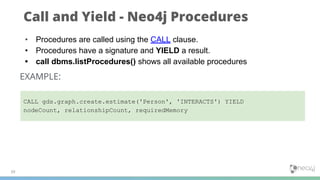
Call and Yield - Neo4j Procedures
39
• Procedures are called using the CALL clause.
• Procedures have a signature and YIELD a result.
• call dbms.listProcedures() shows all available procedures
EXAMPLE:
CALL gds.graph.create.estimate('Person', 'INTERACTS') YIELD
nodeCount, relationshipCount, requiredMemory
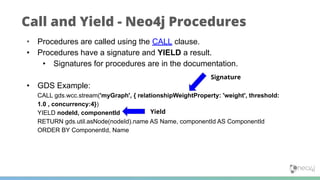
Call and Yield - Neo4j Procedures
• Procedures are called using the CALL clause.
• Procedures have a signature and YIELD a result.
• Signatures for procedures are in the documentation.
• GDS Example:
CALL gds.wcc.stream('myGraph', { relationshipWeightProperty: 'weight', threshold:
1.0 , concurrency:4})
YIELD nodeId, componentId
RETURN gds.util.asNode(nodeId).name AS Name, componentId AS ComponentId
ORDER BY ComponentId, Name
Signature
Yield
Data Modeling
42
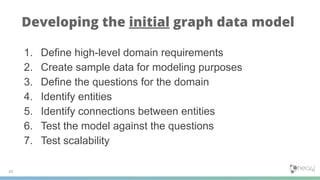
Developing the initial graph data model
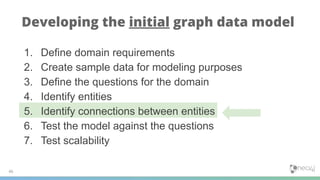
1. Define high-level domain requirements
2. Create sample data for modeling purposes
3. Define the questions for the domain
4. Identify entities
5. Identify connections between entities
6. Test the model against the questions
7. Test scalability
43
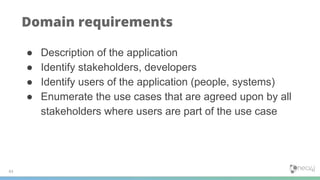
Domain requirements
● Description of the application
● Identify stakeholders, developers
● Identify users of the application (people, systems)
● Enumerate the use cases that are agreed upon by all
stakeholders where users are part of the use case
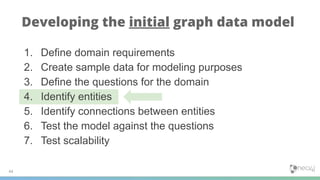
1. Define domain requirements
2. Create sample data for modeling purposes
3. Define the questions for the domain
4. Identify entities
5. Identify connections between entities
6. Test the model against the questions
7. Test scalability
44
Developing the initial graph data model
45
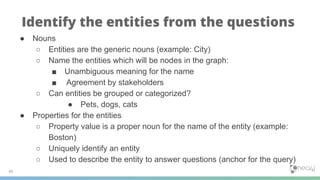
Identify the entities from the questions
● Nouns
○ Entities are the generic nouns (example: City)
○ Name the entities which will be nodes in the graph:
■ Unambiguous meaning for the name
■ Agreement by stakeholders
○ Can entities be grouped or categorized?
● Pets, dogs, cats
● Properties for the entities
○ Property value is a proper noun for the name of the entity (example:
Boston)
○ Uniquely identify an entity
○ Used to describe the entity to answer questions (anchor for the query)
1. Define domain requirements
2. Create sample data for modeling purposes
3. Define the questions for the domain
4. Identify entities
5. Identify connections between entities
6. Test the model against the questions
7. Test scalability
46
Developing the initial graph data model
47
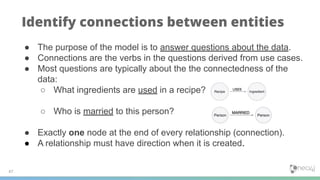
Identify connections between entities
● The purpose of the model is to answer questions about the data.
● Connections are the verbs in the questions derived from use cases.
● Most questions are typically about the the connectedness of the
data:
○ What ingredients are used in a recipe?
○ Who is married to this person?
● Exactly one node at the end of every relationship (connection).
● A relationship must have direction when it is created.
48
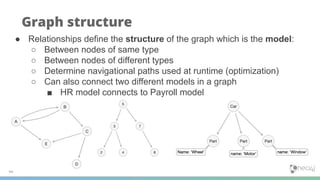
Graph structure
● Relationships define the structure of the graph which is the model:
○ Between nodes of same type
○ Between nodes of different types
○ Determine navigational paths used at runtime (optimization)
○ Can also connect two different models in a graph
■ HR model connects to Payroll model
49
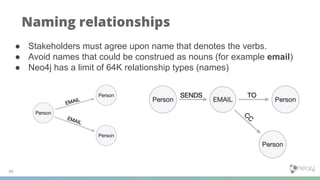
Naming relationships
● Stakeholders must agree upon name that denotes the verbs.
● Avoid names that could be construed as nouns (for example email)
● Neo4j has a limit of 64K relationship types (names)
50
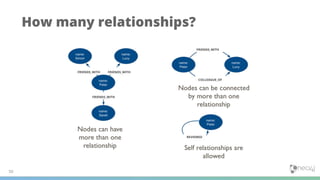
How many relationships?
FRIENDS_WITH FRIENDS_WITH
FRIENDS_WITH
FRIENDS_WITH
COLLEAGUE_OF
REVIEWED
51
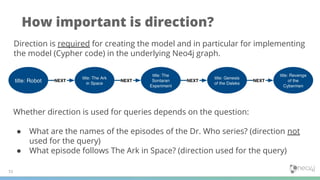
How important is direction?
Whether direction is used for queries depends on the question:
● What are the names of the episodes of the Dr. Who series? (direction not
used for the query)
● What episode follows The Ark in Space? (direction used for the query)
Direction is required for creating the model and in particular for implementing
the model (Cypher code) in the underlying Neo4j graph.
52
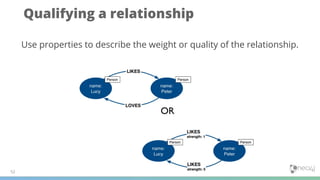
Qualifying a relationship
Use properties to describe the weight or quality of the relationship.

Neo4j Graph Data Science Training - June 9 & 10 - Slides #3

  • 1.
  • 2.
    What is agraph? 2 • Nodes • Relationships • Properties • Labels
  • 3.
    Nodes 3 • Nouns inyour model • Represent the objects or entities in the graph • Can be labeled: • Person • House • Location • Region Person Person House Location
  • 4.
    Relationships 4 • Verbs inyour model • Represent the connection between nodes in the graph • Has a type: • INTERACTS • BELONGS_TO • Directed relationship Person Person House Location INTERACTS BELONGS_TO BELONGS_TO
  • 5.
    Properties 5 • Adjectives todescribe nodes • Adverbs to describe relationships • Property: • Key/value pair • Can be optional or required • Values can be unique for nodes • Values have no type Person Person House Location INTERACTS BELONGS_TO BELONGS_TO name: ‘Cersei Lannister’ birth_year: 266 name: ‘Dorcas’ name: Lannister’ since: 237
  • 6.
    Modeling relational tograph 6 In some ways they’re similar: Relational Graph Rows Nodes Joins Relationships Table names Labels Columns Properties In some ways they’re not: Relational Graph Each column must have a field value. Nodes with the same label aren't required to have the same set of properties. Joins are calculated at query time. Relationships are stored on disk when they are created. A row can belong to one table. A node can have many labels.
  • 7.
    Neo4j GOT model:CALL db.schema.visualization() 7
  • 8.
  • 9.
    What is Cypher? 10 •Declarative query language • Focuses on what, not how to retrieve • Uses keywords such as MATCH, WHERE, CREATE • Runs in the database server for the graph • ASCII art to represent nodes and relationships
  • 10.
    Cypher is ASCIIArt 11 A B C LIKESLIKES LIKES (A)-[:LIKES]->(B),(A)-[:LIKES]->(C),(B)-[:LIKES]->(C) (A)-[:LIKES]->(B)-[:LIKES]->(C)<-[:LIKES]-(A)
  • 11.
    Cypher is readable 12 KarstarkHouse Battle Siege of Winterfell Rating:3 ATTACKER adjective Noun Noun adjective adverb VERB
  • 12.
  • 13.
    Using MATCH toretrieve nodes 14 MATCH (n) // returns all nodes in the graph RETURN n MATCH (p:House) // returns all House nodes in the graph RETURN p
  • 14.
  • 15.
    ASCII art fornodes and relationships 16 () // a node ()--() // 2 nodes have some type of relationship ()-->() // the first node has a relationship to the second node ()<--() // the second node has a relationship to the first node
  • 16.
    Querying using relationships 17 MATCH(h:House) -[:ATTACKER]->(b:Battle) RETURN h.name, b.name MATCH (h:House) --(b:Battle) // any relationship RETURN h.name, b.name
  • 17.
    Using a relationshipin a query 18 match (h:House)-[a:ATTACKER]->(b:Battle) return h,a,b limit 30 Find the Houses attacking in a battle returning the nodes and relationships found:
  • 18.
    Querying by multiplerelationships 19 match (h:House)-[a:ATTACKER|:DEFENDER]->(b:Battle) return h,a,b limit 30 Find the Houses attacking or defending in a battle returning the nodes and relationships found:
  • 19.
  • 20.
    21 APOC ● Add-on Neo4jlibrary ● Custom implementations of certain functionality, that can’t be (easily) expressed in Cypher itself ● ~450 procedures and functions ● CALLed from Cypher ○ CALL apoc.meta.stats(); ○ CALL apoc.cypher.run(some cypher statement);
  • 21.
  • 22.
    23 Important Cypher Keywords- GDS Training ● WHERE ● COUNT ● ORDER BY ● DISTINCT ● WITH ● COLLECT ● UNWIND ● SIZE ● CALL
  • 23.
    Filtering queries usingWHERE 24 MATCH (h:House {name:'Darry'})-[r:DEFENDER]->(b:Battle) RETURN h,b Previously you retrieved nodes as follows: A more flexible syntax for the same query is: MATCH (h:House)-[r:DEFENDER]->(b:Battle) WHERE h.name = ‘Darry’ or b.name=’Sack of Winterfell’ RETURN h,b MATCH (h:House)-[r:DEFENDER]->(b:Battle) WHERE h.name = ‘Darry’ RETURN h,b Testing more than equality:
  • 24.
    Specifying ranges inWHERE clauses 25 MATCH (p:Person)-[:BELONGS_TO]->(h:House) WHERE p.death_year >= 300 AND p.death_year <= 1200 RETURN p.name, h.name Is the same as: This query to find all people who belonged to a house and died between 300 and 1200. MATCH (p:Person)-[:BELONGS_TO]->(h:House) WHERE 300 <= p.death_year <= 1200 RETURN p.name, h.name
  • 25.
    Aggregation in Cypher 26 //implicitly groups by h.name MATCH (a:Person)-[:BELONGS_TO]->(h:House) RETURN h.name, count(*)as Household • Different from SQL - no need to specify a grouping key. • As soon as you use an aggregation function, all non-aggregated result columns automatically become grouping keys. • Implicit grouping based upon fields in the RETURN clause.
  • 26.
    Counting results 27 Find allof the attacking and defending commanders who were in a battle, return the count of the number paths found between attacker and defender and collect the battle names as a list: MATCH (attacker:Person)-[:ATTACKER_COMMANDER]->(b:Battle)<-[d:DEFENDER_COMMANDER]- (defender:Person) RETURN attacker.name, defender.name, count(b) AS commonBattles, collect(b.name) AS battlenames order by commonBattles desc limit 5
  • 27.
    Ordering results 28 You canreturn results in order based upon the property value: MATCH (attacker:Person)-[:ATTACKER_COMMANDER]->(b:Battle)<-[d:DEFENDER_COMMANDER]- (defender:Person) RETURN attacker.name, defender.name, count(b) AS commonBattles, collect(b.name) AS battlenames ORDER BY commonBattles desc limit 5
  • 28.
    Eliminating duplication 29 We caneliminate the duplication in this query by specifying the DISTINCT keyword as follows: MATCH (p:Person)-[:INTERACTS|:INTERACTS_1|:INTERACTS_2]->(p1:Person) WHERE p.name = 'Ramsay Snow' RETURN distinct p1.name
  • 29.
    Using WITH andDISTINCT to eliminate duplication 30 We can also eliminate the duplication in this query by specifying WITH DISTINCT as follows: MATCH (p:Person)-[:INTERACTS|:INTERACTS_1|:INTERACTS_2]->(p1:Person) WHERE p.name = 'Ramsay Snow' WITH distinct p1 RETURN p1.name
  • 30.
    Limiting results 31 What arethe names of the ten youngest persons? MATCH (p:Person) where exists(p.birth_year) RETURN p.name, p.birth_year as year ORDER BY p.birth_year DESC LIMIT 10
  • 31.
    Controlling number ofresults using WITH 32 Retrieve the persons who were the ATTACKER_COMMANDER in two battles, returning the list of battles: MATCH (p:Person)-[:ATTACKER_COMMANDER]->(b:Battle) WITH p, count(*) AS numBattles, collect(b.name) as battles WHERE numBattles = 2 RETURN p.name, numBattles, battles
  • 32.
    Additional processing usingWITH 33 Use the WITH clause to perform intermediate processing or data flow operations. MATCH (p:Person)-[:ATTACKER_COMMANDER]->(b:Battle) WITH p, count(*) AS numBattles, collect(b.name) as battles WHERE numBattles = 2 RETURN p.name, numBattles, battles
  • 33.
    Additional processing usingWITH 34 Find all person who were an ATTACKER_COMMANDER in 2 battles, and find (optionally) the cultures they belong to and return the person and the culture: MATCH (p:Person) WHERE size((p)-[:ATTACKER_COMMANDER]->(:Battle)) = 2 WITH p OPTIONAL MATCH (p)-[:MEMBER_OF_CULTURE]->(c:Culture) RETURN p.name, c.name;
  • 34.
    Collecting results 35 Find theparticipants in the ‘Battle of the Crag’ and return them as a single list. MATCH (b:Battle {name:'Battle of the Crag'})-[]-(p:Person) return b.name, collect(p.name) as allParticipants
  • 35.
    UNWIND ● Transform acollection into rows. ● Very useful for working with collections of properties, nodes, paths and sorting, etc. ● Allows collecting a set of nodes to avoid requerying. ● Especially useful after aggregation where you want to partition the data and perform further processing of the selected aggregated data. 36 MATCH (b:Battle {name:'Battle of the Crag'})-[]-(p:Person) with collect(p) as allParticipants unwind allParticipants as individuals match (individuals)-[:MEMBER_OF_CULTURE]->(c: Culture) return individuals.name, c.name
  • 36.
    Another UNWIND example 37 MATCH(a:House)-[:ATTACKER]->() WITH collect(a) AS attackers MATCH (d:House)-[:DEFENDER]->() WITH attackers, collect(d) AS defenders UNWIND (attackers + defenders) AS houses WITH DISTINCT(houses) RETURN houses.name as Names ORDER BY Names LIMIT 10
  • 37.
    How much longerwill this guy talk?
  • 38.
    Call and Yield- Neo4j Procedures 39 • Procedures are called using the CALL clause. • Procedures have a signature and YIELD a result. • call dbms.listProcedures() shows all available procedures EXAMPLE: CALL gds.graph.create.estimate('Person', 'INTERACTS') YIELD nodeCount, relationshipCount, requiredMemory
  • 39.
    Call and Yield- Neo4j Procedures • Procedures are called using the CALL clause. • Procedures have a signature and YIELD a result. • Signatures for procedures are in the documentation. • GDS Example: CALL gds.wcc.stream('myGraph', { relationshipWeightProperty: 'weight', threshold: 1.0 , concurrency:4}) YIELD nodeId, componentId RETURN gds.util.asNode(nodeId).name AS Name, componentId AS ComponentId ORDER BY ComponentId, Name Signature Yield
  • 40.
  • 41.
    42 Developing the initialgraph data model 1. Define high-level domain requirements 2. Create sample data for modeling purposes 3. Define the questions for the domain 4. Identify entities 5. Identify connections between entities 6. Test the model against the questions 7. Test scalability
  • 42.
    43 Domain requirements ● Descriptionof the application ● Identify stakeholders, developers ● Identify users of the application (people, systems) ● Enumerate the use cases that are agreed upon by all stakeholders where users are part of the use case
  • 43.
    1. Define domainrequirements 2. Create sample data for modeling purposes 3. Define the questions for the domain 4. Identify entities 5. Identify connections between entities 6. Test the model against the questions 7. Test scalability 44 Developing the initial graph data model
  • 44.
    45 Identify the entitiesfrom the questions ● Nouns ○ Entities are the generic nouns (example: City) ○ Name the entities which will be nodes in the graph: ■ Unambiguous meaning for the name ■ Agreement by stakeholders ○ Can entities be grouped or categorized? ● Pets, dogs, cats ● Properties for the entities ○ Property value is a proper noun for the name of the entity (example: Boston) ○ Uniquely identify an entity ○ Used to describe the entity to answer questions (anchor for the query)
  • 45.
    1. Define domainrequirements 2. Create sample data for modeling purposes 3. Define the questions for the domain 4. Identify entities 5. Identify connections between entities 6. Test the model against the questions 7. Test scalability 46 Developing the initial graph data model
  • 46.
    47 Identify connections betweenentities ● The purpose of the model is to answer questions about the data. ● Connections are the verbs in the questions derived from use cases. ● Most questions are typically about the the connectedness of the data: ○ What ingredients are used in a recipe? ○ Who is married to this person? ● Exactly one node at the end of every relationship (connection). ● A relationship must have direction when it is created.
  • 47.
    48 Graph structure ● Relationshipsdefine the structure of the graph which is the model: ○ Between nodes of same type ○ Between nodes of different types ○ Determine navigational paths used at runtime (optimization) ○ Can also connect two different models in a graph ■ HR model connects to Payroll model
  • 48.
    49 Naming relationships ● Stakeholdersmust agree upon name that denotes the verbs. ● Avoid names that could be construed as nouns (for example email) ● Neo4j has a limit of 64K relationship types (names)
  • 49.
    50 How many relationships? FRIENDS_WITHFRIENDS_WITH FRIENDS_WITH FRIENDS_WITH COLLEAGUE_OF REVIEWED
  • 50.
    51 How important isdirection? Whether direction is used for queries depends on the question: ● What are the names of the episodes of the Dr. Who series? (direction not used for the query) ● What episode follows The Ark in Space? (direction used for the query) Direction is required for creating the model and in particular for implementing the model (Cypher code) in the underlying Neo4j graph.
  • 51.
    52 Qualifying a relationship Useproperties to describe the weight or quality of the relationship.